
ClipKaro
Turn long videos into ready-to-post vertical shorts with Claude Code: AI-picked moments, face-framed 9:16, word-by-word captions. Free, local, Hindi/Hinglish…
Install with your AI
Paste into Claude Code, Cursor, or any agent — it reads the repo and wires the tool into your project.
Install and set up ClipKaro (release-binary project) into my current project.
Found on https://claudeers.com/clipkaro
Repo: https://github.com/allthingsaman/ClipKaro
Homepage/docs: —
Detected install method: release-binary → inspect the README
Category: integrations. Platforms: cli, api, desktop, web, mobile.
Read the repo's README for exact setup and env vars, then install it and wire it into my project.

Claudeers Health Verdict:
unknown; community-verified: false. Confirm the source before running anything.
Grab the latest release asset from GitHub.
# download a build from https://github.com/allthingsaman/ClipKaro/releases
git clone https://github.com/allthingsaman/ClipKaro
// compatibility
| Platforms | cli, api, desktop, web, mobile |
|---|---|
| Operating systems | — |
| AI compatibility | claude |
| License | NOASSERTION |
| Pricing | open-source |
| Language | Python |

ClipKaro ✂️
Turn a long video into short videos, ready to post. Give it a YouTube link or a video file. ClipKaro finds the best moments and makes standing (9:16) videos for YouTube Shorts, Instagram Reels and TikTok: framed on whoever is talking, with captions that appear word by word. It's free, it runs on your own computer, and it works just as well for Hindi and Hinglish as for English.
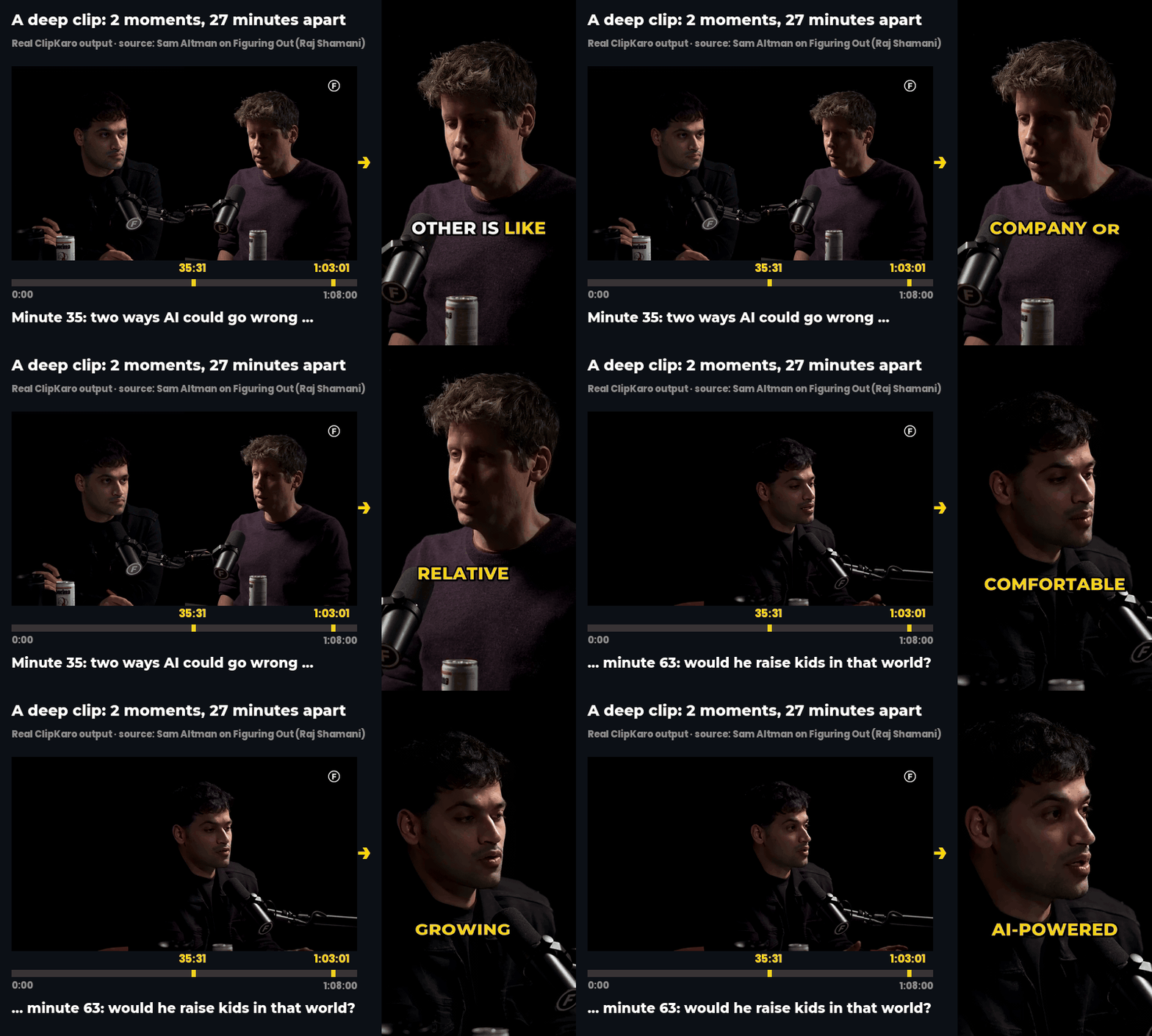
Real ClipKaro output, not a mock-up. Left: the real video, and where each moment sits in it. Right: the short ClipKaro made. Footage: Sam Altman on Figuring Out with Raj Shamani (YouTube), shown as a demo.
"Clip karo" is Hinglish for "clip it".
you:  clip this video: https://youtu.be/...
      → listens to the video → picks the best moments → cuts them standing (9:16) → edits them
      → output/<video>/edited/01-why-hard-work-isnt-enough.mp4  (+ a caption to post with each one)
New to all this? Start with the user guide: simple steps, no coding needed.
🔴 New in v2.6: live clipping, clips posted while you stream
Made for game launches like GTA 6, where the first clips get the views. You stream as usual, and ClipKaro clips your stream while it is still running. It posts the clips to YouTube Shorts, Instagram Reels and your Facebook Page about 15-30 minutes after the moment.
OBS streams to YouTube / Twitch / Kick, and records the same picture: a new file every 10 minutes
        │
        ▼
ClipKaro writes down each finished piece   (+ hints: Twitch chat going wild, the clips viewers made)
        │
        ▼
Claude, every 10 minutes: 0-2 clips per piece → captions → cut → edit → quality check
        │                                                        (a clip that fails is never posted)
        ▼
PostKaro posts each clip at once on every connected platform
- The video is your own OBS recording, never a download: full quality, with your cam in it. Twitch only adds hints about where people reacted. Your words decide what becomes a clip.
- Your stream stays smooth. While it runs, ClipKaro works at low priority and edits on the processor. It uses the graphics card only when OBS leaves enough room.
- No review step. For live streams the clips go out at once (a clip that fails the quality check
is never posted). For a test stream,
"live_post": "dry"only shows what it would post. - What you need:
- OBS recording in 10-minute pieces;
- PostKaro with your accounts connected;
- Claude Code left open;
- free Twitch developer keys (optional).
- Cost: no money. Claude usage is roughly 150-250k tokens per hour of stream: comfortable on Max, a few hours on Pro.
- Start and stop. In Claude Code, inside the ClipKaro folder, say "start live clipping gta6". When you end the stream, say "the stream is over".
Set it up: docs/live.md, step by step:
- the OBS settings (10-minute pieces, recording while streaming, your mic on its own track);
- the Twitch keys;
- multistream bitrates for YouTube, Twitch and Kick;
- a test stream before the real one.
The best of ClipKaro
🧵 Deep clips: one story from moments far apart
Ask for them on a long podcast ("deep clip this"). The question at minute 8 and its answer at minute 52, or a point and the moment that proves it, become one short, in the order they were said, with a white flash where it jumps (the GIF above). Three AI judges check that no join changes what anyone meant, and a deep clip is only kept when it scores at least as well as the best single stretch around it.
🧐 A blind second opinion on every clip
Claude picks about twice as many ideas as you need. Then an AI critic, who never sees the titles or the first scores, judges every idea three times, ranks them, and says what to fix: a slow start, an unfinished ending, seconds nobody needs. Clips with a note get repaired before you see them. A real report, from the podcast above:
 1. 7.4/10 Strong   45:47-46:19 + 46:29-46:58 + 47:10-47:21 (72 s)  "What Sam Altman Misses Most"
    hook 4.0 "'what version of you has died' is a striking opener" · payoff 4.0 "a strong, human landing"
 2. 7.2/10 Strong   56:48-57:49 (61 s)  "Almost All Startup Advice Is Terrible"
    hook 4.0 "answered 'almost all the advice is terrible'" · payoff 4.0 "ironic landing"
🎙️ Two people: the one talking, and both when it matters
It listens to who is talking and shows that person. When someone laughs, both talk at once or the talk goes quickly back and forth, it shows both, stacked, with the captions on the seam.
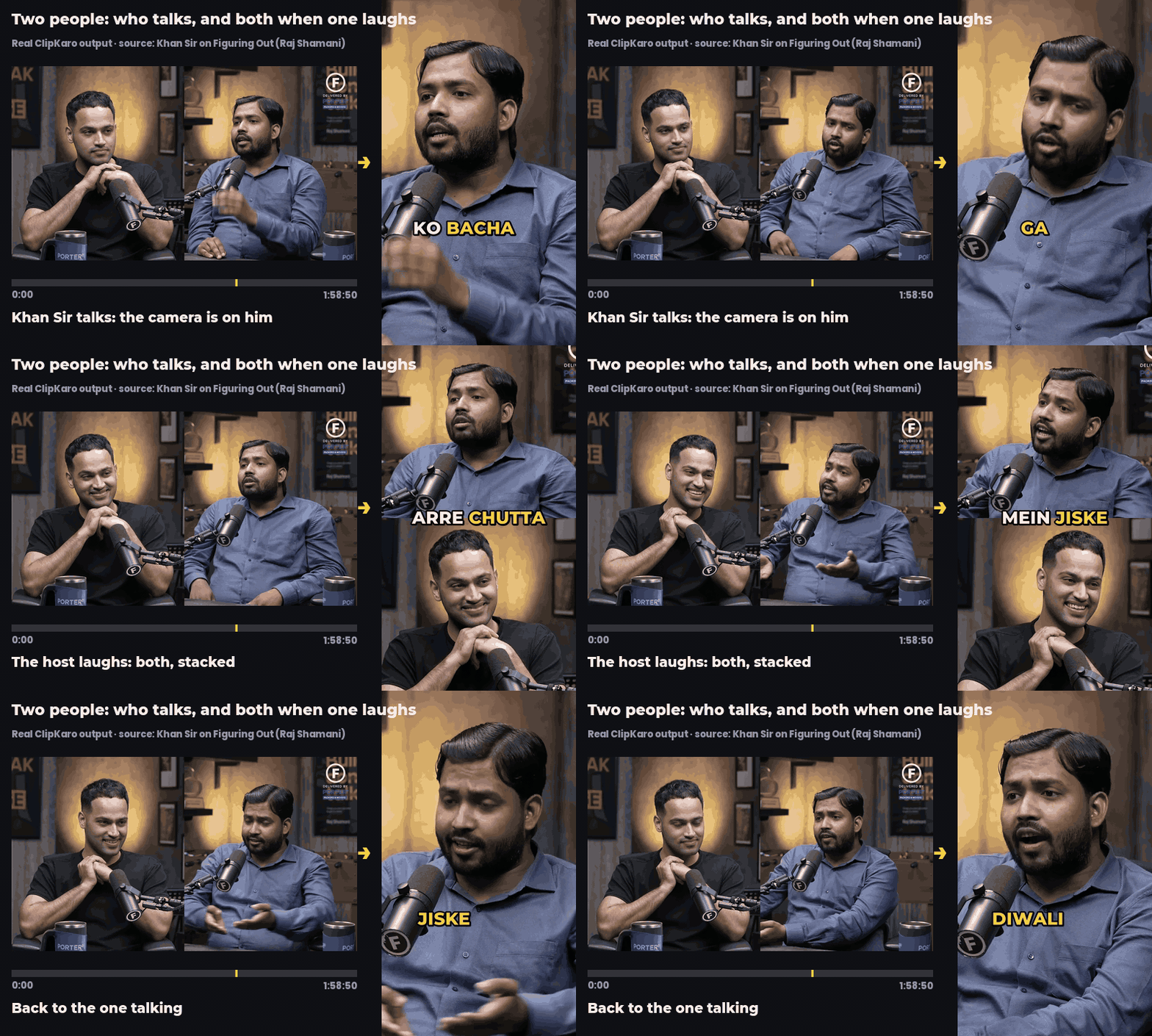
Real output. Footage: Khan Sir on Figuring Out with Raj Shamani (YouTube), shown as a demo.
💬 Captions that stay off faces and out of the apps' buttons
Captions keep out of the like and share buttons and the apps' top and bottom texts, and move to a free line when they would cover a face or a chin. Made-up words (Whisper inventing text during a laugh or game music) get no caption at all. Before cutting, Claude reads every clip's captions like a viewer and fixes clear mishearings ("sorry" heard as "saari", a wrong name) (new in v2.3; standard and deep mode, quick mode skips it).
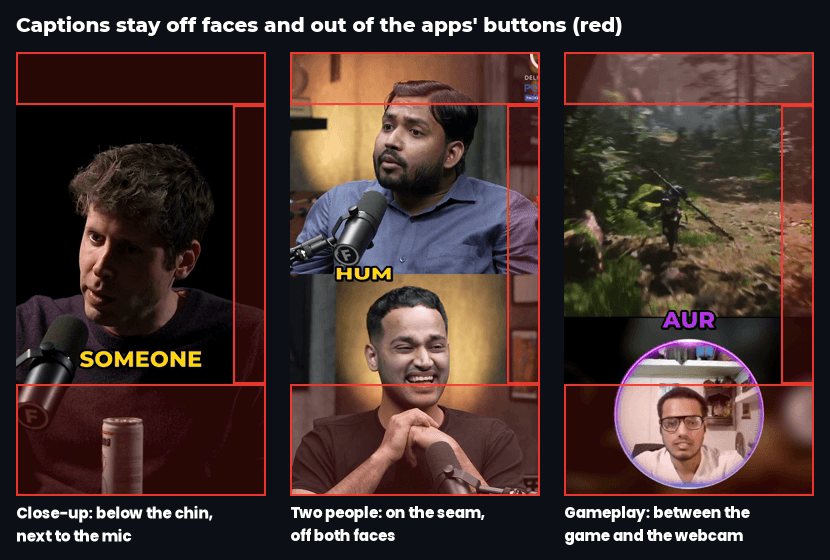
🎮 Gameplay and live streams, without explaining
It notices a webcam overlay by itself: the game on top, you below, the captions in between. It sees that a video was a live stream, leaves out "Starting soon", "Be right back" and the ending screen, and builds clips around your commentary and reactions, not the game characters' lines. Game characters' lines get no captions (the game shows its own subtitles, so they'd appear twice); their sound stays, and a great game scene can still be in a clip (new in v2.3).
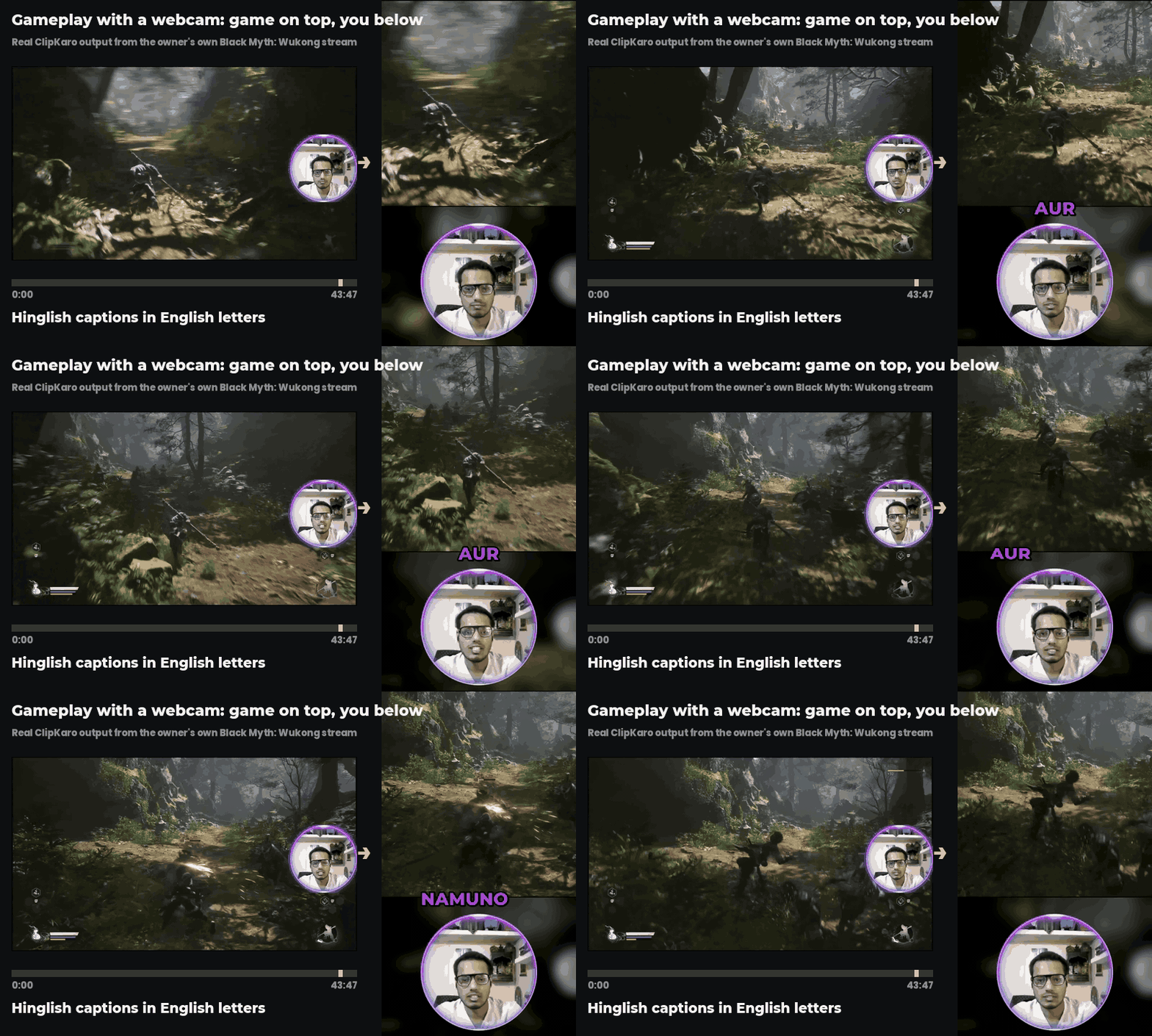
Real output from the owner's own Black Myth: Wukong stream.
🇮🇳 Hindi and Hinglish, for real
Found by itself. Captions in English letters ("aaj hum business ki baat karenge") or in Hindi letters, spelled the way people write Hinglish online. With an NVIDIA card, a speech model trained on Hinglish writes the words down: on public tests it got half as many words wrong as before, and its text costs Claude about 40 % fewer tokens to read (new in v2.3). Skipped words are heard again, so a line isn't lost to one stretched "word".
👂 It hears what the words can't show (new in v2.3)
Some of the best moments live in how something is said or shown. Claude reads short notes next to
the words: [laughter ~2 s], [voice raised], [shouting], [explosion], [big action on screen],
and in gameplay (other voice) on lines spoken by a game character, not the streamer, and a line of
its own for big action where nobody talks. They show where to look; the words decide. A recording with your microphone on its own track (OBS can do that) is
written down from your voice alone.
✂️ A clean, tight edit, every time
Zoom-ins on the beat, captions that pop in word by word in a colour that fits the video, a couple of soft whooshes, emojis on a few strong words (say "no emojis" to skip them), pauses and "um"s cut out, and the volume set right for phones without crackling peaks. Every clip is checked by code before you see it. Six caption looks: classic by default, or say "box", "karaoke", "minimal", "bold" or "comic captions". "Hook title" adds a big title for the first seconds.
And more
- 🔢 The right number of clips. Every good moment: 3 to 8, more for long videos, or "at least 10" / "at most 5". 💾 The good moments that weren't cut stay saved: "3 more clips from that video" later.
- 🏷️ Your brand, and credit to the source. Put your logo and a 3-5 s outro in the
brandfolder: the logo goes in the bottom-right corner of every clip, the outro at the end. Clips from a YouTube link get a small "© Channel name" in the bottom-left corner ("source_credit": falseturns it off). - 🔴 Live clipping for game launches: clips posted while you stream (see above).
- ⚡ Three modes to match your Claude plan: Quick, Standard and Deep (see below).
- 📤 Posting. With PostKaro (a separate app) the clips go to YouTube Shorts, Instagram Reels and your Facebook Page, each with its own text, from your own laptop.
- 🔒 Free and private. No extra accounts, keys or subscriptions for ClipKaro, nothing uploaded. Fast with an NVIDIA graphics card (a 7-minute Hinglish video is written down in about a minute).
Which AI helper do you need?
ClipKaro is driven by an AI coding agent: an AI helper that can work on your computer (run its programs, read and write its files). The AI is the editor that picks the moments; ClipKaro's own programs do the downloading, cutting and editing. It was built with Claude Code, but it doesn't depend on it: any agent that can work on your computer can drive it.
| AI helper | Cost | Does it work? |
|---|---|---|
| Claude Code (what ClipKaro is made with) | a Claude plan that includes Claude Code (Pro or higher) | ✅ best: every feature, helpers working at the same time |
| Google Antigravity | has a free plan (weekly limits, which Google changes now and then) | ✅ the free limits are usually enough for about one video per session |
| Codex, Cursor, Gemini CLI, GitHub Copilot and other agents that read AGENTS.md | their own plans | ✅ they follow the same steps (helpers may run one after another) |
| Claude's free plan (the chat on claude.ai or the Claude app) | free | ❌ the chat can't reach your computer, so it can't run ClipKaro's programs |
Short on usage? Say "quick clip this" (basic mode): it uses the least.
ClipKaro or Opus Clip inside Claude?
Opus Clip, the best-known AI clipper, can also be used from inside Claude (a "connector"). It looks the same from the outside, since you ask Claude for clips either way, but it works very differently:
- With the Opus Clip connector, Opus Clip makes the clips on its own servers. Claude only sends the link and brings the clips back, so you get the same clips as on Opus Clip's website.
- With ClipKaro, your AI helper is the editor. It reads every word of the video and chooses the moments, and ClipKaro's own programs cut and edit them on your computer.
| Opus Clip inside Claude | ClipKaro | |
|---|---|---|
| Who picks the moments | Opus Clip's own AI | your AI helper, reading every word; a second, blind AI critic checks every idea |
| What you pay | your Claude plan plus a paid Opus Clip plan (Pro or higher), and Opus Clip credits for every video (at least 10 per video) | your AI helper's plan only |
| Limits | 15 hours of video a month, at most 4 videos at a time | only your AI plan's usage limits |
| Hindi and Hinglish | ❌ Opus Clip says it doesn't support Hindi | ✅ a Hinglish speech model; captions in English letters |
| Gameplay and live streams | basic (reviews call it weaker on gaming) | ✅ webcam under the game, no captions for game characters, "Starting soon" screens left out |
| Deep clips (a question and its answer far apart, joined into one story) | ❌ | ✅ |
| B-roll, following people who move | ✅ | not yet |
| Your logo and outro | ✅ | ✅ from the brand folder |
| Editing by hand | ✅ a timeline editor | in words ("start clip 2 at 1:05", "'bow' should be 'boat'") |
| Where your video goes | uploaded to Opus Clip | stays on your computer |
In short: for Hindi, Hinglish and gaming, ClipKaro is the clear choice, and it costs nothing on top of your AI plan. Opus Clip is more polished for English talking videos (B-roll, a hand editor). Which one picks better moments on English podcasts hasn't been tested side by side yet.
Opus Clip's facts are from its own help pages, checked in November 2026 (they may change): the Claude connector and Hindi. More: ClipKaro compared with Opus Clip.
Three modes: Quick, Standard and Deep
ClipKaro uses your AI helper's plan (Claude Code, Antigravity ...) to choose the best moments. The three modes only change how carefully the moments are chosen, and so how much of your plan a video uses. Everything else is the same in every mode: the framing, the captions, the edit, Hinglish, gameplay and the posting texts.
| ⚡ Quick (basic) | ⭐ Standard (the default) | 🧵 Deep (advanced) | |
|---|---|---|---|
| How you ask | "quick clip this: (link)" or "basic mode" | just "clip this: (link)" | "deep clip this: (link)" or "advanced mode" |
| Who reads the video | Claude alone, once | Claude, plus helpers that read a long video in parts at the same time, so nothing in the middle is skimmed | same as Standard |
| A second opinion (a blind AI critic scores every idea 3 times; weak starts and endings are repaired) | no | yes | yes |
| Caption check (Claude fixes misheard words, like "sorry" written as "saari") | no | yes | yes |
| Deep clips (two moments far apart joined into one story, checked by 3 honesty judges) | no | no | yes |
| How much of your Claude plan (rough) | least | more | most (about twice Standard on a long podcast) |
| How long it takes | fastest | a few minutes more | the longest |
| Best for | short videos, many videos a day, saving your plan, a quick first look | most videos: the best clips without thinking about it | long podcasts and interviews (40 minutes or more) where a question and its answer are far apart |
Which one is for you?
- Not sure? Use Standard. Just say "clip this". It's the default for a reason.
- On Claude's Pro plan and clipping a lot? Use Quick, and look over the captions yourself before posting (Quick doesn't check them).
- A long podcast with a great story spread across it? Use Deep. For any video longer than 21 minutes, ClipKaro asks you once whether you want deep clips too.
- Want one of them every time? Write "always use quick mode" (or deep) under "My preferences" at the end of CLAUDE.md, or tell Claude "add to my preferences: always use quick mode".
How it works
- Listen: it downloads the sound and writes down every word with its exact time.
- Pick: the AI (Claude Code) reads the words and chooses the best moments. A long podcast is read in parts of about 20 minutes, all at once, so nothing in the middle gets skimmed.
- Captions: for Hindi/Hinglish, it writes every Hindi word in English letters.
- Cut: each moment is cut to a standing video, framed on the speaker's face.
- Edit: zooms, captions and sound effects are added, and the volume is evened out.
The computer does the mechanical work; the AI only makes the choices an editor would make. How it works inside: docs/architecture.md.
Quick start
1. Check your computer
Any 64-bit Windows, Mac or Linux computer with 8 GB of memory (RAM) can run it. An NVIDIA graphics card (4 GB or more) is strongly recommended: with it a video takes minutes, without it a video can take a couple of hours. Details: docs/requirements.md.
2. Install (once)
The easy way: let Claude Code install it. Open Claude Code in the folder where you want ClipKaro (for example your home folder. On Windows, not Documents or Desktop when OneDrive backs them up: the videos and ClipKaro's own files (a few GB) would fill your OneDrive) and type:
install this repo: https://github.com/allthingsaman/ClipKaro
Claude downloads ClipKaro, checks your computer, installs what's missing and finds out by itself
whether you have an NVIDIA graphics card (and sets it up if you do). Anything that needs your
computer's password, it gives you to run yourself. When it's done, open Claude Code inside the
new ClipKaro folder (step 3). Every step explained simply: docs/user-guide.md.
Using Google Antigravity or another agent instead? Open the folder in it and type the same sentence; it follows the same steps (AGENTS.md).
Or install it yourself. You need: an AI helper (Claude Code, or another one from the table above), Python 3.10-3.14, ffmpeg and Node.js (recommended).
Windows (in PowerShell; open a new window after the winget lines):
winget install -e --id Python.Python.3.12
winget install -e --id Gyan.FFmpeg
winget install -e --id OpenJS.NodeJS.LTS
winget install -e --id Git.Git
git clone https://github.com/allthingsaman/ClipKaro.git
cd ClipKaro
python install.py
Mac (with Homebrew):
brew install [email protected] ffmpeg-full node git
git clone https://github.com/allthingsaman/ClipKaro.git
cd ClipKaro
python3.13 install.py
(brew install python now gives Python 3.15, which is too new for the speech engine, and Homebrew's plain
ffmpeg can't draw captions: ffmpeg-full can, and ClipKaro finds it by itself.)
Linux (Ubuntu/Debian shown; Fedora needs the full ffmpeg from RPM Fusion, see the guide):
sudo apt install python3 python3-venv python3-pip ffmpeg nodejs git
git clone https://github.com/allthingsaman/ClipKaro.git
cd ClipKaro
python3 install.py
install.py checks your computer, tells you the exact command for anything that's missing, finds an
NVIDIA graphics card by itself and sets it up, and puts everything else in a private .venv
folder inside ClipKaro. You can run it again any time. Full guide for every system:
docs/installation.md.
3. Make clips
Open Claude Code inside the ClipKaro folder (terminal: cd ClipKaro, then claude; desktop
app or VS Code: open the ClipKaro folder). Claude only knows how to make clips when it's started
there. Then type:
clip this video: https://youtu.be/...
or, for a file on your computer (put the path in quotes):
clip this video: "C:\Users\you\Videos\my podcast.mp4"
Claude does the rest by itself and shows you a table of finished clips, each with a caption you can copy when you post.
Using a different AI helper (Google Antigravity, Codex, Cursor, Copilot, Gemini CLI, ...)? Open the ClipKaro folder in it and type the same sentence; it follows AGENTS.md.
For AI agents installing ClipKaro
If a user asked you to install this repo, follow these steps (details per system in docs/installation.md):
- Clone it where the user is working (or where they ask):
git clone https://github.com/allthingsaman/ClipKaro.git. No git? Downloadhttps://github.com/allthingsaman/ClipKaro/archive/refs/heads/main.zipand unpack it asClipKaro. On Windows, don't clone into a folder OneDrive backs up (often Documents and Desktop): use the home folder (C:\Users\<you>\ClipKaro). - Check the system: OS,
python --version(3.10-3.14; 3.15 is too new for the speech engine; usepython3on macOS/Linux), ffmpeg with libx264 and libass (ffmpeg -hide_banner -encoders,-filters),node --version(20+ recommended), andnvidia-smi(an NVIDIA GPU?). On a Mac, Homebrew'spythonis 3.15 and its plainffmpeghas no libass: install[email protected]andffmpeg-full(install.pyandrun.pyfind ffmpeg-full by themselves) and runpython3.13 install.py. On Windows, ifpythonis 3.15, runpy -3.12 install.py. - Install what's missing, using the commands in docs/installation.md for
that system. Don't run commands that need admin rights (
sudo) yourself: give the user the exact commands in one block and wait until they say they're done. On Windows,wingetmay show a permission prompt; programs it installs only appear on the PATH of new terminals, so ifpythonorffmpegstill isn't found, ask the user to restart Claude Code (or call the program by its full path). Watch for the traps: Fedora's defaultffmpeg-freehas no libx264 (use RPM Fusion'sffmpeg), and Ubuntu/Debian needpython3-venv. If the PC has an NVIDIA card butnvidia-smifails, the driver is missing: help the user install it (docs/installation.md) before step 4. - From inside the ClipKaro folder run
python install.py. It detects an NVIDIA GPU by itself and then installs the GPU libraries and the speech models too. Run it again until every line is[ok](interrupted downloads resume). Without an NVIDIA GPU, tell the user that clipping works but is slow on the CPU. - NVIDIA only:
python run.py gpu large-v3-turbomust print[ok] GPU .... - Report what was installed, then tell the user to start Claude Code inside the ClipKaro folder
and type
clip this video: <link or file>. A session started in another folder doesn't load ClipKaro's clipping skill (.claude/skills/clip-video/). - PostKaro too? (only if the user wants their clips posted for them): clone
https://github.com/allthingsaman/PostKaro.gitnext to ClipKaro (not inside it) and run itsinstall.pywith the same Python. It sets PostKaro to start at login. Connecting the YouTube, Instagram and Facebook accounts is done by the user, once, with itsdocs/connect-accounts.md.
What you can ask for
Add your wishes to the same message, in normal words (English, Hindi or Hinglish):
- "quick clip this" / "basic mode" (uses the least of your Claude plan) · "deep clip this" / "advanced mode" · later: "3 more clips from that video"
- "clip this, but only the 3 best" · "at least 10 clips" · "clips under 30 seconds" · "only the parts about money"
- "show me the moments before you cut them" · "don't edit them, just cut"
- "no sound effects" · "no zooms" · "captions lower" · "bigger captions" · "not in capital letters"
- Caption looks: "box captions" · "karaoke captions" · "minimal captions" · "bold captions" · "comic captions" (classic otherwise)
- "hook title" (a big 3-6 word title for the first seconds; only when you ask) · "no emojis"
- "use #00E5FF as the caption colour" · "Hindi captions in Hindi letters"
- "it's a gameplay video" · "keep it wide (16:9)" · "the video is in English"
- After you see the clips: "clip 2 starts too early" · "make clip 1 shorter" · "use yellow captions"
- Podcasts: "in clip 4, show both of them when he laughs" · "show the whole picture when he holds up the box"
The full list, and what each one changes: docs/usage.md.
Your own lasting wishes ("always 5 clips", "my videos are in English", "my brand colour is #00E5FF"): write them under "My preferences" at the bottom of CLAUDE.md, or just tell Claude "add to my preferences: ...". See the user guide.
What you get
output/<video>/
    edited/01-title.mp4     the finished short videos: upload these
    edited/01-title.srt     the captions as a separate subtitle file
    clips/01-title.mp4      the cut videos without the edit (also fine to post)
    clips.json              the chosen moments, with the text to post on each platform
    post.json               the finished clips with their posting text, for PostKaro
    transcript/             everything that was said, with times
Want them posted for you? PostKaro, ClipKaro's partner app (a separate install, on Windows, Mac and Linux), posts them to YouTube Shorts, Instagram Reels and your Facebook Page from your laptop, each at its own time. With PostKaro installed, Claude ends with a "Post them" link that opens every clip ready to schedule. To install it, tell Claude "install PostKaro too", or see docs/installation.md.
Languages
| Language | How well |
|---|---|
| English | ✅ fully supported |
| Hindi and Hinglish (and spoken Urdu) | ✅ fully supported: captions in English letters or Hindi letters (docs/hinglish.md) |
| Spanish, French, German, Portuguese, Russian and others written in Latin or Cyrillic letters | 🟡 works, not fine-tuned yet |
| Other scripts (Bengali, Tamil, Arabic, Chinese, ...) | 🔧 the words are written down, but the captions need a font added |
Details: docs/languages.md. Add a language: docs/adding-a-language.md.
NVIDIA graphics card
install.py finds an NVIDIA card by itself and sets it up: it puts NVIDIA's helper files inside
ClipKaro's own folder (you only need a recent NVIDIA driver, nothing else) and runs a quick test. You
can test it again any time with python run.py gpu large-v3-turbo. ClipKaro uses the card
automatically; if it ever fails, it tells you why and carries on without it (slower).
Without an NVIDIA card (including all Macs), everything runs on the processor (CPU): it works, but
it's slow and not recommended for long videos.
Settings
Your defaults are in settings.json: the language (auto), the speech model (auto), whether to
use the graphics card (auto), how Hindi captions are written (roman = English letters, or
devanagari = Hindi letters), the gameplay layout (auto), whether to ask about deep clips (ask)
the most clips to make when you don't give a number (20), and the "© Channel" credit on clips from a
YouTube link (source_credit, on). You can also just ask Claude to change them. Details: docs/usage.md.
Running it by hand (optional)
Every step is a plain command you can run yourself:
python run.py fetch "<link or file>"          # sound + written words
# write output/<project>/clips.json (format in docs/architecture.md)
python run.py romanize <project>              # Hindi/Hinglish: English-letter spellings for the captions
python run.py cut <project>                   # standing videos
python run.py edit <project>                  # the edit
python run.py find <project> "exact phrase"   # exact time of a phrase
All commands and options: docs/usage.md.
If something goes wrong
| Problem | Fix |
|---|---|
ffmpeg not found | install ffmpeg (docs/installation.md), then open a new window |
your ffmpeg has no libx264 | install the full ffmpeg (Fedora: from RPM Fusion) |
Sign in to confirm you're not a bot | put your YouTube cookies in the ClipKaro folder as cookies.txt (how) and run it again; on Mac/Linux --cookies-from-browser chrome (or firefox / edge) works too |
| Wrong language detected | python run.py fetch <link> --lang en --retranscribe (or --lang hinglish) |
| Very slow / graphics card not used | python run.py gpu tells you why; python install.py sets up the card |
Or simply paste the error into Claude Code and ask it to fix it. More help: docs/troubleshooting.md.
Documentation
| User guide | start here if you're new: simple steps, no coding |
| Installation | setup on Windows, Mac and Linux, NVIDIA graphics cards, updating |
| Requirements | what computer you need, and how long things take |
| Usage | what to type, all the options, the files you get, settings |
| Languages | which languages work and how well |
| Hindi / Hinglish | how Hindi videos and English-letter captions work |
| Troubleshooting | common problems and questions |
| Architecture | how it works inside, and how it picks moments (for developers) |
| Adding a language | step by step, for developers |
| Live clipping | clips posted while you stream: setup, stream settings, cost |
| Roadmap | what's next, in order |
| Compared with Opus Clip | how ClipKaro compares with Opus Clip today |
| Changelog | what's new in each version |
Folder layout
.claude/skills/clip-video/   the instructions Claude follows to make clips
clipper/                     the program's steps: fetch, sound, voices, hints, motion, parts, topics, critic, deep, romanize, cut, reframe, director, speakers, frames, facecam, brand, brandkit, plan, edit, qa, sfx, find, gpu
remotion/                    an optional second way to draw the edit
assets/                      fonts, the face-finding model, sound effects
docs/                        documentation (docs/media: the README's demo pictures and the script that makes them)
CLAUDE.md                    rules for Claude + your own preferences
settings.json                your defaults
brand/                       your logo and outro (yours, never uploaded)
run.py / install.py          starts each step / the setup
output/                      your projects (never uploaded)
Please clip fairly
Only clip and post videos you own or have permission to use. Respect other creators and each platform's rules. Watch your clips once before posting: automatic captions are good, not perfect. The small "© Channel name" credit ClipKaro adds is a courtesy to the creator, not permission.
The demo pictures above use a few seconds of public podcasts (Sam Altman and Khan Sir on Figuring Out with Raj Shamani) only to show what the tool does, with credit; nothing is offered for download. If you own one of them and want it replaced, open an issue and it will be swapped within a day.
Contributing
Bug reports, fixes and new languages are welcome: CONTRIBUTING.md.
Credits
- Created and maintained by Aman Upadhyay (@allthingsaman).
- Based on Claude-Video-Clipper (MIT).
- Fonts: Montserrat and Poppins (Hindi + English letters), SIL Open Font License 1.1.
- Face finding: YuNet (MIT).
- Pitch of the voice (the "voice raised" hint): SwiftF0 (MIT).
- Who is talking, and laughter (podcasts): sherpa-onnx (Apache 2.0) running pyannote segmentation 3.0 (MIT), 3D-Speaker ERes2Net (Apache 2.0) and Google's YAMNet (Apache 2.0); the same voice model tells a streamer from the game's characters.
- Demo footage in the README: Figuring Out with Raj Shamani (YouTube), credited under each picture; the gameplay is the owner's own stream.
- Built on yt-dlp, faster-whisper, OpenAI's Whisper models, OpenCV, FFmpeg and, optionally, Remotion (free for individuals and small companies; larger companies need a Remotion license).
- Works with Claude Code. ClipKaro is an independent project and isn't affiliated with Anthropic.
License
MIT © 2026 Aman Upadhyay. Fonts, the face model and sound effects keep their own licences; see LICENSE.
// faq
What is ClipKaro?
Turn long videos into ready-to-post vertical shorts with Claude Code: AI-picked moments, face-framed 9:16, word-by-word captions. Free, local, Hindi/Hinglish-friendly.. It is open-source on GitHub.
Is ClipKaro free to use?
ClipKaro is open-source under the NOASSERTION license, so it is free to use.
What category does ClipKaro belong to?
ClipKaro is listed under integrations in the Claudeers registry of Claude-compatible tools.
// embed badge

[](https://claudeers.com/clipkaro)
// retro hit counter

[](https://claudeers.com/clipkaro)
// reviews
// guestbook
// related in Integrations & Connectors
 🔓
Use claude code and codex for free in the terminal, VSCode extension, and discord like OpenClaw (voice supported)
 🔓
Bridge local AI coding agents (Claude Code, Cursor, Gemini CLI, Codex) to messaging platforms (Feishu/Lark, DingTalk, Slack, Telegram, Discord, LINE, WeChat…
 🔓
All parts of Claude Code's system prompt, 27 builtin tool descriptions, sub agent prompts (Plan/Explore/Task), utility prompts (CLAUDE.md, compact, statusli…
 🔓
Claude Code skill/plugin: immersive scroll-scrubbed 'fly through the world' landing pages generated with Higgsfield (Emons-style diorama flights, seamless co…