
cli-faq-shortcuts
An Agent Skill that turns the asks you keep typing into short commands, mined from your own Claude Code and Codex history. Works in Claude Code, Codex and Cu…
Install with your AI
Paste into Claude Code, Cursor, or any agent — it reads the repo and wires the tool into your project.
Install and set up cli-faq-shortcuts (claude-skill project) into my current project.
Found on https://claudeers.com/cli-faq-shortcuts
Repo: https://github.com/kishormorol/cli-faq-shortcuts
Homepage/docs: —
Detected install method: claude-skill → # copy this skill into .claude/skills/cli-faq-shortcuts/
Category: skills. Platforms: cli.
Read the repo's README for exact setup and env vars, then install it and wire it into my project.

Claudeers Health Verdict:
active; community-verified: false. Confirm the source before running anything.
# copy the skill dir into your project:
# .claude/skills/cli-faq-shortcuts/   (or ~/.claude/skills/cli-faq-shortcuts/ for all projects)
git clone https://github.com/kishormorol/cli-faq-shortcuts
// compatibility
| Platforms | cli |
|---|---|
| Operating systems | — |
| AI compatibility | claude |
| License | Apache-2.0 |
| Pricing | open-source |
| Language | Python |
cli-faq-shortcuts
Stop typing the same long request to your coding agent every day. This
Agent Skill reads your own history, finds the asks you keep
repeating, and turns each one into a short command, like /sent or /project billing.
It works in Claude Code, Codex and Cursor.
Quick start
1. Install (macOS / Linux, needs git and Python 3.9+; on Windows see Windows):
git clone https://github.com/kishormorol/cli-faq-shortcuts ~/.agents/skills/faq-shortcuts
mkdir -p ~/.claude/skills && ln -sfn ~/.agents/skills/faq-shortcuts ~/.claude/skills/faq-shortcuts
2. Open your project in Claude Code, Codex or Cursor, in a new session.
3. Ask "what do I keep asking in this project?", or type /faq-shortcuts in Claude Code.
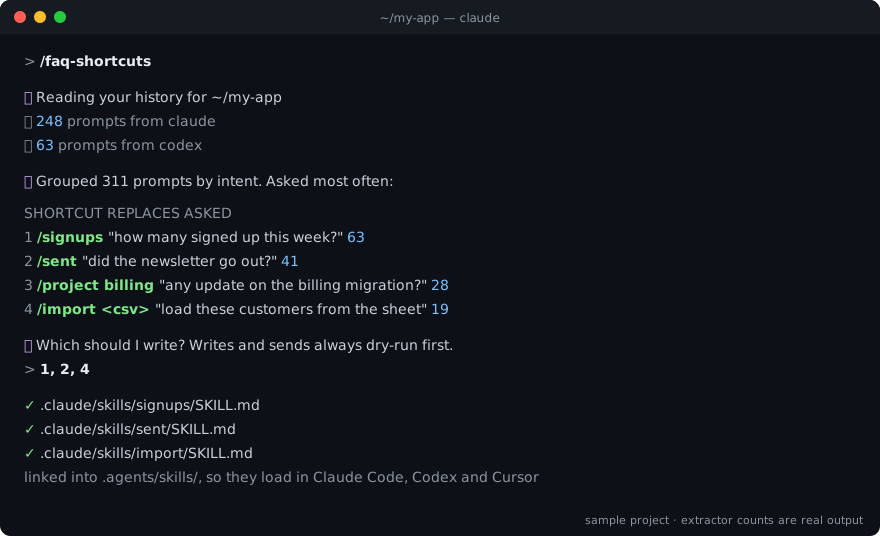
You'll get a table of your most repeated asks with how often you typed each. Pick the ones you want and they become shortcuts in that project.
The repo is
cli-faq-shortcuts; the skill it installs is calledfaq-shortcuts.
If it saves you typing, please ⭐ star the repo. Stars are how other people find it.
Commands
# inside your project, in Claude Code
/faq-shortcuts                        # find your repeated asks and propose shortcuts
/faq-shortcuts --since 2026-06-01     # only look at recent history
/faq-shortcuts --source codex         # only what you asked Codex

# the extractor on its own: no agent, nothing leaves your machine
E=~/.agents/skills/faq-shortcuts/scripts/extract_asks.py
python3 $E .                          # every prompt you typed here, oldest first
python3 $E . --since 2026-09-01 | wc -l                  # how many since September
python3 $E . | awk -F'\t' 'split($3,w," ")>=4 {print tolower($3)}' \
  | sort | uniq -c | sort -rn | head                     # your most repeated exact requests
The last one counts exact repeats only, and it undercounts. On one real project, the most
repeated exact request appeared 4 times. Grouped by intent, however it was worded, the top
ask had been typed 127 times. That grouping is the agent's job in /faq-shortcuts.
What you get
| You kept typing | You type now |
|---|---|
| "how many people signed up this week, not counting test accounts?" | /signups |
| "did the newsletter actually go out? did it reach everyone?" | /sent |
| "any update on the billing migration? what's blocked?" | /project billing |
| "add this CSV of new customers, skip the ones we already have" | /import new.csv |
Each shortcut is a small file in your project, .claude/skills/<name>/SKILL.md, for example:
---
name: sent
description: Check whether a batch email actually reached people. Use for "did the
  newsletter go out?", "did it reach everyone?", "did X get the email?".
---
# Did it go out

Report only. Never re-send from this shortcut.

## Query
scripts/email-status.js --batch <name>   ← the script your project already has

## Traps
- A "delivered" status to a shared inbox proves nobody read it (happened 3 May).

## Report
Sent / delivered / bounced counts, then the bounced addresses. Then ask.
The shortcuts point at the scripts and queries your project already uses, and they record the mistakes already made on that path. So a shortcut is shorter to type and safer to run. Anything that writes or sends does a dry run first and waits for your yes, so a typo stops at the preview.
How it works
- Collect.
scripts/extract_asks.pyprints every prompt you typed in the project, from Claude Code and Codex history. It skips subagent turns and scripted runs, because you didn't type those. - Cluster. The agent groups prompts by intent, whatever the wording, and counts them.
- Check. It looks for shortcuts you already have and the tools your project already has.
- Propose. You get a table of shortcut, the ask it replaces, and how often you asked. You pick.
- Write. Each chosen shortcut becomes a
SKILL.mdin.claude/skills/, linked into.agents/skills/so all three agents load it, committed so your team gets it too. - List. A table in
CLAUDE.md/AGENTS.mdmaps each shortcut to the sentence it replaces.
Install
The quick start above is the whole install. It puts the skill where each agent looks:
| Agent | Reads skills from |
|---|---|
| Codex | ~/.agents/skills/ |
| Claude Code | ~/.claude/skills/ (the link) |
| Cursor | both |
Update: git -C ~/.agents/skills/faq-shortcuts pull
Uninstall: rm ~/.claude/skills/faq-shortcuts && rm -rf ~/.agents/skills/faq-shortcuts
Windows
In PowerShell, with git and Python 3.9+ installed. A directory junction links the skill
into ~/.claude/skills and, unlike a symlink, needs no admin rights or Developer Mode:
git clone https://github.com/kishormorol/cli-faq-shortcuts "$env:USERPROFILE\.agents\skills\faq-shortcuts"
New-Item -ItemType Directory -Force "$env:USERPROFILE\.claude\skills" | Out-Null
New-Item -ItemType Junction -Path "$env:USERPROFILE\.claude\skills\faq-shortcuts" -Target "$env:USERPROFILE\.agents\skills\faq-shortcuts"
Run the extractor with python (or py), not python3:
python "$env:USERPROFILE\.agents\skills\faq-shortcuts\scripts\extract_asks.py" . | Select-Object -First 10
Update: git -C "$env:USERPROFILE\.agents\skills\faq-shortcuts" pull
Uninstall: remove the junction with rmdir, which leaves its target alone, then the clone:
cmd /c rmdir "$env:USERPROFILE\.claude\skills\faq-shortcuts"
Remove-Item -Recurse -Force "$env:USERPROFILE\.agents\skills\faq-shortcuts"
What it reads
| Agent | History | Read? |
|---|---|---|
| Claude Code | ~/.claude/projects/<project>/*.jsonl (the last 30 days) and ~/.claude/history.jsonl (older prompts) | yes |
| Codex | ~/.codex/sessions/ (or $CODEX_HOME), matched by the folder each session ran in | yes |
| Cursor | an undocumented SQLite store | not yet, but Cursor still loads the shortcuts |
To see what it finds without the agent:
python3 ~/.agents/skills/faq-shortcuts/scripts/extract_asks.py ~/my-project | head
This prints date<TAB>source<TAB>prompt. Add --source claude or --source codex to read
one tool only, and --since 2026-01-01 to skip older prompts.
Troubleshooting
| You see | Do this |
|---|---|
The agent doesn't know /faq-shortcuts | Start a new session. Skills load when a session starts. Check that ls ~/.claude/skills/faq-shortcuts/SKILL.md finds the file. |
no session history at … | Run it from the project folder you actually worked in. History is stored per folder, so a subfolder counts as a different project. |
| Very few prompts found | Only Claude Code and Codex history is read. Cursor chats aren't read yet. |
fatal: destination path … already exists | It's already installed. Run the update command instead. |
Contributing
Issues and pull requests are welcome. Good first contributions:
- Windows support without WSL: the install relies on symlinks.
- Reading Cursor history, so Cursor users' asks are counted too.
- A bug report with the extractor command you ran and what it printed.
Everyone whose pull request is merged appears here:
Built with help from Claude Code.
Privacy
The extractor only reads local files and makes no network calls. Your prompts can contain names, emails and tokens, so the skill writes the list to a scratch folder, never into your repo. Your agent then reads that list the same way it reads any file you show it.
License
// faq
What is cli-faq-shortcuts?
An Agent Skill that turns the asks you keep typing into short commands, mined from your own Claude Code and Codex history. Works in Claude Code, Codex and Cursor.. It is open-source on GitHub.
Is cli-faq-shortcuts free to use?
cli-faq-shortcuts is open-source under the Apache-2.0 license, so it is free to use.
What category does cli-faq-shortcuts belong to?
cli-faq-shortcuts is listed under skills in the Claudeers registry of Claude-compatible tools.
// embed badge

[](https://claudeers.com/cli-faq-shortcuts)
// retro hit counter

[](https://claudeers.com/cli-faq-shortcuts)
// reviews
// guestbook
// related in Claude Skills
 🔓
🔓An agentic skills framework & software development methodology that works.
 🔓
🔓 🔓
🔓💫 Toolkit to help you get started with Spec-Driven Development
 🔓
🔓AI coding assistant skill (Claude Code, Codex, OpenCode, Cursor, Gemini CLI, and more). Turn any folder of code, SQL schemas, R scripts, shell scripts, docs,…