
Claudette
A Sublime Text package that integrates the Anthropic Claude AI API into your editor
Install with your AI
Paste into Claude Code, Cursor, or any agent — it reads the repo and wires the tool into your project.
⚠ Unverified source (community-unclaimed, low activity) — reveal the prompt
⚠ Unverified source (community-unclaimed, low activity). Inspect the repo before letting your agent install it.

Install and set up Claudette (release-binary project) into my current project.
Found on https://claudeers.com/claudette
Repo: https://github.com/barryceelen/Claudette
Homepage/docs: https://claudette.dev
Detected install method: release-binary → inspect the README
Category: security. Platforms: api.
Read the repo's README for exact setup and env vars, then install it and wire it into my project.

Claudeers Health Verdict:
dormant; community-verified: false. Confirm the source before running anything.
Grab the latest release asset from GitHub.
# download a build from https://github.com/barryceelen/Claudette/releases
git clone https://github.com/barryceelen/Claudette
// compatibility
| Platforms | api |
|---|---|
| Operating systems | — |
| AI compatibility | claude |
| License | GPL-3.0 |
| Pricing | open-source |
| Language | Python |
Claudette – Claude AI Assistant for Sublime Text
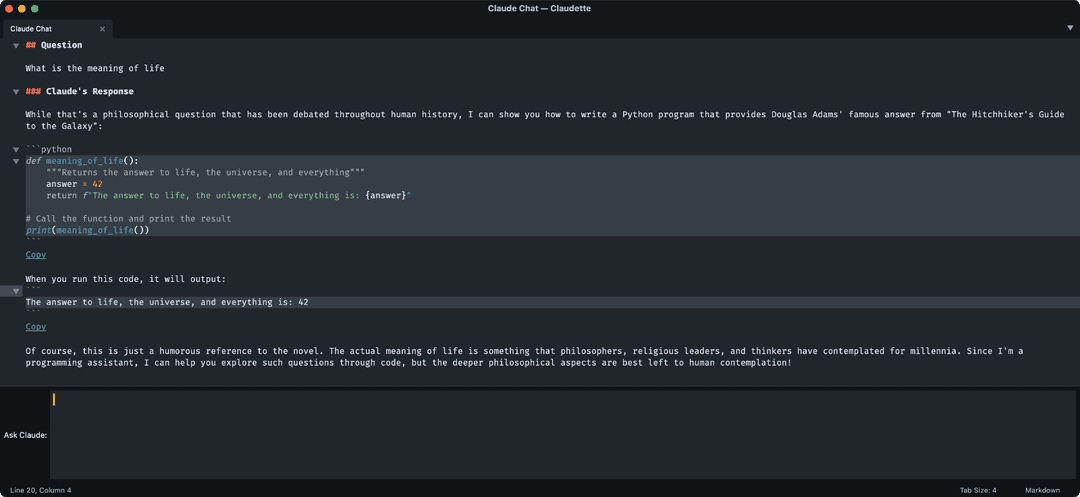
A Sublime Text package that integrates the Anthropic Claude AI API into your editor.
Type "Ask Question" in the command palette or find the Claudette > Ask Question item in the Tools menu to ask a question. Any selected text in the current file will be sent along to the Anthropic Claude API. Note that a Claude API key is required.
Features
- Chat with Claude in multiple chat windows at the same time
- Automatically include selected text as context for your questions
- Include one or more files in the chat context
- Choose between different Claude models
- Configure custom system prompts to customize Claude's behavior
- Chat History: Export and import conversations as JSON files
Commands
All commands are available via the Tools > Claudette menu or via the command palette.
-
Ask Question
claudette_ask_question
Opens a question input prompt. Submit your question with the ⏎ Enter key. ⇧ Shift + ⏎ Enter for line breaks.
Pro tip: In a chat view, press Enter to ask a question. -
Ask Question In New Chat View
claudette_ask_new_question
Opens a question input prompt. A new chat view will open if there is an existing conversation in the current view. Useful for having multiple simultaneous chats, each with their own context and history. -
Clear Chat History
claudette_clear_chat_history
Clear the chat history to reduce token usage while keeping previous messages visible in the interface. Prevents resending previous messages in a conversation when a new question is asked. -
Export Chat History
claudette_export_chat_history
Save any Claude chat conversation. Run this command to export the most recently active chat view in the current window to a JSON file. -
Import Chat History
claudette_import_chat_history
Import a chat history JSON file and continue the conversation where it left off. -
Add File to Chat
claudette_context_add_files
Available as a context menu item in the file list. Include one or more files or the content of a folder to the chat context. -
Add Current File To Chat
claudette_context_add_current_file
Add the content of the currently open view to the chat context. -
Remove Current File From Chat
claudette_context_remove_current_file
Remove the content of the currently open view from the chat context, if it has been added before. -
Add All Open Files To Chat
claudette_context_add_open_files
Add the content of the currently open files to the chat context. -
Refresh Included Files
claudette_context_refresh_files
Update the content of the files in the chat context with their latest version. -
Show Included Files
claudette_context_manage_files
Manage the list of files that are currently included in the chat context. -
Clear Included Files
claudette_context_clear_files
Remove all included files from the chat context. -
Switch Model
claudette_select_model_panel
Claudette chat is powered by Claude 3.5 Sonnet by default, but you can switch between all available Anthropic models. -
Switch System Prompt
claudette_select_system_message_panel
Improve Claude's performance by using a system prompt. You can create and manage multiple prompts. -
Switch API Key claudette_select_api_key_panel Claudette allows using multiple API keys.
Keyboard shortcuts
The Claudette package does not add key bindings out of the box. You can add your own keyboard shortcuts via the Settings > Keybindings settings menu. The following example adds a keyboard shortcut that opens the "Ask Question" panel.
For OSX:
[
	{
		"keys": ["super+k", "super+c"],
		"command": "claudette_ask_question",
	}
]
For Linux and Windows:
[
	{
		"keys": ["ctrl+k", "ctrl+c"],
		"command": "claudette_ask_question",
	}
]
Installation
- Install Package Control if you haven't already
- Open the Command Palette (⌘+⇧+P on Mac, Ctrl+⇧+P on Windows/Linux)
- Type "Package Control: Install Package" and press Enter
- Type "Claudette" and press Enter to install
- Get an API key from Anthropic
- Configure API key in Preferences > Package Settings > Claudette > Settings
What's new
Privacy & legal
Everything that you share with the Anthropic Claude API, for example by including it in a chat, will be sent to Anthropic's servers. For information about Anthropic's privacy practices, data processing, and legal compliance, please visit the Anthropic Privacy & Legal documentation.
Credits
The package is for the most part written by Claude AI itself.
// faq
What is Claudette?
A Sublime Text package that integrates the Anthropic Claude AI API into your editor. It is open-source on GitHub.
Is Claudette free to use?
Claudette is open-source under the GPL-3.0 license, so it is free to use.
What category does Claudette belong to?
Claudette is listed under data in the Claudeers registry of Claude-compatible tools.
// embed badge

[](https://claudeers.com/claudette)
// retro hit counter

[](https://claudeers.com/claudette)
// reviews
// guestbook
// related in Security & Compliance
 🔓
🔓A complete AI agency at your fingertips - From frontend wizards to Reddit community ninjas, from whimsy injectors to reality checkers. Each agent is a specia…
 🔓
🔓π RuView turns commodity WiFi signals into real-time spatial intelligence, vital sign monitoring, and presence detection — all without a single pixel of video.
 🔓
🔓Prowler is the world’s most widely used open-source cloud security platform that automates security and compliance across any cloud environment.
 🔓
🔓🐶 A curated list of Web Security materials and resources.