
claudes-workbench
Claude orchestrates. An OpenCode local LLM on your GPU writes the code. Workbench is a Claude Code plugin that connects the two inside your normal Claude Cod…
Install with your AI
Paste into Claude Code, Cursor, or any agent — it reads the repo and wires the tool into your project.
Install and set up claudes-workbench (git-clone project) into my current project.
Found on https://claudeers.com/claudes-workbench
Repo: https://github.com/a-schaefers/claudes-workbench
Homepage/docs: —
Detected install method: git-clone → git clone https://github.com/a-schaefers/claudes-workbench
Category: plugins. Platforms: cli, api, desktop.
Read the repo's README for exact setup and env vars, then install it and wire it into my project.

Claudeers Health Verdict:
unknown; community-verified: false. Confirm the source before running anything.
git clone https://github.com/a-schaefers/claudes-workbench
// compatibility
| Platforms | cli, api, desktop |
|---|---|
| Operating systems | — |
| AI compatibility | claude |
| License | MIT |
| Pricing | open-source |
| Language | Python |
Claude's Workbench
Claude orchestrates. An OpenCode local LLM on your GPU writes the code. Workbench is a Claude Code plugin that connects the two inside your normal Claude Code session.
- Claude is the lead, your local models are the crew: Claude assigns each step to a model sized for it, reviews what comes back, and returns it until it's right.
- Agents get Claude's know-how: a library of skills Claude keeps and grows, handed out per task (the skill library).
- It's still just Claude Code. You talk to Claude as usual, your plugins, skills and settings keep working, and the agents work on their own branches, so your checkout is untouched until you accept.
- Beyond code: images and audio. Optionally, Claude directs local image and audio models too, making a project's icons, illustrations, voice lines, sound effects and music. It looks at every image; it can't hear, so each sound comes with a transcript and measurements it can read, and for music you have the last word (images, audio).
- See how it's going: the Stats tab. The Workbench pane's Stats tab shows this machine live: each GPU's memory, load and watts, the running task's speed, and every model, loaded or not. Below that is your history: tasks landed, Claude tokens saved (an estimate), energy and its cost, streaks and bests, what the agents fixed without waking Claude, each model's speed over time, and what tends to stop them. It all stays on your machine and costs nothing while the tab isn't on screen.
- Experimental: lighter code reading. Turn on Agent code navigation in the pane's Settings and agents read a file's outline and just the function they need, with probe (its release binary, installed by you), instead of the whole file, which saves their context on big files. It's off by default and may go away (experiments).
On bigger coding tasks, once the session is already open, handing the coding off to the local model typically costs Claude about half the tokens of writing the code itself (how we measured it).
Quickstart
What you need
- Claude Code, with a Claude subscription or an API key
- OpenCode 2.3 or newer
- Git and Python 3.11 or newer, on Linux, macOS, or Windows through WSL2
- A local model. Already run a server that speaks the OpenAI API? Claude uses it (tool calls and a 32K context window recommended, 16K at the least). None yet? Claude suggests one that fits your hardware and asks before installing or downloading anything.
- (optional) An image or audio model, for pictures and sound. The first time a project needs one, Claude proposes a model that fits your machine and your use's licence, and asks before downloading it. Small speech models run on the CPU; music wants a GPU.
Tested in the Claude Code CLI only, not the Claude desktop app.
In your terminal
claude plugin marketplace add a-schaefers/claudes-workbench
claude plugin install workbench@workbench
"${CLAUDE_CONFIG_DIR:-$HOME/.claude}"/plugins/marketplaces/workbench/bin/wb setup   # puts wb on your PATH and /workbench in your skills
In Claude Code, inside your project
/workbench
The first time, Claude finishes the setup and proves it on a tiny sample task.
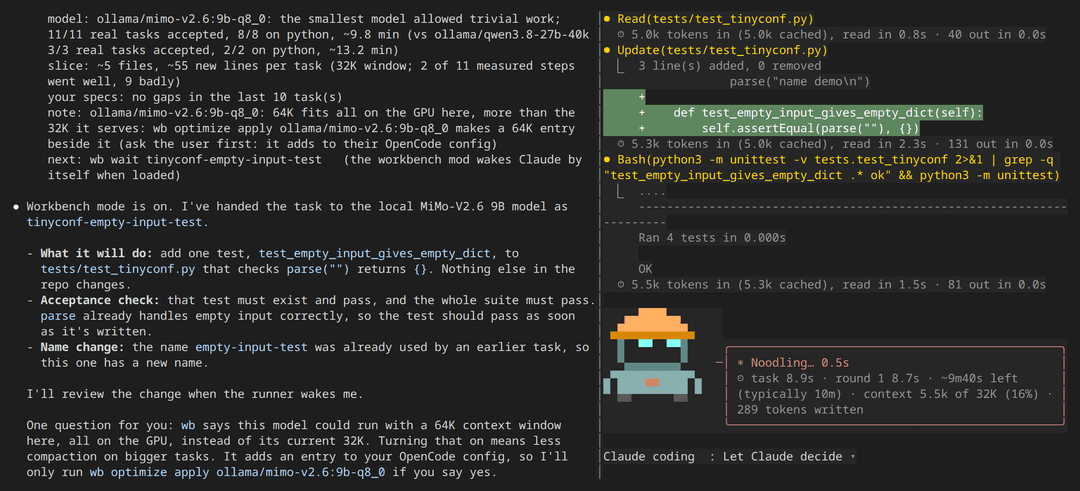
Then work as you always do. On the left is Claude, as usual; on the right, the local agents it's directing for you.
/workbench-quit stops the agents and keeps their work for later.
/workbench-quit-and-hand-back-claude has Claude finish their tasks itself.
/workbench-update installs the latest workbench (Claude Code tells you when there's one).
License
MIT.
// faq
What is claudes-workbench?
Claude orchestrates. An OpenCode local LLM on your GPU writes the code. Workbench is a Claude Code plugin that connects the two inside your normal Claude Code session.. It is open-source on GitHub.
Is claudes-workbench free to use?
claudes-workbench is open-source under the MIT license, so it is free to use.
What category does claudes-workbench belong to?
claudes-workbench is listed under plugins in the Claudeers registry of Claude-compatible tools.
// embed badge

[](https://claudeers.com/claudes-workbench)
// retro hit counter

[](https://claudeers.com/claudes-workbench)
// reviews
// guestbook
// related in Claude Plugins
 🔓
A single CLAUDE.md file to improve Claude Code behavior, derived from Andrej Karpathy's observations on LLM coding pitfalls.
 🔓
Claude Code is an agentic coding tool that lives in your terminal, understands your codebase, and helps you code faster by executing routine tasks, explainin…
 🔓
"CLI-Anything: Making ALL Software Agent-Native" -- CLI-Hub: https://clianything.cc/
🔓financial-services — a Claude ecosystem project on GitHub.