
claudemon
Wild Pokemon appear while you work in Claude Code.
Install with your AI
Paste into Claude Code, Cursor, or any agent — it reads the repo and wires the tool into your project.
Install and set up claudemon (claude-plugin project) into my current project.
Found on https://claudeers.com/claudemon-2
Repo: https://github.com/zamarrowski/claudemon
Homepage/docs: https://zamarrowski.github.io/claudemon/
Detected install method: claude-plugin → /plugin install claudemon@zamarrowski/claudemon
Category: plugins. Platforms: cli, api.
Read the repo's README for exact setup and env vars, then install it and wire it into my project.

Claudeers Health Verdict:
active; community-verified: false. Confirm the source before running anything.
/plugin marketplace add zamarrowski/claudemon
/plugin install claudemon@zamarrowski/claudemon
git clone https://github.com/zamarrowski/claudemon
// compatibility
| Platforms | cli, api |
|---|---|
| Operating systems | — |
| AI compatibility | claude |
| License | MIT |
| Pricing | open-source |
| Language | JavaScript |
claudemon
Wild Pokemon appear while you work in Claude Code. Your prompts are steps through the grass: the longer the prompt, the further you walk, and the more chances something jumps out. So is the waiting — every twenty seconds Claude spends working is another step, because that is the half of the session you actually have free.
The walking happens while Claude does, not the moment you press enter: a prompt buys you the steps and the turn takes them, so anything that jumps out does it with the grass already moving.
One at a time, and only for half a minute: a Pokemon that appears while you are busy wanders off if you leave it there, so a long session never leaves a queue of battles waiting for you.
The original 151. Fully local — no account, no backend, nothing about you leaving the machine.
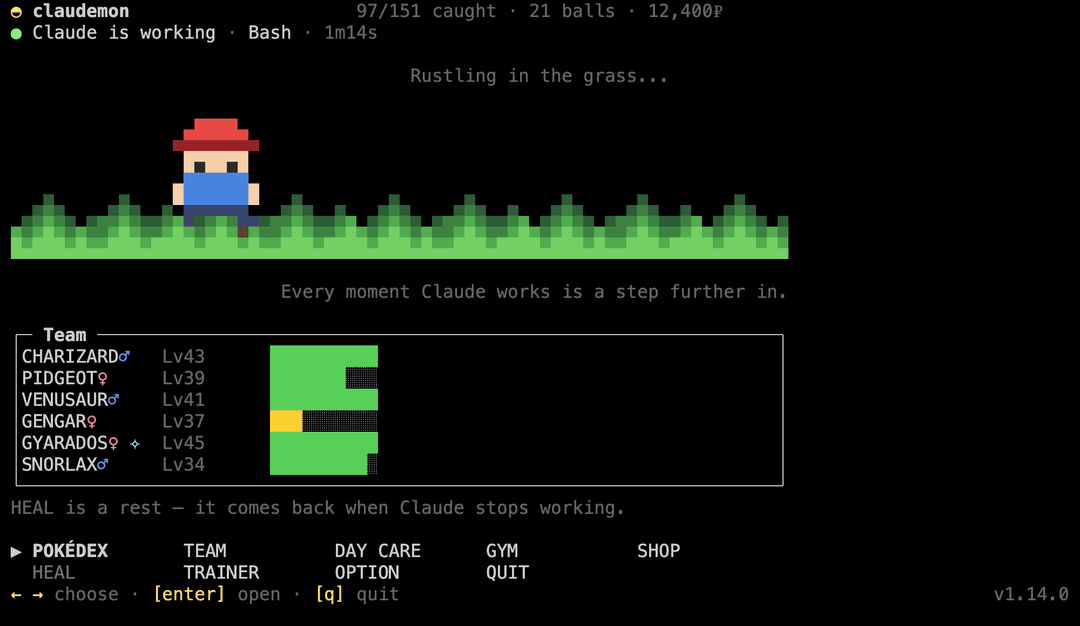 | 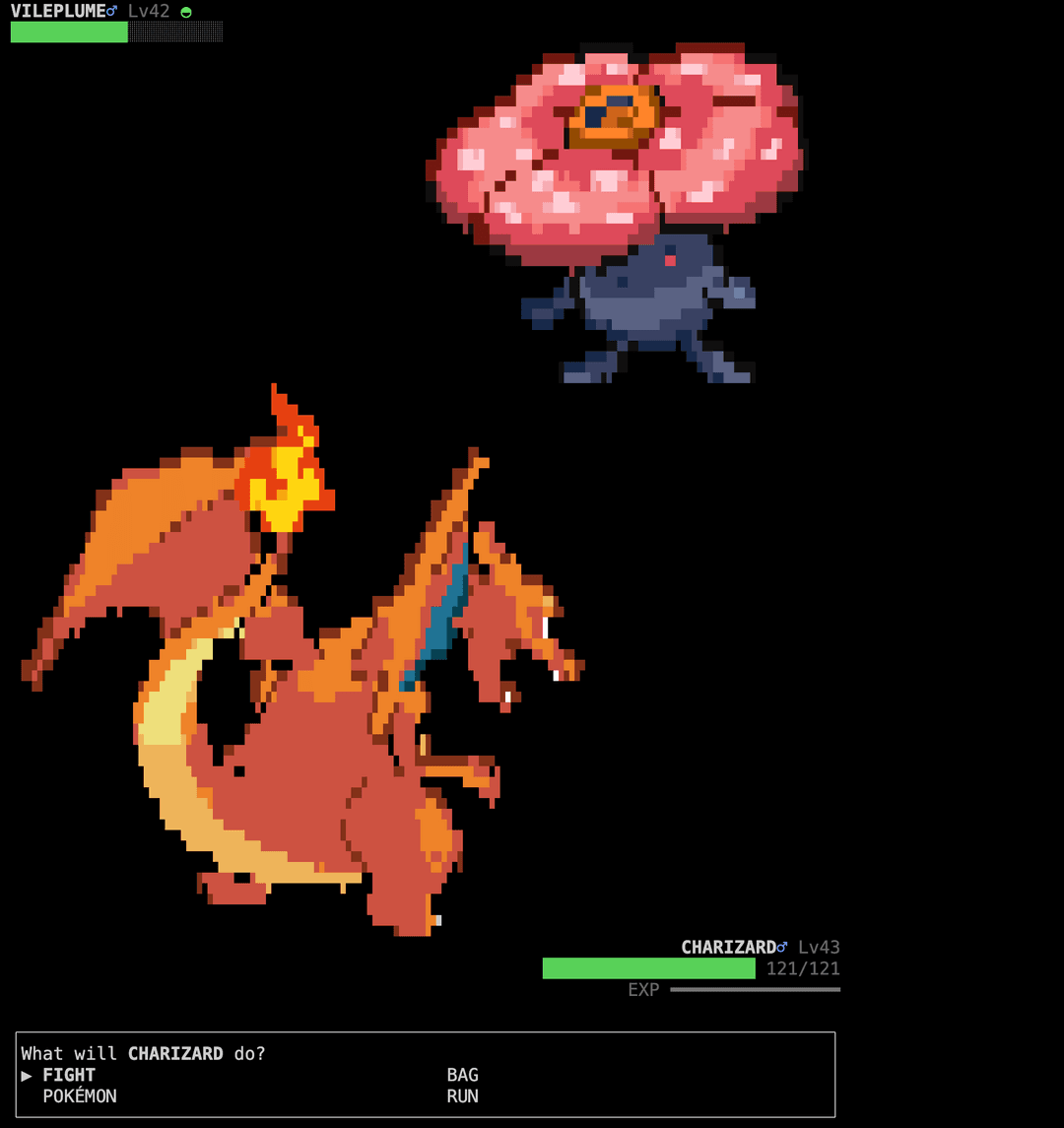 |
| Waiting, which is most of it. The walk only moves while Claude does, so you can tell from across the desk without reading anything. | And when something does jump out. |
It lives in a terminal tab of its own, next to the one you work in. The status line in Claude tells you something is waiting; the game tab is where you go and fight it.
┌─ Terminal 1: claude ──────────────────────────────────┐
│ > refactor this component                             │
│ ███████░░░░░░░ 63% left | Opus 5                      │
│ ✦ A wild PIDGEY appeared!  ·  24s left  ·  claudemon  │
└───────────────────────────────────────────────────────┘
Install
Typed inside Claude Code. Nothing to clone.
/plugin marketplace add zamarrowski/claudemon
/plugin install claudemon@claudemon
That puts the plugin in place — the hooks that make Pokemon appear come from it.
Now restart Claude Code. Claude Code only picks up a plugin's commands and hooks at startup, so until you restart, the next line does not exist yet — if you type it straight after installing, nothing happens. Once you are back:
/claudemon-setup
This does the rest: the claudemon command, the status line, and the sprites. It
prints a line per step and says so if one of them did not work.
Then two one-offs, which it reminds you of:
- Restart Claude Code once more, so the new status line loads.
- In a second terminal tab, run
claudemon.
It asks for a name and a starter the first time, and after that it sits there waiting. Send a longish prompt in the Claude tab and watch the status line.
What you need first
| How to check | |
|---|---|
| Claude Code | You are already in it |
| Node.js 18 or newer | node --version. The game and the hooks run on it, and Claude Code ships as its own binary so it does not bring one. Nothing else to install — no dependencies, no build step |
| A terminal with truecolor | iTerm2, Ghostty, WezTerm, Kitty, Alacritty, VS Code's terminal and macOS Terminal are all fine |
The 151 Pokemon ship with the plugin, so the only thing the install downloads is the sprites — 1.2 MB, a few seconds. After that the only thing that ever goes out is the version check below, and nothing goes out at all with it switched off.
Updating
The version this is sits at the right-hand end of the home screen's bottom row. Once
a day the game asks GitHub whether a newer one is out — a plain GET of the plugin
manifest, about 300 bytes, sending nothing. If there is, the home screen says so:
◆ v0.7.0 is out · [u] update
u does it: it refreshes the marketplace, fetches the new version through
claude plugin update, and reruns the installer to catch anything around the plugin
that changed. Then two one-offs, which it tells you about — restart Claude Code so
the new hooks and status line load, and relaunch claudemon, because a running
process cannot swap its own code out.
Option says when that question gets asked. UPDATE DAILY is the default above.
UPDATE LAUNCH asks every time claudemon starts instead — one request as the tab
comes up, and none while you play, which is what you want if you leave a tab open for
a week and would rather not wait a day to hear about a release. UPDATE OFF stops it
entirely: nothing is offered and no socket is opened; the two commands under
Coming from 0.5.0 below still work whenever you want them.
Updating through Claude Code instead is fine too. The claudemon command is kept
pointing at whichever copy is newest — by a hook, because neither the command nor the
status line can be rewritten by hand once they are on a PATH and in settings.json —
so the game picks the new one up on its next start, and says ◆ v0.7.0 is installed
until you restart it.
Coming from 0.5.0
0.5.0 has none of this in it, so it cannot tell you a new version is out: the first
upgrade is the only one you do by hand. In a terminal — not at the Claude Code prompt,
because /plugin has no update of its own; this lives in the CLI:
claude plugin marketplace update claudemon
claude plugin update claudemon@claudemon
The first line is not optional. Your copy of the marketplace is whatever it was when you added it, so without refreshing it the second line has nothing newer to find and tells you so.
Restart Claude Code, then run claudemon again. That is all of it — the version turns
up in the bottom-right corner, and [u] does every upgrade after this one.
There is one thing 0.5.0 leaves behind that has to be undone, and it undoes itself.
0.5.0's installer wrote the directory it was installed from into both launchers and
nothing ever revisited it; for a plugin install that path has 0.5.0 in it, so the
command would go on starting 0.5.0 whatever else you installed — in silence, the only
symptom being a game that never changes. The first prompt after the restart puts both
right, and notes it in ~/.claudemon/claudemon.log. A clone is left alone, because a
clone is meant to take precedence.
Uninstall
/plugin uninstall claudemon@claudemon
That stops the hooks. To also remove the command and put your status line back, run the installer's undo — from the plugin copy, before you uninstall it:
node "$CLAUDE_PLUGIN_ROOT/tools/install.mjs" --uninstall
Your save is left alone either way — delete ~/.claudemon/ as well to be rid of it.
From a clone instead
For hacking on it, a clone works the same way and takes precedence over the installed copy:
git clone https://github.com/zamarrowski/claudemon
cd claudemon
node tools/install.mjs
That does everything the steps above do, including installing the plugin from the clone — so it needs no slash commands and only one restart, at the end. Keep the directory where it is: the launcher prefers it while it exists.
Controls
Arrow keys move, enter confirms, esc goes back, q quits. Any key advances a
battle message. That is the whole scheme — it is the same everywhere.
| Screen | What it does |
|---|---|
| Home | Whatever is in the grass and how long is left to face it, your team, and the menu |
| Battle | FIGHT / BAG / POKÉMON / RUN, with move types, power and PP. A ◓ by the foe's name means it is already in your Pokédex |
| Pokédex | All 151, with how many of each you have faced, and base stats and evolution requirements for the ones you caught |
| Team | Details, moves, experience, enter to change your lead, and d to send one to the box. i opens the bag on whoever the cursor is on: a potion for somebody on the bench, and the evolution stones, which are used nowhere else. A ✦ marks an item that would evolve them |
| Box | Everything you caught with a full team, reached with b from the team screen. enter takes one back into the team |
| Shop | Balls, potions, revives and evolution stones. 5 buys five |
| Option | How big sprites are drawn, the menu sounds, the bell, and when the version check runs — daily, every launch, or never. ← → changes a setting, and the Pokémon underneath redraws as you do |
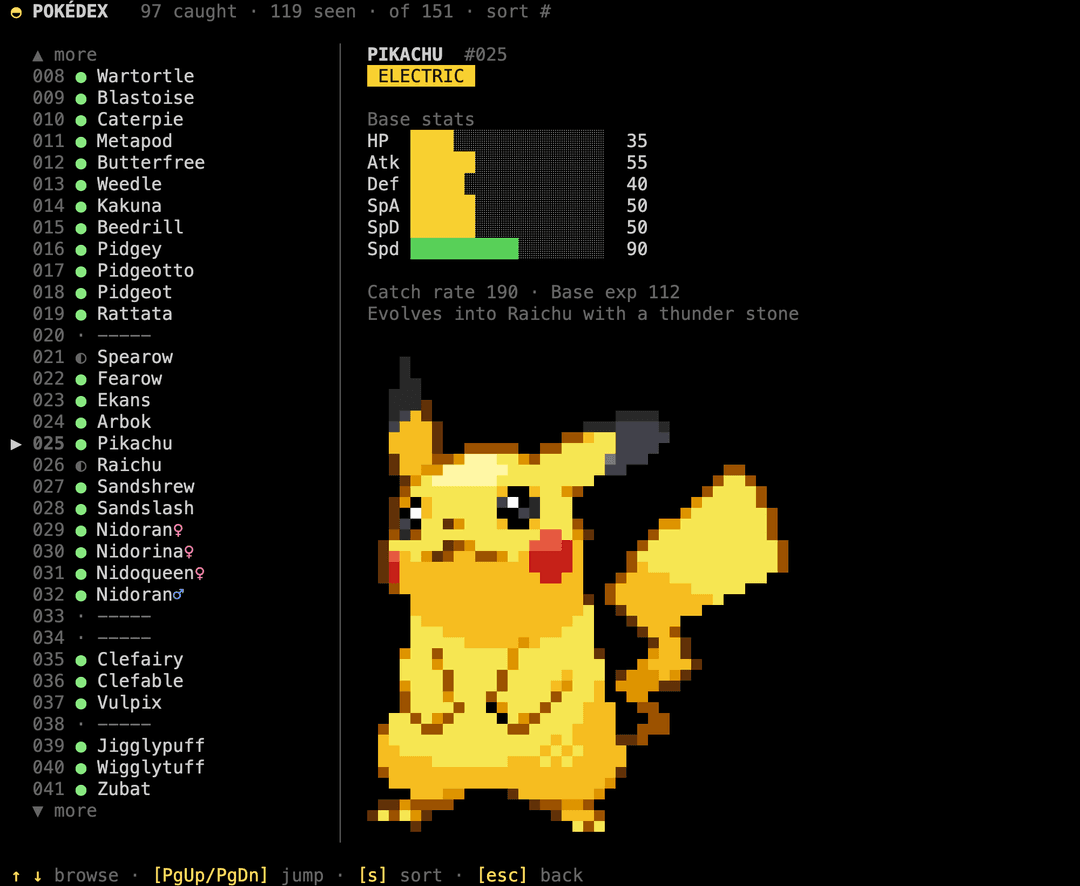 | 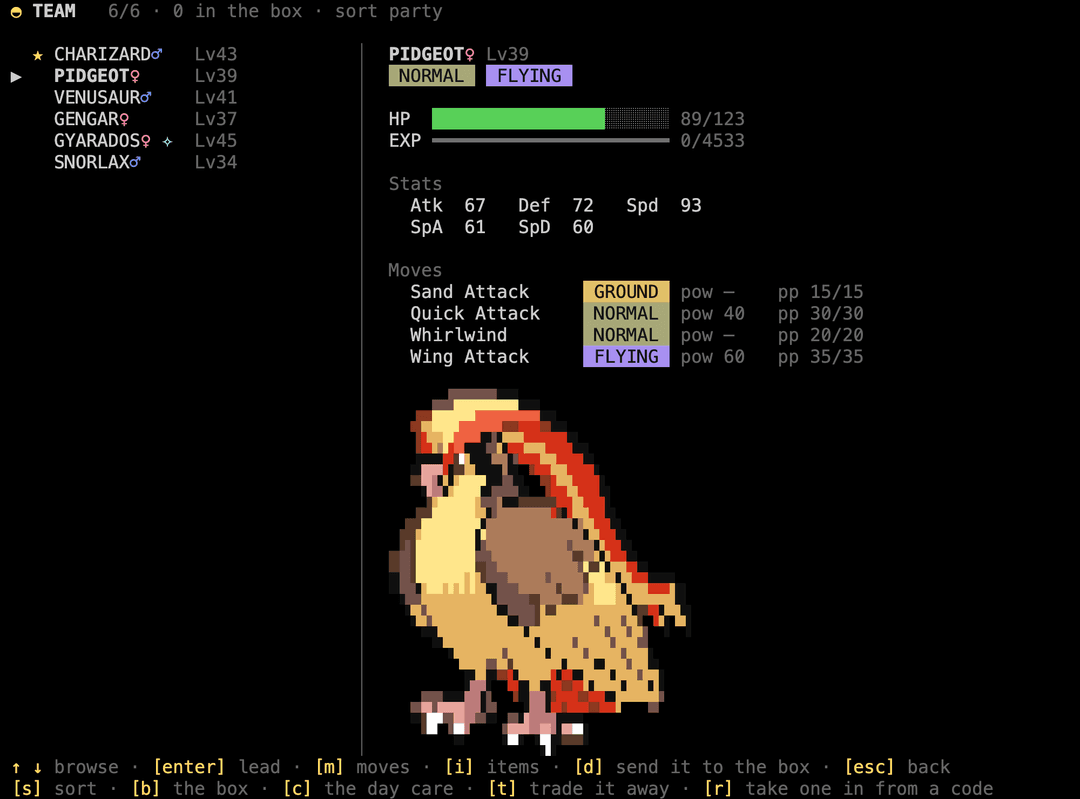 |
| Pokédex — seen and caught are tracked apart, and the stats fill in for the ones you caught. | Team — enter changes which one leads. |
What is in it
- The original 151, with real base stats, types, catch rates and Red/Blue movesets.
- Battles with critical hits, the type chart, status conditions, PP, one-hit KOs, fleeing and switching Pokémon mid-fight.
- Catching, where weakening and status genuinely help.
- Levelling, learning moves, and evolution by level or by stone.
- A Pokédex tracking seen and caught separately and counting how many of each you have faced, a team screen with the box behind it and the bag inside it, and a shop. Items are used on whoever you have picked, which is the only way a stone gets used at all.
- A line telling you whether Claude is working, which tool it is on and for how long — and a bell when it finishes or gets stuck on a permission prompt, so the game tab is somewhere you can actually sit and wait.
- A patch of grass with someone walking through it, who only walks while Claude is working. Something you can catch out of the corner of your eye.
- HEAL greyed out for as long as Claude has the keyboard, and a blackout that leaves your team down rather than picking it up. Healing is a rest, and a rest is the half of the session Claude is not using — so a team back at full health is something you pick up in the gaps, not something you farm between two tool calls.
- Blips as you move through the menus, and a theme that plays from the first frame of
a battle to the last — off in one place if you would rather work in silence. The
blips are generated from a few lines of notes rather than shipped, so a new one
costs three numbers; the theme is two minutes of mono WAV in
assets/, which is the one format every player on every platform will open.
Credits
Data and sprites come from PokeAPI. The stats and movesets in
data/ are built from it by tools/fetch-data.mjs. The sprites are not in here:
they are somebody else's artwork, so they are downloaded at install time rather than
redistributed.
assets/battle.wav is the trainer battle theme from the Game Boy games, trimmed to
two minutes and downmixed to mono. It is not original to this repo and it is not
covered by the LICENSE, which applies to the code.
Pokemon is a trademark of Nintendo, Creatures Inc. and GAME FREAK Inc.; this is a personal, non-commercial toy.
// faq
What is claudemon?
Wild Pokemon appear while you work in Claude Code.. It is open-source on GitHub.
Is claudemon free to use?
claudemon is open-source under the MIT license, so it is free to use.
What category does claudemon belong to?
claudemon is listed under plugins in the Claudeers registry of Claude-compatible tools.
// embed badge

[](https://claudeers.com/claudemon-2)
// retro hit counter

[](https://claudeers.com/claudemon-2)
// reviews
// guestbook
// related in Claude Plugins
 🔓
🔓A single CLAUDE.md file to improve Claude Code behavior, derived from Andrej Karpathy's observations on LLM coding pitfalls.
 🔓
🔓Claude Code is an agentic coding tool that lives in your terminal, understands your codebase, and helps you code faster by executing routine tasks, explainin…
 🔓
🔓"CLI-Anything: Making ALL Software Agent-Native" -- CLI-Hub: https://clianything.cc/
🔓financial-services — a Claude ecosystem project on GitHub.