
Claudegram
@elijahaifl on instagram built out the steps to have any claude environment recreate your own personalized instagram analytics dashboard
Install with your AI
Paste into Claude Code, Cursor, or any agent — it reads the repo and wires the tool into your project.
Install and set up Claudegram (git-clone project) into my current project.
Found on https://claudeers.com/claudegram
Repo: https://github.com/vvselijah/Claudegram
Homepage/docs: —
Detected install method: git-clone → git clone https://github.com/vvselijah/Claudegram
Category: data. Platforms: cli, api.
Read the repo's README for exact setup and env vars, then install it and wire it into my project.

Claudeers Health Verdict:
slowing; community-verified: false. Confirm the source before running anything.
git clone https://github.com/vvselijah/Claudegram
// compatibility
| Platforms | cli, api |
|---|---|
| Operating systems | — |
| AI compatibility | claude |
| License | MIT |
| Pricing | open-source |
| Language | HTML |
Claudegram
Claude + Instagram — your AI growth analyst.
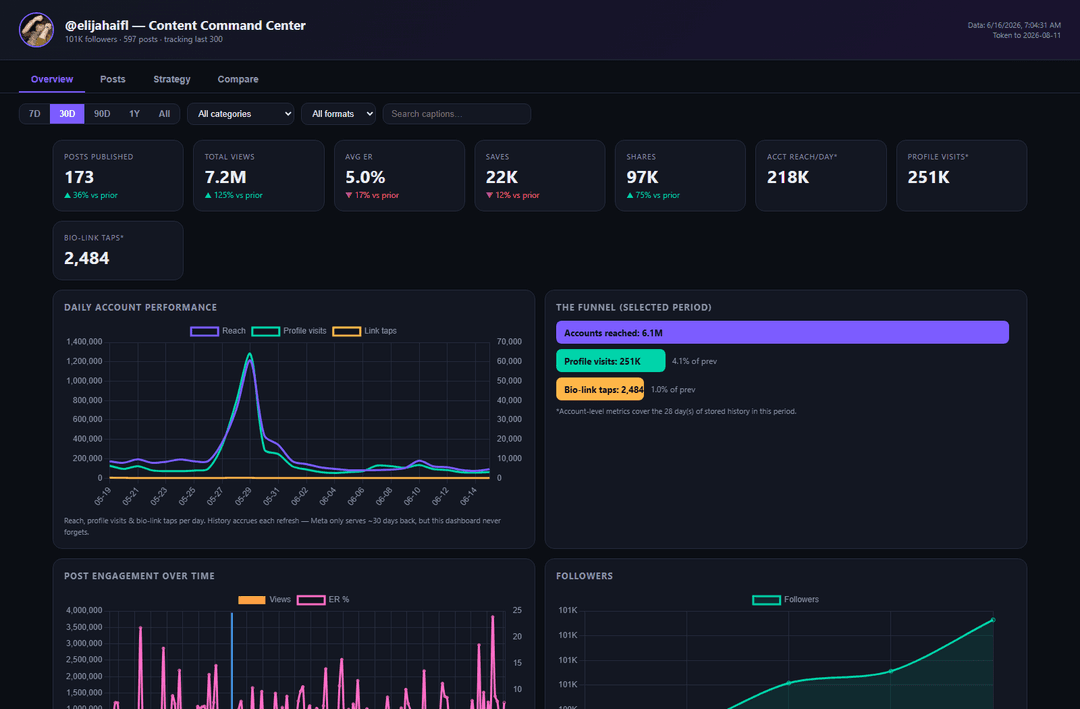
Let Claude run your Instagram. Connect Instagram's Graph API to Claude and get a local analytics dashboard that reads every signal the 2026 algorithm actually ranks on — watch-time, skip-rate, sends/shares, saves, who you really reach — then have Claude tell you exactly what to post next. Free, open-source, runs on your machine. Your data never leaves your computer.
This is the open-sourced version of the dashboard I use to run @elijahaifl (≈100M views). Steal it.
What you get
- A local dashboard (
dashboard.html) — KPI cards, post table sortable by any metric, category/format/time filters, best day+hour heatmap, the reach→profile→link funnel, follower growth, most-saved/most-shared, and a compare tab. - Claude as your analyst — open the folder in Claude Code and ask "what should I post?" It reads your real numbers and gives you data-grounded next-post ideas in your voice. It will never post for you — drafts only.
- A sync engine (
refresh.py) that pulls your posts + insights + ~30 days of account metrics and never forgets the daily history it has seen (Meta only serves ~30 days at a time).
Requirements
- Python 3.8+ (standard library only — nothing to
pip install). - An Instagram Business or Creator account linked to a Facebook Page.
- Claude Code — recommended (it does the setup for you). Not required; you can run the Python directly.
Quickstart (the easy way — let Claude do it)
- Clone this repo and open the folder in Claude Code.
- Say: "set me up."
- Claude reads
CLAUDE.md, runs the connect-instagram skill, and walks you through everything — making your account eligible, creating a Meta app, generating a long-lived token, finding your account id, and the first sync. - Open
dashboard.html. Then ask Claude "what should I post this week?"
Quickstart (manual)
- Eligibility: make your IG a Business/Creator account and link it to a Facebook Page you admin.
- Token: create a Business app at developers.facebook.com,
add the Instagram Graph API product, and in the
Graph API Explorer generate a
User token with
instagram_basic,instagram_manage_insights,pages_show_list,pages_read_engagement. Exchange it for a long-lived token (full walkthrough in.claude/skills/connect-instagram/SKILL.md). - Set env vars (then open a new terminal):
- Windows:
setx INSTAGRAM_ACCESS_TOKEN "<token>" - macOS/Linux:
export INSTAGRAM_ACCESS_TOKEN="<token>"
- Windows:
- Find your account id:
python setup.py→ setINSTAGRAM_ACCOUNT_IDthe same way. - Sync + open:
python refresh.py, then opendashboard.html(or runopen-dashboard.bat/sh open-dashboard.sh).
Keeping it fresh
Run python refresh.py before you post, or schedule it daily (Windows Task
Scheduler / cron) so your long-term daily history keeps building. Long-lived
tokens last ~60 days; the dashboard warns you before yours expires — just
re-run the token steps.
Customizing
- Post categories: edit the
CATEGORIESkeyword rules at the top ofrefresh.pyto match your niche. - How many posts to track / re-fetch window:
POST_LIMITandREFETCH_DAYSinrefresh.py.
Privacy
Everything runs locally. Your analytics live in data/ (gitignored) and your
token lives only in environment variables — never written into this repo. It
only reads your account; it cannot post.
License
MIT — do whatever you want with it.
// faq
What is Claudegram?
@elijahaifl on instagram built out the steps to have any claude environment recreate your own personalized instagram analytics dashboard. It is open-source on GitHub.
Is Claudegram free to use?
Claudegram is open-source under the MIT license, so it is free to use.
What category does Claudegram belong to?
Claudegram is listed under data in the Claudeers registry of Claude-compatible tools.
// embed badge

[](https://claudeers.com/claudegram)
// retro hit counter

[](https://claudeers.com/claudegram)
// reviews
// guestbook
// related in Data & Analytics
 🔓
🔓Wrap Antigravity, ChatGPT Codex, Claude Code, Grok Build as an OpenAI/Gemini/Claude/Codex compatible API service, allowing you to enjoy the free Gemini 3.1 P…
 🔓
🔓Marketing skills for Claude Code and AI agents. CRO, copywriting, SEO, analytics, and growth engineering.
 🔓
🔓Apache Airflow - A platform to programmatically author, schedule, and monitor workflows
 🔓
🔓CLI tool for configuring and monitoring Claude Code