
claude-wp-cli
Complete WordPress management CLI for Claude Code — REST + Application Password. Posts, media, SEO meta (RankMath/Yoast), comments, plugins, users, menus, se…
Install with your AI
Paste into Claude Code, Cursor, or any agent — it reads the repo and wires the tool into your project.
Install and set up claude-wp-cli (claude-skill project) into my current project.
Found on https://claudeers.com/claude-wp-cli
Repo: https://github.com/thenguyenvn90/claude-wp-cli
Homepage/docs: https://ongboit.com/
Detected install method: claude-skill → # copy this skill into .claude/skills/claude-wp-cli/
Category: content. Platforms: cli, api.
Read the repo's README for exact setup and env vars, then install it and wire it into my project.

Claudeers Health Verdict:
slowing; community-verified: false. Confirm the source before running anything.
# copy the skill dir into your project:
# .claude/skills/claude-wp-cli/   (or ~/.claude/skills/claude-wp-cli/ for all projects)
git clone https://github.com/thenguyenvn90/claude-wp-cli
// compatibility
| Platforms | cli, api |
|---|---|
| Operating systems | — |
| AI compatibility | claude |
| License | MIT |
| Pricing | open-source |
| Language | Python |
claude-wp-cli
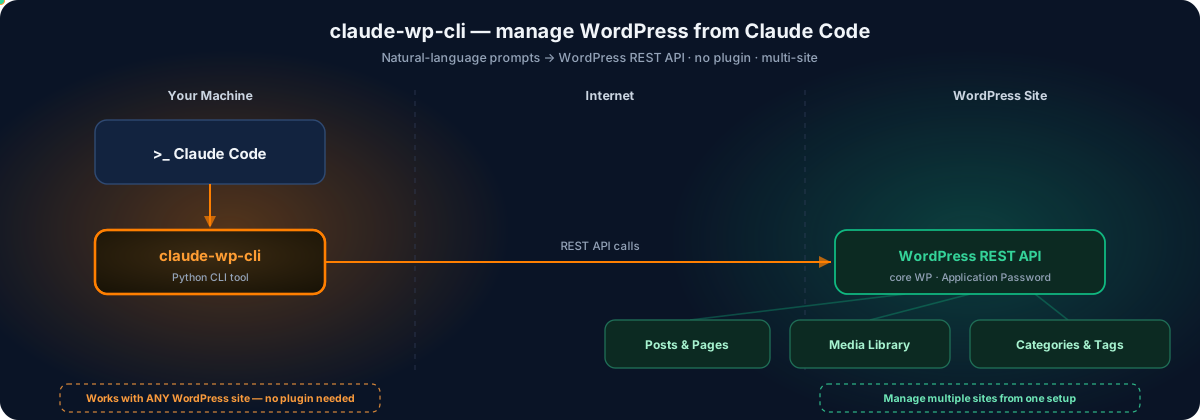
A Claude Code skill that provides complete WordPress content management through the REST API. Manage posts, pages, media, categories, tags, ACF custom fields, and structured data (JSON-LD schema) across multiple WordPress sites -- all from the command line. Content is authored in markdown files and automatically converted to HTML or Gutenberg block markup before publishing.
Overview
wp-cli turns Claude Code into a WordPress management interface. Every operation -- creating a draft post, uploading an optimized image, scheduling publication, pushing FAQ schema to Rank Math -- is a single CLI command that returns structured JSON. The skill supports managing multiple WordPress sites simultaneously through a per-site configuration system where each site has its own config.yaml and .env.site credentials file.
The core workflow is: write content in markdown, run a command, and the skill handles conversion (classic HTML or Gutenberg blocks), authentication (HTTP Basic Auth with Application Passwords), and communication with the WordPress REST API. All output is machine-readable JSON with a status field ("success" or "error") so Claude Code can chain operations reliably.
Key design points:
- Multi-site support with a 4-level site directory resolution chain
- Markdown-to-HTML and markdown-to-Gutenberg conversion with frontmatter stripping
- SEO plugin integration for Rank Math (FAQ block generation), Yoast, and generic schema storage
- Image optimization workflow using Claude Code vision for alt text generation and Pillow for WebP conversion
- All output is structured JSON for programmatic consumption
Features
- Post management -- List, get, create, update, delete, and view revisions for WordPress posts. Supports status filtering, pagination, scheduled publishing, category/tag assignment, and featured images.
- Page management -- Full CRUD for pages with support for hierarchical parent pages and page templates.
- Media library -- Upload files with automatic MIME type detection, set alt text/caption/title, list and filter media by type, delete media items.
- Taxonomy management -- Create, list, and delete categories (with hierarchical parent support) and tags.
- ACF custom fields -- Read and update Advanced Custom Fields data on any post using arbitrary JSON payloads.
- Structured data / schema -- Push JSON-LD schema to posts through three SEO plugin integrations: Rank Math (auto-generates FAQ Gutenberg blocks), Yoast (stores in post meta), and generic meta storage.
- Markdown conversion -- Converts markdown files to classic HTML or Gutenberg block markup. Strips YAML frontmatter and H1 titles. Handles fenced code blocks, tables, attribute lists, headings, lists, blockquotes, images, and separators.
- Multi-site management -- Each site is configured independently. The skill resolves site directories through a 4-level fallback chain:
MARVOMATIC_SITES_DIRenv var,./sites/in CWD,CLAUDE_SKILL_CALLER_CWD/sites/, and~/.marvomatic/sites/. - Scheduling and publishing -- Schedule future publication by setting
--status futurewith an ISO 8601--date. Default post status is configurable per site.
Requirements
| Requirement | Version | Notes |
|---|---|---|
| Python | >= 3.10 | Required for type hint syntax used in codebase |
| httpx | >= 0.27 | HTTP client for REST API communication |
| pydantic | >= 2.5 | Configuration model validation |
| pydantic-settings | >= 2.1 | Settings loading from environment variables |
| pyyaml | >= 6.0 | YAML config file parsing |
| python-dotenv | >= 1.0 | .env.site credential loading |
| markdown | >= 3.5 | Markdown-to-HTML conversion |
| Pillow | (optional) | Image optimization / WebP conversion workflow |
| WordPress | 5.6+ | REST API with Application Passwords support |
Dev dependencies (optional): pytest >= 8.0, respx >= 0.21, pytest-cov >= 4.0
Installation / Setup
Step 1: Install Python dependencies
pip install -r "${CLAUDE_SKILL_DIR}/requirements.txt"
Step 2: Create a site configuration directory
Create a folder under ./sites/<site-id>/ in your working directory (or any location in the resolution chain):
mkdir -p ./sites/my-blog
Step 3: Write the site config file
Create ./sites/my-blog/config.yaml:
site_id: "my-blog"
site_url: "https://www.example.com"

wordpress:
  site_url: "https://www.example.com"
  default_status: "draft"
  editor_type: "classic"       # classic | gutenberg
  seo_plugin: "none"           # rankmath | yoast | generic | none
  default_category_ids: []
  default_tag_ids: []
  default_author_id: null
  timeout: 30
Step 4: Write the credentials file
Create ./sites/my-blog/.env.site:
WP_USERNAME=your-username
WP_APP_PASSWORD=xxxx xxxx xxxx xxxx xxxx xxxx
Generate an Application Password in WordPress Admin at Users > Profile > Application Passwords.
Step 5: Test the connection
export CLAUDE_SKILL_CALLER_CWD="$(pwd)" && cd "${CLAUDE_SKILL_DIR}" && python -m cli.main --site my-blog posts list
A successful response contains "status": "success" in the JSON output.
Usage
All commands follow this invocation pattern:
export CLAUDE_SKILL_CALLER_CWD="$(pwd)" && cd "${CLAUDE_SKILL_DIR}" && python -m cli.main --site <site-id> <resource> <action> [options]
The --site flag is always required and identifies which site configuration to use.
Posts
| Action | Command | Required Options | Optional Options |
|---|---|---|---|
| List posts | posts list | --status draft|publish|any (default: any), --per-page 10, --page 1 | |
| Get post | posts get | --id <post_id> | |
| Create post | posts create | --title "Title" | --content-file draft.md, --status draft|publish|future, --date 2026-03-20T09:00:00, --category-ids 1,2, --tag-ids 3,4, --featured-media 456 |
| Update post | posts update | --id <post_id> | --title "New Title", --content-file updated.md, --status publish, --date 2026-03-25T09:00:00, --featured-media 789 |
| Delete post | posts delete | --id <post_id> | --force (bypass trash) |
| View revisions | posts revisions | --id <post_id> |
Examples:
# Create a draft post from a markdown file with categories
python -m cli.main --site my-blog posts create --title "Getting Started with WordPress" --content-file article.md --category-ids 5,12 --tag-ids 3

# Schedule a post for future publication
python -m cli.main --site my-blog posts update --id 123 --status future --date 2026-03-25T09:00:00

# List all published posts, page 2
python -m cli.main --site my-blog posts list --status publish --per-page 20 --page 2
Pages
| Action | Command | Required Options | Optional Options |
|---|---|---|---|
| List pages | pages list | --status draft|publish|any (default: any), --per-page 10, --page 1 | |
| Get page | pages get | --id <page_id> | |
| Create page | pages create | --title "Title" | --content-file page.md, --status draft|publish, --parent-id 10, --template full-width |
| Update page | pages update | --id <page_id> | --title "...", --content-file page.md, --status publish, --parent-id 10, --template full-width |
| Delete page | pages delete | --id <page_id> | --force (bypass trash) |
Examples:
# Create a child page with a specific template
python -m cli.main --site my-blog pages create --title "About Us" --content-file about.md --parent-id 2 --template full-width

# Update a page's content and publish it
python -m cli.main --site my-blog pages update --id 45 --content-file updated-about.md --status publish
Media
| Action | Command | Required Options | Optional Options |
|---|---|---|---|
| List media | media list | --media-type image|video, --per-page 10, --page 1 | |
| Get media | media get | --id <media_id> | |
| Upload file | media upload | --file image.png | --alt-text "Description", --caption "Photo caption", --title "Image Title" |
| Delete media | media delete | --id <media_id> | --force |
Examples:
# Upload an image with alt text
python -m cli.main --site my-blog media upload --file hero.webp --alt-text "Hero banner for homepage" --title "Hero Image"

# Set a featured image on a post (two-step workflow)
python -m cli.main --site my-blog media upload --file photo.jpg --alt-text "Product photo"
# Note the media ID from the response, then:
python -m cli.main --site my-blog posts update --id 123 --featured-media 456
Taxonomy
| Action | Command | Required Options | Optional Options |
|---|---|---|---|
| List categories | taxonomy categories list | --per-page 100 | |
| Create category | taxonomy categories create | --name "SEO" | --parent-id 5 |
| Delete category | taxonomy categories delete | --id 8 | |
| List tags | taxonomy tags list | --per-page 100 | |
| Create tag | taxonomy tags create | --name "wordpress" | |
| Delete tag | taxonomy tags delete | --id 12 |
Examples:
# Create a child category under an existing parent
python -m cli.main --site my-blog taxonomy categories create --name "Technical SEO" --parent-id 5

# List all tags
python -m cli.main --site my-blog taxonomy tags list
Fields (ACF)
| Action | Command | Required Options | Optional Options |
|---|---|---|---|
| Get fields | fields get | --post-id 123 | |
| Update fields | fields update | --post-id 123, --data '{"field": "value"}' |
Examples:
# Read ACF fields from a post
python -m cli.main --site my-blog fields get --post-id 123

# Update ACF fields with a JSON payload
python -m cli.main --site my-blog fields update --post-id 123 --data '{"hero_title": "Welcome", "show_sidebar": true}'
Schema (Structured Data)
| Action | Command | Required Options | Optional Options |
|---|---|---|---|
| Get schema | schema get | --post-id 123 | |
| Push schema (file) | schema push | --post-id 123, --schema-file faq.json | |
| Push schema (inline) | schema push | --post-id 123, --data '{"@type": "FAQPage", ...}' |
Schema push behavior depends on the site's seo_plugin setting:
| SEO Plugin | Behavior |
|---|---|
rankmath | Converts FAQPage JSON-LD into wp:rank-math/faq-block Gutenberg blocks and appends them to the post content. Replaces any existing FAQ blocks. |
yoast | Stores the schema as a JSON string in post meta field _yoast_wpseo_schema_json. |
generic | Stores the schema as a JSON string in post meta field _schema_jsonld. |
none | Skips schema push; returns {"skipped": true}. |
Examples:
# Push FAQ schema from a JSON file (Rank Math site)
python -m cli.main --site my-blog schema push --post-id 123 --schema-file faq.json

# Push inline FAQ schema
python -m cli.main --site my-blog schema push --post-id 123 --data '{"@type": "FAQPage", "mainEntity": [{"@type": "Question", "name": "What is WP-CLI?", "acceptedAnswer": {"@type": "Answer", "text": "A command-line tool for WordPress."}}]}'
Image Optimization Workflow
This is a multi-step workflow that combines several commands with Claude Code's capabilities:
- Download the image from WordPress using the media get command
- Read the image with Claude Code's multimodal vision to auto-generate descriptive alt text
- Convert to WebP with Pillow:
img.save('out.webp', 'WEBP', quality=80) - Upload the optimized WebP with the generated alt text via
media upload - Update the post's featured image to the new media ID via
posts update --featured-media
Output Format
All commands return JSON. Success responses:
{
  "status": "success",
  "data": { ... },
  "total": 42,
  "total_pages": 5,
  "page": 1
}
Error responses:
{
  "status": "error",
  "code": "rest_post_invalid_id",
  "message": "Invalid post ID.",
  "http_status": 404
}
Exit codes: 0 = success, 1 = API error, 2 = configuration error.
Configuration
Per-Site Config (config.yaml)
| Field | Type | Default | Description |
|---|---|---|---|
site_id | string | required | Unique site identifier (used as folder name and --site flag value) |
site_url | string | required | WordPress site URL |
wordpress.site_url | string | inherits from site_url | WordPress URL (can differ from site_url if WP is in a subdirectory) |
wordpress.rest_url | string | auto-derived | REST API base URL (auto: {site_url}/wp-json/wp/v2) |
wordpress.default_status | string | "draft" | Default post status when creating posts |
wordpress.editor_type | "classic" or "gutenberg" | "classic" | Controls markdown conversion output format |
wordpress.seo_plugin | "rankmath", "yoast", "generic", or "none" | "none" | SEO plugin integration for schema push |
wordpress.default_category_ids | list[int] | [] | Category IDs auto-assigned to new posts |
wordpress.default_tag_ids | list[int] | [] | Tag IDs auto-assigned to new posts |
wordpress.default_author_id | int or null | null | Default author ID |
wordpress.timeout | int | 30 | HTTP request timeout in seconds |
Per-Site Credentials (.env.site)
| Variable | Description |
|---|---|
WP_USERNAME | WordPress username for authentication |
WP_APP_PASSWORD | WordPress Application Password (generate at WP Admin > Users > Profile > Application Passwords) |
Environment Variables
| Variable | Description |
|---|---|
MARVOMATIC_SITES_DIR | Override sites directory location (highest priority in resolution chain) |
CLAUDE_SKILL_CALLER_CWD | Original caller working directory; set automatically by bridge scripts to preserve site resolution when CWD changes |
CLAUDE_SKILL_DIR | Skill installation directory; set automatically by Claude Code |
Site Directory Resolution Chain
The skill searches for the sites/ directory in this order:
MARVOMATIC_SITES_DIRenvironment variable (if set and directory exists)./sites/in the current working directoryCLAUDE_SKILL_CALLER_CWD/sites/(original caller CWD, used by bridge scripts)~/.marvomatic/sites/(global fallback)
Architecture
CLI Layer (cli/)          -- argparse command definitions, input parsing
    |
Client Layer (client/)    -- WordPress REST API domain clients
    |
HTTP Layer (client/http)  -- httpx-based HTTP client with Basic Auth
    |
WordPress REST API        -- remote WordPress site

Models Layer (models/)    -- Pydantic config/secrets + YAML/dotenv loader
Converter (converter/)    -- Markdown-to-HTML/Gutenberg transformation
Scripts (scripts/)        -- Bridge scripts for direct invocation
CLI Layer (cli/)
cli/main.py-- Entry point. Builds the argparse parser with--siteas a required global argument. Resolves site config viaSiteRegistry, creates aWPClient, and dispatches to the appropriate subcommand handler. Defines exit codes: 0 success, 1 API error, 2 config error.cli/posts.py-- Posts subcommand handler. Registers list/get/create/update/delete/revisions actions. Loads markdown content files viaconvert_markdown()and parses comma-separated category/tag IDs.cli/pages.py-- Pages subcommand handler. Registers list/get/create/update/delete actions. Supports--parent-idand--templateoptions.cli/media.py-- Media subcommand handler. Registers list/get/upload/delete actions. Upload accepts--file,--alt-text,--caption,--title.cli/taxonomy.py-- Taxonomy subcommand handler with nestedcategoriesandtagssubcommands, each with list/create/delete actions.cli/fields.py-- ACF fields subcommand handler. Registers get/update actions. Accepts--dataas a JSON string for field updates.cli/schema.py-- Schema subcommand handler. Registers get/push actions. Push accepts--schema-fileor--data(inline JSON). Routes to SEO-plugin-specific push logic based on site config.
Client Layer (client/)
client/http.py-- CoreWPClientclass. Uses httpx with HTTP Basic Auth (base64-encoded Application Password). Providesget(),get_list()(withX-WP-Total/X-WP-TotalPagesheader parsing),post(),post_file()(binary upload withContent-Disposition), anddelete()methods. DefinesWPAPIErrorexception andjson_output()/error_output()formatting helpers.client/posts.py--PostsClient: CRUD + revisions for the/postsendpoint. Applies default status, categories, and tags from site config on create.client/pages.py--PagesClient: CRUD for the/pagesendpoint. Supports parent and template fields.client/media.py--MediaClient: list/get/upload/delete for the/mediaendpoint. Upload reads file bytes, detects MIME type via themimetypesmodule, uploads viapost_file(), then optionally updates alt_text/caption/title in a second request.client/taxonomy.py--TaxonomyClient: CRUD for/categoriesand/tagsendpoints. Categories support hierarchical parent.client/fields.py--FieldsClient: get/update ACF data via the posts endpoint with anacfpayload. Supports apost_typeparameter for custom post types.client/schema.py--SchemaClient: get schema meta and push schema data. Three code paths byseo_plugin: Yoast (meta_yoast_wpseo_schema_json), generic (meta_schema_jsonld), and Rank Math (generates Gutenberg FAQ blocks from FAQPage schema, replaces existing FAQ blocks in post content via regex).
Converter (converter/)
converter/markdown.py-- Three-stage conversion pipeline:strip_frontmatter()removes YAML front matter and H1 titles,markdown_to_html()converts via python-markdown with fenced_code/tables/attr_list extensions,markdown_to_gutenberg()splits HTML into top-level block elements and wraps each in Gutenberg comment markers. Handles 12 HTML element types for Gutenberg wrapping: paragraph, heading (h1-h6), list (ordered/unordered), blockquote, code, table, image, separator, and HTML fallback.
Models (models/)
models/config.py-- Pydantic models:WordPressConfig(site_url, rest_url auto-derived, default_status, editor_type, seo_plugin, defaults for categories/tags/author, timeout),WordPressSecrets(wp_username, wp_app_password asSecretStr), andSiteConfig(combines site_id, site_url, WordPressConfig, and optional secrets).models/loader.py--SiteRegistryclass with the 4-level site resolution chain, YAML config loading,.env.sitedotenv credential loading, and per-site config caching. Exposeslist_sites()for discovery.
Bridge Scripts (scripts/)
scripts/manage_posts.py-- Posts bridge script for direct invocation.scripts/manage_pages.py-- Pages bridge script.scripts/manage_taxonomy.py-- Taxonomy bridge script.scripts/upload_media.py-- Media upload bridge script.scripts/update_fields.py-- ACF fields bridge script.scripts/push_schema.py-- Schema push bridge script.
All bridge scripts wrap cli.main via subprocess, preserving CLAUDE_SKILL_CALLER_CWD for correct site directory resolution when the working directory changes.
Configuration Templates (sites_template/)
sites_template/config.yaml-- Example site configuration with all fields documented.sites_template/.env.site-- Example credentials file with placeholder values.
Other Files
SKILL.md-- Main skill definition file with triggers, usage reference, and all available commands.pyproject.toml-- Python package configuration, dependency declarations, andwp-clientry point.requirements.txt-- Pinned runtime dependency versions.
Troubleshooting
"Site config not found" error (exit code 2)
The skill cannot locate the config.yaml for the specified --site value. Verify that:
- A directory named
sites/<site-id>/exists in one of the resolution chain locations - The directory contains a valid
config.yamlfile - If using bridge scripts,
CLAUDE_SKILL_CALLER_CWDis set to the directory containingsites/
"No .env.site found" error (exit code 2)
The site directory exists but has no .env.site credentials file. Create one with WP_USERNAME and WP_APP_PASSWORD entries.
HTTP 401 Unauthorized
The Application Password is incorrect or has been revoked. Generate a new one at WP Admin > Users > Profile > Application Passwords. Ensure the password in .env.site includes the spaces between groups (e.g., xxxx xxxx xxxx xxxx xxxx xxxx).
HTTP 403 Forbidden
The authenticated WordPress user does not have sufficient permissions for the requested operation. Ensure the user has the appropriate WordPress role (Editor or Administrator).
Schema push returns {"skipped": true}
The site's seo_plugin setting in config.yaml is set to "none". Change it to "rankmath", "yoast", or "generic" to enable schema push.
Rank Math FAQ push returns null
The Rank Math integration only processes FAQPage schema type. Ensure the schema JSON has "@type": "FAQPage" and a non-empty mainEntity array with valid Question objects.
Markdown content not converting to Gutenberg blocks
Check that editor_type in config.yaml is set to "gutenberg". When set to "classic" (the default), content is converted to plain HTML without Gutenberg block wrappers.
File upload fails with incorrect MIME type
The skill uses Python's mimetypes module for automatic detection based on file extension. If the extension is unusual or missing, the MIME type may not be detected correctly. Use standard file extensions (.jpg, .png, .webp, .mp4, etc.).
// faq
What is claude-wp-cli?
Complete WordPress management CLI for Claude Code — REST + Application Password. Posts, media, SEO meta (RankMath/Yoast), comments, plugins, users, menus, settings + guarded publishing.. It is open-source on GitHub.
Is claude-wp-cli free to use?
claude-wp-cli is open-source under the MIT license, so it is free to use.
What category does claude-wp-cli belong to?
claude-wp-cli is listed under plugins in the Claudeers registry of Claude-compatible tools.
// embed badge

[](https://claudeers.com/claude-wp-cli)
// retro hit counter

[](https://claudeers.com/claude-wp-cli)
// reviews
// guestbook
// related in Content & Creative
 🔓
🔓Universal SEO skill for Claude Code. 25 sub-skills + 18 sub-agents covering technical SEO, E-E-A-T, schema, GEO/AEO, backlinks, local SEO, maps intelligence,…
 🔓
🔓A curated list of modern Generative Artificial Intelligence projects and services
 🔓
🔓一键同步文章到多个内容平台,支持今日头条、WordPress、知乎、简书、掘金、CSDN、typecho各大平台,一次发布,多平台同步发布。解放个人生产力
 🔓
🔓AI Marketing Suite for Claude Code. 15 marketing skills with parallel subagents — audit any website, generate copy, email sequences, ad campaigns, content ca…