
claude-unlimited
Rotate Claude and GPT subscriptions and API keys seamlessly inside the Claude Code CLI — switch on usage limits without interrupting your session, all from a…
Install with your AI
Paste into Claude Code, Cursor, or any agent — it reads the repo and wires the tool into your project.
Install and set up claude-unlimited (git-clone project) into my current project.
Found on https://claudeers.com/claude-unlimited
Repo: https://github.com/DevDock-AI/claude-unlimited
Homepage/docs: https://github.com/DevDock-AI/claude-unlimited#readme
Detected install method: git-clone → git clone https://github.com/DevDock-AI/claude-unlimited
Category: devtools. Platforms: cli, api, desktop, web.
Read the repo's README for exact setup and env vars, then install it and wire it into my project.

Claudeers Health Verdict:
active; community-verified: false. Confirm the source before running anything.
git clone https://github.com/DevDock-AI/claude-unlimited
// compatibility
| Platforms | cli, api, desktop, web |
|---|---|
| Operating systems | — |
| AI compatibility | claude |
| License | MIT |
| Pricing | open-source |
| Language | Python |
Claude Unlimited
Rotate your Claude and GPT subscriptions and APIs seamlessly, right inside the Claude Code CLI
Switch between accounts automatically based on usage thresholds and limits — all of it configurable and visible in a local web dashboard built to be eye candy for developers.
 Claude Pro · Max |  ChatGPT Codex · Plus · Pro | 🔑 API keys Anthropic · gateways | → | one Claude Code session that never stops |
You never notice the switch.
Rotation happens between requests, in the background. No logout, no prompt, no restart — you keep typing in the same session while the account underneath you changes.
Contents
| Why Claude Unlimited | The problem it removes |
| Features | What you get |
| How it works | The flow, and why nothing leaves your machine |
| Install | One line |
| Add a Claude subscription | One command |
| Add a ChatGPT / Codex subscription | One command |
| Add an API key | Dashboard only |
| Models parity | Which GPT model runs each Claude model |
| Usage | Daily driving |
| The Claude desktop app | Route the app through your pool too |
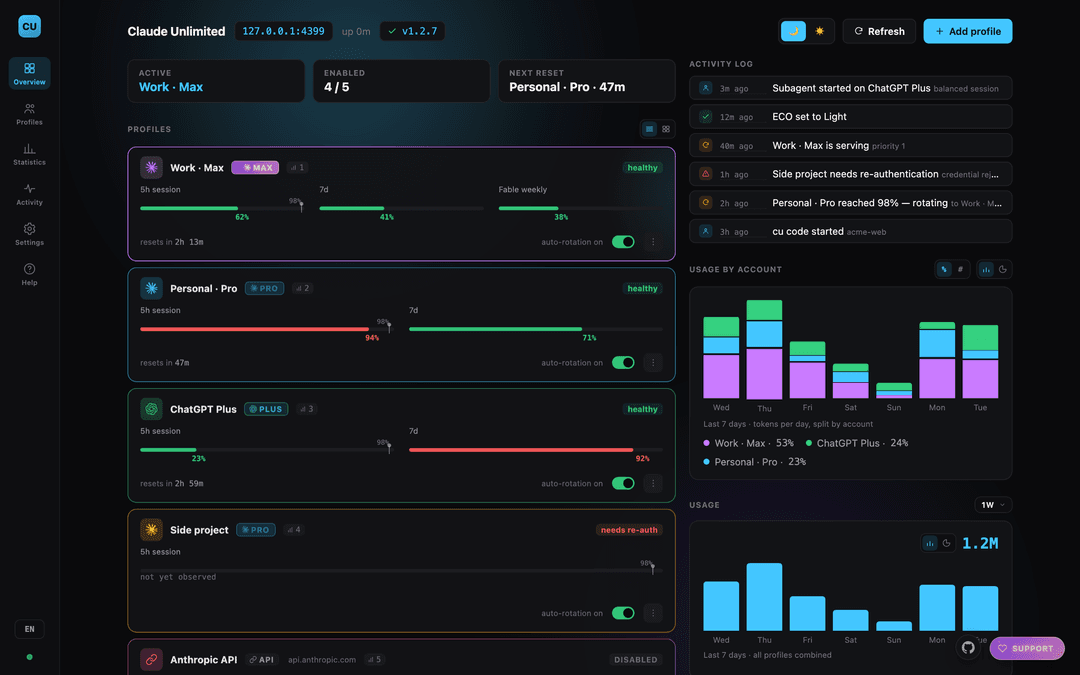
| The dashboard | What you can see and control |
| Notifications | Know before you run out |
| Updates | How new versions reach you |
| Command reference | Every command |
| AGENTS.md | Setting this up with a coding agent |
| Troubleshooting · Security · Contributing | The rest |
Why Claude Unlimited
You're deep in a Claude Code session. Context is loaded, the plan is working — and you hit your usage limit.
The manual workaround is grim: write yourself a handover note, log out, log into another account, paste the note back, and hope nothing important got lost.
Claude Unlimited removes that moment entirely. When one account approaches its limit, the next one takes over on the very next request. Same session, same context, same terminal. You don't get logged out, you don't get prompted, you don't restart anything. Often the first you'll know about it is a line in the activity log.
It pools whatever you've got — Claude Pro/Max subscriptions, ChatGPT/Codex subscriptions, Anthropic API keys, your own gateway — and treats them as one continuous supply.
Other multi-account tools automate the swap too, but they're CLI-only. There's nowhere to see what's happening. Claude Unlimited's control surface is a real dashboard.
Features
| 🔄 | Seamless rotation — the handover happens between requests. Your session never breaks, never prompts, never restarts. |
| Mixed pools — Claude subscriptions, ChatGPT/Codex, and API keys side by side, each with its own priority and threshold. |
| Claude Code, powered by GPT — a Codex account is translated to and from the Anthropic API shape, with real token-level streaming. Claude Code can't tell. |
| 🎚️ | Models parity — you decide which GPT model and reasoning effort each Claude model maps to, and what it costs your Codex quota. |
| 🖥️ | The Claude desktop app too — not just the terminal. One command points it at your pool, and --revert puts it back. |
| 📊 | A dashboard you'll actually open — live usage bars, cost tracking, model split, per-project attribution, activity log. |
| 🔒 | 100% local — no account, no telemetry, no cloud. Your credentials never leave your machine. |
| ⚙️ | One command to work — claude-unlimited code and you're routed. |
| 🔔 | Notifications — told before you run out, not after. |
| 🔑 | OS-native credential storage — Keychain / Secret Service / DPAPI. Never plaintext on disk. |
| 📦 | Encrypted export/import — move your whole setup to another machine safely. |
| 🌍 | 4 languages — English, Spanish, Romanian, German. |
| 🪶 | Almost no dependencies — Python standard library, one library for export encryption, zero frontend build. |
How it works
   claude  (or any Anthropic-API client)
      │
      │   ANTHROPIC_BASE_URL=http://127.0.0.1:4317
      ▼
╔═══════════════════════════════════════════════╗
║   Claude Unlimited daemon — YOUR MACHINE      ║   127.0.0.1 only.
║                                               ║   Not reachable from
║   ┌─────────────────────────────────────┐     ║   your network, let
║   │  Router — picks the account         │     ║   alone the internet.
║   │  sticky until it hits its threshold │     ║
║   └──────────────────┬──────────────────┘     ║
║   ┌──────────────────▼──────────────────┐     ║
║   │  Gateway — swaps in the real        │     ║
║   │  credential for this one request    │     ║
║   └──────────────────┬──────────────────┘     ║
║   ┌──────────────────▼──────────────────┐     ║
║   │  Dashboard  ·  127.0.0.1:4317       │     ║
║   └─────────────────────────────────────┘     ║
╚═══════════════════┬═══════════════════════════╝
                    │  only the request you already meant to make
                    ▼
     api.anthropic.com   ·   ChatGPT/Codex   ·   your own gateway
|
The rotation is invisible to Claude Code. It sends one request, gets one answer. It is
never told which account served it, never asked to re-authenticate, and never sees a
different endpoint. |
Nothing leaves your computer
This is the part worth being explicit about:
- No account. No sign-up. No cloud component. There is no Claude Unlimited server. It cannot phone home, because there is no home.
- No telemetry, ever. Usage stats, cost estimates, the activity log, project
attribution — all of it is written to files in your home directory and read by a
dashboard served from
127.0.0.1. None of it is transmitted anywhere. - Your credentials never move. They live in your OS keystore (macOS Keychain, Linux Secret Service, Windows DPAPI), never in plaintext on disk, and are attached to a request only at the moment it goes to the provider you configured — Anthropic, OpenAI, or your own gateway.
claudenever sees your real credentials either. It authenticates to the daemon with a local placeholder token. The real credential is substituted server-side and never returned to the client.- Almost the only outbound traffic is the API call you already intended to make — same destination as without this tool. No quota probing, no keep-warm pings, no background chatter. The two exceptions are both ones you can name: a once-a-day version check against GitHub's public API, and refreshing an account's own OAuth token shortly before it expires, so an account you haven't used in a while doesn't quietly need a re-login.
Install
Pick your system, copy the one line, paste, done. It installs everything it needs (even Python, if you don't have it), starts in the background, and opens the dashboard at http://127.0.0.1:4317/ — where you add your first account.
🍎 macOS & 🐧 Linux — paste into a terminal:
curl -fsSL https://raw.githubusercontent.com/DevDock-AI/claude-unlimited/main/install.sh | bash
🪟 Windows — press Win + R (or open Command Prompt), paste, press Enter:
powershell -ExecutionPolicy Bypass -NoProfile -Command "irm https://raw.githubusercontent.com/DevDock-AI/claude-unlimited/main/install.ps1 | iex"
🪟 Windows, already in PowerShell? — paste this shorter version instead:
irm https://raw.githubusercontent.com/DevDock-AI/claude-unlimited/main/install.ps1 | iex
Then run claude-unlimited code and you're routed. On Windows, run the installer from an
Administrator PowerShell if you also want it to start automatically at logon;
credentials are stored with Windows DPAPI instead of the Keychain.
Which platform is this best on? Claude Unlimited is developed and tested on macOS, so that's the most battle-hardened path. Windows and Linux are best-effort: every OS-specific piece (credential storage, the background service, the installer) is implemented and covered by tests, and it should work fine — but it hasn't had the same real-world mileage, so treat it as "should be fine, not guaranteed." If anything's off, please open an issue.
Don't want it starting on login? Turn it off in Settings → Daemon, or run
claude-unlimited uninstall. It keeps running either way until you stop it.
Using an AI agent to set this up? Point it at
AGENTS.md— it spells out the install, what's safe, and the one step an agent must hand back to you (the browser login).
What that command does, and how to install from a clone instead
The installer creates an isolated environment at ~/.local/share/claude-unlimited/,
links claude-unlimited into ~/.local/bin, runs claude-unlimited doctor, and
registers the daemon as a login service (launchd / systemd --user / Task Scheduler).
It touches nothing else, and tells you if ~/.local/bin isn't on your PATH.
If the service can't be registered it falls back to running for this session only, and says so rather than pretending it succeeded.
Prefer to read it first, or install from a checkout?
git clone https://github.com/DevDock-AI/claude-unlimited.git
cd claude-unlimited
./install.sh
Requires Python 3.10+, git, and the claude CLI on your PATH.
Add a Claude subscription
Claude Pro or Max
claude-unlimited add-account
Opens your browser, logs into the account, and adds it. That's it — no account IDs to find or paste.
It logs in through an isolated session, so whatever is already signed into claude on
your machine is never touched. Run it again for each additional account.
Add a ChatGPT / Codex subscription
ChatGPT Plus, Pro, or Business — used through Codex
claude-unlimited add-codex-account
Same flow, for a ChatGPT/Codex account. Once added, it joins the same rotation — Claude Code keeps speaking the Anthropic API, and requests routed to this account are translated to and from OpenAI's transparently, streaming included.
Also isolated: your existing codex login is left alone.
Which GPT model runs your Claude model
Claude Code asks for a Claude model. When the request lands on a Codex account, something has to decide which GPT model actually answers — and how hard it thinks. That mapping is yours to set, in Settings → Models parity:
| Claude model | Runs as | Reasoning effort |
|---|---|---|
| Claude Fable 5 | gpt-5.6-sol | high |
| Claude Opus 5 | gpt-5.6-terra | high |
| Claude Sonnet 5 | gpt-5.6-terra | medium |
| Claude Haiku 4.5 | gpt-5.6-luna | low |
Change either column per row, or hit Reset to defaults. Effort runs from minimal
through low, medium, high, xhigh, max to ultra.
Effort is the expensive dial, not model size. A Codex plan's quota is spent on
reasoning tokens produced, multiplied by the model's tier — not on how much context you
send. Turning Sonnet up to high costs noticeably more of your weekly allowance than
leaving it at medium; resending a long conversation costs nothing extra. That's
measured behaviour, not a guess — see
docs/adr/0007-codex-quota-is-driven-by-reasoning-not-context.md.
This mapping applies to Codex profiles left on Automatic. A profile with its own model override keeps using that instead, so you can pin one account to a specific model and let the rest follow the table.
Add an API key
🔑 Anthropic API keys and Anthropic-compatible gateways
API keys are added in the dashboard, not the CLI — open http://127.0.0.1:4317/ → Add profile.
That's deliberate. Anything with a form (base URL, auth mode, default model, budget cap, token threshold) belongs somewhere you can see and edit it, not behind flags you have to remember. The same goes for everything else about an account: priority, thresholds, enabling, disabling, and removal are all dashboard-managed.
Works with Anthropic API keys and any Anthropic-compatible gateway.
Usage
Start working
claude-unlimited code
Starts the daemon if it isn't running and launches claude routed through your pool. With
more than one account it asks which to use — or pick Rotated accounts to let it manage
itself.
claude-unlimited code --profile "Personal Max"   # pin this session to one account
claude-unlimited code --model opus               # any extra args pass through to claude
The dashboard URL stays in Claude Code's status line while you work.
What rotation actually does
- Requests go to the enabled account with the lowest priority number.
- It stays on that account — sticky — until it crosses its switch threshold (default 98%) or hits a real quota limit.
- The next account takes over on the next request. Your session continues uninterrupted; nothing is lost and nothing is restarted.
- When a quota window resets, that account rejoins the rotation automatically.
A brief rate-limit blip never causes a switch — only a real threshold crossing or genuine exhaustion does.
Using the Claude desktop app
The desktop app can send its inference through your pool too, not just the terminal:
claude-unlimited desktop
It creates an inference profile named Claude Unlimited in the app, points it at the local daemon, makes it active, and starts the app. Any inference profiles you already have are left alone.
This restarts the Claude desktop app. If it is running, the command asks it to quit, waits for it to close, and reopens it afterwards. Save anything you are working on first. The app rewrites its own settings as it exits, so it has to be fully stopped before its configuration can be changed — a half-quit app would overwrite the new settings on its way out. If it will not quit (a dialog, unsaved work), the command stops and changes nothing rather than writing settings that are about to be clobbered.
Undoing it. Everything the command changes is backed up before the first write, and:
claude-unlimited desktop --revert
restores it. Quit the app before reverting too, for the same reason. The inference profile named Claude Unlimited stays in the app's list — remove it there if you no longer want it.
Three things worth knowing:
- The app calls this third-party inference mode, and it runs from a separate app profile with its own session — so you may be asked to sign in again. Your normal Claude setup is unaffected.
- The app's own chat still talks to claude.ai and is not routed through the pool. Only Claude Code sessions inside the app are.
- Enable at least one account first. Otherwise the app's "Test connection" fails with No eligible Profile available, which looks like a configuration error but isn't.
This is the only command that writes outside ~/.claude-unlimited/ and
~/.local/share/claude-unlimited/; it touches
~/Library/Application Support/Claude*, and only when you run it. macOS only
for now. The Help page in the dashboard also documents the manual route, if you
would rather set it up in the app yourself.
Your project setup is untouched
claude-unlimited code runs the same claude binary in the same directory. Your
CLAUDE.md, .claude/ settings, skills, subagents, memory, and session history all
behave exactly as they normally do. The only thing that changes is which account serves
the request.
Your project's .claude/settings.json is used as-is — permissions, allow lists, hooks,
everything. The one exception is its env block: if it pins ANTHROPIC_BASE_URL or
ANTHROPIC_AUTH_TOKEN, Claude Code applies that on top of the routing set up for you,
and every request would go to whatever that file names, with whatever credential it
carries, never reaching your pool. Those two keys are reasserted for the session, and it
says so when it happens. Nothing else in env is touched, and no file is modified.
One other difference: because the daemon authenticates you with its own local token, claude.ai-hosted connectors are disabled for that session. Locally-configured MCP servers are unaffected.
The dashboard
http://127.0.0.1:4317/ — everything is managed here.
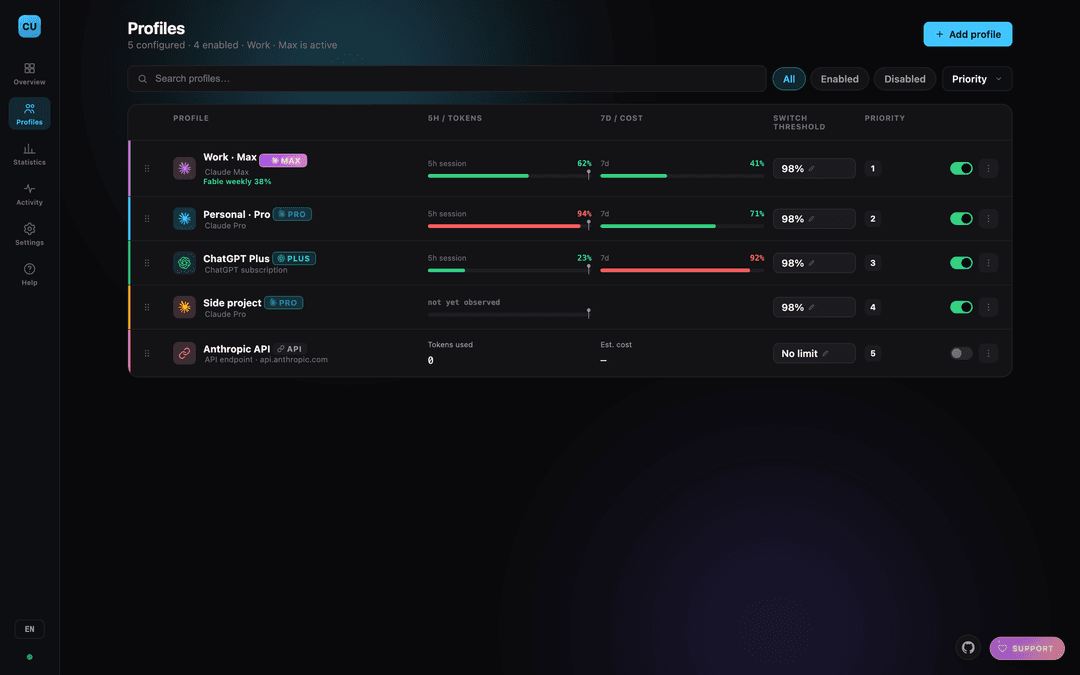
Profiles — drag to reorder priority, edit thresholds inline, enable or disable in one click
- Overview — account cards (roomy list or compact cells), live usage and cost, model breakdown, per-project attribution, recent activity.
- Profiles — the full table: search, filter, sort, drag to reorder priority, and a menu to edit, test, disable, or remove.
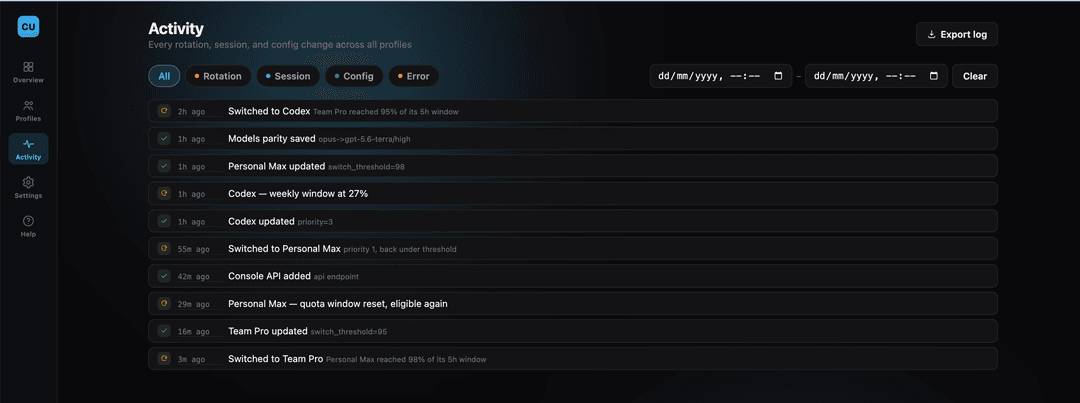
- Activity — every rotation, session, and config change, filterable and exportable.
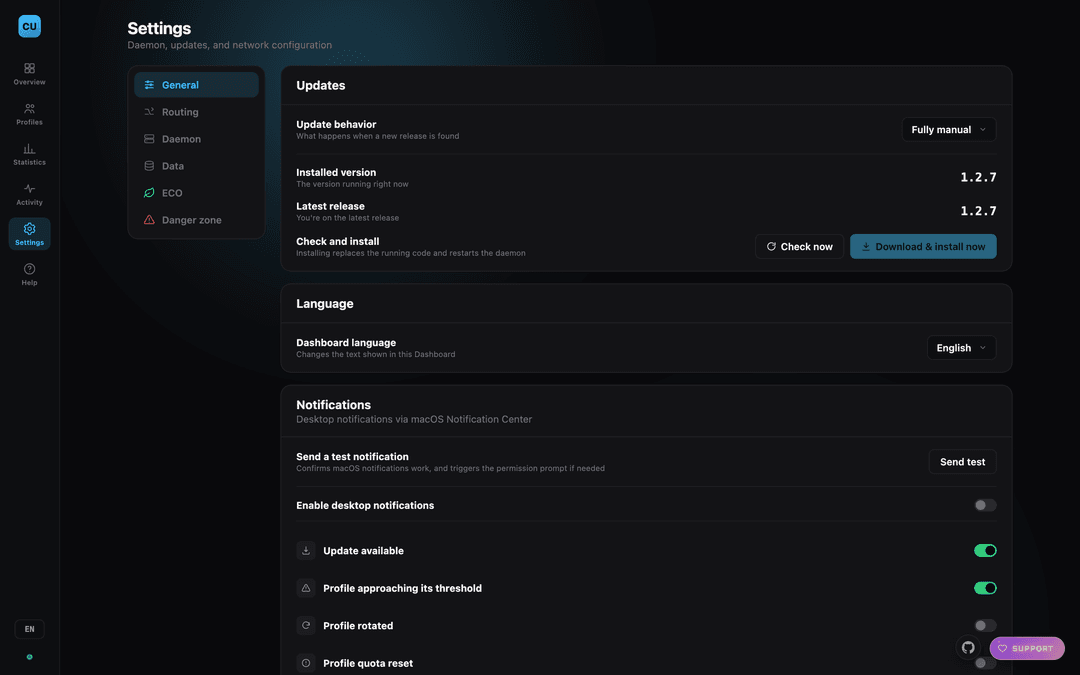
- Settings — updates, models parity, auto-start, process controls, notifications, export/import, language.
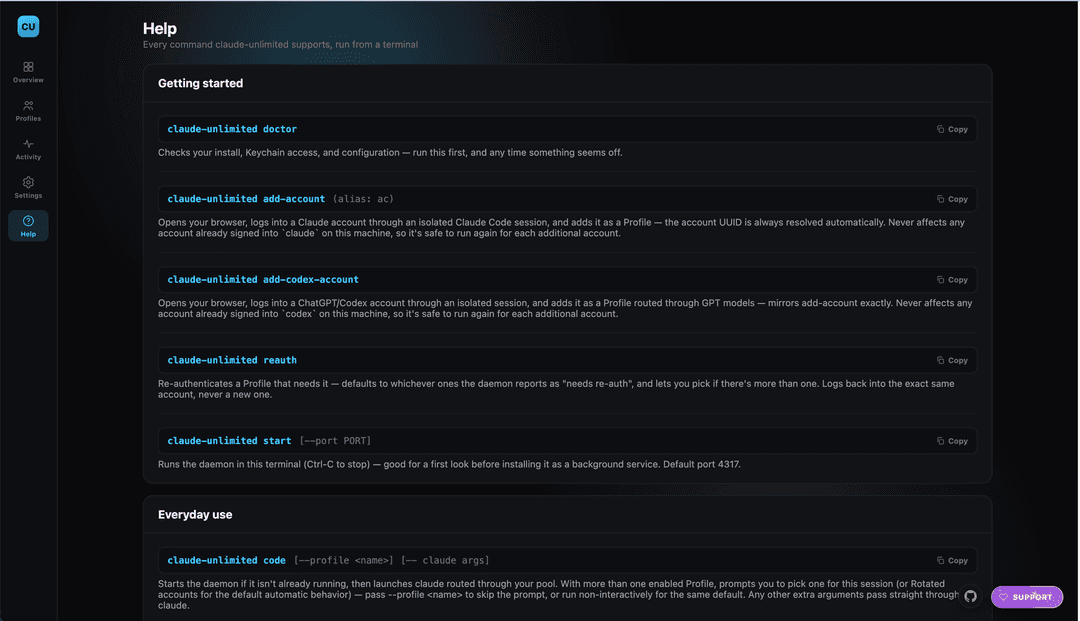
- Help — every CLI command, explained.
Numbers update live, without refreshing. Usage bars shift amber then red as an account nears its threshold, so you see it coming.
Every view has its own URL — /profiles, /activity, /settings, /help — so you can
bookmark one, reload without losing your place, and use the browser's back button.
More screenshots — activity log, settings, help, light theme

Notifications
Desktop notifications tell you what's happening without watching the dashboard:
| Notification | Tells you |
|---|---|
| Approaching threshold | An account is close to switching — before it does |
| Rotated | Which account just took over |
| Quota reset | An account is available again |
| Needs attention | Something needs you: re-auth, or no eligible account left |
| Update available | A new version has been released, downloaded, or installed |
Turn them on per category in Settings → Notifications, and use Send test notification there to confirm they reach you.
Not seeing any? Check two things. First, Settings → Notifications — each category has its own switch, and Rotated and Quota reset are off by default, so the two most frequent events are silent until you enable them. Second, your OS: on macOS your terminal needs permission under System Settings → Notifications, or they're delivered silently and you never see them.
Updates
Claude Unlimited checks for new releases on its own and does exactly what you tell it to in Settings → Updates:
| Mode | What happens when a release is found |
|---|---|
| Fully manual | You're told. Nothing is downloaded. |
| Auto-download only | Downloaded and verified, then waits for you to click install. |
| Auto-download + install | Downloaded, verified, and installed. Restart to finish. |
How a download is trusted, since this installs code on your machine:
- The release source is hardcoded — nothing in your config can point the updater at a different repository.
- Every request is HTTPS with certificate verification; a non-HTTPS redirect is refused.
- The GitHub API names the commit a release's tag points at. The updater clones that tag and refuses to install unless the commit it actually got is that same commit. Git objects are content-addressed, so altered contents cannot produce the expected hash.
- Your previous installation is kept. If the new version can't even be imported, it's rolled back automatically — a bad release leaves you on the version that worked.
This proves the code came from this repository's history as GitHub reports it. It is not a signature check: it can't prove GitHub itself, or an account with push access, is honest. That's a deliberate, documented limit.
Command reference
Every command is daemon lifecycle or account authentication. Everything else — accounts, thresholds, priority, budget caps, export/import — lives in the dashboard. The same list is in the dashboard under Help.
Getting started
| Command | What it's for |
|---|---|
claude-unlimited doctor | Checks your install, credential storage, and config. Run it first, and whenever something seems off. |
claude-unlimited add-account | Adds a Claude subscription via browser login. Isolated — never disturbs your existing claude login. |
claude-unlimited add-codex-account | Same, for a ChatGPT/Codex subscription. |
claude-unlimited reauth | Re-authenticates an account that needs it. Logs back into the same account, never a new one. |
Everyday use
| Command | What it's for |
|---|---|
claude-unlimited code | The one you'll use. Launches claude routed through your pool. |
claude-unlimited code --profile <name> | Pin the session to one account instead of rotating. |
claude-unlimited desktop | Route the Claude desktop app through your pool, then launch it. --revert undoes it. |
claude-unlimited status | Is the daemon installed and running, and its pid. |
claude-unlimited start | Run the daemon in this terminal (Ctrl-C to stop). |
Background service
Auto-start on login — the same thing Settings → Daemon controls.
| Command | What it's for |
|---|---|
claude-unlimited install | Start automatically on login (launchd / systemd --user / Task Scheduler), and start now. |
claude-unlimited uninstall | Stop starting on login. |
claude-unlimited service-start | Start the background daemon now. |
claude-unlimited service-stop | Stop it. |
claude-unlimited restart | Stop and start the daemon, service-managed or not. Needed after an update replaces the code, since a running process keeps serving the version it started with. |
Removing it
| Command | What it's for |
|---|---|
claude-unlimited purge | Removes everything: stored credentials, config, usage history, the app and its virtualenv, the CLI symlink, and the service registration. If the Claude desktop app was routed through the pool, its own settings are restored first. Asks for confirmation first. ~/.claude is never touched. |
Credentials are deleted from your OS keystore before the config goes, since the config is the only record of which Profiles exist.
Troubleshooting
An account says "needs re-auth"
Usually it fixes itself — tokens are refreshed in the background whether or not an account
is currently in rotation. If it doesn't, run claude-unlimited reauth: it lists whichever
accounts actually need it, so there's no guessing.
claude-unlimited: command not found
~/.local/bin isn't on your PATH:
export PATH="$HOME/.local/bin:$PATH"
The dashboard won't load
claude-unlimited status
claude-unlimited doctor
If it's installed but stopped: claude-unlimited service-start. Logs are in
~/.claude-unlimited/logs/.
Rotation isn't happening
Check the next account is enabled, not already exhausted, and has a higher priority number than the current one. The activity log records every rotation and every reason one was skipped.
Port 4317 is taken
claude-unlimited start --port 4400 — and point ANTHROPIC_BASE_URL at the same port.
Where your data lives
| What | Where |
|---|---|
| Credentials | macOS Keychain / Linux Secret Service / Windows DPAPI — never plaintext on disk |
| Account configuration | ~/.claude-unlimited/config.json |
| Usage history | ~/.claude-unlimited/usage_history.jsonl (capped at 20,000 events) |
| Project attribution | ~/.claude-unlimited/project_usage.json |
| Logs | ~/.claude-unlimited/logs/ |
| Your Claude Code setup | ~/.claude — untouched |
Security
- Binds to
127.0.0.1only, and refuses to bind anywhere else. claudeauthenticates with a local placeholder token, never your real credentials.- The dashboard API is CSRF-protected with a strict Content-Security-Policy.
- Nothing local is ever transmitted anywhere except the provider you configured.
Full threat model and vulnerability reporting: SECURITY.md.
Requirements
- macOS, Linux, or Windows — macOS is verified on real hardware; the Linux and Windows backends are a real but unverified first cut (details).
- Python 3.10+, git, and the
claudeCLI.
A note on Terms of Service
Claude Unlimited automates something you could do by hand: switching to another of your own accounts when one runs low. It uses only credentials you configure, runs entirely on your machine, and is fully open source.
Anthropic hasn't explicitly endorsed automated multi-account rotation. This project deliberately avoids what would make that worse — no quota probing, no keep-warm traffic, nothing that acts without a real request from you. Use your own judgment about your own accounts' terms.
Development
python3 -m pip install -e ".[dev]"
python3 -m pytest tests/
pytest is the only extra the dev install adds — the daemon itself still
needs nothing but the standard library and cryptography.
No frontend build step — claude_unlimited/static/ is plain HTML/CSS/JS.
See docs/ARCHITECTURE.md for the module map, and
CONTRIBUTING.md for the ground rules.
Adding a language is one file: copy claude_unlimited/locales/en.json and translate it.
Roadmap
- Signed releases — the updater verifies that a downloaded release matches the commit GitHub names for its tag, which proves the code came from this repository's history. A detached signature would additionally prove authorship; not implemented yet.
- Real-hardware verification on Linux and Windows — the code exists and is unit-tested,
but needs someone running it for real.
CONTRIBUTING.mdhas what to check.
Contributing
See CONTRIBUTING.md. Keep the backend dependency-free, keep OS-specific
code behind the existing interfaces, and keep account management in the dashboard.
Bug reports and PRs welcome — especially from Linux and Windows users.
License
MIT — do whatever you'd like with it.
If this saves you a session, buy me a coffee ☕
// faq
What is claude-unlimited?
Rotate Claude and GPT subscriptions and API keys seamlessly inside the Claude Code CLI — switch on usage limits without interrupting your session, all from a local dashboard. 100% local.. It is open-source on GitHub.
Is claude-unlimited free to use?
claude-unlimited is open-source under the MIT license, so it is free to use.
What category does claude-unlimited belong to?
claude-unlimited is listed under devtools in the Claudeers registry of Claude-compatible tools.
// embed badge

[](https://claudeers.com/claude-unlimited)
// retro hit counter

[](https://claudeers.com/claude-unlimited)
// reviews
// guestbook
// related in Developer Tools
 🔓
🔓The agent harness performance optimization system. Skills, instincts, memory, security, and research-first development for Claude Code, Codex, Opencode, Curs…
 🔓
🔓Makes your AI agent think like the laziest senior dev in the room. The best code is the code you never wrote.
 🔓
🔓Use Garry Tan's exact Claude Code setup: 23 opinionated tools that serve as CEO, Designer, Eng Manager, Release Manager, Doc Engineer, and QA
 🔓
🔓AI coding assistant skill (Claude Code, Codex, OpenCode, Cursor, Gemini CLI, and more). Turn any folder of code, SQL schemas, R scripts, shell scripts, docs,…