
claude-tasbih
Code with dhikr — replace Claude Code's spinner verbs with tasbih and the 99 Names of Allah (Asma-ul-Husna)
Install with your AI
Paste into Claude Code, Cursor, or any agent — it reads the repo and wires the tool into your project.
Install and set up claude-tasbih (git-clone project) into my current project.
Found on https://claudeers.com/claude-tasbih
Repo: https://github.com/hijam-git/claude-tasbih
Homepage/docs: —
Detected install method: git-clone → git clone https://github.com/hijam-git/claude-tasbih
Category: devtools. Platforms: cli, api.
Read the repo's README for exact setup and env vars, then install it and wire it into my project.

Claudeers Health Verdict:
active; community-verified: false. Confirm the source before running anything.
git clone https://github.com/hijam-git/claude-tasbih
// compatibility
| Platforms | cli, api |
|---|---|
| Operating systems | — |
| AI compatibility | claude |
| License | — |
| Pricing | open-source |
| Language | — |
claude-tasbih — Islamic Vibe Coding
Dhikr in your terminal: tasbih & the 99 Names of Allah, every time Claude Code thinks
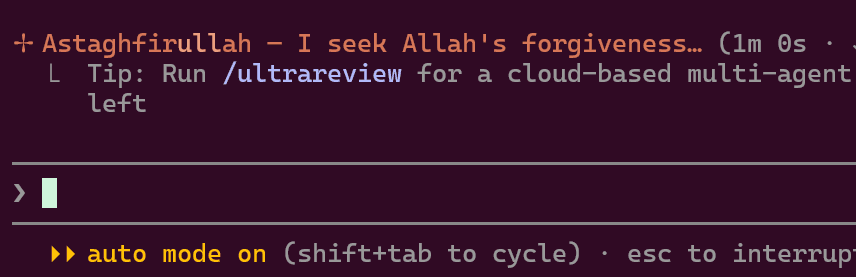
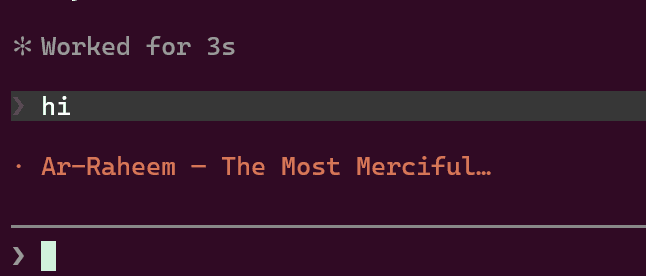
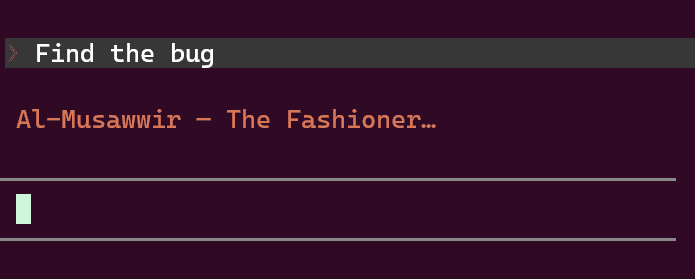
Replace Claude Code's random spinner verbs ("Cogitating…", "Noodling…") with dhikr — the tasbih phrases and the 99 Names of Allah (Asma-ul-Husna).
Every time Claude Code is thinking, you see something like:
 |  |  |
About
Claude Code shows a random verb while it thinks — "Cogitating…", "Noodling…", "Percolating…". It is idle text you end up reading dozens of times a day.
This swaps that idle text for dhikr: the five core tasbih phrases followed by the 99 Names of Allah, each with its English meaning. The waiting time you cannot avoid becomes a moment of remembrance instead of filler. Nothing else changes — it is a single cosmetic setting, with no effect on how Claude Code behaves.
What's in here
| File | Purpose |
|---|---|
spinner-verbs.json | The spinnerVerbs block to merge into your Claude Code settings |
README.md | This file — install steps and the install prompt |
docs/ | Screenshots used above |
Install
Option A — one prompt, no clone (recommended)
Paste this into Claude Code from anywhere — it fetches the verbs straight from GitHub, no need to clone this repo.
Install the Islamic dhikr spinner verbs for Claude Code.
- Repo: https://github.com/hijam-git/claude-tasbih
- Verbs file (browse): https://github.com/hijam-git/claude-tasbih/blob/main/spinner-verbs.json
- Verbs file (raw, fetch this one): https://raw.githubusercontent.com/hijam-git/claude-tasbih/refs/heads/main/spinner-verbs.json
Fetch the raw URL and merge its top-level
spinnerVerbskey into my Claude Code user settings at~/.claude/settings.json(on Windows:C:\Users\<me>\.claude\settings.json).Requirements:
- Preserve every existing key in my settings file — do not drop or reorder my current settings.
- If a
spinnerVerbskey already exists, replace it wholesale with the fetched one.- Write the file as UTF-8 without a BOM — the verbs contain em dashes (
—) and apostrophes that get corrupted intoâ€"if a tool reads or writes UTF-8 as ANSI. Do not use Windows PowerShell 5.1Get-Content/Out-Filefor this; use the Read and Write tools, or[IO.File]::ReadAllText/WriteAllText.- Keep the result valid JSON (correct commas) and verify by parsing it after writing.
- Confirm the verb count and tell me to restart Claude Code so it takes effect.
If the fetch is blocked or returns HTML instead of JSON, download the raw file yourself and point Claude at the local path, or use Option B.
Option B — let Claude Code do it from a clone
Clone this repo, open Claude Code inside it, and paste:
Read
spinner-verbs.jsonin this repo and merge its top-levelspinnerVerbskey into my Claude Code user settings at~/.claude/settings.json(on Windows:C:\Users\<me>\.claude\settings.json).Requirements:
- Preserve every existing key in my settings file — do not drop or reorder my current settings.
- If a
spinnerVerbskey already exists, replace it wholesale with the one fromspinner-verbs.json.- Read and write the files as UTF-8 without a BOM — the verbs contain em dashes (
—) and apostrophes that get corrupted intoâ€"if a tool reads UTF-8 as ANSI. Do not use Windows PowerShell 5.1Get-Content/Out-Filefor this; use the Read and Write tools, or[IO.File]::ReadAllText/WriteAllText.- Keep the result valid JSON (correct commas) and verify by parsing it after writing.
- Show me a short diff of what changed, then tell me to restart Claude Code so the new spinner verbs take effect.
Variants you can append to that prompt:
- Append instead of replace (keep Claude's built-in verbs too): "…and set
spinnerVerbs.modeto"append"." - Project-only install: "…merge into
.claude/settings.jsonin the current project instead of my user settings." - Uninstall: "Remove the
spinnerVerbskey from my Claude Code settings, keep every other key intact, verify the file still parses, and remind me to restart."
Option C — edit settings.json directly
Yes, editing settings.json by hand is perfectly fine — it is the same result, and
there is no separate install step or CLI for spinner verbs. The prompt options are only
better because Claude does the JSON merge and comma bookkeeping for you.
- Open the raw verbs file and copy it.
- Open your user settings file:
- Windows:
C:\Users\<you>\.claude\settings.json - macOS / Linux:
~/.claude/settings.json
- Windows:
- Paste the
"spinnerVerbs": { ... }object in as a top-level key, alongside your existing keys. - Mind the commas — the file must stay valid JSON. Example result:
{
  "model": "opus[1m]",
  "tui": "fullscreen",
  "spinnerVerbs": {
    "mode": "replace",
    "verbs": ["SubhanAllah — Glory be to Allah", "..."]
  }
}
- Save as UTF-8 without BOM (see the Encoding section below).
- Restart Claude Code (
/exit, then relaunch). The spinner picks a random verb per turn.
Settings reference
mode"replace"— use only these verbs (default here)"append"— add these on top of Claude Code's built-in verbs
verbs— array of strings. 104 entries here: 5 core dhikr phrases followed by the 99 Names with English meanings.
Settings precedence, if you want it scoped differently:
| File | Scope |
|---|---|
~/.claude/settings.json | You, everywhere (recommended) |
<project>/.claude/settings.json | One project, shared via git |
<project>/.claude/settings.local.json | One project, just you (gitignored) |
Encoding: the â€" problem
If your verbs show up as SubhanAllah â€" Glory be to Allah, the file was written by a
tool that read UTF-8 bytes as Windows-1252. The em dash — is three bytes (E2 80 94)
in UTF-8; misread as ANSI they become the three characters â€".
Rules that avoid it:
- Save
settings.jsonas UTF-8, no BOM. In VS Code the status bar should readUTF-8(notUTF-8 with BOM, notWindows 1252). - On Windows PowerShell 5.1,
Get-Contentdefaults to ANSI andOut-File -Encoding utf8writes a BOM — both break this file. Use[IO.File]::ReadAllText(path)and[IO.File]::WriteAllText(path, text, (New-Object Text.UTF8Encoding $false)), or use PowerShell 7+, or just edit in an editor. - Once corrupted, the text is genuinely changed on disk — re-save won't fix it. Re-copy
the verbs from
spinner-verbs.json. - If you'd rather sidestep all of this, replace every
—with a plain ASCII hyphen-. It looks slightly plainer in the terminal but is immune to encoding mishaps.
Customising
Edit the verbs array freely — add salawat, du'a, or ayah fragments. Keep each line
short (roughly under 45 characters) so it doesn't wrap in a narrow terminal.
To go back to the defaults, delete the spinnerVerbs key and restart.
Notes
- Transliterations use a simple Latin scheme without diacritics for terminal safety.
- Purely cosmetic — no effect on Claude Code's behaviour, permissions, or billing.
Support this project
If the dhikr spinner brought a bit of barakah to your terminal:
- ⭐ Star the repo — it helps other Muslim developers find it.
- 👤 Follow @hijam-git for more Claude Code tweaks.
- 🐛 Open an issue or PR with corrections to any transliteration or meaning — accuracy matters more than speed here.
Jazakum Allahu khayran.
// faq
What is claude-tasbih?
Code with dhikr — replace Claude Code's spinner verbs with tasbih and the 99 Names of Allah (Asma-ul-Husna). It is open-source on GitHub.
Is claude-tasbih free to use?
claude-tasbih is open-source, so it is free to use.
What category does claude-tasbih belong to?
claude-tasbih is listed under devtools in the Claudeers registry of Claude-compatible tools.
// embed badge

[](https://claudeers.com/claude-tasbih)
// retro hit counter

[](https://claudeers.com/claude-tasbih)
// reviews
// guestbook
// related in Developer Tools
 🔓
🔓The agent harness performance optimization system. Skills, instincts, memory, security, and research-first development for Claude Code, Codex, Opencode, Curs…
 🔓
🔓Makes your AI agent think like the laziest senior dev in the room. The best code is the code you never wrote.
 🔓
🔓Use Garry Tan's exact Claude Code setup: 23 opinionated tools that serve as CEO, Designer, Eng Manager, Release Manager, Doc Engineer, and QA
 🔓
🔓AI coding assistant skill (Claude Code, Codex, OpenCode, Cursor, Gemini CLI, and more). Turn any folder of code, SQL schemas, R scripts, shell scripts, docs,…