
claude-statusline-burnrate
Stop opening /usage — a Claude Code status line that does the weekly-limit math: today's share, sustainable burn rate, sleep-aware pacing. Pure bash + jq.
Install with your AI
Paste into Claude Code, Cursor, or any agent — it reads the repo and wires the tool into your project.
Install and set up claude-statusline-burnrate (git-clone project) into my current project.
Found on https://claudeers.com/claude-statusline-burnrate
Repo: https://github.com/Gui-Gou/claude-statusline-burnrate
Homepage/docs: —
Detected install method: git-clone → git clone https://github.com/Gui-Gou/claude-statusline-burnrate
Category: devtools. Platforms: cli, api.
Read the repo's README for exact setup and env vars, then install it and wire it into my project.

Claudeers Health Verdict:
active; community-verified: false. Confirm the source before running anything.
git clone https://github.com/Gui-Gou/claude-statusline-burnrate
// compatibility
| Platforms | cli, api |
|---|---|
| Operating systems | — |
| AI compatibility | claude |
| License | MIT |
| Pricing | open-source |
| Language | Shell |
claude-statusline-burnrate
Stop opening /usage. It's all right there.
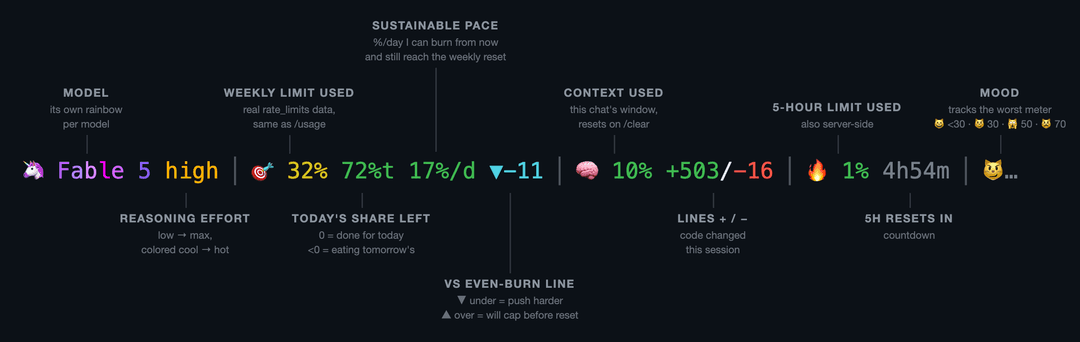
Real server-side rate_limits — the same numbers /usage shows — answers what you actually want: am I ok, and how hard can I push? Pure bash + jq. No node, no daemons, no estimates.
The pacing math counts awake hours, so the trend doesn't fall "behind" every night while you sleep.
Install
Needs jq and Claude Code v2.1+.
Easiest — you already have an AI open. Paste this into Claude Code:
Install the status line from github.com/Gui-Gou/claude-statusline-burnrate: download
https://raw.githubusercontent.com/Gui-Gou/claude-statusline-burnrate/main/statusline.sh
to ~/.claude/statusline.sh, chmod +x it, then set statusLine to
{"type":"command","command":"~/.claude/statusline.sh"} in ~/.claude/settings.json
without touching my other settings.
By hand — two commands:
curl -fsSL https://raw.githubusercontent.com/Gui-Gou/claude-statusline-burnrate/main/statusline.sh -o ~/.claude/statusline.sh
chmod +x ~/.claude/statusline.sh
Then add to ~/.claude/settings.json:
{
  "statusLine": { "type": "command", "command": "~/.claude/statusline.sh" }
}
Open a new session. That's it.
Try it first
git clone https://github.com/Gui-Gou/claude-statusline-burnrate && cd claude-statusline-burnrate
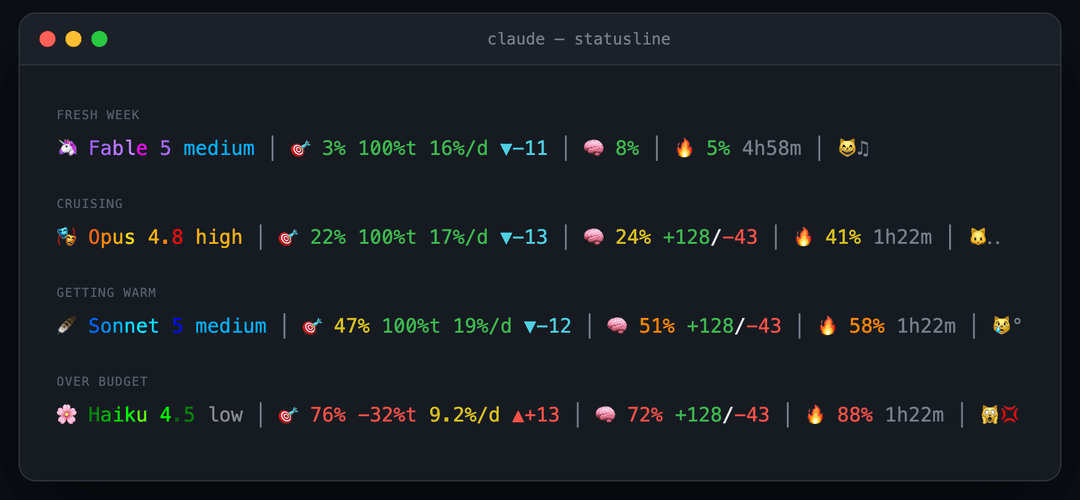
./demo.sh          # the four states below, fake data
./demo.sh --live   # animated
Tweak
| Variable | Default | |
|---|---|---|
SL_DAY_START | 2 | Hour your day flips (2 = 2am) |
SL_SLEEP_HOURS | 6 | Hours after that spent asleep — zero-weight in the pacing math |
Colors, thresholds, mascots, cat moods: each is a short case block in ~300 lines of commented bash. Make it yours.
A ⭐ helps the next dev find it before a rate-limit panic.
MIT
// faq
What is claude-statusline-burnrate?
Stop opening /usage — a Claude Code status line that does the weekly-limit math: today's share, sustainable burn rate, sleep-aware pacing. Pure bash + jq.. It is open-source on GitHub.
Is claude-statusline-burnrate free to use?
claude-statusline-burnrate is open-source under the MIT license, so it is free to use.
What category does claude-statusline-burnrate belong to?
claude-statusline-burnrate is listed under devtools in the Claudeers registry of Claude-compatible tools.
// embed badge

[](https://claudeers.com/claude-statusline-burnrate)
// retro hit counter

[](https://claudeers.com/claude-statusline-burnrate)
// reviews
// guestbook
// related in Developer Tools
 🔓
🔓The agent harness performance optimization system. Skills, instincts, memory, security, and research-first development for Claude Code, Codex, Opencode, Curs…
 🔓
🔓Makes your AI agent think like the laziest senior dev in the room. The best code is the code you never wrote.
 🔓
🔓Use Garry Tan's exact Claude Code setup: 23 opinionated tools that serve as CEO, Designer, Eng Manager, Release Manager, Doc Engineer, and QA
 🔓
🔓AI coding assistant skill (Claude Code, Codex, OpenCode, Cursor, Gemini CLI, and more). Turn any folder of code, SQL schemas, R scripts, shell scripts, docs,…