
claude-starter-kit
A disciplined engineering team for Claude Code — not a prompt. 11 specialist agents auto-chain plan → build → audit → ship, with security/privacy gates and a…
Install with your AI
Paste into Claude Code, Cursor, or any agent — it reads the repo and wires the tool into your project.
Install and set up claude-starter-kit (claude-plugin project) into my current project.
Found on https://claudeers.com/claude-starter-kit
Repo: https://github.com/byerlikaya/claude-starter-kit
Homepage/docs: https://www.npmjs.com/package/@byerlikaya/claude-starter-kit
Detected install method: claude-plugin → /plugin install claude-starter-kit@byerlikaya/claude-starter-kit
Category: templates. Platforms: cli, api, desktop, web, mobile.
Read the repo's README for exact setup and env vars, then install it and wire it into my project.

Claudeers Health Verdict:
active; community-verified: false. Confirm the source before running anything.
/plugin marketplace add byerlikaya/claude-starter-kit
/plugin install claude-starter-kit@byerlikaya/claude-starter-kit
git clone https://github.com/byerlikaya/claude-starter-kit
// compatibility
| Platforms | cli, api, desktop, web, mobile |
|---|---|
| Operating systems | — |
| AI compatibility | claude |
| License | MIT |
| Pricing | open-source |
| Language | Shell |
🛠️ Claude Starter Kit
An agentic working kit for Claude Code — a reusable scaffold that drives any project, at any stage, with the same engineering discipline.
plan → build → review → commit, where every critical rule is a gate, not a reminder.
🇬🇧 English · 🇹🇷 Türkçe
Why this kit?
Most "agent setups" are a pile of suggestions — the rules sit in a file, and whether they're honored is left to the model. This kit is different: it drops a disciplined engineering team into Claude Code, where the rules that matter are gates, not reminders — it doesn't just tell the agent the rules, it makes breaking the critical ones impossible, and it installs safely onto the repo you already have.
| 👥 | A team, not a prompt — 11 specialist agents auto-chain across plan → build → audit → ship; you don't wire them, the main thread does. |
| 🛡️ | Security & privacy are gates, not options — risk-critical changes must clear the security/privacy audit before they can close. |
| 🚦 | Every commit is yours to approve — no commit/push runs without your explicit OK, enforced at the tool level even in auto/bypass mode. |
| 🌿 | Safe on an existing repo — adopt hands the kit over on a branch; main is never touched, and you review before you keep it. |
🧠 The agents — the heart of the kit
11 agents, each a thin trigger — it says only who and when, and delegates the how to a skill. The main thread selects and chains them across five stages, escalating quality before anything is committed:
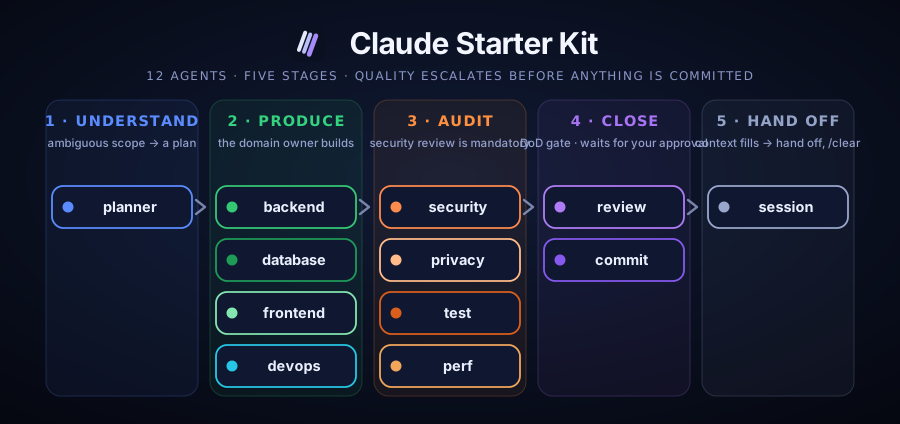
🧭 Understand → 🔨 Produce → 🔍 Audit → ✅ Close → 🤝 Hand off
| Agent | Stage | Fires when | Model |
|---|---|---|---|
| planner-csk | 🧭 Understand | scope is ambiguous | inherit |
| backend-expert-csk | 🔨 Produce | server / API / business logic | inherit |
| database-expert-csk | 🔨 Produce | schema, migration, index, cache | inherit |
| frontend-expert-csk | 🔨 Produce | UI, component, client work | inherit |
| devops-expert-csk | 🔨 Produce | deployment, CI pipeline, incident | inherit |
| security-expert-csk | 🔍 Audit | auth / IDOR / injection / secret · mandatory if security-critical | sonnet |
| privacy-agent-csk | 🔍 Audit | personal data (KVKK / GDPR) | sonnet |
| test-expert-csk | 🔍 Audit | tests, coverage, regression | inherit |
| review-agent-csk | ✅ Close | pre-commit code-health review | haiku |
| commit-agent-csk | ✅ Close | proposes the commit, waits for approval | haiku |
| session-manager-csk | 🤝 Hand off | context fills / phase boundary | haiku |
Agent names carry a
-csksuffix (Claude Starter Kit) so they never collide with the host project's own agents. Each agent is thin; the real method lives in a skill — the single source of truth.
Three principles
- Agent = thin trigger. An agent only says "who, when"; it stays short and leaves the "how" to a skill.
- Skill = single source of truth. The actual method and rule live in the skill; they are not copied into the agent.
- Rule → gate. The rule that matters is enforced at the tool level (hook · permission · eval). The model is not expected to remember it.
Install & run
Two entry points: start.sh sets up a fresh project; adopt (adopt.sh) hands the kit over to an existing one. Pick any channel — each runs the same two commands.
npx — nothing to install:
npx @byerlikaya/claude-starter-kit          # fresh project
npx @byerlikaya/claude-starter-kit adopt    # existing project
npx @byerlikaya/claude-starter-kit@latest update   # refresh a project that already has the kit
Homebrew:
brew install byerlikaya/tap/claude-starter-kit
claude-starter-kit          # fresh project
claude-starter-kit adopt    # existing project
Release tarball — no package manager:
gh release download --repo byerlikaya/claude-starter-kit -p '*.tgz' && tar xzf claude-starter-kit-*.tgz
bash start.sh               # fresh project
bash adopt.sh              # existing project
Just want the agents & skills inside your existing Claude Code (no scaffolding)?
/plugin marketplace add byerlikaya/claude-starter-kitthen/plugin install claude-starter-kit@byerlikaya.
Windows: the kit is bash-based — run it inside Git Bash (from git-scm.com) for the smoothest experience; WSL works as a fallback.
🌱 Fresh project — start.sh
bash start.sh [--backend|--frontend|--mobile|--fullstack] [--dotnet|--generic] [-h]
An install wizard. With no flags it walks each step (profile → backend stack → summary and approval); the flags are for silent/CI use, and -h / --help prints usage. Every choice shows what it will install before installing it.
After install, paste
.claude/FIRST_PROMPT.mdas your first Claude Code message — an optional kickoff that verifies the agents/skills and plans the first sprint. (CLAUDE.mdloads the discipline every session regardless, so this is a one-time convenience, not a requirement.)
| Profile | Expert agents | Highlighted skills |
|---|---|---|
--backend | backend · database | db-migration · api-design · observability |
--frontend | frontend | frontend · a11y · i18n-integrity |
--mobile | frontend (+ React Native/Expo layer) | frontend-rn-expo · a11y |
--fullstack | all of them | all skills — backend and web and mobile (RN/Expo) |
There is no separate mobile agent: frontend-expert-csk covers web, mobile and desktop, and the mobile how lives in the frontend-rn-expo skill. --fullstack installs it too, so a fullstack project is ready for mobile without picking --mobile.
The backend stack is asked only for --backend/--fullstack: --dotnet brings the .NET / DevArchitecture pattern (MediatR CQRS · IResult · AOP) behind an approval gate; --generic installs the same expert without it — for Node, Go, Python, or a .NET project on a different pattern.
.NET — start proven, not from scratch.
--dotnetclones the production-ready DevArchitecture foundation (CQRS · IResult · AOP · auth) and installs agents that already know it — so you skip the tokens an agent would burn regenerating a standard architecture; they go to your business logic, not boilerplate. Opinionated by default, not by force: the backend expert applies your project's pattern skill — DevArchitecture out of the box, or your own (Clean Architecture, Vertical Slice, Minimal API, plain layered) dropped into.claude/skills/.--genericstays stack-agnostic.
On
--fullstack+--dotnetthe DevArchitecture backend is placed in./backend,./frontendis reserved for your frontend, and the solution file is renamed to your project's name — so the project root stays clean instead of looking like a bare backend.
🔄 Existing project — adopt.sh
bash adopt.sh # at the root of the target project
Applies the kit to a project already in motion, like one team handing a project over to another — the project is not broken, decisions already made are not lost, and the kit does not stay passive.

All changes land on a separate git branch staged, not committed — so every added and changed file shows up in your editor's Source Control / Changes panel; you review it there, then git commit to accept (or reset to discard). main stays untouched. Kit agents install side-by-side (never colliding), the discipline is bound via a single @import, settings.json is merged schema-aware, and existing husky/lefthook chains run alongside the kit via a shim. It closes with a durable docs/HANDOVER.md and an ADR, so decisions live in version control, not in a chat.
🔁 Update an installed project
npx @byerlikaya/claude-starter-kit@latest update # `update` is an alias of `adopt`; run it at the project root
At install time the kit stamps .claude/kit.conf with the profile, the backend stack and which installer ran, plus .claude/VERSION. The updater reads that stamp and refreshes the project in the shape it was installed in: a --backend project does not get frontend agents grafted back on, and a --dotnet project keeps its devarch-module pattern skill. Where the stamp is absent, the updater derives the shape from the installed files and writes it. Compare cat .claude/VERSION against npm view @byerlikaya/claude-starter-kit version to see whether an update is waiting.
| On update | |
|---|---|
.claude/ agents · skills · commands · hooks · eval | refreshed from the new version |
.claude/DISCIPLINE.md | overwritten — it is kit-owned, so keep nothing of your own in it |
./CLAUDE.md | never touched — your project rules stay exactly as you wrote them |
.claude/settings.json | merged schema-aware; your own hooks and permissions survive |
your own agents and skills (no -csk suffix) | untouched |
Like adopt, an update needs a git repo and lands on a kit-adopt-<timestamp> branch, staged and uncommitted — review the diff, then commit to accept or reset to discard.
If a project's
CLAUDE.mdcarries the discipline inline instead of importing it, discipline updates cannot reach that project. The updater detects this, shows which lines hold the inline block, and offers to replace them with the single@.claude/DISCIPLINE.mdimport — writing a backup first, on a branch you review. Decline and nothing is touched; your project section and your own rules survive either way.
What's inside
- 11 agents — see the table above.
- 30 skills — the single source of "how", one per area (full catalogue below).
- 6 slash commands —
/brainstorm·/plan·/review·/ship·/handoff·/simplify. - Hooks —
guard-bash.sh(tool-level gate),pre-commit+commit-msg(trace + secret scan),context-usage.shandsession-guard.sh(session measurement). - CLAUDE.md — behavior, the three principles, workflow, Definition of Done, token discipline, and prohibitions.
Full skill catalogue — all 30, generated from each skill
| Skill | What it does |
|---|---|
a11y | Frontend accessibility audit (WCAG): semantic HTML, keyboard access, focus management, contrast, ARIA, screen readers. |
adr | Architecture Decision Record: context-decision-consequences, for decisions that are expensive to reverse. |
api-design | API contract design: resource naming, error model, versioning, pagination, backward compatibility, OpenAPI. |
brainstorm | Divergent discovery BEFORE planning: turn a fuzzy ask into 2–4 scoped options + named unknowns, pick a direction, hand to spec-planning. |
ci-pipeline | CI pipeline discipline: lint→build→test→quality→security, fail-fast, deterministic build, secret handling, PR gates. |
code-review | Code review discipline: severity-ranked, reasoned feedback on whether a change improves the system's overall code health. |
commit-message | Conventional Commits: reads the staged diff and proposes type(scope): summary, with body/footer when needed. |
db-migration | Apply schema migrations safely: detect the tool, classify the change by risk, gate destructive ones behind approval, back up in prod,… |
dependency-audit | Dependency audit: known CVEs, licence compliance, abandoned/outdated packages, lockfile integrity, and a justification for every new… |
devarch-module | DevArchitecture backend pattern: MediatR CQRS handler/command/query, IResult/IDataResult, Autofac AOP chain, FluentValidation, i18n. |
docs-writer | Keeps documentation in sync with the code: README, usage and related docs when a public API or behavior changes. |
frontend-rn-expo | OPTIONAL, stack-specific: React Native + Expo (prebuild). |
frontend | Stack-agnostic frontend discipline (web · mobile · desktop): component structure, state, data fetching, loading/empty/error states,… |
handoff | Session handover: when context fills, a phase closes, or the topic changes, write an action-oriented handover to docs/SESSION_STATE.md,… |
i18n-integrity | Translation integrity: every key present in every language, no hardcoded strings, consistent placeholders and plurals. |
incident-runbook | Production incident response: diagnose → mitigate → resolve, then a blameless postmortem and a repeatable runbook. |
iterate | Refine-to-Done loop: repeat until tests green + review clean + nothing deferred; bounded. |
observability | Stack-agnostic observability: structured logs, correlation ids, metrics and traces; no PII or secrets in logs. |
performance | Stack-agnostic performance: measure first, find the bottleneck, then optimise. |
privacy-compliance | KVKK/GDPR audit method: data inventory, purpose/basis/retention, minimisation, consent, transparency, data-subject rights, cross-border… |
red-team | Attacker's-eye test of LLM/agent defenses: instruction hijacking, data exfiltration and tool abuse through untrusted content; verifies… |
reflect | Retrospective self-audit after nontrivial work: unverified assumptions, skipped items, is-this-the-right- approach — findings, not code. |
release | Versioning and CHANGELOG: SemVer mapped from Conventional Commits, Keep a Changelog format, tagging, pre-release gates. |
security-scan | Stack-agnostic security audit: map the attack surface, trace untrusted input to dangerous calls, surface dependency and configuration flaws. |
sonarqube-check | SonarQube quality gate (language-agnostic): 0 Bugs · 0 Vulnerabilities · 0 Security Hotspots · 0 Code Smells, build 0 warnings / 0… |
spec-planning | Spec-first planning: task breakdown, measurable acceptance criteria, dependency order, risk priority. |
testing | The how of testing: pyramid, AAA, isolation, risk coverage, determinism. |
token-budget | Context/token discipline: subagent isolation, output = summary, move-to-file, delegation threshold, lean skills. |
trace-scan | Trace scan (§4.1/§4.2): before a commit, scans the staged changes and the message for AI traces (co-author trailers, footers, robot… |
vps-deploy | Deploy to a VPS safely: runtime detection, reverse proxy + SSL, atomic swap, keep the previous version, post-deploy health gate,… |
Session & token management
An assistant cannot run /context itself, so most setups guess the session fill. This kit measures it. context-usage.sh reads the real token count from the last turn's API usage in the transcript — the same figure /context shows. The UserPromptSubmit hook injects it every turn; the Stop hook (session-guard.sh) warns you the first time fill crosses 75%, and once more at 90% — one warning per threshold, and it never blocks your turn. The session-health line rests on a measurement, not a guess.
Token cost
DISCIPLINE.md and the agent/skill descriptions load into every session's context. That always-on material measured 9,198 tokens on a real turn for 11 agents and 28 skills; brainstorm and reflect add ~660 bytes (≈ 280 tokens) on top — the price of the whole discipline layer.
smoke-test.sh enforces a byte budget per component (discipline · agent descriptions · skill descriptions), so the cost cannot drift upward unnoticed. A budget can be raised, but only by editing smoke-test.sh explicitly.
Profile pruning does not save tokens. A
--backendinstall (10 agents, 27 skills) costs only ~640 tokens less than--fullstack(11 agents, 30 skills). Pick a profile to narrow the scope of the work.
Rule → gate
| Rule | Enforcing mechanism |
|---|---|
| Commit/push only with approval — in every permission mode | guard-bash.sh (PreToolUse) raises an approval prompt only you can answer; approve once and Claude runs the commit. Fails closed under bypassPermissions; CLAUDE_GIT_OK=1 pre-authorises headless runs |
| Destructive op (reset --hard · force push · rm -rf · --no-verify) | guard-bash.sh (blocked at the tool level) |
| No AI-authorship trace or external vendor name in a commit | pre-commit + commit-msg git hook — scans your project's files; the kit's own .claude/ tree is exempt (it names the tool it configures), secrets never are |
| No API key / token / private key committed | pre-commit secret scan (secret-blocklist.txt + .secret-allowlist.txt) |
| Session threshold | context-usage.sh + session-guard.sh (Stop hook) |
| Always-on context stays lean | smoke-test.sh byte budgets per component (discipline · agent descriptions · skill descriptions) |
| A running session never follows stale rules | context-usage.sh compares .claude/VERSION against the version the session started with, and says so |
| Quality gate (SonarQube projects — language-agnostic) | sonarqube-check + /ship |
The gates are armed via settings.json and git core.hooksPath; smoke-test.sh verifies they are ready after every change.
Verification
bash .claude/eval/smoke-test.sh      # structure, frontmatter, gate integrity
bash .claude/eval/routing-eval.sh    # does an example prompt route to the right agent/skill
Workflow
/plan (ambiguous scope) → expert agents build → /review (security · quality · test) → /ship (DoD gate; proposes the commit, waits for approval) → when context fills up, /handoff → /clear.
Extending
When you add an agent or skill, follow the AGENT_TEMPLATE.md contract: frontmatter (name · description + Trigger phrases · least-privilege tools · model tier) and body (When → Expertise stance → How/skill → Coordination → DoD → Output & context → Errors/escalation → Example → Constraints).
License & attribution
MIT — see LICENSE. The discipline layer builds on these upstream sources:
- DevArchitecture — the backend pattern (MediatR CQRS / IResult / AOP), referenced as a pattern only.
- multica-ai/andrej-karpathy-skills — the four working principles at the core of the discipline.
- google/eng-practices — the
code-reviewskill, distilled and restated (CC-BY 3.0).
// faq
What is claude-starter-kit?
A disciplined engineering team for Claude Code — not a prompt. 11 specialist agents auto-chain plan → build → audit → ship, with security/privacy gates and approval-guarded commits. Set up a fresh project or safely adopt an existing repo.. It is open-source on GitHub.
Is claude-starter-kit free to use?
claude-starter-kit is open-source under the MIT license, so it is free to use.
What category does claude-starter-kit belong to?
claude-starter-kit is listed under templates in the Claudeers registry of Claude-compatible tools.
// embed badge

[](https://claudeers.com/claude-starter-kit)
// retro hit counter

[](https://claudeers.com/claude-starter-kit)
// reviews
// guestbook
// related in Examples & Templates
 🔓
🔓Claude Code skill that removes signs of AI-generated writing from text
 🔓
🔓👨🏻💻👩🏻💻 Use Ant Design like a Pro!
 🔓
🔓Clone any website with one command using AI coding agents
 🔓
🔓A 100% free modern JS SaaS boilerplate (React, NodeJS, Prisma). Full-featured: Auth (email, google, github, slack, MS), Email sending, Background jobs, Landi…