
Claude-Session-Manager-
Claude Session Manager — A tool for managing Claude Code sessions across projects. Quickly find, organize, and resume previous conversations to streamline de…
Install with your AI
Paste into Claude Code, Cursor, or any agent — it reads the repo and wires the tool into your project.
Install and set up Claude-Session-Manager- (git-clone project) into my current project.
Found on https://claudeers.com/claude-session-manager
Repo: https://github.com/mquand/Claude-Session-Manager-
Homepage/docs: —
Detected install method: git-clone → git clone https://github.com/mquand/Claude-Session-Manager-
Category: plugins. Platforms: cli, api, web.
Read the repo's README for exact setup and env vars, then install it and wire it into my project.

Claudeers Health Verdict:
unknown; community-verified: false. Confirm the source before running anything.
git clone https://github.com/mquand/Claude-Session-Manager-
// compatibility
| Platforms | cli, api, web |
|---|---|
| Operating systems | — |
| AI compatibility | claude |
| License | MIT |
| Pricing | open-source |
| Language | TypeScript |
Claude Session & Issue Tracker (VS Code Extension)
Tiếng Việt | English
A fast, lightweight, and real-time VS Code extension to monitor, organize, categorize, and switch between Claude Code sessions effortlessly. Seamlessly supports both Issue/Ticket-based workflows (
#xxxx) and free-form ad-hoc chats.
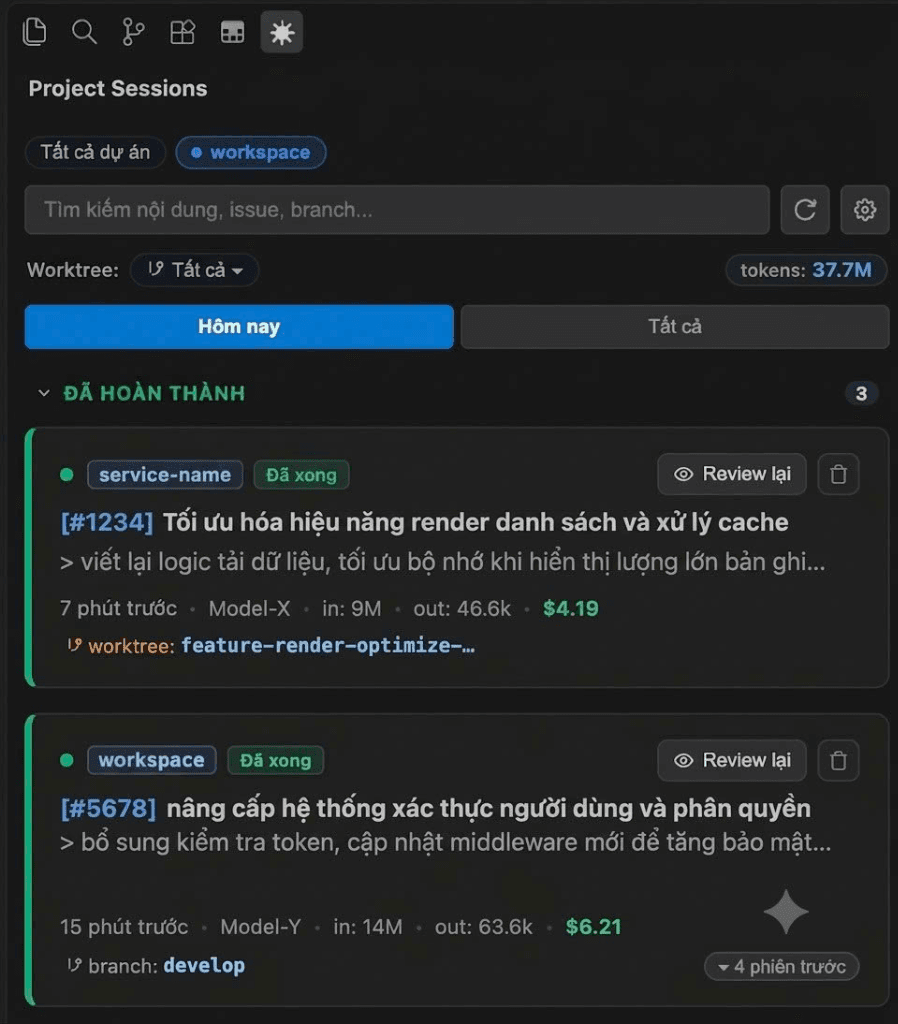
💡 Why Claude Session Manager?
When working extensively with Claude Code (or autonomous AI agent workflows):
- You often have multiple tasks running simultaneously and lose track of which session is running, which is done, and which is awaiting your approval (
need accept). - Chat logs accumulate over time, making it hard to find and switch back to previous contexts.
- Reviewing command execution or jumping back into an old session requires manually finding session IDs or typing terminal commands.
Claude Session Manager inspects active OS runtime processes and session transcripts in real-time, bringing an interactive, clean, single-click task dashboard right into your VS Code Sidebar and Status Bar.
✨ Key Features
1. Accurate Real-Time OS & Runtime Tracking
- 🔵 Running: Tracked by OS-level Process ID (PID) combined with Claude Code runtime state. Only marked as Running when Claude is actively thinking, generating, or running commands (
running/busy). Once Claude finishes its answer and returns toidle, the session automatically transitions to Done. - 🟡 Need Accept: Instantly alerts you when Claude is paused waiting for your approval (executing terminal commands or applying file changes).
- 🟢 Done: Completed tasks or sessions whose processes have terminated, displaying precise relative timestamps (
just now,5 mins ago...).
2. 100% Compatible with All Login Methods & Plans
The extension directly analyzes local machine runtime data and transcripts at ~/.claude/:
- Web Login (
claude login): Full support for Claude Pro, Claude Team, and Claude Enterprise accounts authenticated via browser OAuth. - API Key Login (
ANTHROPIC_API_KEY): Full support for developer tokens and pay-as-you-go usage. - Independent of subscription plans or authentication methods.
3. Dual Workflow Modes
- Ticket / Issue-Driven Workflow: Automatically parses issue tags matching
#<number>(e.g.,#100,#7152,#5433), displays a dedicated highlighted badge, and cleans up redundant text from session titles. - Free-Form Chat Workflow: When no issue number is present, it intelligently extracts your initial query as the concise session title without any placeholder artifacts or
#0.
4. Dual Notification Access Points
- Activity Bar (Sidebar): Custom Claude icon with a real-time numeric badge indicating active tasks requiring approval.
- Status Bar (Bottom Right): Live indicator (e.g.,
🔔 Claude: 1 Need Acceptor✨ Claude: 5 Tasks) that focuses the panel with a single click.
5. 1-Click Instant Session Switch
Click on any session card to immediately open and focus the corresponding conversation tab in Claude Code.
6. Clear Technical Stats & Spacious Clean Layout
Every session card displays clean, distraction-free technical metrics with improved line height and comfortable spacing:
- 🕒 Relative Timestamp:
just now,3 mins ago,2 hours ago... - 🌿 Git Branch & Repo: Real-time identification of target repository and branch.
- ✨ Model Identifier:
Opus 5.5,Sonnet 3.7,Haiku 3.5... - 🗄️ Token Metrics: Distinct
in: 20.6M • out: 68Klabels for input and output tokens. - 💬 Conversation Turns: Accurately counts user prompt round-trips.
- 🆔 Short Session ID: First 8 characters for quick reference.
7. Integrated Toolbar: Quick Refresh & Settings
Located right beside the search input:
- 🔄 Refresh Button: Instantly rescans all active sessions and updates status in real-time with visual spinner feedback.
- ⚙️ Settings Button: One-click jump to the extension's VS Code configuration settings.
8. Safe One-Click Conversation Deletion
- Hovering over any session card reveals a discrete Trash / Delete button.
- Clicking delete prompts a native modal confirmation dialog to prevent accidental deletion.
- Confirmed deletion completely removes the local
.jsonltranscript and its associated directory.
9. Collapsible Section Dropdowns & Smooth Scrolling
- Click any section header (NEED ACCEPT, RUNNING, DONE) to fold/unfold it, keeping your view organized.
- Automatically persists your collapsed/expanded preferences across sessions.
- Smooth native vertical scrolling with custom compact scrollbars.
10. In-Extension Auto-Updater (GitHub Releases)
- The extension automatically checks GitHub Releases for newer releases when VS Code launches (or when you click the Update toolbar icon).
- When a newer release is published, a notification appears with a [Update Now] button.
- With a single click, it automatically downloads the
.vsixpackage and installs it directly into VS Code, eliminating manual downloads!
11. Git Worktrees & Branch Management
- Automatically discovers all local Git worktrees across workspace repositories.
- Dedicated Worktree dropdown filter and intuitive branch tags (
⑂ worktree: <branch>).
12. Smart Continuation Grouping & Review Flow
- When Claude splits sessions due to context limits or timeouts, it automatically groups them cleanly under one stream with expandable earlier sessions and token counts.
- Dedicated review flow with intuitive inspection actions (Review & Review lại) using eye icons 👁.
🛠️ Installation
Method 1: Install from .vsix Package (Recommended for Users)
Compatible with macOS, Linux, and Windows without requiring Node.js:
- Download the latest
.vsixpackage from GitHub Releases. - Open VS Code and press:
- macOS:
Cmd + Shift + P - Windows / Linux:
Ctrl + Shift + P
- macOS:
- Type:
Extensions: Install from VSIX... - Select the downloaded
.vsixfile and click Install. - Reload VS Code (
Developer: Reload Window).
Method 2: Development & Source Build
# 1. Clone repository
git clone https://github.com/mquand/Claude-Session-Manager-.git
cd Claude-Session-Manager-

# 2. Install dependencies
npm install

# 3. Compile TypeScript
npm run compile

# 4. Open in VS Code and press F5 to launch the Extension Development Host
code .
⚙️ Configuration
The extension defaults to standard Claude Code directories:
~/.claude/projects(session transcript logs)~/.claude/sessions(active runtime PID states)
To customize settings:
- Open VS Code Settings (
Cmd + ,orCtrl + ,). - Search for
Claude Session Manager. - Configurable properties:
claudeSessionManager.storagePath: Custom path to your Claude project directory.claudeSessionManager.autoRefreshInterval: Background scan interval in seconds (default:10).
🤝 Contributing
Contributions, bug reports, and feature requests are welcome!
- Fork the Project
- Create your Feature Branch (
git checkout -b feature/AmazingFeature) - Commit your Changes (
git commit -m 'feat: add amazing feature') - Push to the Branch (
git push origin feature/AmazingFeature) - Open a Pull Request
📄 License
Distributed under the MIT License. See LICENSE for more information.
// faq
What is Claude-Session-Manager-?
Claude Session Manager — A tool for managing Claude Code sessions across projects. Quickly find, organize, and resume previous conversations to streamline development workflows and improve productivity.. It is open-source on GitHub.
Is Claude-Session-Manager- free to use?
Claude-Session-Manager- is open-source under the MIT license, so it is free to use.
What category does Claude-Session-Manager- belong to?
Claude-Session-Manager- is listed under plugins in the Claudeers registry of Claude-compatible tools.
// embed badge

[](https://claudeers.com/claude-session-manager)
// retro hit counter

[](https://claudeers.com/claude-session-manager)
// reviews
// guestbook
// related in Claude Plugins
 🔓
A single CLAUDE.md file to improve Claude Code behavior, derived from Andrej Karpathy's observations on LLM coding pitfalls.
 🔓
Claude Code is an agentic coding tool that lives in your terminal, understands your codebase, and helps you code faster by executing routine tasks, explainin…
 🔓
"CLI-Anything: Making ALL Software Agent-Native" -- CLI-Hub: https://clianything.cc/
🔓financial-services — a Claude ecosystem project on GitHub.