
claude-real-video
Let Claude (or any LLM) actually watch a video — scene-aware, deduplicated frames + transcript, from a URL or local file. Runs locally, MIT.
Install with your AI
Paste into Claude Code, Cursor, or any agent — it reads the repo and wires the tool into your project.
Install and set up claude-real-video (claude-plugin project) into my current project.
Found on https://claudeers.com/claude-real-video
Repo: https://github.com/HUANGCHIHHUNGLeo/claude-real-video
Homepage/docs: —
Detected install method: claude-plugin → /plugin install claude-real-video@HUANGCHIHHUNGLeo/claude-real-video
Category: rag. Platforms: cli.
Read the repo's README for exact setup and env vars, then install it and wire it into my project.

Claudeers Health Verdict:
active; community-verified: false. Confirm the source before running anything.
/plugin marketplace add HUANGCHIHHUNGLeo/claude-real-video
/plugin install claude-real-video@HUANGCHIHHUNGLeo/claude-real-video
git clone https://github.com/HUANGCHIHHUNGLeo/claude-real-video
// compatibility
| Platforms | cli |
|---|---|
| Operating systems | — |
| AI compatibility | claude |
| License | MIT |
| Pricing | open-source |
| Language | Python |
claude-real-video
Let Claude — or any LLM — actually watch a video.
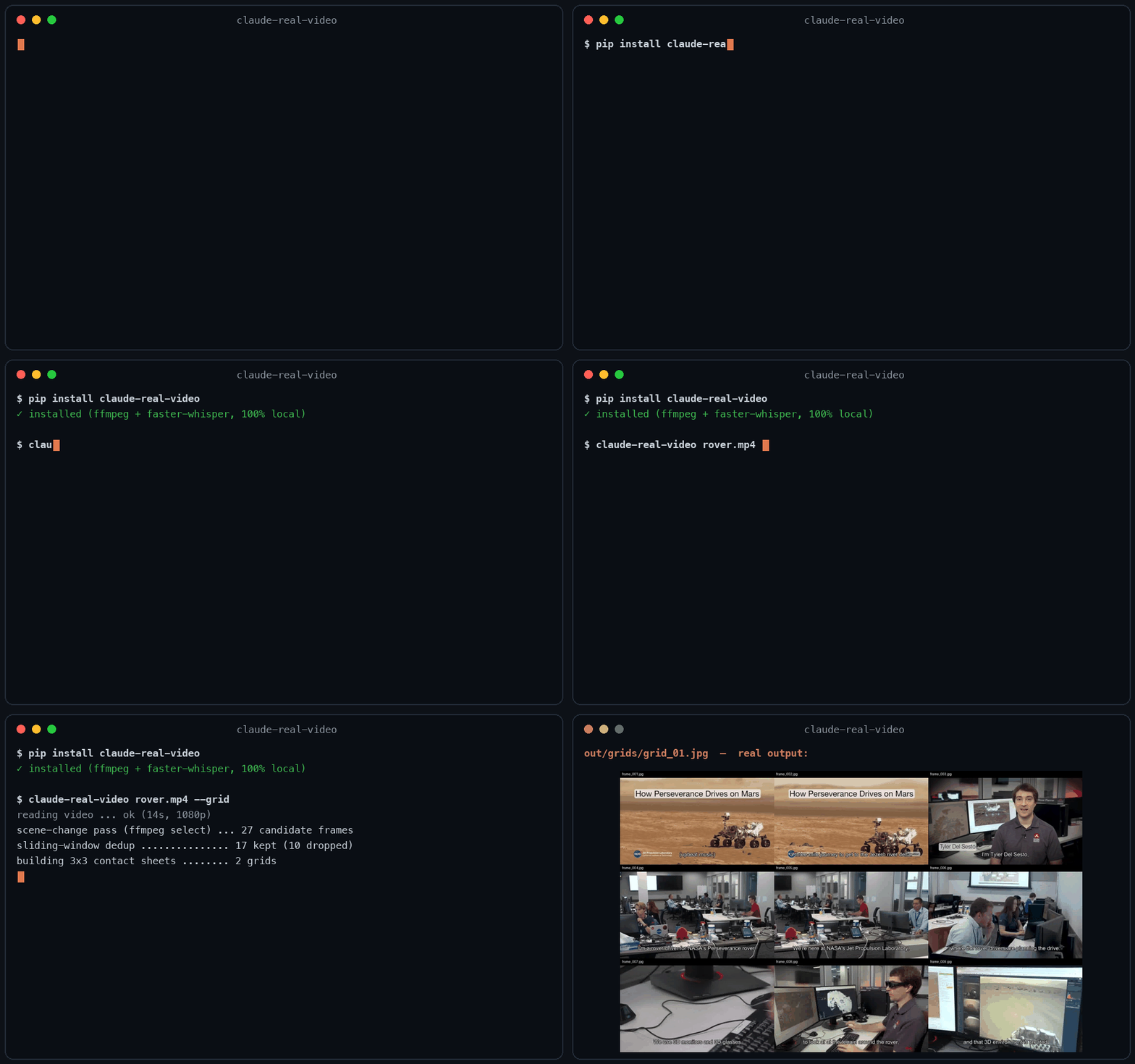
Same 58-second clip: fixed 1 fps sampling = 58 frames. crv keeps the 26 that actually differ — and
--gridpacks them into 3 contact sheets. Fewer tokens, nothing missed.
Most AI tools don't really see a video. Paste a YouTube link into ChatGPT and it reads the transcript, not the picture. Claude won't take a video file at all. Even Gemini, which can read video natively, has to send it up to Google and samples frames at a fixed interval (1 fps by default), so fast cuts slip past.
claude-real-video does it differently, and locally: point it at a URL or a
file, and it pulls the frames that actually matter (every scene change, not a
fixed quota), throws away the near-duplicates, transcribes the audio, and hands
you a clean folder any LLM can read. All the processing happens on your own machine — what gets sent anywhere is only the frames/text you choose to paste into an LLM afterwards.
crv "https://www.youtube.com/watch?v=..."
# → crv-out/frames/*.jpg  +  crv-out/transcript.txt  +  crv-out/MANIFEST.txt
Then drop the frames + MANIFEST.txt into Claude / ChatGPT / Gemini and ask away.
Not doing LLM work? It also works as a general-purpose video keyframe extractor — scene-change detection + dedup, no ML models to download.
Using Claude Code? Install it as a skill so Claude watches videos on its own:
pip install claude-real-video
mkdir -p ~/.claude/skills && cp -r skills/claude-real-video ~/.claude/skills/
Then just paste a video link into Claude Code and ask about it.
New in 0.3.0 — tell it why you're watching, and keep what it finds:
crv "https://youtu.be/..." --why "find the pricing strategy" --kb ~/notes
--why makes the analysis focus on what you care about instead of a generic summary;
--kb saves the result as a dated note in your own notes folder, so it doesn't die in crv-out.
Why not just sample frames?
Most "let an LLM watch a video" scripts (and Gemini's own pipeline) grab frames
at a fixed interval — e.g. one per second. That over-samples a static
screencast and under-samples a fast-cut reel. claude-real-video is smarter:
| fixed-interval sampling | claude-real-video | |
|---|---|---|
| Frame selection | every N seconds | scene-change detection + density floor |
| Repeated shots (A-B-A cuts) | sent again every time | sliding-window dedup sends each shot once |
| Static slide (10 min) | ~600 near-identical frames | collapses to 1 (dedup) |
| Fast-cut reel | misses frames between samples | catches each visual change |
| Audio | often ignored | Whisper transcript w/ language detect |
| Where the processing happens | often in someone's cloud | on your machine (you choose what to share with an LLM afterwards) |
| Input | usually local file only | URL (yt-dlp) or local file |
You feed the model fewer, more meaningful frames — cheaper context, better understanding.
Install
pip install claude-real-video              # core (frames + dedup)
pip install "claude-real-video[whisper]"   # + audio transcription
System requirement: ffmpeg
ffmpeg / ffprobe are used for frame extraction and audio, and aren't
pip-installable. Install them once:
| OS | command |
|---|---|
| macOS | brew install ffmpeg |
| Linux | sudo apt install ffmpeg (or your distro's package manager) |
| Windows | winget install Gyan.FFmpeg — or choco install ffmpeg — or download a build and add its bin\ folder to your PATH |
Verify it's on your PATH:
ffmpeg -version
Transcription uses the whisper CLI (installed by the [whisper] extra, or
pip install openai-whisper). Whisper also relies on ffmpeg.
Works on macOS, Windows, and Linux — Python 3.10+.
Usage
# A YouTube / Instagram / TikTok / ... link
crv "https://www.instagram.com/reel/XXXX/"

# A local file, English transcript, output to ./out
crv lecture.mp4 -o out --lang en

# Frames only, no transcription
crv clip.mp4 --no-transcribe

# A login-gated video (your own / authorised use): pass a Netscape cookie file
crv "https://..." --cookies cookies.txt
python -m claude_real_video ... works as an alias for crv too.
Options
| flag | default | meaning |
|---|---|---|
-o, --out | crv-out | output directory |
--scene | 0.30 | scene-change sensitivity (lower = more frames) |
--fps-floor | 1.0 | at least one frame every N seconds |
--max-frames | 150 | hard cap on total frames |
--lang | auto | Whisper language (en, zh, auto, ...) |
--dedup-threshold | 8 | % of pixels that must change for a frame to count as new; higher = fewer frames |
--dedup-window | 4 | compare against the last N kept frames — a shot the model already saw doesn't come back after a cutaway (1 = consecutive-only) |
--report | off | keep dropped frames in ./dropped + write report.html visualising every keep/drop decision |
--no-transcribe | off | skip audio |
--keep-audio | off | also save the full soundtrack (audio.m4a) so audio models can hear it |
--why | – | why you're watching, e.g. --why "find the pricing strategy" — written into MANIFEST.txt so the model analyses with that lens instead of a generic summary |
--kb | – | also save the analysis as a dated markdown note into this folder (your Obsidian vault, notes dir, ...) — so it joins your knowledge base instead of dying in crv-out |
--cookies | – | Netscape cookie file for login-gated sources |
What --grid output looks like
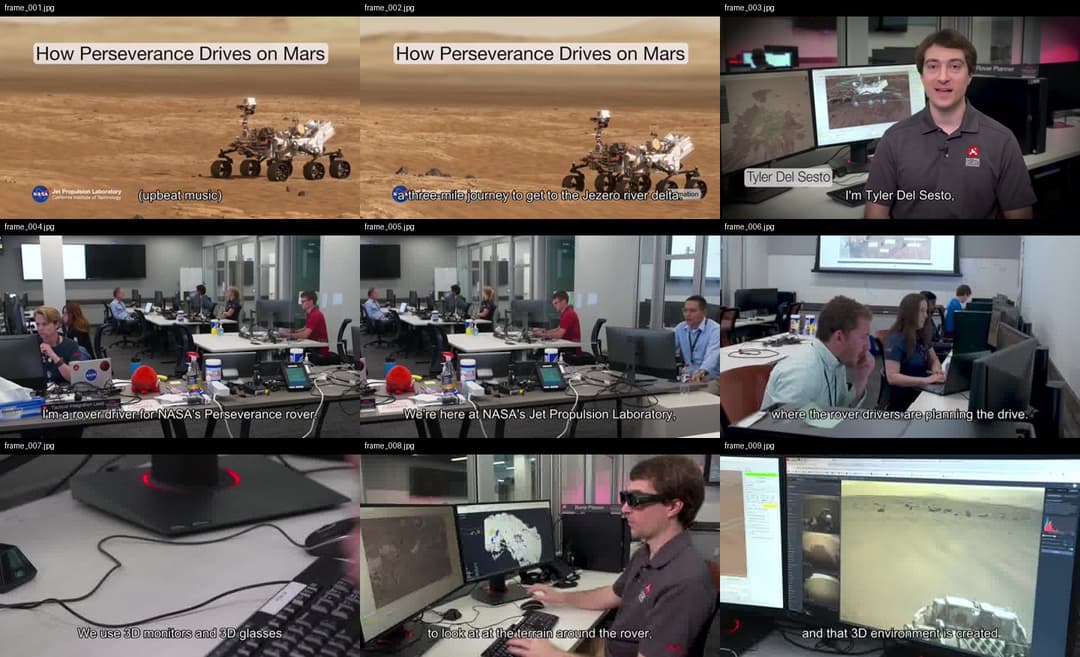
One contact sheet = nine consecutive keyframes, in order, filenames on each cell — the model reads a sequence, not scattered stills:
Use it from Python
from claude_real_video import process

r = process("https://youtu.be/...", "out", lang="en")
print(r.frame_count, r.transcript_path)
How it works
- Fetch —
yt-dlpfor URLs (optional cookies), or copy a local file. - Extract — one chronological
ffmpeg selectpass grabs every scene change plus a density floor (at least one frame every--fps-floorseconds), so fast cuts and slow screencasts are both covered. - Dedup — real pixel difference (downscaled RGB, not a perceptual hash — hashes
go blind on flat colours and equal-luma hue changes) against a sliding window
of the last
--dedup-windowkept frames, so an A-B-A cutaway doesn't re-send a shot the model has already seen.--reportwritesreport.htmlshowing every keep/drop decision with its diff %, for tuning. - Text — if the video already has subtitles (a sidecar
.srt/.vttnext to a local file, or an embedded subtitle track), those are used as the transcript — faster and more accurate than re-transcribing. Only when there are no subtitles does it fall back to Whisper on the audio (skipped cleanly if there's no audio). - Audio (optional,
--keep-audio) — save the full original soundtrack (audio.m4a: music + speech + effects, copied losslessly when possible). The transcript only has the words; the audio file lets a model that can listen (Gemini, GPT-4o, …) actually hear the music and tone. - Manifest —
MANIFEST.txtsummarises everything for the model.
So the model can see (key frames), read (transcript) and — with --keep-audio —
hear (full soundtrack) the video. The transcript is plain text any model can read;
the tool doesn't burn subtitles into the video — burning is a presentation choice,
not something needed to make a video AI-readable.
Notes
- Only download content you have the right to. The
--cookiesoption is for your own, authorised access — don't ship credentials in a repo. - Re-running overwrites the output directory.
crv Pro — understand how a video was shot
The free version tells your AI what's on screen. crv Pro tells it how it was shot — and why it works. Camera moves, editing rhythm, action bursts, plus a one-flag --breakdown report: hook analysis, pacing curve, camera language, Reels-algorithm lens, and a rubric your own LLM completes into a full video teardown.
This free tool tells an LLM what is on screen. A stack of keyframes can't tell it how the video moves — the camera work and the pacing.
crv Pro adds a --motion pass on top of everything here:
- Camera-move classification — every shot labelled static / pan / tilt / zoom / handheld (verified against ground-truth footage)
- Editing rhythm — shot list, cuts per minute, and how pacing shifts across the video
- Action bursts — high-motion shots get 0.2s-apart frame sequences so the model reads movement, not guesses
All as plain text in the same manifest, still 100% local. One-time $19 → https://leoaido.com/crv-pro/
License
MIT
// faq
What is claude-real-video?
Let Claude (or any LLM) actually watch a video — scene-aware, deduplicated frames + transcript, from a URL or local file. Runs locally, MIT.. It is open-source on GitHub.
Is claude-real-video free to use?
claude-real-video is open-source under the MIT license, so it is free to use.
What category does claude-real-video belong to?
claude-real-video is listed under rag in the Claudeers registry of Claude-compatible tools.
// embed badge

[](https://claudeers.com/claude-real-video)
// retro hit counter

[](https://claudeers.com/claude-real-video)
// reviews
// guestbook
// related in RAG & Knowledge
 🔓
🔓Persistent Context Across Sessions for Every Agent – Captures everything your agent does during sessions, compresses it with AI, and injects relevant contex…
 🔓
🔓✨ Light and Fast AI Assistant. Support: Web | iOS | MacOS | Android | Linux | Windows
 🔓
🔓Compress tool outputs, logs, files, and RAG chunks before they reach the LLM. 60-95% fewer tokens, same answers. Library, proxy, MCP server.
 🔓
🔓A light-weight and powerful meta-prompting, context engineering and spec-driven development system for Claude Code by TÂCHES.