
claude-overlay
A floating, screen-aware Claude Code chat for Windows - it reads your screen to answer, and runs on your own Claude subscription (no API key).
Install with your AI
Paste into Claude Code, Cursor, or any agent — it reads the repo and wires the tool into your project.
Install and set up claude-overlay (release-binary project) into my current project.
Found on https://claudeers.com/claude-overlay
Repo: https://github.com/shengyanlin/claude-overlay
Homepage/docs: —
Detected install method: release-binary → inspect the README
Category: automation. Platforms: cli, api, desktop, web.
Read the repo's README for exact setup and env vars, then install it and wire it into my project.

Claudeers Health Verdict:
active; community-verified: false. Confirm the source before running anything.
Grab the latest release asset from GitHub.
# download a build from https://github.com/shengyanlin/claude-overlay/releases
git clone https://github.com/shengyanlin/claude-overlay
// compatibility
| Platforms | cli, api, desktop, web |
|---|---|
| Operating systems | — |
| AI compatibility | claude |
| License | MIT |
| Pricing | open-source |
| Language | Python |
Claude Overlay
Talk to Claude Code without ever leaving the app you're in — and let it actually see your screen.
Windows 10 / 11 only (for now) · runs on your existing Claude subscription — no API key

Claude Overlay is a frameless, always-on-top chat window that floats over everything you do. Ask a question, and Claude looks at your real screen — every monitor — to answer. No copy-pasting error messages, no describing what you're staring at, no alt-tabbing to a browser. And because it runs the full Claude Code agent under the hood, it doesn't just chat — it can read, edit, and run things for you, right where you work. Point it at the slide deck, document, or spreadsheet you have open and it can change the file you're looking at — you never have to tell it where the file lives or even alt-tab away.
Best of all, it costs nothing extra: it drives your own claude CLI login,
so it uses your existing Claude subscription — no API key, no metered billing.
⭐ If a screen-aware Claude that floats over your work sounds useful, star the repo — it helps other people find it.
✨ Why you'll want it
- 👁️ It sees what you see. Auto-captures each monitor on every message and labels primary vs. secondary — just ask "what's wrong here?" and it looks.
- 🪟 Never breaks your flow. Always-on-top and frameless; it collapses to a tiny draggable orb when you're not using it, and clicks back open when you are.
- 🧠 A real agent that acts, not a chatbot. Full Claude Code (Opus 4.8) — it edits files, runs commands, and can even reach into the app on your screen (say, fix the wording on your open slide, or build a model in your open Excel), not just answer questions.
- 💸 No API key, no extra cost. Runs on your existing Claude subscription.
- 🖼️ Screenshots and pasted images. Snap a screen on demand, or paste any image with Ctrl+V to ask about it.
- ⚡ Live, polished UI. Responses stream token-by-token with clean tool-call chips, an in-place model switcher, and a context-usage meter.
- 🎨 Looks the part, crisp anywhere. Styled after the Claude desktop app, DPI-aware on HiDPI displays, resizable from any edge, with live Ctrl +/– zoom.
- 🔒 Local & private. Runs entirely on your machine against your own login.
Where a floating overlay wins
The CLI and the desktop app are perfect when you're already in a terminal or a chat window. The overlay earns its place by floating over whatever you're doing, seeing it, and acting on it — so it shines exactly where those can't:
- ✍️ Edit what's right in front of you. Don't just ask about the open document — ask it to change it. Fix a typo on the current slide, tighten a paragraph in your draft, fill a cell, or reword a heading. Because it's a full Claude Code agent with a shell, it can drive the app you already have open (e.g. via PowerShell/COM automation) to edit the file you're looking at — no file path needed. It works this out at run time rather than from a built-in integration, so it's not infallible: sanity-check important documents first (see the Security note near the end of this README).
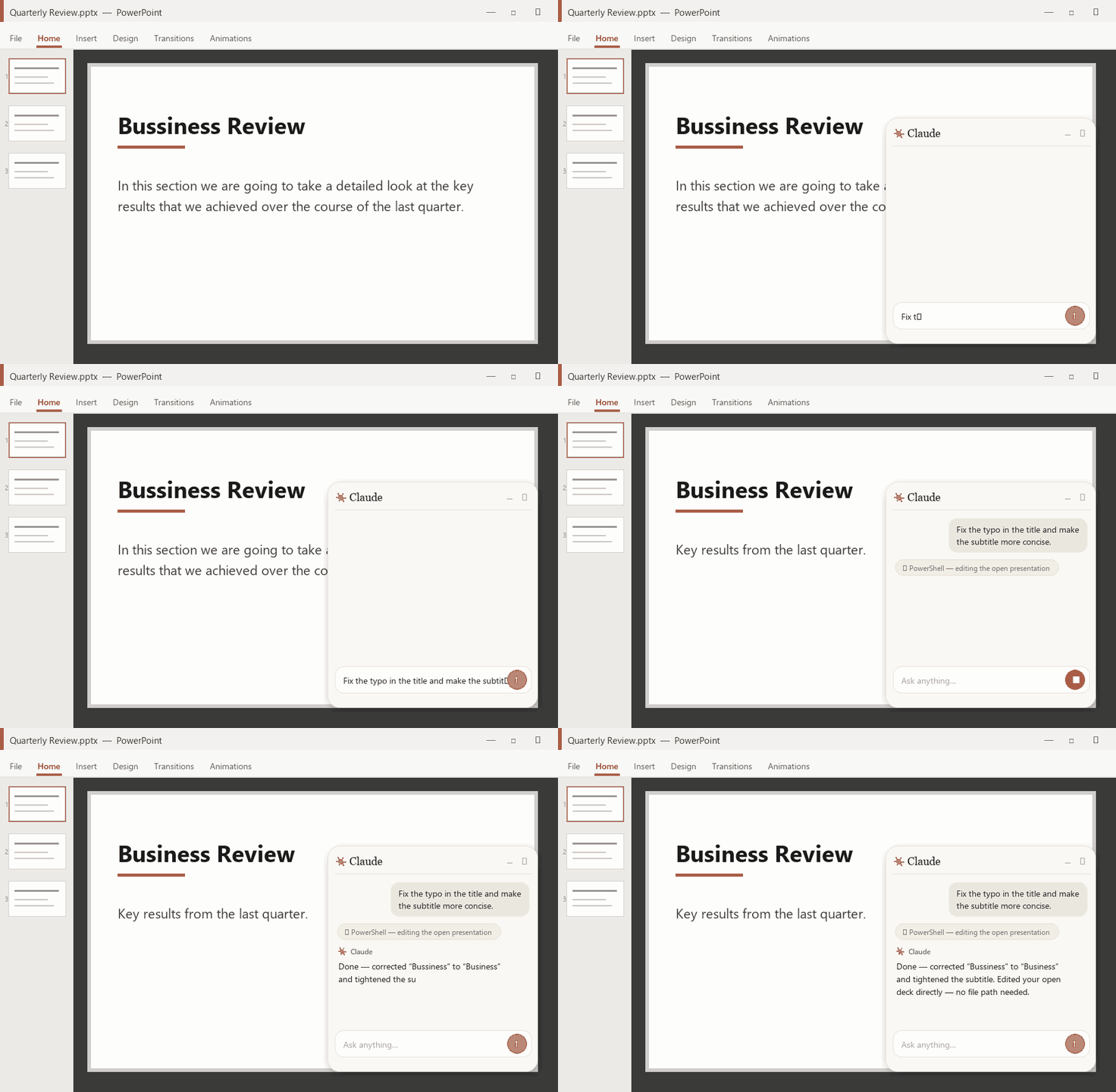
Ask it to fix the open slide — it edits the deck you already have open, no file path given.
- 📊 Build, not just edit. Ask for a spreadsheet and it builds the real thing in your open Excel — sourced assumptions, live formulas, a top-down calculation, even a low/base/high sensitivity, laid out like a banker's model. One sentence in the overlay, a working model in the sheet.

Ask in the overlay; it drives Excel to build the model — assumptions, formulas, and a sensitivity.
- 🖥️ Mid-presentation. Stay in full-screen slideshow. Summon the overlay to fact-check a number, translate a term, or field an audience question on the spot — then dismiss it without ever leaving the deck.
- 🌐 Reading in another language. On a foreign-language page, PDF, or slide, ask it to translate or explain what's on screen, in place — no copy-pasting into a separate translator tab.
- 📄 Skimming something long. "TL;DR this", "what does it say about X?" — about the article, whitepaper, or PDF you're looking at, without selecting or pasting a word.
- 🧩 Any GUI with no terminal. A cryptic error dialog, a settings panel, a BI dashboard, a spreadsheet formula — point your screen at it and ask. It works over apps that have no command line and nothing to copy.
- 🖥️🖥️ Across monitors. It captures every screen, so ask it to reconcile the spec on one monitor against the figure or table on the other.
- 🎥 On a call or screen-share. A discreet, always-on-top helper to look things up about what's being shown — without alt-tabbing away from the meeting.
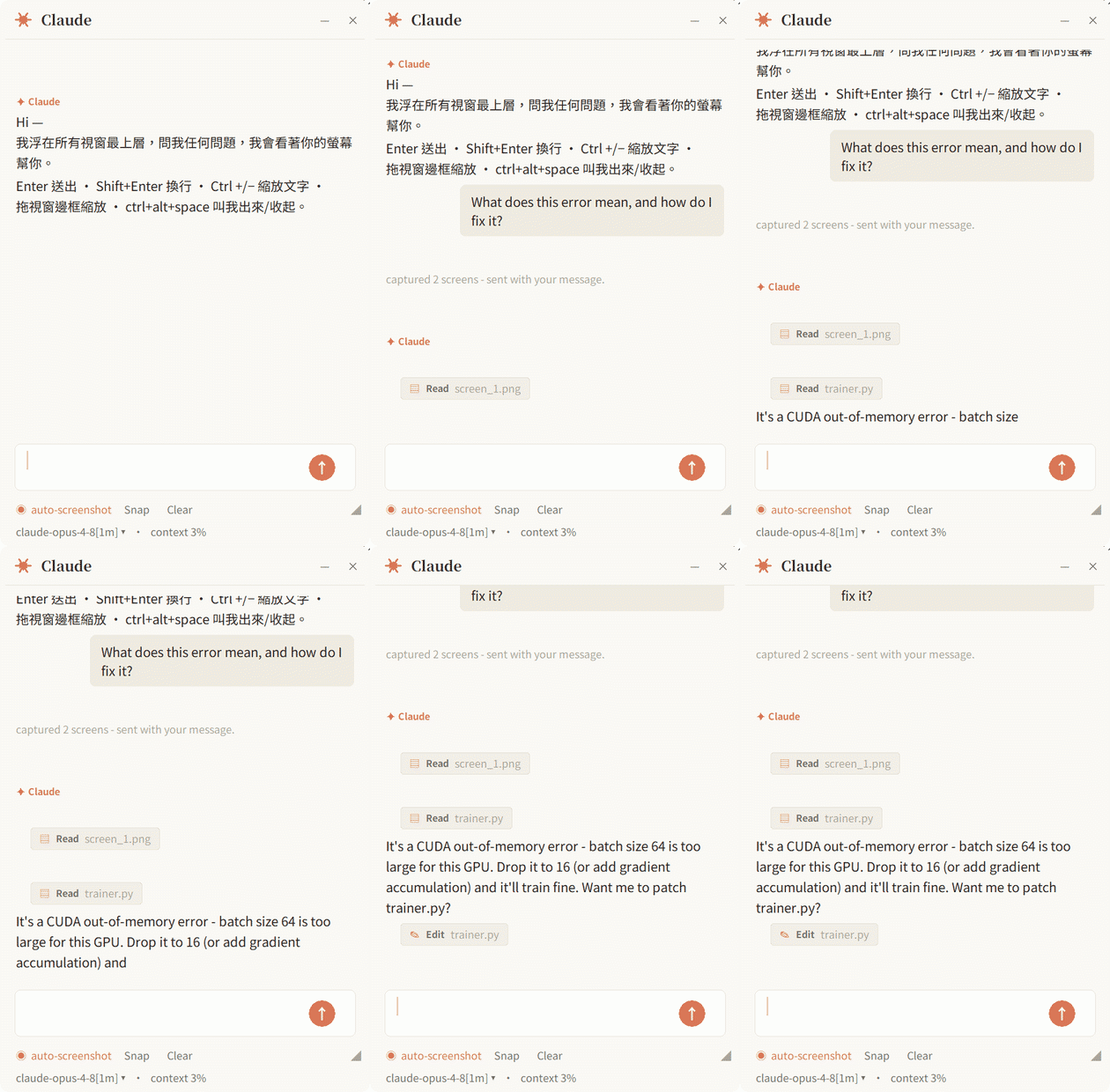
Not using it? It collapses to an orb that floats out of the way — click to bring it back.
How it works
Overlay (Tkinter UI)  →  claude-agent-sdk  →  spawns the `claude` CLI  →  Anthropic
        ▲ screenshots (Pillow ImageGrab, one image per monitor)
- UI — Tkinter (ships with Python; no extra GUI runtime).
- Brain —
claude-agent-sdkspawns your installedclaudeCLI as a subprocess and talks to it. It is not a direct API client, so the CLI is required. - Eyes — Pillow
ImageGrabsnapshots each monitor separately; the prompt labels which is the primary vs secondary screen, and Claude reads each with itsReadtool. The window hides itself during capture.
Prerequisites
You need three things. The included setup.cmd handles #2 and #3 for you — it
auto-installs the Claude Code CLI if it's missing and installs the Python packages.
1. Windows 10 / 11
The app uses Win32 APIs (DPI awareness, rounded corners, multi-monitor capture), so it currently runs on Windows only.
2. Claude Code CLI — installed and logged in
The overlay has no brain of its own; it drives the claude command line.
Easiest: just run setup.cmd (below) — it installs the CLI for you with the
official native installer if you don't already have it. To install it yourself:
- Native installer — recommended, no Node.js (PowerShell):
(or
irm https://claude.ai/install.ps1 | iexwinget install Anthropic.ClaudeCode). It auto-updates itself. - npm (needs Node.js 18+):
npm install -g @anthropic-ai/claude-code
Log in with your own Claude account (Pro/Max subscription — no API key needed):
run claude auth login (in PowerShell or CMD — not Git Bash) and follow the browser prompt once.
Verify — this must print a version number:
claude --version
If it says "command not found", the CLI isn't installed / on PATH yet.
3. Python 3.10+
Install from https://www.python.org/downloads/ and tick "Add python.exe to PATH" in the installer.
Verify:
python --version
Install
Pick whichever you like — all three end with the overlay ready to run.
🖱️ One double-click — setup.cmd (recommended)
Get the repo, then double-click setup.cmd. It checks Python,
auto-installs the claude CLI if it's missing (and offers to log you in), and
installs the Python packages — so even a fresh machine is one double-click from ready.
git clone https://github.com/shengyanlin/claude-overlay.git
(or download the ZIP from the green Code button and unzip it.)
⚡ Let Claude install it (if you already have the CLI)
It's an agent — so it can set itself up. With the claude CLI already installed
(see Prerequisites), run this from
wherever you want it to live:
claude "Set up Claude Overlay for me: clone https://github.com/shengyanlin/claude-overlay, make sure Python 3.10+ is installed (install it if missing), ensure pip is present (python -m ensurepip --upgrade), then run python -m pip install -r requirements.txt, then launch it with pythonw. Tell me when it's running."
Claude will ask before each step.
🛠️ By hand
git clone https://github.com/shengyanlin/claude-overlay.git
cd claude-overlay
python -m ensurepip --upgrade          # only needed if pip is missing; harmless otherwise
python -m pip install -r requirements.txt
This installs only the Python packages (claude-agent-sdk, pillow, keyboard) —
you still need the claude CLI installed and logged in (see Prerequisites). Use
python -m pip (not a bare pip): it works even when Python's Scripts\ folder
isn't on PATH, and ensurepip bootstraps pip if your Python install shipped without it.
Update
The overlay shows its version in the bottom status line (e.g. v1.1.1) and checks
GitHub for a newer release on startup — when one exists you'll see a 🔔 note and a ⬆
next to the version. To upgrade:
🖱️ One double-click — update.cmd (recommended)
Double-click update.cmd. It runs git pull, refreshes the Python packages, and — if you
already have a Desktop shortcut — refreshes its icon to match the current version.
🛠️ By hand
cd claude-overlay
git pull
(Installed via ZIP instead of git clone? Re-download the latest ZIP from the green
Code button and unzip it over the folder — at minimum replace claude_overlay.py.)
Then restart the overlay. It's a long-running process and does not reload while running — close it and re-open
Start Claude Overlay.cmdfor the update to take effect. (On a managed/enterprise machine, updating is what fixes the older versions that could hang on the first tool call.)Updated by hand (
git pull) and the Desktop icon still looks old? Re-runCreate Desktop Shortcut.cmdonce — the shortcut is a machine-specific file thatgit pullcan't refresh (update.cmddoes this for you).
Run
- Make sure
claude --versionworks and you've logged in (claude auth login). - Start it (any of):
- Double-click
Start Claude Overlay.cmd— launches with no console window. pythonw claude_overlay.py— no console.python claude_overlay.py— keeps a console open for logs (good for debugging).
- Double-click
- The window appears. Type and hit Enter — it auto-captures your screen each message, so you can ask about whatever's in front of you right away.
- Not using it? Hit – to collapse it to a small floating orb, and click the orb to expand it again.
Put it on your Desktop (optional)
Double-click Create Desktop Shortcut.cmd to drop a Claude Overlay shortcut
— with the orb icon — on your Desktop, so you can launch it like any other app.
Don't just drag
Start Claude Overlay.cmdto your Desktop — it's a portable launcher that must stay next toclaude_overlay.py. The shortcut points back to it in place, which is why it keeps working.
Controls
| Action | How |
|---|---|
| Send message | Enter (or click the ↑ button) |
| New line | Shift+Enter |
| Stop a running reply | click Stop (the ↑ becomes ■ while busy) |
| Attach screen to next msg | Snap |
| Paste an image | Ctrl+V (click 📎 to clear) |
| Toggle auto-screenshot | ◉ / ○ auto-screenshot (orange = on) |
| Switch model | click the statusline (model ▾) |
| Zoom text in / out | Ctrl + / Ctrl − (or Ctrl + mouse-wheel); Ctrl 0 resets |
| New conversation | Clear |
| Collapse to a Claude orb | –, or double-click the title bar |
| Expand from the orb | click the orb (drag it to move) |
| Quit | ✕ |
| Move | drag the title bar |
| Resize | drag any edge or corner (or the ◢ grip) |
Configuration
All settings are constants at the top of claude_overlay.py:
MODEL— defaults to"claude-opus-4-8"(Opus 4.8, 200K context). Append the[1m]suffix for the 1M-context variant (also one click away in the in-app model switcher). Don't useNone: the Agent SDK resolvesNoneto an older model, not the CLI's interactive default.PERMISSION_MODE—"bypassPermissions"by default (see security note below). Use"acceptEdits","default", or"plan"to add confirmation / read-only.WORKING_DIR— folder Claude operates in (default: your home directory).THEME—"light"(warm paper) or"dark".AUTO_SCREENSHOT_DEFAULT,FONT_SANS/SERIF/MONO,CORNER_RADIUS,ORB_SIZE,HIDE_SCREENSHOT_TOOL,WINDOW_ALPHA— see inline comments.
⚠️ Security note
The default PERMISSION_MODE = "bypassPermissions" makes this a fully
autonomous agent: Claude can edit files and run commands in WORKING_DIR
without asking, and it can see your screen. Combined with screen vision, that
also lets it act on the app you have open — e.g. edit the document or slide
deck on your screen via Windows/COM automation, and (with autosave on) persist
those edits straight to the original file. That's the magic, but it also means it
can change important documents without a confirmation step — double-check before
you let it loose on anything you can't afford to lose. If you don't want that, set
PERMISSION_MODE to "acceptEdits" (asks before edits), "default" (asks before
most actions), or "plan" (read-only) before running.
Contributing
Issues and PRs are welcome — bug reports, feature ideas, and especially help making it cross-platform (macOS/Linux capture + windowing). See CONTRIBUTING.md for how to get started.
License
MIT © shengyanlin
Built with Claude Code. If it earned a spot on your screen, leave a ⭐ — it genuinely helps.
// faq
What is claude-overlay?
A floating, screen-aware Claude Code chat for Windows - it reads your screen to answer, and runs on your own Claude subscription (no API key).. It is open-source on GitHub.
Is claude-overlay free to use?
claude-overlay is open-source under the MIT license, so it is free to use.
What category does claude-overlay belong to?
claude-overlay is listed under devtools in the Claudeers registry of Claude-compatible tools.
// embed badge

[](https://claudeers.com/claude-overlay)
// retro hit counter

[](https://claudeers.com/claude-overlay)
// reviews
// guestbook
// related in Automation & Workflows
 🔓
🔓 🔓
🔓The API to search, scrape, and interact with the web at scale. 🔥
 🔓
🔓🌐 Make websites accessible for AI agents. Automate tasks online with ease.
 🔓
🔓Taste-Skill - gives your AI good taste. stops the AI from generating boring, generic slop