
claude-manufacturing-skills
Claude Skills that encode chemical process and manufacturing engineering practice
Install with your AI
Paste into Claude Code, Cursor, or any agent — it reads the repo and wires the tool into your project.
Install and set up claude-manufacturing-skills (claude-plugin project) into my current project.
Found on https://claudeers.com/claude-manufacturing-skills
Repo: https://github.com/ScottDuncanAI/claude-manufacturing-skills
Homepage/docs: —
Detected install method: claude-plugin → /plugin install claude-manufacturing-skills@ScottDuncanAI/claude-manufacturing-skills
Category: skills. Platforms: cli, api, desktop, web.
Read the repo's README for exact setup and env vars, then install it and wire it into my project.

Claudeers Health Verdict:
slowing; community-verified: false. Confirm the source before running anything.
/plugin marketplace add ScottDuncanAI/claude-manufacturing-skills
/plugin install claude-manufacturing-skills@ScottDuncanAI/claude-manufacturing-skills
git clone https://github.com/ScottDuncanAI/claude-manufacturing-skills
// compatibility
| Platforms | cli, api, desktop, web |
|---|---|
| Operating systems | — |
| AI compatibility | claude |
| License | MIT |
| Pricing | open-source |
| Language | Python |
Chemical Manufacturing Skills for Claude
By Scott Duncan. Reach me on LinkedIn here: https://www.linkedin.com/in/s-r-duncan/
A collection of Claude Skills that encode chemical manufacturing engineering practices so that Claude produces work a practicing engineer would actually accept, rather than something that merely looks plausible.
Ask a general-purpose model for a PFD and you get a steam coil above the liquid level, an open control loop, a tag hidden under a valve body. A skill brings the standards and the review checklist into the session so those defects get caught first.
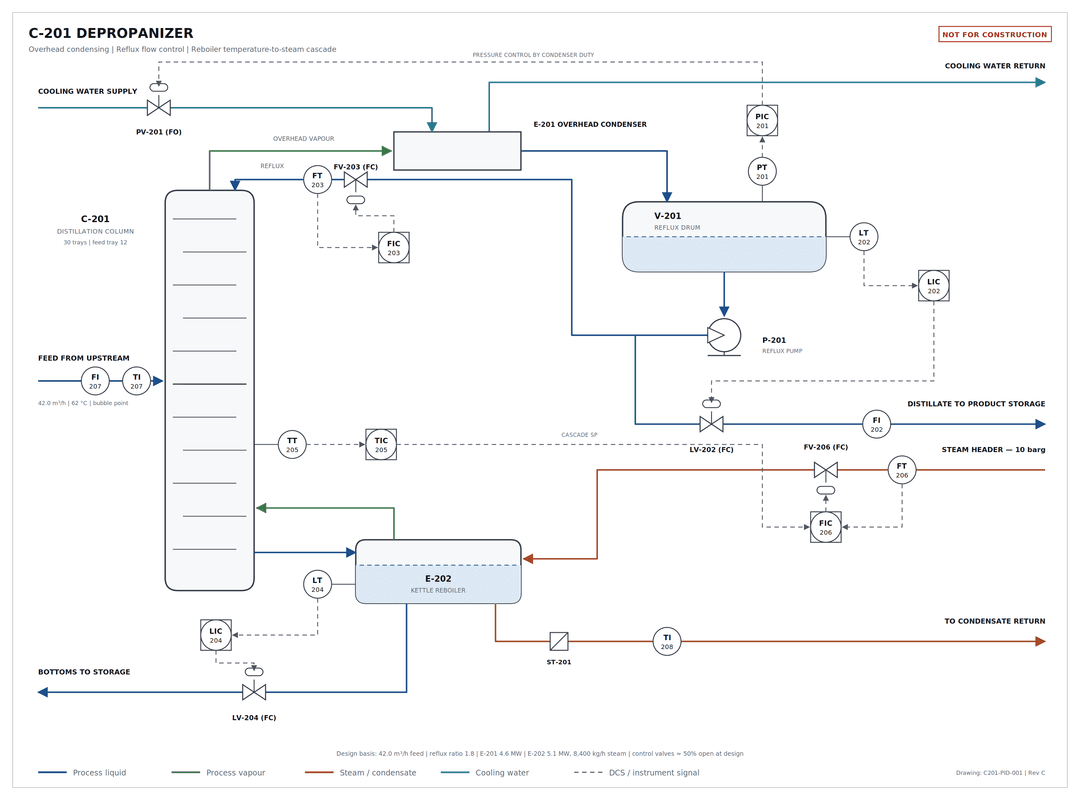
Claude's output using the pfd-generator skill. A PFD of a depropanizer unit which includes process flows and control logic. Delivered as an editable SVG.
Skills
| Skill | Produces | Triggers on |
|---|---|---|
pfd-generator | A conceptual PFD as editable SVG, plus the Python script that generated it | A process description with a request to draw, diagram, sketch, or visualize it; any mention of P&ID, PFD, control loop drawings, or cascade control; a request to edit an existing PFD SVG |
Additional skills will be added over time.
Install
Pick whichever matches how you use Claude. The first one needs no terminal, no git, and no coding.
In claude.ai — point and click
- Download
pfd-generator.zip. Leave it zipped — that's the format Claude wants. - Turn the feature on. In claude.ai, open Settings → Capabilities and switch on Skills and Code execution and file creation.
- Upload it. Go to Customize → Skills, click + → Create skill, choose the zip, and toggle the skill on.
The same zip works in the Claude desktop app. You only do this once.
In Claude Code — as a plugin
Two commands, and git pull on your side keeps it current:
/plugin marketplace add ScottDuncanAI/claude-manufacturing-skills
/plugin install pfd-generator@chem-mfg-skills
Use /plugin install chem-mfg-skills-all@chem-mfg-skills to get every skill in the collection, including ones added later.
In Claude Code — by copying the folder
For yourself, or for a project so everyone in that repo gets it:
cp -r skills/pfd-generator ~/.claude/skills/            # just you
cp -r skills/pfd-generator <your-project>/.claude/skills/   # the whole repo
Restart Claude Code after copying. Some skills carry Python dependencies — check for a scripts/requirements.txt inside the skill folder.
Drawing your first PFD
Simply open Claude and describe the process you'd like depicted in a PFD. The skill will load automatically, there's no need to say "use the PFD generator skill to..). Example:
Draw me a PFD for a jacketed batch reactor. Steam to the jacket on temperature control, cascaded from the batch temperature to the jacket outlet. Level indication on the reactor, agitator, and a bottoms transfer pump.
Claude will ask a question or two about anything that changes the drawing, then hand back an SVG. Open it in a browser, or drop it into PowerPoint, Visio, or Illustrator — every tag and note is real text, so you can edit labels yourself. It also returns the script that drew it, so "move the steam header down and re-issue" is a small change rather than a redraw.
Then read it like a reviewer. It is a conceptual drawing, and it is your name on anything you pass along.
What is a skill?
A skill is a folder containing a SKILL.md file with a short YAML header and a set of instructions. Claude reads only the header by default; when the description matches what you're doing, it loads the full instructions and any supporting reference files, scripts, or templates in that folder.
Practically: you don't invoke a skill. You describe your problem, and the right expertise loads itself.
Repo layout
.
├── .claude-plugin/
│   └── marketplace.json          plugin catalog — one entry per skill
├── skills/
│   └── pfd-generator/
│       ├── SKILL.md              instructions Claude loads
│       ├── references/           detail loaded on demand, not up front
│       ├── scripts/              deterministic code the skill calls
│       └── examples/             sample output
└── templates/
    └── skill-template/           scaffold for a new skill
One folder per skill. templates/ deliberately sits outside skills/ so the scaffold never loads as a real skill.
Adding a skill
See CONTRIBUTING.md. Short version: copy templates/skill-template/, write the description carefully, add a marketplace.json entry and a row in the table above.
License
MIT. The license covers the skill text and code — it does not transfer engineering judgment, and it does not make the output of these skills correct. Review before use.
// faq
What is claude-manufacturing-skills?
Claude Skills that encode chemical process and manufacturing engineering practice. It is open-source on GitHub.
Is claude-manufacturing-skills free to use?
claude-manufacturing-skills is open-source under the MIT license, so it is free to use.
What category does claude-manufacturing-skills belong to?
claude-manufacturing-skills is listed under skills in the Claudeers registry of Claude-compatible tools.
// embed badge

[](https://claudeers.com/claude-manufacturing-skills)
// retro hit counter

[](https://claudeers.com/claude-manufacturing-skills)
// reviews
// guestbook
// related in Claude Skills
 🔓
🔓An agentic skills framework & software development methodology that works.
 🔓
🔓 🔓
🔓💫 Toolkit to help you get started with Spec-Driven Development
 🔓
🔓AI coding assistant skill (Claude Code, Codex, OpenCode, Cursor, Gemini CLI, and more). Turn any folder of code, SQL schemas, R scripts, shell scripts, docs,…