
claude-log-skill
Claude Code /log skill: capture per-task engineering learnings (decisions, questions, quiz) into a personal Notion knowledge base
Install with your AI
Paste into Claude Code, Cursor, or any agent — it reads the repo and wires the tool into your project.
Install and set up claude-log-skill (git-clone project) into my current project.
Found on https://claudeers.com/claude-log-skill
Repo: https://github.com/swastij/claude-log-skill
Homepage/docs: —
Detected install method: git-clone → git clone https://github.com/swastij/claude-log-skill
Category: skills. Platforms: api.
Read the repo's README for exact setup and env vars, then install it and wire it into my project.

Claudeers Health Verdict:
active; community-verified: false. Confirm the source before running anything.
git clone https://github.com/swastij/claude-log-skill
// compatibility
| Platforms | api |
|---|---|
| Operating systems | — |
| AI compatibility | claude |
| License | MIT |
| Pricing | open-source |
| Language | Python |
claude-log-skill
A /log skill for Claude Code that captures what you learned on a task into a personal Notion knowledge base: what surprised you, how the thing actually works, the decisions you made (with the alternatives you rejected) and the questions you asked or should have asked. Once a task ships, it adds quiz questions you answer from memory two weeks later.
The PR records what changed. The log records why, and what you would do differently.
Notion template: Engineering learnings — Template
How it works
- You type
/login Claude Code at the end of a task session (PR opened, or ticket Done). - Claude drafts an entry from the session and shows you a readable summary.
- You edit; nothing is sent until you confirm.
scripts/notion-log.pyupserts a Task page and adds Decision and Question rows in your Notion.
Re-running is safe. The task is matched by its Task ID, and rows whose title already exists for that task are skipped.
Setup (about 10 minutes)
1. Duplicate the Notion template
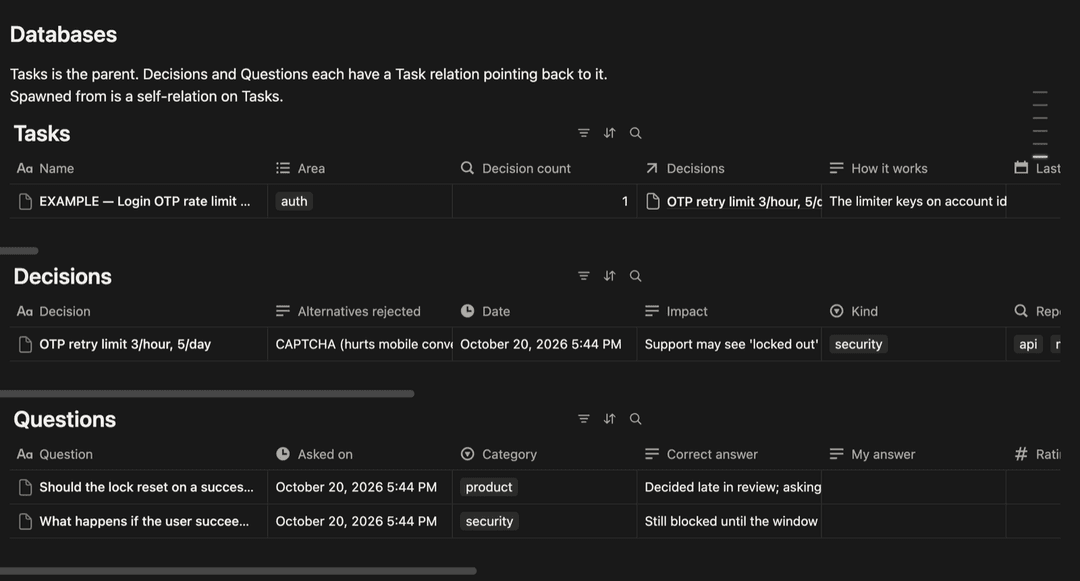
Open the template and click Duplicate (top right). It copies one page with three linked databases: Tasks, Decisions, Questions. Property names must stay as they are; the script addresses them by name. Delete the example row once you have seen the shape.
2. Create a Notion integration
At notion.so/profile/integrations create an internal integration with Read, Insert and Update content. Copy the secret.
Then, on each of the three databases in your copy: ··· → Connections → add the integration. All three must be connected or relations fail.
3. Write the two config files
The database id is the 32-hex-character segment in a database URL, before ?v=.
printf '%s' 'ntn_...' > ~/.notion-token && chmod 600 ~/.notion-token
cat > ~/.notion-learnings.json <<'JSON'
{ "tasks": "<tasks db id>", "decisions": "<decisions db id>", "questions": "<questions db id>" }
JSON
NOTION_TOKEN and NOTION_LEARNINGS environment variables override these paths if you prefer.
4. Install the skill and script
git clone https://github.com/swastij/claude-log-skill
mkdir -p ~/.claude/skills ~/.claude/scripts
cp -r claude-log-skill/skills/log ~/.claude/skills/log
cp claude-log-skill/scripts/notion-log.py ~/.claude/scripts/notion-log.py
Python 3.9+, standard library only. Restart Claude Code; /log now appears in the skill list.
5. Smoke test
Writes nothing, prints what it would send:
python3 -I ~/.claude/scripts/notion-log.py --dry-run examples/entry.example.json
The Notion template
Tasks is the parent. Decisions and Questions each have a Task relation back to it. Spawned from is a self-relation on Tasks for follow-up work.
| Database | Key properties |
|---|---|
| Tasks | Name, Task ID (upsert key), Task URL, PRs, Repo, Area, Risk, Status, Shipped on, Surprised me, How it works, Would bite again, Spawned from, Last reviewed, Review score, Review due (formula), Decision count and Quiz avg (rollups) |
| Decisions | Decision, Why, Alternatives rejected, Impact, Kind (product, architecture, security, workaround, deferred, process), Reversible, Task |
| Questions | Question, Source (quiz, I asked, should have asked), My answer, Correct answer, Rating 1–5, Category, Task |
Review loop. Review due turns true 14 days after Last reviewed, or immediately once a task is Done and never reviewed. Filter Tasks on it, answer the quiz rows from memory, fill My answer, score yourself in Review score, set Last reviewed.
Task ID is an opaque string: ClickUp ids, Jira keys, Linear ids or GitHub issue numbers all work. The JSON keys clickup_id / clickup_url are accepted as aliases of task_id / task_url.
Writing a good entry
- Surprised me / How it works / Would bite again: one paragraph each, mechanism not diff. Empty for trivial tasks; never pad.
- Decisions: every product, architecture or security choice with why and alternatives rejected. Workarounds and deferred items count; tag them so they show up in your debt view.
- "I asked": questions that changed the outcome. Rate 1–5 by how much they mattered.
- "Should have asked": questions that would have saved rework or caught a bug. Rate 1–5 by the cost of not asking. The most valuable list; be honest.
- Quiz: mechanism and failure modes ("what happens if X", "why not Y"), not trivia.
- Risk: high for auth, payments, migrations, infra, data deletion.
- Never put tokens or customer data in an entry. Never set Status unless confirmed; your tracker is the source of truth.
See examples/entry.example.json for a complete entry.
Troubleshooting
| Error | Cause | Fix |
|---|---|---|
object_not_found | Integration not connected to that database | ··· → Connections on the database |
validation_error ... property does not exist | A property name or type differs from the template | Rename in Notion to match |
unauthorized | Token wrong or has trailing newline | Rewrite ~/.notion-token with printf |
warning: spawned_from ... not found | Parent task not logged yet | Log the parent first, re-run |
| Edited decision text not updated | Rows are matched by title and skipped | Edit the row in Notion |
Layout
skills/log/SKILL.md      the Claude Code skill
scripts/notion-log.py    sender; stdlib only
examples/entry.example.json
Licence
MIT
// faq
What is claude-log-skill?
Claude Code /log skill: capture per-task engineering learnings (decisions, questions, quiz) into a personal Notion knowledge base. It is open-source on GitHub.
Is claude-log-skill free to use?
claude-log-skill is open-source under the MIT license, so it is free to use.
What category does claude-log-skill belong to?
claude-log-skill is listed under skills in the Claudeers registry of Claude-compatible tools.
// embed badge

[](https://claudeers.com/claude-log-skill)
// retro hit counter

[](https://claudeers.com/claude-log-skill)
// reviews
// guestbook
// related in Claude Skills
 🔓
An agentic skills framework & software development methodology that works.
 🔓
 🔓
AI coding assistant skill (Claude Code, Codex, OpenCode, Cursor, Gemini CLI, and more). Turn any folder of code, SQL schemas, R scripts, shell scripts, docs,…
 🔓
💫 Toolkit to help you get started with Spec-Driven Development