
Claude-Fleet
A simple Claude Plugin , to organise and to run multiple agents
Install with your AI
Paste into Claude Code, Cursor, or any agent — it reads the repo and wires the tool into your project.
Install and set up Claude-Fleet (git-clone project) into my current project.
Found on https://claudeers.com/claude-fleet-2
Repo: https://github.com/mbelsis/Claude-Fleet
Homepage/docs: —
Detected install method: git-clone → git clone https://github.com/mbelsis/Claude-Fleet
Category: plugins. Platforms: cli, api, web.
Read the repo's README for exact setup and env vars, then install it and wire it into my project.

Claudeers Health Verdict:
unknown; community-verified: false. Confirm the source before running anything.
git clone https://github.com/mbelsis/Claude-Fleet
// compatibility
| Platforms | cli, api, web |
|---|---|
| Operating systems | — |
| AI compatibility | claude |
| License | NOASSERTION |
| Pricing | open-source |
| Language | TypeScript |
Agent fleet for Claude Code
A Claude Code plugin that splits each task you give Claude across a fleet of subagents you configure — a market researcher, a lead planner, workers on the models you choose, a reviewer, a designer and a security reviewer — and shows you what every one of them is doing.
Version 0.8.0 · © 2026 Belsis Meletis · free to use, see Licence and disclaimer. This is a test plugin: try it on work you can afford to redo.
How a request flows
you type a task
   │
   ▼
Researcher ─ searches the web for what already exists: competitors,     (optional)
   │         alternatives, their features, books, decks, videos, news
   ▼
Planner ──── thinks it through, names the deliverable, writes one brief per worker,
   │         marks which jobs need others first ("## Job 3 … (after 1, 2)")
   ▼
Workers ──── run in parallel, wave by wave, each on its slot's model,
   │         each writing its result to the run folder
   ▼
Claude ───── combines the results
   ▼
Reviewer ─── checks facts and consistency, corrects the draft          (optional)
   ▼
Designer ─── turns it into finished files: .docx/.pdf, .pptx, a better (optional)
   │         web page, charts — on your laptop only
   ▼
Security ─── reviews the code, configuration and AI agents that were    (optional)
             built, and reports findings; changes nothing
Every stage is optional except the workers, and each lead agent (researcher, planner, reviewer, designer, security reviewer) has its own model.
Screenshots
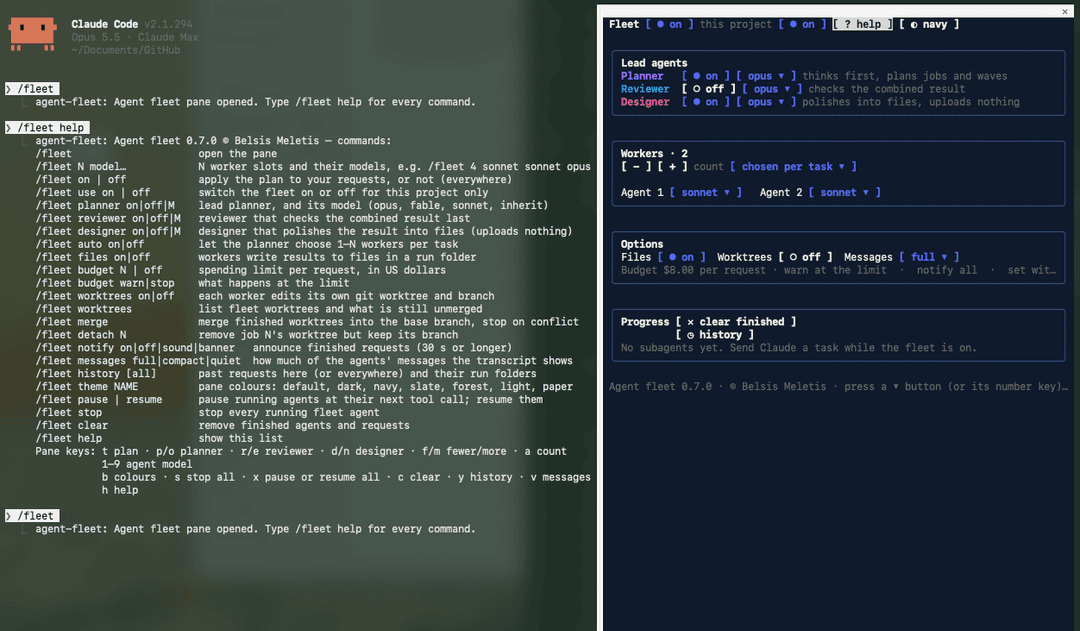
The fleet pane: the lead agents (planner, reviewer, designer) each with a model, the workers and their models, and the options, beside /fleet help:
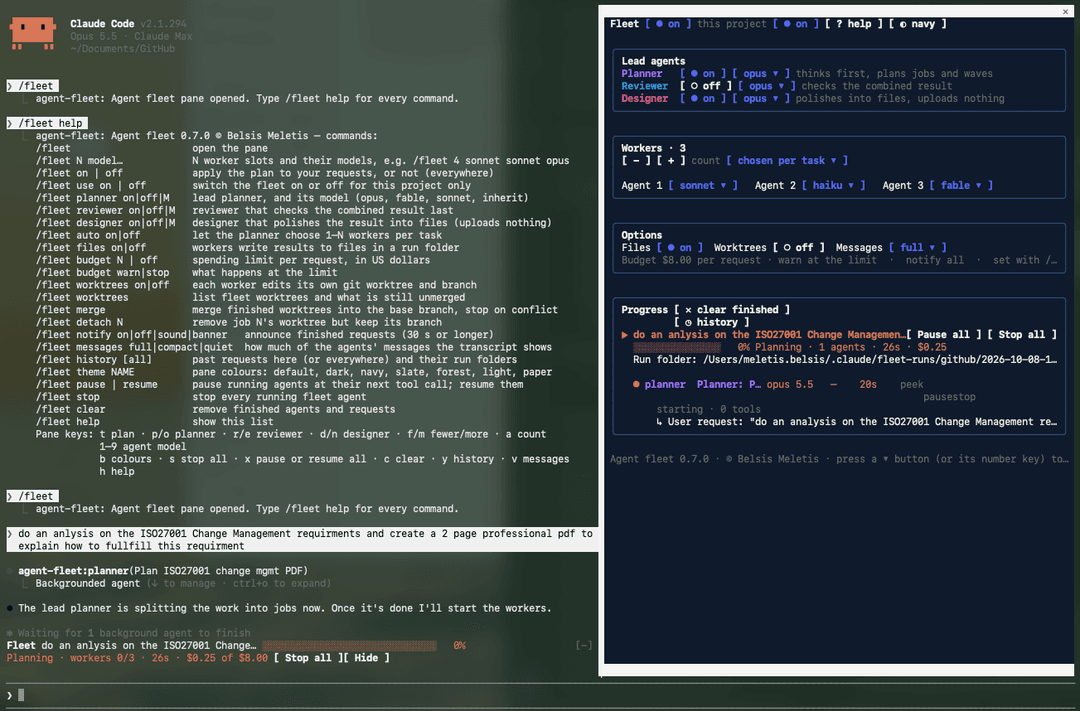
A request starts: the planner (violet) is splitting "a 2-page PDF on ISO 27001 change management" into jobs. The band above the prompt shows the stage, time and cost against the $8 budget:
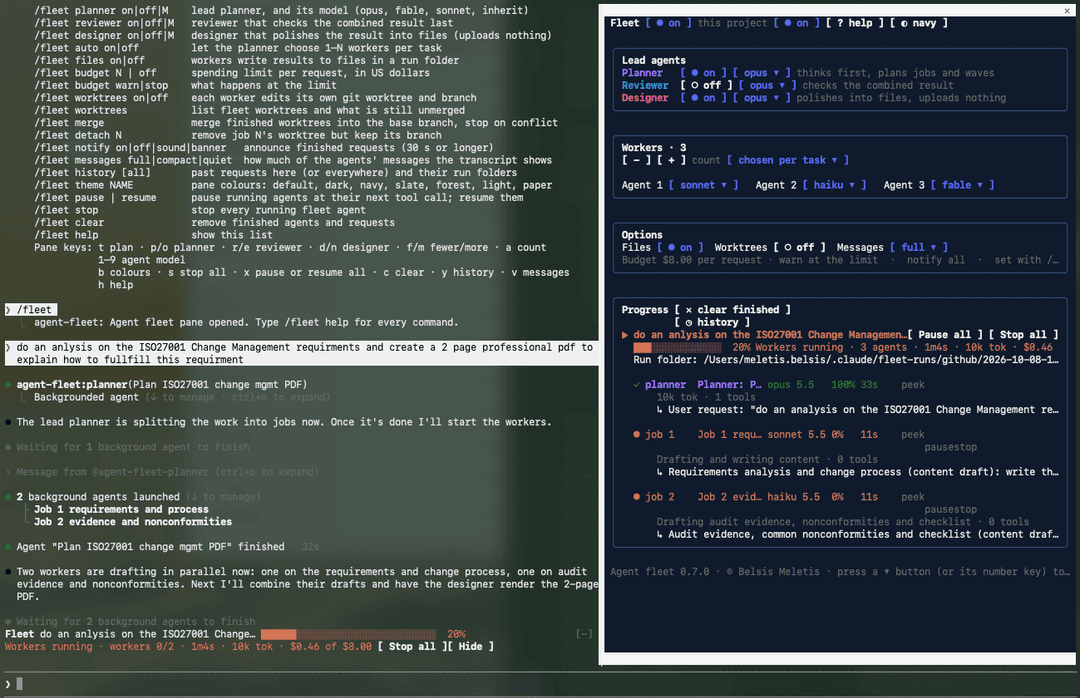
The planner has finished and two workers run in parallel — the planner chose two jobs for this task — each on its own slot's model (sonnet and haiku), with its current step and the job it was given:
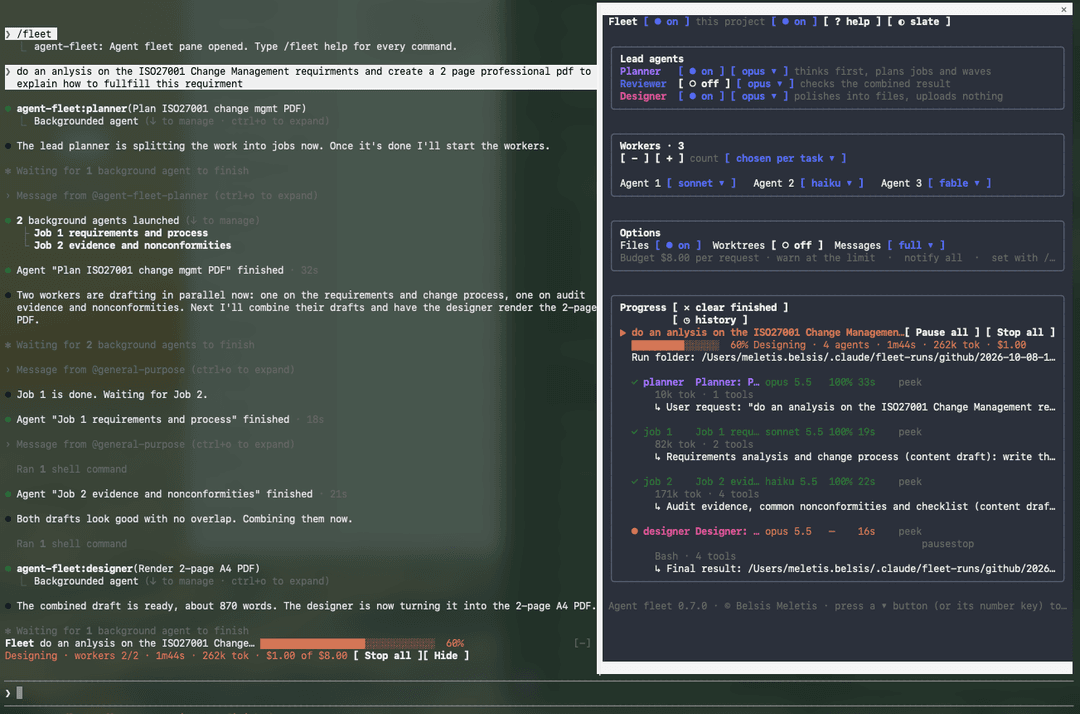
Both workers are done, Claude has combined their drafts, and the designer (pink) is laying the result out as a PDF; here in the slate colour scheme:
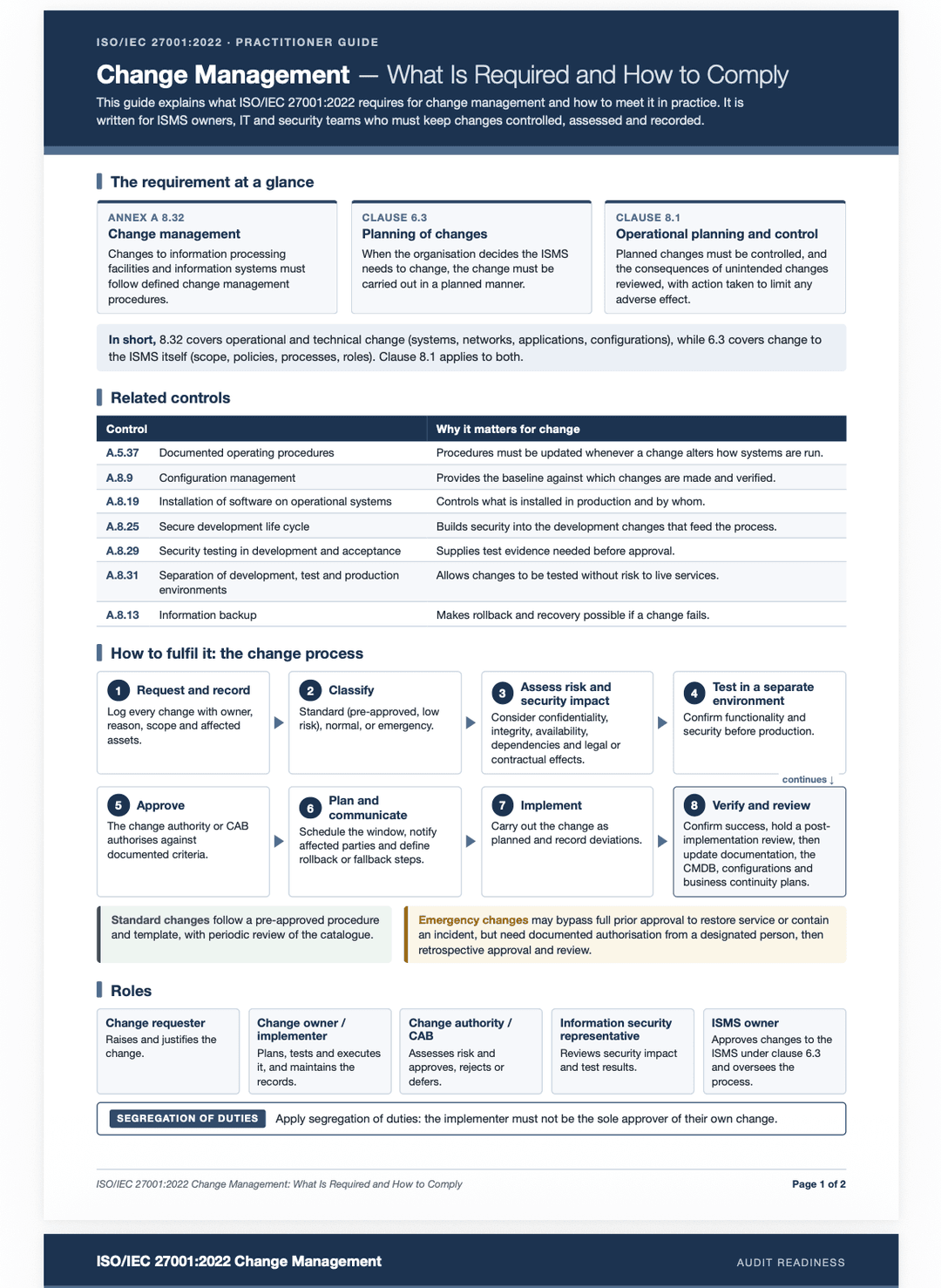
What the designer produced — a two-page practitioner guide, built on the laptop and saved in the run folder's design/, nothing uploaded:
Features
The fleet
- Worker slots: how many subagents a task uses (1–10) and which model each runs on:
/fleet 4 sonnet sonnet opus inherit. Agents launched together always get distinct slots, so slot N's model is really used for one of them. - Lead planner (on by default): thinks the task through, names the deliverable (report, slides, website, code or data) and writes one self-contained brief per worker. A job can depend on others —
## Job 3: UI (after 1, 2)— and the fleet runs such jobs in waves, refusing to start one before the jobs it needs have finished and handing it their result files. - Market researcher (off by default,
/fleet researcher on): runs before the planner when the request starts something new — a project, a product, a feature, a book, a piece of research, a presentation. It searches the web thoroughly and opens the pages that matter: competing products and alternatives with their features, pricing and what users say; for a book or paper, existing books, papers, PDFs and reports; for a presentation, published decks, talks, videos and news. It returns a research brief — what exists, a feature comparison (what everyone has, what only some have, what nobody does well), recommendations for the plan, and every source with its URL — saved asresearch.mdin the run folder. The fleet names that file in the planner's prompt, so the plan is built on it. It is skipped for bug fixes, refactors and small edits. It runs on sonnet unless you choose another model. - Security reviewer (off by default,
/fleet security on): the last step, when the request created or changed code, configuration, infrastructure or an AI agent. It finds the changes with git (the fleet tells it the commit the project started from, and any worktree branches), reads the files, and checks injection, authentication and authorisation, secrets, input handling, cryptography, new dependencies and configuration — and, for AI agents, prompt injection, over-broad tools and permissions, actions without human approval, data sent to models or third parties, and unchecked model output. It reports a verdict and findings by severity with file, line, how it goes wrong and the fix, saved assecurity-review.md. It is read-only and fixes nothing; Claude asks you before fixing. - Automatic sizing (
/fleet auto on): the planner chooses between 1 and N workers per task instead of always N. - Reviewer (off by default): checks the combined draft against the workers' "unverified or conflicting" notes. It answers with a list of exact edits, never a rewritten draft, and Claude applies them — so a review costs minutes of checking, not minutes of retyping. Two settings keep it short:
/fleet reviewer autoruns it only where it pays (two or more workers ran, or a worker flagged something it could not verify) and refuses it otherwise;/fleet reviewer quickchecks only the flagged points and contradictions between sections, at medium effort./fleet reviewer alwaysand/fleet reviewer fullare the defaults. See Reviewer limits. - Designer (off by default): turns the reviewed result into finished files by deliverable type — an improved Markdown copy plus
.docxand.pdffor a report; a.pptxfor slides (one message per slide, charts for numbers, speaker notes); browser-checked fixes to layout, spacing, contrast and accessibility for a web page; charts for data. It writes into the run folder'sdesign/with aCHANGES.md, never adds facts, never overwrites the original, and uploads nothing: tools that would publish or send work off the laptop are refused for it. It is also the most thorough stage, so it can be the most expensive;/fleet designer sonnetkeeps it cheaper. - Run folders (on by default): each request gets
~/.claude/fleet-runs/<project>/<date>-<title>/with the request, the plan, each worker's result (job-N.md), the combined result, the designer'sdesign/and asummary.md.
Watching and controlling it
- The pane (
/fleet): the plan and its settings, then each request with its agents — role, model, completion, time, tool calls, tokens, current step and the task each was given. The planner (violet), reviewer (blue) and designer (pink) are coloured apart from the workers. - Status band above the prompt: the current request's stage (Planning, Workers running, Combining, Reviewing, Designing, Paused, Done), an overall progress bar, time, tokens and cost.
- Real progress: workers report their steps through a small progress tool, so each row shows a true percentage and the step it is on.
- Peek: open any agent to see its latest output and tool call, refreshed while it runs.
- Rerun: run a finished agent again with the same brief plus a note ("cut it to 6,000 words").
- Pause and resume — see Pausing agents.
- Stop: per agent, Stop all for a request, or
/fleet stop. - Fewer messages — see Quieter transcript.
- Finish notification: a request of 30 seconds or longer ends with a chime (rising when finished, falling when stopped) and, on macOS, a system banner.
/fleet notify on | off | sound | banner. - History: finished requests are kept across sessions;
/fleet history(this project) or/fleet history all, and a history section in the pane with an open button for each run folder. - Budget — see Budget.
- Memory guard — see Memory guard.
- Stuck agents — see Stuck agents.
- Small requests stay direct — see Small requests.
- Per project:
/fleet use offswitches the fleet off in one project only. - Colours: seven schemes for the pane (
bor/fleet theme), navy by default.
Pausing agents
A pause takes effect at the agent's next tool call — not immediately. Claude Code has no way to freeze an agent in the middle of its thinking, so the fleet waits for the next point where nothing is half-done: when the agent next tries to read a file, search, run a command or write, that call is refused and the agent is stopped there. An agent that is only thinking or writing a long answer keeps going until it reaches that point — usually seconds, sometimes longer. Meanwhile its row says pausing.
- Pause one agent with its pause button, a whole request with Pause all (
x), or every running agent with/fleet pause. Resume the same ways (/fleet resume). - Nothing is left half-written: the refused call never ran, and the agent is told so, so it repeats it after resuming.
- While paused an agent costs nothing. The request stays open, the band says Paused, and Claude is told not to relaunch the agent or finish without it.
- Resume wakes the agent with a message and it continues with its full context. If it cannot be woken, the fleet starts it again with its original brief, how far it had got and its partial result file, and says so.
- A pause lasts for the session: agents belong to the session that started them, so resume them before you close it, or they end stopped.
- Stop on a paused agent ends it for good. The budget keeps counting after a resume.
Quieter transcript
Agents fill the transcript with completion notices and reports. /fleet messages (or the pane's messages button, v) chooses how much of that you see:
| Mode | What you see |
|---|---|
full (default) | everything, as Claude Code shows it |
compact | each agent notice or report folded into one dim line — who, what happened, its first words — ▸ agent completed · 2m31s — … (ctrl+o for all) |
quiet | as compact, and Claude keeps its own progress updates to one short line while agents run; the routine "finished" line is dropped (the chime and banner still come) |
Press ctrl+o to read any folded row in full. Only what you see changes: Claude still reads every report in full, so the quality of the work is unaffected.
Budget
/fleet budget 5 sets a spending limit per request in US dollars; /fleet budget warn (default) or /fleet budget stop chooses what happens at the limit; /fleet budget off removes it.
- The cost is read every second from the same running total
/costshows, counted from the moment you send the request — the main conversation's share included. - It warns at 80% and at the limit, with a toast and a line that stays in the transcript. With stop, it stops the request's agents, refuses any further agent until your next message, and tells Claude why.
- It is a tripwire, not a hard cap. Cost is counted only when a model response finishes, and responses already running when the stop happens still complete, so a request with several agents can end noticeably above the limit (in testing, $1.32 against $0.50). Set it below what you can tolerate.
- On a subscription such as Claude Max the figure is what the usage would cost at API prices, not what you are billed.
Reviewer limits
Two things about the faster reviewer are worth knowing before you rely on it:
- Flag detection is a heuristic.
/fleet reviewer autodecides whether a single worker's result needs a review by reading the text under the "Unverified or conflicting" heading of that worker's reply. A section that is empty or says "None" or "Nothing" counts as nothing flagged, and the review is skipped. A worker that words its doubts differently, puts them elsewhere in its reply, or leaves the heading out also counts as having flagged nothing — so a result with real open points can go unreviewed. Requests with two or more workers are always reviewed. If a result matters, use/fleet reviewer always, or ask Claude for a review in your message. - Applying edits is Claude's step. The reviewer is read-only: it returns exact find-and-replace edits and Claude applies them to the draft or the files. An edit whose "find" text does not match exactly (the reviewer paraphrased it, or the text occurs more than once) fails to apply, and Claude then has to place it by hand or tell you it could not. The reviewer's list of changes is always passed on to you, so you can check that each one landed.
Small requests
"commit please" or "push to git" should take seconds, not a planner and three workers. With /fleet quick on (the default) the fleet stays out of small requests:
- Recognised at once: a short message (12 words at most) about a git or housekeeping step — commit, push, pull, open a pull request, tag, status, diff — that asks for no real work. For these the fleet opens no request at all: no planner, no band, no run folder. Claude is told to do it directly.
- Your own marker: start any message with
quick:(ordirect:) and it is treated the same way, whatever it says:quick: rename the helper in utils.ts. - Claude's judgement for the rest: the plan itself now tells Claude that small requests — one command, an edit to a line or two, a follow-up question, anything it can finish in a few tool calls — are done directly, and the fleet is for work that really divides.
- A request Claude answers without any agent leaves no entry in the history and is not announced.
/fleet quick offsends every request to the fleet again, however small. A message such as "write a commit hook" or "fix the merge conflicts" is real work and still goes to the fleet.
Memory guard
Agents start builds, test runs, browsers and servers, and several at once can use all the memory a laptop has. The guard keeps a reserve.
- Before an agent starts, the fleet reads the memory still available. Below the limit it refuses to start the agent and tells Claude to wait for a running one to finish.
- While agents run, it reads memory every five seconds. When it falls below the limit it alerts you (toast, transcript line, sound, banner) and, as you chose with
/fleet memory warn | pause | stop: only warns; pauses every running agent at its next tool call (the default); or stops the request. Paused agents are resumed by you (/fleet resume, orxin the pane) once memory is free — the fleet does not resume them itself. - The limit is a tenth of the installed memory (1 GB at least) unless you set one:
/fleet memory 4g,/fleet memory 4096m./fleet memoryshows the current reading;/fleet memory offremoves the guard. - What is measured: on macOS the kernel's own figure for available memory (the percentage
memory_pressureprints); on LinuxMemAvailable. On other systems the guard does nothing and says so. - It is a guard, not a cap. A pause takes effect at the agent's next tool call, so a command that is already eating memory runs to its end;
stopends it at once. Agents launched together are all checked against the same reading. Set the limit with room to spare.
Stuck agents
An agent can hang — on a command that waits for input, a server started in the foreground, a model response that never finishes — while Claude goes on waiting for it. The fleet watches for that.
- What counts as activity: every piece of a model response arriving, and every tool call. An agent with none for 15 minutes counts as stuck (
/fleet stuck 20changes it;/fleet stuck offturns the check off). An agent waiting on its own subagents or background work gets three times as long. - What happens (
/fleet stuck warn | tell | restart): the row is marked STUCK? and you are alerted. With restart (the default) the fleet stops the agent and starts its job again once, with the same brief, how far it had got, its partial result file and a note on what hung; the new result is handed to Claude when it arrives. If the job gets stuck a second time, or with tell, Claude is woken with a message to check the agent, stop it, and relaunch the job or take over its work — the fleet allows a stuck job to be launched again. With warn nothing else is done. - Agents that ended without saying so: if Claude Code lists an agent as finished, failed or stopped while the fleet still shows it running, the fleet corrects its row after a minute, so a request is not held open by it.
Worktrees: how parallel code changes come back together
With /fleet worktrees on, every worker edits its own git worktree on its own branch, so parallel workers never overwrite each other. The rules are built to never lose or overwrite code:
- Worktrees live outside the repository (
~/.claude/fleet-worktrees/<repo>/), on branchesfleet/<request>/job-N, all cut from the commit you were on when the request started. - A worker may only write inside its worktree (and the run folder). File edits under your main checkout, shell commands that name it, and git commands that move or publish branches (push, checkout, switch, rebase, reset --hard, stash, merge, branch -D …) are refused.
- When a worker finishes, anything it left uncommitted is committed on its branch. A worktree with no changes is removed.
- Nothing is merged automatically.
/fleet merge(or Merge finished in the pane) merges the finished branches into the base branch one at a time, in job order, with--no-ff. It refuses to start if your checkout has uncommitted changes, a merge is in progress, a worker is still running, or a different branch is checked out. On the first conflict it runsgit merge --abort, so your checkout is exactly as before that branch, names the conflicting files, and stops. Resolve withgit merge <branch>yourself, then run/fleet mergeagain to continue. - A worktree is removed, and its branch deleted with the safe
git branch -d, only after the branch is confirmed merged. Nothing is ever forced. - The list of fleet worktrees is kept across sessions. Each new session in the repository reminds you of branches that still hold unmerged work;
/fleet worktreeslists them, and/fleet detach Nremoves a worktree folder while keeping its branch.
Install on any laptop
What you need
- Claude Code 2.1.294 or later. The fleet is a plugin of function hooks (the plugin API Claude Code calls "mods"), which older versions do not load. Check with
claude --version; update withclaude update. - git, if you will use worktrees.
- Nothing else: no Node, npm or build step. Claude Code compiles the TypeScript itself.
Option A — from GitHub
Inside any Claude Code session:
/plugin install agent-fleet --marketplace mbelsis/Claude-Fleet
Answer y to add the marketplace, then choose user scope so it loads in every project. It is active straight away.
The repository is private, so the laptop must be able to clone it: signed in to GitHub with access to mbelsis/Claude-Fleet (for example through gh auth login, a credential manager, or an SSH key). If the install says the marketplace cannot be fetched, check access with git clone https://github.com/mbelsis/Claude-Fleet.git first.
Option B — from a copy of this folder
-
Get the folder onto the laptop:
git clone https://github.com/mbelsis/Claude-Fleet.git "claude fleet", or copy it. -
Register the folder as a plugin marketplace and install from it:
claude plugin marketplace add "/path/to/claude fleet" claude plugin install agent-fleet@belsis-plugins --scope user -
Start a new Claude Code session and type
/fleet.
Claude Code reads the plugin straight from that folder: after you edit or git pull it, run /reload-plugins in a session. No reinstall is needed.
First-time setup
The plan starts off. A sensible start:
/fleet 3 sonnet sonnet opus     # three workers and their models (also turns the plan on)
/fleet planner opus             # lead planner on the newest Opus
/fleet researcher on            # research what exists before planning new work
/fleet security on              # security review of code the agents wrote
/fleet reviewer on              # check facts before you see the result
/fleet budget 5                 # warn when a request passes $5
/fleet messages compact         # fold the agents' messages
Settings are saved per user and follow you to every project. /fleet use off turns the fleet off in one project; /fleet off everywhere.
Check, update, remove
claude plugin list                                  # shows agent-fleet and the folder it is read from
claude plugin update agent-fleet@belsis-plugins     # for a GitHub install; a local folder just needs /reload-plugins
claude plugin uninstall agent-fleet@belsis-plugins
claude plugin marketplace remove belsis-plugins
Uninstalling leaves your run folders (~/.claude/fleet-runs/) and any fleet worktrees (~/.claude/fleet-worktrees/) in place. Merge or detach worktrees first (/fleet worktrees, /fleet merge).
Troubleshooting
/fleetis not recognised: the plugin is not loaded. Runclaude plugin list; if it is missing, repeat the install; if it is listed, start a new session.claude --debugshows why a plugin did not load.- The pane text is hard to read: your Claude Code theme and terminal background disagree. Run
/themeand pick the matching one, or change the pane with/fleet theme. - "only … of memory is available": the memory guard refused to start an agent. Close what you do not need, or change the limit with
/fleet memory. - An agent is marked STUCK? but is working: raise the time with
/fleet stuck 30, or use/fleet stuck warnso nothing is stopped. - "could not create a worktree": the project is not a git repository, or git refused. Turn worktrees off with
/fleet worktrees off, or fix the repository. - A paused agent says it was "stopped": that is how Claude Code lists a paused agent;
/fleet resumewakes it.
Commands
/fleet opens the pane; /fleet help lists:
/fleet N model…            N worker slots and their models, e.g. /fleet 4 sonnet sonnet opus
/fleet on | off            apply the plan to your requests, or not (everywhere)
/fleet use on | off        switch the fleet on or off for this project only
/fleet planner on|off|M    lead planner, and its model (opus, fable, sonnet, inherit)
/fleet reviewer on|off|M   reviewer that checks the combined result last
/fleet reviewer auto|always  review only where it pays (2+ workers, or flagged points)
/fleet reviewer quick|full   check only what was flagged, or everything doubtful
/fleet designer on|off|M   designer that polishes the result into files (uploads nothing)
/fleet researcher on|off|M market research on the web before the planner plans
/fleet security on|off|M   security review of what was built, as the last step (read-only)
/fleet memory N | off      memory to keep available (4g, 4096m): below it no agent starts
/fleet memory warn|pause|stop   what happens to running agents when memory runs low
/fleet stuck N | off       minutes without activity before an agent counts as stuck
/fleet stuck warn|tell|restart  only warn you, hand it to Claude, or restart it once
/fleet quick on|off        small requests (commit, push, one command) skip the fleet
/fleet auto on|off         let the planner choose 1–N workers per task
/fleet files on|off        workers write results to files in a run folder
/fleet budget N | off      spending limit per request, in US dollars
/fleet budget warn|stop    what happens at the limit
/fleet worktrees on|off    each worker edits its own git worktree and branch
/fleet worktrees           list fleet worktrees and what is still unmerged
/fleet merge               merge finished worktrees into the base branch, stop on conflict
/fleet detach N            remove job N's worktree but keep its branch
/fleet notify on|off|sound|banner   announce finished requests (30 s or longer)
/fleet messages full|compact|quiet  how much of the agents' messages the transcript shows
/fleet history [all]       past requests here (or everywhere) and their run folders
/fleet theme NAME          pane colours: default, dark, navy, slate, forest, light, paper
/fleet pause | resume      pause running agents at their next tool call; resume them
/fleet stop                stop every running fleet agent
/fleet clear               remove finished agents and requests
/fleet help                show this list
Pane keys: t plan · u skip this project · i/j researcher · p/o planner · r/e reviewer · d/n designer · k/z security · f/m fewer/more workers · a count · 1–9 agent model · l files · w worktrees · v messages · b colours · x pause or resume all · s stop all · c clear · y history · g merge · h help.
Develop
claude plugin validate .   # what the module hooks and calls, and anything the engine would refuse
claude plugin test .       # runs tests/*.test.ts against the engine
How it is built, how each feature works inside, and how to extend it: docs/TECHNICAL-GUIDE.md.
Contents
hooks/,types/,tests/,fx/,.claude-plugin/— the plugin (see the technical guide).docs/TECHNICAL-GUIDE.md— architecture, design decisions and how to extend the fleet.docs/GRC-Tool-Specification.md— a product specification for a GRC tool produced by a fleet run (planner, four workers, reviewer): 428 requirements, every Must with acceptance criteria.Screenshots/— the images above.
Licence and disclaimer
Copyright © 2026 Belsis Meletis.
You may use this plugin free of charge, for any purpose, and copy, change or customise it as you want.
This is a test plugin. It is provided as is, with no warranty of any kind. The creator accepts no responsibility for any action, loss or damage that results from installing, using or customising it, including lost or overwritten code, model usage charges, or anything an agent does while it runs. Use it at your own risk.
The full terms are in LICENSE.
// faq
What is Claude-Fleet?
A simple Claude Plugin , to organise and to run multiple agents. It is open-source on GitHub.
Is Claude-Fleet free to use?
Claude-Fleet is open-source under the NOASSERTION license, so it is free to use.
What category does Claude-Fleet belong to?
Claude-Fleet is listed under plugins in the Claudeers registry of Claude-compatible tools.
// embed badge

[](https://claudeers.com/claude-fleet-2)
// retro hit counter

[](https://claudeers.com/claude-fleet-2)
// reviews
// guestbook
// related in Claude Plugins
 🔓
A single CLAUDE.md file to improve Claude Code behavior, derived from Andrej Karpathy's observations on LLM coding pitfalls.
 🔓
Claude Code is an agentic coding tool that lives in your terminal, understands your codebase, and helps you code faster by executing routine tasks, explainin…
 🔓
"CLI-Anything: Making ALL Software Agent-Native" -- CLI-Hub: https://clianything.cc/
🔓financial-services — a Claude ecosystem project on GitHub.