
claude-desktop-bin
Unofficial Linux packages for Claude Desktop AI assistant with automated updates.
Install with your AI
Paste into Claude Code, Cursor, or any agent — it reads the repo and wires the tool into your project.
Install and set up claude-desktop-bin (release-binary project) into my current project.
Found on https://claudeers.com/claude-desktop-bin
Repo: https://github.com/patrickjaja/claude-desktop-bin
Homepage/docs: https://patrickjaja.github.io/claude-desktop-bin/
Detected install method: release-binary → inspect the README
Category: mcp-servers. Platforms: cli, api, desktop, web, mobile.
Read the repo's README for exact setup and env vars, then install it and wire it into my project.

Claudeers Health Verdict:
active; community-verified: false. Confirm the source before running anything.
Grab the latest release asset from GitHub.
# download a build from https://github.com/patrickjaja/claude-desktop-bin/releases
git clone https://github.com/patrickjaja/claude-desktop-bin
// compatibility
| Platforms | cli, api, desktop, web, mobile |
|---|---|
| Operating systems | — |
| AI compatibility | claude |
| License | MIT |
| Pricing | open-source |
| Language | Nim |
Claude Desktop for Linux
Unofficial Linux packages for Claude Desktop AI assistant with automated updates.
Table of contents
- Installation
- Optional Dependencies
- Features
- Claude Chat
- Claude Code Integration
- Cowork Integration
- CoworkSpaces
- Computer Use
- Hardware Buddy (Nibblet)
- Third-Party Inference
- Custom Themes
- Patches
- Automation
- Repository Structure
- Multiple Profiles
- Environment Variables
- Debugging
- Dispatch Architecture
- Known Limitations
- Tips
- See Also
- Legal Notice
Installation
After installing, see Optional Dependencies to enable Computer Use, Cowork, and more.
Arch Linux / Manjaro (AUR)
yay -S claude-desktop-bin

# Optional: Computer Use dependencies
# Pick the line matching your session type (echo $XDG_SESSION_TYPE and echo $XDG_CURRENT_DESKTOP):
# X11/XWayland:
sudo pacman -S --needed xdotool scrot imagemagick wmctrl
# Wayland (Sway):
sudo pacman -S --needed ydotool grim jq
# Wayland (Hyprland):
sudo pacman -S --needed ydotool grim hyprland
# Wayland (KDE Plasma) - no extra packages needed
# Wayland (GNOME):
sudo pacman -S --needed ydotool xdotool glib2 gnome-screenshot imagemagick python-gobject gst-plugin-pipewire
# GNOME Wayland: enable Quick Entry hotkey (one-time, after install):
# claude-desktop --install-gnome-hotkey
# Optional: socat (faster Quick Entry toggle, ~2ms vs ~25ms python3 - not required)
sudo pacman -S --needed socat
On Sway, Hyprland, or GNOME Wayland, the ydotoold daemon must be running - see ydotool setup.
Updates arrive through your AUR helper (e.g. yay -Syu).
Debian / Ubuntu (APT Repository)
# Add repository (one-time setup)
curl -fsSL https://patrickjaja.github.io/claude-desktop-bin/install.sh | sudo bash

# Install
sudo apt install claude-desktop-bin

# Optional: Computer Use dependencies
# Pick the line matching your session type (echo $XDG_SESSION_TYPE and echo $XDG_CURRENT_DESKTOP):
# X11/XWayland:
sudo apt install xdotool scrot imagemagick wmctrl
# Wayland (Sway):
sudo apt install ydotool grim jq
# Wayland (Hyprland):
sudo apt install ydotool grim hyprland
# Wayland (KDE Plasma) - no extra packages needed
# Wayland (GNOME):
sudo apt install ydotool xdotool libglib2.0-bin gnome-screenshot imagemagick python3-gi gstreamer1.0-pipewire
# GNOME Wayland: enable Quick Entry hotkey (one-time, after install):
# claude-desktop --install-gnome-hotkey
# Optional: socat (faster Quick Entry toggle, ~2ms vs ~25ms python3 - not required)
sudo apt install socat
Sway / Hyprland / GNOME Wayland users: Computer Use requires ydotool v1.0+, but Ubuntu/Debian ship v0.1.8 which is too old. Run the ydotool setup script - without this, clicks will not work.
Updates are automatic via sudo apt update && sudo apt upgrade.
Manual .deb install (without APT repo)
wget https://github.com/patrickjaja/claude-desktop-bin/releases/latest/download/claude-desktop-bin_1.15962.0-3_amd64.deb
sudo dpkg -i claude-desktop-bin_*_amd64.deb
Fedora / RHEL (DNF Repository)
# Add repository (one-time setup)
curl -fsSL https://patrickjaja.github.io/claude-desktop-bin/install-rpm.sh | sudo bash

# Install
sudo dnf install claude-desktop-bin

# Optional: Computer Use dependencies
# Pick the line matching your session type (echo $XDG_SESSION_TYPE and echo $XDG_CURRENT_DESKTOP):
# X11/XWayland:
sudo dnf install xdotool scrot ImageMagick wmctrl
# Wayland (Sway):
sudo dnf install ydotool grim jq
# Wayland (Hyprland):
sudo dnf install ydotool grim hyprland
# Wayland (KDE Plasma) - no extra packages needed
# Wayland (GNOME):
sudo dnf install ydotool xdotool glib2 gnome-screenshot ImageMagick python3-gobject gstreamer1-plugin-pipewire
# GNOME Wayland: enable Quick Entry hotkey (one-time, after install):
# claude-desktop --install-gnome-hotkey
# Optional: socat (faster Quick Entry toggle, ~2ms vs ~25ms python3 - not required)
sudo dnf install socat
On Sway, Hyprland, or GNOME Wayland, the ydotoold daemon must be running - see ydotool setup.
Updates are automatic via sudo dnf upgrade.
Manual .rpm install (without DNF repo)
wget https://github.com/patrickjaja/claude-desktop-bin/releases/latest/download/claude-desktop-bin-1.15962.0-3.x86_64.rpm
sudo dnf install ./claude-desktop-bin-*.x86_64.rpm
Verifying the repository signing key
The APT and DNF repositories are GPG-signed. The install scripts import the key from GitHub Pages over HTTPS. If you want to verify the key out-of-band before trusting it, compare its fingerprint against the value published here (this README lives in the git repo, a separate channel from the Pages-hosted key):
Key:         Claude Desktop Linux <[email protected]>
Type:        RSA 4096
Fingerprint: 825A 7D15 D78B ABE4 5646  D5DF 3824 09F5 9790 8867
Check the downloaded key before/after install:
curl -fsSL https://patrickjaja.github.io/claude-desktop-bin/gpg-key.asc \
  | gpg --show-keys --with-fingerprint
# The printed fingerprint must match the value above.
NixOS / Nix
# Try without installing
nix run github:patrickjaja/claude-desktop-bin

# Or add to flake.nix
nix profile install github:patrickjaja/claude-desktop-bin
For Computer Use, pass optional dependencies via override. Pick the block matching your session type (echo $XDG_SESSION_TYPE and echo $XDG_CURRENT_DESKTOP):
claude-desktop.override {
  # X11/XWayland:
  xdotool = pkgs.xdotool; scrot = pkgs.scrot;
  imagemagick = pkgs.imagemagick; wmctrl = pkgs.wmctrl;
  # Wayland (wlroots - Sway, Hyprland):
  # ydotool = pkgs.ydotool; grim = pkgs.grim; jq = pkgs.jq;
  # hyprland = pkgs.hyprland;
  # Wayland (KDE Plasma) - the bundled kwin-portal-bridge won't run on NixOS
  # (glibc linker mismatch). Use the fallback tools:
  # ydotool = pkgs.ydotool; xdotool = pkgs.xdotool;
  # spectacle = pkgs.kdePackages.spectacle; imagemagick = pkgs.imagemagick;
  # Wayland (GNOME):
  # ydotool = pkgs.ydotool; xdotool = pkgs.xdotool;
  # glib = pkgs.glib; gnome-screenshot = pkgs.gnome-screenshot;
  # GNOME Wayland: enable Quick Entry hotkey (one-time, after install):
  # Run: claude-desktop --install-gnome-hotkey
  # Optional: socat (faster Quick Entry toggle, ~2ms vs ~25ms python3 - not required)
  socat = pkgs.socat;
}
NixOS flake configuration
{
  inputs.claude-desktop.url = "github:patrickjaja/claude-desktop-bin";

  # In your system config:
  environment.systemPackages = [
    inputs.claude-desktop.packages.x86_64-linux.default
  ];
}
Note: Update by running
nix flake updateto pull the latest version.nix runalways fetches the latest.
Dispatch/Cowork: Requires Claude Code >= 2.1.86 (fixes
CLAUDE_CODE_BRIEFenv parsing). If nixpkgs ships an older version, install Claude Code manually and override withextraSessionPaths:claude-desktop.override { extraSessionPaths = [ "/path/to/directory/containing/claude" ]; }
AppImage (Any Distro)
Works on standard and immutable/atomic distros - Bazzite, Fedora Silverblue/Kinoite, SteamOS, Universal Blue, NixOS (without the Nix package), and any other glibc-based Linux.
The claude:// protocol handler (needed for OAuth sign-in) is automatically registered on first launch. If you move or rename the AppImage, the registration updates on the next launch.
# Download from GitHub Releases
wget https://github.com/patrickjaja/claude-desktop-bin/releases/latest/download/Claude_Desktop-1.15962.0-x86_64.AppImage
chmod +x Claude_Desktop-*-x86_64.AppImage
./Claude_Desktop-*-x86_64.AppImage
Computer Use: Install optional dependencies using your distro's package manager - see the Computer Use packages table. On Sway, Hyprland, or GNOME Wayland,
ydotoolv1.0+ is required - see ydotool setup.
Update: AppImage supports delta updates via appimagetool. Only changed blocks are downloaded.
appimageupdatetool Claude_Desktop-*-x86_64.AppImage
# Or from within the AppImage:
./Claude_Desktop-*-x86_64.AppImage --appimage-update
Compatible with AppImageLauncher and Gear Lever for automatic update notifications.
Manual control: Use
--integrateto force re-register the protocol handler, or--unintegrateto remove it. Use--diagnoseto check registration status.
From Source
git clone https://github.com/patrickjaja/claude-desktop-bin.git
cd claude-desktop-bin
./scripts/build-local.sh --install
Note: Source builds do not receive automatic updates. Pull and rebuild to update.
ARM64 / aarch64 (Raspberry Pi 5, NVIDIA DGX Spark, Jetson, etc.)
ARM64 .deb, .rpm, AppImage, and Nix packages are available for platforms like Raspberry Pi 5 (Raspberry Pi OS 64-bit / Ubuntu arm64), NVIDIA DGX Spark (Ubuntu 24.04 arm64), and Jetson (JetPack/Ubuntu 22.04 arm64). All features including the integrated terminal are supported on ARM64.
# Debian/Ubuntu ARM64 (via APT repo)
curl -fsSL https://patrickjaja.github.io/claude-desktop-bin/install.sh | sudo bash
sudo apt install claude-desktop-bin

# Fedora ARM64 (via DNF repo)
curl -fsSL https://patrickjaja.github.io/claude-desktop-bin/install-rpm.sh | sudo bash
sudo dnf install claude-desktop-bin
The APT and DNF repos serve both x86_64 and arm64 packages - your package manager picks the correct architecture automatically.
Optional Dependencies
Claude Desktop works without these - features degrade gracefully when tools are missing.
| Feature | Packages | Notes |
|---|---|---|
| Computer Use | See table below | Install manually for your session type (X11 or Wayland) - the app auto-detects which tools to call at runtime |
| Cowork & Dispatch | claude-cowork-service | Agentic workspace and mobile→desktop task orchestration |
| Claude Code CLI | claude | Required for Code integration, Cowork, and Dispatch |
| Browser Tools | Claude in Chrome extension | Uses Claude Code's native host (~/.claude/chrome/chrome-native-host). Claude Code CLI must be installed |
| Custom MCP Servers | nodejs | Only needed for third-party MCP servers requiring system Node.js |
Computer Use packages - check your session type (echo $XDG_SESSION_TYPE) and desktop (echo $XDG_CURRENT_DESKTOP), then install the matching packages. At runtime, the app auto-detects your compositor and calls the correct tools.
| Operation | X11 / XWayland | Wayland - wlroots (Sway, Hyprland) | Wayland - GNOME | Wayland - KDE Plasma |
|---|---|---|---|---|
| Input automation | xdotool | ydotool (+ ydotoold running) | ydotool (+ ydotoold running) | bundled (kwin-portal-bridge) |
| Screenshots | scrot, imagemagick | grim | Portal+PipeWire (GNOME 46+), gdbus, gnome-screenshot | bundled (kwin-portal-bridge) |
| Clipboard | Electron API (built-in) | Electron API (built-in) | Electron API (built-in) | bundled (kwin-portal-bridge) |
| Display info | Electron API (built-in) | Electron API (built-in) | Electron API (built-in) | bundled (kwin-portal-bridge) |
| Window queries | wmctrl | swaymsg (Sway), jq | - | bundled (kwin-portal-bridge) |
| Cursor positioning | xdotool | ydotool | xdotool (read), ydotool (move) | bundled (kwin-portal-bridge) |
KDE Plasma Wayland: The bundled
kwin-portal-bridgehandles all Computer Use operations natively via XDG RemoteDesktop/ScreenCast portals - no extra packages needed. One consent prompt per session. Falls back toydotool+spectacleif the bridge is unavailable.GNOME: On GNOME 46+ (Ubuntu 25.10+, Fedora 40+), screenshots use the XDG ScreenCast portal with PipeWire restore tokens - the first screenshot shows a one-time permission dialog, all subsequent screenshots are silent (requires
python-gobject/python3-giandgst-plugin-pipewire, typically pre-installed on GNOME). Token is stored in~/.config/Claude/pipewire-restore-token. Falls back tognome-screenshotandgdbus(glib2/libglib2.0-bin).Custom screenshot command: Set
COWORK_SCREENSHOT_CMDto override the auto-detection. Use placeholders{FILE}(output path),{X},{Y},{W},{H}(region). Example:COWORK_SCREENSHOT_CMD='spectacle -b -n -r -o {FILE}'
ydotool setup (Wayland - GNOME, Sway, Hyprland)
Computer Use needs ydotool v1.0+ and the ydotoold daemon for mouse/keyboard input on GNOME, Sway, and Hyprland Wayland sessions. KDE Plasma does not need ydotool.
Arch Linux / Fedora - ydotool v1.x ships in the repos:
# Arch
sudo pacman -S ydotool && sudo systemctl enable --now ydotool

# Fedora
sudo dnf install ydotool && sudo systemctl enable --now ydotool
Ubuntu / Debian - the repo ships v0.1.8 which is incompatible. Run the setup script to build and configure v1.0.4:
curl -fsSL https://raw.githubusercontent.com/patrickjaja/claude-desktop-bin/master/scripts/setup-ydotool.sh | sudo bash
GNOME users - also set flat mouse acceleration for accurate cursor positioning:
gsettings set org.gnome.desktop.peripherals.mouse accel-profile flat
Note: this changes acceleration for all mice, not just ydotool.
Restart Claude Desktop after setup.
Features
All major Claude Desktop features work natively on Linux through 42+ patches:
- Claude Chat - full desktop UI on Linux (x86_64 and ARM64, X11 and Wayland)
- Claude Code CLI - auto-detects system-installed Claude Code (setup)
- Local Agent Mode - git worktrees and agent sessions
- Cowork - agentic workspace with Live Artifacts, CoworkSpaces, and Imagine/Visualize (requires claude-cowork-service)
- Computer Use - 27 desktop automation tools (screenshot, click, type, scroll, drag, teach mode, and more) - see Optional Dependencies
- Dispatch - phone→desktop task orchestration via Anthropic's dispatch agent (requires claude-cowork-service)
- Browser Tools - 18 Chrome automation tools via the Claude in Chrome extension
- Third-Party Inference - use Vertex AI, Bedrock, Azure AI Foundry, or any Anthropic-compatible gateway (docs)
- Hardware Buddy (Nibblet) - BLE companion device showing animated session state (requires
bluez) - MCP server support - Model Context Protocol servers work on Linux
- Multi-monitor Quick Entry - global hotkey (Ctrl+Alt+Space) opens on the monitor where your cursor is
- Automated daily version checks, and more
Custom Features
Features unique to the Linux port - not available in upstream Claude Desktop:
- Custom Themes - 7 built-in dual light/dark themes (Mario, Sweet, Nord, 4x Catppuccin), each with a custom loading spinner, or create your own via JSON config. See themes/README.md for the full guide
- Multiple Profiles - run several instances side by side, each logged in to a different account with fully isolated state.
claude-desktop --create-profile=workand you're done - Cowork Backend - claude-cowork-service enables Cowork, Dispatch, and Live Artifacts on Linux via a native backend (default, no VM overhead) or an experimental KVM backend for sandboxed execution matching macOS/Windows
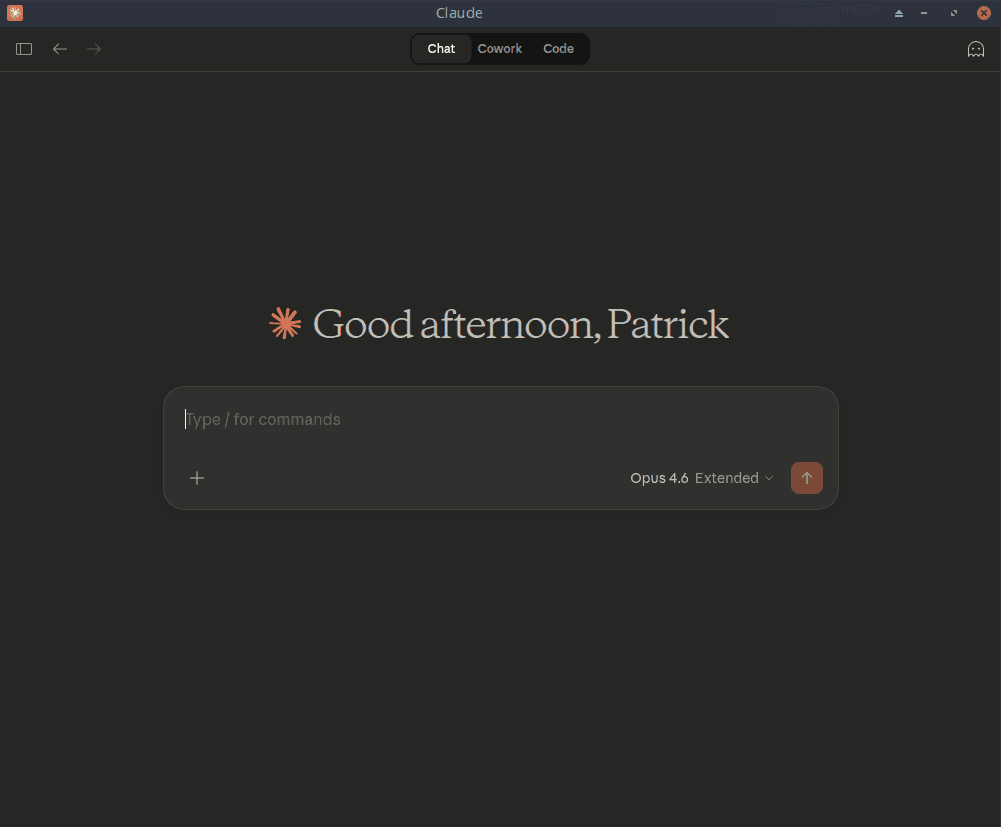
Claude Chat
The main Chat tab running natively on Linux.
Claude Code Integration
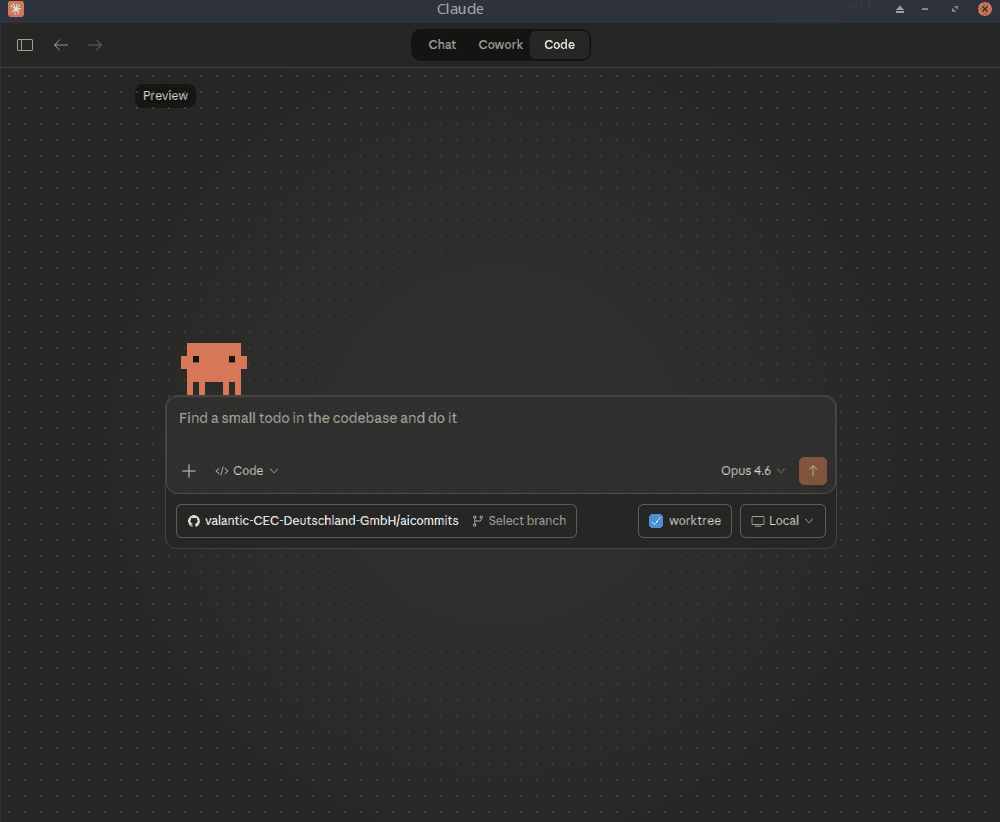
This package patches Claude Desktop to work with system-installed Claude Code on Linux.
 | 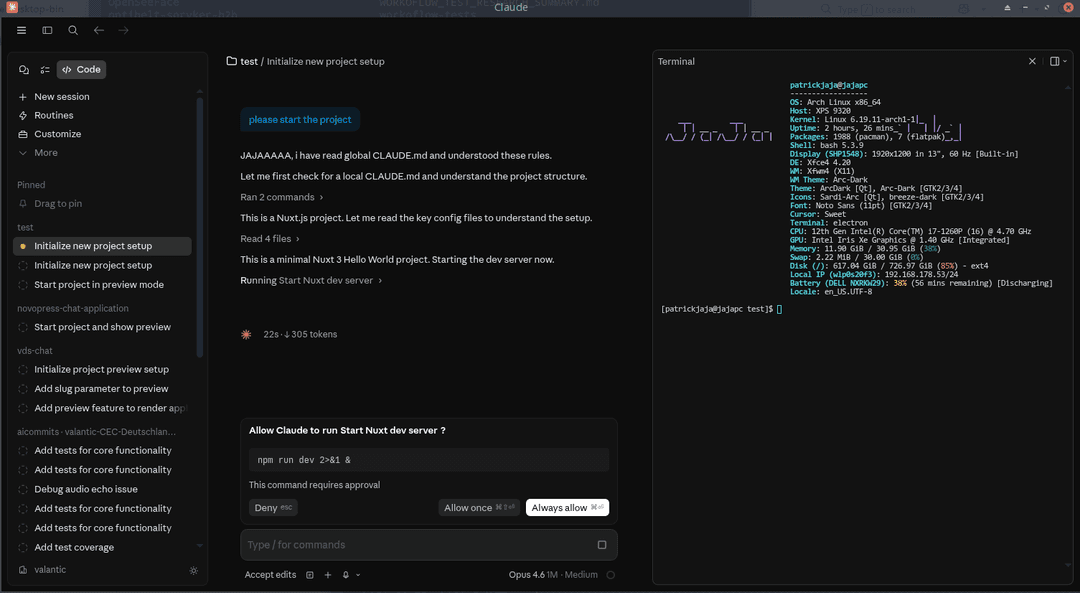 |
| Code Preview | Integrated Terminal |
To use Claude Code (and Cowork) features, install the CLI following the official setup guide, then verify it's accessible:
which claude # e.g. ~/.local/bin/claude, /usr/bin/claude, /usr/local/bin/claude
The patch auto-detects claude in /usr/bin, ~/.local/bin, and /usr/local/bin.
Cowork Integration
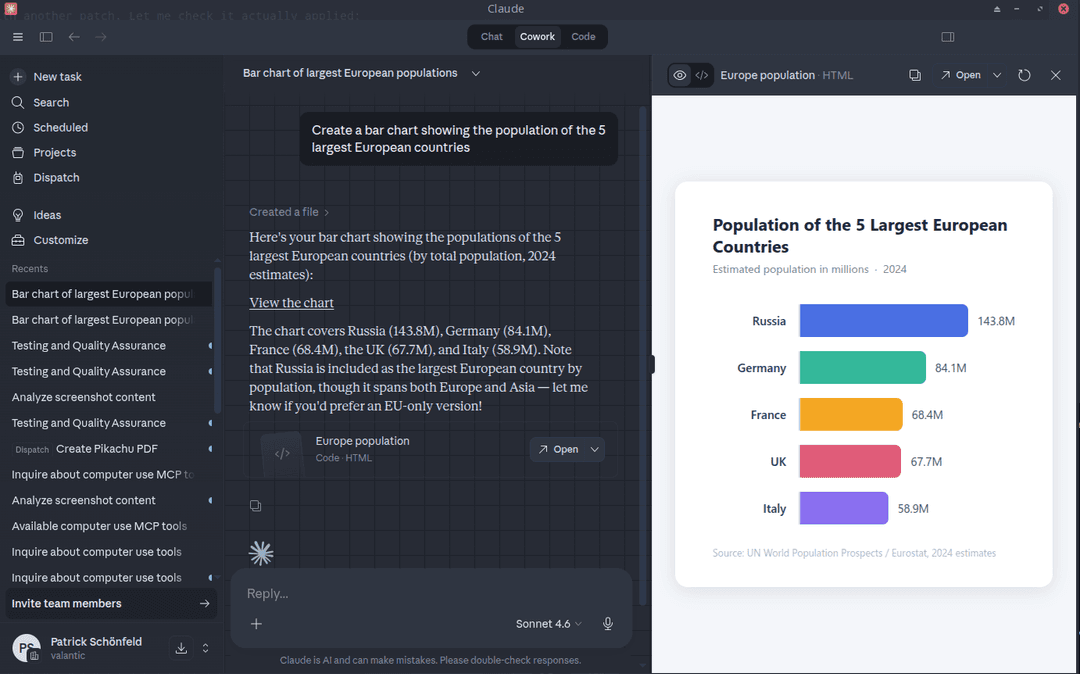
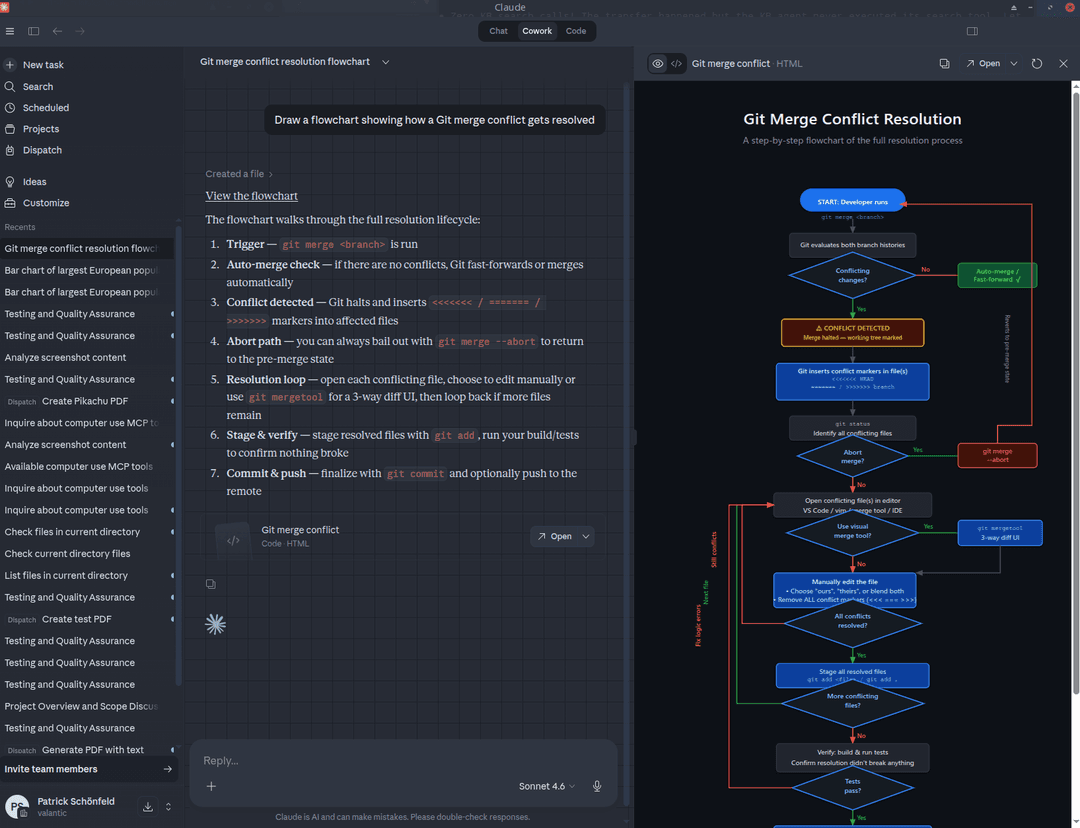
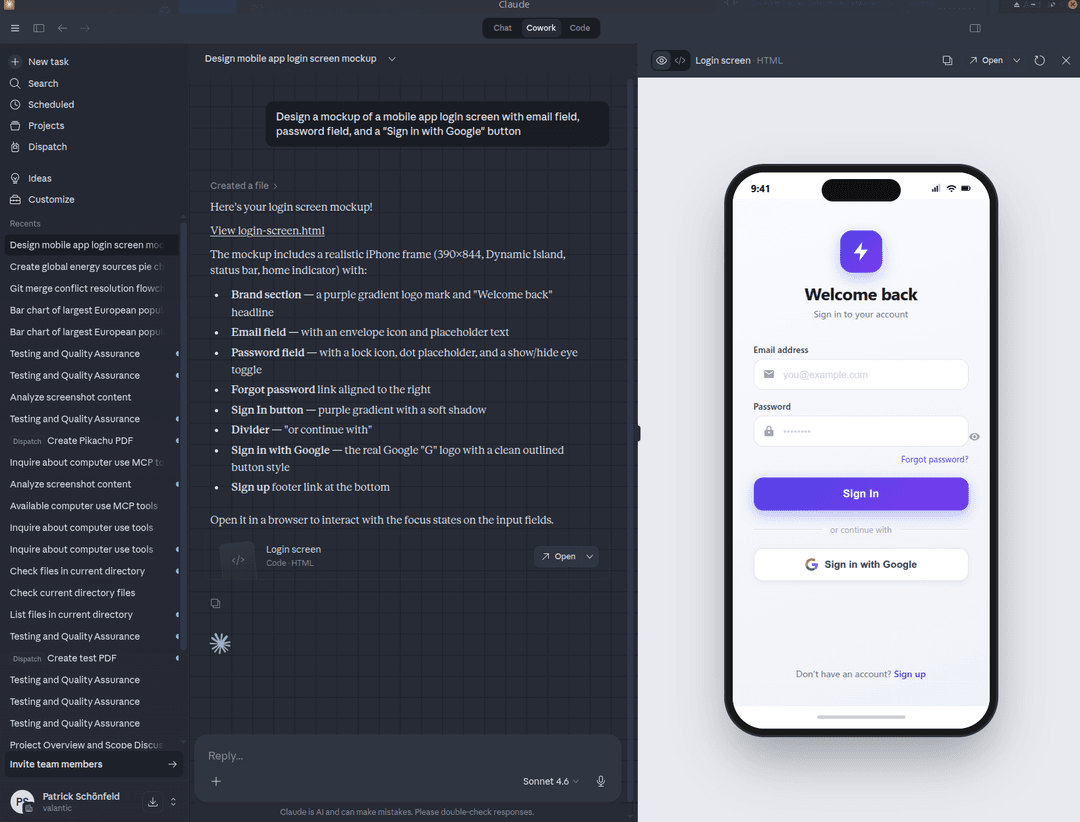
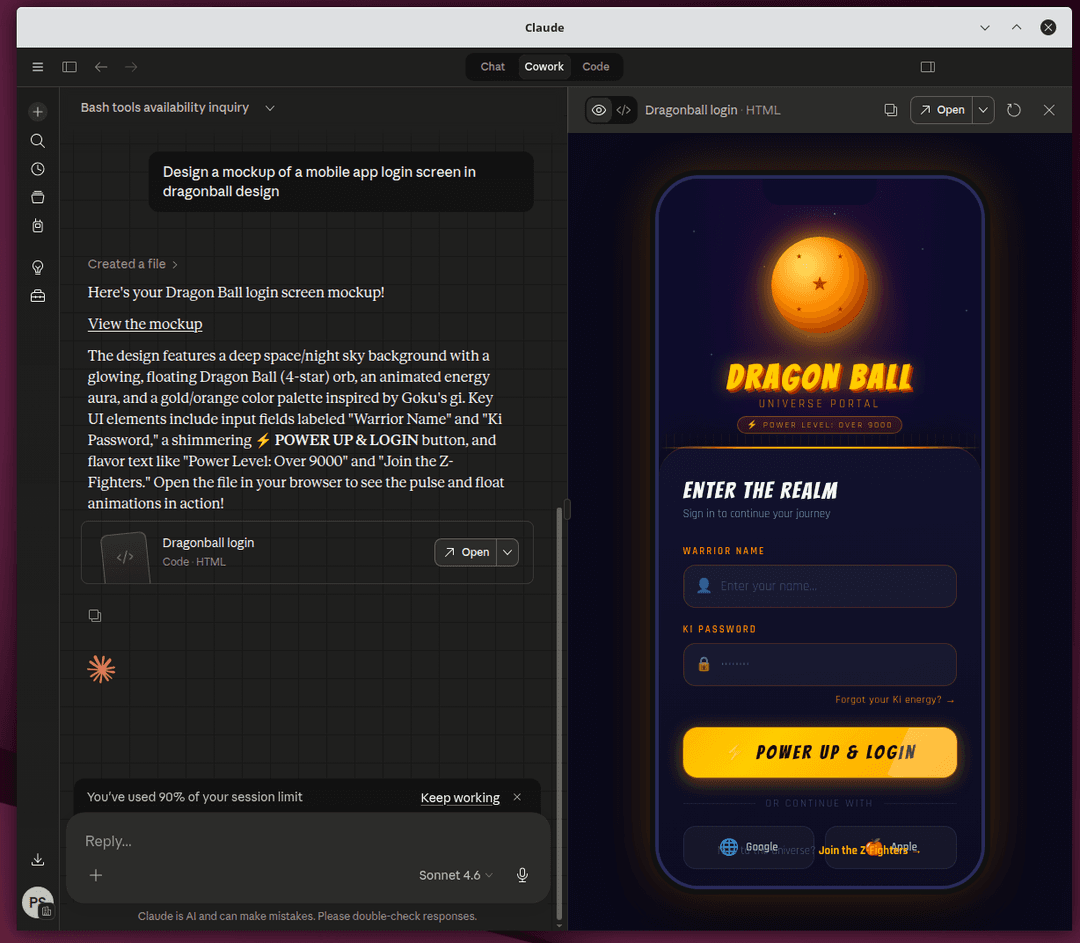
Cowork is Claude Desktop's agentic workspace feature. This package patches it to work on Linux using claude-cowork-service, which offers two backends:
- Native (default) - runs commands directly on your host. Zero VM overhead, ideal for most users.
- KVM (experimental) - runs sessions inside a QEMU/KVM virtual machine, matching the sandboxed execution model of macOS and Windows. See the KVM Backend docs for prerequisites and setup.
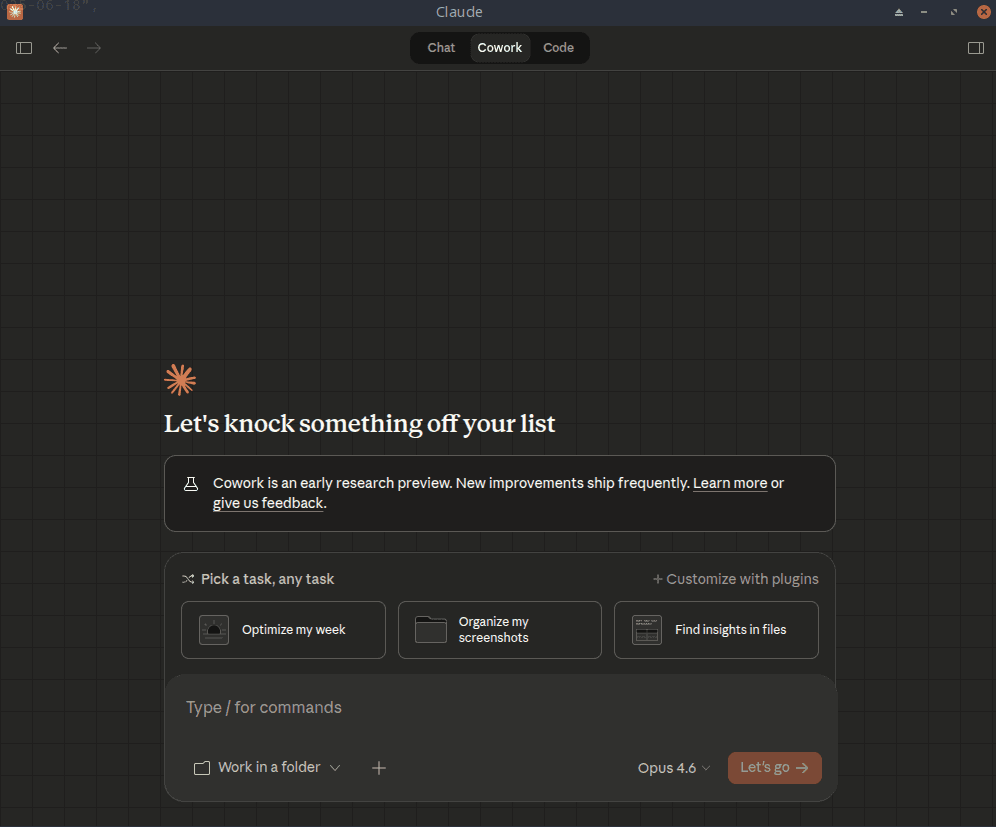
 |  |  |  | 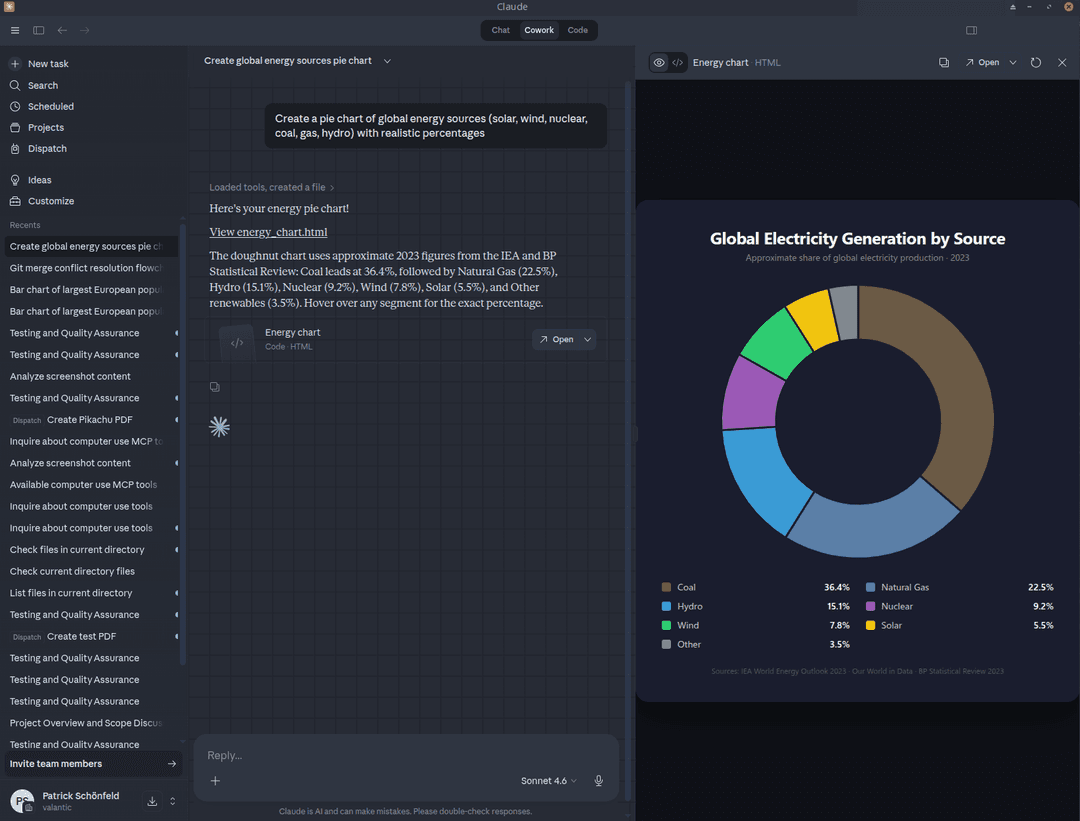 | 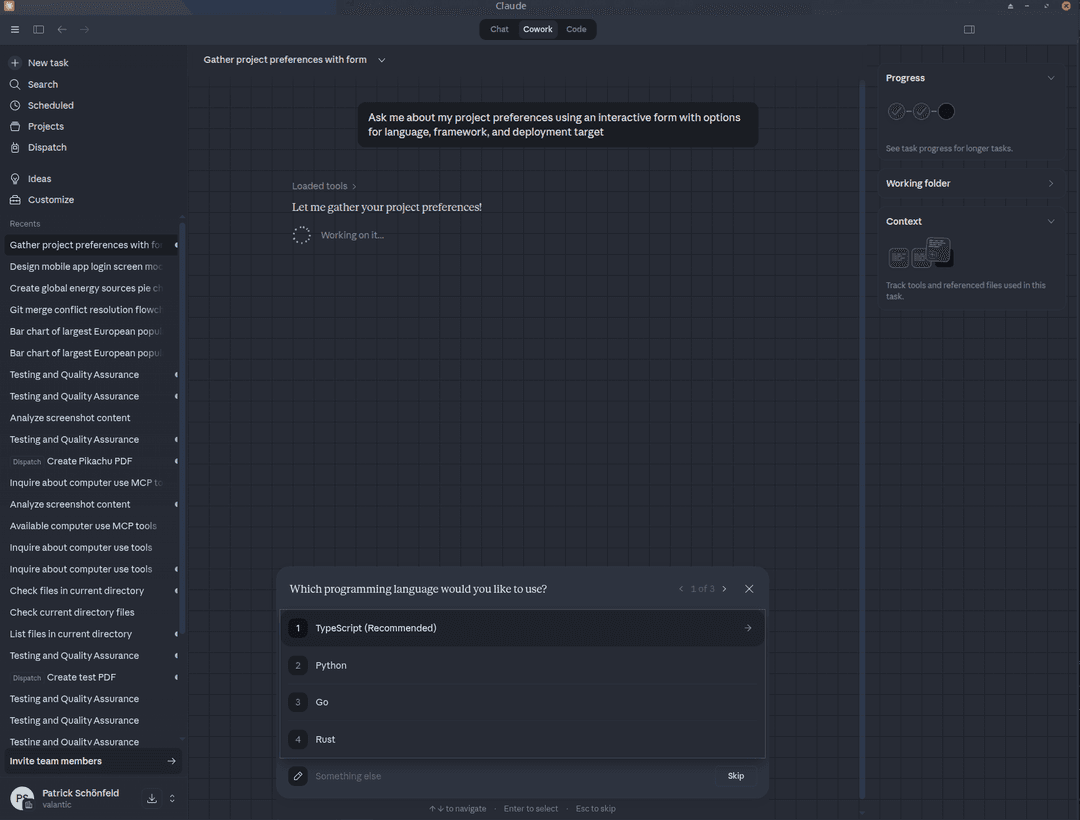 |
Live Artifacts
Live Artifacts are persistent HTML pages stored within Cowork sessions that can pull live data from connected MCP tools (Jira, GitLab, HubSpot, Trello, etc.). They persist across sessions and can be starred for quick access.
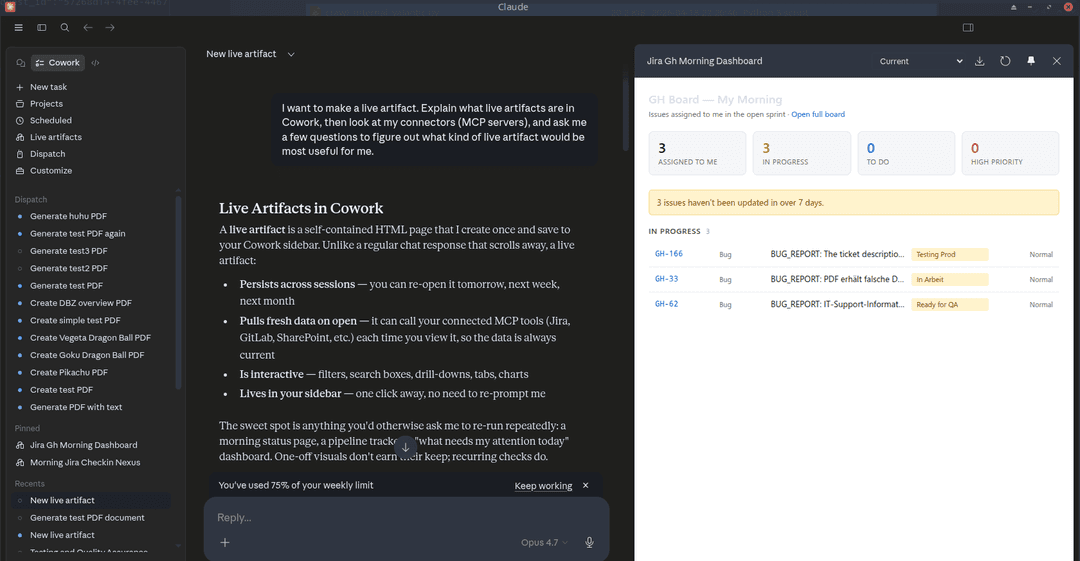
Requires Claude Code CLI (see above) and claude-cowork-service. See its Installation section for distro-specific instructions (APT, DNF, AUR, Nix, or binary install).
CoworkSpaces
CoworkSpaces organizes folders, projects, and links into named Spaces for Cowork sessions. On macOS/Windows this is handled by the native backend (@ant/claude-swift). On Linux, fix_cowork_spaces.nim provides a full file-based implementation:
- Stores spaces in
~/.config/Claude/spaces.json - Full CRUD: create, update, delete spaces with folders, projects, and links
- File operations: list folder contents, read files, open with system handler
- Auto-memory directories per space (
~/.config/Claude/spaces/<id>/memory/) - Integrates with the SpaceManager singleton so
resolveSpaceContextworks for sessions
The Spaces UI is rendered by the claude.ai web frontend (loaded in the BrowserView).
Computer Use
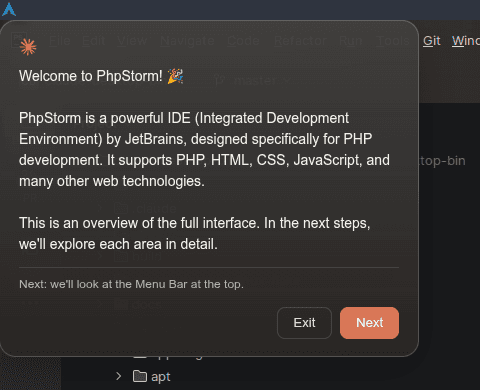
Claude Desktop includes a built-in Computer Use MCP server with 27 tools for desktop automation - screenshot, click, type, scroll, drag, clipboard, and more. The learn tools (learn_application, learn_screen_region) generate interactive overlay tutorials that walk through any application's UI elements step by step.
Example prompt: "Can you use computer use MCP to explain me the PhpStorm application?"
| Welcome | Menu Bar | Toolbar |
|---|---|---|
 | 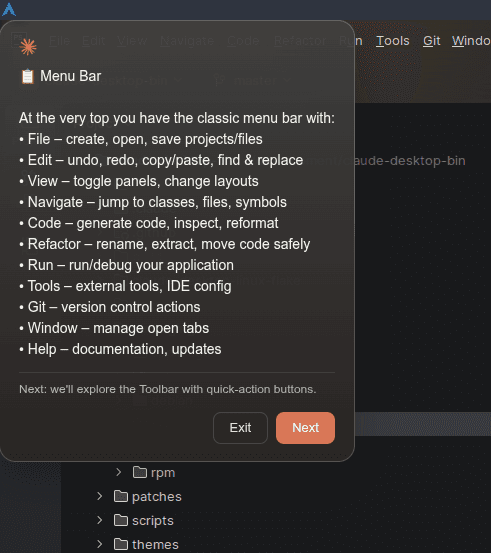 | 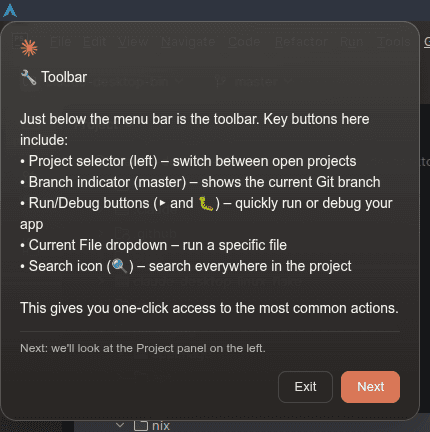 |
How it works on Linux: Upstream Computer Use is macOS-only - gated behind process.platform==="darwin" checks, macOS TCC permissions, and a native Swift executor. The patch (fix_computer_use_linux.nim) removes the platform gates, routes both upstream executor factories (createDarwinExecutor and the Cowork/agent platform-executor factory) to it, bypasses TCC with a no-op {granted: true}, and injects a Linux executor that auto-detects your session type and uses the right tools. See Optional Dependencies for the full package list.
App discovery for the teach/learn overlay scans .desktop files from /usr/share/applications, ~/.local/share/applications, and Flatpak directories. Each app is registered with multiple name variants (full name, first word, exec basename, icon name, .desktop filename) so the model can match apps flexibly (e.g., "Thunar" matches "Thunar File Manager").
Multi-monitor limitation: Computer Use on Linux is limited to the primary monitor only. Screenshots, clicks, and the teach overlay all target the primary display. On multi-monitor setups, coordinates are translated from display-relative to absolute screen space automatically. Use switch_display if you need to target a different monitor for screenshots/clicks, but the teach overlay always appears on primary.
Teach overlay on Linux: Since Electron's setIgnoreMouseEvents(true, {forward: true}) is broken on X11, the teach overlay stays fully interactive (buttons are clickable) but blocks clicks to apps behind it during the guided tour. The tooltip repositions between steps via anchorLogical coordinates pointing to UI elements.
See CLAUDE_BUILT_IN_MCP.md for the full tool reference and Optional Dependencies for required packages.
Hardware Buddy (Nibblet)
Hardware Buddy connects Claude Desktop to a Nibblet - a small M5StickC Plus BLE companion device that displays animated characters reflecting Claude's session state (idle, busy, celebrating, etc.).
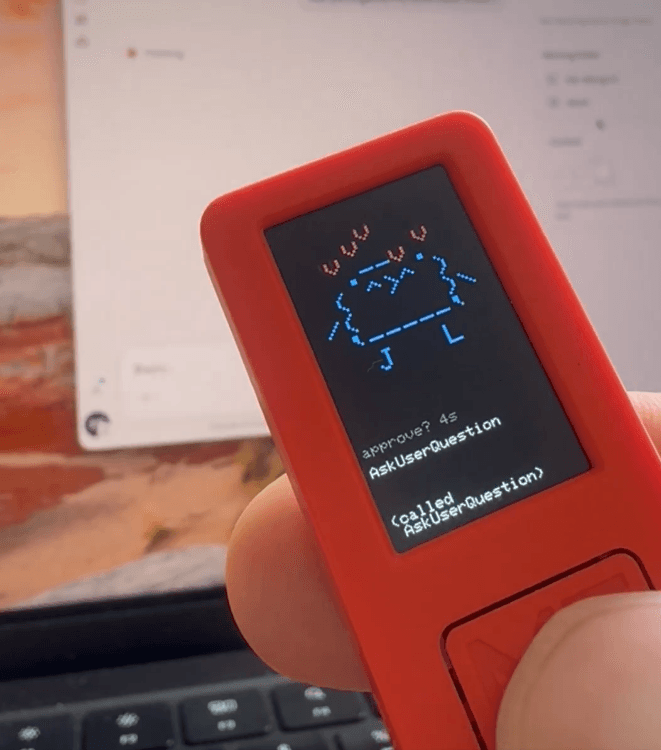
Access: App menu → Developer → Open Hardware Buddy…
How it works on Linux: The BLE communication uses standard Web Bluetooth (Nordic UART Service) via Electron's Chromium layer - no native code needed. Upstream gates the feature behind a server-side flag. The patch (fix_buddy_ble_linux.nim) forces the flag on Linux so the BLE bridge initializes.
Prerequisites: bluez package (sudo pacman -S bluez bluez-utils / sudo apt install bluez). Bluetooth must be enabled (bluetoothctl power on).
Pairing: Power on the Nibblet - it advertises as Nibblet-XXXX. Click "Open Hardware Buddy…" from the Developer menu, then pair from the buddy window. The device shows session activity, token counts, and responds to permission prompts with physical button presses.
Third-Party Inference
Run Claude Desktop entirely on your own inference backend - no personal claude.ai login required. Point it at Vertex AI (Google Cloud), Bedrock (AWS), Azure AI Foundry (Microsoft), or any Anthropic-compatible gateway (LiteLLM, Portkey, in-house proxies) via a single /etc/claude-desktop/enterprise.json. Chat, Code, and Cowork all work in 3P mode on Linux today.
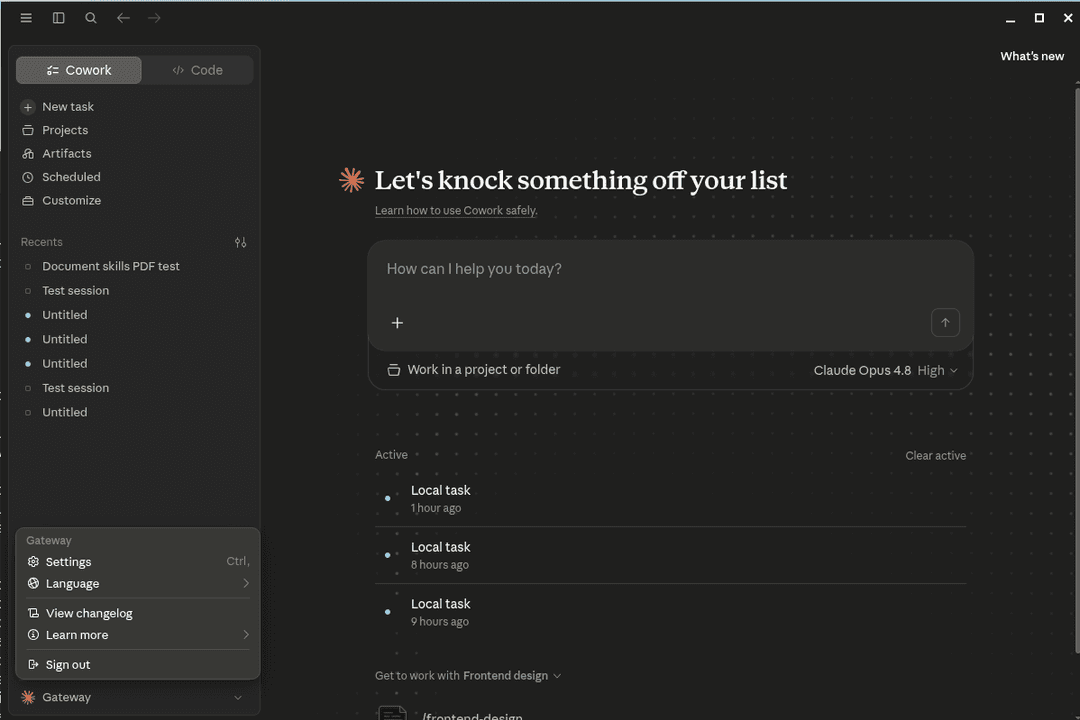
⚡ Try it in 5 minutes. Stand up a local LiteLLM proxy, drop one JSON file, and you're running Cowork against your own endpoint - see the LiteLLM quickstart. No claude.ai account, no cloud setup.
Enable the tabs you want. The Chat, Cowork, and Code surfaces are managed-config toggles (all scopes:["3p"]): add "betaFeaturesEnabled": true, "chatTabEnabled": true, "coworkTabEnabled": true, and "isClaudeCodeForDesktopEnabled": true to your enterprise.json. For a full feature-complete file - surfaces, governance, telemetry, sandbox, usage limits - see the maximum enterprise.json.
The in-app configuration window (Developer → Configure Third-Party Inference) lets you manage connection settings, provider credentials, model lists, sandbox/workspace restrictions, MCP servers, telemetry, usage limits, and org-plugin directories - all from a single UI. Configurations export as .mobileconfig (macOS MDM), .reg (Windows GPO), or plain JSON (Linux /etc/claude-desktop/enterprise.json).
How it works on Linux: The upstream SPA requires two patches on Linux (fix_ion_dist_linux.nim): a mountPath entry for the Linux org-plugins directory, and a platform ternary fix. Only the file manager label text was upstreamed in v1.8089.0. The main process reads enterprise config from /etc/claude-desktop/enterprise.json and passes platform: "linux" to the frontend.
Enterprise deployment: Use MDM (macOS), GPO (Windows), or drop a JSON file at /etc/claude-desktop/enterprise.json (Linux) to manage fleet-wide configuration.
Switching back to personal (1P) login: deployment mode is sticky - the first 3P launch persists "deploymentMode": "3p" to ~/.config/Claude-3p/claude_desktop_config.json, so simply deleting enterprise.json leaves the app stuck in (now credential-less) 3P mode. Launch once with the upstream flag claude-desktop --boot-1p-once, or set that key to "1p" for a permanent switch. See docs/third-party-inference.md → Common gotchas.
Linux setup walkthrough: The official 3P docs only cover macOS and Windows. See docs/third-party-inference.md for a Linux-specific guide - the in-app wizard route (requires Developer Mode), a headless enterprise.json route with worked Vertex AI (gcloud ADC) and LiteLLM gateway examples, and how to verify it via main.log.
enterprise.json key reference (official Anthropic docs):
- Configuration reference - the full key reference (
inferenceProvider,inferenceModels+anthropicFamilyTier, gateway/Bedrock/Vertex/Foundry keys, credential helpers, sandbox & security profiles). - Enterprise configuration for Claude Desktop - managed-preferences overview for fleet rollouts.
- Extend Claude Cowork with third-party platforms - note: on 3P (Bedrock/Vertex/Azure/gateway), MCP connectors, plugins, and skills work differently than on Claude Enterprise. Cowork skills come from a local store rather than your claude.ai org, so document skills (
/pdf,/docx, …) must be installed locally.
Custom Themes
Recolor the whole app - chat, sidebar, Code/Cowork, dialogs, Quick Entry - by overriding CSS variables, injected into every window via Electron's insertCSS(). Each theme is dual light/dark: it ships a light and a dark palette, and the app's own toggle (Settings -> Appearance) picks the matching one live. Every built-in is contrast-checked (WCAG AA).
Quick start - just pick a theme, no extra config needed:
echo '{"activeTheme": "mario"}' > ~/.config/Claude/claude-desktop-bin.json
# Restart Claude Desktop, then toggle Settings -> Appearance for light/dark
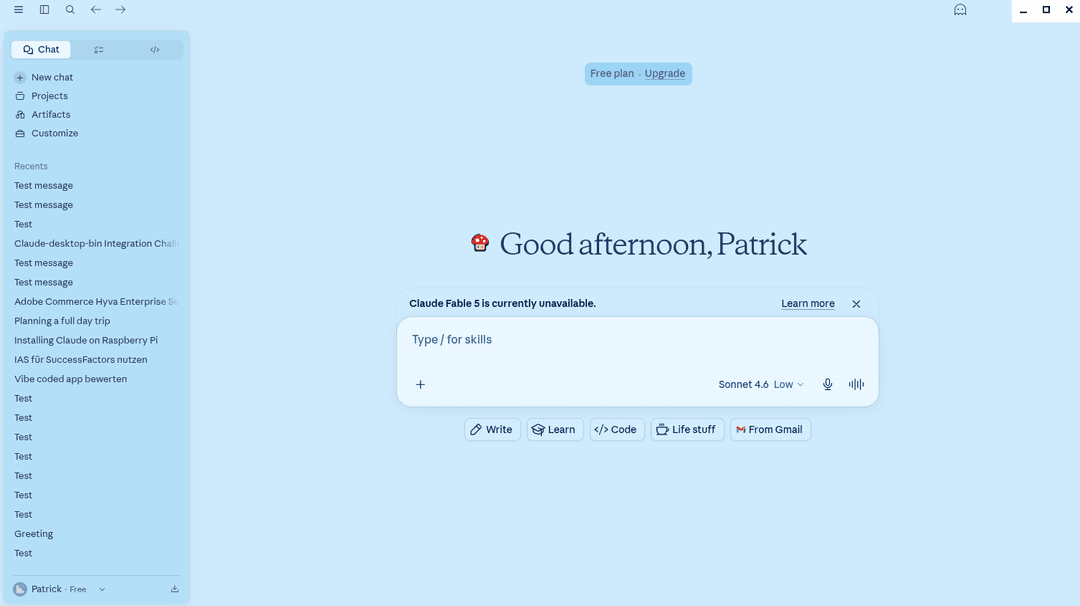
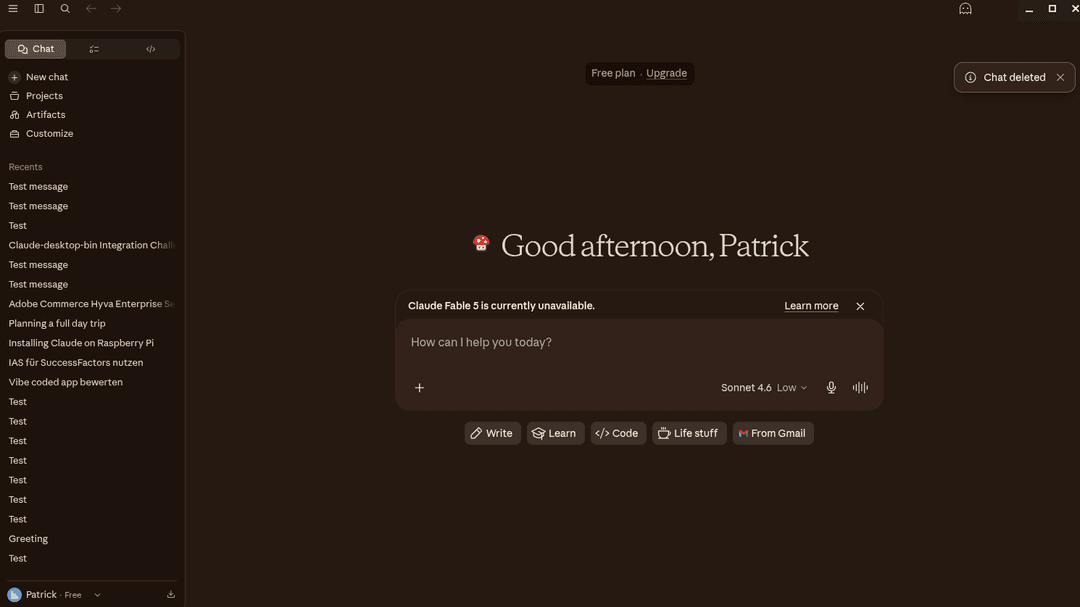
New: Mario theme
A full Nintendo-flavored theme with a light "overworld" and a dark "underground" variant - and the loading starburst is replaced with a bouncing mushroom spinner.
| Light (overworld) | Dark (underground) |
|---|---|
 |  |
Built-in themes
| Theme | Light variant | Dark variant | Spinner |
|---|---|---|---|
mario | sky-blue overworld | warm-brick underground | mushroom |
sweet | blush/lavender | deep purple, vivid pink (Sweet) | blossom |
nord (alias nordic) | Snow Storm | Polar Night (nordtheme.com) | snowflake |
catppuccin-mocha | Latte | Mocha (catppuccin.com) | cat |
catppuccin-macchiato | Latte | Macchiato | cat |
catppuccin-frappe | Latte | Frappe | cat |
catppuccin-latte | Latte | Mocha | coffee cup |
Each theme can also replace the loading glyph with a custom SVG (the spinner field), and inject raw customCss. See themes/README.md for the full guide: schema, CSS variable reference, contrast tips, and how to author your own theme.
Patches
The package applies several patches to make Claude Desktop work on Linux. Each patch is isolated in patches/ for easy maintenance:
| Patch | Purpose | Debug pattern |
|---|---|---|
add_feature_custom_themes.nim | CSS theme injection - 7 dual light/dark themes (mario, sweet, nord, catppuccin-*) + per-theme spinner reshape | Prepended IIFE, no regex |
claude-native.js | Linux stubs for @anthropic/claude-native (Windows-only module) | Static file, no regex |
enable_local_agent_mode.nim | Removes platform gates for Code/Cowork features, spoofs UA | rg -o 'function \w+\(\)\{return process\.platform.*status' index.js |
fix_0_node_host.nim | Fixes 4 sidecar runtime paths (MCP nodeHost, directMcpHost, shell-path-worker, transcript-search-worker) that join process.resourcesPath+"app.asar"; without this fix_locale_paths corrupts them into resources/locales/app.asar/... (remote MCP fails with ERR_MODULE_NOT_FOUND, issue #140) | rg -o 'process\.resourcesPath,"app.asar"' index.js |
fix_app_quit.nim | Uses app.exit(0) to prevent hang on exit | rg -o '.{0,50}app\.quit.{0,50}' index.js |
fix_asar_folder_drop.nim | Prevents app.asar from being misdetected as a folder drop on launch (#24) | rg -o 'filter.*\.asar' index.js |
fix_asar_workspace_cwd.nim | Redirects app.asar workspace paths to home directory (#24) | rg -o '__cdb_sanitizeCwd' index.js |
fix_browse_files_linux.nim | Enables openDirectory in file dialog (upstream macOS-only) | rg -o 'openDirectory.{0,60}' index.js |
fix_browser_tools_linux.nim | Enables Chrome browser tools - redirects native host to Claude Code's wrapper | rg -o '"Helpers".{0,50}' index.js |
fix_builtin_mcp_browser_env.nim | Forwards DISPLAY/Wayland/XDG/DBUS/BROWSER env to built-in MCP servers so OAuth (e.g. the M365 connector) can open a browser on Linux (#139) | rg -o '"HOME","LOGNAME","PATH","SHELL","TERM","USER".{0,40}' index.js |
fix_buddy_ble_linux.nim | Enables Hardware Buddy (Nibblet BLE device) - forces feature flag, uses Web Bluetooth via BlueZ | rg -o '2358734848.{0,50}' index.js |
fix_claude_code.nim | Detects system-installed Claude Code binary | rg -o 'async getStatus\(\)\{.{0,200}' index.js |
fix_cli_governor_memavailable.nim | Computes CliGovernor memory pressure from MemAvailable/MemTotal (/proc/meminfo) instead of Electron's free (= Linux MemFree, which excludes reclaimable page cache) - stops false [CliGovernor] memory pressure warnings on healthy systems; falls back to the upstream metric if the /proc read fails (#128) | rg -o 'getFreeMemoryRatio.{0,160}' index.js |
fix_computer_use_linux.nim | Enables Computer Use - removes platform gates, routes both executor factories to an injected Linux executor (portal+PipeWire/grim/GNOME D-Bus/spectacle/scrot, xdotool/ydotool) | rg -o '.{0,60}executor not implemented' index.js |
fix_computer_use_tcc.nim | Stubs macOS TCC permission handlers to prevent error logs | Prepended IIFE, UUID extraction |
fix_cowork_download_status_linux.nim | Suppresses the false VM-download banner and prevents background VM provisioning on Linux native mode (no VM image needed); leaves win/mac and Linux-KVM untouched. Gated on process.platform==="linux"&&!globalThis.__coworkKvmMode | rg -o 'getDownloadStatus\(\)\{return.{0,40}' index.js; rg -o 'setYukonSilverConfig\(.{0,60}' index.js |
fix_cowork_error_message.nim | Replaces Windows VM errors with Linux-friendly guidance | String literal match |
fix_cowork_font.nim | Applies the user's chat font preference to the Cowork tab on load (avoids default Serif) | Prepended dom-ready IIFE, no regex |
fix_cowork_linux.nim | Enables Cowork - VM client, Unix socket, bundle config, binary resolution | rg -o '.{0,50}vmClient.{0,50}' index.js |
fix_cowork_sandbox_refs.nim | Replaces VM/sandbox system prompts and tool descriptions with accurate host-system text | rg 'lightweight Linux VM|isolated Linux' index.js |
fix_cowork_first_bash.nim | Fixes first bash command returning empty output - events socket race condition | rg -o 'subscribeEvents' index.js |
fix_cowork_spaces.nim | File-based CoworkSpaces service (CRUD, file ops, events) | rg -o 'CoworkSpaces' index.js |
fix_cross_device_rename.nim | EXDEV fallback for cross-filesystem file moves | Uses .rename( literal |
fix_detected_projects_linux.nim | Enables detected projects with Linux IDE paths (VSCode, Cursor, Zed) | rg -o 'detectedProjects.{0,50}' index.js |
fix_disable_autoupdate.nim | Disables auto-updater (no Linux installer) | rg -o '.{0,40}isInstalled.{0,40}' index.js |
fix_dispatch_linux.nim | Enables Dispatch - forces bridge init, bypasses platform gate, forwards responses natively | rg -o 'sessions-bridge.*init' index.js |
fix_dock_bounce.nim | Suppresses taskbar attention-stealing on KDE/Wayland | Prepended IIFE, no regex |
fix_enterprise_config_linux.nim | Reads enterprise config from /etc/claude-desktop/enterprise.json | rg -o 'enterprise.json' index.js |
fix_imagine_linux.nim | Enables Imagine/Visualize - forces GrowthBook flag for inline SVG/HTML rendering | rg -o '3444158716' index.js |
fix_ion_dist_linux.nim | Adds Linux org-plugins mount path + platform ternary to ion-dist 3P config SPA | rg -o 'mountPath.{0,80}' ion-dist/assets/v1/*.js |
fix_locale_paths.nim | Redirects locale file paths to Linux install location (also handles index.pre.js if present) | Global string replace on process.resourcesPath |
fix_marketplace_linux.nim | Forces host-local mode for plugin operations (no VM); promotes $HOME-scoped CLI plugins to user scope so they appear under "Personal Plugins" | rg -o 'function \w+\(\w+\)\{return\(\w+==null.*mode.*ccd' index.js |
fix_native_frame.nim | Default: Windows-style integrated titlebar on Linux. Opt-out via CLAUDE_NATIVE_TITLEBAR=1 or --native-titlebar to restore the native GTK frame. Preserves Quick Entry. | rg -o 'titleBarStyle:process\.platform.{0,80}' index.js |
fix_native_frame_renderer.nim | Renderer companion to fix_native_frame. As of v1.13576 the fix is upstreamed (the main-window title-bar component returns null natively), so this patch is now a regression guard: it asserts the upstream null short-circuit still exists and fails the build loudly if a future release reintroduces the pointer-absorbing drag region. | rg -o '\{isMainWindow:\w+,.{0,80}return null' MainWindowPage-*.js |
fix_open_in_editor_linux.nim | Makes "Open in VS Code / Cursor / Zed / Windsurf" work in Local Code Sessions on Linux by replacing the macOS/Windows-only getApplicationInfoForProtocol calls with an xdg-based shim | rg -o 'getApplicationInfoForProtocol.{0,40}' index.js |
fix_process_argv_renderer.nim | Injects process.argv=[] in renderer preload to prevent TypeError | rg -o '.{0,30}\.argv.{0,30}' mainView.js |
fix_profile_url_routing.nim | Hooks shell.openExternal to write a per-profile auth-marker file before opening SSO URLs, so the system claude:// handler can route callbacks to the right profile | rg -o 'shell\.openExternal' index.js |
fix_profile_window_title.nim | Appends profile name to window title (Claude → Claude (work)) for named profiles | Prepended IIFE, page-title-updated listener |
fix_quick_entry_app_id.nim | Gives Quick Entry a distinct Wayland app_id so shell-extension users can blacklist it independently (#39); resets to per-profile app_id after Quick Entry closes | rg -o '.{0,30}BrowserWindow.*titleBarStyle.*hidden.{0,30}' index.js |
fix_quick_entry_cli_toggle.nim | Enables claude-desktop --toggle Quick Entry hotkey (~5-25 ms via Unix socket); per-profile socket path | rg -o 'QUICK_ENTRY.{0,80}' index.js |
fix_quick_entry_position.nim | Quick Entry opens on cursor's monitor (multi-monitor); position+focus retries gated to X11 only (Wayland: no jitter) | rg -o 'getPrimaryDisplay.{0,50}' index.js |
fix_quick_entry_ready_wayland.nim | Adds 100ms timeout to Quick Entry ready-to-show wait (Wayland hang fix; ready-to-show never fires for frameless transparent windows) | rg -o 'ready-to-show.{0,50}' index.js |
fix_quick_entry_wayland_blur_guard.nim | Guards Quick Entry blur-to-dismiss against spurious Wayland blur events | rg -o '.{0,30}blur.{0,30}null.{0,30}' index.js |
fix_read_terminal_linux.py | Removed in v1.2.234 - upstream now natively supports Linux | N/A |
fix_renderer_gone_suppressed_log.nim | Logs main-webview renderer deaths that upstream silently swallows (expected kills, killed/clean-exit reasons - a kernel OOM SIGKILL maps to killed, so OOM-killed renderers left no trace in main.log) (#128) | rg -o 'render process gone \(suppressed\).{0,60}' index.js |
fix_sensitive_dirs_linux.nim | Adds Linux entries (.local/share/keyrings, .pki, .config/autostart) to the sandbox sensitive-directories block list | rg -o '\.gnupg.{0,80}' index.js |
fix_startup_settings.nim | XDG autostart management for "Start at login" toggle; per-profile autostart files for named profiles | rg -o 'isStartupOnLoginEnabled.{0,50}' index.js |
fix_terminal_shell_linux.nim | Rewrites the hardcoded powershell.exe shell of the built-in agent/Cowork terminal to a platform-aware ternary ($SHELL → /bin/bash → /bin/sh off-Windows, the last for NixOS), so the PTY no longer dies with exit code 1 (#143) | rg -o '\{shell:"powershell\.exe".{0,20}' index.js |
fix_tray_dbus.nim | Prevents DBus race conditions with mutex and cleanup delay | rg -o 'menuBarEnabled.*function' index.js |
fix_tray_icon_theme.nim | Theme-aware tray icon (light/dark) | rg -o 'nativeTheme.{0,50}tray' index.js |
fix_tray_path.py | Removed - tray icon paths handled by fix_locale_paths.nim | N/A |
fix_updater_state_linux.nim | Adds version fields to idle updater state to prevent TypeError | rg -o 'status:"idle".{0,50}' index.js |
fix_utility_process_kill.nim | SIGKILL fallback when UtilityProcess doesn't exit gracefully | rg -o 'Killing utiltiy proccess' index.js |
fix_vm_session_handlers.nim | Global exception handler for VM session safety | Prepended IIFE with fallbacks |
fix_window_bounds.nim | Fixes BrowserView bounds on maximize/snap, Quick Entry blur | Injected IIFE, minimal regex |
When Claude Desktop updates break a patch, only the specific patch file needs updating. The debug pattern column shows the rg command to find the relevant code in the new version's index.js.
Automation
This repository automatically:
- Checks for new Claude Desktop versions daily
- Validates all patches in Docker before pushing to AUR
- Updates the AUR package when new versions are detected
- Creates GitHub releases for tracking updates
- Maintains proper SHA256 checksums
Patch Validation
The CI pipeline includes a test build step that validates patches before updating AUR:
- Docker Test Build - Runs
makepkgin anarchlinux:base-develcontainer - Pattern Matching Validation - Each patch exits with code 1 if patterns don't match
- Pipeline Stops on Failure - Broken packages never reach AUR users
- Build Logs Uploaded - Artifacts available for debugging failures
If upstream Claude Desktop changes break a patch:
- The pipeline fails with clear
[FAIL]output - Build logs show which pattern didn't match
- AUR package remains unchanged until patches are updated
Repository Structure
.github/workflows/- GitHub Actions for automationscripts/- Build and validation scriptspatches/- Linux compatibility patchespackaging/- Debian, RPM, AppImage, and Nix build scriptsPKGBUILD.template- AUR package template
Multiple Profiles
Run several Claude Desktop instances side by side, each logged in to a different account, with fully isolated state for both Desktop and the Claude Code CLI it spawns. Useful for separating work from personal accounts, juggling multiple SSO tenants, or testing config changes without affecting your main install.
Quick start
# One-time setup per profile
claude-desktop --create-profile=work
claude-desktop --create-profile=personal

# Launch (any of these work)
claude-desktop-work                     # via the per-profile shortcut
claude-desktop --profile=work           # via the system launcher
# …or click "Claude (work)" in your application menu

# Inspect / clean up
claude-desktop --list-profiles
claude-desktop --delete-profile=work    # removes entry points; user data preserved
The default (unnamed) profile
If you don't pass --profile= and don't launch through a named-profile shortcut, you get the default profile. This is byte-identical to a single-instance install - same ~/.config/Claude, same ~/.claude, same sockets, same WM identity. Nothing changes for users who never touch profiles. There's no --create-profile=default step, and it's always available implicitly.
You can run the default profile alongside any number of named profiles. The default profile is just "the profile with no suffix."
Named profiles
A named profile is created with --create-profile=NAME. Names must match [a-zA-Z0-9_-]+ and the literal default is reserved.
--create-profile installs three things in your home directory (no root needed):
| Path | Purpose |
|---|---|
~/.local/lib/claude-desktop/claude-NAME | Per-profile Electron binary (real file - see Why a copy? below). Sibling files in the same directory are symlinks back to the system install. |
~/.local/bin/claude-desktop-NAME | Convenience launcher - symlink to the system launcher. Pulls profile name from its own basename. |
~/.local/share/applications/claude-NAME.desktop | Application-menu entry titled Claude (NAME). Exec= is absolute so it works regardless of $PATH. |
User data is not created until first launch - that way --create-profile is cheap and reversible.
Selecting a profile at launch
Three equivalent ways:
claude-desktop --profile=NAME [args…]- explicit flag.CLAUDE_PROFILE=NAME claude-desktop [args…]- env var, useful for scripts.claude-desktop-NAME [args…]- invocation via the per-profile shortcut. The launcher infersNAMEfrom its own basename.
All three set the same CLAUDE_PROFILE env var, which propagates through Electron, the cowork hooks, and any spawned claude (Code CLI) child processes.
Subcommands honor the active profile: claude-desktop-work --toggle toggles work's Quick Entry, claude-desktop --profile=work --diagnose reports work's paths.
What's isolated
| Resource | Default profile | Named profile (e.g. work) |
|---|---|---|
| Electron userData (login, logs, settings, custom themes, spaces.json, PipeWire portal token) | ~/.config/Claude | ~/.config/Claude-work |
| Claude Code config (settings, projects, sessions, plugins) | ~/.claude | ~/.claude-work |
| Quick Entry toggle socket | $XDG_RUNTIME_DIR/claude-desktop-qe.sock | …/claude-desktop-qe-work.sock |
| systemd user scope (cgroup, portal identity) | app-claude-PID.scope | app-claude-work-PID.scope |
| WM_CLASS / Wayland app_id (taskbar grouping, Alt-Tab) | claude | claude-work |
| XDG autostart entry ("Start at login") | ~/.config/autostart/claude.desktop | …/claude-work.desktop |
The cowork VM-service socket ($XDG_RUNTIME_DIR/cowork-vm-service.sock) is shared across all profiles. The cowork-svc daemon is a stateless process spawner - per-profile isolation comes from the spawned claude CLI inheriting CLAUDE_CONFIG_DIR=~/.claude-NAME and using the per-profile --plugin-dir (which derives from Electron's app.getPath("userData")). One daemon serves them all.
Plugins, MCP servers, login state, and chat history from one profile are not visible in another. This is by design - profiles are independent installs, not views into shared state.
Removing a profile
claude-desktop --delete-profile=work
Removes the three entry points listed above. User data is preserved at ~/.config/Claude-work and ~/.claude-work. Delete those manually if you really want a clean slate:
rm -rf ~/.config/Claude-work ~/.claude-work
SSO and URL routing
The claude:// URL scheme is registered system-wide and points to the default profile's .desktop file. Without extra work, an SSO callback initiated from a named profile would launch the default profile and consume the auth token there, breaking login. claude-desktop-bin uses a small two-part routing mechanism to fix this:
// faq
What is claude-desktop-bin?
Unofficial Linux packages for Claude Desktop AI assistant with automated updates.. It is open-source on GitHub.
Is claude-desktop-bin free to use?
claude-desktop-bin is open-source under the MIT license, so it is free to use.
What category does claude-desktop-bin belong to?
claude-desktop-bin is listed under mcp-servers in the Claudeers registry of Claude-compatible tools.
// embed badge

[](https://claudeers.com/claude-desktop-bin)
// retro hit counter

[](https://claudeers.com/claude-desktop-bin)
// reviews
// guestbook
// related in MCP Servers
 🔓
🔓f.k.a. Awesome ChatGPT Prompts. Share, discover, and collect prompts from the community. Free and open source — self-host for your organization with complete…
 🔓
🔓A cross-platform desktop All-in-One assistant for Claude Code, Codex, OpenCode, OpenClaw, Gemini CLI & Hermes Agent. Only official website: ccswitch.io
 🔓
🔓🪨 why use many token when few token do trick — Claude Code skill that cuts 65% of tokens by talking like caveman
 🔓
🔓An open-source AI agent that brings the power of Gemini directly into your terminal.