
claude-deck
Mission control for your Claude Code sessions — a 100% local dashboard to see, resume, and drive every session on your Mac.
Install with your AI
Paste into Claude Code, Cursor, or any agent — it reads the repo and wires the tool into your project.
Install and set up claude-deck (release-binary project) into my current project.
Found on https://claudeers.com/claude-deck
Repo: https://github.com/tachodril/claude-deck
Homepage/docs: —
Detected install method: release-binary → inspect the README
Category: devtools. Platforms: cli, api, web.
Read the repo's README for exact setup and env vars, then install it and wire it into my project.

Claudeers Health Verdict:
slowing; community-verified: false. Confirm the source before running anything.
Grab the latest release asset from GitHub.
# download a build from https://github.com/tachodril/claude-deck/releases
git clone https://github.com/tachodril/claude-deck
// compatibility
| Platforms | cli, api, web |
|---|---|
| Operating systems | — |
| AI compatibility | claude |
| License | MIT |
| Pricing | open-source |
| Language | CSS |
ClaudeDeck
Mission control for your Claude Code sessions.
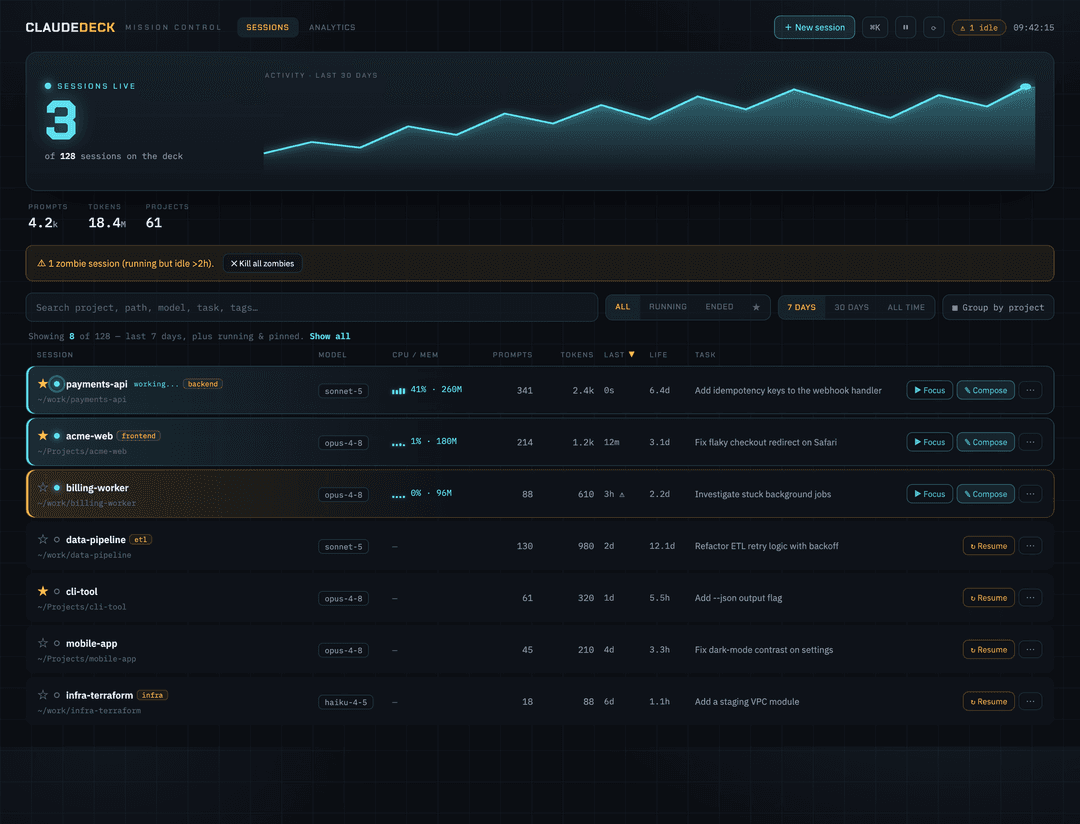
One local dashboard for every Claude Code session on your Mac — live or long-finished. See what's running right now, jump back into any session, drive a live session straight from your browser — send it a prompt, switch its model, compact or kill it — and see how you actually use Claude Code.
100% local. No account, no cloud, no telemetry. ClaudeDeck only reads the files Claude Code already writes on your machine.
Why
Run Claude Code enough and the sessions pile up — dozens of them, scattered across dozens of directories. Which are still running? What was that one from Tuesday doing? Where did you leave off? There's no single place to look. ClaudeDeck is that place: one screen for every session, past and present — and a remote control for the live ones.
What you can do
🛰 See everything, live
- Every session, ever — auto-ingested from
~/.claude. Zero setup, nothing to configure. - Named sessions — shows each session's title (your Claude Code rename, or its auto-generated one), so multiple sessions in the same directory are easy to tell apart.
- Live status — which sessions are running right now (real process detection), which are idle, which ended — with live CPU & memory for each.
- Working right now — spot which running sessions are actively processing a prompt (a live pulse + equalizer) versus just sitting idle at the prompt.
🎮 Drive a session from your browser
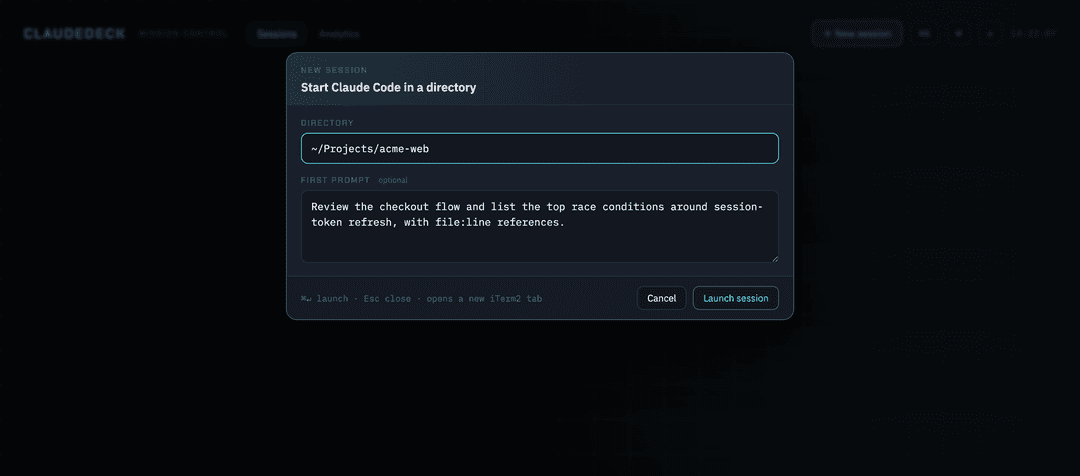
- Start a new session — pick a directory (created for you if it doesn't exist), optionally seed a first prompt, and choose its permission mode; ClaudeDeck opens a new iTerm2 tab running
clauderight there. - Compose & send — write or paste a long prompt (or a
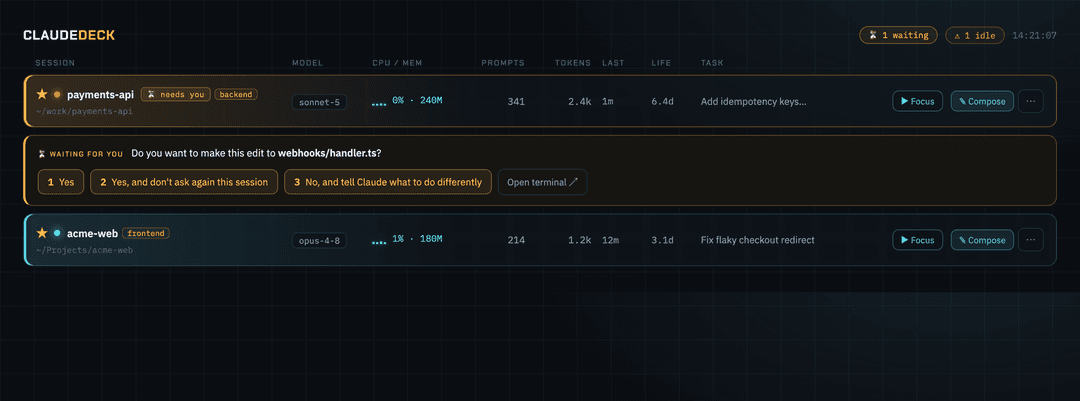
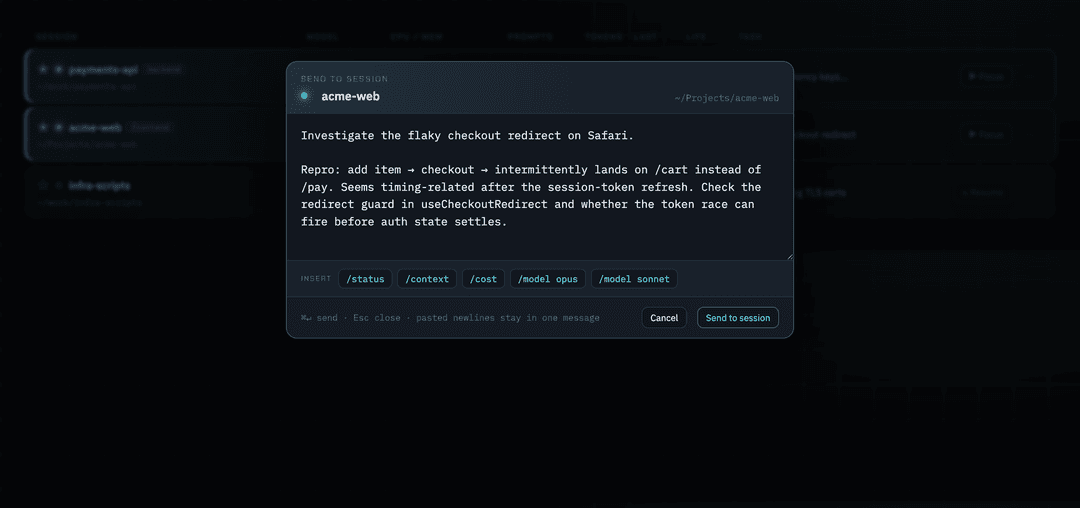
/command) in a proper editor and fire it straight into a running session. Multi-line arrives as one message — far nicer than wrestling with it in the terminal. - Answer when a session needs you — ClaudeDeck flags any session sitting on a yes/no permission prompt, shows you the exact question, and lets you pick the answer right from the dashboard.
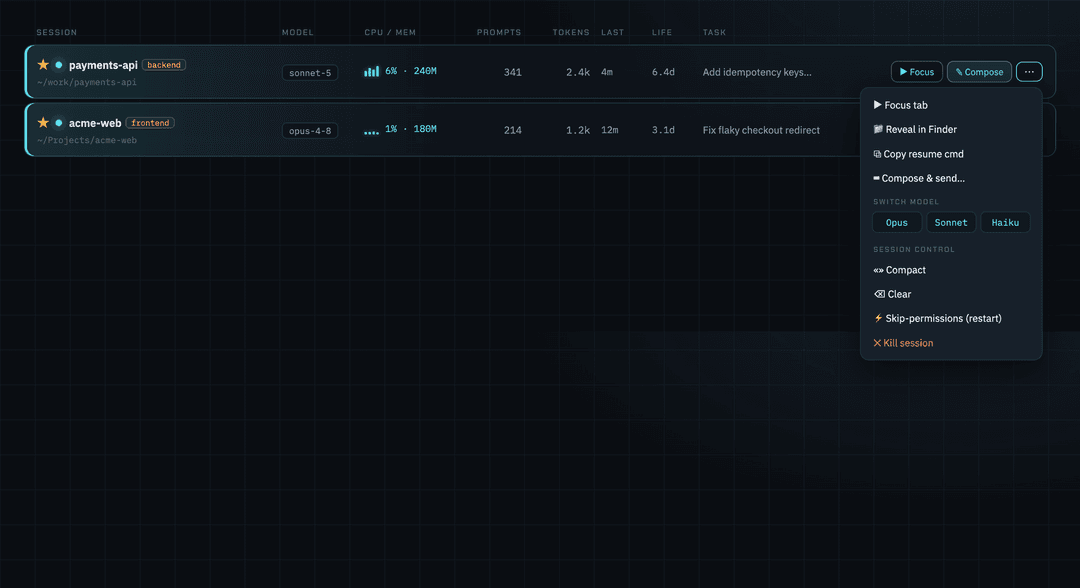
- Act on a running session — switch its model, compact, clear, toggle skip-permissions on or off (it detects the current mode and restarts in place), or kill it, right from its row.
- Jump & resume — one click to focus a running session's iTerm2 tab, or reopen a finished one with
claude --resume— choosing the permission mode (keep the session's own, force prompts, or skip them) right as you resume.
📊 Understand your usage
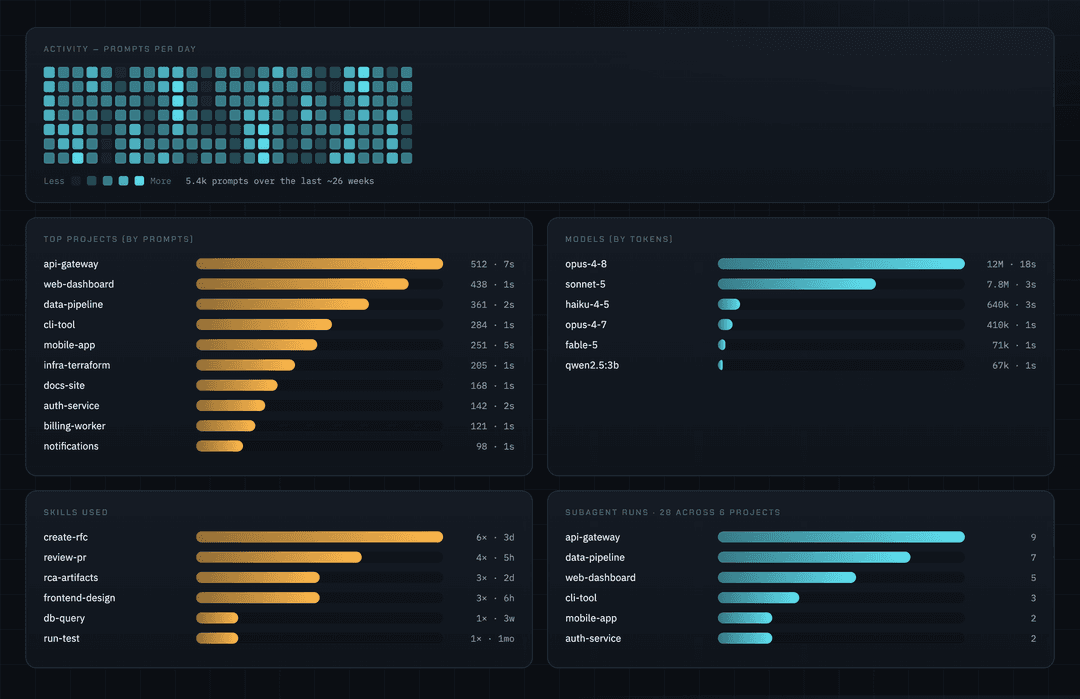
- Analytics — an activity heatmap, top projects, and model & token usage. Spot your patterns at a glance.
- Skills & subagents — which skills you lean on and how often you run subagents, derived automatically from your session files. No hooks, no setup.
🗂 Stay organized
- Favorites ★, tags & notes, group-by-project, and a ⌘K palette to jump to any session instantly.
- Zombie sweep — spot and bulk-kill sessions that are running but idle.
A closer look
Know when a session needs you — and answer without leaving the dashboard.
| Compose & send into a running session | Act on a session from its row |
|---|---|
 |  |
| Start a session in any directory | See how you use Claude Code |
 |  |
Quick start
Install (prebuilt binary):
curl -fsSL https://raw.githubusercontent.com/tachodril/claude-deck/main/install.sh | bash
claude-deck              # opens http://localhost:7420
Or build from source (needs Go 1.24+ and Node 18+):
git clone https://github.com/tachodril/claude-deck && cd claude-deck
./build.sh               # builds the React frontend + the Go binary
./claude-deck            # opens http://localhost:7420
Always-on (auto-start at login, restart on crash)
So you never have to launch it by hand:
claude-deck --install-service
That installs a macOS launchd agent that keeps ClaudeDeck running at
http://localhost:7420 — starting at login and restarting if it crashes. Turn it
off any time with claude-deck --uninstall-service.
How it works
A single Go binary embeds the React UI and serves it on localhost. On startup it ingests your session data into a local SQLite DB (~/.claude/claude-deck.db) and computes live status from running processes.
| Data | Source |
|---|---|
| prompts, last-used, first prompt | ~/.claude/history.jsonl |
| model, tokens, git branch, messages | ~/.claude/projects/**/*.jsonl transcripts |
| running status, CPU, memory | live pgrep/lsof/ps (computed per request) |
| favorites, tags, notes | ClaudeDeck's own SQLite table (survives re-ingest) |
Your favorites/tags/notes are the only original data ClaudeDeck stores; everything else is derived from Claude Code's own files.
The Task column (optional)
Each session can show a one-line task summary. If a session's directory has a .claude/context/CURRENT_TASK.md, ClaudeDeck uses it; otherwise it falls back to the session's first prompt. To get curated task summaries (with a tiny hook or by hand), see docs/TASK_TRACKING.md.
Requirements
- macOS with iTerm2 (the focus/resume actions drive iTerm2 via AppleScript; the rest of the dashboard works regardless).
- Claude Code installed (so
~/.claudeexists).
Development
make dev     # frontend hot-reload (Vite), proxies /api → :7420
make build   # production build
make help    # all targets
Stack: Go (backend, SQLite) + React + TypeScript + Vite + Tailwind (embedded via go:embed).
Contributing
Contributions are very welcome — and genuinely appreciated. 🙌 Issues, feature ideas, docs fixes, and pull requests are all fair game; you don't need permission to open one.
Especially welcome:
- Terminal drivers beyond iTerm2 (Terminal.app, Ghostty, WezTerm, …) and Linux support
- New dashboard features and UX polish
- Parser robustness across Claude Code versions
Getting started: make dev runs the frontend with hot-reload (see Development); make build produces the binary. Keep PRs focused and describe the change — and if you're planning something big, open an issue first so we can align. First-time contributors are more than welcome.
Thanks for helping make ClaudeDeck better!
License
MIT — see LICENSE.
// faq
What is claude-deck?
Mission control for your Claude Code sessions — a 100% local dashboard to see, resume, and drive every session on your Mac.. It is open-source on GitHub.
Is claude-deck free to use?
claude-deck is open-source under the MIT license, so it is free to use.
What category does claude-deck belong to?
claude-deck is listed under devtools in the Claudeers registry of Claude-compatible tools.
// embed badge

[](https://claudeers.com/claude-deck)
// retro hit counter

[](https://claudeers.com/claude-deck)
// reviews
// guestbook
// related in Developer Tools
 🔓
🔓The agent harness performance optimization system. Skills, instincts, memory, security, and research-first development for Claude Code, Codex, Opencode, Curs…
 🔓
🔓Makes your AI agent think like the laziest senior dev in the room. The best code is the code you never wrote.
 🔓
🔓Use Garry Tan's exact Claude Code setup: 23 opinionated tools that serve as CEO, Designer, Eng Manager, Release Manager, Doc Engineer, and QA
 🔓
🔓AI coding assistant skill (Claude Code, Codex, OpenCode, Cursor, Gemini CLI, and more). Turn any folder of code, SQL schemas, R scripts, shell scripts, docs,…