
claude-console
Multi-project console for Claude Code, built as a Claude Code mod: live project board, trigger actions, quota batteries; executes via Claude Code or Codex.
Install with your AI
Paste into Claude Code, Cursor, or any agent — it reads the repo and wires the tool into your project.
Install and set up claude-console (claude-plugin project) into my current project.
Found on https://claudeers.com/claude-console
Repo: https://github.com/SaM-runtime/claude-console
Homepage/docs: —
Detected install method: claude-plugin → /plugin install claude-console@SaM-runtime/claude-console
Category: plugins. Platforms: cli, api, desktop, web, mobile.
Read the repo's README for exact setup and env vars, then install it and wire it into my project.

Claudeers Health Verdict:
active; community-verified: false. Confirm the source before running anything.
/plugin marketplace add SaM-runtime/claude-console
/plugin install claude-console@SaM-runtime/claude-console
git clone https://github.com/SaM-runtime/claude-console
// compatibility
| Platforms | cli, api, desktop, web, mobile |
|---|---|
| Operating systems | — |
| AI compatibility | claude |
| License | MIT |
| Pricing | open-source |
| Language | TypeScript |
claude-console
A console for keeping several projects moving from inside Claude Code. One pane shows where every project stands and who it is waiting on; decisions are pressed, dispatch is one button, and Git, PR, CI and quota sit beside them, so you don't switch windows.
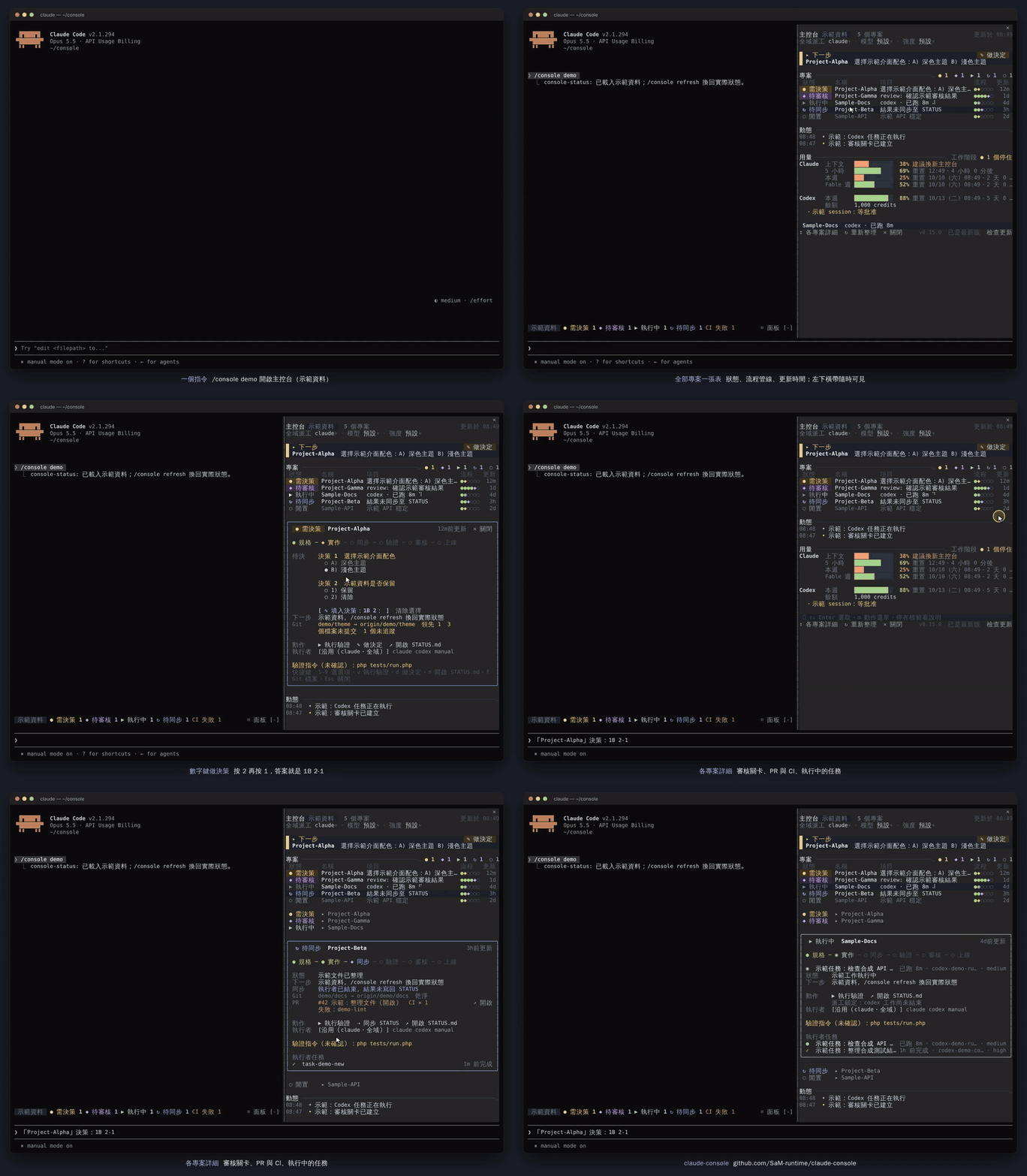
▶ Watch the 45-second demo (MP4) · 繁體中文
The real screen of Claude Code 2.1.294 with console-status 0.15.0 in a terminal (captured frame by frame with tmux, then encoded), showing /console demo data; the captions and mouse pointer were added afterwards.
Try the demo
claude plugin marketplace add SaM-runtime/claude-console
claude plugin install console-status@claude-console
Run /console demo in any Claude Code session to see the whole pane without a registry; /console refresh goes back to real state. To connect your own projects, see Configure.
Features
- Every project in one table. One row per project: its state (
●decision needed,◆awaiting review,▶running,↻needs sync,○idle), a six-step pipeline (spec → build → sync → verify → review → release), when it was updated, and a Git summary. The next-step card on top names the one thing to handle now; with the pane closed, the band above the prompt still counts each state. See Project actions and Pipeline and project mode. - Decisions are pressed, not typed. Every option in a card can be pressed; with the action menu open, number keys answer the decisions in order (
2then1reads1B 2-1) and Backspace takes the last pick back.✎ 填入決策or✎ 做決定puts the answer in the prompt; Enter sends it. - One-button actions. Verify, sync STATUS, continue to the next step, review a gate, open STATUS.md: right-click or
mopens the action menu, and every action has a single-key shortcut. When an executor finished without writing the CARD back, the console dispatches one sync by itself (autoSync) and shows its progress step by step. An executor that stopped to ask you is answered from the console (↩ 回覆執行者), and the way on waits in the prompt box as a dim suggestion: Tab, then Enter (suggestNext). - Your choice of executor. Claude Code background agents by default; Codex for everything or per project, with a fallback to Claude when Codex is unusable or low on quota. A prompt sent with a project selected carries an executor digest (what it was last doing, its last three tool calls, its last words), and the project card's 執行者 section shows the same. See Dispatch settings.
- Git, PR and CI without switching windows. Branch and ahead/behind, uncommitted line counts, stash, recent commits, a warning when the last fetch is old;
▸ 檔案opens the files grouped likegit status; the PR's review state and failing CI checks, with the band turning red on a CI failure. See Git, PR and CI. - Usage and cache. Claude's 5-hour, weekly and per-model limits and Codex's quota share one 用量 table, with an estimate of when the current pace runs out; the prompt cache's countdown, the cost of re-writing it once cold, and the last hit rate. See Usage pace and Prompt cache and cost.
- Guards. Commands that cannot be taken back (
rm -r, force pushes,git reset --hard,DROP TABLEand more) ask first; a tool call that failed twice with the same error is not tried a third time. See Command guard and Loop guard. - Only where you want it. By default only a session where you ran
/consoleruns the console (and again when it resumes); other sessions get the guards only, and a session inside a registered project switches to project mode. See Light sessions. - Updates from the pane. The footer shows the installed version; when a new one is out, press
⬆ 更新or run/console update. See Upgrade.
Every change, version by version, is in CHANGELOG.md.
How it works
claude-console is a local, multi-project Claude Code mod. One console session owns specification, supervision, and review gates across registered projects; the operator supplies decisions and performs the final release approval.
The console-status mod reads compact STATUS cards and managed executor state, then exposes trigger-style actions. Verification, dispatch, STATUS sync, and review start from one button and report their outcome in the activity feed. The panel never performs a release or formal-environment change.
Dispatch is selectable. claude is the default executor and uses Claude Code's native background agents, so it needs no Codex account. Choose codex to use Codex Companion when Claude quota is limited.
Panel refreshes query local files and CLIs, then update mod-owned managed-state records when observations change. Refresh itself does not request a model. A decision draft spends Claude quota only when the operator submits it. The current UI is Traditional Chinese.
Requirements
- Windows or macOS (macOS uses the bundled POSIX
shprobes; no PowerShell needed) - Claude Code 2.1.289 or later with mod support
- A project registry and one STATUS file per registered project
- For
executor: codexonly: Node.js, Codex Companion and a Codex account. Windows probes need PowerShell and the Codex desktop app; macOS probes need thecodexCLI onPATH(Homebrew prefixes are added automatically)
Install
claude plugin marketplace add SaM-runtime/claude-console
claude plugin install console-status@claude-console
For this checkout:
claude plugin marketplace add .
claude plugin install console-status@claude-console
Marketplace management is covered by the official plugin marketplace documentation.
Configure
claude plugin configure accepts a JSON object whose values are single-line strings. Unspecified options retain their current values.
@'
{
  "registryPath": "C:\\Projects\\console\\projects-scope.md",
  "dispatchSettingsPath": "~/.claude/handoffs/dispatch.json",
  "claudeSessionsPath": "~/.claude/handoffs/claude-sessions.json",
  "executor": "claude",
  "defaultModel": "",
  "defaultEffort": "",
  "companionScript": "",
  "companionStateDir": "",
  "companionStateRoots": "",
  "modelsCachePath": "~/.codex/models_cache.json",
  "codexFallback": "ask",
  "codexMinQuotaPercent": "10"
}
'@ | claude plugin configure console-status@claude-console --values-stdin
| Key | Purpose | Default |
|---|---|---|
registryPath | Markdown registry mapping names to STATUS files | ~/.claude/handoffs/projects-scope.md |
dispatchSettingsPath | Shared executor, model, and effort file | ~/.claude/handoffs/dispatch.json |
claudeSessionsPath | Managed Claude session mapping | ~/.claude/handoffs/claude-sessions.json |
executor | Fallback executor when settings are missing or invalid | claude |
defaultModel / defaultEffort | Fallback model settings; empty uses the executor's native default | Empty |
companionScript | Codex Companion script used by executor: codex; empty or stale paths auto-resolve to the newest installed Codex plugin | Empty |
companionStateDir | Legacy companion state root, also passed to Codex preflight | System Temp codex-companion directory |
companionStateRoots | JSON array encoded as a string; overrides Codex job roots | Plugin data first, then legacy Temp |
modelsCachePath | Codex model and effort cache | ~/.codex/models_cache.json |
codexFallback | What to do when Codex is unusable: ask, claude, or off | ask |
codexMinQuotaPercent | Codex quota (percent remaining) below which the fallback applies | 10 |
gitProbe | on: each project's Git state (branch, uncommitted, unpushed) plus its pull request and CI checks through gh; git: local Git only; off: neither (see Git, PR and CI) | on |
commandGuard | ask: an irreversible shell command asks you first (see Command guard); deny: refuse them; off: no guard | ask |
loopGuard | on: a tool call that fails twice with the same arguments and the same error tells the model not to try a third time (see Loop guard); off: no note | on |
cacheHint | on: show the console's prompt-cache countdown and re-write cost (see Prompt cache and cost); off: hide | on |
cacheTtl | auto (the TTL the API reports in the session transcript's usage; 5 minutes until one is seen), 5m or 1h | auto |
cacheWritePrice | USD per million cache-write tokens for the estimate; empty uses the model's list price | Empty |
autoSync | on: when finished executor work left the CARD behind (待同步), the console dispatches one sync by itself, once per job, and never retries one that fails or writes nothing. off: only the 同步 button syncs | on |
suggestNext | on: the way on (a decision, a reply to an executor that asked, a gate, a sync, a continue) waits in the prompt box as a dim suggestion, Tab to take (see Tab for the next step); off: leave the box to Claude Code's own suggestions | on |
activation | auto: only a session where you ran /console runs the console, and it starts again when that session resumes; other sessions get the command guard only (see Light sessions). always: every session | auto |
projectMode | auto: a session opened inside a registered project switches to project mode (see Pipeline and project mode); off: always the multi-project console | auto |
Paths beginning with ~ expand on Windows, macOS, and Linux. Run /reload-plugins or start another Claude Code session after plugin configuration changes. See the registry example.
Dispatch settings
The canonical file is ~/.claude/handoffs/dispatch.json (dispatchSettingsPath). It holds the global executor, model, and effort, plus optional per-project overrides:
{
  "executor": "claude", "model": "", "effort": "",
  "projects": {
    "D:/Projects/api": { "executor": "codex", "model": "", "effort": "high" },
    "D:/Projects/legacy-portal": { "executor": "manual" }
  }
}
The 0.1 flat file without projects keeps working unchanged. When dispatch.json is missing, the mod reads the legacy codex-dispatch.json next to it (read-only; a legacy file without executor means codex). Every write goes to dispatch.json.
Per-project executor
Each project resolves its executor in this order:
- Pane override:
projects["<root>"]indispatch.json. Keys are project roots; Windows drive and UNC paths match case-insensitively. - Registry: the optional
Executorcolumn of the registry table (claude,codex,manual, or blank). Registries without the column parse as before. - Global: the
executorfield.
Model and effort follow the same chain. A project whose executor differs from the global one does not inherit the global model and effort, because those values belong to the other executor.
manual means the panel never dispatches that project: Sync and Continue are hidden, the card shows a handoff note, and CARD, verification, decisions, and gates still work.
In the expanded project card and the right-click menu, the 執行者 row offers 沿用 (inherit, naming what it inherits and from where), claude, codex and manual; one press picks one, and the current choice is bracketed. The pane updates at once; the refresh that follows runs in the background. /console project executor|model|effort <value|inherit> <project name> sets the same fields, and /console project lists the effective settings.
A project may hold jobs from both executors (after an executor change or a Claude fallback). Job listing merges both executors for every project; any running or queued job from either executor marks the project RUNNING and blocks a second dispatch.
The executor, model, and effort controls beneath the panel title are plain Buttons. A press spreads that setting's choices out on the line below, with the current one in brackets and 預設 for the executor's own default; pressing a choice writes the file and shows a toast, and pressing the current one, ✕ or the label again closes the line. Efforts follow the chosen model. Without a readable Codex model cache the model line offers only 預設 and the current model, and says to use /console model <name>. The same Buttons render on mobile without Client support. Settings apply to the next dispatch; each running task keeps its requested values.
Commands show or set the same values:
/console executor
/console executor claude
/console model
/console model <name>
/console effort <level>
Use /console model "" or /console effort "" to restore the selected executor's default. A missing, malformed, or unreadable file falls back to executor, defaultModel, and defaultEffort.
Sync model
同步 STATUS only writes the CARD and its history, so it can run on a cheaper model than the work itself. Nothing is set by default: until you choose one, a sync uses the same model and session as any other dispatch. Set it per executor, because Claude and Codex accounts have different models:
{
  "executor": "claude", "model": "opus", "effort": "high",
  "sync": { "claude": { "model": "haiku" }, "codex": { "model": "luna", "effort": "low" }, "session": "fresh" },
  "projects": { "D:/Work/Beta": { "sync": { "session": "resume" } } }
}
- Model names are free text: write whatever your account offers. A blank field falls back to the normal dispatch's model or effort, and a project's
syncfields win over the global ones. session:freshstarts a new small session that reads STATUS.md,git log/git statusand the executor digest, and is told to write only what those show.resumecontinues the project's session, as before. Left out, a Claude sync with its own model goesfresh(a cheap model resuming the long session would re-cache all of it at the new model's price), and Codex stays onresume, because the next continue's--resume-lastwould pick up a fresh sync's thread instead of the work's. A row whose executor stopped to ask always resumes that session.- Every sync on its own model says so: the accepted notice reads
(用 haiku・新 session)and the 同步 lineclaude(haiku・新 session) 寫回中. If the sync model fails to launch, the console syncs again at once with the normal model and tells you; if a sync on it fails or ends without writing the CARD, a toast says so. In both cases later syncs use the normal model until you set the sync model again. - The pane's
同步模型control beneath the title picks the sync model of the global executor (同派工clears it);新 sessionfollows it when a sync will start one, and its choices line names the executor, e.g.同步模型(claude)./console sync-model [claude|codex] <name>,/console sync-effort [claude|codex] <level>and/console sync-session fresh|resumeset the same fields;""clears one, and/console sync-modelalone shows them.
executor: claude
This is the default. It uses native Claude Code background agents and does not require Codex Companion or a Codex account.
The mod keeps a project-to-session mapping and the latest 20 managed job records per project in claudeSessionsPath. A first task starts in native background mode with the project as its working directory; later tasks resume the mapped full session ID. Local help from Claude Code 2.1.289 documents --bg, --resume, and --continue. The mod uses --bg with a unique --name, confirms the returned short ID through the agents list, and uses the saved full session ID for resume. It does not use --continue --bg, because that combination selects the most recent session for the working directory instead of the explicitly managed session.
claude agents --json --all --cwd <project-root> supplies active and completed agents. The mod accepts only background agents whose cwd exactly matches the project, uses their short id, full sessionId, name, state, status, and waitingFor, and reads output with claude logs <id>. A launch must resolve by its unique name to exactly one full session UUID (the existing UUID when resuming) before the mapping is saved; an ambiguous launch stays unresolved and blocks another dispatch. A later refresh can recover a uniquely named launch. Blocked or waiting agents remain running, and an absent agent does not imply completion. The local sample showed working and blocked states with busy, idle, and waiting statuses; the documented terminal states done, failed, and stopped end the managed job.
The sessions file is mod-owned state. Malformed content fails closed instead of discarding the saved session identity. Writes are serialized inside one mod process, so keep one console process as its writer; simultaneous writes from separate processes are not guaranteed atomic. Claude dispatch adds no permission-bypass flag and inherits the normal Claude Code permission flow. A background agent that finished its turn on a question is answered from the console with ↩ 回覆執行者 (see Project actions); attach to one that waits on a permission prompt to handle the approval.
Model Buttons offer the CLI aliases fable, opus, sonnet and haiku; /console model <name> also accepts a free-form value. Effort options are low, medium, high, xhigh, and max. Empty values leave both choices to Claude Code.
Claude Code's agent view is the upstream interface for inspecting and controlling background agents. The CLI reference owns current command and flag behavior; this mod stores only the managed session identity needed to continue a project.
executor: codex
Use this optional executor when Claude quota is limited. Configure companionScript and ensure Codex Companion can reach its account before dispatching.
Codex model order comes from models_cache.json (models[].slug). Efforts use supported_reasoning_levels[].effort, falling back to low, medium, high, and xhigh. An unavailable cache leaves the current values visible; set a model with /console model <name>. Empty model or effort values omit their flags and use Codex defaults.
Jobs are read from ~/.claude/plugins/data/codex-openai-codex/state before the legacy Temp root. Duplicate IDs use the newest updatedAt; the state timestamp is the fallback, and ties keep the first root. Override the list with, for example, "companionStateRoots": "[\"~/jobs/current\",\"~/jobs/legacy\"]". This setting does not change the Codex quota or preflight probes.
With the Codex executor selected, refresh runs the bundled companion and broker preflight on its probe interval. Quota comes from the newest locally available Codex record and may be stale. Dispatch acceptance only means the companion accepted the job. Completion and review still require STATUS evidence and the configured local verification.
Companion auto-resolve
When companionScript is empty, or the preflight reports the configured file MISSING (the Codex plugin installs each version into its own cache folder, so a pinned path goes stale after an update), the mod picks the newest semantic version among ~/.claude/plugins/installed_plugins.json install paths for codex@openai-codex and ~/.claude/plugins/cache/openai-codex/codex/<version>/scripts/codex-companion.mjs that actually contains the script. The footer shows the path in use, marked 自動選用, with a warning when the configured path was stale.
Quota and broker fallback
Before each Codex dispatch the mod checks the latest probes:
- the Codex quota battery reports less than
codexMinQuotaPercentremaining (lowest window), or - the preflight reports a stale broker for this project's workspace, the Codex app or broker missing, or the companion script missing.
A quota reading older than six hours is shown but treated as unknown; it never triggers the fallback by itself. Then:
codexFallback | Behavior |
|---|---|
ask (default) | Does not dispatch. A toast and the project card state why and offer ⇢ 改用 Claude 派工, which sends the same prompt to Claude. |
claude | Sends the same prompt to the Claude executor and records fallbackFrom: "codex" and the reason on the job. |
off | 0.1 behavior: always dispatch to Codex. |
Claude stand-in jobs show codex→claude in the task list. They use Claude's own model and effort only when the global executor is claude; otherwise Claude Code defaults.
CLAUDE.md snippet
Paste this into the user CLAUDE.md so a console that dispatches by hand follows the same file:
## Dispatch settings
Before dispatching to any executor, read ~/.claude/handoffs/dispatch.json
(if it is missing, read ~/.claude/handoffs/codex-dispatch.json; never write it).
- Global: "executor" (claude | codex), "model", "effort".
- Per project: "projects"["<project root>"] may set "executor"
  (claude | codex | manual), "model", "effort". Match the root case-insensitively
  on Windows. Precedence: projects entry > registry Executor column > global.
- Pass each nonempty model/effort as one --model / --effort argument; omit empty ones.
- "manual" means: never dispatch that project; prepare a handoff for the user instead.
STATUS cards
Each STATUS file has one machine-readable block delimited by <!-- CARD --> and <!-- /CARD -->. Keep it to ten lines or fewer. The parser recognizes the Traditional Chinese keys in the template, including 更新, 狀態, 驗證, 等使用者, 下一步, and 關卡.
Set 關卡 to 無, spec:…, review:…, or release:…. Unknown nonempty gate text also blocks continuation. A practical local path for a Git project is .console/STATUS.md, excluded through that project's .git/info/exclude when it should remain local.
Project actions
The right-click menu (or m on the keyboard for the row under the cursor; Esc closes it) and expanded project cards expose the same actions. With the menu open, digit keys answer the pending decisions in order (2 then 1 reads 1B 2-1) and Backspace takes the last pick back; 做決定 and d fill the composer with the picks made so far. The menu shows the project's state and pipeline, what is running with its elapsed time and latest output line, and the CARD's decision, gate and next step. A dispatch that is blocked by running work is stated as 派工鎖定:… instead of a disabled button. Mobile uses card Buttons. Every trigger shows an immediate toast, shows elapsed seconds and rejects duplicate activation while running, then writes its result to the activity feed.
| Action | Availability | Behavior |
|---|---|---|
| ▶ Run verification | CARD has 驗證 | Runs in the project root with a five-minute timeout; no model quota |
| ⇢ Sync STATUS | SYNC, executor not manual | Dispatches the project's executor to update only CARD and history; autoSync: on does this by itself once per finished job |
| ⇢ Continue | IDLE, with a next step and no decision or gate; executor not manual | Requires a second press within six seconds (the pane shows the next step it will dispatch), then dispatches the project's executor |
| ↩ 回覆執行者 | A Claude executor finished its turn on a question to you; executor not manual | Fills the composer with /console reply <project> : write the answer and press Enter, and the console resumes the session that asked with your words as its prompt (plus the CARD rules a continue carries). No attaching. A permission prompt (等待批准) still needs attaching |
| ⇢ 改用 Claude 派工 | A Codex dispatch held by codexFallback: ask | Sends the same action to Claude, recorded as a fallback |
| ✎ Decide | 等使用者 is nonempty | Prefills a draft and one-shot project context; Claude runs only when submitted. In the expanded card each option is a pressable row, and ✎ 填入決策:1A 2B fills the picked answer |
| ⚑ Review gate / final review | Recognized spec, review, or release gate | Sends evidence to the console Claude; release review cannot execute release. The row unlocks when that turn ends, when the CARD moves past the gate, or after ten minutes with no review turn running |
| ↗ Open STATUS.md | Always | Requests the editor to open the file |
When a project is 待同步. A finished job counts as written back when the CARD was written at or after the minute the job started, or when the CARD's 更新 names the job (· job <id>). "Written" is the later of 更新 and the STATUS file's own modification time, so a CARD whose 更新 holds a guessed, UTC or unchanged time still counts once the file was saved after the job started. 更新 is read as 2030-01-05 09:05, 2030/1/5 9:05, with seconds, or with a zone (Z, +08:00). Only a job that ended without touching STATUS.md (or failed) leaves the project in 待同步. The console remembers which jobs it sent as syncs, so a sync is never itself taken for work that needs syncing.
Sync progress. A sync shows its steps on the project's 同步 line, ● 派工 ─ ◉ 執行 ─ ○ 寫回 STATUS (● done, ◉ under way, ○ not reached, ✕ stopped there), with the executor, its phase and the elapsed time underneath, and the band shows ↻ 同步:執行中 1 分 20 秒. It is done when the CARD's 更新 changes; a sync that ends without changing it says so (✕ 寫回 STATUS) instead of quietly leaving 待同步. The outcome stays on screen for five minutes and is also a toast. While a job or a sync runs, the console refreshes every 20 seconds instead of every minute.
With the menu open, one key runs an action on offer: v verify, s sync, c continue (still asks for the second press), r reply to the executor, d decide, g gate, o open STATUS.md, p open the pull request. The menu lists the keys that apply to that project; a key for an action not on offer does nothing.
Executor section. An expanded card (the action menu, or the focused project of ↧ 各專案詳細) has a 執行者 section with the same four lines as the executor digest. It is read when the card opens (執行者:讀取中… until then) and again only when the transcript changed; a card that is not open reads nothing.
Other sessions. Under 用量, 其他工作階段 lists Claude Code sessions in the console's folder or a registered project that wait on you: 等待批准 (a permission prompt), 停在提問 (it finished a turn on a question) or 等待輸入. Sessions the daemon retired (no process, no status) are left out, each project shows one, named with the project (the most pressing wording first, then the newest), and past three lines the list ends with …另 N 條. A session stopped on a question is only pointed out here; its project row already offers the decision.
Git, PR and CI
Each refresh reads git status --porcelain=v2 --branch --show-stash in every project root (with --no-optional-locks, so it never takes the index lock a running executor needs). When gh is installed and signed in, gh pr view reads the current branch's pull request and its checks every five minutes, every minute while checks are still running, and on a forced refresh or a branch change. Neither spends model quota.
- The project table gains a
Gitcolumn (from 80 columns wide) with the most pressing item:✕衝突nmerge conflicts,CI✕nfailed checks on the open PR,●nuncommitted or untracked files,↑nunpushed,↓nbehind upstream,CI…checks running,✓clean. - The action menu and expanded card show the branch and upstream, ahead/behind, uncommitted and untracked counts, and the PR with its review state and the names of failing checks, plus
↗ 開啟to open it (gh pr view --web, else the OS URL handler). - Git file list.
▸ 檔案at the right of the Git line (orfin the action menu) opens a list below it, grouped the waygit statusgroups it: conflicts, staged (what the next commit takes), unstaged, untracked, each file marked modified/added/deleted/renamed with its line counts; then the files the latest commit touched, and last what.gitignoreexcludes. It is read only when opened (git status -z --ignored,git diff --numstat HEAD,git show --numstat HEAD), read again whenever the project's Git state changes while it is open, or with↻ 重讀. Each group lists up to 12 files; long paths keep their start and the file name. Line-by-line diffs, staging hunks and resolving conflicts are still better done in an editor or lazygit. - What you would otherwise type by hand: the uncommitted change's size
(+120 −34)(git diff --numstat HEAD, read only while something is uncommitted) andstash non the Git line; a提交field with the latest commit (short hash, subject, age) and the ones before it, three in the menu and five in the card (git log -5, read again only when HEAD moves); and, when the lastgit fetchis over a day old, aFetchline saying ahead/behind may be out of date (the time of.git/FETCH_HEAD). - The band shows
CI 失敗 nin red while open PRs have failing checks. A new failure is a toast and a red feed line; a recovery and a merge are green feed lines. - A selected project's Git, latest commit and PR lines ride along with the next prompt, so the console knows the branch and the failing check without asking.
Set gitProbe to git to skip GitHub, or off to skip both. A project root that is not a repository simply shows nothing.
Verification stores the latest timestamp, exit status, and final three captured lines per project. Put only trusted local checks in 驗證; the command runs through a shell and must not contain deployment or formal-environment operations. Because background executors write the CARD, the pane shows the full command and runs a command it has not run for that project before (new, or changed since) only after a second press within 10 seconds; approved commands are remembered per project across sessions.
A dispatch shows RUNNING optimistically until managed state is refreshed. Acceptance is not completion. GATE is purple, sorts after ACTION and before RUNNING, and remains busy until its matching Claude review turn ends. prompt.fill can refuse when no composer exists or a dialog owns it; the panel reports that failure without submitting a decision. Remote Control composer behavior still needs device acceptance testing.
Commands
| Command | Behavior |
|---|---|
/console | Open or close the panel |
/console refresh | Refresh files and slow probes |
/console reply <project> <answer> | Answer the executor that stopped to ask, in its own session |
/console sync|continue|gate|verify <project> | Run that project action; sending continue is its confirmation, verify of a new command still asks to run it again |
/console band | Toggle the band above the prompt |
/console plain | Toggle interactive and plain project rows |
/console demo | Load fictional data; refresh returns to live state |
| `/console executor [claude | codex]` |
/console model [name] | Show choices or set a model |
/console effort [level] | Show choices or set effort |
/console sync-model|sync-effort [claude|codex] [value] | Show or set the sync's own model or effort (Sync model) |
/console sync-session [fresh|resume] | Show or set whether a sync runs in a new session |
/console project | List each project's effective executor, model, and effort |
/console project executor|model|effort <value|inherit> <name> | Set or clear one project's override |
/console mode [auto|console|project] | Show or choose project mode for this session |
/console off | Stop the console in this session (the guard stays); /console starts it again |
/console version | Show the installed and the latest version |
/console update | Update console-status and reload plugins when a newer version is on main |
Selecting a project applies only to the next accepted prompt. A downstream rejection retains the selection for retry.
What the selected project's prompt carries, so the console need not read files to know what "this" means:
| Context | Content |
|---|---|
| Selection | The project, its STATUS path, state, decision, gate, next step, executor jobs, Git and PR lines |
Executor digest (執行者摘要:) | Four lines about the project's latest executor session: 執行者:<launch name> · <kind> · <status>/<phase>, 最後活動:<time> (N 分鐘前), 最後動作: the last three tool calls, 最後一句: its last words (up to 400 characters); 執行者摘要:無紀錄 when there is no job or transcript |
The panel's own gate review and continue prompts carry the executor digest too. The session is the one the daemon recorded for the job (~/.claude/jobs/<id>/state.json), the plugin's record only when the daemon has none; only the transcript's last 64 KB is parsed, and an unchanged transcript (same mtime and size) is not read again.
Tab for the next step
With suggestNext: on (the default) the console puts the way on in the empty prompt box as a dim suggestion; Tab takes it, Enter sends it. It is the project the 下一步 card points at:
| The project | Suggestion |
|---|---|
Has a decision (等使用者) | 「<project>」決策:, then write the answer |
| Its executor stopped to ask you | /console reply <project> , then write the reply |
| Waits on a gate | /console gate <project> |
| Waits on a sync | /console sync <project> |
| Otherwise, the first idle project with a next step | /console continue <project> |
A suggestion is offered when the way on changes, and again at the next refresh when the box could not show it (a turn was running, or you were typing). Nothing is suggested while that project's action is running, with demo data, or after a failed refresh. It needs no model call. Claude Code shows its own suggestions the rest of the time; suggestNext: off leaves the box to them.
Light sessions
With activation: auto (the default), a new session is light: it gets the command guard and the /console command, and nothing else. It runs no git, gh, claude agents or Codex probes, draws no band, adds nothing to the system prompt or to prompts, and shows no cache or update toasts. A quick side session, a claude -p run and a background executor stay that way.
The first /console command in a session (any of them except version, update and off) starts the console there, and the session is remembered: resuming it or reloading plugins starts the console again without asking. /console off returns the session to light. Project mode also waits for /console in that session. Set activation to always for the behaviour before 0.6.0, where every session runs the console.
Pipeline and project mode
Every project shows where it stands in the workflow as a pipeline: 規格 spec → 實作 build → 同步 sync → 驗證 verify → 審核 review → 上線 release.
| Mark | Meaning |
|---|---|
● green | Done |
◉ teal | An executor is working on it (a job under a spec or review gate counts for that gate) |
◆ amber / blue / purple | Waiting: for the user or a continue (amber), for a sync (blue), for a gate decision (purple) |
✕ red | Verification failed: the console's latest run of the same command, else the CARD's 驗證 verdict after → |
○ grey | Not reached |
The position comes from what the console already reads: a running job, then an unsynced result, then the gate, then a failed verification, then a next step. A decision in 等使用者 holds the current stage. A review or release gate implies acceptance passed, as the workflow sets them only then.
The project table has a six-mark 流程 column (from 64 columns wide); project cards and the action menu show the full line with stage names.
Project mode. When a console session (see Light sessions) runs inside a registered project's root (or a folder under it), the console follows that project:
- the band shows the project's pipeline and current step, plus how many other projects need a decision or gate;
- the pane opens with a project card (pipeline, next step, actions, verification) above the usual console;
- the system prompt gets one section with the project's STATUS path and the CARD contract (re-read before writing,
rev + 1, one gate value, stop at gates, no release). It does not change while the session stays in the project, so it does not break prompt caching; - a prompt carries a short progress note (stages, current step, next step, decision, gate) only when that progress changed since the last one.
/console mode console turns it off for the session, /console mode project forces it, /console mode auto follows projectMode.
Command guard
A Bash or PowerShell command that cannot be taken back asks first in Claude Code's own question dialog, with the reason and the command, even when the permission mode or an allow rule would run it unseen: 執行一次 runs it once, anything else (or no one to ask, as in claude -p) refuses it and tells the model not to retry the same effect another way. The activity feed records each decision.
It covers recursive deletes (rm -r, Remove-Item -Recurse, rd /s) except build output and caches (node_modules, dist, build, .next, target, coverage, __pycache__ and similar), force or mirror pushes and remote deletes, git reset --hard, git clean -f, discarding all working-tree changes, git branch -D, git stash drop|clear, history rewrites, DROP TABLE/TRUNCATE TABLE, disk formatting and raw device writes, terraform destroy, bulk kubectl delete, helm uninstall, docker system prune -a, gh repo|release delete, and publishing (npm|pnpm|yarn|cargo publish, gh release create). It also looks inside bash -c, powershell -Command, cmd /c, eval and Invoke-Expression/iex, past wrappers and their options (sudo -u root, env, nice -n 10, timeout 60, xargs -0), treats a recursive rm fed by xargs as deleting whatever the pipe sends, reads -Recurse:$true as -Recurse, and catches +branch force refspecs, push --prune, checkout -f/switch -f, find -delete and find -exec rm -r. --force-with-lease, single-file deletes, ordinary pushes, dry runs (-n, --dry-run, -WhatIf), deletes inside a temp directory (/tmp/…, $TMPDIR/…, $env:TEMP\…), PowerShell's rm -Force on a file and SQL words in text a command only searches or records (git commit -m "drop table…", grep) pass.
The guard runs in every session where the plugin is enabled, background executors included: a background agent that hits it waits for an answer like any other question (attach to it), and one with no one to ask is refused. Set commandGuard to deny to refuse without asking, or off to turn it off.
Loop guard
When a tool call fails twice in a row with the same tool, the same arguments (its description aside) and the same error, in the same loop (the main thread or one subagent), the second error carries a note only the model reads: do not try a third time as is; re-read the error, change approach or ask the user. A toast says the note went out. It goes out once per pair; a success forgets the call, so a new pair sends it again. An error naming a time, a date or a random id is never matched, and only the last error is kept, so A, B, A sends nothing. A new session forgets every call. loopGuard: off turns it off.
Usage pace
Beside each Claude rate-limit meter (5 hours, the week, a per-model window), the pane checks the average rate since that window opened: when it would run out before the reset, the reset time is followed by 照目前速度約 2 小時 13 分後用完, amber, red inside the last hour. A window used for less than ten minutes, unused or already empty shows nothing extra.
Prompt cache and cost
The console session's prompt cache lasts five minutes (or an hour) from the start of its last request. After that, the next prompt re-writes the whole context at the cache-write price. The band shows 快取 4m while the cache is warm (the last minute counts in seconds, highlighted: 快取 45s) and 快取已冷 $0.90 once it is cold; a toast warns a minute before it expires and again when a prompt goes out on a cold cache. The pane's Claude frame shows the same line with the context size and 上次命中 92%, the share of the last request's input the cache served (amber under 70%, red under 30%: the cache lapsed or was just rebuilt), and 本次花費, this session's cost at API list prices. After an install or /reload-plugins the countdown resumes from the last response in the session transcript; when the transcript cannot be read, the pane shows 下一則回應後開始倒數 until the next response. The band chip is hidden while a turn runs (the pane says 回應中,結束後重新倒數) and when the context is under 20k tokens.
The estimate is the context tokens of the last request times the model's input list price times 1.25 (five-minute TTL) or 2 (one hour); set cacheWritePrice for other rates (a gateway, negotiated pricing). With cacheTtl: auto the TTL is the one the API actually used: each response's usage.cache_creation splits its cache writes into ephemeral_5m_input_tokens and ephemeral_1h_input_tokens, and Claude Code records it in the session transcript, which the console reads after each turn (the pane marks it 1h・實際). Until a response that wrote to the cache is seen, it is five minutes (5m・預設), or one hour once a request after a 5–60 minute idle gap still reads most of the context (推測); either is remembered across sessions. On a subscription plan these are API-price equivalents, not charges.
Compaction, including Claude Code's idle compaction. Since Claude Code 2.1.286, a long conversation on the one-hour cache can be compacted while you are away, shortly before the cache expires (the transcript says Compacted while idle, before the prompt cache expired). It is rolled out by Claude Code itself; the idleCompaction setting in Claude Code's own settings.json can only turn it off (false), and CLAUDE_CODE_IDLE_COMPACT_MIN_TOKENS sets the smallest context it compacts (at least 100k, 200k by default). After any compaction of the console session (that one, /compact or the automatic one at the threshold), the old context and its price no longer apply: the band shows 已壓縮 $0.12, the next prompt's cost for the summary, instead of a countdown or 快取已冷, the pane reads 已壓縮 3m前 214k → 31k tokens・下則重寫約 $0.12, the feed notes 對話已壓縮:214k → 31k tokens, and no cold-cache toast fires. The next response restarts the countdown. The console does not wrap or change these Claude Code settings.
Workflow
The claude-console workflow defines the console operating procedure. Normal console reads stay limited to the registry, CARD blocks, and short managed-task summaries.
Works with other plugins
The band above the prompt is shared: since 0.5.1, what other plugins draw there stacks under the console's line instead of being hidden by it. This was added so the console can be used beside paste-preview by alan890104 (MIT License), which shows thumbnails of pasted images above the prompt and opens an editor to mark them up. claude-console contains none of paste-preview's code; install it separately:
claude plugin marketplace add alan890104/claude-code-paste-preview
claude plugin install paste-preview@paste-preview
Thanks to alan890104 for paste-preview.
Three features since 0.10.0 take their idea from mods in other people's repositories. console-status contains none of their code; each is its own implementation:
- The usage meters' pace (
照目前速度約 2 小時 13 分後用完) follows session-meter's “whether the current pace lasts until the reset”, and the loop guard follows loop-guard's “no third try of the same failing call”, both in claude-code-mods by arasovic (MIT License). - The cache hit rate beside the cache clock follows cache-clock in claude-code-mods by hamzafer (MIT License).
Thanks to arasovic and hamzafer.
Since 0.11.0 the Git line's uncommitted line count follows change-ledger in claude-code-mods by arasovic (MIT License), which shows git diff --numstat beside the files a session edited, and its stash count follows the git file stats of claude-hud by jarrodwatts (MIT License). As above, the code is console-status's own. Thanks to jarrodwatts.
Since 0.13.0 the pane's section titles (name, a hairline to the edge, figures at the end) follow the titled panels of lazygit by jesseduffield (MIT License). Only the look is borrowed; no code. Thanks to jesseduffield.
Since 0.17.0 the Tab suggestion for the next step follows next-steps in hamzafer's claude-code-mods (MIT License), which offers likely next prompts after each turn. console-status reads its suggestion from the STATUS CARD instead of asking a model, and contains none of its code.
Limitations
- Bundled probes: PowerShell scripts on Windows,
shscripts on macOS and Linux (Linux is covered by tests and a simulated stale broker, not daily use). There a broker is reported STALE when itscodex app-serverstarted before the installed Codex CLI was last upgraded. - On macOS,
open STATUS.mdfalls back toopenwhen thecodeCLI is unavailable. - The UI is currently Traditional Chinese.
- Project matching depends on the configured registry and STATUS contract.
- The panel reports local evidence and does not replace project-specific verification.
- Refresh runs every 60 seconds; process probes are cached for five minutes unless forced.
ghprobes follow the same five minutes (one minute while checks run) and run one per project, four at a time. - Roots with the same final directory name can collide in companion-state matching.
- Codex support reads the Codex plugin's internal
state.jsonand plugin cache layout. An unrecognised state shape is reported on the companion footer line; update console-status when that happens. - Keep one console session dispatching at a time. Writes to
claude-sessions.jsonare serialized within one Claude Code process and refuse to overwrite a file another process changed, but the plugin file API has no rename or exclusive create, so two consoles writing in the same instant are not fully safe. - A selected project adds context to one prompt and does not change the active working directory.
Upgrade
The pane's footer shows the installed version against the newest one on main (checked at each load and every 30 minutes; a new version also toasts once). Press ⬆ 更新到 vX.Y.Z, or run /console update: it runs the two commands below and then /reload-plugins --force. When console-status is read from a local folder (a marketplace added from a directory, or --plugin-dir), those commands only re-read that folder, so the button runs git pull --ff-only in it instead; a folder that is not a git clone, a pull that cannot fast-forward, or a branch that still has the old version is reported in the pane. If the reload is refused or does not happen within 20 seconds, the pane says to run /reload-plugins yourself. By hand:
claude plugin marketplace update claude-console
claude plugin update console-status@claude-console
Then run /reload-plugins or start a new session. See CHANGELOG.md.
Development checks
claude plugin validate .
claude plugin validate plugins/console-status
claude plugin test plugins/console-status
node scripts/check-docs.mjs
License
MIT. See LICENSE.
// faq
What is claude-console?
Multi-project console for Claude Code, built as a Claude Code mod: live project board, trigger actions, quota batteries; executes via Claude Code or Codex.. It is open-source on GitHub.
Is claude-console free to use?
claude-console is open-source under the MIT license, so it is free to use.
What category does claude-console belong to?
claude-console is listed under plugins in the Claudeers registry of Claude-compatible tools.
// embed badge

[](https://claudeers.com/claude-console)
// retro hit counter

[](https://claudeers.com/claude-console)
// reviews
// guestbook
// related in Claude Plugins
 🔓
A single CLAUDE.md file to improve Claude Code behavior, derived from Andrej Karpathy's observations on LLM coding pitfalls.
 🔓
Claude Code is an agentic coding tool that lives in your terminal, understands your codebase, and helps you code faster by executing routine tasks, explainin…
 🔓
"CLI-Anything: Making ALL Software Agent-Native" -- CLI-Hub: https://clianything.cc/
🔓financial-services — a Claude ecosystem project on GitHub.