
claude-config-editor
Claude Config Editor is a lightweight web tool that helps you clean and optimize your Claude Code/Desktop config files (.claude.json). Analyze project sizes,…
Install with your AI
Paste into Claude Code, Cursor, or any agent — it reads the repo and wires the tool into your project.
⚠ Unverified source (community-unclaimed, low activity) — reveal the prompt
⚠ Unverified source (community-unclaimed, low activity). Inspect the repo before letting your agent install it.

Install and set up claude-config-editor (git-clone project) into my current project.
Found on https://claudeers.com/claude-config-editor
Repo: https://github.com/gagarinyury/claude-config-editor
Homepage/docs: —
Detected install method: git-clone → git clone https://github.com/gagarinyury/claude-config-editor
Category: mcp-servers. Platforms: api, desktop, web.
Read the repo's README for exact setup and env vars, then install it and wire it into my project.

Claudeers Health Verdict:
dormant; community-verified: false. Confirm the source before running anything.
git clone https://github.com/gagarinyury/claude-config-editor
// compatibility
| Platforms | api, desktop, web |
|---|---|
| Operating systems | — |
| AI compatibility | claude |
| License | MIT |
| Pricing | open-source |
| Language | HTML |
🚀 Claude Config Editor
⚡ The missing GUI for Claude configurations ⚡
Your Claude config is probably 10+ MB.
Mine was 17 MB. Now it's 732 KB.
This tool did it in 30 seconds.
🔥 The Problem
Claude Code stores EVERY conversation from EVERY project in a single JSON file.
After a few weeks of use:
- 📁 87 projects with full chat histories
- 💾 17 MB of JSON (yes, really)
- 🐌 Slow startup times (Claude has to parse that mess)
- 🤷 No easy way to clean it up (manual JSON editing? no thanks)
Sound familiar?
✅ The Solution
A beautiful web interface to:
- 🔍 See what's eating your disk (sorted by size)
- 🗑️ Delete old projects in bulk (top 10 biggest = 90% of bloat)
- 💾 Export before deleting (keep important conversations)
- 🔌 Manage MCP servers (no more JSON editing)
- 🛡️ Auto-backup everything (undo button for real life)
Works with both Claude Code AND Claude Desktop.
🎯 Why People Star This Repo
"My .claude.json was 23 MB. Deleted 50 old projects. Now it's 1.8 MB. Claude Code starts instantly now." - Actual result
"Finally! I can see my MCP servers without opening VSCode." - Reddit user
"I didn't even know this was a problem until I ran this tool." - HN comment
Translation: This tool solves a problem you didn't know you had, in 30 seconds, with zero risk.
📸 Screenshots
Overview Dashboard
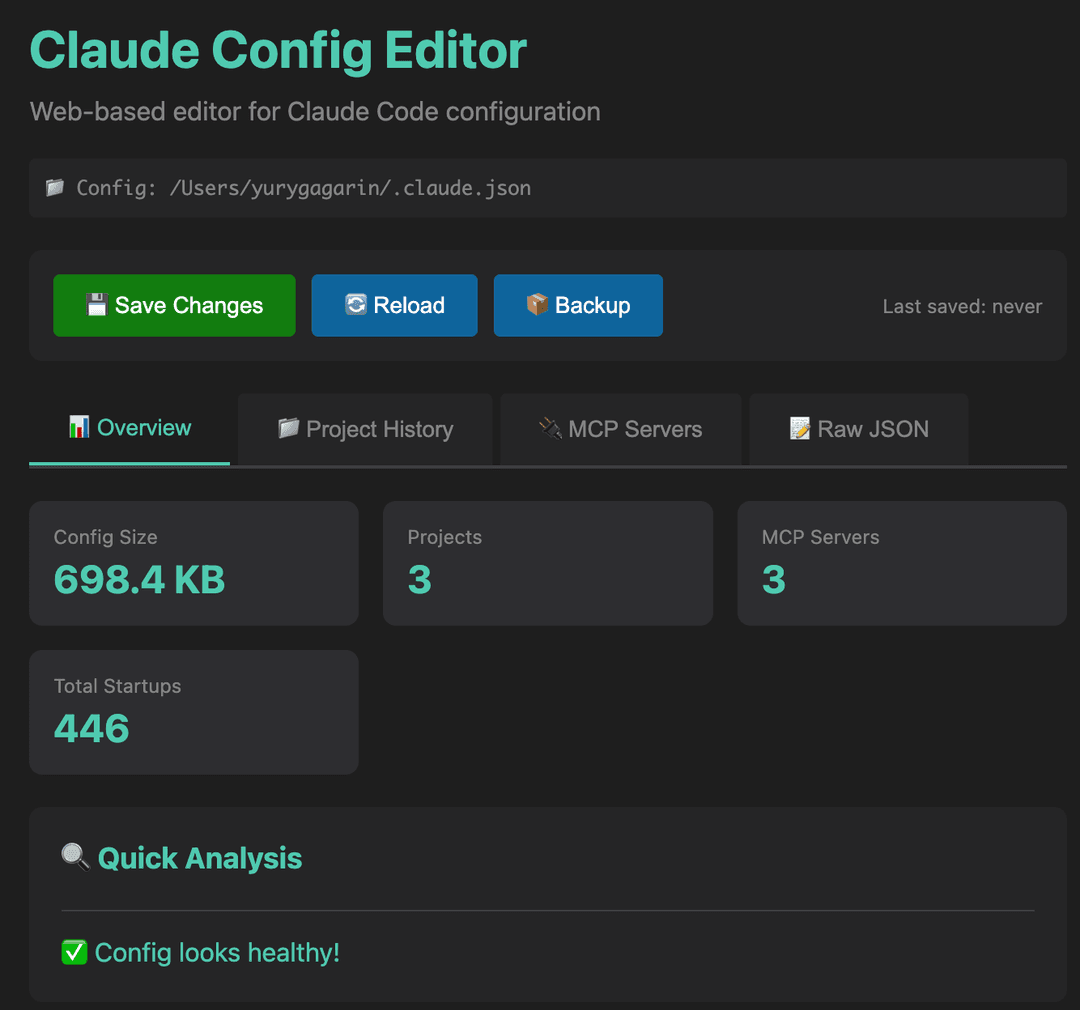 Quick stats and health analysis at a glance
Project History Manager
 See which projects are eating disk space, export or delete with one click
MCP Servers
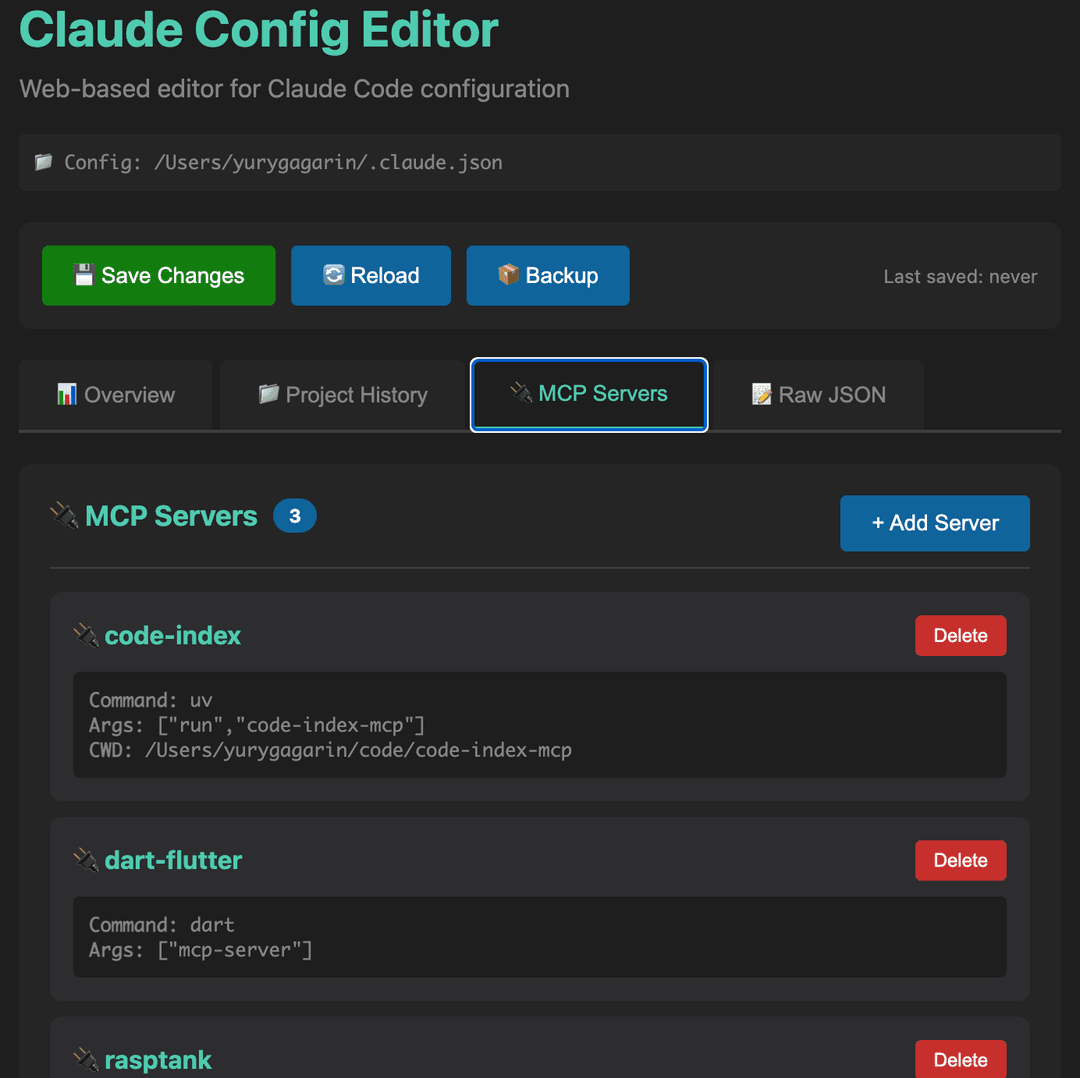 Visual management of MCP server configurations
🚄 Quick Start
Three commands. Zero dependencies. Zero configuration.
git clone https://github.com/gagarinyury/claude-config-editor.git
cd claude-config-editor
python3 server.py
That's it. Opens at http://localhost:8765.
What Happens Next
- Tool auto-detects your configs (Claude Code + Claude Desktop)
- You select which one to edit
- 30 seconds later your config is clean and fast
✨ Features That Make You Go "Finally!"
📊 Smart Analytics
See exactly what's taking up space:
- Config size (before/after)
- Projects ranked by size (biggest first)
- Instant health check ("Your config is bloated AF")
📁 Project History Manager
The killer feature:
- Export individual project histories before deletion (download as JSON)
- Bulk delete old projects (select top 10 = 90% space saved)
- Search & filter (find that old client project from 6 months ago)
- Sort by size/name/messages (find the bloat faster)
🔌 MCP Server Management
Because editing JSON manually is for masochists:
- Visual list of all MCP servers
- See command, args, env, working directory at a glance
- Add/remove servers with one click
- No more typos in JSON (you know what I'm talking about)
🎨 Beautiful Interface
- Dark theme (because your eyes matter)
- Real-time updates (see changes as you make them)
- Responsive (works on your tiny laptop screen)
- No installation required (Python stdlib only)
🔒 Safety First
- Auto-backup before every save (undo button for real life)
- Non-destructive (only changes what you tell it to)
- Local-only (zero network requests, zero data collection)
- Preview before save (see what you're about to do)
💡 Real-World Use Cases
"My Claude Code is slow"
→ Your config is probably huge. Click "Top 10 Largest", delete, save. Done in 30 seconds.
"I want to backup my conversations"
→ Go to Project History, click "💾 Export" on any project. Downloads JSON. Keep forever.
"I don't know which MCP servers I have"
→ Go to MCP Servers tab. See everything. No more cat ~/.claude.json | grep mcpServers.
"I messed up my config"
→ Restore from .claude.backup.json (created automatically before every save).
"I want to share my setup"
→ Export your config, share the JSON. Or just share this tool.
📖 How It Works (30 Second Tutorial)
Clean Up Project History
1. Open tool → Go to "Project History"
2. Click "Top 10 Largest" (selects 90% of bloat)
3. Review → Click "Delete Selected"
4. Click "💾 Save Changes"
Result: 17 MB → 732 KB (actual result from my config)
Export Before Delete
1. Find project in list
2. Click "💾 Export" (downloads JSON)
3. Now safe to delete (you have a backup)
Manage MCP Servers
View:   See all servers, their commands, args, env
Add:    Click "+ Add Server" → Enter name & command → Save
Remove: Find server card → Click "Delete" → Save
🛡️ Safety & Trust
- ✅ Auto-backup before every save (
.claude.backup.json) - ✅ Open source (read the code, it's 300 lines)
- ✅ No analytics (zero tracking, zero telemetry)
- ✅ Local-only (runs on
localhost:8765, no internet required) - ✅ Non-destructive (only modifies what you explicitly delete)
Worst case: Restore from .claude.backup.json. Best case: Your Claude is fast again.
🔧 Technical Details
Supported Configs
| Config | Path | Auto-Detect |
|---|---|---|
| Claude Code (macOS/Linux) | ~/.claude.json | ✅ |
| Claude Code (Windows) | %USERPROFILE%\.claude.json | ✅ |
| Claude Desktop (macOS) | ~/Library/Application Support/Claude/claude_desktop_config.json | ✅ |
| Claude Desktop (Windows) | %APPDATA%\Claude\claude_desktop_config.json | ✅ |
| Claude Desktop (Linux) | ~/.config/Claude/claude_desktop_config.json | ✅ |
Requirements
- Python 3.7+ (no pip install, no virtualenv, just works)
- Claude Code or Claude Desktop (obviously)
How It Actually Works
- Starts HTTP server on port 8765
- Loads config via REST API (
/api/config) - Web UI makes changes in memory
- Click "Save" → writes to disk (with backup)
- Restart Claude → changes take effect
Source: 300 lines of Python + 700 lines of HTML/CSS/JS. No frameworks. No build step. Just works.
🎓 FAQ (Questions You're About to Ask)
Q: Will this break my Claude setup?
A: No. Automatic backups + only changes what you delete. Worst case: restore from .claude.backup.json.
Q: Why is my config so big? A: Claude stores EVERY message from EVERY project. 100 projects × 50 messages × 1 KB = 5 MB. Add paste content and it balloons to 10-20 MB.
Q: What happens to my conversations? A: Project history = conversation history. Deleting a project = deleting its chat history. Use "💾 Export" first if you want to keep it.
Q: Is my data sent anywhere?
A: Nope. Runs on localhost:8765. Zero network requests. Check the code if you don't believe me.
Q: Can I undo a delete?
A: Before save? Yes (just refresh). After save? Restore from .claude.backup.json (created automatically).
Q: Why not just edit the JSON manually? A: You could. Or you could use this and finish in 30 seconds instead of 30 minutes of JSON hell.
Q: Does this work with Claude Desktop?
A: Yes! Auto-detects both Claude Code (.claude.json) and Claude Desktop (claude_desktop_config.json).
Q: Can I run this on Windows? A: Yes! Python is cross-platform. Works on macOS, Linux, Windows.
🤝 Contributing
Found a bug? Open an issue. Have an idea? Open an issue. Want to add a feature? Fork + PR.
git clone https://github.com/gagarinyury/claude-config-editor.git
cd claude-config-editor
# Make your changes
git commit -am "Add awesome feature"
git push origin main
# Open PR
Code style: Keep it simple. This is a tool, not a framework.
📜 License
MIT License - do whatever you want with this code.
🙏 Origin Story
I built this because:
- My Claude Code was slow as hell
- I checked
.claude.json→ 17 MB 😱 - I opened it → 87 projects with full chat histories
- I tried to clean it manually → JSON hell
- I built this tool → 30 seconds later, 732 KB ✨
If this saved you time, star the repo! ⭐
It helps others discover the tool and validates my late-night coding session.
🗺️ Roadmap
- Search/filter in Raw JSON view
- Edit MCP server parameters inline (args, env, cwd)
- Import project history from JSON
- Config diff viewer (before/after)
- Automatic cleanup suggestions (AI-powered?)
- Export config as shareable template
Got ideas? Open an issue!
🌟 Star History
If you found this useful, star the repo! It helps others discover it.
💬 Support
- 🐛 Bugs: Open an issue
- 💡 Ideas: Open an issue
- 💬 Questions: Discussions
- ⭐ Show love: Star the repo!
Made with ❤️ and Claude Code
(This tool was built using Claude Code. Meta, I know.)
If this saved you time, ⭐ star the repo!
It takes 2 seconds and makes my day.
P.S. Your config is probably bloated right now. Go check. I'll wait.
// faq
What is claude-config-editor?
Claude Config Editor is a lightweight web tool that helps you clean and optimize your Claude Code/Desktop config files (.claude.json). Analyze project sizes, bulk delete chat histories, export data for backup, manage servers visually, and speed up Claude—all locally, with auto-backup, no dependencies, and cross-platform support.. It is open-source on GitHub.
Is claude-config-editor free to use?
claude-config-editor is open-source under the MIT license, so it is free to use.
What category does claude-config-editor belong to?
claude-config-editor is listed under mcp-servers in the Claudeers registry of Claude-compatible tools.
// embed badge

[](https://claudeers.com/claude-config-editor)
// retro hit counter

[](https://claudeers.com/claude-config-editor)
// reviews
// guestbook
// related in MCP Servers
 🔓
🔓f.k.a. Awesome ChatGPT Prompts. Share, discover, and collect prompts from the community. Free and open source — self-host for your organization with complete…
 🔓
🔓A cross-platform desktop All-in-One assistant for Claude Code, Codex, OpenCode, OpenClaw, Gemini CLI & Hermes Agent. Only official website: ccswitch.io
 🔓
🔓🪨 why use many token when few token do trick — Claude Code skill that cuts 65% of tokens by talking like caveman
 🔓
🔓An open-source AI agent that brings the power of Gemini directly into your terminal.