
claude-code-usage-quota-mod
Know your Claude limits before they hit you (Live band above the Claude Code prompt): 5 Hour and Weekly usage (whole account) with a live usage forecast agai…
Install with your AI
Paste into Claude Code, Cursor, or any agent — it reads the repo and wires the tool into your project.
Install and set up claude-code-usage-quota-mod (git-clone project) into my current project.
Found on https://claudeers.com/claude-code-usage-quota-mod
Repo: https://github.com/anantraghunath/claude-code-usage-quota-mod
Homepage/docs: —
Detected install method: git-clone → git clone https://github.com/anantraghunath/claude-code-usage-quota-mod
Category: plugins. Platforms: cli, api, desktop.
Read the repo's README for exact setup and env vars, then install it and wire it into my project.

Claudeers Health Verdict:
unknown; community-verified: false. Confirm the source before running anything.
git clone https://github.com/anantraghunath/claude-code-usage-quota-mod
// compatibility
| Platforms | cli, api, desktop |
|---|---|
| Operating systems | — |
| AI compatibility | claude |
| License | MIT |
| Pricing | open-source |
| Language | TypeScript |
Claude Code Usage Quota Mod with Auto Compact






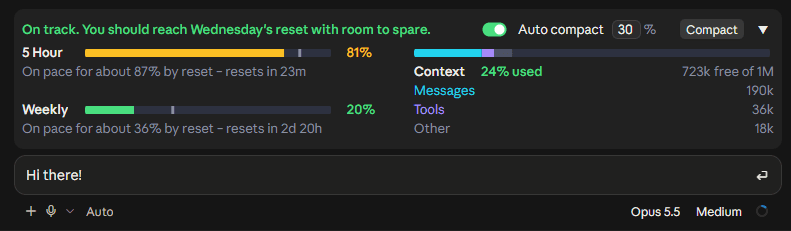
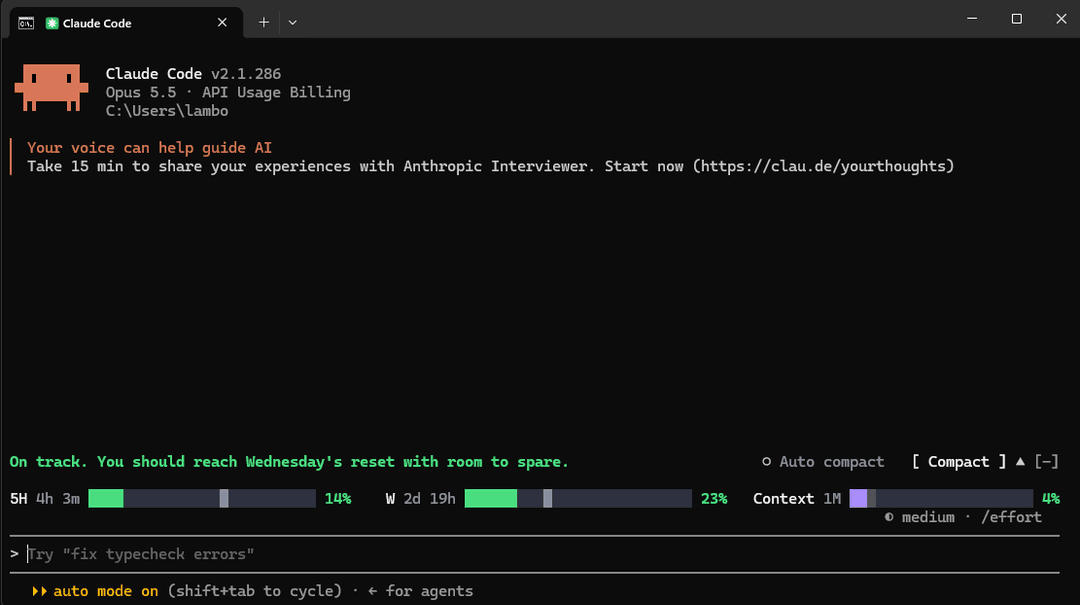
Know your Claude limits before they hit you. A live band above the Claude Code prompt that shows your plan limits, forecasts whether you'll run out before they reset, and shows how full your context window is. Compact in one click, or let it compact automatically.
The 5 Hour and Weekly limits are your whole Claude account's, including what you use in Claude chat and Cowork. The band itself shows in Claude Code: the desktop app and the terminal.
Type /quota to turn the band off and on.
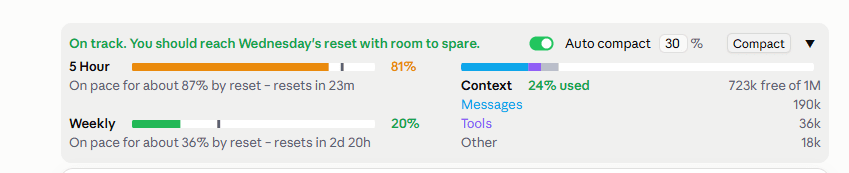
Expanded
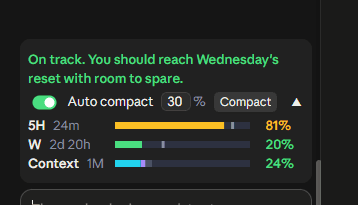
Collapsed
One row that still shows the time left until each limit resets:

[!TIP] Never hit a full context again: Auto compact, on by one click. With Auto compact on, the band compacts your session once the context reaches 30% (the default; set 15 to 99). A long context costs more on every reply, so compacting early keeps replies cheaper and your limits lasting longer. Auto compact never interrupts a reply. Want to compact right now? The Compact button runs
/compactin one click.Each session keeps its own Auto compact setting, even after a restart, so you can run them differently side by side:
- Building something big? Set Auto compact higher (say 70%) or turn it off, so Claude keeps the whole picture. Press Compact yourself at a good stopping point. (With it off, Claude Code's built-in compaction still steps in when the context is nearly full.)
- Everyday sessions? One click turns Auto compact on at 30%. They stay lean, and your 5 Hour and Weekly limits last longer.
What it shows
5 Hour and Weekly limits
- The % used, matching the app's own Plan usage limits panel.
- A forecast of where you'll be at reset: a grey tick on the bar and a note, e.g. On pace for about 87% by reset – resets in 23m.
- A headline at a glance: On track. You should reach Wednesday's reset with room to spare.
- The forecast starts from your usual pace (learned from your past windows) and shifts to your actual pace as the window goes on, so an early burst doesn't set it off.
- Bars turn amber at 75% and red at 90%, or sooner if you're on course to run out.
On course to run out, it warns you and says when you'll hit the limit:


Context window
- The % used and space free, as
/contextcounts it, split into Messages, Tools and Other. - Amber at 50%, red at 80%: the point to compact.
Compacting
- Compact runs
/compactin one click. - Auto compact runs at your % (30% by default, 15 to 99), never mid-reply. Each session keeps its own setting; a new session starts with it off.
If the session is already past your % when you turn it on, it asks first:
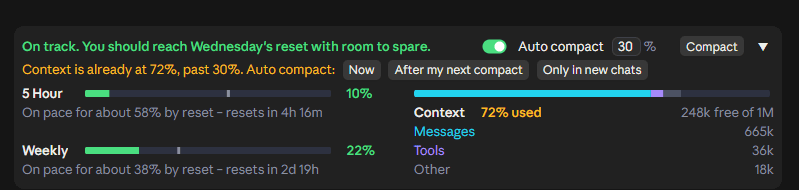

- Now compacts straight away.
- After my next compact waits until the session is compacted some other way (Compact,
/compact, or Claude Code's own), then takes over. - Only in new chats leaves this session alone until it's next opened.
Works in light and dark themes and at every width down to the narrowest. Collapsed or expanded is shared across all sessions.
MORE SCREENSHOTS
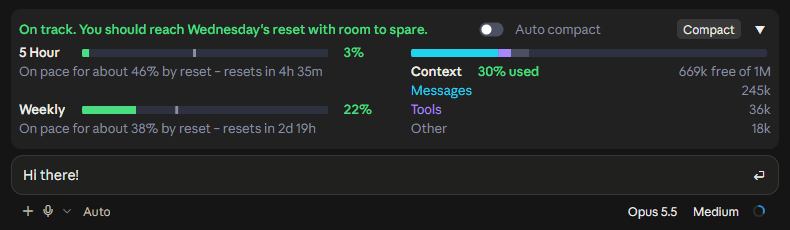
Early in a 5 hour window:

Running out on the Weekly limit:


| Light theme | Narrowest window |
|---|---|
 | 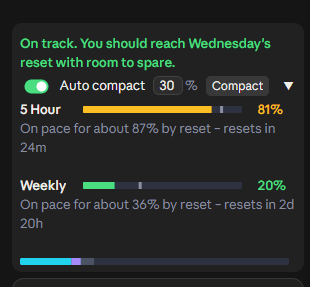 |
 |  |
Where it works
- Claude desktop app, Code tab
- Claude Code in a terminal
[!NOTE] In the desktop app, the band appears once a session has started. The brand-new Welcome back screen has no session yet, so no mod can draw there. Send your first message and it appears.
In the terminal, ▲/▼ expands and collapses it. The [-] next to it is Claude Code's own control and hides the band; ctrl+x ctrl+a brings it back.
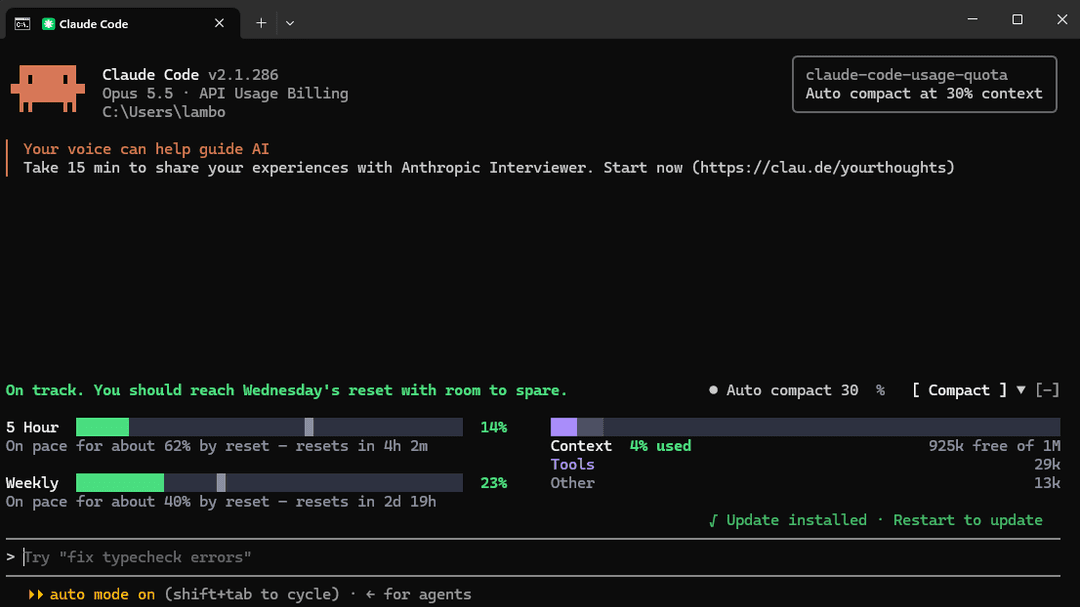
Terminal, collapsed
Install
Needs a recent Claude Code, signed in with a Pro or Max plan.
Desktop app: in the Code tab, send this as a message, allow the claude plugin command if asked, then quit and reopen the app:
Install the claude-code-usage-quota plugin from the GitHub marketplace anantraghunath/claude-code-usage-quota-mod
Terminal: inside claude, run:
/plugin install claude-code-usage-quota --marketplace anantraghunath/claude-code-usage-quota-mod
Either way installs it for both the desktop app and the terminal.
Update: ask Claude, then restart:
Update the claude-code-usage-quota plugin from its marketplace
Uninstall: in the desktop app, ask Claude:
Remove the claude-code-usage-quota-mod plugin marketplace
or in the terminal:
/plugin marketplace remove claude-code-usage-quota-mod
then restart. This removes it from both. Just want it out of sight? /quota hides it without uninstalling.
From your own shell instead
claude plugin marketplace add anantraghunath/claude-code-usage-quota-mod; claude plugin install claude-code-usage-quota@claude-code-usage-quota-mod
To update:
claude plugin marketplace update claude-code-usage-quota-mod; claude plugin update claude-code-usage-quota@claude-code-usage-quota-mod
To uninstall:
claude plugin marketplace remove claude-code-usage-quota-mod
Privacy
Everything runs on your machine. It reads what Claude Code already has (your context and the limits each reply carries), and about every 2 minutes asks Anthropic's usage service for your limits through your existing Claude login. It never sees your credentials and sends nothing anywhere else. In the desktop app it reads the app's theme setting to match light or dark.
Feedback and contributing
First release: I'd love to hear how it works for you. Open an issue for bugs or ideas. Pull requests welcome.
To work on it, clone the repo, then load it from the folder, or run its tests:
claude --plugin-dir ./claude-code-usage-quota-mod
claude plugin test ./claude-code-usage-quota-mod
If you find it useful, a ⭐ helps others find it.
Credits
Inspired by I'm liking the new mods feature on r/ClaudeCode. Thanks to u/itsxzy for sharing the original prompt that started this project.
License
MIT © 2026 Anant Raghunath
// faq
What is claude-code-usage-quota-mod?
Know your Claude limits before they hit you (Live band above the Claude Code prompt): 5 Hour and Weekly usage (whole account) with a live usage forecast against limit resets, context window usage, one-click Compact and per-session Auto compact (30% default).. It is open-source on GitHub.
Is claude-code-usage-quota-mod free to use?
claude-code-usage-quota-mod is open-source under the MIT license, so it is free to use.
What category does claude-code-usage-quota-mod belong to?
claude-code-usage-quota-mod is listed under plugins in the Claudeers registry of Claude-compatible tools.
// embed badge

[](https://claudeers.com/claude-code-usage-quota-mod)
// retro hit counter

[](https://claudeers.com/claude-code-usage-quota-mod)
// reviews
// guestbook
// related in Claude Plugins
 🔓
🔓A single CLAUDE.md file to improve Claude Code behavior, derived from Andrej Karpathy's observations on LLM coding pitfalls.
 🔓
🔓Claude Code is an agentic coding tool that lives in your terminal, understands your codebase, and helps you code faster by executing routine tasks, explainin…
 🔓
🔓"CLI-Anything: Making ALL Software Agent-Native" -- CLI-Hub: https://clianything.cc/
🔓financial-services — a Claude ecosystem project on GitHub.