
claude-code-plus
🖥️ GUI Plugin for Claude Code / Codex CLI / Gemini CLI in JetBrains IDEs - Run AI coding assistants with a beautiful visual interface
Install with your AI
Paste into Claude Code, Cursor, or any agent — it reads the repo and wires the tool into your project.
⚠ Unverified source (community-unclaimed, low activity) — reveal the prompt
⚠ Unverified source (community-unclaimed, low activity). Inspect the repo before letting your agent install it.

Install and set up claude-code-plus (release-binary project) into my current project.
Found on https://claudeers.com/claude-code-plus
Repo: https://github.com/touwaeriol/claude-code-plus
Homepage/docs: https://plugins.jetbrains.com/plugin/28343-claude-code-plus
Detected install method: release-binary → inspect the README
Category: devtools. Platforms: cli, api.
Read the repo's README for exact setup and env vars, then install it and wire it into my project.

Claudeers Health Verdict:
dormant; community-verified: false. Confirm the source before running anything.
Grab the latest release asset from GitHub.
# download a build from https://github.com/touwaeriol/claude-code-plus/releases
git clone https://github.com/touwaeriol/claude-code-plus
// compatibility
| Platforms | cli, api |
|---|---|
| Operating systems | — |
| AI compatibility | claude |
| License | MIT |
| Pricing | open-source |
| Language | JavaScript |
Claude Code Plus

Advanced AI Programming Assistant for JetBrains IDEs
 한국어
한국어Claude Code Plus is an IntelliJ IDEA plugin that integrates Claude AI directly into your development environment, providing intelligent code assistance through natural language interaction.
✨ Features
- AI-Powered Conversations - Chat with Claude AI directly in your IDE
- Smart Context Management - Reference files and code snippets with @ mentions
- Multi-Session Support - Manage multiple chat sessions simultaneously
- Rich Tool Integration - View and interact with Claude's tool usage (file read/write, bash commands, etc.)
- IDE Integration - Click to open files, view diffs, and navigate to specific lines
- Dark Theme Support - Fully compatible with IntelliJ's dark themes
- Export Capabilities - Save conversation history in multiple formats
📸 Screenshots
Tool Calls Demo
View Claude's tool usage with detailed information for Read, Write, and Edit operations.

@ Mention File Search
Quickly reference files in your project using the @ mention feature.

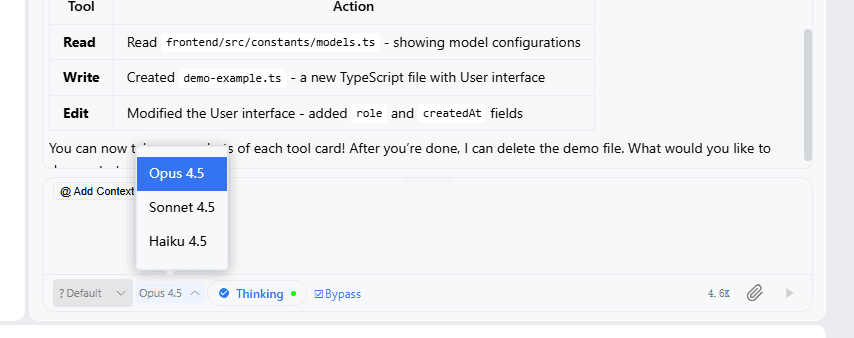
Model Selector
Switch between different Claude models (Opus 4.5, Sonnet 4.5, Haiku 4.5).
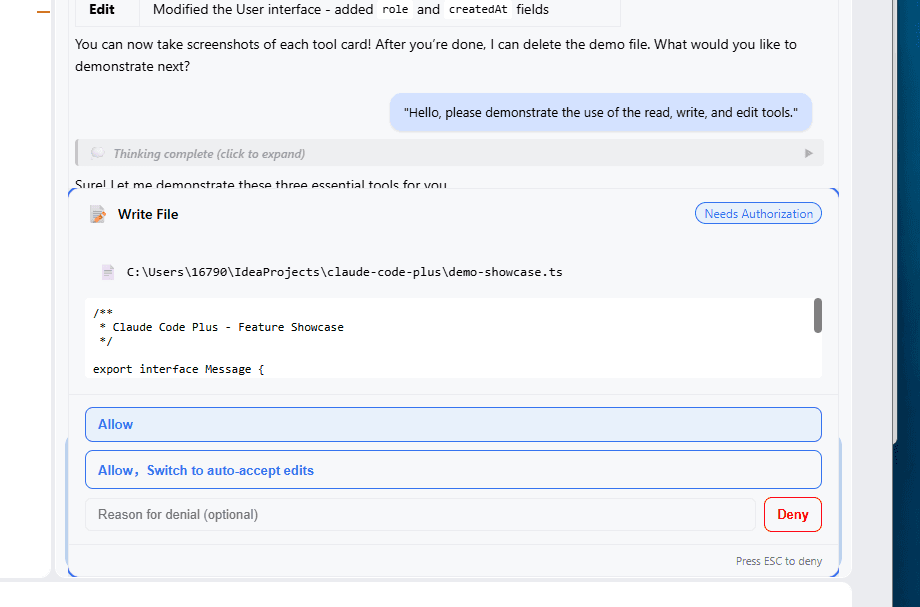
Permission Request
Secure authorization dialog for file write operations.
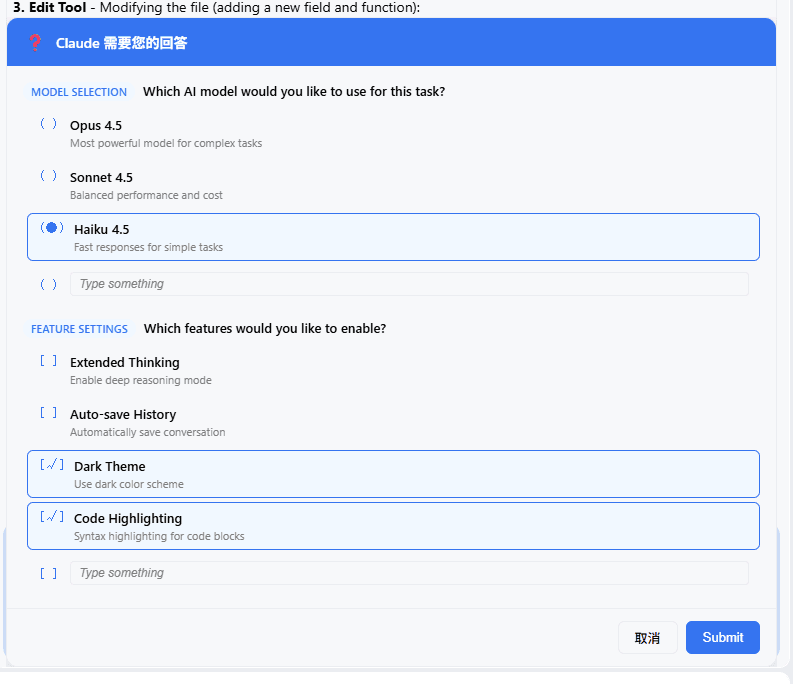
User Question Dialog
Interactive dialog for Claude to ask clarifying questions with model selection and feature settings.
Keyboard Shortcuts
Rich keyboard shortcuts for efficient operations.

Task Progress View
Real-time view of Claude's task execution progress.

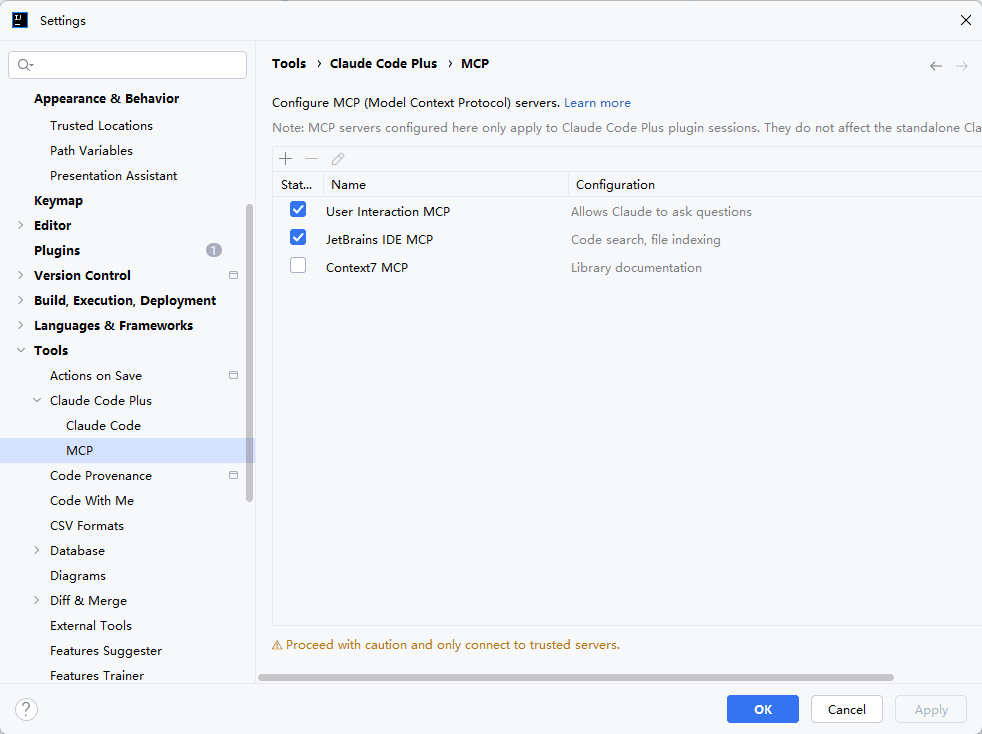
MCP Configuration
Support Model Context Protocol to extend Claude's capabilities.
📦 Installation
Option 1: JetBrains Marketplace (Recommended)
- Open your JetBrains IDE
- Go to Settings → Plugins → Marketplace
- Search for "Claude Code Plus"
- Click Install and restart IDE
Option 2: GitHub Release (Manual)
- Download the latest
jetbrains-plugin-x.x.x.zipfrom Releases - In your IDE: Settings → Plugins → ⚙️ → Install Plugin from Disk...
- Select the downloaded zip file and restart IDE
🔧 Requirements
- JetBrains IDE: IntelliJ IDEA 2024.2 - 2025.3.x (Build 242-253)
- Node.js: v18 or higher (Download) - ensure
nodecommand is available in PATH - Claude Code: One-time setup required
- Open terminal and run:
npx @anthropic-ai/claude-code - Follow the prompts to authenticate
- See Official Documentation for detailed setup guide
- Open terminal and run:
Note: The plugin includes a bundled Claude CLI - no separate CLI installation required!
Using API Key (Alternative)
If you prefer to use your own Anthropic API key instead of Claude Code subscription, you can use cc-switch to configure it:
npx cc-switch
This tool helps you switch between different authentication methods for Claude Code.
🚀 Quick Start
- Install the plugin following the installation steps above
- Ensure Claude CLI is installed and authenticated
- Open the Claude Code Plus tool window (right sidebar)
- Start chatting with Claude!
Tips
- Use
@to mention files and add them as context - Click on file paths in tool outputs to open them in the editor
- Click on tool cards (Read/Write/Edit) to view diff preview
- Press
ESCto interrupt AI generation - Switch models anytime using the model selector (Opus/Sonnet/Haiku)
- Use keyboard shortcuts:
Ctrl+J- Quick actionsCtrl+U- Common operationsEnter- Send messageShift+Enter- New line in input
🤝 Contributing
Contributions are welcome! Please feel free to submit a Pull Request.
📝 License
This project is licensed under the MIT License - see the LICENSE file for details.
🔗 Links
Made with ❤️ by touwaeriol
// faq
What is claude-code-plus?
🖥️ GUI Plugin for Claude Code / Codex CLI / Gemini CLI in JetBrains IDEs - Run AI coding assistants with a beautiful visual interface. It is open-source on GitHub.
Is claude-code-plus free to use?
claude-code-plus is open-source under the MIT license, so it is free to use.
What category does claude-code-plus belong to?
claude-code-plus is listed under plugins in the Claudeers registry of Claude-compatible tools.
// embed badge

[](https://claudeers.com/claude-code-plus)
// retro hit counter

[](https://claudeers.com/claude-code-plus)
// reviews
// guestbook
// related in Developer Tools
 🔓
🔓The agent harness performance optimization system. Skills, instincts, memory, security, and research-first development for Claude Code, Codex, Opencode, Curs…
 🔓
🔓Makes your AI agent think like the laziest senior dev in the room. The best code is the code you never wrote.
 🔓
🔓Use Garry Tan's exact Claude Code setup: 23 opinionated tools that serve as CEO, Designer, Eng Manager, Release Manager, Doc Engineer, and QA
 🔓
🔓AI coding assistant skill (Claude Code, Codex, OpenCode, Cursor, Gemini CLI, and more). Turn any folder of code, SQL schemas, R scripts, shell scripts, docs,…