
claude-code-local
Run Claude Code 100% on-device with local AI on Apple Silicon. MLX-native Anthropic-API server, 65 tok/s Qwen 3.5 122B, Llama 3.3 70B, Gemma 4 31B. Private,…
Install with your AI
Paste into Claude Code, Cursor, or any agent — it reads the repo and wires the tool into your project.
Install and set up claude-code-local (release-binary project) into my current project.
Found on https://claudeers.com/claude-code-local
Repo: https://github.com/nicedreamzapp/claude-code-local
Homepage/docs: https://nicedreamzwholesale.com/airgap/
Detected install method: release-binary → inspect the README
Category: mcp-servers. Platforms: cli, api, desktop, web.
Read the repo's README for exact setup and env vars, then install it and wire it into my project.

Claudeers Health Verdict:
active; community-verified: false. Confirm the source before running anything.
Grab the latest release asset from GitHub.
# download a build from https://github.com/nicedreamzapp/claude-code-local/releases
git clone https://github.com/nicedreamzapp/claude-code-local
// compatibility
| Platforms | cli, api, desktop, web |
|---|---|
| Operating systems | — |
| AI compatibility | claude |
| License | MIT |
| Pricing | open-source |
| Language | Python |
🧠⚡ Claude Code Local — The Lineup
Three local AI brains. Four modes. One MacBook. Zero cloud.
Pick your fighter and run Claude Code 100% on-device.
📍 Now with DeepSeek V4 Flash · 1M-token context · via Antirez's ds4 engine.
Built by Matt Macosko in Arcata, CA. Started with a chicken problem. Still figuring it out.
🎬 Demo · 🥊 Lineup · 🎮 Modes · 🚀 Quick Start · 📊 Benchmarks · 🔒 Safety · 🎤 Voice · 🧩 The Stack · 🛣️ Roadmap · 🤝 Contribute
🎬 WATCH THE DEMO — AirGap AI
A real NDA. Llama 3.3 70B. Wi-Fi physically OFF. lsof running live.
Watch a 70-billion-parameter model audit a confidential legal document, on-device, with the receipts on screen.
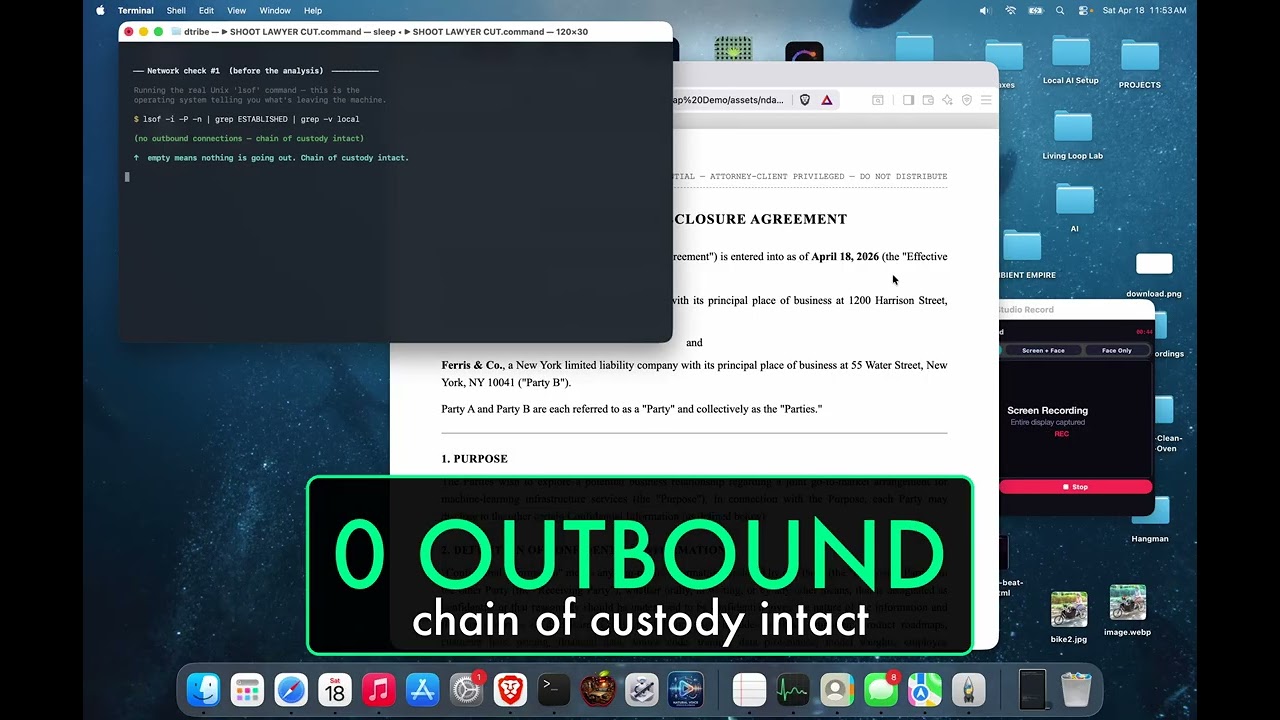
Built for lawyers, accountants, doctors, therapists, contractors — anyone handling other people's private stuff.
🖥️ Don't want to DIY? Get this stack on a Mac mini, ready to plug in.
The AirGap Box ships a pre-configured Mac mini to your office with this stack, a 31B-parameter language model, and three working agents already installed.
One-time price. No subscription. Founding-customer pricing for the first 5 buyers.
🌌 THE REMATCH — 4 AI Engines Build Northern Lights, 3 Fully Local
Same prompt. Four engines. One MacBook.
The new local challenger — Qwen3.6 27B — painted the best aurora, and never touched the internet.
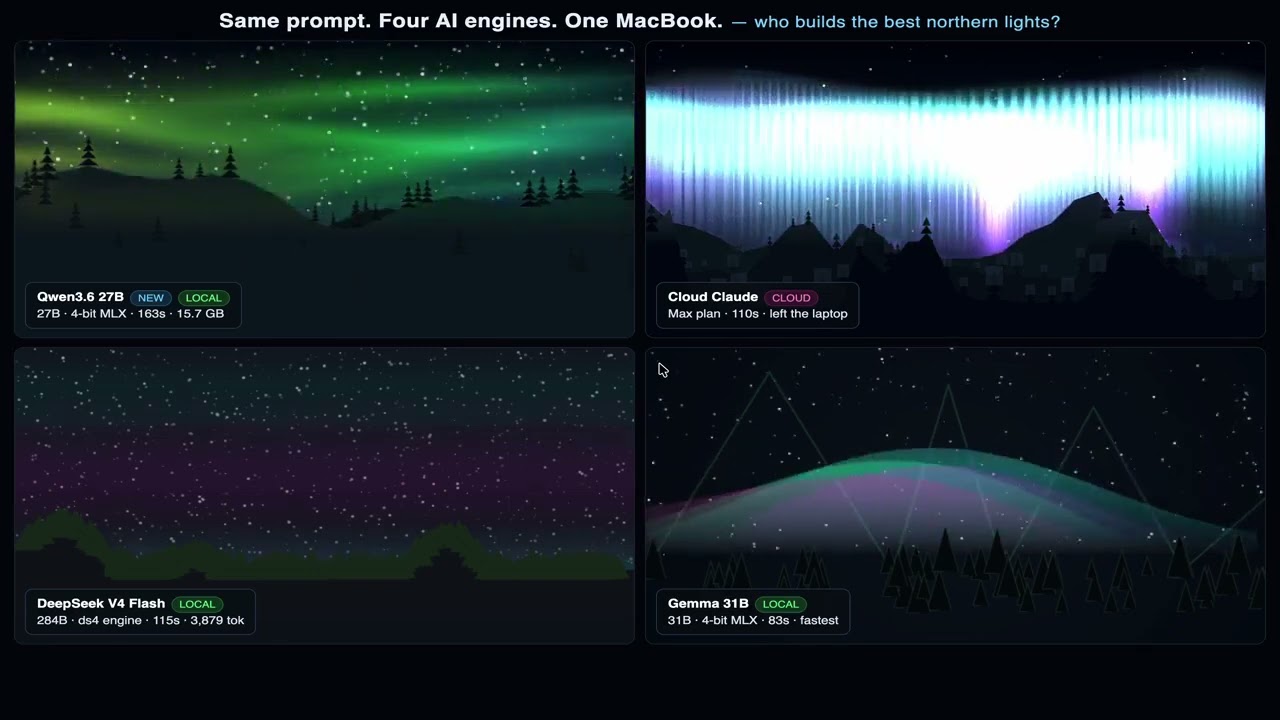
Qwen3.6 27B: 5,262 tok / 163s · DeepSeek V4 Flash: 3,879 tok / 115s · Cloud Claude: 110s · Gemma 31B: 2,001 tok / 83s — 3 of 4 ran fully offline.
🏁 HEXAGON SHOOTOUT — Free AI vs $100/mo Claude Code
Three AIs. One laptop. Same prompt. Live counters.
Watch Gemma 31B local, Llama 70B local, and Claude cloud race the same HTML physics prompt on a MacBook.
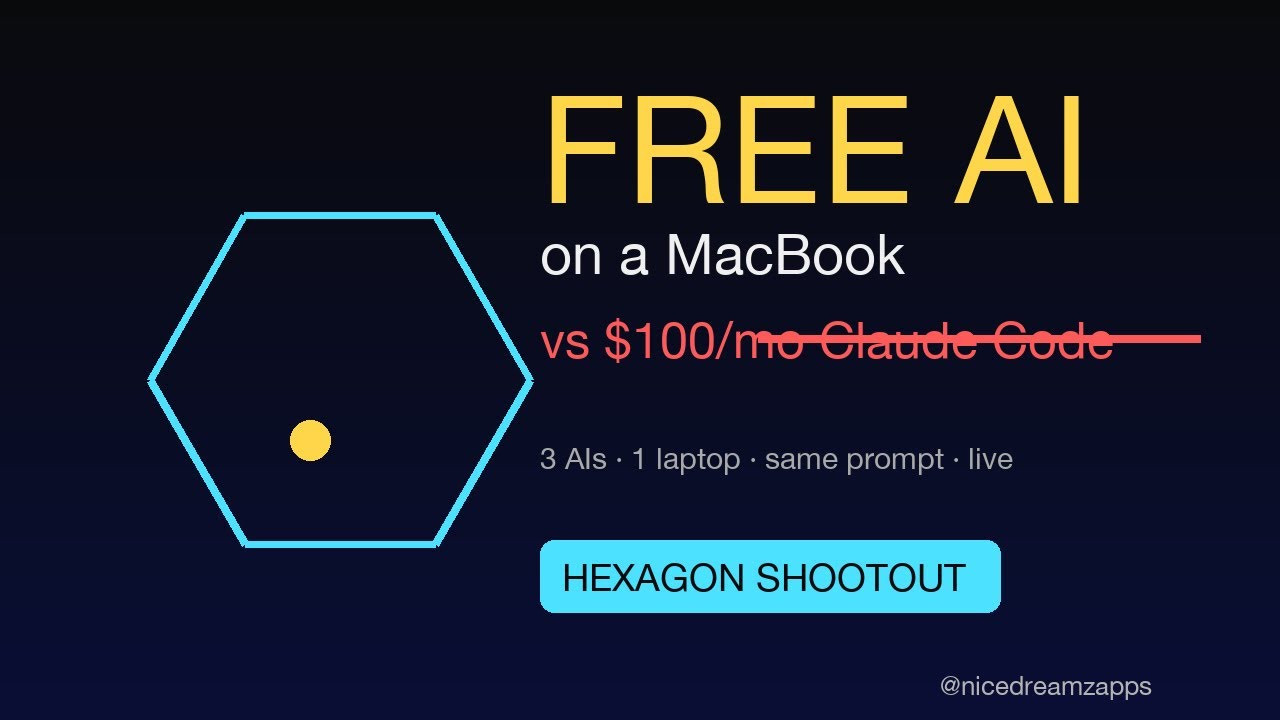
Gemma 31B: 56s · Claude cloud: 22s · Llama 70B: 2:17 — two of three ran with zero cloud calls.
🎤 Also on the channel — NarrateClaude (Hands-Free Ambient AI)
Speak to Claude Code, hear replies in a cloned voice — 100% on-device. 2:31.
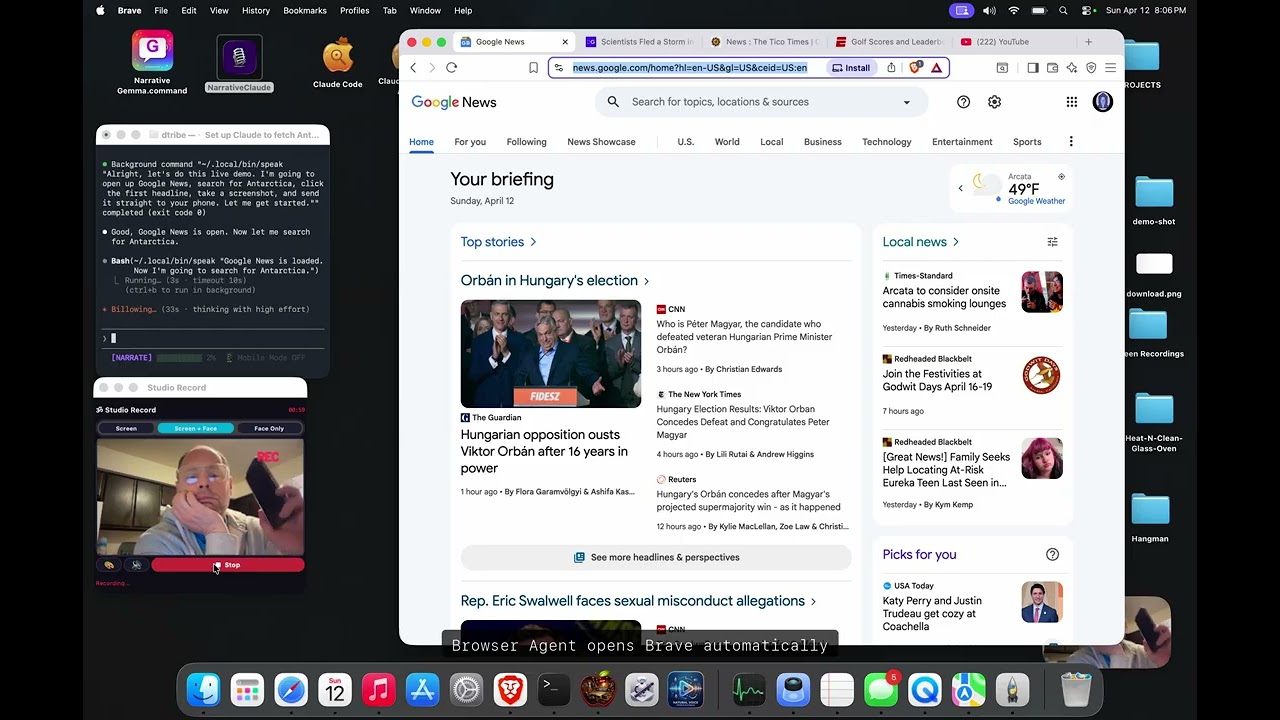
🏠 New — My Mac mini at home is the AI. I just talk to it from any browser.
Open any browser on any phone — chat with the Mac mini at home, hear it reply in your own cloned voice. 0:50.
🧩 This repo is the BRAIN of a 4-part local-first ambient-computing stack
Brain (here) · 🎤 Ears+Mouth · 🌐 Hands · 📱 Phone. Each repo stands alone; together they take Claude Code off the keyboard and off the screen. Jump to the stack diagram →
🖥️ More of my open-source software: nicedreamzwholesale.com/software
🥊 The Lineup — Pick Your Fighter
We started with one model. Now we ship a roster. Same MLX server, same Anthropic API, swap one env var and you swap the brain — plus the brand-new ds4 engine for DeepSeek V4 Flash slotted in via its own native Metal runtime.
| 🟢 Gemma 4 31B | 🔵 Qwen 3.5 122B | 🐳 DeepSeek V4 Flash ⭐ | |
|---|---|---|---|
| Nickname | The Quick One | The Beast | The 1M-Context Whale |
| Build | 4-bit IT abliterated | 4-bit MoE (A10B) | 2-bit asymmetric (ds4 GGUF) |
| Speed | ~15 tok/s | 65 tok/s 🚀 | ~32 tok/s |
| Params | 31 B dense | 122 B / 10 B active | 284 B / 37 B active |
| Context | 128 K | 256 K | 1 M tokens |
| RAM | ~18 GB | ~75 GB | ~81 GB |
| Disk | 18 GB | 65 GB | 81 GB (+ disk KV cache) |
| Best at | Daily coding, fits 64 GB Mac | Max throughput, active sparsity | Long context, agentic loops |
| Engine | MLX Native | MLX Native | antirez/ds4 |
| Launcher | Gemma 4 Code.command | Claude Local.command | DeepSeek V4 Flash.app |
| Min RAM to run | 32 GB | 96 GB | 128 GB |
💡 Fun fact: Qwen wins raw speed because it's an MoE — only 10B of 122B params activate per token. DeepSeek V4 Flash is even bigger (284B) but only ~37B active per token, and it ships with on-disk KV cache so a 25k-token Claude Code system prompt prefills exactly once, ever.
🐳 New: DeepSeek V4 Flash via ds4
We tested it the day Antirez (the Redis guy) shipped ds4. Local DeepSeek beat cloud Claude on wall-clock time on the same MacBook, same prompt.
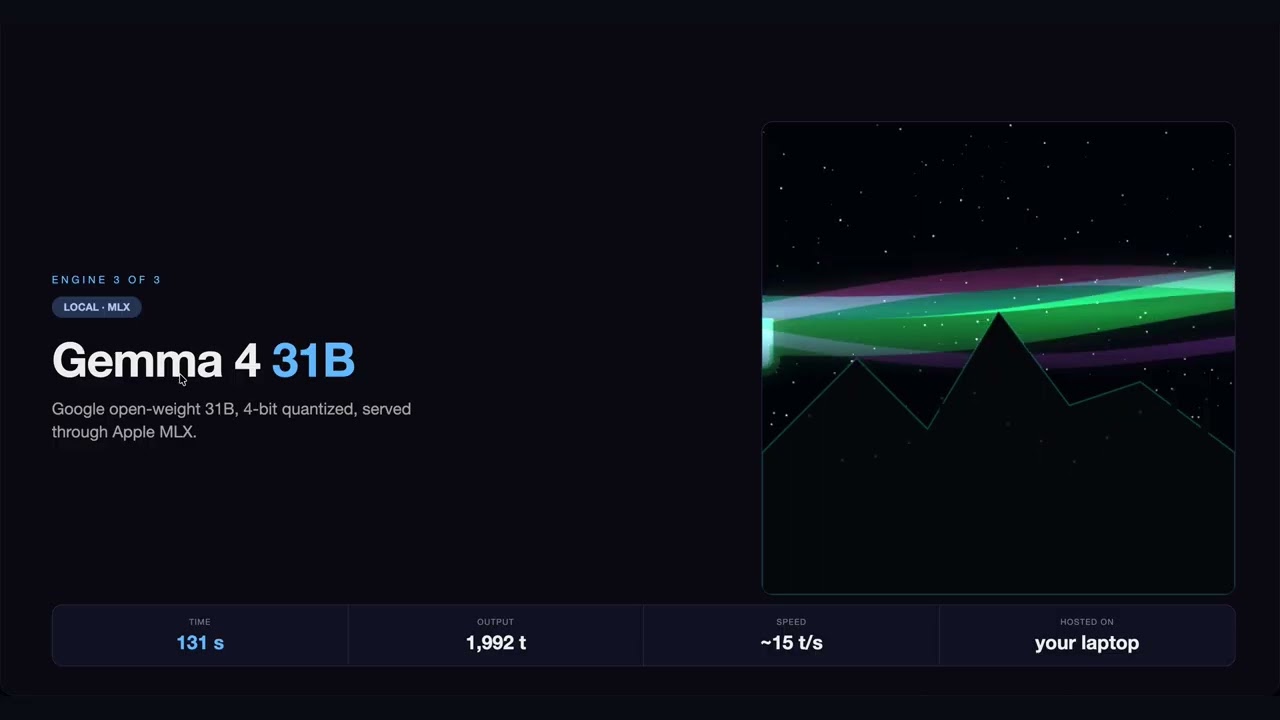
▶ Watch on YouTube — DeepSeek V4 Flash vs Cloud Claude vs Gemma 4 31B
same prompt · three completely different auroras · one MacBook
| 🧠 Engine | antirez/ds4 — pure C + Metal kernels, ~few thousand lines |
| 🤗 Weights | antirez/deepseek-v4-gguf (q2: 81 GB, q4: 153 GB) |
| 📦 Server wrapper | ~/.local/bin/ds4-server-up (boots on demand) |
| 🚀 Claude Code wrapper | ~/.local/bin/claude-ds4 (drop-in replacement for claude) |
| 📏 Context | 1 M tokens; 200 K is sane for most agent runs |
| 💾 Disk KV cache | Persists across restarts — first prefill is the only one that ever happens |
⭐ Our Own MLX Abliterated Uploads
The models in this lineup aren't from generic mirrors — we package and upload our own abliterated MLX builds to HuggingFace so anyone running this repo can pull them with one command. Browse the full set at huggingface.co/divinetribe (also showcased at nicedreamzwholesale.com/software/huggingface/).
# Llama 3.3 70B — full-precision feel
MLX_MODEL=divinetribe/Llama-3.3-70B-Instruct-abliterated-8bit-mlx \
  bash scripts/start-mlx-server.sh

# Gemma 4 31B — fast daily driver
MLX_MODEL=divinetribe/gemma-4-31b-it-abliterated-4bit-mlx \
  bash scripts/start-mlx-server.sh

# Hermes 4 14B — sweet spot for 16/32 GB Macs (NEW · May 2026)
MLX_MODEL=divinetribe/Hermes-4-14B-abliterated-4bit-mlx \
  bash scripts/start-mlx-server.sh
| Model | Quant | Disk | Params | Context | Best for |
|---|---|---|---|---|---|
Llama-3.3-70B-Instruct-abliterated-8bit-mlx | 8-bit, g64 | ~75 GB | 71 B dense | 128 K | Hardest reasoning on 96 GB+ Macs |
gemma-4-31b-it-abliterated-4bit-mlx | 4-bit, g64 | ~17 GB | 31 B dense | 128 K | Daily coding on a 32 GB+ Mac |
Hermes-4-14B-abliterated-4bit-mlx | 4-bit, g64 | ~8 GB | 14 B dense (Qwen3 base) | 40 K | 16 GB Macs, instruction-following, tool use |
Abliteration sources: huihui-ai (Llama, Gemma) and Babsie (Hermes). MLX conversion + quantization by us — chosen to preserve quality over minimal footprint. See what abliteration means.
⚠️ Use it responsibly. "Abliterated" suppresses the model's built-in refusal direction so it doesn't refuse benign-but-edgy requests. It is not a general capability upgrade, and you remain bound by each upstream license (Llama 3.3, Gemma, Hermes/Qwen3).
🎮 The Modes
Four ways to run the lineup. Each one is a double-clickable launcher in launchers/.
| Mode | What it does | Launcher |
|---|---|---|
| 🤖 Code | Run Claude Code with a local model — same UX, no API key | Claude Local.command, Gemma 4 Code.command, Llama 70B.command |
| 🌐 Browser | Local AI controls real Brave browser via Chrome DevTools | Browser Agent.command |
| 🎤 Hands-Free Voice | Speak in, hear replies in your cloned voice — full loop, 100% on-device | Narrative Gemma.command + NarrateClaude |
| 📱 Phone | iMessage in → text/image/video out, full pipeline | ~/.claude/imessage-*.sh |
🤔 What Is This?
Your MacBook has a powerful GPU built right into the chip. This project uses that GPU to run massive AI models — the same kind that power ChatGPT and Claude — entirely on your computer.
🚫 No internet needed 💰 No monthly subscription 🔒 No one sees your code or data ✅ Full Claude Code experience — write code, edit files, manage projects, control your browser, or run a full hands-free voice session where you speak every question and hear every reply in your own cloned voice (both directions on-device)
         📱 You (Mac or Phone)
          │
     🤖 Claude Code           ← the AI coding tool you know
          │
     ⚡ MLX Native Server      ← our server (~1000 lines of Python)
          │
     🥊 Pick your fighter     ← Gemma 4 31B · Llama 3.3 70B · Qwen 3.5 122B
          │
     🖥️  Apple Silicon GPU    ← your M-series chip does all the work
🔒 Safety + How the Data Flows
This is the part we're proudest of. Your code never leaves your Mac. Not for a model call. Not for telemetry. Not for "anonymous analytics". Not ever.
🛡️ The Data-Flow Diagram
   ┌─────────────────────────────────────────────────────────────┐
   │                    🖥️  YOUR MACBOOK                          │
   │                                                             │
   │   📝 Your code         ┌────────────────────┐               │
   │       │                │  🤖 Claude Code     │               │
   │       └───────────────▶│  (CLI on your Mac)  │               │
   │                        └────────┬───────────┘               │
   │                                 │  HTTP localhost:4000       │
   │                                 ▼                            │
   │                        ┌────────────────────┐               │
   │                        │  ⚡ MLX Server      │               │
   │                        │  (Python, ours)    │               │
   │                        └────────┬───────────┘               │
   │                                 │  Metal API                 │
   │                                 ▼                            │
   │                        ┌────────────────────┐               │
   │                        │  🧠 Local model     │               │
   │                        │  (Gemma·Llama·Qwen)│               │
   │                        └────────┬───────────┘               │
   │                                 │                            │
   │                                 ▼                            │
   │                        ┌────────────────────┐               │
   │                        │  🖥️  Apple GPU      │               │
   │                        │  (unified memory)  │               │
   │                        └────────────────────┘               │
   │                                                             │
   │             🚫 ZERO outbound network calls                  │
   │             🚫 ZERO telemetry                               │
   │             🚫 ZERO phone-home                              │
   └─────────────────────────────────────────────────────────────┘
                   │
                   ✗  ←  Nothing from *our* code crosses this line.
                   │
   ┌─────────────────────────────────────────────────────────────┐
   │                    ☁️  THE INTERNET                          │
   │                  (your code never goes here)                 │
   └─────────────────────────────────────────────────────────────┘
🔍 What We Audited (Every Component)
| Component | Source | Outbound calls | Verdict |
|---|---|---|---|
| server.py (ours) | We wrote it line by line | 0 | ✅ Safe |
| browser agent (separate repo) | nicedreamzapp/browser-agent — we wrote it | 0 (talks to localhost CDP only) | ✅ Safe |
| mlx-lm | Apple ML team | 0 | ✅ Safe |
| MLX framework | Apple | 0 | ✅ Safe |
| Model weights | HuggingFace verified mlx-community repos | 0 at runtime | ✅ Safe |
| iMessage scripts | Pure shell + AppleScript | localhost only (Studio Record port 17494) | ✅ Safe |
| Claude Code CLI | Anthropic (closed-source binary) | 0 with our launchers — lsof-verified, only localhost:4000 | ✅ Safe |
✅ Verified offline (as of v0.1.0). Claude Code 2.1's own binary previously reached out to
api.anthropic.comon startup for telemetry, statsig feature flags, marketplace auto-install, and the autoupdater — even withANTHROPIC_BASE_URLset. PR #32 (thanks @tadrianonet) plugs all four channels via documented Anthropic env vars, and the new launchers set them automatically:CLAUDE_CODE_DISABLE_NONESSENTIAL_TRAFFIC=1 DISABLE_AUTOUPDATER=1 CLAUDE_CODE_DISABLE_OFFICIAL_MARKETPLACE_AUTOINSTALL=1 CLAUDE_CODE_DISABLE_BACKGROUND_TASKS=1Run
lsof -p $(pgrep -f claude)while a session is active — you'll see onlylocalhost:4000. Your prompts, code, and completions never leave the machine. Our code (server.py, launchers, scripts) has always made zero outbound connections; the Claude Code CLI now matches.
🚫 What We Ripped Out
⚠️ We removed LiteLLM after supply-chain attack concerns. Every dependency was re-audited from scratch. If a package had unexplained network calls, it didn't ship.
✅ What This Means in Practice
| Scenario | Cloud Claude | This Repo |
|---|---|---|
| Working with NDA / proprietary code | ❌ Risky | ✅ Air-gapped (lsof-verified) |
| Coding on a plane (no wifi) | ❌ Doesn't work | ✅ Works |
| Running on a kill-switch firewall | ❌ Blocked | ✅ Works |
| Healthcare / legal / finance review | ⚠️ Compliance burden | ✅ Stays on-device |
| Worry about training-data leakage | ⚠️ Trust required | ✅ Mathematically impossible |
🔒 The math is simple: if there are no outbound HTTP calls, your data cannot leak. We grep'd every file for
requests,urllib,urlopen,httpx,socket.connect— the only network calls in the entire codebase are tolocalhost. Runlsof -i -Pwhile it's running. You'll see nothing leaving your Mac.
📊 Benchmarks
Three generations of optimization. Each one got faster.
⚡ Speed Comparison
| Generation | Approach | Speed |
|---|---|---|
| 🐌 Gen 1 | Ollama | 30 tok/s |
| 🏃 Gen 2 | llama.cpp | 41 tok/s |
| 🚀 Gen 3 | MLX Native (ours) | 65 tok/s |
⏱️ Real-World Claude Code Task
How long to ask Claude Code to write a function:
| Setup | Time |
|---|---|
| 😴 Ollama + Proxy | 133 s |
| 😐 llama.cpp + Proxy | 133 s |
| 🔥 MLX Native (no proxy) | 17.6 s |
7.5× faster ⚡ — one change (killing the proxy) produced the entire delta. ~1000 lines of Python, no C++ fork, no generic inference backend.
🥊 Lineup Comparison
| Model | tok/s | RAM | Best For |
|---|---|---|---|
| 🟢 Gemma 4 31B Abliterated | ~15 | ~18 GB | Daily coding on a 64 GB Mac |
| 🟠 Llama 3.3 70B Abliterated | ~7 | ~70 GB | Hardest reasoning, full precision |
| 🔵 Qwen 3.5 122B-A10B | 65 | ~75 GB | Maximum throughput, MoE sparsity |
Qwen 122B numbers are measured on M5 Max 128 GB. Gemma and Llama are observed real-world approximations. Full benchmarks for all three pending — see BENCHMARKS.md.
☁️ vs Cloud APIs
| 🖥️ Our Local Setup | ☁️ Claude Sonnet | ☁️ Claude Opus | |
|---|---|---|---|
| Speed | 65 tok/s | ~80 tok/s | ~40 tok/s |
| Monthly cost | $0 🎉 | $20-100+ | $20-100+ |
| Privacy | 100% local 🔒 | Cloud | Cloud |
| Works offline | Yes ✈️ | No | No |
| Data leaves your Mac | Never | Always | Always |
💡 Our local setup beats cloud Opus on raw speed (65 vs 40 tok/s) at $0/month.
🔧 Tool-Call Reliability (v2 — March 2026)
Local models don't format tool calls perfectly. They want to call a tool but mix XML and JSON syntax. Claude Code sees no valid tool call, re-prompts, and the model does it again. The result: infinite loops where the AI says "let me do that" but never actually does anything.
We fixed this. Here's what was happening and what we did about it.
🐛 The Problem
The model was generating garbled tool calls like this:
<tool_call>
<function=Bash><parameter=command>rm -rf /tmp/old</parameter></function>
</tool_call>
Instead of the correct JSON format Claude Code expects:
<tool_call>
{"name": "Bash", "arguments": {"command": "rm -rf /tmp/old"}}
</tool_call>
The JSON parser choked, Claude Code saw no tool call, re-prompted the model, and the model garbled it the exact same way again — creating an infinite loop.
✅ The Fix (4 changes to server.py)
| Change | What | Why |
|---|---|---|
| KV Cache | 4-bit → 8-bit, quantization starts at token 1024 | Model retains conversation context instead of "forgetting" earlier messages |
| Temperature | 0.7 → 0.2 | Less randomness = more consistent tool formatting |
| Garbled Recovery | New recover_garbled_tool_json() function | Catches XML-in-JSON hybrids, <function=X><parameter=Y> inside <tool_call> tags, and infers tool names from parameter keys |
| Retry Logic | Up to 2 retries when tool intent is detected but parsing fails | Re-prompts with explicit formatting instructions before giving up |
🧪 Test Results
We built an automated test suite (scripts/test_mlx_server.py) that sends real Anthropic API requests to the server simulating multi-step tasks — the exact kind that were failing before.
Test Suite: 14 tests per run
─────────────────────────────
  ✅ Simple Bash commands
  ✅ Directory creation (mkdir -p)
  ✅ File reading (Read tool)
  ✅ Complex Bash with pipes
  ✅ File editing (Edit tool with find/replace)
  ✅ Multi-tool sequences (Glob → Read)
  ✅ 5 rapid-fire sequential commands
  ✅ Multi-step calendar scenario (create → delete → verify)
Results: 98/98 tests passed across 7 consecutive runs. Zero failures.
The multi-step calendar scenario — create 12 month folders, delete all but September, verify — was the exact task that triggered infinite loops before the fix. Now it passes every time.
# Run the test suite yourself:
python3 scripts/test_mlx_server.py
⚙️ Tuning
You can override defaults with environment variables:
| Variable | Default | What It Does |
|---|---|---|
MLX_MODEL | divinetribe/gemma-4-31b-it-abliterated-4bit-mlx | Pick which fighter to load |
MLX_KV_BITS | 8 | KV cache quantization bits (4 saves memory, 8 improves coherence) |
MLX_KV_QUANT_START | 1024 | Token position where KV quantization begins |
MLX_TOOL_RETRIES | 2 | Max retries when a garbled tool call is detected |
MLX_MAX_TOKENS | 8192 | Max output tokens per response |
MLX_SUPPRESS_THINKING | 1 | Pre-fill an empty thinking block so Gemma 4 skips its reasoning chain entirely. Saves ~1 min/request. Set to 0 if you want the model to reason before responding. |
📱 Control From Your Phone — Full Media Pipeline
You don't have to be at your Mac to use this. Text a command, get back a full video.
📱 Your iPhone                    💻 Your Mac
     │                                │
     │── "find me an article  ──────>│── imessage-receive.sh reads it
     │    and send me a video"        │── local model plans the task
     │                                │── Brave browser finds the article
     │                                │── speak narrates in your voice
     │                                │── Studio Record captures it all
     │                                │── build_production_video.py edits it
     │<── 🎥 video in iMessage ──────│── imessage-send-video.sh ships it
     │                                │
   🛋️  From your couch            🖥️  At your desk
Everything works — text, images, and video:
| Command | What happens | You get |
|---|---|---|
| "summarize this article" | Local model reads + replies | 💬 Text |
| "send me a screenshot of X" | Claude screenshots | 📸 Image in iMessage |
| "screen record you doing Y" | Records + sends | 🎥 Video in iMessage |
| "make me a produced video" | Full edit pipeline | 🎬 Title card + subs |
Full pipeline repo: nicedreamzapp/claude-screen-to-phone
→ Clone it, run setup.sh, fill in your phone number. Works with this local AI stack or Claude cloud.
We built this before Anthropic shipped their Dispatch feature. Same concept, but ours uses iMessage, runs on your local model, and can send back media — not just text.
💡 Pro tip: Anthropic's Dispatch doesn't read your CLAUDE.md. Mention it in your message or it'll miss your custom setup. Our iMessage system doesn't have this problem.
💡 How We Got Here
Most people trying to run Claude Code locally hit the same wall:
Claude Code speaks Anthropic API. Local models speak OpenAI API. Different languages. 🤷
So everyone builds a proxy to translate between them. That proxy adds latency, complexity, and breaks things.
We took a different approach:
| 🐌 What everyone else does | 🚀 What we did |
|---|---|
| Claude Code → Proxy → Ollama → Model | Claude Code → Our Server → Model |
| 3 processes, 2 API translations | 1 process, 0 translations |
| 133 seconds per task | 17.6 seconds per task |
🎯 That one change — eliminating the proxy — made it 7.5x faster.
💻 What You Need
| Your Mac | RAM | What You Can Run |
|---|---|---|
| M1/M2/M3/M4 (base) | 8-16 GB | 🟡 Small models (4B) |
| M1/M2/M3/M4 Pro | 18-36 GB | 🟠 Gemma 4 31B (tight) |
| M2/M3/M4/M5 Max | 64-128 GB | 🟢 Gemma 4 31B + 🔵 Qwen 3.5 122B |
| M2/M3/M4 Ultra | 128-192 GB | 🔵 Multiple large models, all three fighters |
Also need:
- 🐍 Python 3.12+ (for MLX)
- 🤖 Claude Code (
npm install -g @anthropic-ai/claude-code)
🚀 Quick Start (3 Commands)
git clone https://github.com/nicedreamzapp/claude-code-local
cd claude-code-local
bash setup.sh
setup.sh auto-detects your RAM, picks a model from the lineup, downloads it, installs the MLX server, and creates a Claude Local.command launcher on your Desktop.
Then double-click Claude Local.command. You're coding locally.
🐛 If the launcher asks you to sign in to a Claude account: your
claudeCLI is too old. The launchers pass--bareto force local-only API-key auth, but older versions of the CLI don't support that flag and fall through to the Anthropic login prompt. Fix:npm install -g @anthropic-ai/claude-code claude --version # should print a recent version
🛠️ Note for contributors / hackers:
setup.shinstalls the server as a symlink at~/.local/mlx-native-server/server.pypointing back at this repo'sproxy/server.py. Edit the file in the repo, restart the MLX server, done — no re-runningsetup.sh, no copying, no silent drift between "what I committed" and "what's actually running." There is one source of truth for the server, and it'sproxy/server.pyin the repo.
Or do it manually
# 1. Set up the MLX virtualenv
python3.12 -m venv ~/.local/mlx-server
~/.local/mlx-server/bin/pip install mlx-lm

# 2. Pick a fighter and download (one time, ~18-75 GB)
bash scripts/download-and-import.sh gemma   # or 'llama' or 'qwen'

# 3. Start the server
MLX_MODEL=divinetribe/gemma-4-31b-it-abliterated-4bit-mlx \
  bash scripts/start-mlx-server.sh

# 4. Launch Claude Code
ANTHROPIC_BASE_URL=http://localhost:4000 \
ANTHROPIC_API_KEY=sk-local \
claude --model claude-sonnet-4-6
💡 Or just double-click a launcher in
launchers/. They do all of this automatically.
🔧 How It Works
┌──────────────────────────────────────────────────┐
│              Your MacBook (M5 Max)               │
│                                                  │
│  📝 You type ──> 🤖 Claude Code                  │
│                      │                           │
│                      ▼                           │
│                 ⚡ MLX Server (port 4000)        │
│                      │                           │
│                      ▼                           │
│                 🥊 Local model ──> 🖥️  GPU        │
│                 (Gemma·Llama·Qwen)               │
│                      │                           │
│                      ▼                           │
│  📝 Answer <─── ✨ Clean response                │
│                                                  │
│         🔒 Nothing leaves this box. Ever.        │
└──────────────────────────────────────────────────┘
The server (proxy/server.py) is one file, ~1000 lines. It does six things:
- 📦 Loads the model — Apple's MLX framework, native Metal GPU, unified memory. Handles Gemma's
RotatingKVCachequirk automatically so sliding-window models don't crash on the first request. - 🔌 Speaks Anthropic API — Claude Code thinks it's talking to Anthropic's cloud. It's not.
- 🔧 Translates tool use — Three different tool-call formats in and out: Gemma 4 native (
<|tool_call>call:Name{...}<tool_call|>), Llama 3.3 raw JSON ({"type":"function",...}), and HuggingFace<tool_call>JSON (Qwen and others). All converted ↔ Anthropictool_useblocks, with garbled-output recovery for small models. - 🧹 Cleans the output — Local models think out loud in
<think>/<|channel>thoughttags, emit stop markers (<turn|>,<|python_tag|>), and sometimes drop in reasoning preamble. A real-timeThinkingFilterstrips thinking blocks token-by-token during generation — before they accumulate in the buffer — thenclean_responsehandles the rest. - ⚡ Reuses prompt caches across requests — so Claude Code's 4K-token system prompt doesn't get re-prefilled on every turn. Huge speedup for short questions.
- 🎯 Code mode — auto-detects Claude Code coding sessions (any of Bash/Read/Edit/Write/Grep/Glob in the tools list), swaps Claude Code's ~10K-token harness prompt for a slim ~150-token one tuned for local models, and strips verbose tool descriptions down to name + parameter types. In practice: 35 tools with full descriptions = ~5 600 prompt tokens; after code mode, ~200 tokens — a 28× reduction that cuts prefill time from ~60 s to ~2 s on Gemma 4 31B. Also stops models from refusing with "I am not able to execute this task."
🔌 MCP Servers — Claude Code's plugin ecosystem, 100% local
The only way to run Claude Code's full MCP plugin ecosystem 100% local on Apple Silicon.
Claude Code talks to the world through MCP servers — Anthropic's plugin protocol. There's a fast-growing ecosystem of them: filesystem, GitHub, Postgres, Slack, web search, Apple Notes, Notion, Chrome DevTools, and a couple hundred more. They're how Claude Code reads your files, browses the web, queries your databases, controls your browser.
Most local-LLM proxies break MCP. They strip the tool definitions, mangle the tool_use blocks, or refuse to forward the streaming format Claude Code expects. So even if you swap in a "Claude alternative," your plugins stop working.
claude-code-local doesn't break MCP. The proxy passes tool definitions through to your local model and translates the model's tool_use blocks back into Anthropic's format — across all three model families (Gemma 4 native, Llama 3.3 raw JSON, Qwen <tool_call> JSON), with garbled-output recovery for small models. From Claude Code's perspective it's talking to Anthropic. From your MCP server's perspective, the same Claude Code is calling it. Nothing in the middle changes.
How to plug in a server
Wire MCP servers up the normal Claude Code way (~/.claude.json or per-project .mcp.json). Make sure your ANTHROPIC_BASE_URL is pointed at the local proxy, then add the server. Three quick examples:
1. Filesystem — let the local model read/write a folder
# Anthropic's reference filesystem MCP server
claude mcp add filesystem -- npx -y @modelcontextprotocol/server-filesystem ~/projects
Now you can launch Claude Code (any of the launchers in launchers/) and ask it to "summarize every README in ~/projects" — it'll call the filesystem MCP server, which streams files back to your local Gemma/Qwen, which writes the summary. Zero cloud round-trips.
2. GitHub — issues, PRs, code search, all local
claude mcp add github --env GITHUB_TOKEN=$GITHUB_TOKEN -- npx -y @modelcontextprotocol/server-github
Now your local model can read GitHub issues, draft PRs, search code across repos. The model still runs on your Mac; only the GitHub API calls leave the building (which is fine — that's GitHub's data, not yours).
3. Web search — for when the local model needs fresh info
# Brave Search MCP (free tier, no PII)
claude mcp add brave-search --env BRAVE_API_KEY=$BRAVE_API_KEY -- npx -y @modelcontextprotocol/server-brave-search
Now your local Gemma can answer "what's the latest version of MLX?" without hallucinating.
MLX_BROWSER_MODE — optimized for chrome-devtools MCP
Claude Code's chrome-devtools MCP integration sends a 30+ tool list and a 10K-token system prompt to every request. That's fine for cloud Claude. It's death for a local model.
Set MLX_BROWSER_MODE=1 when starting the proxy and it auto-detects Claude Code MCP browser sessions (by looking for mcp__chrome-devtools__* tool registrations), strips the bloat, and keeps only the 9 essential browser-control tools. Same browser automation, ~99% fewer tokens to chew through.
MLX_BROWSER_MODE=1 ./scripts/start-mlx-server.sh
Direct clients (anything that brings its own system prompt + tools) are passed through untouched — only Claude Code MCP sessions get the optimization.
What this unlocks
Honestly the whole MCP ecosystem becomes available to you with no compromise. Every tool the cloud-Claude-Code-using developer has — filesystem, GitHub, web search, browser automation, database access, calendar, anything someone has shipped an MCP server for — works the same against your local Gemma or Qwen. The 200+ tool universe is yours, just running on your machine instead of someone else's.
🌐 Browser Agent
A standalone browser agent that controls your real Brave browser via Chrome DevTools Protocol — powered entirely by local AI. No Claude Code wrapper needed.
🧭 The browser agent lives in its own repo:
nicedreamzapp/browser-agent. It's not bundled inside this repo. TheBrowser Agent.commandlauncher here points at the installed location (~/.local/browser-agent/agent.py) that you get from cloning the browser-agent repo separately. Keeping it in its own project keeps both repos focused and stops "edit the wrong file" drift between a vendored copy and the real source of truth.
         📝 Your task
          │
     🤖 agent.py              ← autonomous browser agent (separate repo)
          │
     ⚡ MLX Server             ← local AI decides what to do
     (Gemma · Llama · Qwen)
          │
     🌐 Brave (CDP port 9222) ← clicks, types, navigates your real browser
          │
     📊 Context Meter          ← shows memory usage so you know its limits
Context memory pipeline — the agent doesn't forget what it's doing:
| 🐌 Old Behavior | 🚀 New Pipeline | |
|---|---|---|
| Memory | Hard drop after 5 steps | Smart trim at 60% of 32K budget |
| When trimming | Deletes old steps entirely | Compresses into summary |
| Original task | Lost after step 6+ | Re-injected every cycle |
| Visibility | None — flying blind | Color-coded context meter |
| Response tokens | 1,024 | 2,048 |
The context meter shows green/yellow/red after each step:
  Step 5 snapshot() 2.2s
         → [101] heading "The Best Coffee Cake Recipe"...
  [Context: 18% ████░░░░░░░░░░░░░░░░ 6K/32K tokens]    ← green = plenty of room
💡 Double-click
Browser Agent.commandto launch. It starts the MLX server, opens Brave with remote debugging, and drops you into the agent.
🎤 Hands-Free Voice Mode — The Whole Loop On-Device
Talk to your Mac. It talks back in your own cloned voice. Nothing touches the internet in either direction.
This is the feature I'm proudest of in the whole stack, and the one I haven't seen anyone else demo publicly. Most "AI voice" demos use cloud STT (Whisper API, Deepgram, Google Cloud Speech) and cloud TTS (ElevenLabs cloud, OpenAI, Azure) — so your voice hits someone else's server before you see a word of transcript, and every reply makes another cloud round-trip back as audio. This doesn't. Both sides of the loop run fully on your Mac, end to end.
The full voice loop
┌─────────────────────────────────────────────────────────────────┐
│                     YOUR MACBOOK (M-series)                     │
│                                                                 │
│    🎙️  Your voice                                               │
│         │                                                       │
│         ▼                                                       │
│    🎧 listen  (custom Swift binary)                             │
│       • Apple SFSpeechRecognizer — on-device engine             │
│       • Continuous listening, stability-based utterance end     │
│       • Auto-pauses during playback to stop feedback loops      │
│       • Wedge-detection watchdog, preventive 10-min recycle     │
│         │                                                       │
│         ▼                                                       │
│    📬 dispatch  (bash watchdog + router)                        │
│         │                                                       │
│         ▼                                                       │
│    ⌨️  inject  (AppleScript → target Terminal window by id)     │
│         │                                                       │
│         ▼                                                       │
│    🤖 claude  (narration persona loaded from CLAUDE.md)         │
│         │                                                       │
│         ▼                                                       │
│    ⚡ MLX Server → 🥊 Gemma 4 31B  (local, 4-bit, ~15 tok/s)    │
│         │                                                       │
│         ▼                                                       │
│    🔊 ~/.local/bin/speak  "naturally phrased reply"             │
│       • Pocket TTS with your own cloned voice                   │
│       • Or any TTS that takes text + plays audio                │
│         │                                                       │
│         ▼                                                       │
│    🎵 afplay  (listen pauses itself during this so the          │
│                model's own voice doesn't feed back in)          │
│         │                                                       │
│         ▼                                                       │
│    👂 You hear it                                               │
│         │                                                       │
│         └──────────────► and you keep talking                   │
│                                                                 │
│           🔒 Your voice never leaves this box. Ever.            │
└─────────────────────────────────────────────────────────────────┘
What makes this actually work
- 🎙️ Speech-in — a compiled Swift binary wraps Apple's
SFSpeechRecognizer(the same on-device engine that powers macOS Dictation) in a continuous listening loop rather than the usual Fn-Fn toggle. End of utterance is detected via partial-result stability: if the transcribed text stops changing for 2.5 seconds, the recognizer finalizes that sentence. That's way more robust than silence/RMS heuristics against background noise, fans, or music. - 🔊 Speech-out — a CLI at
~/.local/bin/speakwraps Pocket TTS driving a cloned copy of Matt's own voice. Any TTS that accepts a string and plays audio slots in — macOSsay, Piper, local ElevenLabs, your choice. - 🔁 Feedback-loop prevention — the listener auto-pauses while
afplayis running, so the TTS output of one turn never gets picked up as input for the next. No "the model talking to itself" loops. - 🧠 Speak-every-turn is enforced via system prompt —
NarrativeGemma/CLAUDE.mdis loaded as the narration persona. It tells Gemma to narrate every tool call, every reasoning step, every result, before it writes the text reply. You're never staring at a silent terminal wondering if it's thinking. - 🛡️ Real production hardening — 10-minute preventive process recycle (dodges a known
SFSpeechdaemon wedge), queue-backlog detection with a non-zero exit code when the listener is stuck. Not a demo script — a tool that has to run unattended for hours.
Why it matters
"Voice-controlled AI" is everywhere right now, but under the hood almost every public demo is a cloud pipeline wearing a local-looking coat. If the network drops, the demo dies. If your client's laptop blocks outbound connections, the demo dies. If you're on a plane, in a Faraday cage, or debugging on a disconnected-by-policy machine, the demo dies.
This setup doesn't die. Apple's on-device speech engine is a fully local model that already ships with the OS, and accessing it via SFSpeechRecognizer is a first-class macOS API — it's just that almost nobody wraps it in a continuous-listen daemon with production hardening and plumbs it to a local LLM with a cloned-voice reply stream. Now there's one.
How to wire it up
🛠️ The listening stack lives in its own repo. The
Listen.swiftbinary, thedictation/dispatch/injectscripts, and thenarrative-claude.shlauncher are a sibling project:nicedreamzapp/NarrateClaude. Same design as the browser agent: one repo per focused tool, so edits don't drift between a vendored copy and the real source of truth.
The two halves of the loop, and where each half lives
🗣️ The speak-and-think half (this repo, claude-code-local):
launchers/Narrative Gemma.command— boots the MLX server with Gemma 4 31B and injects the narration persona viaMLX_APPEND_SYSTEM_PROMPT_FILEso Gemma narrates every turnNarrativeGemma/CLAUDE.md— the narration persona itself (opt-in, sanitized, generic)~/.local/bin/speak— your chosen TTS CLI (Matt uses Pocket TTS with a cloned voice;say "$@"works as a three-line stub if you don't have a fancier setup)
🎧 The listen-and-inject half (NarrateClaude, sibling repo):
- A compiled Swift binary wrapping Apple's
SFSpeechRecognizerin continuous-listen mode with stability-based end-of-utterance detection and wedge-recovery - A bash dispatch pipeline that respawns the listener, watches the target Terminal window, and tears everything down cleanly when you close the session
- An AppleScript injector that writes transcribed utterances straight into the bound Terminal tab by window ID
- A
narrative-claude.shone-click launcher that opens the Terminal, starts Claude Code, captures the window ID, and starts the listener
Running the full hands-free loop
# 1. Install this repo (claude-code-local) — gives you the MLX server + Narrative launcher
git clone https://github.com/nicedreamzapp/claude-code-local.git "$HOME/Desktop/Local AI Setup"
cd "$HOME/Desktop/Local AI Setup" && bash setup.sh

# 2. Install the sibling NarrateClaude repo — gives you the listening pipeline
git clone https://github.com/nicedreamzapp/NarrateClaude.git ~/NarrateClaude
cd ~/NarrateClaude && chmod +x dictation/bin/* narrative-claude.sh
./dictation/bin/dictation setup   # compiles the Swift listener + grants permissions

# 3. Launch the full loop
bash ~/NarrateClaude/narrative-claude.sh
💡 Double-click
Narrative Gemma.commandfrom this repo to run the model-and-speak side standalone (keyboard in, voice out — useful when you don't want to be on mic). Runnarrative-claude.shfrom the NarrateClaude repo to launch the full hands-free loop (voice in, voice out, no keyboard at all).
✈️ When To Use This
| Situation | Use This? | Why |
|---|---|---|
| On a plane | ✅ | Full AI coding, no internet needed |
| Sensitive client code | ✅ | Nothing leaves your machine |
| Don't want API fees | ✅ | $0/month forever |
| Want fastest possible | ☁️ | Cloud Sonnet is still slightly faster |
| Need Claude-level reasoning | ☁️ | Local models are good, not Claude-level |
| Controlling from phone | ✅ | iMessage pipeline works offline |
| Healthcare / legal / finance review | ✅ | 100% on-device, audit-friendly |
📁 What's In This Repo
📦 claude-code-local/
 ├── ⚡ proxy/
 │   └── server.py              ← MLX Native Anthropic Server with tool-call recovery (~1000 lines)
 ├── 🚀 launchers/
 │   ├── Claude Local.command    ← Default fighter — Claude Code + local model
 │   ├── Gemma 4 Code.command    ← 🟢 THE QUICK ONE
 │   ├── Llama 70B.command       ← 🟠 THE WISE ONE
 │   ├── Browser Agent.command   ← 🌐 Autonomous Brave browser control
 │   ├── Narrative Gemma.command ← 🎭 Auto-narration mode
 │   └── lib/claude-local-common.sh ← Shared: model-aware restart, local-cache resolver, health-wait
 ├── 🎭 NarrativeGemma/
 │   └── CLAUDE.md              ← Narration persona (sanitized, generic, opt-in)
 ├── 🛠️  scripts/
 │   ├── download-and-import.sh ← Download a fighter (`gemma` / `llama` / `qwen`)
 │   ├── persistent-download.sh ← Auto-retry downloader for big models
 │   ├── start-mlx-server.sh    ← Server start helper
 │   ├── test_mlx_server.py     ← Tool-call reliability test suite
 │   └── upload-mlx-quant.sh    ← Publish your own MLX-quantized uploads to HF
 ├── 📊 docs/
 │   ├── BENCHMARKS.md          ← Detailed speed comparisons
 │   └── TWITTER-THREAD.md      ← Social media content
 ├── 📱 IMESSAGE_MEDIA_PIPELINE.md ← Phone control + media sending docs
 └── setup.sh                    ← One-command installer
🛤️ The Journey
We didn't start here. We went through three generations in one night:
| Gen | What We Tried | Speed | 💡 What We Learned |
|---|
// faq
What is claude-code-local?
Run Claude Code 100% on-device with local AI on Apple Silicon. MLX-native Anthropic-API server, 65 tok/s Qwen 3.5 122B, Llama 3.3 70B, Gemma 4 31B. Private, offline, airgap-ready. Built for NDA / legal / healthcare workflows.. It is open-source on GitHub.
Is claude-code-local free to use?
claude-code-local is open-source under the MIT license, so it is free to use.
What category does claude-code-local belong to?
claude-code-local is listed under automation in the Claudeers registry of Claude-compatible tools.
// embed badge

[](https://claudeers.com/claude-code-local)
// retro hit counter

[](https://claudeers.com/claude-code-local)
// reviews
// guestbook
// related in MCP Servers
 🔓
🔓f.k.a. Awesome ChatGPT Prompts. Share, discover, and collect prompts from the community. Free and open source — self-host for your organization with complete…
 🔓
🔓A cross-platform desktop All-in-One assistant for Claude Code, Codex, OpenCode, OpenClaw, Gemini CLI & Hermes Agent. Only official website: ccswitch.io
 🔓
🔓🪨 why use many token when few token do trick — Claude Code skill that cuts 65% of tokens by talking like caveman
 🔓
🔓An open-source AI agent that brings the power of Gemini directly into your terminal.