
claude-account-rotator
Claude Code mod: rotates between your Claude logins as their usage limits fill
Install with your AI
Paste into Claude Code, Cursor, or any agent — it reads the repo and wires the tool into your project.
Install and set up claude-account-rotator (claude-plugin project) into my current project.
Found on https://claudeers.com/claude-account-rotator
Repo: https://github.com/ivokund/claude-account-rotator
Homepage/docs: —
Detected install method: claude-plugin → /plugin install claude-account-rotator@ivokund/claude-account-rotator
Category: plugins. Platforms: cli, api, web.
Read the repo's README for exact setup and env vars, then install it and wire it into my project.

Claudeers Health Verdict:
active; community-verified: false. Confirm the source before running anything.
/plugin marketplace add ivokund/claude-account-rotator
/plugin install claude-account-rotator@ivokund/claude-account-rotator
git clone https://github.com/ivokund/claude-account-rotator
// compatibility
| Platforms | cli, api, web |
|---|---|
| Operating systems | — |
| AI compatibility | claude |
| License | MIT |
| Pricing | open-source |
| Language | TypeScript |
Claude account rotator
A Claude Code mod for people with more than one Claude account. It shows each account's usage under the prompt, and moves your session to another account before the one in use runs out.
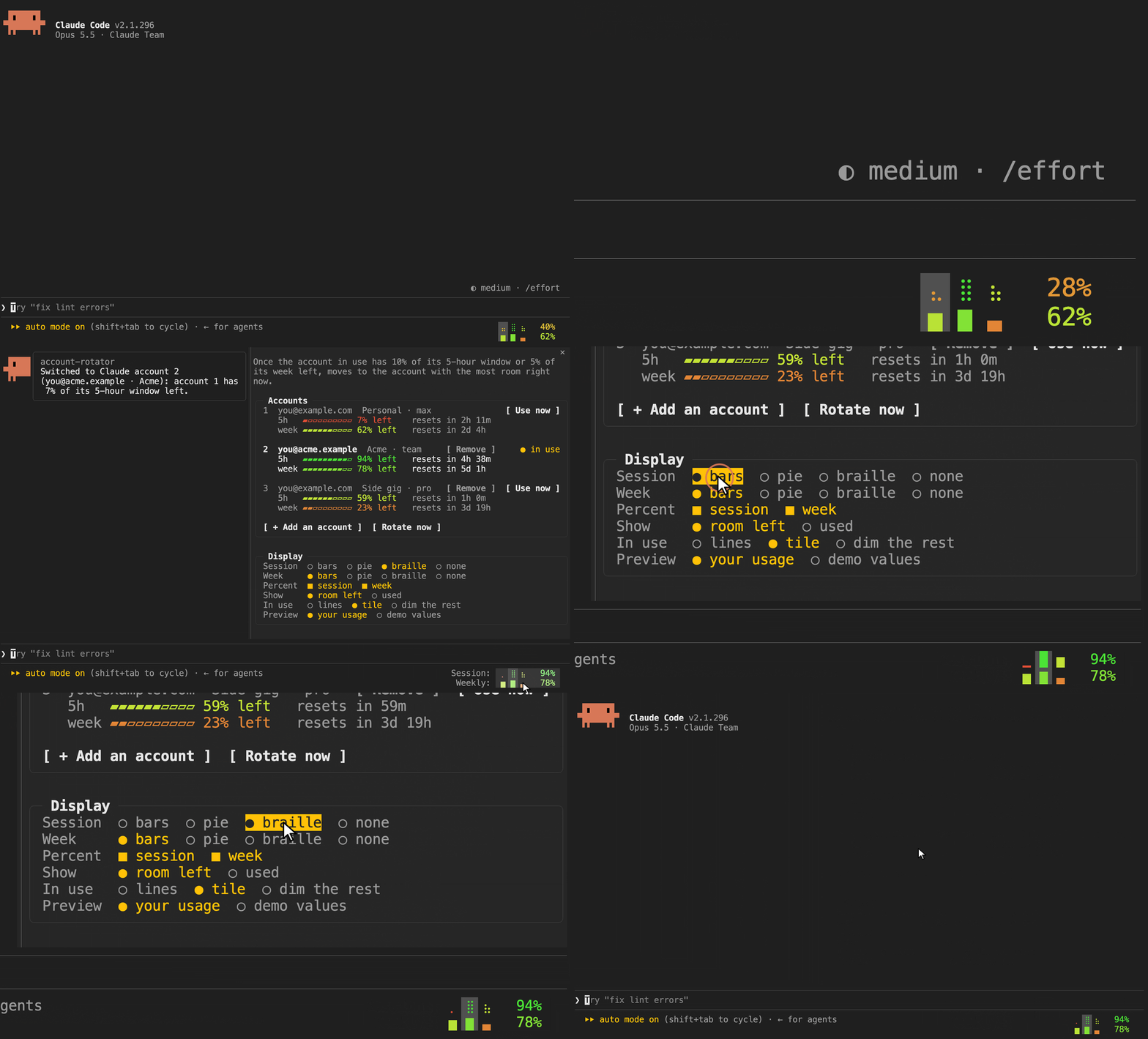
A real session fed imitated accounts (demo/harness), so no real account appears.
Install
/plugin install account-rotator --marketplace ivokund/claude-account-rotator
Then click the usage in the footer, press + Add an account and approve the sign-in in your browser. The account you are signed in with now is account 1.
The footer
A column per account. The top row is the room it has right now (its 5-hour window, or none once its week is spent), the bottom row its week: green with plenty left, red with little. The percents are the account in use's.
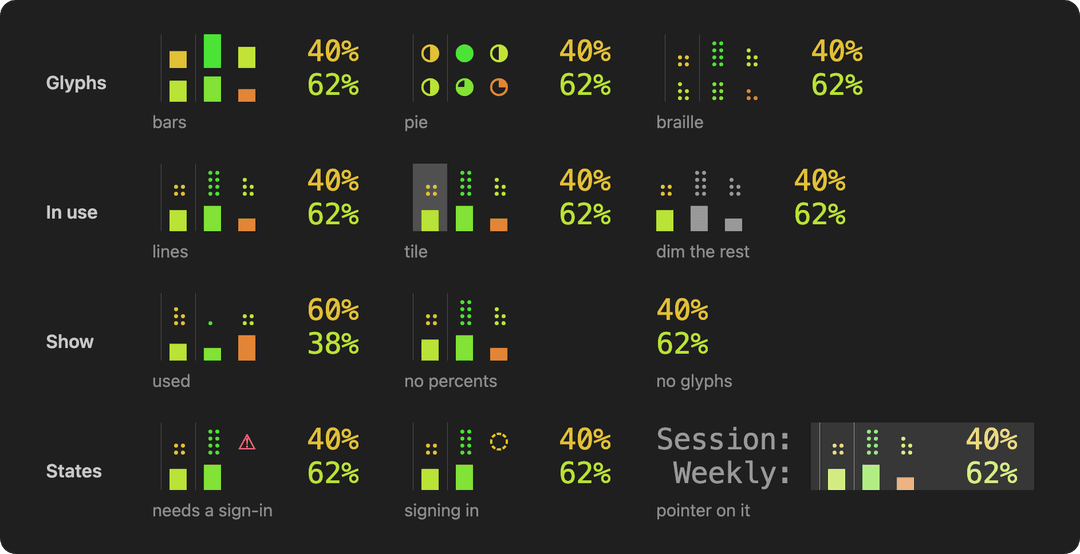
Click it for the panel: each account's usage and reset times, Sign in, Use now and Remove, + Add an account, Rotate now, Rotation, which picks the account it moves to, and Display, which picks the footer's look:
What it does
- Rotates. Once the account in use is down to 10% of its 5-hour window or 5% of its week, the session moves to another account, and a notice says which and why. Rotation in the panel picks which: by default the one whose 5-hour window resets soonest, so room about to refill is used before it does; else the one with the most room, or the next in the list; or disabled, which leaves switching to you.
- Recovers. A turn that still hits a usage limit or a rejected sign-in switches accounts and asks Claude to carry on.
- Shows what is really in use. If a switch doesn't take, the footer and panel go back to the old account, and the rotation stops trying the other one for that session.
- Warns. When every account is near its limit, a line above the prompt says when the next one frees up. When an account needs signing in again, the same line says so and signs it in with one click.
Requirements
- macOS, where Claude Code keeps sign-ins in the keychain, or Linux, where it keeps them in files.
- Claude Code 2.1.296 or later, in its fullscreen renderer (
/tui fullscreen), the only one that passes clicks on: the panel opens with a click. - Any Mac terminal: Terminal.app, iTerm2, Ghostty, Warp, VS Code; on Linux, one with mouse reporting. In iTerm2 the profile's Enable mouse reporting must be on, in tmux
set -g mouse on, and iTerm2'stmux -CCmode can't run fullscreen. - Claude subscription accounts (tested with Max and Team seats). Your
/loginmust be a personal one, Pro or Max: see Team and Enterprise accounts.
Claude Code's own "You've used N% of your session limit" warning can still show for a minute after a switch: the switch lands within about 35 seconds, and warnings Claude Code queued before it still play. No mod can hide it.
Mods are early access in Claude Code, and this one relies on internals a release can change: where sign-ins are stored, and the usage endpoint behind /usage.
Team and Enterprise accounts
The mod moves between personal accounts and Team or Enterprise seats. But Claude Code stops plugins from switching accounts, for the rest of a session, when:
- the session started on a Team or Enterprise account, or
- plugins reloaded while one was in use:
/reload-plugins, or installing, enabling or disabling a plugin (since 2.1.299).
The mod tells you when this happens. To keep switching:
/loginwith your personal account (Pro or Max). New sessions always start on your last/login. It doesn't unblock the session it runs in: restart Claude after.- Add Team seats from the panel, not
/login: + Add an account, and Sign in to renew. - Restart Claude when blocked: quit, and run
claude --continueorclaude --resumeto keep your conversation (or plainclaude). Each starts on your/login. Not/restart: it stays on the account in use.
The block comes from a built-in security default that stops plugins you install from changing where Claude Code reads its sign-in. It also runs on any machine with managed settings.
Turning the security default off
[!WARNING] This removes a security protection for every plugin and every session on the machine. With it off, a plugin you install can override what an organization's policy sets for Claude Code (its hooks, prompt content, settings, tool and MCP server rules) and change where Claude Code reads sign-ins and settings from. Anthropic's Usage Policy forbids intentionally bypassing restrictions or guardrails built into its products. This is a setting Claude Code offers administrators, but using it so a Team session can switch accounts may count as bypassing. Do it only on a machine you alone control, with plugins you trust. Never do it where an organization manages Claude Code, or where your Team or Enterprise organization's rules forbid it.
Managed settings decide whether the default runs: once they set prependPlugins, it runs only if listed there. The file must be owned by an administrator, since Claude Code ignores this key in a file your account can write. If the file below already exists, it holds your organization's policy: leave it alone. Otherwise:
# macOS
sudo mkdir -p "/Library/Application Support/ClaudeCode"
echo '{ "prependPlugins": [] }' | sudo tee "/Library/Application Support/ClaudeCode/managed-settings.json"

# Linux
sudo mkdir -p /etc/claude-code
echo '{ "prependPlugins": [] }' | sudo tee /etc/claude-code/managed-settings.json
It applies to sessions started after. Delete the file to turn the default back on. Managed settings an organization sends from Anthropic's servers can override it.
Untested: this follows how Claude Code 2.1.299 describes and reads the setting, but it has not been tried end to end, and a release can change it. You use it at your own risk.
How it works
- Each account you add gets a folder,
~/.claude/accounts/<n>, and Claude Code keeps its sign-in in the keychain under that folder's name (on Linux, in that folder's.credentials.json), as for any config folder. A switch points the session at another account's sign-in. - Its only network traffic: each account's usage every 10 minutes, from the endpoint
/usagereads, with that account's own token. Tokens stay where Claude Code keeps them; the mod stores each account's email, organization, plan and last usage.
Uninstall
Remove each account in the panel, which signs it out, then run claude plugin uninstall account-rotator@claude-account-rotator and delete ~/.claude/accounts.
Terms
As of October 2026:
- Neither Anthropic's Consumer Terms (October 8, 2025) nor its Commercial Terms (June 17, 2025) forbid one person from holding more than one Claude account. The Consumer Terms forbid sharing an account's login details, so add only your own. A Team or Enterprise seat is also under its organization's rules.
- Claude Code's legal page says the advertised usage limits of Pro and Max assume ordinary, individual usage. It also says Anthropic may enforce its rules on sign-ins and credentials without notice. The mod signs accounts in only through Claude Code's own
claude auth loginand keeps no tokens of its own. - The Consumer Terms forbid reaching the Services "through automated or non-human means" except with an API key. The mod's usage check every 10 minutes and its "carry on" prompt after a switch run inside Claude Code, as part of your own session, but judge that for yourself.
- The Usage Policy forbids intentionally bypassing restrictions or guardrails built into Anthropic's products: read the warning in Turning the security default off first.
Terms change; this is not legal advice. Not affiliated with or endorsed by Anthropic.
Develop
claude --plugin-dir .     # a session with the mod loaded from this folder
claude plugin validate .
claude plugin test .
demo/record.mjs records the GIF and demo/looks.mjs draws the footer's looks, both from a real session fed imitated accounts; their headers say what they need.
License
// faq
What is claude-account-rotator?
Claude Code mod: rotates between your Claude logins as their usage limits fill. It is open-source on GitHub.
Is claude-account-rotator free to use?
claude-account-rotator is open-source under the MIT license, so it is free to use.
What category does claude-account-rotator belong to?
claude-account-rotator is listed under plugins in the Claudeers registry of Claude-compatible tools.
// embed badge

[](https://claudeers.com/claude-account-rotator)
// retro hit counter

[](https://claudeers.com/claude-account-rotator)
// reviews
// guestbook
// related in Claude Plugins
 🔓
A single CLAUDE.md file to improve Claude Code behavior, derived from Andrej Karpathy's observations on LLM coding pitfalls.
 🔓
Claude Code is an agentic coding tool that lives in your terminal, understands your codebase, and helps you code faster by executing routine tasks, explainin…
 🔓
"CLI-Anything: Making ALL Software Agent-Native" -- CLI-Hub: https://clianything.cc/
🔓financial-services — a Claude ecosystem project on GitHub.