
chat-seek-vscode
Local VS Code search across Claude Code, Codex, and OpenCode chats with Laya reranking
Install with your AI
Paste into Claude Code, Cursor, or any agent — it reads the repo and wires the tool into your project.
Install and set up chat-seek-vscode (git-clone project) into my current project.
Found on https://claudeers.com/chat-seek-vscode
Repo: https://github.com/fstandhartinger/chat-seek-vscode
Homepage/docs: —
Detected install method: git-clone → git clone https://github.com/fstandhartinger/chat-seek-vscode
Category: devtools. Platforms: cli, api.
Read the repo's README for exact setup and env vars, then install it and wire it into my project.

Claudeers Health Verdict:
active; community-verified: false. Confirm the source before running anything.
git clone https://github.com/fstandhartinger/chat-seek-vscode
// compatibility
| Platforms | cli, api |
|---|---|
| Operating systems | — |
| AI compatibility | claude |
| License | MIT |
| Pricing | open-source |
| Language | JavaScript |
Point your coding agent at this repository and ask it to install Chat Seek in your local VS Code—see Agent installation instructions below.
Chat Seek
Find past Claude Code, Codex, and OpenCode conversations from a plain language description, inside VS Code.
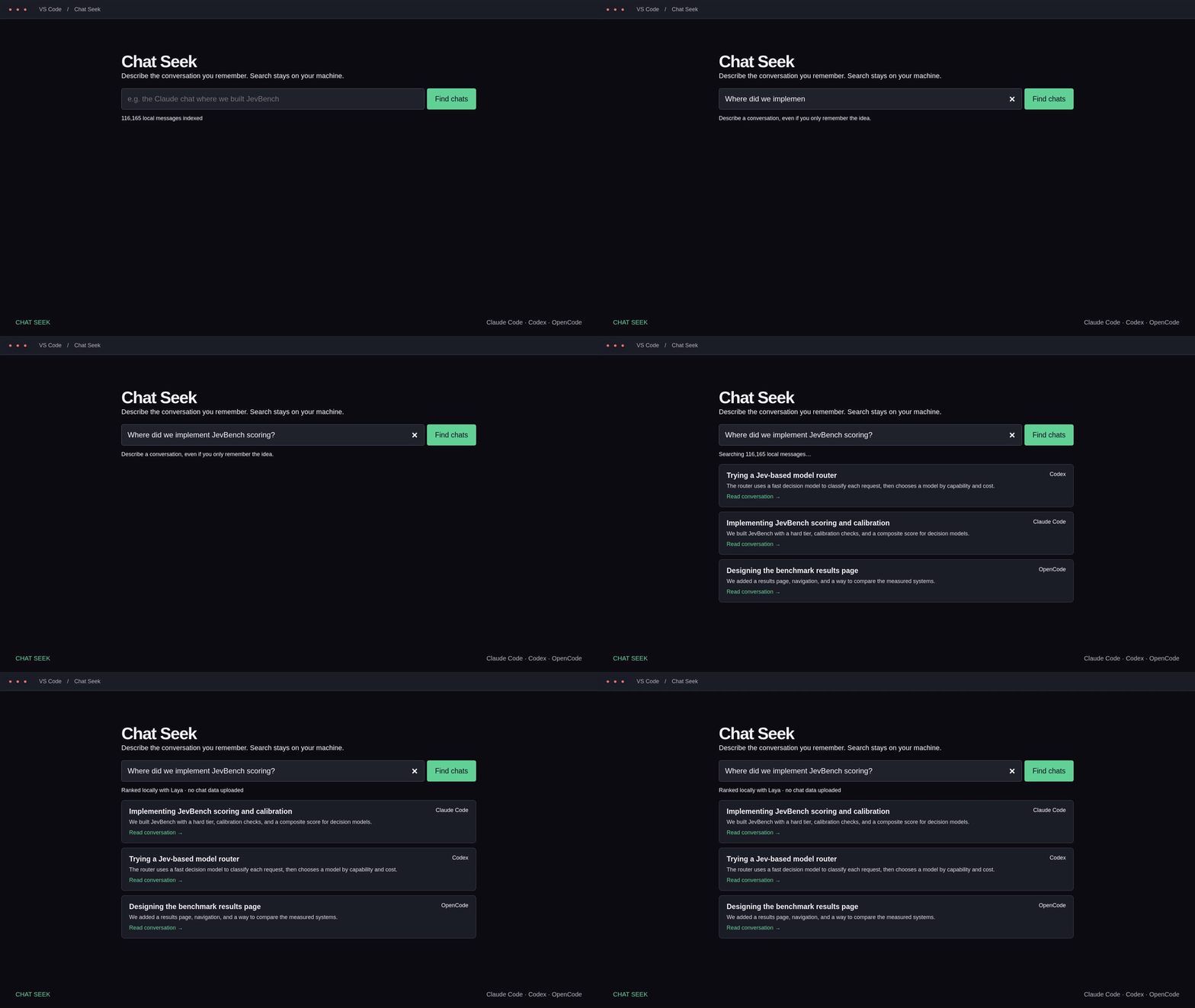
Demo video · Narrated explainer. These videos show the original UI with illustrative excerpts; the current version also has dates, summaries, and resume actions.
Chat Seek searches local user and assistant messages, then uses the Laya local decision model to rerank likely matches. Optional one-sentence AI descriptions help you recognize a chat. Cards show its last activity (“1 week ago”), with the exact date on hover, a readable excerpt, and a Resume in Claude Code / Codex / OpenCode action.
Open and pin Chat Seek
Press Ctrl+Shift+P (Cmd+Shift+P on macOS), run Chat Seek: Search past AI chats, and type in the search box. You can also click the Chat Seek magnifying-glass icon in the Activity Bar to use the sidebar.
Click Pin search tab to keep the editor tab handy. You can right-click the Activity Bar to show Chat Seek if its icon is hidden, or drag its view to your preferred sidebar. If commands do not appear immediately after installation, run Developer: Reload Window.
Resume opens the matching CLI in a VS Code integrated terminal using its session ID and original working directory when available. It does not automatically submit a new prompt. The CLI must be installed and signed in within the same environment as the extension. This launches the CLI, not a vendor's proprietary chat sidebar. An archived or moved session may no longer be resumable by its CLI; Read excerpt still opens the indexed context.
Optional summaries and API keys
Search, indexing, and Laya reranking work without an API key. Summaries are off by default. Click Configure summaries in Chat Seek, or run Chat Seek: Configure summaries. Add an API key through the masked input (stored in VS Code SecretStorage), then enable summaries after reviewing the provider disclosure. Existing environment keys are also supported; merely having a key does not enable uploads.
In auto mode, Chat Seek tries only providers with a key and model configured, in this order. Missing keys are skipped; request errors fall through to the next configured provider. Choose one provider in settings to prevent cross-provider fallback.
| Provider | Environment variables | Default model |
|---|---|---|
| OpenAI | OPENAI_API_KEY | gpt-5.6-luna |
| OpenRouter | OPENROUTER_API_KEY or OPEN_ROUTER_API_KEY | openai/gpt-5.6-luna |
| TensorX | TENSORX_API_KEY | z-ai/glm-5.3-flash |
| Custom OpenAI-compatible endpoint | CHAT_SEEK_API_KEY | Set your model and base URL |
SecretStorage keys take precedence over environment keys for the same provider. Removing a stored key does not remove an environment key. VS Code must inherit environment variables; reload/restart the relevant local or remote extension host if new variables are not visible. Never put keys in committed settings, prompts, screenshots, or this repository.
Override models under chatSeek.summaries.<provider>Model. For example, use gpt-5.6-luna or openai/gpt-5.6-luna when available to your provider account; GPT-5/6 overrides request low reasoning. The default GPT-5.6 Luna model requests low reasoning for short summaries. Model availability and prices can change—check your provider.
For other providers or a local server, set chatSeek.summaries.provider to custom, chatSeek.summaries.customUrl to the OpenAI-compatible base URL (for example https://your-provider.example/v1), and chatSeek.summaries.customModel to its exact model ID. HTTPS is required except for localhost. Add the custom key via Configure summaries or CHAT_SEEK_API_KEY.
Descriptions are generated lazily for displayed search results (up to 30 chats, two requests at a time), not for the entire archive on installation. Each request includes at most 12 sampled messages of up to 600 characters apiece, distributed across the chat. Summaries are cached locally by chat content, reused across queries, and regenerated when indexed messages change. Long chats can span many topics: a sampled summary is a recognition aid, and the matching excerpt remains available. API failures leave ordinary search results usable.
Privacy: enabled summaries send sampled excerpts to the configured provider(s) and may incur API charges. Common credential patterns and known environment secrets are redacted, but redaction cannot remove every kind of sensitive information. Other private chat text can still be sent. The UI labels AI summaries and their provider. Disable summaries to keep search entirely local. Private indexes and summary caches live in VS Code extension storage; do not publish them.
Install manually
Download the Linux x64 VSIX from the latest release. In VS Code, run Extensions: Install from VSIX..., select it, and open Chat Seek. The prebuilt package supports Linux x64, including VS Code Remote WSL. VS Code 1.99+ is required.
To build on Linux x64 with Node.js 20+:
npm ci
npm test
npm run lint
npm run package
code --install-extension chat-seek-linux-x64-0.2.1.vsix --force
Use code-insiders for VS Code Insiders. In a remote window, install into the environment containing the histories, not just the local UI host. Building for another platform requires changing the vsce --target argument and .vscodeignore ONNX native-binary exclusions to retain that platform's runtime. The supplied VSIX must not be relabeled for another platform.
The first Laya use downloads about 1.7 GB of model weights into ~/.cache/receptron-laya. The runtime uses CPU inference. Keyword results appear first; Laya then refines the order. Set chatSeek.useLaya to false if the machine cannot support the model. Opening the search refreshes the local index; unchanged transcript files are reused. Refresh chats updates it while the panel is open.
Agent installation instructions
When a user points you at this repo to install Chat Seek:
- Identify the actual VS Code environment. Check standard VS Code versus Insiders, OS and CPU architecture, WSL/SSH/container use, the active user's home, and which environment holds their chat files. Find the correct
code/code-insidersCLI. Do not assume a Windows UI means the extension should run on Windows when the chats are in WSL. - Install the matching release or build it locally. Clone this public repository. On Linux x64, install the latest release VSIX, or use the build commands above. For another platform, adjust the packaging target and native runtime exclusions, build on that platform, and verify the included ONNX runtime. Keep local adjustments documented; never bundle private histories or credentials.
- Locate histories and adjust only what is needed. Defaults are below. Use
chatSeek.extraRootsfor custom roots or Windows mounts. Verify a known chat can be indexed; use local indexing and synthetic text for API smoke tests. No API key is required for basic installation. - Explain optional summaries. Tell the user they can now provide an OpenAI, OpenRouter, TensorX, or compatible-provider key through Chat Seek: Configure summaries. Explain sampled-excerpt uploads, possible charges, local caching, and the configured fallback order. Never ask them to paste a key into a public issue or commit it. Leave summaries disabled unless they authorize enabling them; if they already authorized it, carry that authorization forward. Prefer SecretStorage or existing environment variables.
- Verify the installed result. Check
code --list-extensions --show-versions(or the appropriate Insiders/remote CLI) forfstandhartinger.chat-seek. Verify commands and the sidebar are available. If a native runtime cannot load, report that accurately and keep keyword search usable. - Give concrete opening instructions. Tell the user: “Press Ctrl+Shift+P (Cmd+Shift+P on macOS), run Chat Seek: Search past AI chats, and type your description. You can also use the Chat Seek Activity Bar icon. Click Pin search tab to keep it handy.” Suggest Developer: Reload Window only if the command/icon has not appeared. Explain that Resume opens the corresponding CLI in VS Code's terminal and may require CLI login.
Finish by stating which environment/version you installed, where to open the search, whether summaries are enabled, which provider/model is configured, and any actual local limitations. Do not claim to have tested interactive CLI resumption if you only verified its arguments.
Supported history and limitations
~/.claude/projectsand~/.claude/archived_projects~/.codex/sessionsand~/.codex/archived_sessions~/.local/share/opencode/storage(file-based session/message/part storage)
chatSeek.extraRoots accepts additional paths. Paths containing codex or opencode select those parsers; other paths are treated as Claude Code roots. OpenCode roots should point at its storage directory. Only user and assistant text is indexed; tool results and subagent transcripts are excluded. Newer OpenCode database-only storage is not yet imported.
The shortlist depends on word overlap; a description with no shared words can miss a chat. Long messages are clipped at 2,800 characters, and previews show nearby indexed messages. Missing timestamps are labeled “Date unknown”. Dates refer to the latest indexed message in the conversation. Native resume availability depends on the source application's retained session files.
Development
Run npm test, npm run lint, and npm run package. Tests cover parser behavior, index updates, summary cache invalidation and fallback, redaction, relative dates, and safe resume arguments. Public videos use illustrative data.
MIT license. Laya weights are downloaded separately under Apache 2.0.
// faq
What is chat-seek-vscode?
Local VS Code search across Claude Code, Codex, and OpenCode chats with Laya reranking. It is open-source on GitHub.
Is chat-seek-vscode free to use?
chat-seek-vscode is open-source under the MIT license, so it is free to use.
What category does chat-seek-vscode belong to?
chat-seek-vscode is listed under devtools in the Claudeers registry of Claude-compatible tools.
// embed badge

[](https://claudeers.com/chat-seek-vscode)
// retro hit counter

[](https://claudeers.com/chat-seek-vscode)
// reviews
// guestbook
// related in Developer Tools
 🔓
🔓The agent harness performance optimization system. Skills, instincts, memory, security, and research-first development for Claude Code, Codex, Opencode, Curs…
 🔓
🔓Makes your AI agent think like the laziest senior dev in the room. The best code is the code you never wrote.
 🔓
🔓Use Garry Tan's exact Claude Code setup: 23 opinionated tools that serve as CEO, Designer, Eng Manager, Release Manager, Doc Engineer, and QA
 🔓
🔓AI coding assistant skill (Claude Code, Codex, OpenCode, Cursor, Gemini CLI, and more). Turn any folder of code, SQL schemas, R scripts, shell scripts, docs,…