
chat-history
ChatGPT and Claude history exploration
Install with your AI
Paste into Claude Code, Cursor, or any agent — it reads the repo and wires the tool into your project.
⚠ Unverified source (community-unclaimed, low activity) — reveal the prompt
⚠ Unverified source (community-unclaimed, low activity). Inspect the repo before letting your agent install it.

Install and set up chat-history (git-clone project) into my current project.
Found on https://claudeers.com/chat-history
Repo: https://github.com/mirableio/chat-history
Homepage/docs: https://mirable.io
Detected install method: git-clone → git clone https://github.com/mirableio/chat-history
Category: rag. Platforms: cli, api, web.
Read the repo's README for exact setup and env vars, then install it and wire it into my project.

Claudeers Health Verdict:
dormant; community-verified: false. Confirm the source before running anything.
git clone https://github.com/mirableio/chat-history
// compatibility
| Platforms | cli, api, web |
|---|---|
| Operating systems | — |
| AI compatibility | claude |
| License | MIT |
| Pricing | open-source |
| Language | Python |
Chat History
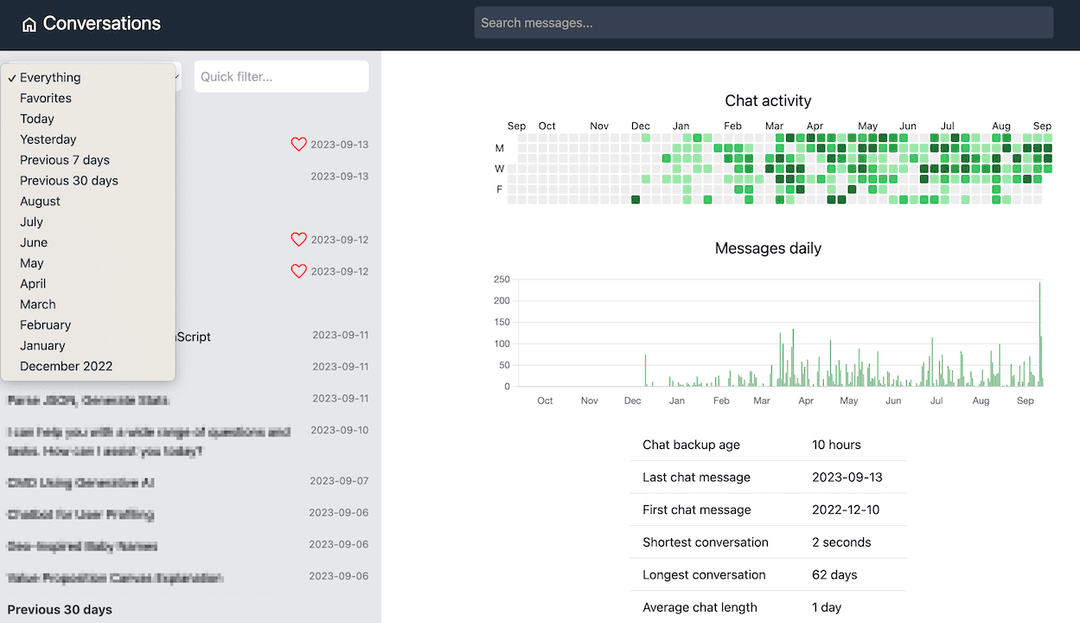
Browse and export your ChatGPT and Claude conversations locally.
Getting Started
Requires Python 3.11+ and uv.
-
Export your chats from ChatGPT or Claude (Settings → Export data). Both services send a ZIP file by email.
-
Create a folder for your chat history, save the ZIP there, and open a terminal in that folder. The wizard will store all data inside it.
-
Run the setup wizard:
uvx chat-historyThe wizard finds your export files, configures everything, and opens the browser.
Next time, run uvx chat-history in the same folder to start browsing.
To update to the latest version, run uvx chat-history install.
To export all conversations as markdown (useful for feeding to other AI tools):
uvx chat-history export
Features
- Unified conversation browser for ChatGPT and Claude exports
- Provider-aware favorites and external links
- Full-text search with optional semantic search (OpenAI embeddings + FAISS)
- Activity and token statistics
- Export conversations to markdown for downstream AI workflows
CLI Reference
All commands work as uvx chat-history <command> or, if installed locally, chat-history <command>.
| Command | Description |
|---|---|
| (none) | Start server if configured, otherwise run setup wizard |
init | Run the interactive setup wizard |
serve | Start the web server |
export | Export conversations to markdown |
inspect | Print conversation and message counts |
install | Reinstall chat-history via uvx --reinstall chat-history |
serve
uvx chat-history serve [--host 127.0.0.1] [--port 8080] [--no-browser]
export
uvx chat-history export [--provider chatgpt|claude|all] [--out DIR] [--clean]
                        [--exclude-system] [--exclude-tool]
                        [--exclude-thinking] [--exclude-attachments]
--cleanremoves old export files before writing (scoped to--providerif set)- Default output:
./data/export/{chatgpt|claude}/
init
uvx chat-history init [--path DIR]
Scans the current folder and ~/Downloads for export ZIPs, validates them,
extracts to ./data/, writes ./data/.env, and offers to start the server.
Supports adding a second provider to an existing setup.
Configuration
All config lives in ./data/.env (created by the wizard or manually):
| Variable | Default | Description |
|---|---|---|
CHAT_HISTORY_DATA_DIR | data | Root directory for derived data |
CHAT_HISTORY_CHATGPT_PATH | — | Path to ChatGPT export folder or conversations.json |
CHAT_HISTORY_CLAUDE_PATH | — | Path to Claude export folder or conversations.json |
CHAT_HISTORY_OPENAI_ENABLED | false | Enable semantic search |
OPENAI_API_KEY | — | Required if semantic search is enabled |
OPENAI_ORGANIZATION | — | Optional OpenAI org |
OPENAI_EMBEDDING_MODEL | text-embedding-3-small | Embedding model for semantic search |
CHAT_HISTORY_SETTINGS_DB_PATH | — | Override path for settings SQLite DB |
Developer Setup
make install    # uv sync
make dev        # uvicorn with hot-reload on :8080
make test       # run tests
Install as a global command from the local repo (editable, changes reflected immediately):
make tool-install         # uv tool install -e .
chat-history              # works from any directory
make tool-uninstall       # uv tool uninstall chat-history
Notes
- Export is non-destructive by default. Existing files remain unless
--cleanis used. - Token stats for Claude are approximate (fallback tokenizer), not exact Claude-native counts.
// faq
What is chat-history?
ChatGPT and Claude history exploration. It is open-source on GitHub.
Is chat-history free to use?
chat-history is open-source under the MIT license, so it is free to use.
What category does chat-history belong to?
chat-history is listed under data in the Claudeers registry of Claude-compatible tools.
// embed badge

[](https://claudeers.com/chat-history)
// retro hit counter

[](https://claudeers.com/chat-history)
// reviews
// guestbook
// related in RAG & Knowledge
 🔓
🔓Persistent Context Across Sessions for Every Agent – Captures everything your agent does during sessions, compresses it with AI, and injects relevant contex…
 🔓
🔓✨ Light and Fast AI Assistant. Support: Web | iOS | MacOS | Android | Linux | Windows
 🔓
🔓Compress tool outputs, logs, files, and RAG chunks before they reach the LLM. 60-95% fewer tokens, same answers. Library, proxy, MCP server.
 🔓
🔓A light-weight and powerful meta-prompting, context engineering and spec-driven development system for Claude Code by TÂCHES.