
ccsession
pick any past Claude Code session via fzf, then resume it from the right cwd
Install with your AI
Paste into Claude Code, Cursor, or any agent — it reads the repo and wires the tool into your project.
Install and set up ccsession (release-binary project) into my current project.
Found on https://claudeers.com/ccsession
Repo: https://github.com/sorafujitani/ccsession
Homepage/docs: —
Detected install method: release-binary → inspect the README
Category: devtools. Platforms: cli, api.
Read the repo's README for exact setup and env vars, then install it and wire it into my project.

Claudeers Health Verdict:
active; community-verified: false. Confirm the source before running anything.
Grab the latest release asset from GitHub.
# download a build from https://github.com/sorafujitani/ccsession/releases
git clone https://github.com/sorafujitani/ccsession
// compatibility
| Platforms | cli, api |
|---|---|
| Operating systems | — |
| AI compatibility | claude |
| License | MIT |
| Pricing | open-source |
| Language | Go |
ccsession
An fzf-powered session picker for resuming local agent sessions.
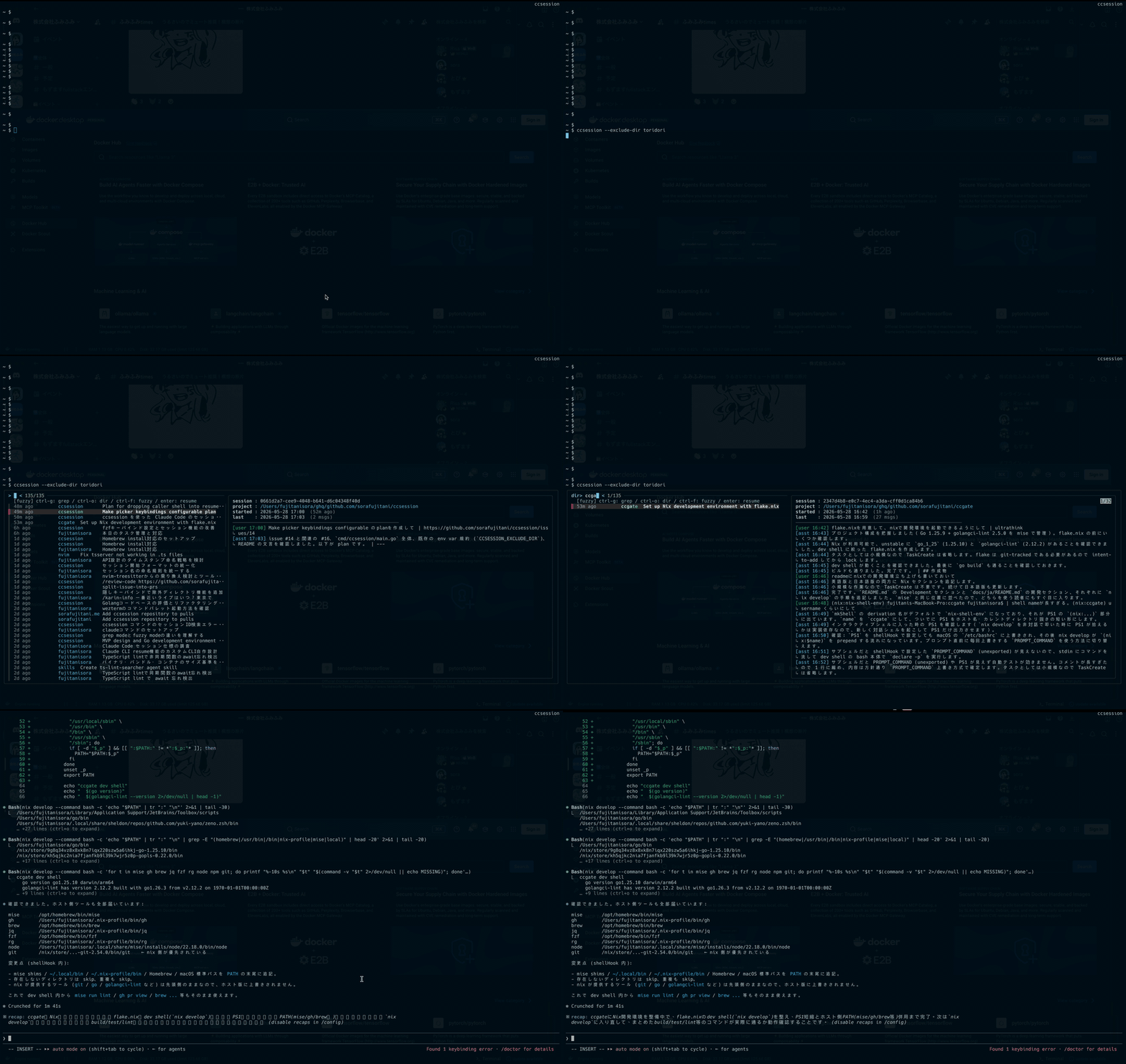
ccsession lists local agent sessions (Claude Code by default, with optional
OpenCode, Grok, and Codex backends), lets you fuzzy-find across all of your
projects with a live preview pane, and resumes the one you pick in its original
working directory.
Features
- Cross-project listing — every session from every project in one view, sorted by last activity.
- Three search modes — fuzzy (default), directory-only, and full-text grep over JSONL transcripts, with configurable mode-switch keys.
- Live preview — last 30 messages of the highlighted session, with
timestamps and roles. In grep mode the matched query is highlighted in the
preview so you can spot the hit at a glance. Set
CCSESSION_PREVIEW_MESSAGESto change the preview length. - Faithful resume —
chdirs back to the session's originalcwdbefore exec'ing the selected agent's resume command, so paths and tooling Just Work. - Single static binary — written in Go with no cgo; bundles a pure-Go SQLite reader (for OpenCode support) and a small TOML parser for the optional config file.
Requirements
| Tool | Required for |
|---|---|
fzf >= 0.58.0 | interactive picker |
claude (Claude Code CLI) | resuming sessions |
opencode | listing & resuming OpenCode sessions (only with --source=opencode) |
grok (Grok Build TUI) | listing & resuming Grok sessions (only with --source=grok) |
codex (Codex CLI) | listing & resuming Codex sessions (only with --source=codex) |
ccsession depends on newer fzf actions such as transform, rebind,
unbind, disable-search, and change-nth. The newest of those,
change-nth, landed in fzf 0.58.0, so older versions may start but the mode
switch bindings will not work correctly.
Install
Go
go install github.com/sorafujitani/ccsession/cmd/ccsession@latest
Requires Go 1.25 or newer (the pure-Go SQLite reader for OpenCode support needs it; see #52).
Version metadata is recovered from runtime/debug.ReadBuildInfo, so
ccsession --version works for go install builds as well.
Pre-built binaries
Grab the ccsession_<ver>_<os>_<arch>.tar.gz for your platform from the
Releases page, extract
it, and drop the binary somewhere on your PATH:
tar xzf ccsession_0.1.0_darwin_arm64.tar.gz
install -m 0755 ccsession ~/.local/bin/
If macOS Gatekeeper complains:
xattr -d com.apple.quarantine ~/.local/bin/ccsession
Nix flake
nix run github:sorafujitani/ccsession             # one-off
nix profile install github:sorafujitani/ccsession # install into a profile
Homebrew
brew install sorafujitani/tap/ccsession
The formula lives in
sorafujitani/homebrew-tap
and GoReleaser refreshes it on every tagged release. fzf is installed as a
dependency; the claude CLI must be installed separately. opencode, grok,
and codex are needed only with their matching --source backends — they back
optional features (unlike fzf, which is always required), so they are
intentionally left out of the formula's depends_on.
Usage
ccsession                            # list -> fzf -> resume
ccsession --grok                     # use Grok sessions from ~/.grok/sessions
ccsession --codex                    # use Codex sessions from ~/.codex/sessions
ccsession list  [--grep Q] [--regex] # emit TSV rows to stdout
ccsession list --json --grep Q --limit 5 # emit structured rows for agents
ccsession preview [--query Q] [--regex] <id> # render the preview pane (Q highlighted)
ccsession preview --json <id>        # emit structured preview data for scripts/agents
ccsession preview --no-color <id>    # force plain preview output
ccsession resume-spec <id>           # print the resume target without launching it
ccsession resume  <id>               # chdir to the session's cwd, exec the selected agent
ccsession --version
ccsession --help
Agent Skill
This repository ships a Codex Agent Skill at
.agents/skills/ccsession. Use $ccsession when you want an agent to recover
prior context, compare historical sessions, preview a likely match, or hand off
to a previous local agent session.
When Codex is working from this repository checkout, Codex discovers the
repo-local skill from .agents/skills/ccsession. Invoke it explicitly with
$ccsession or ask for the same workflow in natural language, for example:
Use $ccsession to find the session where we worked on issue 84.
If you installed only the ccsession binary and want the skill available from
other repositories, install it with the skills CLI:
npx skills add sorafujitani/ccsession --skill ccsession
Here --skill ccsession selects this skill from the repository. The skill
itself is the standard Agent Skills directory format: a folder with SKILL.md
plus optional resources.
For a user-wide install:
npx skills add sorafujitani/ccsession --skill ccsession -g
When developing from a local checkout, install from the current directory:
npx skills add . --skill ccsession
Start a new Codex session after installing or updating the skill so the skill
metadata is reloaded. The skill assumes the ccsession binary is on PATH.
The skill teaches agents to use ccsession in a read-first workflow:
-
Search candidates with structured output:
ccsession list --json --grep "<query>" --limit 5Use a source selector when the target backend is known:
ccsession --codex list --json --grep "<query>" --limit 5 ccsession --source all list --json --grep "<query>" --limit 5 -
Summarize a small candidate set for the user. The JSON rows include
source,id,locator,cwd,cwd_basename,label,last_activity,cwd_exists, andcwd_unknown. -
Preview the selected candidate before recommending resume:
ccsession preview --locator "<locator>" --query "<query>" "<id>" ccsession preview --json --locator "<locator>" "<id>" -
Show the non-launching handoff target:
ccsession resume-spec --locator "<locator>" "<id>"resume-specprints the selected backend, working directory, binary, and arguments as JSON. It does not start an interactive process. -
Run
ccsession resume --locator "<locator>" "<id>"only after explicit user confirmation.resumechanges into the recordedcwdandexecs the selected agent CLI, replacing the current process.
When using --source, repeat the same source selector on list, preview,
resume-spec, and resume; global flags apply only to that ccsession
process and the fzf children it starts.
Keys inside fzf
| Key | Mode |
|---|---|
Ctrl-G | grep — refilters by user/assistant content on every keystroke; matches are highlighted in the preview |
Ctrl-O | dir — fuzzy match restricted to the directory column |
Ctrl-F | fuzzy — default; matches across time / dir / label |
Enter | resume the selected session |
Esc | cancel |
The three mode-switch keys are the defaults and can be overridden (see below).
Configuring the keybindings
If a mode-switch key clashes with your terminal, shell, or muscle memory, you can remap any of the three. Keys are resolved in this order (first wins):
CLI flags > environment variables > config file > defaults
The on-screen header is regenerated from the resolved keys, so the hint always matches what is active.
# CLI flags (highest precedence)
ccsession --bind-grep ctrl-r --bind-fuzzy alt-f

# environment variables
export CCSESSION_BIND_GREP=ctrl-r
export CCSESSION_BIND_DIR=ctrl-o
export CCSESSION_BIND_FUZZY=alt-f
Config file at ~/.config/ccsession/config.toml (lowest precedence before
defaults; honors XDG_CONFIG_HOME). ccsession only reads this file — it
never creates it, so create it yourself only if you want file-based overrides:
[keybindings]
grep  = "ctrl-r"
dir   = "ctrl-o"
fuzzy = "alt-f"
Any key you leave unset falls through to the next source. A key name must be
lower-case fzf syntax (ctrl-r, alt-f, f1, …); the three keys must be
distinct and must not be a reserved fzf event name (enter, change, …), or
ccsession exits with an error instead of starting the picker.
How it works
ccsession listreads the selected backend (~/.claude/projects/*/by default, or--source=opencode/--source=grok/--source=codex) and prints one TSV row per session (id,locator,epoch, relative time, cwd basename, label).ccsession list --json --limit Nemits the same candidates as a JSON array for agent integrations.fzfconsumes the TSV. The three key bindings swap fzf's matcher between fuzzy mode, directory-only mode, and grep mode (which reloads viaccsession list --grep <query>on every keystroke). The current query is also forwarded to the preview asccsession preview --query <query> <id>, which highlights its matches in the rendered messages.ccsession resume-spec <id>resolves the same target asresumeand prints the source, cwd, binary, and arguments as JSON without launching anything.- On
Enter,ccsession resume <id>resolves the session's originalcwd,chdirs into it, andexecves the selected agent's resume command so the resumed process fully replaces the picker.
Backend-specific homes can be overridden with GROK_HOME for Grok and
CODEX_HOME for Codex. Codex defaults to ~/.codex, reading sessions from
its sessions subdirectory.
Development
nix develop                    # Go + fzf + gopls + goreleaser
go build ./cmd/ccsession
go test ./...
Snapshot a release locally
goreleaser release --snapshot --clean --skip=publish
ls dist/
Build with Nix
nix build
./result/bin/ccsession --version
Contributing
Bug reports and pull requests are welcome at https://github.com/sorafujitani/ccsession. For larger changes, please open an issue first to discuss what you'd like to change.
License
// faq
What is ccsession?
pick any past Claude Code session via fzf, then resume it from the right cwd. It is open-source on GitHub.
Is ccsession free to use?
ccsession is open-source under the MIT license, so it is free to use.
What category does ccsession belong to?
ccsession is listed under devtools in the Claudeers registry of Claude-compatible tools.
// embed badge

[](https://claudeers.com/ccsession)
// retro hit counter

[](https://claudeers.com/ccsession)
// reviews
// guestbook
// related in Developer Tools
 🔓
🔓The agent harness performance optimization system. Skills, instincts, memory, security, and research-first development for Claude Code, Codex, Opencode, Curs…
 🔓
🔓Makes your AI agent think like the laziest senior dev in the room. The best code is the code you never wrote.
 🔓
🔓Use Garry Tan's exact Claude Code setup: 23 opinionated tools that serve as CEO, Designer, Eng Manager, Release Manager, Doc Engineer, and QA
 🔓
🔓AI coding assistant skill (Claude Code, Codex, OpenCode, Cursor, Gemini CLI, and more). Turn any folder of code, SQL schemas, R scripts, shell scripts, docs,…