
cc-switch-helper
Run different Claude Code providers in different terminals. 支持同时在不同终端窗口用不同 API Key 跑 Claude Code,互不影响
Install with your AI
Paste into Claude Code, Cursor, or any agent — it reads the repo and wires the tool into your project.
Install and set up cc-switch-helper (git-clone project) into my current project.
Found on https://claudeers.com/cc-switch-helper
Repo: https://github.com/luckybilly/cc-switch-helper
Homepage/docs: —
Detected install method: git-clone → git clone https://github.com/luckybilly/cc-switch-helper
Category: devtools. Platforms: cli, api.
Read the repo's README for exact setup and env vars, then install it and wire it into my project.

Claudeers Health Verdict:
slowing; community-verified: false. Confirm the source before running anything.
git clone https://github.com/luckybilly/cc-switch-helper
// compatibility
| Platforms | cli, api |
|---|---|
| Operating systems | — |
| AI compatibility | claude |
| License | MIT |
| Pricing | open-source |
| Language | JavaScript |
cc-switch-helper
English | 中文文档
Overcomes the global single-config limitation of the original CC-Switch, enabling per-terminal, per-window binding of different API keys and models — multiple sessions running in parallel without interference.
The native CC-Switch shares one global API config across all terminals — switching providers changes every window at once. This tool provides session-level isolation: one terminal on a personal key, another on a company key, running side by side with no conflicts.
Why?
CC-Switch is a great tool for managing Claude Code providers, but switching providers changes the global config — every running Claude Code instance picks up the change.
ccs takes a different approach: it passes the provider settings directly to each claude process. This means you can run DeepSeek in one terminal and GLM in another, at the same time, without ever touching the global config.
Terminal 1: ccs deep     → Claude Code running DeepSeek
Terminal 2: ccs glm      → Claude Code running GLM
Terminal 3: ccs zcy      → Claude Code running your custom provider
Each window is independent. Switch providers in one — the others stay untouched.

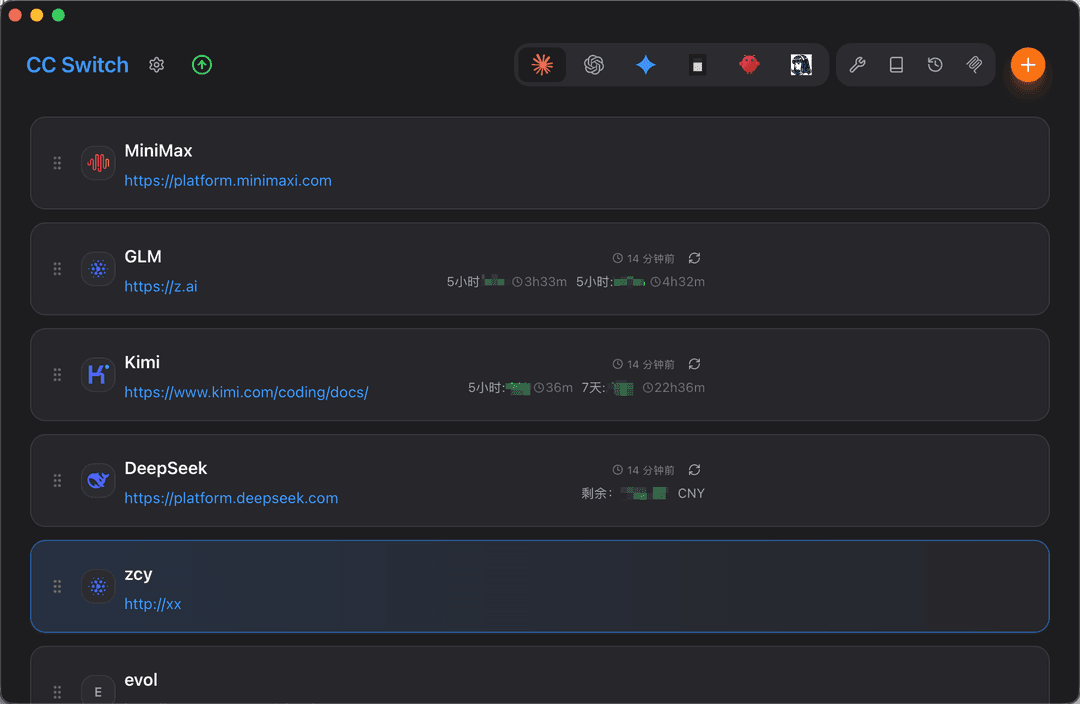
CC-Switch provider configuration panel:
Features
- Session-level config isolation — run different API keys, providers, and models across multiple terminals/windows simultaneously, no interference
- Interactive menu — arrow keys to pick a provider, no need to remember names
- Fuzzy match —
ccs deepmatches "DeepSeek",ccs minimatches "Minimax" - Cross-platform — works on macOS, Linux, and Windows (PowerShell / CMD / Git Bash)
- Zero config — reads directly from your CC-Switch database, compatible with existing key groups and relay configs
- Non-invasive — does not modify CC-Switch source code; CC-Switch upgrades won't affect this tool
Prerequisites
- CC-Switch installed with at least one Claude provider configured
- Claude Code CLI installed
- Node.js ≥ 18
Install
npm install -g luckybilly/cc-switch-helper
This registers the ccs command globally.
Usage
ccs                       # Interactive provider selection
ccs <name>                # Fuzzy-match provider by name
ccs <name> -- <args...>   # Pass extra arguments to claude
ccs --no-skip             # Launch without --dangerously-skip-permissions
ccs --list                # List all configured providers
ccs --help                # Show help
Examples
# Pick from an interactive menu
ccs
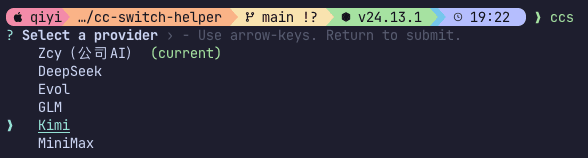
# Launch with a specific provider (case-insensitive fuzzy match)
ccs zcy
ccs DeepSeek
ccs glm

# Pass extra arguments to claude (everything after --)
ccs zcy -- --resume
ccs DeepSeek -- -p "hello world"

# Launch without --dangerously-skip-permissions (review each permission)
ccs zcy --no-skip

# See all your configured providers
ccs --list
Alias to cc
If you prefer the shorter cc command, add an alias to your shell config:
# ~/.zshrc or ~/.bashrc
alias cc=ccs
Note:
ccis also the system C compiler on macOS/Linux. The alias takes priority in your shell, but be aware if you work with C projects.
How it works
- Reads providers from CC-Switch's SQLite database (
~/.cc-switch/cc-switch.db) - Reads your base Claude settings from
~/.claude/settings.json - Merges the selected provider's
envandenabledPluginsinto the base settings - Launches
claude --settings <json> --dangerously-skip-permissions
The provider's environment variables override same-named keys in your base settings, while all other settings (permissions, hooks, plugins, etc.) are preserved.
--dangerously-skip-permissions is a built-in Claude Code flag that skips per-action permission prompts for a smoother experience. Add --no-skip to restore per-action approval, useful when you want tighter permission control.
Platform support
| Platform | Shell | Status |
|---|---|---|
| macOS | zsh, bash | ✅ |
| Linux | bash, zsh, fish | ✅ |
| Windows | PowerShell | ✅ |
| Windows | CMD | ✅ |
| Windows | Git Bash | ✅ |
FAQ
Q: Does ccs conflict with switching providers in CC-Switch?
A: No.
ccsonly affects the claude process it launches — it doesn't touch the global config. You can switch providers in CC-Switch anytime without affecting runningccssessions.
Q: How do I know which provider a window is using?
A:
ccsprints→ Launching [provider-name]on startup. The terminal title bar also shows it.
Q: What's the difference between default and --no-skip?
A: Default includes
--dangerously-skip-permissions, which skips Claude Code's per-action permission prompts.--no-skiprestores per-action approval, useful for tighter security control.
License
MIT
// faq
What is cc-switch-helper?
Run different Claude Code providers in different terminals. 支持同时在不同终端窗口用不同 API Key 跑 Claude Code,互不影响. It is open-source on GitHub.
Is cc-switch-helper free to use?
cc-switch-helper is open-source under the MIT license, so it is free to use.
What category does cc-switch-helper belong to?
cc-switch-helper is listed under devtools in the Claudeers registry of Claude-compatible tools.
// embed badge

[](https://claudeers.com/cc-switch-helper)
// retro hit counter

[](https://claudeers.com/cc-switch-helper)
// reviews
// guestbook
// related in Developer Tools
 🔓
🔓The agent harness performance optimization system. Skills, instincts, memory, security, and research-first development for Claude Code, Codex, Opencode, Curs…
 🔓
🔓Makes your AI agent think like the laziest senior dev in the room. The best code is the code you never wrote.
 🔓
🔓Use Garry Tan's exact Claude Code setup: 23 opinionated tools that serve as CEO, Designer, Eng Manager, Release Manager, Doc Engineer, and QA
 🔓
🔓AI coding assistant skill (Claude Code, Codex, OpenCode, Cursor, Gemini CLI, and more). Turn any folder of code, SQL schemas, R scripts, shell scripts, docs,…