
cc-best
🎭 cc-best: Turn Claude Code into a full dev team — PM→Lead→Dev→QA autonomous workflow. 44 commands · 19 skills · 8 agents · 43 rules · 30 hooks · auto-learn…
Install with your AI
Paste into Claude Code, Cursor, or any agent — it reads the repo and wires the tool into your project.
Install and set up cc-best (claude-plugin project) into my current project.
Found on https://claudeers.com/cc-best
Repo: https://github.com/xiaobei930/cc-best
Homepage/docs: https://xiaobei930.github.io/cc-best/
Detected install method: claude-plugin → /plugin install cc-best@xiaobei930/cc-best
Category: devtools. Platforms: cli, api, desktop, web, mobile.
Read the repo's README for exact setup and env vars, then install it and wire it into my project.

Claudeers Health Verdict:
slowing; community-verified: false. Confirm the source before running anything.
/plugin marketplace add xiaobei930/cc-best
/plugin install cc-best@xiaobei930/cc-best
git clone https://github.com/xiaobei930/cc-best
// compatibility
| Platforms | cli, api, desktop, web, mobile |
|---|---|
| Operating systems | — |
| AI compatibility | claude |
| License | MIT |
| Pricing | open-source |
| Language | JavaScript |
CC-Best
Role-Driven Development Workflow for Claude Code
English | 中文 | 🌐 Homepage
Transform Claude into a complete development team. From product requirements to code review — one plugin, full workflow.
44 commands · 19 skills · 8 agents · 43 rules · 30 hooks
Quick Start • Features • Workflow • Commands • FAQ
Why CC-Best?
🎯 The Problem: Claude Code is powerful, but configuring workflows, coding standards, and safety rules from scratch takes hours.
✨ The Solution: Pre-configured roles (PM → Lead → Designer → Dev → QA) that mirror real team collaboration, with safety guardrails built-in.
⚡ Quick Start
# Add marketplace and install
/plugin marketplace add xiaobei930/cc-best
/plugin install cc-best@xiaobei930

# Verify installation (30 seconds)
/cc-best:status

# Start using
/cc-best:iterate "implement user authentication"
💡 Enable Hooks: After installation, run
/cc-best:setup --hooksto activate safety guards and automation hooks. See Hooks Configuration for details.
Plugin vs Clone: Command Format
| Installation | Command format | Example |
|---|---|---|
| Plugin ⭐ | /cc-best:command | /cc-best:iterate "add feature" |
| Clone | /command | /iterate "add feature" |
💡 Recommended: Install via plugin for automatic updates and easier management. All documentation uses plugin format (
/cc-best:xxx). Clone users: runconvert-to-local.js.
📦 Alternative: Clone for full customization
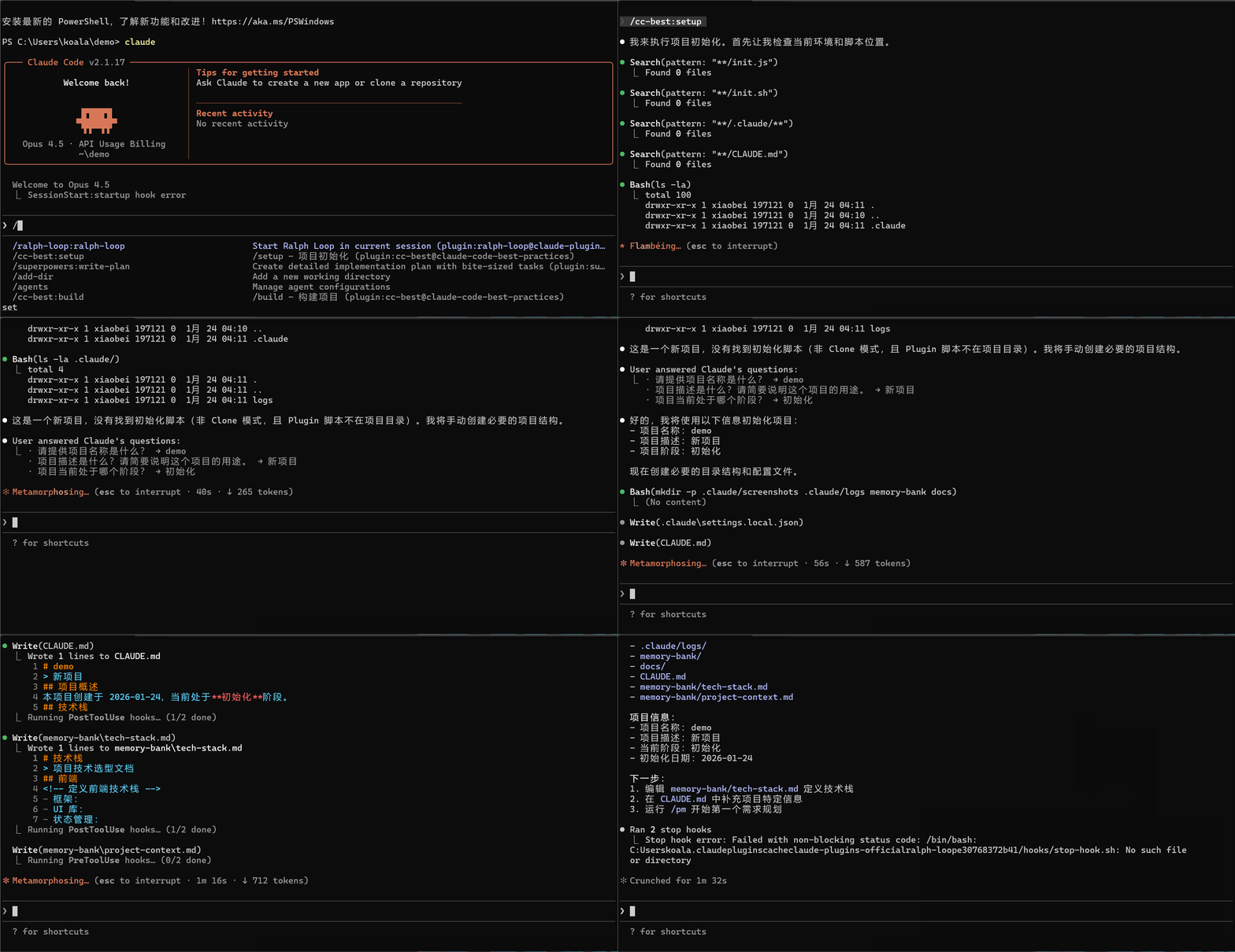
git clone https://github.com/xiaobei930/cc-best.git .claude
cd .claude && bash scripts/shell/init.sh

# Convert command format from /cc-best:xxx to /xxx
node scripts/node/convert-to-local.js
Use clone when you need to customize all files in your repo.
⚠️ Important: All documentation uses plugin format (
/cc-best:xxx). Run the conversion script to update to local format (/xxx).
🗑️ Uninstall
# Remove the plugin
/plugin uninstall cc-best@xiaobei930

# Remove marketplace (optional)
/plugin marketplace remove xiaobei930/cc-best
No files are left behind.
What Happens Next?
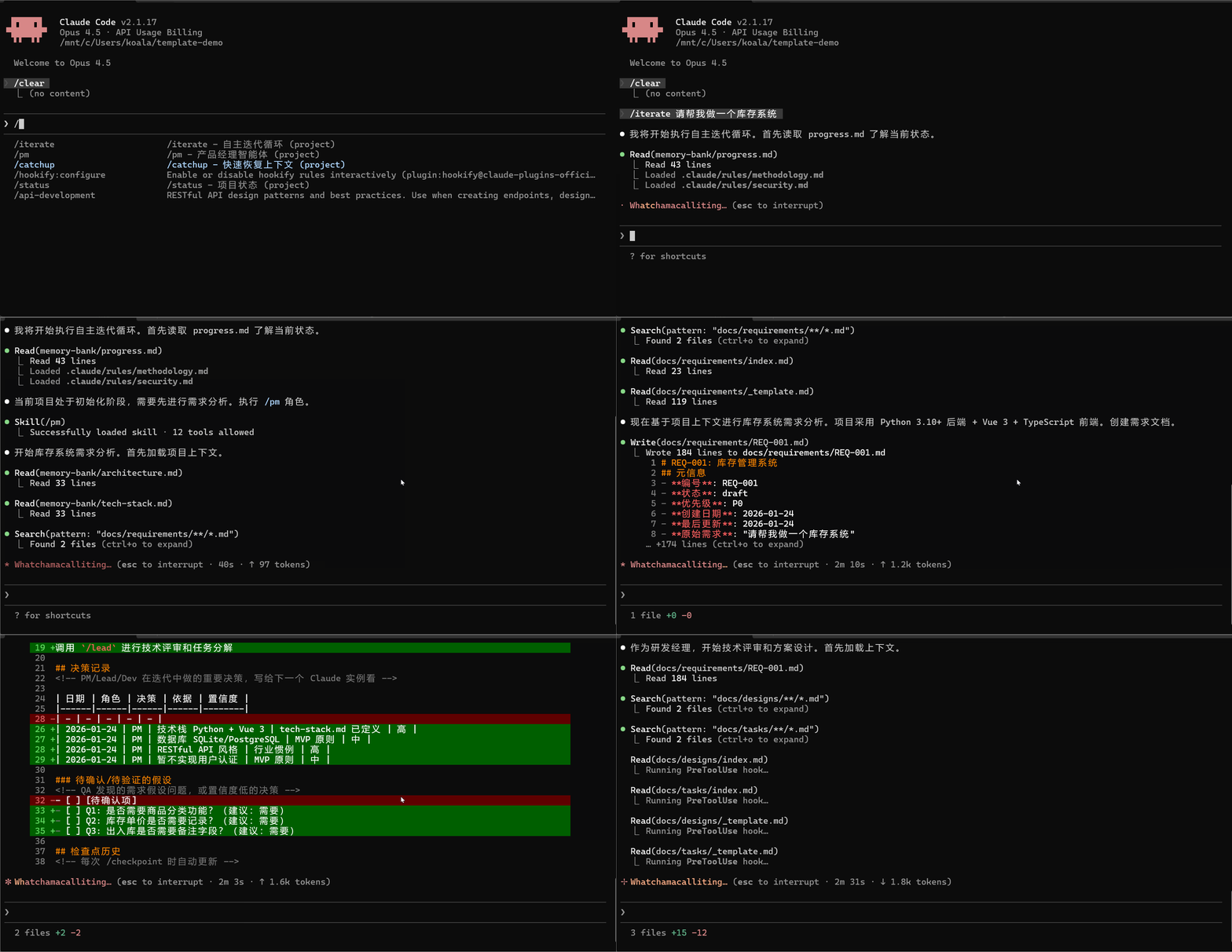
After running /cc-best:iterate "implement user authentication", Claude will:
1. 📋 /cc-best:pm     → Analyze requirements, create task breakdown
2. 🏗️ /cc-best:lead   → Design technical solution
3. 💻 /cc-best:dev    → Write code, create tests
4. 🧪 /cc-best:qa     → Run tests, verify quality
5. ✅ /cc-best:commit → Commit changes with proper message
You just watch. Intervene only when needed.
Common Workflows
| I want to... | Command | What Claude does |
|---|---|---|
| Build a feature | /cc-best:iterate "add dark mode toggle" | Full cycle: plan → code → test → commit |
| Fix a bug | /cc-best:iterate "fix login timeout issue" | Investigate → fix → verify → commit |
| Review code | /cc-best:pm "review recent changes" | Analyze code, suggest improvements |
| Learn the codebase | /cc-best:pair | Step-by-step exploration with explanations |
Who Is This For?
| You are... | Recommended mode | Why |
|---|---|---|
| Team with multiple roles | Full workflow | PM → Lead → Dev → QA mirrors your process |
| Solo developer | /cc-best:iterate | Let Claude handle the boring parts |
| Learning Claude Code | /cc-best:pair | Understand each step before proceeding |
| Need quick fixes | Direct commands | /cc-best:dev "fix the typo" for simple tasks |
✨ Core Features
| Feature | What it does |
|---|---|
| 🎭 Role-Based Workflow | PM → Lead → Designer → Dev → QA — complete development cycle |
| 🔄 Autonomous Mode | /cc-best:iterate runs tasks without intervention until completion |
| 🛡️ Safety Hooks | Blocks rm -rf /, git push --force, and other risky commands |
| 📐 Multi-Language Standards | 8-dir layered structure: common + Python/frontend/Java/C#/C++/embedded/UI rules |
| 🧠 Memory Bank | Persists progress and decisions across sessions |
| 👥 Pair Programming | /cc-best:pair — step-by-step collaboration with 5 confirmation checkpoints |
| 🔗 Knowledge Pipeline | observe → analyze → learn → evolve — self-improving knowledge loop |
| 🌐 Cross-Platform | Windows, macOS, Linux — auto-detects package manager |
While CC-Best is built for Claude Code, the methodology (Dao-Fa-Shu-Qi) and role-driven patterns are framework-agnostic and can be adapted for other AI coding assistants.
What Makes CC-Best Different
🎭 Role-Driven Development Pipeline
Not just a prompt template collection — CC-Best simulates real team collaboration:
- 7 roles with clear boundaries: PM → Lead → Designer → Dev → QA → Verify → Commit
- Each role has explicit MUST/SHOULD/NEVER rules, output templates, and handoff protocols
- Automatic flow: PM creates REQ → Lead reviews & creates DES/TSK → Dev implements → QA validates
- Downstream correction (A3): Lead can adjust PM decisions; QA distinguishes implementation bugs from requirement assumption errors
- Document traceability: REQ-XXX → DES-XXX → TSK-XXX numbered chain
🔄 Autonomous Iteration Engine
/cc-best:iterate enables fully autonomous development:
Read progress.md → Select role → Execute → Verify → Commit → Next task (no waiting)
- Smart role selection: 8 state conditions determine which role activates
- A1-A5 decision principles: Context inference (A1), decision recording (A2), downstream correction (A3), MVP fallback (A4), issue classification (A5)
- 4 strict stop conditions: All tasks done, user interrupt, fatal error, external dependency
- Cross-session continuity: memory-bank + progress.md rolling window
🔗 Self-Evolving Knowledge Pipeline
CC-Best learns from your development patterns:
observe → analyze → learn → evolve
- observe:
observe-patterns.jshook automatically tracks tool usage patterns - analyze:
/cc-best:analyzemines git history and usage data - learn:
/cc-best:learnextracts reusable knowledge - evolve:
/cc-best:evolvegenerates new commands, skills, or agents from learned patterns
📁 Directory Structure
your-project/
├── CLAUDE.md          # Project constitution
├── commands/          # 44 slash commands
├── skills/            # 19 development skills
├── agents/            # 8 specialized agents
├── rules/             # 43 coding standards (10 dirs)
├── hooks/             # Safety hooks
├── scripts/           # Automation (node/python/shell)
├── memory-bank/       # Progress & architecture docs
└── .claude/           # Claude Code config
📂 Detailed structure
| Directory | Contents |
|---|---|
commands/ | Role commands (pm, lead, dev, qa), Mode commands (iterate, pair), Tool commands (build, test, commit) |
skills/ | Backend, Frontend, Testing, Security, DevOps, Architecture, Git |
agents/ | architect, build-error-resolver, code-reviewer, code-simplifier, planner, requirement-validator, security-reviewer, tdd-guide |
rules/ | 43 rules in 10 dirs: common/ + python/, frontend/, java/, csharp/, cpp/, embedded/, ui/, rust/, go/ |
scripts/ | Cross-platform hooks in Node.js (default), with Python/Bash alternatives |
memory-bank/ | progress.md (rolling window), architecture.md, tech-stack.md |
🔄 Workflow
Standard Development Cycle
flowchart LR
    PM["/pm<br/>Requirements"] --> Clarify["/clarify<br/>Clarify"]
    Clarify --> Lead["/lead<br/>Design"]
    Lead --> Designer["/designer<br/>UI Design"]
    Designer --> Dev["/dev<br/>Implement"]
    Dev --> QA["/qa<br/>Test"]
    QA --> Verify["/verify<br/>Verify"]
    Verify --> Commit["/commit<br/>Commit"]
    Commit --> Clear["/clear<br/>Clear Context"]
    Clear -.->|Loop| PM
Three Development Modes
| Mode | Command | Use Case | Characteristics |
|---|---|---|---|
| Autonomous Iteration | /cc-best:iterate | Clear task list | Fully autonomous, no intervention needed |
| Pair Programming | /cc-best:pair | Learning, sensitive operations | Confirm each step, human-machine collaboration |
| Long-Running Loop | /cc-best:cc-ralph | Hour-level batch tasks | Requires ralph-loop plugin (/plugin install ralph-loop@claude-plugins-official) |
How /cc-best:iterate selects roles automatically
| Current State | Role Selected | Action |
|---|---|---|
| No requirements doc | /cc-best:pm | Requirement analysis |
| REQ has low-confidence items | /cc-best:clarify | Requirement clarification |
| Has REQ, no design | /cc-best:lead | Technical design |
| Has design, frontend tasks | /cc-best:designer | UI design guidance |
| Has tasks to implement | /cc-best:dev | Coding implementation |
| Code ready for verification | /cc-best:verify | Build + type + lint + test + security |
| Verification passed | /cc-best:qa | Functional acceptance |
Core behavior: Task complete → Update progress.md → Read next task → Execute immediately (no waiting).
Stop conditions: All tasks done | User interrupt (Ctrl+C) | Fatal error | External dependency needed.
How /cc-best:pair collaboration works
5 mandatory confirmation checkpoints:
| Checkpoint | Example |
|---|---|
| Understanding | "I understand you need X. Correct?" |
| Design choice | "Option A or B? I recommend A because..." |
| Destructive action | "About to delete X. Confirm?" |
| External call | "Will call production API. Proceed?" |
| Commit | "Commit message: '...'. OK?" |
Learning mode: /cc-best:pair --learn "teach me unit testing" — Claude explains every step in detail.
Safe autonomy: Even in pair mode, Claude can freely read files, search code, run tests, and format code.
📖 Detailed usage guide: See MODES.md for comprehensive documentation on each mode, including when to use, how to control, and best practices.
📋 Command Reference
44 commands organized into categories:
| Category | Commands | Purpose |
|---|---|---|
| Role | /cc-best:pm, /cc-best:lead, /cc-best:dev, /cc-best:qa, /cc-best:designer, /cc-best:clarify, /cc-best:verify | Development workflow roles |
| Mode | /cc-best:iterate, /cc-best:pair, /cc-best:cc-ralph, /cc-best:mode, /cc-best:model | Autonomous/pair modes & model strategy |
| Build | /cc-best:build, /cc-best:test, /cc-best:run, /cc-best:fix | Build and test automation |
| Git | /cc-best:commit, /cc-best:pr, /cc-best:git-guide | Version control |
| Context | /cc-best:compact-context, /cc-best:checkpoint, /cc-best:catchup, /cc-best:context, /cc-best:memory | Session management |
| Quality | /cc-best:cleanup, /cc-best:docs, /cc-best:learn, /cc-best:analyze, /cc-best:evolve | Code quality & knowledge |
| Ops | /cc-best:fix-issue, /cc-best:release, /cc-best:service, /cc-best:hotfix | Issue fix, release, hotfix, services |
| Setup | /cc-best:setup, /cc-best:setup-pm, /cc-best:status, /cc-best:self-check, /cc-best:confidence-check, /cc-best:security-audit | Configuration & diagnostics |
📖 Full reference: See COMMANDS.md for all parameters and usage examples.
🛠️ Skills
19 development skills organized by domain:
| Domain | Skills | Coverage |
|---|---|---|
| Backend | backend, api, database | Python, TS, Java, Go, C# |
| Frontend | frontend, native | Web + iOS/macOS/Tauri |
| Quality | quality, testing, security, debug | TDD, OWASP, profiling |
| Architecture | architecture, devops, git | ADR, CI/CD, branching |
| Routing | model | Task→model recommendation |
| Session | session, learning, compact, exploration | Lifecycle + knowledge management |
| Research | search-first, second-opinion | Search strategy, cross-validation |
📖 Full reference: See skills/README for detailed skill documentation.
🏗️ Architecture Overview
CC-Best uses a four-tier architecture:
flowchart TB
    subgraph User["👤 You"]
        CMD["/cc-best:iterate 'add feature'"]
    end

    subgraph Commands["📋 Commands (44)"]
        PM["/pm"] --> Lead["/lead"] --> Dev["/dev"] --> QA["/qa"]
    end

    subgraph Skills["🛠️ Skills (19)"]
        S1["backend · frontend · testing · security"]
        S2["architecture · devops · git"]
        S3["learning · compact · exploration"]
    end

    subgraph Agents["🤖 Agents (8)"]
        A1["architect · planner · code-reviewer"]
        A2["code-simplifier · security-reviewer"]
        A3["tdd-guide · build-error-resolver · requirement-validator"]
    end

    subgraph Safety["🛡️ Safety Hooks (30)"]
        H1["PreToolUse: validate, secrets, protect"]
        H2["PostToolUse: format, typecheck, observe"]
    end

    CMD --> Commands
    Commands -.->|"auto-inject"| Skills
    Commands -.->|"delegate"| Agents
    Commands -.->|"guard"| Safety
| Layer | Trigger | Purpose |
|---|---|---|
| Commands | User types /xxx | Role workflow, user-initiated actions |
| Skills | Auto-injected | Best practices, coding standards |
| Agents | Task tool delegation | Specialized sub-tasks (review, planning) |
| Hooks | Lifecycle events | Safety guards, auto-format, pattern learning |
8 specialized agents: architect, build-error-resolver, code-reviewer, code-simplifier, planner, requirement-validator, security-reviewer, tdd-guide
📐 Full documentation: See ARCHITECTURE.md for component relationships and call chains.
🤖 Agent details: See agents/README for agent capabilities and invocation.
🔌 Plugin Compatibility
CC-Best is designed to work seamlessly with official Claude Code plugins. Our built-in agents and skills complement (not replace) official plugins.
Relationship with Official Plugins
| CC-Best Content | Official Plugin | Relationship |
|---|---|---|
code-reviewer agent | code-review plugin | Built-in: lightweight local version; Official: more powerful with auto-trigger |
security-reviewer agent | security-guidance | Built-in: OWASP checklist; Official: automatic security analysis |
code-simplifier agent | code-simplifier | Similar function; official plugin has more context |
/cc-best:cc-ralph command | ralph-loop plugin | CC-Best wrapper; requires plugin for cross-session persistence |
hookify examples | hookify plugin | Built-in: examples; Official: full hook management |
Recommended Plugin Configuration
{
  "enabledPlugins": {
    "code-review@claude-plugins-official": true,
    "hookify@claude-plugins-official": true,
    "security-guidance@claude-plugins-official": true
  }
}
When to Use Which
- No plugins installed: Built-in agents/skills work standalone
- With plugins: Use official plugins for advanced features, CC-Best for quick local checks
- Best practice: Install official plugins, use built-in agents for immediate feedback, official plugins for deep analysis
⚙️ Customization Guide
Adding New Rules
Create a file in rules/:
---
paths:
  - "**/*.your-ext"
---

# Rule Title

## Rule Content

...
Adding New Commands
Create a file in commands/:
---
allowed_tools:
  - Read
  - Edit
  - Write
  - Bash
---

# /your-command - Command Name

## Responsibilities

...

## Execution Steps

1. ...
2. ...
Configuring Hooks
Edit .claude/settings.local.json:
{
  "hooks": {
    "PreToolUse": [
      {
        "matcher": "Bash",
        "hooks": [
          {
            "type": "command",
            "command": "python scripts/your-script.py",
            "timeout": 5
          }
        ]
      }
    ]
  }
}
Pre-configured Hooks
⚠️ Important: Hooks Require Manual Setup
Due to a known Claude Code issue, plugin hooks are disabled by default. To enable the safety guards and automation hooks, run:
/cc-best:setup --hooksThis command configures hooks with absolute paths. See the FAQ for more details.
All hooks default to Node.js for cross-platform compatibility. Python/Bash alternatives available in scripts/.
| Trigger | Function | Script (Node.js) |
|---|---|---|
| PreToolUse | Validate dangerous commands | validate-command.js |
| PreToolUse | Confirm before git push | pause-before-push.js |
| PreToolUse | Protect sensitive files | protect-files.js |
| PreToolUse | Block random .md creation | block-random-md.js |
| PreToolUse | Long-running task warning | long-running-warning.js |
| PostToolUse | Auto-format code | format-file.js |
| PostToolUse | Check console.log | check-console-log.js |
| PostToolUse | TypeScript type check | typescript-check.js |
| SessionStart | Session health check | session-check.js |
| PreCompact | Save state before compact | pre-compact.js |
💡 Best Practices
1. Keep CLAUDE.md Concise
- Keep it under 100 lines
- Put detailed specifications in
rules/
2. Use the Memory Bank
- Update
progress.mdafter each task completion - Record important decisions in
architecture.md
3. Context Management
- Normal mode: Use
/clearfrequently to avoid context overflow /cc-best:iteratemode: Don't clear manually, maintain loop continuity
4. Don't Overload MCP
- Enable no more than 10 MCP servers per project
- Use
disabledMcpServersto disable unused ones
5. Regular Cleanup
- Delete unused language rules
- Remove unused commands
6. MCP Temporary Directory Management
MCP tools auto-create temporary directories in your project:
| Directory | Source | Purpose |
|---|---|---|
.playwright-mcp/ | MCP auto-created | Playwright MCP temporary files |
.claude/mcp-data/ | MCP auto-created | MCP shared data |
*-mcp/ | MCP auto-created | Other MCP tool directories |
.claude/screenshots/ | Template-defined | Manually saved screenshots (meaningful) |
Cleanup Script: Use cleanup.sh for regular maintenance:
# Preview files to delete (dry run)
bash scripts/shell/cleanup.sh --dry-run

# Clean files older than 7 days (default)
bash scripts/shell/cleanup.sh

# Clean files older than 3 days
bash scripts/shell/cleanup.sh --days 3

# Clean all MCP temporary files
bash scripts/shell/cleanup.sh --all
❓ FAQ
📖 Full FAQ: See FAQ.md for comprehensive troubleshooting guides.
Quick Answers
Hooks not working?
Run /cc-best:setup --verify to diagnose. Common fixes:
- Clone users:
cp .claude/settings.local.json.example .claude/settings.local.json - Plugin users: Run
/cc-best:setup --hooksto configure absolute paths - Windows: See FAQ.md for
${CLAUDE_PLUGIN_ROOT}workarounds
/cc-best:iterate vs /pair?
| Mode | Control | Use Case |
|---|---|---|
/cc-best:iterate | Fully autonomous | Clear task list |
/cc-best:pair | Confirm each step | Learning, sensitive ops |
How to stop /iterate?
- Interrupt: Press
Ctrl+C(orEscin some terminals) - Pause: Type anything — Claude will wait for your input
- Resume: Just continue the conversation
Claude saves progress to memory-bank/progress.md, so you can always resume later.
What if /cc-best:qa fails?
Claude will:
- Analyze the failure
- Return to
/cc-best:devto fix the issue - Re-run
/cc-best:qato verify
If stuck after 3 attempts, Claude will ask for your input. You can:
- Provide hints: "Try checking the database connection"
- Skip the test: "Skip this test for now"
- Take over: "I'll fix this manually"
MCP configuration?
Edit .claude/settings.local.json:
{ "enabledMcpjsonServers": ["memory", "sequential-thinking"] }
Best practice: Enable ≤10 MCP servers per project.
CC-Best vs Superpowers?
Both are excellent. Choose based on your needs:
| Scenario | Recommended | Why |
|---|---|---|
| Team collaboration | CC-Best | Role workflow (PM→Lead→Dev→QA) |
| Multi-language stack | CC-Best | 7 language coding standard dirs |
| Chinese team | CC-Best | Bilingual docs |
| Solo developer | Superpowers | Lighter, git worktree automation |
| Need git worktree | Superpowers | Auto-creates isolated branches |
💡 They can coexist! Use CC-Best for workflows, Superpowers for git automation.
🔧 Requirements
| Dependency | Version | Notes |
|---|---|---|
| Claude Code | Latest recommended | Hooks require recent versions |
| Node.js | 16+ | For cross-platform hooks (default) |
| Python | 3.8+ | For some hook scripts |
| Bash/Git Bash | Any version | Optional for bash hooks |
Optional MCP Servers
Some commands use MCP (Model Context Protocol) tools for enhanced functionality:
| MCP Server | Used By | Purpose |
|---|---|---|
| Playwright | /cc-best:designer, /cc-best:dev, /cc-best:pm | Browser automation for UI testing and screenshots |
| Firecrawl | /cc-best:pm, /cc-best:lead | Web scraping for requirement research |
Note: These are optional. Commands work without MCP servers but with reduced functionality. Install via Claude Code settings:
Settings > MCP Servers
Supported Languages
| Language | Rule File | Formatter | Test Framework |
|---|---|---|---|
| Python | python-style.md | Black + isort | pytest |
| Vue/TS/JS | frontend-style.md | Prettier | Vitest |
| C++ | cpp-style.md | clang-format | Google Test |
| Java | java-style.md | google-java-format | JUnit |
| C# | csharp-style.md | dotnet format | xUnit/NUnit |
| Go | backend/go.md | gofmt | testing |
| Swift | native/ios.md | swift-format | XCTest |
📚 References
Official Resources
Plugin Documentation
- Quick Start Guide - Get started in 5 minutes
- Advanced Guide - Deep dive into methodology and architecture
🌐 Note on Internal Files
CC-Best's internal files (commands/, rules/, skills/) are written in Chinese. This is intentional:
- Claude understands Chinese - All Claude models can read and follow Chinese instructions perfectly
- No translation burden - Maintaining dual-language internal files would be impractical
- Focus on users - The README (this file) is fully English for international users
If you prefer English internal files, community contributions for English translations are welcome!
🤝 Contributing
Contributions are welcome! See CONTRIBUTING.md for details.
| Contribution Type | Description |
|---|---|
| ⭐ Star | Show your support |
| 🐛 Bug Report | Report issues |
| 💡 Feature Request | Suggest features |
| 📝 Documentation | Improve docs |
| 🔧 Code | Add commands, rules, skills |
📄 License
MIT License - Free to use and modify
🌐 Visit Homepage · ⭐ Star on GitHub
If CC-Best helps you, please give it a ⭐ Star!
Star History
// faq
What is cc-best?
🎭 cc-best: Turn Claude Code into a full dev team — PM→Lead→Dev→QA autonomous workflow. 44 commands · 19 skills · 8 agents · 43 rules · 30 hooks · auto-learning pipeline. | 一个插件,完整开发团队。. It is open-source on GitHub.
Is cc-best free to use?
cc-best is open-source under the MIT license, so it is free to use.
What category does cc-best belong to?
cc-best is listed under plugins in the Claudeers registry of Claude-compatible tools.
// embed badge

[](https://claudeers.com/cc-best)
// retro hit counter

[](https://claudeers.com/cc-best)
// reviews
// guestbook
// related in Developer Tools
 🔓
🔓The agent harness performance optimization system. Skills, instincts, memory, security, and research-first development for Claude Code, Codex, Opencode, Curs…
 🔓
🔓Makes your AI agent think like the laziest senior dev in the room. The best code is the code you never wrote.
 🔓
🔓Use Garry Tan's exact Claude Code setup: 23 opinionated tools that serve as CEO, Designer, Eng Manager, Release Manager, Doc Engineer, and QA
 🔓
🔓AI coding assistant skill (Claude Code, Codex, OpenCode, Cursor, Gemini CLI, and more). Turn any folder of code, SQL schemas, R scripts, shell scripts, docs,…