
cam
Pick the Claude Code account per folder via .claude-account files
Install with your AI
Paste into Claude Code, Cursor, or any agent — it reads the repo and wires the tool into your project.
Install and set up cam (git-clone project) into my current project.
Found on https://claudeers.com/cam
Repo: https://github.com/brunorodmoreira/cam
Homepage/docs: https://crates.io/crates/cam-cli
Detected install method: git-clone → git clone https://github.com/brunorodmoreira/cam
Category: devtools. Platforms: cli, api, web.
Read the repo's README for exact setup and env vars, then install it and wire it into my project.

Claudeers Health Verdict:
unknown; community-verified: false. Confirm the source before running anything.
git clone https://github.com/brunorodmoreira/cam
// compatibility
| Platforms | cli, api, web |
|---|---|
| Operating systems | — |
| AI compatibility | claude |
| License | Apache-2.0 |
| Pricing | open-source |
| Language | Rust |
cam
Pick the Claude Code account per folder, the way .nvmrc picks a Node version.
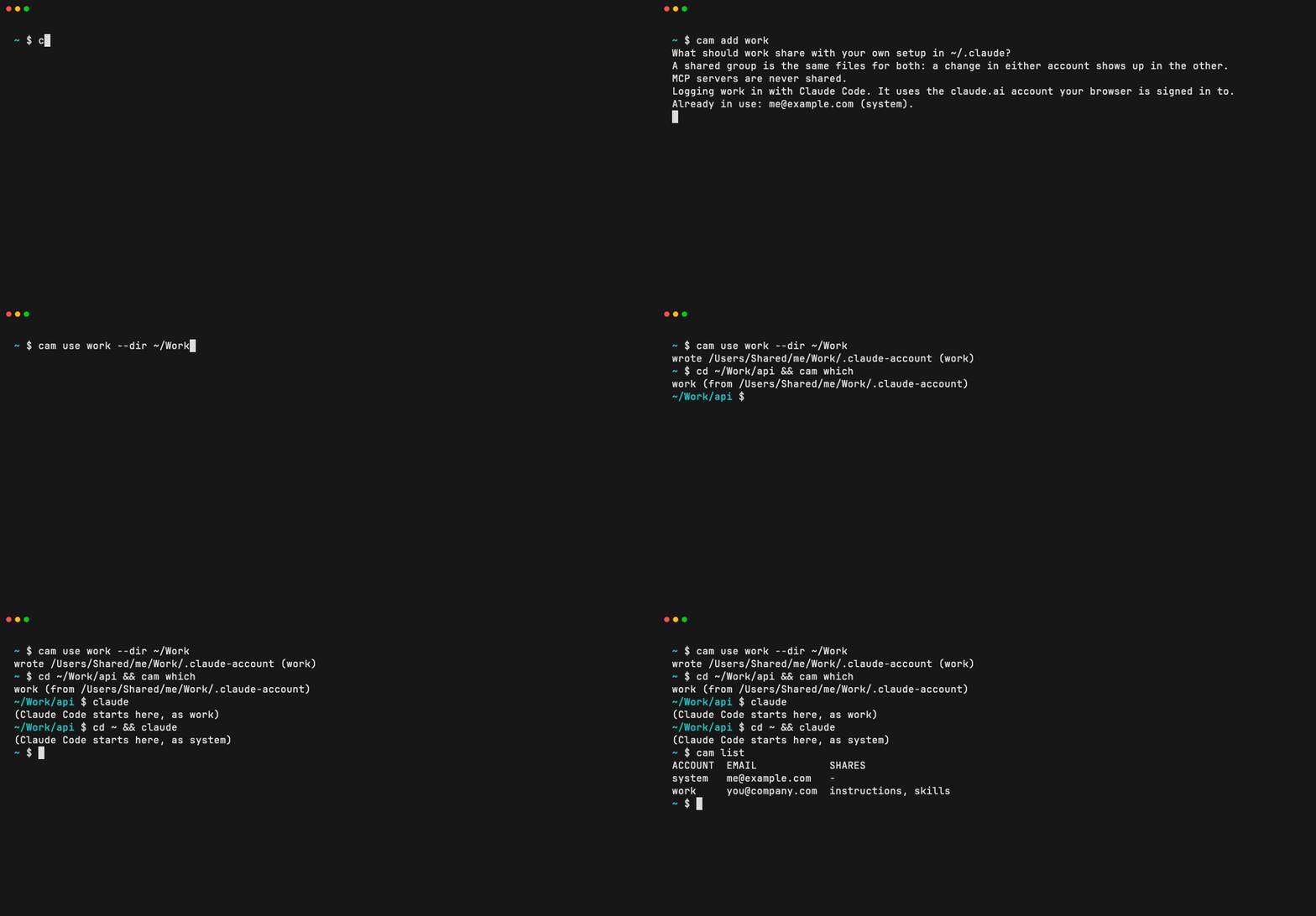
Put a .claude-account file in a folder, and claude starts with that account there and in every folder below it. Each account is logged in with Claude Code's own /login and stays logged in, so you're signed in to all of them at once.
Features
- Per folder. One marker at
~/Workcovers every repo under it. Nothing goes into the repos themselves. - Claude Code's own login. cam runs
claude auth loginin the account's own config folder. It never sees, stores or passes a credential, and sessions get your plan,/usagelimits and claude.ai connectors. - Plain
claude. One line in your shell's startup file, andclaudepicks the account wherever you start it. Nocdhook. - Share what you want. An account can share your settings, CLAUDE.md, skills or history with your own setup, or nothing at all.
- It explains itself.
cam whichsays which account applies and why,cam whoamiwho it's logged in as, andcam doctorwhat could get in the way.
Install
brew install brunorodmoreira/tap/cam
Other ways: install script, Windows, Cargo, or a download
The install script puts cam in ~/.local/bin, next to Claude Code:
curl --proto '=https' --tlsv1.2 -LsSf https://github.com/brunorodmoreira/cam/releases/latest/download/cam-cli-installer.sh | sh
On Windows, in PowerShell, the install script puts cam.exe in ~\.local\bin, next to Claude Code:
powershell -ExecutionPolicy Bypass -c "irm https://github.com/brunorodmoreira/cam/releases/latest/download/cam-cli-installer.ps1 | iex"
With Rust, from crates.io, where it's cam-cli because cam is taken:
cargo install cam-cli
Or download an archive for your platform from the releases. The binary is called cam either way.
Quick start
The login you already have is system: Claude Code's own setup in ~/.claude. cam leaves it alone, and it's what claude uses wherever no marker applies. Add another account next to it:
cam add work                 # Claude Code's login opens in the browser
cam use work --dir ~/Work    # every folder under ~/Work uses it
Then add one line at the end of your shell's startup file, after the line that puts Claude Code's ~/.local/bin on PATH:
| Shell | File | Line |
|---|---|---|
| zsh | ~/.zshrc | eval "$(cam init zsh)" |
| bash | ~/.bashrc | eval "$(cam init bash)" |
| fish | ~/.config/fish/config.fish | cam init fish | source |
| PowerShell (Windows) | $PROFILE | Invoke-Expression (& cam init powershell | Out-String) |
Open a new terminal, and claude under ~/Work runs as work, anywhere else as system.
cam add asks which parts of your own setup the new account should share (see Sharing). The rest starts empty: its first session shows Claude Code's first-run screens, and your MCP servers aren't in it.
Commands
| Command | What it does |
|---|---|
cam add <name> | Create an account and log it in with Claude Code's own login |
cam login [<name>] | Log an account in again |
cam use <name> [--dir <dir>] | Use an account in a folder and every folder below it |
cam unuse [--dir <dir>] | Remove a folder's marker |
cam share <name> [<group>…] | Share parts of ~/.claude with an account |
cam unshare <name> <group>… | Stop sharing them |
cam list | system and the accounts, with the email each is logged in as |
cam which [--short] | The account that applies here, and why. --short is for your shell prompt |
cam whoami | Who that account is logged in as |
cam doctor | Check the setup, the logins and what could get in the way |
cam remove <name> | Log an account out and delete it |
cam exec [<args>…] | Run claude with the account, without the shell line |
cam <command> --help has the details.
Documentation
- Using cam: adding accounts, folders, plain
claude, logging in again, checking the setup, the status line, the shell prompt (Starship), completions and removing an account. - Sharing: which parts of your setup an account can share, and how.
- Configuration: how cam picks an account, the marker file, the config file and environment variables.
- Herdr: the account on each
claudein Herdr's sidebar, and a popup to change it. - DESIGN.md: the full spec, with what Claude Code was observed to do and the decisions along the way.
- CHANGELOG.md: what changed in each release.
FAQ
claude uses the wrong account. Run cam doctor. It says whether plain claude reaches cam (the cam init line has to come after the one that adds ~/.local/bin), which account applies here and why, and whether something such as ANTHROPIC_API_KEY outranks the login.
Why not set CLAUDE_CONFIG_DIR myself? That's what cam does, per folder and only for the claude it starts. On top, it runs the login in the right folder, keeps markers out of your repos, shares what you choose, and explains which account applies.
Does cam see my credentials? No. Logins are Claude Code's own, kept where Claude Code keeps them. cam only runs claude auth login, auth status and auth logout, and from auth status it reads only the email, org, plan and expiry.
Does it work in VS Code or another editor? Not checked yet. An editor extension that runs its own bundled claude rather than the one on PATH would skip cam.
How do I get cam out of the way? CAM_ACCOUNT=system claude runs Claude Code untouched, even with a broken config. cam use system does it for a folder, and deleting the cam init line stops it for plain claude.
Upgrading and uninstalling
Upgrade the way you installed: brew upgrade cam, the install script again, or cargo install cam-cli.
To uninstall:
- Delete the
cam initline from your shell's startup file. - Run
cam remove <name>for each account you don't want to keep. It logs the account out, so its login doesn't stay behind. - Delete
~/.local/share/cam(the link for plainclaude, and the accounts' folders) and~/.config/cam. - Uninstall the binary:
brew uninstall cam,cargo uninstall cam-cli, or delete~/.local/bin/cam(cam.exeon Windows).
.claude-account files left in folders do nothing without cam.
Platforms
- macOS: the main platform, arm64 and Intel. Claude Code keeps each account's login in the Keychain itself.
- Linux: released, and the whole test suite passes there, but cam hasn't been tried in a real Claude Code session on Linux yet. The binaries need glibc 2.35 or newer (Ubuntu 22.04, Debian 12). Reports are welcome.
- Windows: new, x64, from PowerShell. Tried in real Claude Code sessions on Windows Server 2025, with two accounts, sharing and plain
claude, and the test suite runs on Windows in CI. Reports from Windows 11 are welcome. Plainclaudegoes through a copy of cam namedclaude.exein~\.local\share\cam\shims, whichcam init powershellkeeps up to date. Sharing links folders through junctions, which need nothing special, and files through symlinks, which Windows makes only with Developer Mode on: without it,skillsis the group that can be shared. - Shells:
cam initwrites for bash, zsh, fish and PowerShell, which is the one on Windows. In another shell, put~/.local/share/cam/shimsfirst onPATHyourself, after runningcam init bashonce to make the link.
Contributing
Bug reports and pull requests are welcome: see CONTRIBUTING.md. For a security problem, see SECURITY.md.
License
Licensed under either of Apache License, Version 2.0 or MIT license, at your option.
Unless you explicitly state otherwise, any contribution intentionally submitted for inclusion in this project by you, as defined in the Apache-2.0 license, shall be dual licensed as above, without any additional terms or conditions.
// faq
What is cam?
Pick the Claude Code account per folder via .claude-account files. It is open-source on GitHub.
Is cam free to use?
cam is open-source under the Apache-2.0 license, so it is free to use.
What category does cam belong to?
cam is listed under devtools in the Claudeers registry of Claude-compatible tools.
// embed badge

[](https://claudeers.com/cam)
// retro hit counter

[](https://claudeers.com/cam)
// reviews
// guestbook
// related in Developer Tools
 🔓
The agent harness performance optimization system. Skills, instincts, memory, security, and research-first development for Claude Code, Codex, Opencode, Curs…
 🔓
Makes your AI agent think like the laziest senior dev in the room. The best code is the code you never wrote.
 🔓
AI coding assistant skill (Claude Code, Codex, OpenCode, Cursor, Gemini CLI, and more). Turn any folder of code, SQL schemas, R scripts, shell scripts, docs,…
 🔓
Orca is the ADE for working with a fleet of parallel agents. Run any coding agent with your own subscription. Available on desktop and mobile.