
buildable-plugin-skills
Local-first AI app-builder brain for Claude Code, Codex, and Cursor: archetypes, golden templates, UI/UX playbooks, and review loops, designed to load less b…
Install with your AI
Paste into Claude Code, Cursor, or any agent — it reads the repo and wires the tool into your project.
Install and set up buildable-plugin-skills (claude-plugin project) into my current project.
Found on https://claudeers.com/buildable-plugin-skills
Repo: https://github.com/suntay44/buildable-plugin-skills
Homepage/docs: —
Detected install method: claude-plugin → /plugin install buildable-plugin-skills@suntay44/buildable-plugin-skills
Category: productivity. Platforms: cli, api, desktop, web, mobile.
Read the repo's README for exact setup and env vars, then install it and wire it into my project.

Claudeers Health Verdict:
active; community-verified: false. Confirm the source before running anything.
/plugin marketplace add suntay44/buildable-plugin-skills
/plugin install buildable-plugin-skills@suntay44/buildable-plugin-skills
git clone https://github.com/suntay44/buildable-plugin-skills
// compatibility
| Platforms | cli, api, desktop, web, mobile |
|---|---|
| Operating systems | — |
| AI compatibility | claude |
| License | MIT |
| Pricing | open-source |
| Language | TypeScript |
⭐ Stars are appreciated!
Local-first AI app-builder brain for Claude Code, Codex, and Cursor.
Buildable gives your coding agent the product intelligence that hosted no-code builders (Lovable, Replit Agent, Base44, Emergent) hide behind their infrastructure — archetypes, golden templates, UI/UX playbooks, and a review loop — so it goes from a vague prompt to a polished prototype, using only a small slice of context per request.
It does not replace your agent or run as a hosted platform. It is a file-based skills/plugin package that runs locally. Buildable is independent and is not affiliated with, endorsed by, or sponsored by those products.
Contents
- Why Buildable
- What it is
- Example workflows
- Quick start
- Install as a plugin
- CLI commands
- Slash commands and MCP
- Templates
- How much it guides
- Token efficiency
- Supported app types
- Non-goals
- Stability
- Roadmap
- Repository map
- Templates catalog
- License
Why Buildable
A raw coding agent starts every app from a blank slate. Hosted builders feel magical because they already know what a "todo app" or "CRM" should contain. Buildable packages that same knowledge locally:
- Runnable starters first — 15 build-verified golden starters for the most common app types, plus 55 archetypes it recognizes and plans, so even the long tail gets a real spec and implementation plan instead of a blank slate.
- Micro-blocks — small reusable UI/product units (filterable table, detail panel, stat-card grid, form, empty state) that
planselects per app and the agent composes, instead of reinventing each one. - Adapt, don't invent — the agent starts from a proven golden template and adapts it to the prompt, instead of reconstructing app structure from scratch.
- UI/UX system guidance — compact design profiles plus patterns for forms, tables, filters, empty states, and responsive layout.
- Plan + review loop — a CLI that classifies prompts, emits an app spec, and audits the result.
- Progressive loading — the agent reads only the references a prompt needs, not the whole repo.
What it is (and when to use it)
Buildable is a product-structure compiler, compact UI/UX brain, and quality gate for your coding agent: it decides what to build (archetype → screens, entities, features, states), selects reusable blocks, gives the app a selected designSystem, copies a runnable, build-verified starter, and reviews the result (build, layout, accessibility, state coverage, local-first). It is not a hosted builder.
| Buildable | Design plugins (e.g. Frontend Design) | Hosted builders (Lovable, v0, Replit) | |
|---|---|---|---|
| Decides product structure | ✅ | — | ✅ |
| Runnable, build-verified code | ✅ | — | hosted |
| Reviews / grades the output | ✅ | — | — |
| Local — your repo, your agent | ✅ | ✅ | — |
| Gives UI/UX direction | ✅ | ✅ | ✅ |
| Deep brand/art direction | guided | ✅ | ✅ |
Pairs with dedicated design skills: Buildable decides what to build, gives compact product-specific UI/UX direction, and proves it works; add a design skill when you want high-end brand exploration, custom art direction, or multiple visual concepts.
- Use it when you want consistent, real prototypes for common app types — fast, in your own stack, no lock-in.
- Skip it when you need a one-off component or throwaway script; a raw agent is enough.
Proof it's real, not a prompt wrapper: every one of the 15 starters is built and type-checked in CI, the CLI is covered by 77 tests with zero runtime dependencies, and each plan loads only ~10% of the bundled brain. See it yourself — buildable eval --compare prints the numbers, and the generated screenshots are unedited single-prompt output.
Example workflows
Buildable is audit-first: before code is written, plan creates a reusable build contract with the chosen app type, target, template, selected micro-blocks, screens, entities, features, references, guardrails, design profile, mock-data needs, and review gates. If the prompt is vague, it stops and asks the product-direction question first. If the prompt is clear, it adds optional prompt-refinement questions with sensible defaults so the agent can keep momentum without oversteering.
Fresh app
buildable plan "Build me a CRM for tracking leads"
buildable design "Build me a CRM for tracking leads"
buildable generate "Build me a CRM for tracking leads"
cd leadflow
buildable review
What happens:
planwrites.buildable/phase-plan.md,.buildable/phase-plan.json, and.buildable/phase-plan.toon. These are decision/context files, not app source.planalso selects compatibleappSpec.blocks; block docs are appended toappSpec.references, so agents load only the reusable building blocks this app actually needs.designturns the selected design system into concrete UI/UX tokens, page rules, component states, and realistic mockup-data guidance.generatecreates the app folder. If the selected template is runnable, it copies build-verified starter source. If the selected template is planned-only,--plan-packwrites an implementation pack instead of source.reviewaudits the generated app against the saved spec, local-first rules, UI completeness, accessibility signals, responsive layout, and optional build output.
Behind the scenes this distinction is explicit: plan outputs a buildable-phase-plan with workflowStage: decision; generate writes a buildable-generated-project config with workflowStage: generated-files and sourcePlan set to either saved-phase-plan or inline-prompt-plan.
Existing app
cd my-existing-app
buildable init --existing
buildable plan "Add a local-first customer notes workflow"
buildable design --page customer-notes --write
buildable generate "Add a local-first customer notes workflow" --augment
buildable review
What happens:
init --existingmakes the current repo Buildable-aware without overwriting code.planrecords the intended feature direction and selected references in.buildable/.design --pagecan be used mid-session for one screen or component.generate --augmentwrites Buildable implementation guidance for the existing app instead of copying a new starter over it.
With screenshots or files
buildable plan "Use this screenshot for a CRM dashboard" --file ./crm-mockup.png
buildable design --write
buildable generate "Use this screenshot for a CRM dashboard"
Buildable stores explicit user files in appSpec.referenceInputs, so the agent inspects only those files plus the selected appSpec.references. It does not scan every template or every knowledge file.
The recommended flow is Plan > Design > Generate > Review, but the commands are interchangeable: use design before planning for visual exploration, after planning to sharpen the UI, or mid-build for a specific page. After plan or design, the agent should ask whether the user is satisfied. If not, revise the saved phase plan; if yes, continue to generate or implementation.
Quick start
npm install
npm link
buildable check
buildable plan "Build me a task manager"
buildable design "Build me a task manager"
buildable generate "Build me a task manager"
cd taskflow
buildable status
buildable review
With a screenshot or file reference:
buildable plan "Use this screenshot for a CRM" --file ./crm-mockup.png
buildable design --write
buildable generate "Use this screenshot for a CRM"
Prefer not to link a global command? Run through Node:
node ./bin/buildable.mjs check
node ./bin/buildable.mjs plan "Build me a mobile habit tracker"
See docs/install.md for Codex Desktop, Claude Code, Cursor, and CLI setup notes.
Install as a plugin
Claude Code
Buildable ships a plugin manifest (.claude-plugin/plugin.json) and a local marketplace (.claude-plugin/marketplace.json):
/plugin marketplace add suntay44/buildable-plugin-skills
/plugin install buildable@buildable
This auto-discovers the planner, web-builder, mobile-builder, and reviewer skills and registers these slash commands:
| Command | What it does |
|---|---|
/buildable-plan | Create or revise the audit-first phase plan, app spec, selected references, and prompt-refinement questions |
/buildable-design | Create a UI/UX-only brief from the prompt, saved plan, or current app spec |
/buildable-generate | Create local project files from the saved plan: copy a runnable starter, write an augment pack, or write a planned-template pack |
/buildable-status | Inspect the current workspace and suggest the next safe command |
/buildable-review | Audit a prototype against the saved app spec (--build runs typecheck/build) |
/buildable-preview | Optional: render the running app, screenshot it, catch runtime errors |
/buildable-init | Make the current workspace Buildable-aware |
Cursor
Use the slash commands in .cursor/commands/ plus the rule at .cursor/rules/buildable.mdc.
Codex
Load .codex-plugin/plugin.json when your Codex surface supports local plugins/skills. For desktop or tool clients that cannot run project slash commands directly, register the MCP bridge shown below.
CLI commands
| Command | Purpose |
|---|---|
buildable plan "<prompt>" [--file <path>] [--with-auth] [--no-write] | Create or revise the audit-first decision files: .buildable/phase-plan.md/json/toon. It classifies the prompt, preserves explicit screenshots/files, selects compatible micro-blocks, asks blocking product questions when needed, adds optional refinement questions with defaults, and selects only the references the agent should load. |
buildable design "<prompt>" [--page <surface>] [--dark] [--write] | Produce a UI/UX-only brief with concrete tokens (every profile ships light and dark palettes; --dark activates the dark theme), mockup-data guidance, and page/component rules; can use the current app spec |
buildable generate "<prompt>" [--out <dir>] | Create local project files from the saved plan. Runnable templates copy starter source; --plan-pack writes implementation files for planned templates; --augment writes guidance into an existing app. |
buildable status [path] | Read-only workflow inspector: reports whether the workspace is uninitialized, planned, blocked, design-ready, generated, or reviewed, then suggests the next command |
buildable review [path] [--build] | Audit the current app by default; optional path reviews another folder, optional --build runs typecheck/build |
buildable preview [path] --url <url> | Optional: render the running app in a headless browser; screenshot + catch runtime errors |
buildable init [--existing] | Create .buildable config for a workspace |
buildable mcp | Start the optional Buildable MCP stdio bridge for desktop/agent clients |
buildable check | Verify local assets, adapters, and template references |
buildable list | List archetypes and runnable/planned template status |
buildable eval [--compare] | Score classification, efficiency, and spec quality (--compare vs a raw prompt) |
plan emits an enhancedPrompt and appSpec with the selected archetype, target, stack, template, micro-blocks, design system, references, expected features, acceptance criteria, explicit user referenceInputs, audit-first planAudit, smart promptRefinement questions, and no-hosted-feature guardrails. Matching uses compact tags in core/archetype-registry.json, so the agent classifies against one small registry instead of reading every archetype file.
A few things worth knowing about the flow:
planis the routing source. It classifies the prompt, picks the archetype/template/blocks, lists the exact references to load, and asks blocking questions only when product direction or architecture-changing choices are unclear. Not satisfied? Revise the saved.buildable/phase-plan.*and keep planning before you generate.generatereuses the saved plan. If.buildable/phase-plan.jsonmatches the prompt, it builds from that audited plan instead of re-planning, then writes the compact.tooncontract into the generated app. Use--augmentto plan into an existing app instead of copying a new starter.statuskeeps sessions oriented. It reads only local Buildable files and expected app files, then tells Codex/Claude/Cursor whether to plan, answer questions, design, generate, review, or keep fixing.reviewis a real gate. Add--buildto run typecheck/build, and--strictto fail (not just warn) on local-first guardrail drift.
Review
buildable review audits the app spec, source representation, local-first guardrails, responsive-layout risk, accessibility signals, state coverage, design-token discipline (components that hard-code colors instead of using theme tokens get flagged), and — when persistence was requested — whether storage sits behind the repository seam. Add --build only when you also want it to run installed typecheck/build scripts. It is a static/local quality gate, not a replacement for manual QA, browser screenshots, or real device/simulator checks when visuals matter.
Design quality is graded against surface-specific rubrics, not taste: every plan loads the base web/mobile rubric plus a specialized one (content-marketing, data-dense, or forms-auth) selected by the app's design profile, backed by the shared token scales in core/design-system-registry.json (foundations). This is the part a hosted builder can't give you: design quality as an enforceable, local gate.
review also prints an advisory readiness section — an honest "what's left to productionize" list derived from the spec. It names what's intentionally mocked (in-memory vs local-persisted data, mock vs named-provider auth, no deploy) and points at the seam that makes each real (the persistence ladder, the auth seam). It is advice, not a gate: Buildable never auto-adds a backend — it tells you the local-first path to a real one.
Slash Commands and MCP
Buildable is command-first. Use the lightest integration your agent surface supports:
- Terminal / CLI: run
buildable plan,buildable design,buildable generate,buildable status,buildable review, and the other commands above. - Project slash commands/rules: Claude Code uses
/buildable-*; Cursor uses.cursor/commands/and.cursor/rules/buildable.mdc; Codex can load the plugin manifest when local plugins are supported. - MCP bridge: use
buildable mcponly for desktop or agent tool clients that cannot run those project commands directly. The client sees local tools namedbuildable_plan,buildable_design,buildable_generate,buildable_status,buildable_review,buildable_init,buildable_list,buildable_check,buildable_eval, andbuildable_preview.
MCP does not load the whole Buildable brain. Each tool calls the same CLI engine, which returns a compact plan/spec and the exact appSpec.references the agent should inspect. Keep BUILDABLE_WORKSPACE pointed at the app folder you want the desktop client to work in.
Example local MCP config:
{
  "mcpServers": {
    "buildable": {
      "command": "node",
      "args": ["/absolute/path/to/buildable-plugin-skills/bin/buildable-mcp.mjs"],
      "env": {
        "BUILDABLE_WORKSPACE": "/absolute/path/to/your-app"
      }
    }
  }
}
Use that shape in Claude Desktop's local MCP settings, Cursor's .cursor/mcp.json / ~/.cursor/mcp.json, or the equivalent Codex MCP config. For Codex config TOML, the same server is typically:
[mcp_servers.buildable]
command = "node"
args = ["/absolute/path/to/buildable-plugin-skills/bin/buildable-mcp.mjs"]
env = { BUILDABLE_WORKSPACE = "/absolute/path/to/your-app" }
This makes the same Buildable actions available in desktop apps, but the UI may show them as tools instead of slash commands. If a desktop app already supports project slash commands or a local plugin install, prefer that; use MCP as the compatibility bridge.
Optional: visual preview (for headless/CI or agents without a screenshot tool)
Most of the time you can just open localhost yourself, and agents that already have a screenshot/preview tool (such as Claude Code's preview) should use that. buildable preview exists for the cases that have neither — a fully autonomous or CI run that still needs to know whether the page actually renders. Start the dev server, then:
buildable preview --url http://localhost:3000
It loads the page in a headless browser (Playwright — optional, resolved from the app or Buildable), writes .buildable/preview.png, and fails on a blank render or uncaught runtime errors — the visual issues tsc/build can't see. It is the only feature that needs a browser binary, so it stays optional and skips gracefully when Playwright is absent. It targets browser-rendered web apps today; native mobile visual checks would need a simulator and remain future work.
Templates
Golden templates are Buildable's approved starting points. They come in two levels:
- Runnable starters copy real, build-verified source into the user's local folder.
- Planned template packs do not copy app source yet; they write a scoped
IMPLEMENTATION_PLAN.md,buildable-app-spec.json, and reference list so Claude, Codex, Cursor, or another agent can implement the app without reading every template.
Only templates marked ✅ runnable are copied by buildable generate without extra flags. Templates marked 📝 planned need buildable generate "<prompt>" --plan-pack; that writes instructions and specs, not runnable source.
Runnable coverage grows release over release (9 → 15 in v0.3; see the roadmap). Planned packs aren't stubs — they emit a full app spec, implementation plan, and scoped reference list, so the agent builds the long tail from a real contract instead of from scratch.
What it generates
Real, unedited output — each rendered straight from a single prompt against its runnable starter:
 buildable generate "Build me a todo app" | 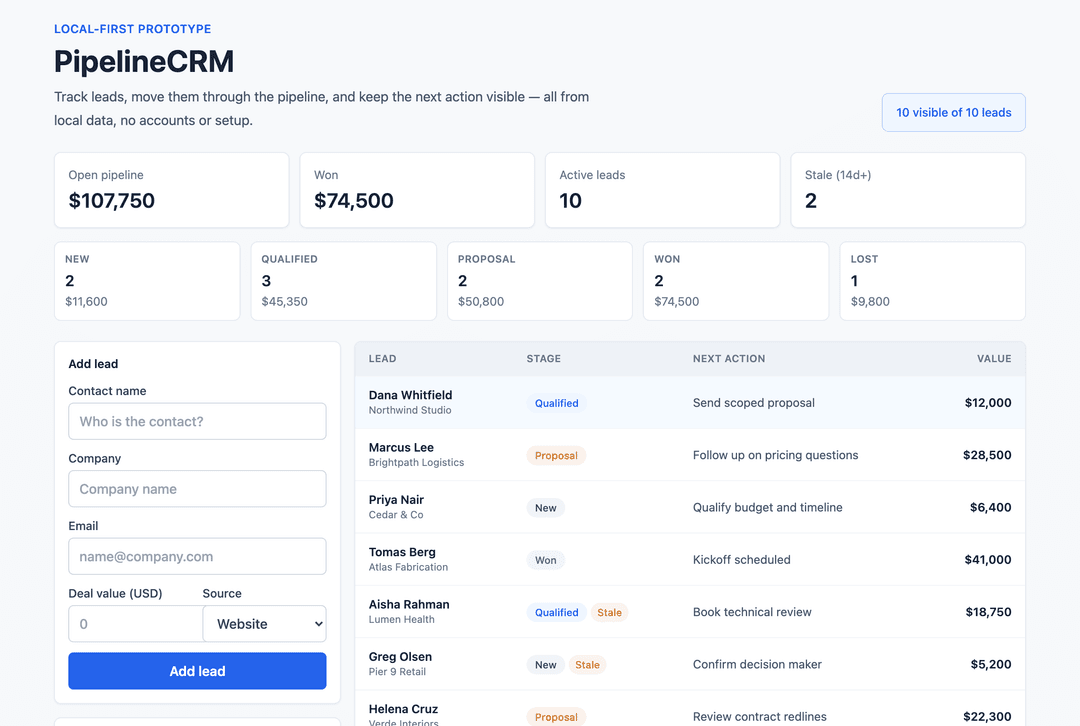 buildable generate "Build me a CRM for tracking leads" |
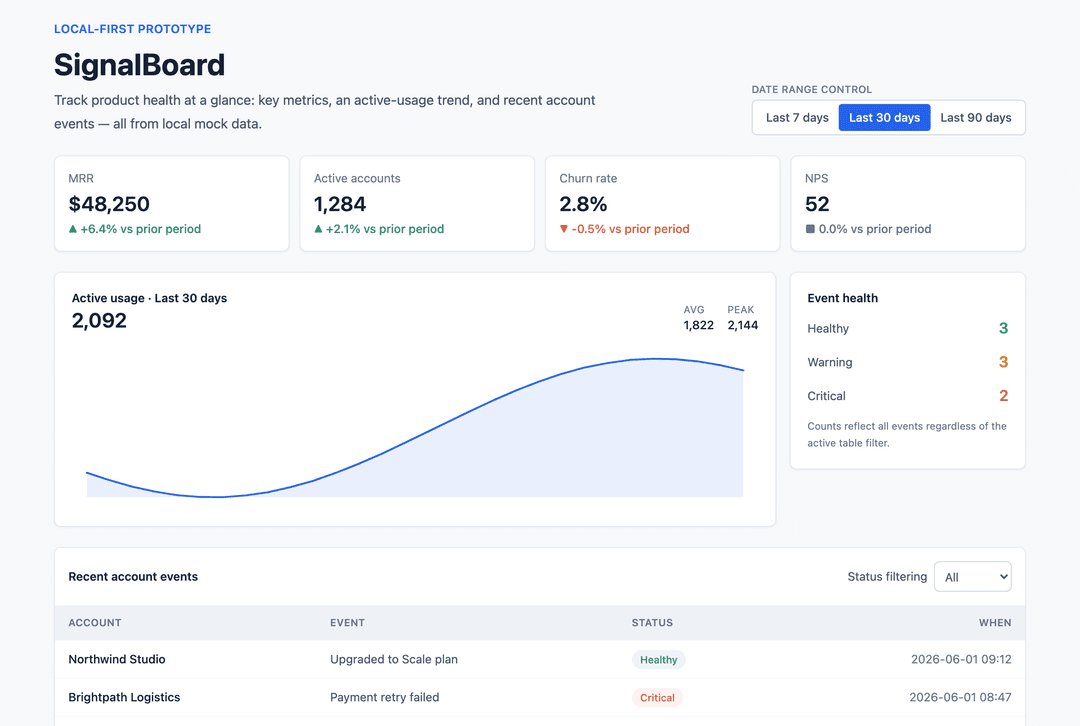 buildable generate "Build me a SaaS analytics dashboard" |  buildable generate "Build me a marketplace for local services" |
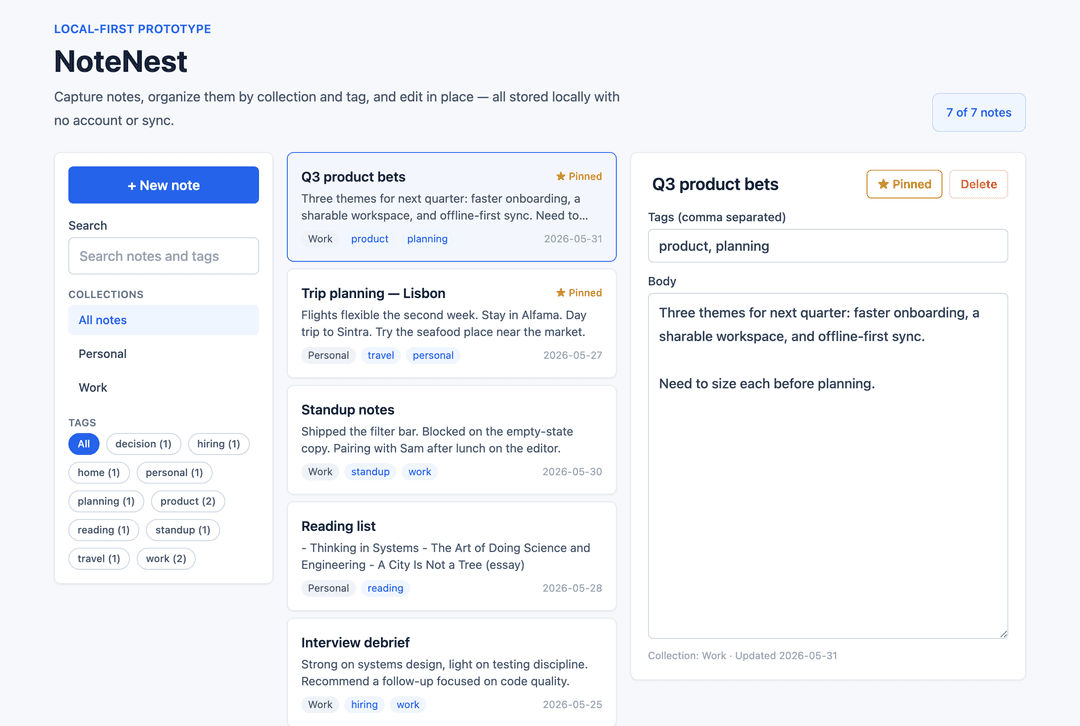 buildable generate "Build me a notes app for organizing ideas" |  buildable generate "Build me an ecommerce admin to manage products and orders" |
 buildable generate "Build me a landing page for my startup" |  buildable generate "Build me a job board with apply forms" |
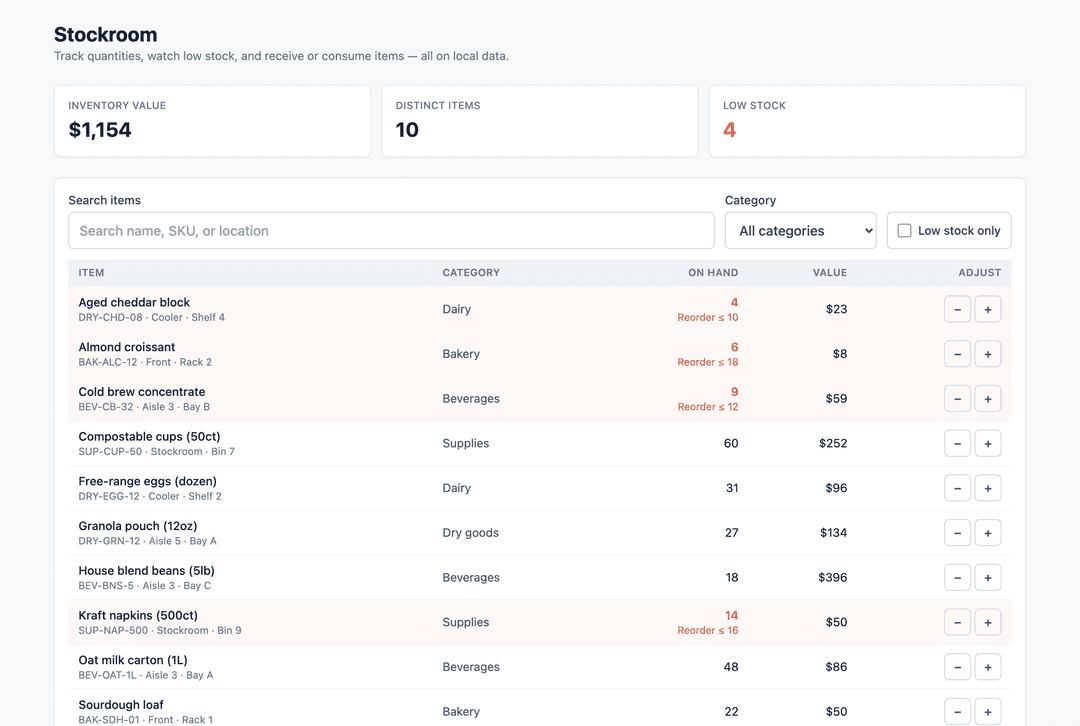 buildable generate "Build me an inventory manager with low-stock alerts" | 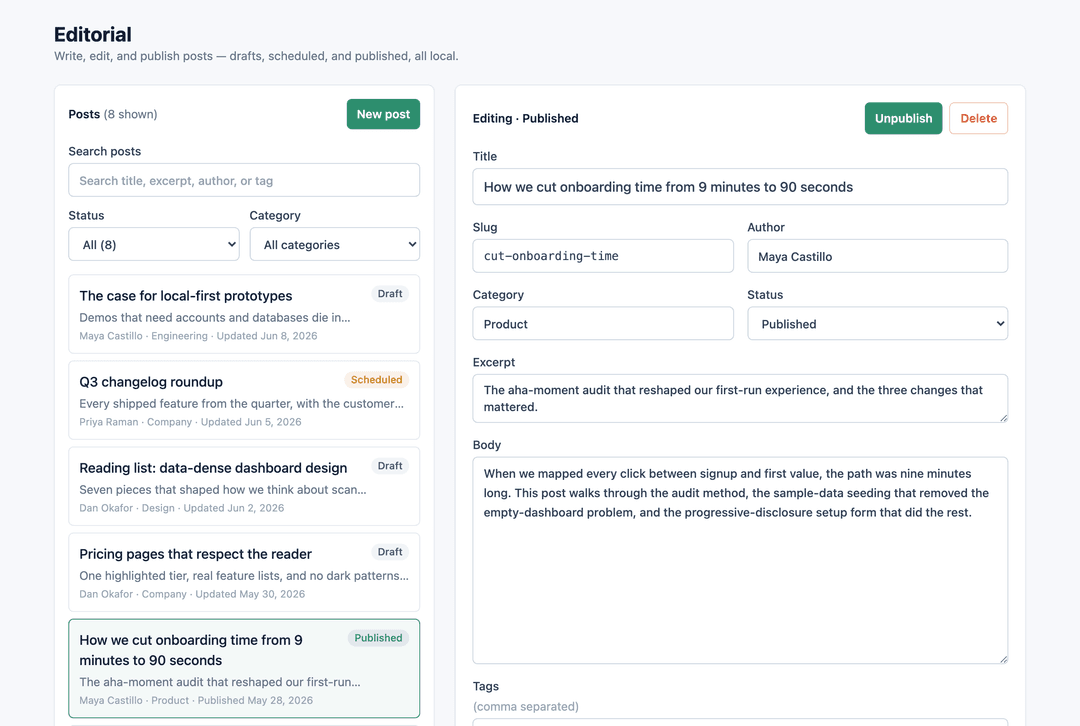 buildable generate "Build me a blog with a CMS editor" |
| Template | Target | Status |
|---|---|---|
templates/web/task-manager | web | ✅ runnable |
templates/web/crm | web | ✅ runnable |
templates/web/dashboard | web | ✅ runnable |
templates/web/marketplace | web | ✅ runnable |
templates/web/notes | web | ✅ runnable |
templates/web/ecommerce-admin | web | ✅ runnable |
templates/web/landing-page | web | ✅ runnable |
templates/web/portfolio | web | ✅ runnable |
templates/web/blog-cms | web | ✅ runnable |
templates/web/recipe-app | web | ✅ runnable |
templates/web/job-board | web | ✅ runnable |
templates/web/inventory-manager | web | ✅ runnable |
templates/mobile/habit-tracker | mobile | ✅ runnable |
templates/mobile/booking | mobile | ✅ runnable |
templates/mobile/task-manager | mobile | ✅ runnable |
templates/web/generic-app | web | 📝 planned fallback |
templates/mobile/expense-tracker | mobile | 📝 planned |
templates/mobile/travel-planner | mobile | 📝 planned |
templates/mobile/fitness-tracker | mobile | 📝 planned |
templates/mobile/meal-planner | mobile | 📝 planned |
templates/mobile/chat-app | mobile | 📝 planned |
templates/mobile/subscription-tracker | mobile | 📝 planned |
templates/mobile/maintenance-request | mobile | 📝 planned |
templates/mobile/field-service | mobile | 📝 planned |
templates/mobile/generic-app | mobile | 📝 planned fallback |
- Default web stack: Next.js, TypeScript, Tailwind CSS, shadcn-style patterns, local/mock data.
- Default mobile stack: Expo, React Native, TypeScript, NativeWind, Expo Router, local/mock data.
Fresh start vs existing app
# Fresh: copy a runnable starter and an app spec
buildable generate "Build me a todo app"
cd taskflow
buildable review

# Existing: profile the app and get guidance without overwriting code
cd my-existing-app
buildable init --existing
buildable plan "Add a booking workflow to this app"
buildable review
How much it guides
Buildable applies three levels of guidance so it reduces blank-page ambiguity without overstepping.
- Defaults (applied automatically) — task managers get create/edit/delete/complete/reopen; dashboards get metrics, charts/tables, filters, empty states; forms get labels and validation; prototypes get meaningful sample data; local/mock data is the default.
- Design system (applied automatically) — every plan includes
appSpec.designSystem: visual tone, palette intent, typography mood, density, layout rules, component rules, motion, accessibility, and anti-patterns. Runbuildable designonly when you want a deeper UI/UX brief. - Micro-blocks (applied automatically) — every plan includes
appSpec.blocks: selected reusable UI/product guidance such as filterable tables, detail panels, stat cards, entity forms, mobile list filters, and empty states. Blocks are not automatic code composition; they are compact references the builder adapts to the selected template and entities. - Mockup data (applied automatically) — every plan includes
appSpec.mockData: 6-10 realistic local records per entity, domain-specific values, edge cases, and populated/empty/filtered/loading/error states so the design can be judged honestly before backend work exists. - Recommendations (agent may adapt) — task priority/due dates/tags, CRM stage summaries, dashboard date ranges, mobile-first touch layouts, and product-specific UI choices.
- Ask first (never decided silently) — unclear product direction, auth, database/persistence, payments, collaboration/roles, external APIs, notifications, maps/camera/device permissions, deployment.
buildable plan "I have a restaurant"asks what kind of restaurant product to build;buildable generatepauses when architecture-changing choices appear in a prompt unless you force it. - Auth shape (opt-in) — when the user explicitly asks for login/accounts or passes
--with-auth, Buildable addsappSpec.authand auth references. The default is local/mock auth behind a seam; named providers are treated as swappable adapters, not screen-level dependencies. - Persistence ladder (opt-in) — when the user asks to save/persist/remember data, Buildable adds
appSpec.persistenceand theknowledge/data-layer/references: default to local browser/file storage behind a vendor-neutral repository seam, climbing to a hosted database only when the user names one — andbuildable reviewthen allows that one vendor while still flagging others.
Token efficiency
Agents load only the references a prompt needs (the appSpec.referenceLoadingContract), never the whole repo. Across the golden prompts, each plan loads ~10% of the bundled-brain reference bytes — about 90% less than loading the whole brain — while still specifying, on average, 6 features, 9 typed entity fields, and 4 acceptance criteria that a raw prompt gives you none of. (This measures Buildable's bundled context, not your total Claude/Codex session tokens.) Prove it yourself:
buildable eval --compare
Compact plan handoffs (TOON). The plan an agent reads back is itself token-optimized. Buildable serializes the build contract in TOON — a compact, dependency-free toon-style-v1 format (no install; it's built into the CLI). The same plan that is ~22 KB as full JSON is ~4.4 KB as TOON (~80% smaller), so:
buildable plan "<prompt>" --toonprints the compact contract;--compactprints slim JSON (drops the humanplanMarkdownrender).- The MCP tools return the compact form by default (full JSON via
verbose: true, the TOON contract viatoon: true), so desktop/agent clients spend ~20–80% fewer tokens per plan with no loss of structured information.
Supported app types
15 generate runnable, build-verified code today — task managers, CRMs, dashboards, marketplaces, notes, ecommerce admin, landing pages, portfolios, blogs, recipe apps, job boards, inventory, plus mobile habit-tracker / booking / task-manager. On top of that, 55 archetypes are recognized and planned (tag-matched via core/archetype-registry.json): the long tail still gets a full app spec + implementation plan, not a blank slate. See the full list and runnable status in CONTRIBUTING.md.
Non-goals
Buildable is and will remain a local plugin/skills layer for coding agents — not a hosted product. It does not include billing, accounts, cloud previews, managed databases, hosted deployments, telemetry, or a central template service, and it never sends your code anywhere. A user who names their own backend or auth provider is supported — but always behind a swappable local seam, never as a platform dependency. See Explicitly out of scope in the roadmap.
Stability
Buildable follows semantic versioning. As of 1.0, these are the stable public surfaces — they won't be renamed or removed without a major (2.0) release:
- Commands & flags —
buildable plan/design/generate/review/init/preview/check/list/evaland the/buildable-*slash commands, plus their documented flags. - App spec shape — the fields agents read in
appSpec(references,blocks,persistence,auth,designSystem, …), defined incore/schemas/app-spec.schema.json. - MCP tools — the
buildable_*tool names and their documented arguments. - Block registry format — the shape contributors build blocks against.
Additive changes — new commands, optional flags, new appSpec fields, new blocks, new runnable starters — ship in minor/patch releases and won't break you. Renames and removals are reserved for a 2.0.
Repository map
core/           Prompt classification, app spec, workflow, ask-vs-build policy
blocks/         Reusable micro-template packs (registry + per-block guidance)
knowledge/      Archetypes, data models, screen graphs, UI patterns, playbooks, rubrics
templates/      Golden templates (15 runnable starters + 10 planned specs)
skills/         Agent skills: planner, web-builder, mobile-builder, reviewer
commands/       Claude Code slash commands
adapters/       Codex, Claude, Cursor integration notes
bin/            Dependency-free CLI entrypoint
scripts/        Maintenance scripts (starter config sync)
.claude-plugin/ Claude Code plugin manifest + local marketplace
.codex-plugin/  Codex Desktop plugin manifest
.cursor/        Cursor rule and slash commands
evals/          Prompts, fixtures, and scoring rubric (buildable eval)
examples/       Generated reference apps
Templates catalog
See CONTRIBUTING.md for the full list of archetypes, golden templates, UI/UX playbooks, rubrics, and simple contribution instructions.
License
MIT — see LICENSE.
// faq
What is buildable-plugin-skills?
Local-first AI app-builder brain for Claude Code, Codex, and Cursor: archetypes, golden templates, UI/UX playbooks, and review loops, designed to load less bundled context in evals.. It is open-source on GitHub.
Is buildable-plugin-skills free to use?
buildable-plugin-skills is open-source under the MIT license, so it is free to use.
What category does buildable-plugin-skills belong to?
buildable-plugin-skills is listed under productivity in the Claudeers registry of Claude-compatible tools.
// embed badge

[](https://claudeers.com/buildable-plugin-skills)
// retro hit counter

[](https://claudeers.com/buildable-plugin-skills)
// reviews
// guestbook
// related in Productivity
 🔓
🔓Agent skills for Obsidian. Teach your agent to use Obsidian CLI and open formats including Markdown, Bases, JSON Canvas.
 🔓
🔓Garry's Opinionated OpenClaw/Hermes Agent Brain
 🔓
🔓Open source repository of plugins primarily intended for knowledge workers to use in Claude Cowork
 🔓
🔓An open-source alternative to Claude Cowork (powered by opencode)