
buddy
A little pet on your Mac that tells you when Claude Code or Codex needs you. 100% local.
Install with your AI
Paste into Claude Code, Cursor, or any agent — it reads the repo and wires the tool into your project.
Install and set up buddy (release-binary project) into my current project.
Found on https://claudeers.com/buddy
Repo: https://github.com/varun-ml/buddy
Homepage/docs: —
Detected install method: release-binary → inspect the README
Category: data. Platforms: cli, api, desktop, web, mobile.
Read the repo's README for exact setup and env vars, then install it and wire it into my project.

Claudeers Health Verdict:
active; community-verified: false. Confirm the source before running anything.
Grab the latest release asset from GitHub.
# download a build from https://github.com/varun-ml/buddy/releases
git clone https://github.com/varun-ml/buddy
// compatibility
| Platforms | cli, api, desktop, web, mobile |
|---|---|
| Operating systems | — |
| AI compatibility | claude |
| License | MIT |
| Pricing | open-source |
| Language | Swift |
Buddy
A little pet that lives on your Mac and tells you when Claude Code or Codex needs you.
You start an AI agent on a task, switch to email, and forget about it. Buddy sits at the bottom of your screen, watches your agents, and taps you on the shoulder when one is done or waiting for your OK. One click takes you straight back to it.
git clone https://github.com/varun-ml/buddy.git ~/buddy && ~/buddy/install.sh
That's the whole install. Buddy builds on your Mac in about a minute and starts right away. Everything stays on your Mac: no account, no tracking, nothing sent to us.
What Buddy does for you
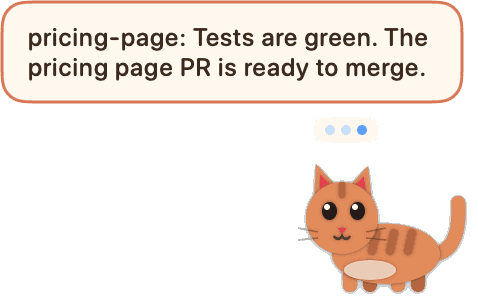
- Tells you when an agent is done, with its own one-line summary: "Rewrote email 2: shorter, one clear call to action." Click the bubble and you're back in that chat or terminal.
- Tells you when an agent is waiting for your OK, with a soft sound, so it doesn't sit idle for an hour.
- Lets agents talk to you. Any agent can put a message on your screen ("Tests are green, ready to merge"). See Let your agents message you.
- Shows everything at a glance. Hover over Buddy to see what's running, what's finished, and how much of your plan you've used.
- Looks after your day: nudges you to take a break after 90 minutes, warns you when you're juggling too many agents at once, and tells you when it's time to stop.
Two tabs: Work and Personal
Work is what your agents are doing: what's running, what's done, your usage limits, and (if you connect GitHub) your pull requests.
Personal is the rest of your life, kept private on your Mac:
- Goals for today, this week and this month. Click to tick them off or count them up ("Talk to 5 customers: 2 of 5").
- One simple to-do list. Add due dates; Buddy sorts it. Hover any item for "not today".
- The people who matter. Birthdays, a nudge to call your mum on Sundays, your kid's bedtime. Right-click Buddy → Personal → Set up my profile… and answer a few questions.
The card always opens on Work; Personal is one click away.
Three looks
Right-click Buddy → Look → Theme.
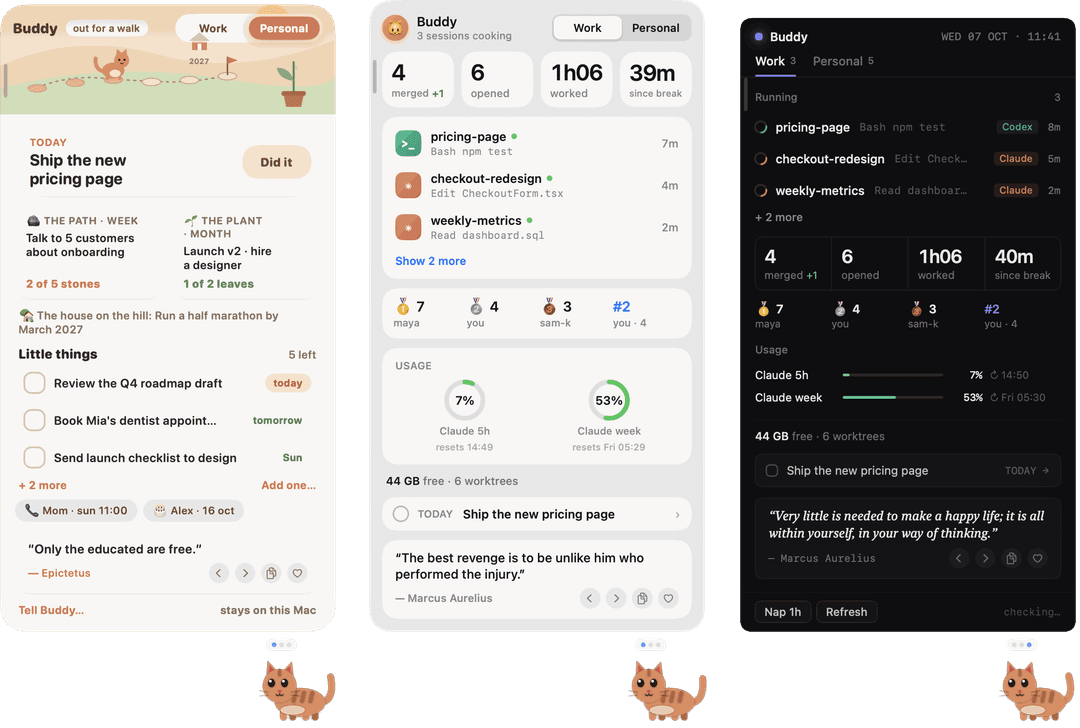
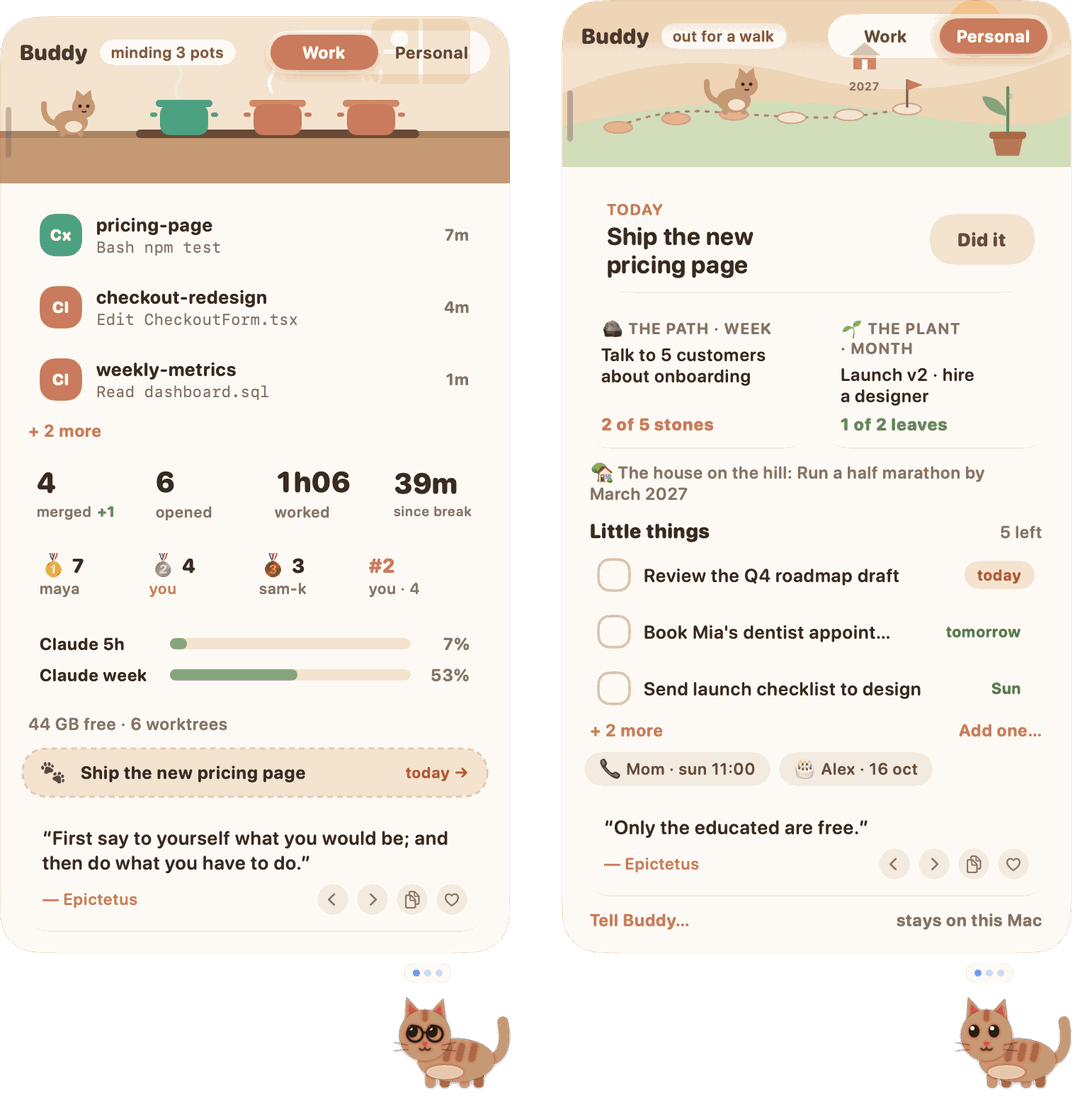
| Burrow | Glass | Ink |
|---|---|---|
| Warm and playful. Your pet walks a little path as you make progress on the week's goal, and a plant grows a leaf for each step of the month. | A frosted macOS widget with big numbers and progress rings. | Dark and precise, for people who live in the terminal. |
 | 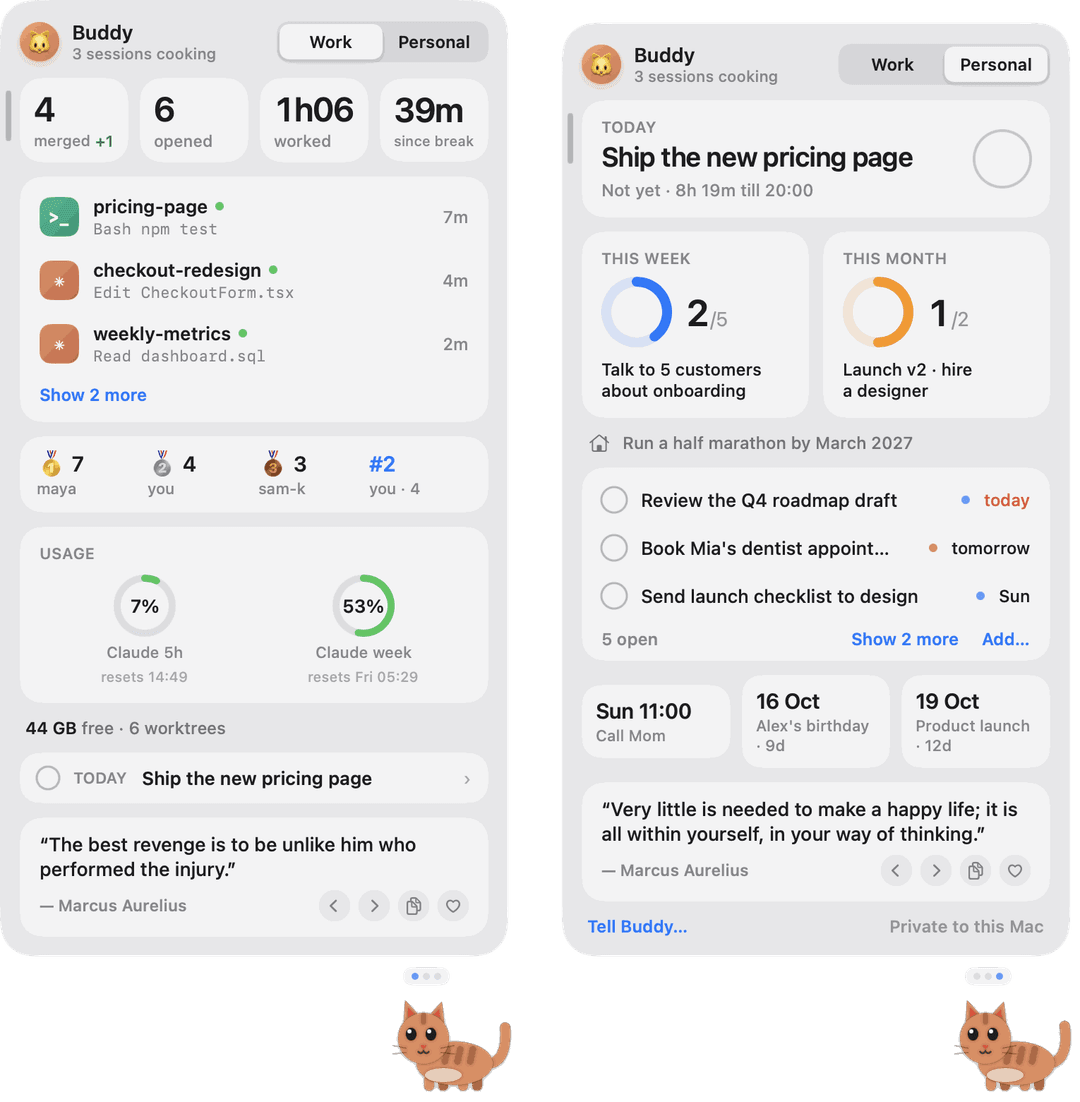 | 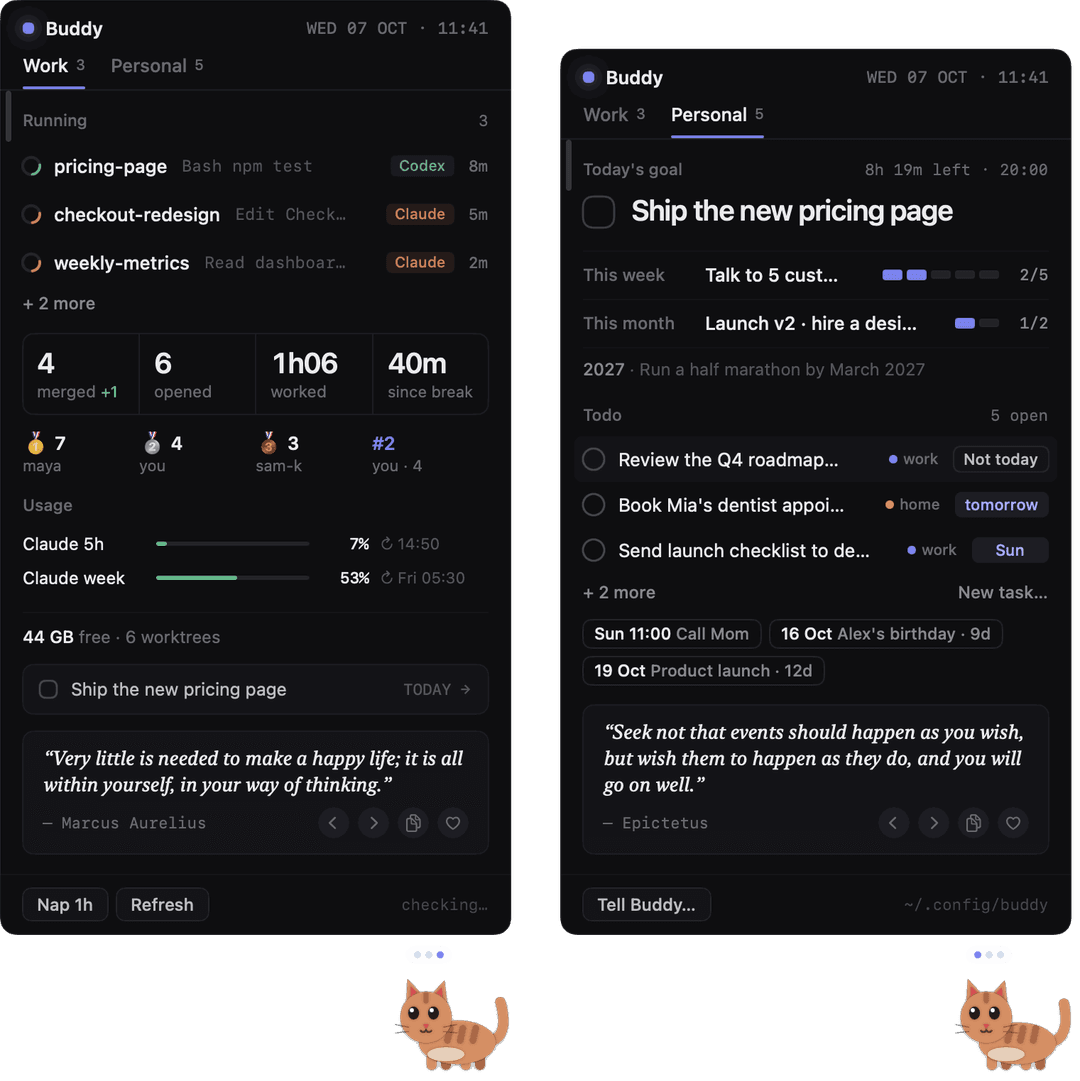 |
Pick your buddy
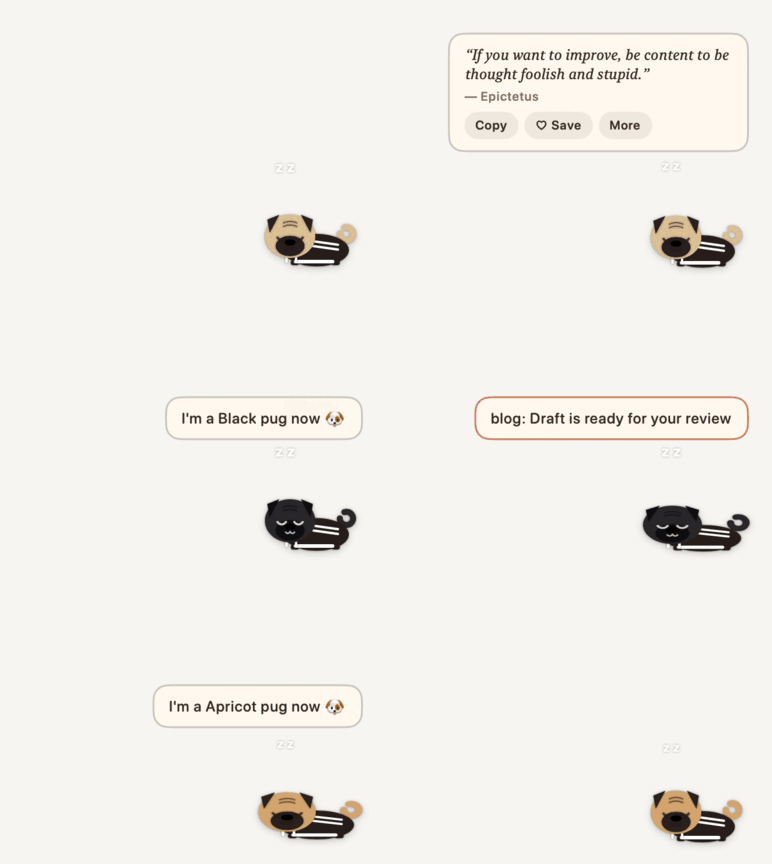
Right-click Buddy → Look → Buddy. Three animals, six that aren't, each with five looks. Or random for a different one every day, or right-click → 🎲 Shuffle buddy for a new one right now. Don't like one? Leave it out of both with "skipBuddies": ["robot"] in ~/.config/buddy.json.
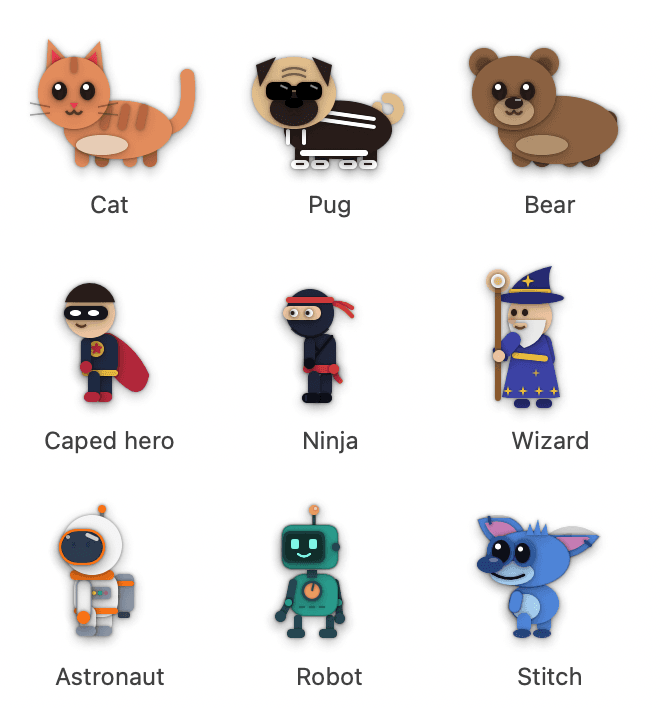
Each has its own way of reacting: the hero flies off when a PR breaks, the ninja climbs a rope and throws a toy star, the wizard teleports and floats on a cloud, the astronaut plants a flag when you merge, the robot dances, and Stitch plays the ukulele, surfs, and goes full alien (extra arms, antennae, spines) when a PR breaks.

Costumes and festivals
Right-click Buddy → Look → Costume dresses the cat, pug or bear (the other buddies come dressed):

- Caped hero: a cape and mask. It glides instead of walking, does a hero landing when you merge, flies off the screen when a PR breaks, and now and then grapples up to the top of your screen.
- Pujo and Diwali switch on by themselves from a week before the festival days to three days after. Pujo: a red-bordered drape and kash flowers; it plays the dhak when an agent finishes and does a dhunuchi dance when you merge. Diwali: a kurta and marigold garland; it lights diyas, waves a phuljhari, and carries a diya after dark.
- Pick a costume yourself, or No costume, ever, and it won't dress up on its own.
Relax mode
Right-click Buddy → 🌿 Relax mode, on until midnight. Buddy ambles slower with leaves drifting past, takes sleepy little stretches and naps, and swaps work chatter (merge counts, the leaderboard) for calm quotes. Every 2 hours a soft chime offers a break: tap the bubble, or right-click → Breathe for 2 minutes, and Buddy naps inside a ring that grows and shrinks (4 s in, 6 s out) over soft rain-like noise it makes itself. A session waiting for your OK and a red PR still get through.
Everyday use
| You want to… | Do this |
|---|---|
| See what's going on | Hover over Buddy |
| Jump to an agent | Click its row or its bubble |
| See a bubble you missed | Hover over Buddy: the Inbox at the top of Work keeps today's last 100 events. "Wants your OK" and red-PR bubbles stay up until they're handled |
| Pick a buddy, costume or theme | Right-click Buddy → Look |
| Set goals, add a task, update your profile | Right-click Buddy → Personal |
| Nap for an hour, or relax mode | Right-click Buddy |
| Make the card wider | Drag its outer edge |
| Close Buddy | Right-click → Close Buddy. Type buddy in Terminal to bring it back |
How it works
Fully vibe coded. Buddy is a fun side project from the team at Fermi, built end to end with Claude Code (and a bear from a teammate). Running it is a different story: Buddy never calls a model, never reads your code, and never sends your prompts anywhere. It is a small native Mac app (Swift) plus one Python script.
Claude Code / Codex ──hook──▶ beat.py ──writes──▶ ~/.claude/pet/sessions/<id>.json ◀──reads every 2 s── Buddy
- Hooks, not plugins.
install.shaddsbeat.pyto the hook settings of Claude Code (~/.claude/settings.json) and Codex (~/.codex/hooks.json), next to any hooks you already have. The agent runs it on its own events: you send a prompt, a tool is about to run, it needs your OK, it finishes. Uninstalling removes only those lines. - beat.py writes one small JSON file per session: its folder, branch, state (working, waiting, finished), the last tool's name, your prompt, and the agent's last line. It never blocks the agent; if anything goes wrong it exits quietly.
- Buddy reads those files and draws the pet, bubbles and card. For today's counts it also reads the agents' own local transcripts (
~/.claude/projects,~/.codex/sessions) to count sessions and prompts. Nothing is copied out of them. - Clicking a bubble brings that session's app to the front (the desktop app, or Terminal / iTerm through AppleScript).
Privacy mode
Right-click Buddy → 🔒 Privacy mode, for screen sharing and demos. Bubbles say only what kind of thing happened ("A session needs your OK", "Done ✨"), never a repo, a prompt or a PR title. Chatter that names people or work stays quiet, and the card doesn't open on hover. Sounds and the click-to-jump still work. It stays on until you turn it off.
Switch tracking (off by default)
Right-click Buddy → Personal → Track app switching if you want help with overwhelm. Buddy then counts how often the front app changes, and between which two apps, per hour. That's all: app names only, no window titles, tabs, URLs or screen contents, no timestamps finer than the hour, kept 7 days on your Mac, and forgotten the moment you turn it off. macOS tells every app which app is in front, so it needs no permission.
At most once an hour it may say "You switched apps 140 times in the last hour. Mostly Chrome ↔ Slack. Close or mute one of them for 30 minutes?", or, from your agents, "You've jumped between 7 agent sessions in 2 hours. Finish two before you start another?"
What it asks permission for
macOS may ask you three things. All are optional; Buddy works without them.
- "Buddy wants to control Terminal": only when you click a session that runs in Terminal or iTerm, so Buddy can bring that tab to the front.
- Codex → Settings → Hooks → "Trust all": if you use Codex, this lets Codex tell Buddy what it's doing.
- Your Claude plan limits are off by default. Turn them on with
"claudeLimits": truein~/.config/buddy.json. Buddy then reads the Keychain item "Claude Code-credentials" and callsapi.anthropic.com/api/oauth/usage, the same thing Claude Code's own/usagedoes. macOS will ask you once.
Privacy
- 100% local, no telemetry. Buddy has no server and collects nothing.
- Your goals, to-dos and people live in
~/.config/buddy/on your Mac. They never leave it. - The only network calls are ones you turn on: GitHub (through your own
ghlogin) for PRs, and Anthropic's usage endpoint for plan limits.
Let your agents message you
Any agent can run:
buddy say "Tests are green, PR is ready to merge"
buddy say "I need your decision on the pricing copy" --urgent
buddy say "Lesson 12 is ready. Answer the 3 questions in chat." --sticky lesson-12   # stays up until…
buddy done lesson-12                                                                # …this, or you tap it
To make your agents actually do it, paste this into ~/.claude/CLAUDE.md (Claude Code) and ~/.codex/AGENTS.md (Codex):
## Buddy
When you finish something I'm waiting on, need my decision, or are blocked on me,
run `buddy say "<one short sentence>"` (add --urgent if I must act now).
Under 20 words. No secrets. Not for routine progress.
Buddy on your phone (Android, beta)
Away from the desk, Buddy follows you to your phone. A small Android app shows the same buddy as a floating bubble over your other apps. For each event it plays a sound you learn to tell apart (needs you, done, failed, a message), then reads one short line aloud: "pricing-page is done. Fixed the login test, and all tests pass." Tap the bubble for the same status card, sessions and inbox only. Long-press it to mute for an hour.
- Nothing leaves your network. The Mac talks to the phone over Tailscale only, with a token. No cloud relay and no push service.
- The line it reads is written by the hook, not by Buddy. When a session ends a turn and the phone is connected,
beat.pyasks a small model (Claude Haiku, through your ownclaudeCLI) to turn the reply into one sentence without code or paths. With no phone connected, nothing runs and nothing is spent. - It works with the screen off and Maps open. Maps gets quieter while Buddy talks.
- Car mode reads more. Tap 🚗 Car in the app (or run
buddy car on): it adds each finished session's details to what it reads (did, result, needs you), even in quiet hours, for 12 hours or until you tap it off. Tapping it opens Hotspot: turn that on and the laptop joins it (save the hotspot once on the Mac with Auto-join). Buddy says "Car mode on" once the laptop is reachable. - A login that doesn't expire on you. The summary uses your
claudelogin. If that lapses, Buddy tells you once. For a login only Buddy uses that lasts a year, runclaude setup-tokenand save what it prints:pbpaste > ~/.config/buddy/claude-token && chmod 600 ~/.config/buddy/claude-token.
To set it up:
- Install Tailscale on the Mac and the phone, and sign in to the same account on both.
- Add
"phone": trueto~/.config/buddy.json, then run./install.shagain. - Build the app once:
cd android && ./gradlew assembleDebug. It needs JDK 17 and the Android SDK. - Right-click Buddy → 📱 Pair phone… (or run
buddy pair) and scan the code with the phone camera. A page opens with two buttons: Install the app, then Pair with this Mac.
You pair once. After that the app updates itself: when the Mac has a newer build, the card shows Update available, and one tap installs it.
Talking back to your sessions comes later. For now, answer them in Claude's own app (Remote Control).
Settings
All optional, in ~/.config/buddy.json. Restart Buddy after editing (type buddy).
{
  "pet": "random",
  "stop": "19:00",
  "breakMins": 60,
  "juggle": 4,
  "claudeLimits": true,
  "statsRepos": ["your-org/your-repo"]
}
| Setting | What it does |
|---|---|
pet | cat, pug, bear, hero, ninja, wizard, astronaut, robot, stitch, or random (a different one each day). The right-click menu overrides it. |
skipBuddies | Buddies that random and Shuffle never pick, e.g. ["robot"] |
costume | hero, durga, diwali, off (never), or leave it out to dress up for festivals on its own. Cat, pug and bear only. |
outfit | none takes off the pug's tracksuit and shades |
stop | When your workday ends (default 20:00). Buddy yawns and offers a note for tomorrow. |
breakMins | Minutes without a break before the nudge (default 90). Quiet while your mic is on. |
juggle | How many agents at once before Buddy suggests finishing one (default 5) |
claudeLimits | Show your Claude plan usage (default off; see What it asks permission for) |
switchesPerHour | App switches in an hour before Buddy suggests calming down (default 120; needs switch tracking on) |
sessionsPer2h | Agent sessions touched in 2 hours before Buddy suggests finishing some (default 6; needs switch tracking on) |
minPRLines | Merged PRs smaller than this many changed lines (submodule bumps, version pins) and bots' PRs don't count on your tile or the leaderboard (default 3) |
statsRepos | GitHub repos for your merged/opened PR counts and a team leaderboard (needs gh) |
Requirements
- macOS 13 (Ventura) or later
- Apple's command line tools: if the install asks, run
xcode-select --install - Claude Code and/or Codex (the desktop app or the CLI)
- Optional: GitHub's
gh, for PRs
Remove it
~/buddy/install.sh --uninstall           # keeps your goals, to-dos and settings
~/buddy/install.sh --uninstall --purge   # deletes those too
Credits
Built by Varun Tulsian with Claude Code. The bear 🐻 is by Siddharth Sahu.
Want Buddy to work with your agent (Cursor, Gemini CLI, …), or to add a pet, a theme or a fix? See CONTRIBUTING.md. MIT licensed.
// faq
What is buddy?
A little pet on your Mac that tells you when Claude Code or Codex needs you. 100% local.. It is open-source on GitHub.
Is buddy free to use?
buddy is open-source under the MIT license, so it is free to use.
What category does buddy belong to?
buddy is listed under data in the Claudeers registry of Claude-compatible tools.
// embed badge

[](https://claudeers.com/buddy)
// retro hit counter

[](https://claudeers.com/buddy)
// reviews
// guestbook
// related in Data & Analytics
 🔓
Marketing skills for Claude Code and AI agents. CRO, copywriting, SEO, analytics, and growth engineering.
 🔓
Wrap Antigravity, ChatGPT Codex, Claude Code, Grok Build as an OpenAI/Gemini/Claude/Codex compatible API service, allowing you to enjoy the free Gemini 3.1 P…
 🔓
Apache Airflow - A platform to programmatically author, schedule, and monitor workflows
 🔓
CLI tool for configuring and monitoring Claude Code