
brink
Know when you're on the brink — Claude Code & Codex usage limits on the edge of your Mac screen
Install with your AI
Paste into Claude Code, Cursor, or any agent — it reads the repo and wires the tool into your project.
Install and set up brink (release-binary project) into my current project.
Found on https://claudeers.com/brink
Repo: https://github.com/semihtalii/brink
Homepage/docs: —
Detected install method: release-binary → inspect the README
Category: finance. Platforms: cli, api, web.
Read the repo's README for exact setup and env vars, then install it and wire it into my project.

Claudeers Health Verdict:
active; community-verified: false. Confirm the source before running anything.
Grab the latest release asset from GitHub.
# download a build from https://github.com/semihtalii/brink/releases
git clone https://github.com/semihtalii/brink
// compatibility
| Platforms | cli, api, web |
|---|---|
| Operating systems | — |
| AI compatibility | claude |
| License | MIT |
| Pricing | open-source |
| Language | Swift |
Brink
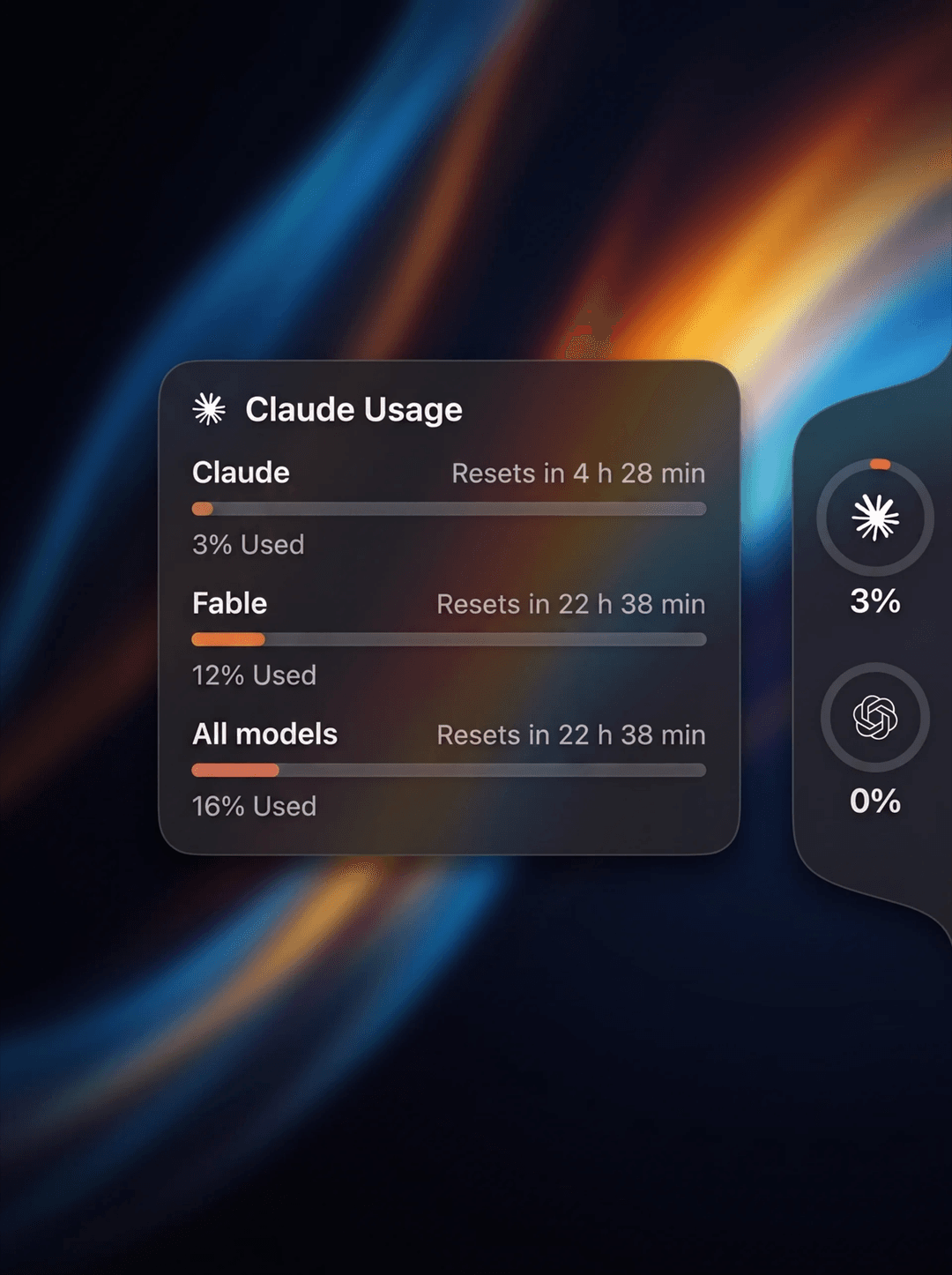
Know when you're on the brink. A tiny macOS panel that lives on the right edge of your screen and shows your Claude Code and Codex usage limits at a glance.
Move the mouse to the thin strip on the right edge → the panel slides out. Hover a ring → a card shows the session limit, weekly limits and reset times.
No Dock icon, no menu bar clutter. Just the edge.

Features
- Three looks: Black, Liquid Glass and System. On macOS 26+ the glass is
Apple's real, adaptive Liquid Glass (
.glassEffect): it turns light or dark from what's behind it, so type stays legible over a white web page and a dark wallpaper alike. On macOS 13–15 it falls back to a frostedNSVisualEffectViewblur. - Notch-style tab that flares into the screen edge; rings scale on hover; the detail card glides between rings
- Notifications when a limit fills up — and again the moment it resets (scheduled for the reset time, so it arrives even if the app is idle)
- 10 languages — follows your macOS language automatically (English, Türkçe, Deutsch, Français, Español, Português (Brasil), Italiano, 日本語, 简体中文, 한국어); override in the menu
- Rings for each provider, colored by usage (green → yellow → red; Claude ring in Claude orange)
- Detail card with Current session, All models and per-model weekly limits (e.g. Fable / Opus / Sonnet)
- Auto-refresh every 2 minutes, manual refresh from the context menu
- Launch at login toggle (System Settings → Login Items compatible)
- Works with whatever CLIs you already have installed — no API keys, no accounts
Requirements
- macOS 13 Ventura or later
- Claude Code and/or Codex CLI, logged in
- To build from source: Xcode Command Line Tools (
xcode-select --install)
Install
Download
Grab Brink.dmg from the latest release, open it and
drag Brink to Applications.
The app is not yet notarized. On first launch macOS will complain about an unidentified developer: right-click → Open, or allow it in System Settings → Privacy & Security.
Build from source
git clone https://github.com/semihtalii/brink.git
cd Brink
./build.sh
open dist/Brink.app
build.sh produces both dist/Brink.app and dist/Brink.dmg.
First launch
macOS will ask once:
Brink wants to use your confidential information stored in "Claude Code-credentials" in your keychain.
Click Always Allow. This is Claude Code's own login token; Brink reads it to ask Anthropic for your usage numbers. It is never sent anywhere else.
Usage
| Action | Result |
|---|---|
| Move mouse to right edge | Panel slides out |
| Hover a ring | Detail card |
| Right-click panel or card | Refresh now · Providers · Appearance · Language · Launch at login · Notifications · Test notification · Quit Brink |
| Move the mouse far from the edge | Panel folds away by itself |
If a CLI is not installed or not logged in, its ring shows DEMO data so you can still see the UI.
How it works
- Claude — reads the OAuth access token Claude Code stores in the macOS
Keychain (
Claude Code-credentials) or in~/.claude/.credentials.json, then callsapi.anthropic.com/api/oauth/usage— the same request Claude Code makes for its/usagecommand. - Codex — reads the token in
~/.codex/auth.jsonand callschatgpt.com/backend-api/wham/usage.
Security & privacy
- Tokens are only ever sent to Anthropic's / OpenAI's own API hosts over HTTPS. There is no telemetry, no third-party server.
- Brink caches only the short-lived access token and its expiry in
~/Library/Application Support/Brink/credentials.json(mode0600) so the Keychain prompt appears once rather than every refresh. It never stores or uses refresh tokens, and it never refreshes tokens on your behalf — so it cannot log you out of Claude Code. - When the cached token expires, Brink re-reads Claude Code's own store. Opening Claude Code once is enough to get a fresh token.
Caveats
- These usage endpoints are not official, documented APIs. If Anthropic or
OpenAI change the response shape, the parsers in
ClaudeProvider.swift/CodexProvider.swiftwill need a small update. PRs welcome. - The panel attaches to the main display only (v1).
When not to use this
- You want numbers inside the terminal or a status line → look at CLI tools such as llmquota or ccusage.
- You need token-level cost accounting → this only shows the percentage windows the vendors expose.
- You're on Linux/Windows → Brink is macOS-only (NSPanel + Keychain).
How Brink compares
| Brink | llmquota | ccusage | |
|---|---|---|---|
| Form | Edge panel (GUI) | Terminal TUI | Terminal report |
| Providers | Claude Code, Codex | Claude, Codex, Cursor, Grok… | Claude Code |
| Setup | Open the app | Node 22 + npm | Node + npm |
| Needs API key | No | No | No |
| Always visible | Hover the edge | Only while running | Only while running |
Project layout
Package.swift                 Swift Package (macOS 13+)
build.sh                      build → .app + .dmg
Sources/Brink/
  main.swift                  entry point (accessory app, no Dock icon)
  PanelController.swift       edge panel + detail card windows (NSPanel)
  Views.swift                 SwiftUI: rings, strip, detail card
  Models.swift                data model, color scale, refresh store
  Theme.swift                 Black / Liquid Glass / System palettes + blur surface
  LaunchAtLogin.swift         SMAppService wrapper
  Notifier.swift              limit-reached / reset notifications (UserNotifications)
  L10n.swift                  localization lookup + language override
  Resources/                  provider logos, <lang>.lproj/Localizable.strings
  ClaudeProvider.swift        Claude usage source
  CodexProvider.swift         Codex usage source
Adding a provider (Cursor, Gemini CLI, …) means implementing the
UsageProvider protocol and appending it to the list in main.swift.
Adding a language is one file: copy Resources/en.lproj/Localizable.strings
to <code>.lproj/, translate the right-hand side, and add the code to
L10n.available and build.sh's CFBundleLocalizations.
For design work or screenshots, BRINK_PREVIEW=1 dist/Brink.app/Contents/MacOS/Brink
starts the app expanded with the first card open.
Credits
The edge-panel design is based on a concept shared by @hivinz_ — original post. Brink is an independent, open-source implementation of that idea; all code is original. Claude and OpenAI logos belong to Anthropic and OpenAI respectively and are used only to identify each provider.
License
MIT © Semih Tali
// faq
What is brink?
Know when you're on the brink — Claude Code & Codex usage limits on the edge of your Mac screen. It is open-source on GitHub.
Is brink free to use?
brink is open-source under the MIT license, so it is free to use.
What category does brink belong to?
brink is listed under finance in the Claudeers registry of Claude-compatible tools.
// embed badge

[](https://claudeers.com/brink)
// retro hit counter

[](https://claudeers.com/brink)
// reviews
// guestbook
// related in Finance & Trading
 🔓
🔓An AI SKILL that provide design intelligence for building professional UI/UX multiple platforms
 🔓
🔓TradingAgents: Multi-Agents LLM Financial Trading Framework
 🔓
🔓AI-powered job application framework built on Claude Code. Fork it, fill in your profile, and let Claude evaluate jobs, tailor CVs, write cover letters, and…
 🔓
🔓"Vibe-Trading: Your Personal Trading Agent"