
briefproof
Your AI agent builds exactly what you asked for, and proves it. A Claude Code plugin: brief → quoted requirements → spec → tickets → blind acceptance check,…
Install with your AI
Paste into Claude Code, Cursor, or any agent — it reads the repo and wires the tool into your project.
Install and set up briefproof (claude-plugin project) into my current project.
Found on https://claudeers.com/briefproof
Repo: https://github.com/dmitribogatenkov/briefproof
Homepage/docs: —
Detected install method: claude-plugin → /plugin install briefproof@dmitribogatenkov/briefproof
Category: plugins. Platforms: cli, desktop.
Read the repo's README for exact setup and env vars, then install it and wire it into my project.

Claudeers Health Verdict:
unknown; community-verified: false. Confirm the source before running anything.
⚠ Unverified / not recently updated — review before pasting a run-this config.
/plugin marketplace add dmitribogatenkov/briefproof
/plugin install briefproof@dmitribogatenkov/briefproof
git clone https://github.com/dmitribogatenkov/briefproof
// compatibility
| Platforms | cli, desktop |
|---|---|
| Operating systems | — |
| AI compatibility | claude |
| License | MIT |
| Pricing | open-source |
| Language | TypeScript |
Briefproof
Your AI agent builds exactly what you asked for, and proves it.
https://github.com/user-attachments/assets/89693ac5-fee5-433d-8874-d70fb84f8a7f
Why I built this
AI agents are good at building things. They are also surprisingly good at declaring something finished when it isn't. A requirement gets paraphrased in the spec, quietly dropped in the plan, and by the time the agent says "done" nobody can say what happened to it.
For about a year I've built every project the same way: write the brief in plain words, turn it into requirements, a spec and tickets, let the agent build, then have a separate agent check the result against the original brief. If something is missing, fix and check again. The agent can't call it done while something you asked for is still missing.
That workflow lived as a set of prompts I wrote for myself. When Claude Code shipped mods, I turned it into a plugin with a pane you can watch, and here it is.
Briefproof runs in Claude Code only: the terminal, or the desktop app's Code tab in a local session. In plain chat the skill shows up but the pane and the ledger don't, because those are a Claude Code mod.
Install
In a Claude Code terminal session:
/plugin install briefproof --marketplace dmitribogatenkov/briefproof
Answer y to add the marketplace and press Enter for the user scope. That's
it. There is nothing else to install: no Python, no Node, no config. Everything
runs inside Claude Code, and the plugin works in every project from then on.
You need a Claude Code version with mods (October 2026 or later).
Use
Open Claude Code in an empty folder (or an existing project) and describe what you want:
/briefproof:build A booking page for a small massage studio: clients pick a service and a time, and every request lands in a Google Sheet
A few more ways to start a run:
/briefproof:build brief.md          # a longer brief in a file
/briefproof:build auto brief.md     # no questions; every decision listed in the final report
/briefproof:build                   # resume an interrupted run
The pane opens on its own when a run starts.
Changing what it built
/briefproof:change add a cancellation link to the confirmation email
A change request is the same discipline at small scale, on top of a finished
run: the request becomes new quoted requirements, the spec is a delta, only the
tickets that change are built, and the blind checker verifies the request
sentence by sentence and then confirms that everything the base run delivered
still holds. Each run, build or change, lives in its own folder under
.briefproof/runs/, so the history of a project is a list of briefs and
reports.
How it works
Your brief becomes numbered requirements, quoted word for word. Briefproof asks you the questions the brief leaves open (one round, suggested answer first), writes a spec and a plan, then builds each ticket in a fresh subagent. At the end, another agent that has only seen your original brief checks the finished project against it, and you get a plain-language report.
A few rules make this trustworthy, and I didn't bend any of them:
| Rule | Why it's there |
|---|---|
Requirements are quoted, never paraphrased (R01…) | Paraphrase drifts. Each rewrite loses a little, and by the spec a requirement can simply be gone. Nothing leaves the list without your own words saying why. |
| The checks are independent | A fresh subagent compares the spec, and later a clean clone of the finished project, against only your brief. Authors check their intent; a stranger checks the text. |
| The coordinator never writes code | Each ticket runs in its own fresh context, so the main session stays sharp from the first question to the final report. |
| Boundaries come before tickets | interfaces.md is written from the whole spec, so the first ticket doesn't quietly decide the architecture. |
| Review where it pays | Foundation and risky tickets get a review, plus one pass over the whole branch. At most two fix rounds, so the cost stays predictable. |
| Changes keep the proof | A change request is a small run on top of a finished one: quoted requirements, a spec delta, and a blind check of the request plus a regression pass over what the base run delivered. |
| Tickets run in waves | Each ticket owns its files. Tickets that don't overlap run in parallel, three at a time; the ones that share files wait their turn. |
| Gates the agent can't talk its way past | The run ledger refuses to mark a gate passed while it still has a problem: an open requirement, a ticket that traces to nothing. |
| Safe by default | It never asks for secret values, and always asks before deploying, paying, sending or deleting. |
Two modes: ask (the default; asks only what the brief leaves open) and auto
(asks nothing and lists every decision it made in the final report).
The pane
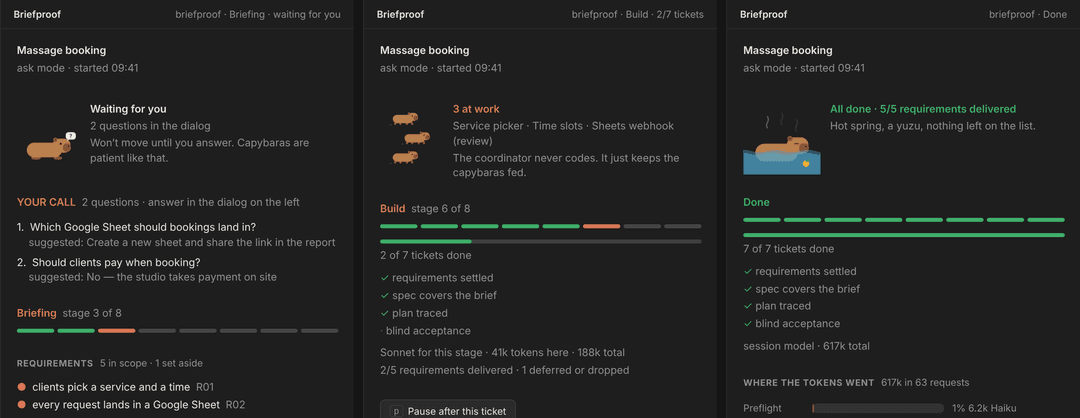
The first version of this pane was a wall of scrolling text. My daughter looked at it and asked what the computer was doing, and I didn't have a good answer. So now there's a capybara, and it tells you.
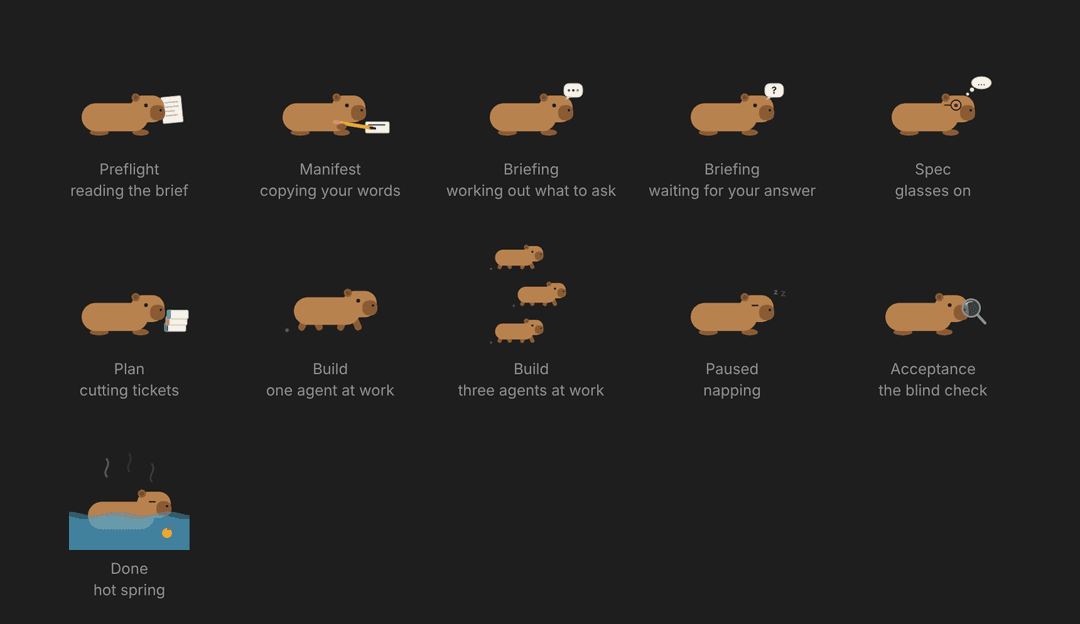
- One capybara per stage. It reads your brief, copies your words with a
pencil, works out what to ask, puts glasses on for the spec, stacks tickets
for the plan, holds a magnifying glass for the blind check, and soaks in a
hot spring when the run is done. During the build it runs, one capybara per
ticket in progress. While it waits for you it holds up a
?; when you pause, it naps. - Questions stay where you expect them. Clarifying questions use Claude Code's own dialog, with the suggested answer first. The pane mirrors them while the dialog is open, so you can see what's being asked at a glance.
- Steer requirements in your own words. Pick a requirement to defer or drop it; the pane asks why, in your words, and that's what the ledger keeps. Type a new requirement and it lands in the brief under "Additions" and in the plan.
- It stays true even when the agent gets sloppy. The mod watches the
subagents the agent spawns: a ticket shows as running the moment its subagent
starts, moves to review or done on what the subagent reports, and a
BLOCKEDreport is logged as such. The ledger is still the record, but the pane no longer depends on the agent remembering to update it. - Pause after this ticket. The ledger refuses to start new tickets while you're paused, and so does the spawn itself, so the agent can't run past you.
- A token budget, if you want one. Set it in the settings and the pane shows a bar filling towards it. When a run crosses it, no new ticket starts until you press Continue anyway; what's already running finishes. You get a notification when that happens.
- Resume is one click. Open Claude Code in a folder with an unfinished run and the pane says where it stopped, with a Resume button.
- An estimate before the build. Once the plan exists, the pane says roughly
how many tokens and minutes this many tickets will take, from your own past
runs (kept in
~/.briefproof/stats.json; a stated default before the first). In ask mode the agent asks Go, set a budget, or stop; the pane has a budget field for the same thing. - A report page you can send. When the run finishes, the mod writes
8-report/report.html: the report, every requirement and its status, the tickets, and the token and time chart, in one file that opens anywhere. Open report page is the first button in What you got. - It tells you when it needs you. A desktop notification when questions are waiting, a short message as each ticket finishes.
- When it's done, it shows you what you got. One line per stage folder in
.briefproof/with its file count, an Open folder button (Finder, Explorer, or your desktop's file manager) and Copy path. In the terminal the names are links you can Cmd-click.
The status line reads briefproof · Build · 3/7 tickets, with · waiting for you or · paused when that's the case.
Pick a model per stage
Not every stage needs the biggest model. Copying your brief into quotes is mechanical; the blind acceptance check is the whole promise. So each of the eight stages can run on a model of your choice, and the plugin enforces it on every request made during that stage, the agent's own and its subagents'.
/plugin configure briefproof@briefproof
(In the desktop app: + > Plugins > Manage plugins > Briefproof > Configure.)
Each stage is a picker: session (the model your session runs on, the
default), fable, opus, sonnet or haiku. You can change it mid-run; the run lives
in the ledger file and carries on.
The split I use when I want to save:
| Stage | Model | Why |
|---|---|---|
| Preflight, Manifest | haiku | mechanical: copy the brief, split it into quotes |
| Briefing, Spec, Plan | session | this is where the judgment is |
| Build | sonnet | executors write code from a tight ticket |
| Acceptance | session | the blind check is the whole promise |
| Done (the report) | haiku | summarization |
The pane shows the model in force and the tokens spent so far. When the run is
done it draws a bar per stage, so you can see where the tokens went, which
model answered, and how many minutes each stage took. The final report carries
the same table, and the run's state.json keeps it under usage and
timeline.
Two more settings live in the same place: Token budget per run (0 means no limit) and Capybara (off keeps the pane, drops the picture).
The ledger
The mod registers one tool, state, and it's the only way the agent can record
progress. It validates every change (no dropping a requirement without your
words, no passing a gate with open problems, no new ticket while paused), writes
the run's state.json, and never needs your approval because it only touches
its own folder.
Contributing
git clone https://github.com/dmitribogatenkov/briefproof
claude --plugin-dir ./briefproof          # load it from the folder for one session
claude plugin test ./briefproof           # 20 tests against an in-memory engine
There is an eval suite under evals/: two full builds (the tip calculator and
the massage studio), a change request on an empty folder, and a plain question
that must not trigger anything. The cheap cases run in seconds:
claude plugin eval . --trust-plugin --tag negative --tag refusal --ablation none --allow-tools mcp__briefproof__state
claude plugin eval . --trust-plugin --tag build --allow-tools Bash Write Edit Agent mcp__briefproof__state   # the real thing; costs real tokens
The build cases give the run a shell, so Claude Code needs its sandbox: on
Linux that is bubblewrap and socat (apt install bubblewrap socat); macOS
has one built in. The GitHub Action validates and tests on every push, and runs
the evals weekly and on demand (it needs an ANTHROPIC_API_KEY secret).
Pull requests are welcome. The screenshots in docs/ are rendered from the
mod's own SVG into a mock of the pane layout; if you have a capture from a real
run, I'd rather use that.
Layout
.claude-plugin/plugin.json, marketplace.json
skills/build/SKILL.md            the orchestrator (/briefproof:build)
skills/build/prompts/            executor + reviewer, coverage (G2), acceptance (G4)
skills/change/                   change requests on a finished run (/briefproof:change)
evals/                           claude plugin eval cases
.github/workflows/check.yml      validate + tests on push; evals weekly
hooks/register.tsx               the mod: state tool, live pane, capybaras, model routing
types/index.d.ts                 the run-state contract
tests/                           claude plugin test .
docs/                            images for this README
What a run leaves in your project
Every run in its own folder, one subfolder per stage, numbered the way the pane numbers them:
.briefproof/
  current                               which run is current (a relative path)
  runs/20261101-0941-massage-booking/
    state.json                          the ledger (written only by the state tool)
    1-brief/brief.md                    your words, secrets redacted; later wishes under "## Additions"
    1-brief/base-requirements.md        change requests only: what the base run delivered
    2-manifest/requirements.md          the numbered requirements and every change to them (the mod keeps it current)
    3-briefing/answers.md               what was asked and what you answered (the mod writes it); decisions.md in auto mode
    4-spec/spec.md                      the specification (a delta, for a change request)
    4-spec/interfaces.md                boundaries, shared types, what each finished ticket built
    5-plan/NN-*.md                      one file per ticket
    6-build/*-review.md                 what the reviewers flagged, plus the branch review
    7-acceptance/acceptance.md          the blind checker's verdict, sentence by sentence
    8-report/report.md                  the final report (also posted in the chat)
    8-report/report.html                the same, with the tables and chart, as one page to send
AGENTS.md                               project memory (unless you already have one)
Runs from before 0.9 keep their files directly under .briefproof/ and still
work. ~/.briefproof/stats.json holds one line per finished run (tickets,
tokens and minutes per stage) and nothing else; it feeds the estimate.
The pane's Open folder and Open report page buttons run your OS's
opener (open on macOS, explorer on Windows, xdg-open on Linux) on the run
folder or on report.html; that is the only command the mod ever runs, and only
when you press one of those buttons.
MIT © 2026 Dmitri Bogatenkov
// faq
What is briefproof?
Your AI agent builds exactly what you asked for, and proves it. A Claude Code plugin: brief → quoted requirements → spec → tickets → blind acceptance check, with a live capybara pane and a model per stage.. It is open-source on GitHub.
Is briefproof free to use?
briefproof is open-source under the MIT license, so it is free to use.
What category does briefproof belong to?
briefproof is listed under plugins in the Claudeers registry of Claude-compatible tools.
// embed badge

[](https://claudeers.com/briefproof)
// retro hit counter

[](https://claudeers.com/briefproof)
// reviews
// guestbook
// related in Claude Plugins
 🔓
A single CLAUDE.md file to improve Claude Code behavior, derived from Andrej Karpathy's observations on LLM coding pitfalls.
 🔓
Claude Code is an agentic coding tool that lives in your terminal, understands your codebase, and helps you code faster by executing routine tasks, explainin…
 🔓
"CLI-Anything: Making ALL Software Agent-Native" -- CLI-Hub: https://clianything.cc/
🔓financial-services — a Claude ecosystem project on GitHub.