
brief2mp4
Text to motion graphics for Claude Code and Codex: write a brief, get a checked MP4. 2D explainers, Shorts, maths, 3D products, editing. macOS, Windows, Linu…
Install with your AI
Paste into Claude Code, Cursor, or any agent — it reads the repo and wires the tool into your project.
Install and set up brief2mp4 (claude-plugin project) into my current project.
Found on https://claudeers.com/brief2mp4
Repo: https://github.com/qualixar/brief2mp4
Homepage/docs: https://qualixar.com/learn/guides/brief2mp4-guide
Detected install method: claude-plugin → /plugin install brief2mp4@qualixar/brief2mp4
Category: skills. Platforms: cli, api, desktop, web.
Read the repo's README for exact setup and env vars, then install it and wire it into my project.

Claudeers Health Verdict:
unknown; community-verified: false. Confirm the source before running anything.
⚠ Unverified / not recently updated — review before pasting a run-this config.
/plugin marketplace add qualixar/brief2mp4
/plugin install brief2mp4@qualixar/brief2mp4
git clone https://github.com/qualixar/brief2mp4
// compatibility
| Platforms | cli, api, desktop, web |
|---|---|
| Operating systems | — |
| AI compatibility | claude |
| License | MIT |
| Pricing | open-source |
| Language | Python |
brief2mp4
Text to motion graphics for Claude Code and Codex. Write a video brief, get a finished MP4 that has been checked against every line of it.
2D explainers · maths animations · tutorials · Shorts and Reels · data stories · product launches · logo stings · kinetic type · 3D products
Quick start · What it makes · How it works · 3D pack · Edit pack · Examples · Write a brief · Docs · FAQ
One brief, five worlds, no cuts. This is example 08: the brief was pasted as written and the skill made the video, 2D type and charts in HyperFrames, the city and 27,000 particles in Three.js, finished with ffmpeg. Its report shows 0 scene cuts and a first-to-last frame SSIM of 0.97, so it loops. Make it yourself and check it · Full-quality MP4 with sound.
▶ The 90-second story: three AIs, one brief, and why brief2mp4 checks its own work. Press play, sound on.
https://github.com/user-attachments/assets/8e975937-03d7-4648-b527-19b712c7e6c8
| You give it | You get back |
|---|---|
| A written brief: length, size, the exact words on screen, what happens when, and a "done when" list. | final.mp4, plus a REPORT.md that goes through your brief line by line with the measurement or still that backs each one. Example 01's report shows a 126 px headline against a 120 px minimum. |
brief2mp4 is a free, MIT-licensed agent skill. You paste a written brief (length, size, exact words, what happens when). The agent writes a spec with a checkable "done when" list, routes each beat to the right tool (HyperFrames for type and 2D motion, Three.js for stylised 3D, an optional 3D pack for CAD models, materials and physics, Blender for photoreal shots), renders, finishes the file with ffmpeg, measures it, looks at real frames, fixes what misses and hands you final.mp4 with a REPORT.md that shows the evidence for every line. Everything runs on your own machine.
▶ Watch the video · All 11 contest films, untouched · Free 69-page guide · How it was built
⭐ Free and MIT. If brief2mp4 makes a video you keep, star the repo. It is the only signal I get that it worked for you, and it is how other Claude Code and Codex users find it. Made something? Post it in Show and tell.
Quick start
Fastest: let your agent set everything up. Open Claude Code or Codex in any folder and send:
Set up brief2mp4 from https://github.com/qualixar/brief2mp4 by following its SETUP.md.
The agent detects your OS, asks before installing Node, ffmpeg (and Git Bash on Windows), installs the skill, runs the doctor and makes a 12-second test video so you know it works. SETUP.md is the exact script it follows.
Or install it yourself:
| You use | Run |
|---|---|
| Claude Code (plugin) | /plugin marketplace add qualixar/brief2mp4 then /plugin install brief2mp4@brief2mp4 |
| Codex (plugin) | codex plugin marketplace add qualixar/brief2mp4 then codex plugin add brief2mp4@brief2mp4 |
| macOS / Linux / WSL (both apps) | git clone https://github.com/qualixar/brief2mp4.git && bash brief2mp4/install.sh |
| Windows PowerShell (both apps) | git clone https://github.com/qualixar/brief2mp4.git; powershell -ExecutionPolicy Bypass -File .\brief2mp4\install.ps1 -InstallTools |
Add the 3D pack with --with-3d (macOS/Linux) or -With3D core (Windows), and the edit pack with --with-edit or -WithEdit film,sound. Plugins install the skill only, so on a fresh machine also install the tools below. Start a new session after installing so the app loads the skill.
Then make a video. In a folder for the video:
Use the brief2mp4 skill to make the video in this brief: (paste your brief)
When it says it is done, send one follow-up:
Check it against the brief.
That makes the agent go back to your original brief line by line, show the evidence for each line, fix what falls short and render again. In our run of example 01 it caught headlines that cleared the 120 px minimum by only a few pixels, enlarged them and rendered again.
Why a star helps. brief2mp4 is a one-person project with no ads and no paywall. A star tells the next person looking for a motion-graphics skill that someone else got it working, and it tells me which direction to keep building in. If it fell short on your brief, an issue with the REPORT.md helps just as much.
Requirements
| Tool | Needed for | macOS | Windows | Ubuntu / Debian |
|---|---|---|---|---|
| Node.js 22+ | every video | brew install node | winget install -e --id OpenJS.NodeJS.LTS | nodesource setup_22.x |
| ffmpeg | every video | brew install ffmpeg | winget install -e --id Gyan.FFmpeg | sudo apt install ffmpeg |
| Git Bash | Windows only (the scripts are bash) | winget install -e --id Git.Git | ||
| Blender 4.2+ | photoreal shots (optional) | brew install --cask blender | winget install -e --id BlenderFoundation.Blender | blender.org/download |
| Python 3.12 or 3.13 | the 3D pack (optional) | brew install [email protected] | winget install -e --id Python.Python.3.12 | Ubuntu 24.04: sudo apt install python3 python3-venv (Debian 12 ships 3.11: uv python install 3.12, then install with B2M3D_PYTHON="$(uv python find 3.12)", see uv) |
Check a machine at any time with bash plugin/skills/brief2mp4/scripts/doctor.sh. It prints ok or the exact install command for each tool.
What it makes
Round 4 of the video: Fable 5.2 in Claude Code got a written brief for a 60-second film, one continuous camera move through four worlds with its own music, and delivered this. That was a sealed contest run made without this skill; brief2mp4 packages the same loop (spec, build, measure, check every line, fix) so you can run it on your own briefs. The full films are untouched, with checksums.
| Format | What the skill does for it | Route |
|---|---|---|
| 2D explainers (YouTube, courses) | hook, setup, three-step idea, example, takeaway; diagrams that draw on, labels word by word | HyperFrames |
| Maths and algorithms | equations term by term, colour-coded to the picture; one transformation per beat | HyperFrames + KaTeX, or Manim inserts |
| Tutorial intros and callouts | title and chapter cards, callouts and zooms over your screen recording | HyperFrames + your recording |
| Stories and skits | situation, want, obstacle, turn; timing pauses before the punchline; captions to the voice | HyperFrames, SVG, Lottie or Rive characters |
| YouTube Shorts, Reels, TikTok | 9:16 safe zones, a hook in the first frame, a change every 2-4 s, loopable endings | HyperFrames |
| Data stories | charts that draw from the baseline, numbers that count to the exact value | HyperFrames + SVG/D3 |
| Product launches | problem, reveal, features, call to action; real UI recreated sharp | HyperFrames, 3D pack, Blender |
| Logo stings and titles | build-up, resolve on the sound accent, hold | HyperFrames, 3D pack |
| Kinetic type and lyric videos | words timed to measured audio, stress shown with scale and weight | HyperFrames |
| Stylised 3D | planets, particles, abstract shapes, flying cameras | Three.js |
| 3D products with physics | parts that drop and settle, exploded views, turntables | 3D pack |
| Photoreal shots | glass, metal, soft shadows | Blender |
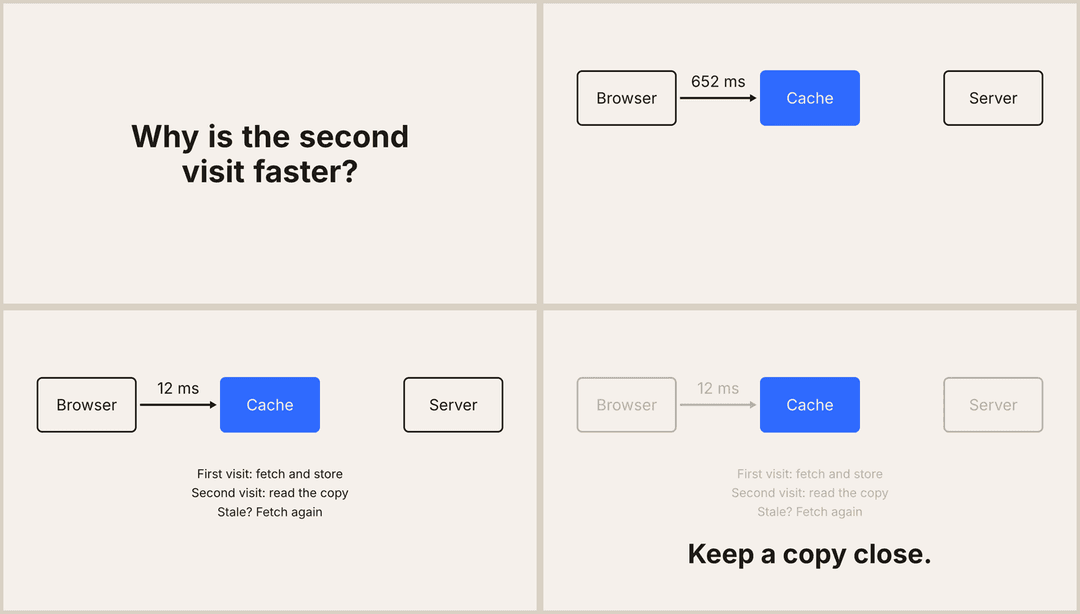
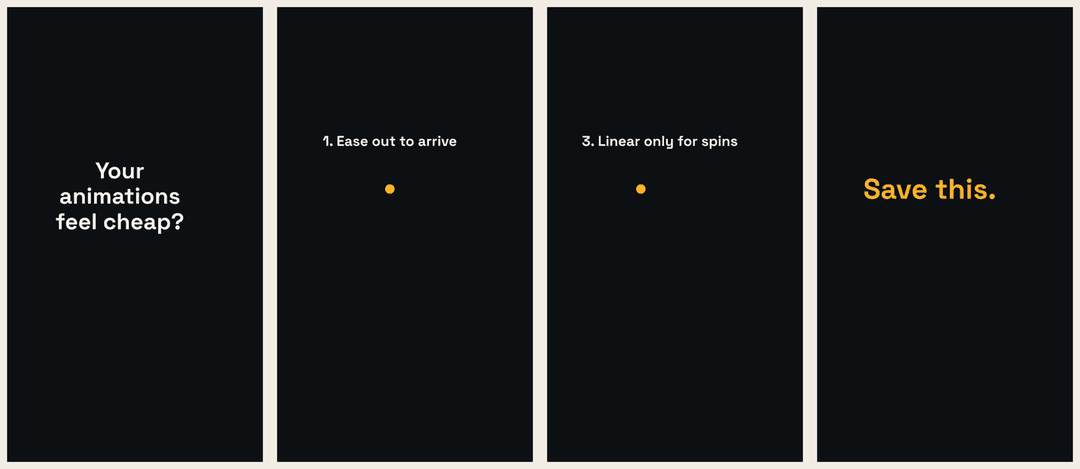
Examples 05 (a 20 s explainer) and 06 (a 15 s vertical Short), each made by running the skill on the brief as written: both passed check_delivery.sh, and their sample reports list the evidence for every line, including the fixes the self-check forced.
Every format has a beat sheet, a route and its own checks in references/formats.md, which the agent reads when your brief names the kind of video.
Proof the skill works: example brief 01, pasted as written, came back as a 12.000 s, 1920x1080, 30 fps file that passed the delivery check. Its report lists every requirement with its evidence: which still shows which line, the measured headline height (126 px against a 120 px minimum), the text bounds and the loudness at each sound accent.
How it works
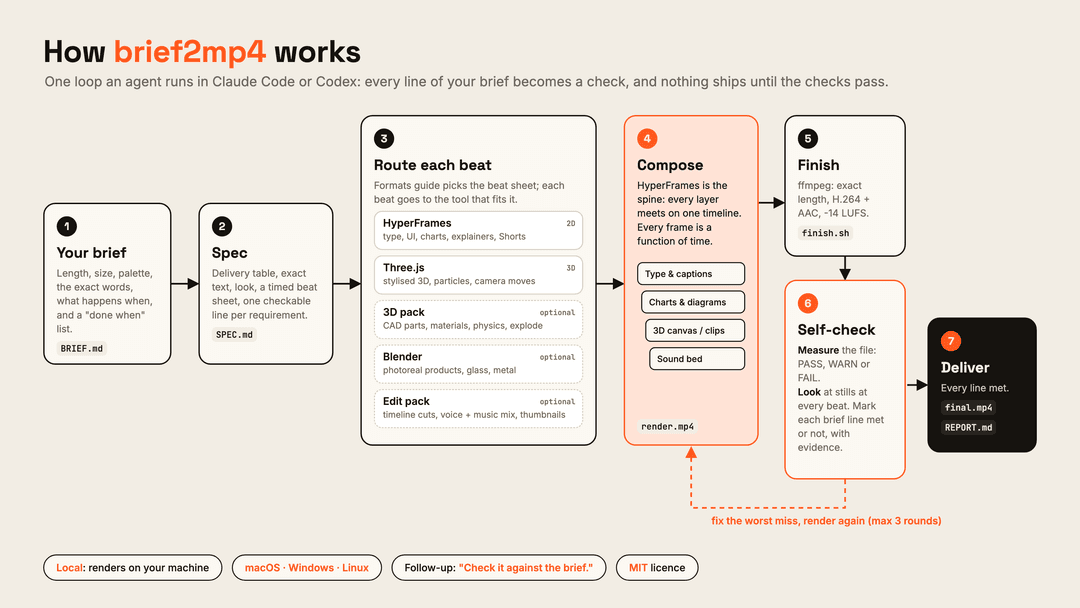
- Spec. Before any code the agent writes
SPEC.md: size, frame rate, exact duration, codecs and loudness; every on-screen word copied exactly; the palette; a beat sheet with times; and a "done when" list with one checkable line per requirement. - Route and build. Each beat goes to the tool that fits it, starting from templates that already render. HyperFrames is the spine where every layer meets on one timeline.
- Self-check.
check_delivery.shmeasures the file (PASS, WARN or FAIL).contact_sheet.shpulls stills at the important moments, and the agent views them and marks every "done when" line met or not met, with evidence. - Fix. Worst miss first, render again, up to three rounds.
- Deliver.
final.mp4and aREPORT.mdthat says what was checked, how, and what is still open.
| The beat needs | Tool | Licence |
|---|---|---|
| Type, layouts, UI, charts, 2D motion | HyperFrames (HTML, CSS and GSAP to MP4) | Apache-2.0 |
| Stylised 3D, particles, camera moves | Three.js inside HyperFrames, seeked by time | MIT |
| CAD models, materials, physics, exploded views | the optional 3D pack | MIT and Apache-2.0 parts |
| Realistic products, materials, soft light | Blender, scripted in Python, headless | GPL (external tool) |
| Sound, joins, exact length, loudness, encoding | ffmpeg | LGPL/GPL (external tool) |
Mixed briefs, recipes for each mix and the architecture in detail: docs/architecture.md for people, references/pipelines.md for the agent.
The 3D pack
Example 04, rendered by the 3D pack on a laptop: five parts drop and settle with baked rigid-body physics, open into an exploded view, and the title lands. 8 seconds of 1080p rendered in about 5 seconds; check_delivery.sh passes.
An optional layer for briefs with 3D products. It turns a CAD or mesh spec into a GLB, applies material presets, bakes rigid-body physics once so every render frame is identical, writes a self-contained HyperFrames project from a short shot JSON, and renders photoreal hero shots through Blender. The skill detects it; without it, 3D beats use the Three.js template.
| Component | What it adds | Built on |
|---|---|---|
core | models from mesh specs, material presets, physics bakes, GLB optimisation, shot JSON to HyperFrames | three.js, glTF-Transform, meshoptimizer, Jolt Physics, Manifold, trimesh |
cad | exact parametric parts: enclosures, gears, brackets | CadQuery |
blender | photoreal hero renders on the GPU (Metal, OptiX, CUDA or CPU) | your installed Blender |
bash install.sh --with-3d              # core
bash install.sh --with-3d=core,cad     # core + CadQuery
powershell -ExecutionPolicy Bypass -File .\install.ps1 -With3D core,cad
The brief does the asking. "Parts fall and settle" becomes a physics bake with a camera that frames the landing zone; "show what's inside" becomes an exploded view; "hero product" becomes a Blender render with a dramatic light rig. The full mapping, the shot JSON and the look rules are in 3d/README-3D.md.
The edit pack
Motion graphics are half of a video. The other half is editing: cutting your screen recording or footage on a timeline, mixing a voiceover over music so the music ducks when you speak, compositing titles, making the thumbnail. The optional edit pack installs the command-line tools of five free, open-source desktop editors, the ArtCraft apps by storytold (MIT or Apache-2.0, at your option), so Claude Code or Codex can do that work too, headless, and hand the result to the same checks.
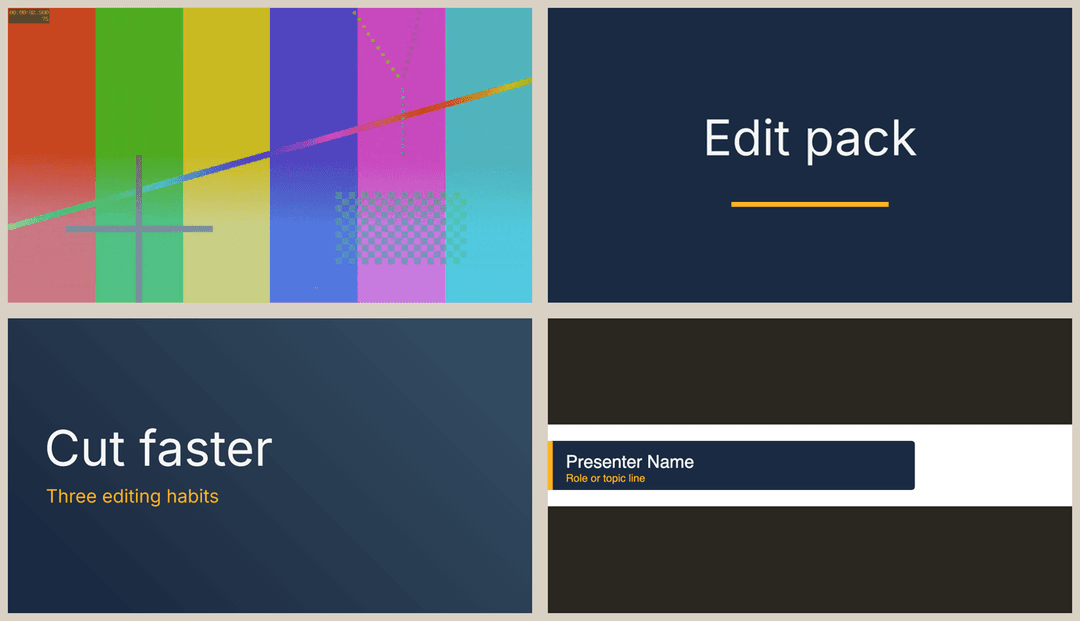
| Component | App | Like | The agent uses it for | Tested recipe |
|---|---|---|---|---|
film | FilmCraft 0.20.1 | Premiere | cutting clips on a timeline, transitions, titles, export | film_timeline.sh |
sound | SoundCraft 0.20.1 | a DAW | voice + music mix, ducking with automation, bounce | sound_mix.sh |
effect | EffectCraft 0.24.1 | After Effects | layered, keyframed compositing and titles | effect_title.sh |
photo | PhotoCraft 0.23.1 | Photoshop | thumbnails, title cards | photo_thumbnail.sh |
vector | VectorCraft 0.24.1 | Illustrator | logos and lower thirds as SVG | vector_lower_third.sh |
bash install.sh --with-edit                                  # film + sound
bash install.sh --with-edit=film,sound,effect,photo,vector   # all five, about 420 MB download on macOS
powershell -ExecutionPolicy Bypass -File .\install.ps1 -WithEdit film,sound
Every download is checked before anything is unpacked: its SHA-256 must match both the release's SHA256SUMS.txt and the hash pinned in this repository, and when gpg is installed the release signature must verify against the pinned signing-key fingerprint. Versions are pinned because these apps are alpha and move fast; the skill tells the agent to look up each app's real commands (<app>-cli commands) before using one a recipe does not cover. Details, sizes per platform and uninstall: edit/README-EDIT.md.
Examples
| # | Brief | Route | Length |
|---|---|---|---|
| 01 | Kinetic type: "Finish something today" (sample report) | HyperFrames | 12 s |
| 02 | Three.js: a low-poly planet, three moons, "ORBIT" | Three.js in HyperFrames | 10 s |
| 03 | Blender: a smart-speaker turntable, "LISTEN." | Blender | 8 s |
| 04 | 3D product: parts drop and settle, explode, title | 3D pack | 8 s |
| 05 | 2D explainer: "How a cache works" | HyperFrames | 20 s |
| 06 | Vertical Short: "3 easing rules", 1080x1920 with safe zones | HyperFrames | 15 s |
| 07 | Edited tutorial: two clips cut together with a title and a ducked voice-over mix | edit pack + HyperFrames | 14 s |
| 08 | Five worlds: a brief's words become a 3D city, a 2D chart world and a galaxy in one camera move (how to make and check it, sample report, video) | HyperFrames + Three.js | 25 s |
Write a brief
The agent guesses less when the brief says more. A brief that works well has these parts:
Length and size: 15 s, 1920x1080, 30 fps.
Look: background #F2EDE4, text #16130F, one accent #FF5A1F. Font: Space Grotesk Bold.
Words on screen, exactly: "First line." / "Second line." / "Last line."
What happens when:
- 0.0 to 4.0 s: the first line types on, one word at a time.
- 4.0 s: a hard cut to the second line.
- 9.0 s: the last line lands and holds still until the end.
Sound: a quiet bed with a low hit at 4.0 s.
Done when: every line is readable, nothing touches the frame edge, headlines are at least 100 px tall.
The "done when" lines matter most, because they are what the self-check measures. The free 69-page field guide goes through brief writing, every format, each tool, the 3D and edit packs and the checks in detail, and includes every brief and setting from the contest in the video. The technical deep dive explains the engineering: determinism, baked physics, the loudness loop and the self-check.
How it compares
brief2mp4 sits on top of the tools below rather than replacing them. The table compares scope as each project describes itself.
| brief2mp4 | HyperFrames skills | Remotion skills | Prompting an agent with no skill | |
|---|---|---|---|---|
| Input | a written brief | a request | a request in a Remotion project | a request |
| Writes a spec with a checkable done-when list | yes | |||
| Routes beats across HyperFrames, Three.js, a 3D pack and Blender | yes | HyperFrames | Remotion | whatever the agent picks |
| Measures the delivered file (duration, size, codecs, loudness) | yes, PASS/WARN/FAIL | |||
| Looks at frames and reports evidence per brief line | yes, REPORT.md | lint and preview | ||
| Physics and CAD 3D | optional 3D pack | |||
| Licence | MIT | Apache-2.0 | see repo; Remotion has its own licence |
They work well together: install the HyperFrames skills next to brief2mp4 for deeper HyperFrames know-how, and the agent uses both. For more than 45 other open-source motion, 3D, capture and agent-skill projects, with licences and how to bring each one into a brief2mp4 pipeline, see references/ecosystem.md.
FAQ
Does it cost anything? The skill is free and MIT licensed. The agent runs on your own Claude Code or Codex plan, and rendering happens on your machine.
Which models has it been tested with? Claude Code on Sonnet made briefs 01, 05 and 06 from the brief as written, each passing the delivery check (05 and 06 rendered in about 7 seconds each on an Apple M-series laptop). Stronger models handle harder briefs better, but the loop and the checks are the same for all of them.
Does it work on Windows? Yes, with Git for Windows installed (install.ps1 -InstallTools does it), because the scripts are bash. CI runs the install, the doctor and the tests on Windows, macOS and Ubuntu on every change. Full renders are tested on macOS.
Does it upload my files anywhere? No. Rendering, checks and reports stay in your project folder. The only network traffic is what the tools fetch: npm and PyPI packages at install time and any web fonts your brief names.
What about music? sound_bed.sh makes a quiet original placeholder so the file is never silent. For a real soundtrack, pass your own licensed track to finish.sh --audio.
Can I use the scripts without an agent? Yes. They are plain bash and ffmpeg, for example bash plugin/skills/brief2mp4/scripts/check_delivery.sh my-video.mp4 --seconds 30.
How do I update or remove it? Claude Code plugin: claude plugin update brief2mp4@brief2mp4 or claude plugin uninstall brief2mp4@brief2mp4. Codex plugin: codex plugin marketplace upgrade or codex plugin remove brief2mp4@brief2mp4. Script install: git pull and run the installer again, or install.sh --uninstall / install.ps1 -Uninstall. The installers only replace or remove a folder they created; an existing brief2mp4 folder is moved aside with a timestamp, never deleted.
What is inside
SETUP.md                           the setup script an agent follows (macOS, Windows, Linux)
AGENTS.md, CLAUDE.md               what an agent opened in this repo should do
install.sh, install.ps1            install, update or remove for both apps; --with-3d / -With3D
.claude-plugin/marketplace.json    marketplace entry, read by Claude Code and Codex
plugin/
  .claude-plugin/plugin.json       Claude Code plugin manifest
  .codex-plugin/plugin.json        Codex plugin manifest
  skills/brief2mp4/
    SKILL.md                       the loop the agent follows
    references/                    formats, pipelines, ecosystem, hyperframes, threejs, blender, ffmpeg
    scripts/                       finish, check_delivery, contact_sheet, sound_bed, doctor, detect_3d,
                                   detect_edit, bounds.py, vendor_libs
    templates/                     SPEC.md, a Three.js scene, a Blender turntable
    3d/                            the optional 3D pack and its installers
    edit/                          the optional edit pack: verified installers, pinned versions, recipes
docs/                              getting started, architecture, 3D walkthrough
examples/                          seven briefs; 01, 05, 06 and 07 with sample reports, 04 with a worked build
tests/                             fast checks and render tests (bash tests/run_tests.sh [--slow])
Sibling skill: brief2motion
Want the motion live on a website instead of in a video file? brief2motion turns a plain brief into a web page that moves: dust that forms your face, product or logo, a paper plane across the page, scenes that play as you scroll. It installs from this same marketplace:
/plugin install brief2motion@brief2mp4
brief2motion can hand its page back to brief2mp4 when you want a video of it too.
Contributing
Made something with it? Post the brief and the video in Show and tell; the best ones go into the examples table with your name on them. Bad results are the most useful bug reports: open a Brief result issue with the brief, the app and model, and the REPORT.md. Code changes are welcome too; see CONTRIBUTING.md. Security reports go through SECURITY.md. Releases are listed in CHANGELOG.md.
Star history
Licence
MIT. Use it, change it, ship videos with it. HyperFrames (Apache-2.0), Three.js (MIT), GSAP (standard no-charge licence), Jolt (MIT), glTF-Transform (MIT), meshoptimizer (MIT), Manifold (Apache-2.0), CadQuery (Apache-2.0), trimesh (MIT), Blender (GPL), ffmpeg (LGPL/GPL) and the ArtCraft apps by storytold (MIT or Apache-2.0, downloaded from their own releases by the edit pack) keep their own licences; this repo does not bundle them.
Made by Varun Pratap Bhardwaj. If it saved you a day of editing, a ⭐ is the thank-you that helps most.
// faq
What is brief2mp4?
Text to motion graphics for Claude Code and Codex: write a brief, get a checked MP4. 2D explainers, Shorts, maths, 3D products, editing. macOS, Windows, Linux. MIT.. It is open-source on GitHub.
Is brief2mp4 free to use?
brief2mp4 is open-source under the MIT license, so it is free to use.
What category does brief2mp4 belong to?
brief2mp4 is listed under skills in the Claudeers registry of Claude-compatible tools.
// embed badge

[](https://claudeers.com/brief2mp4)
// retro hit counter

[](https://claudeers.com/brief2mp4)
// reviews
// guestbook
// related in Claude Skills
 🔓
An agentic skills framework & software development methodology that works.
 🔓
 🔓
AI coding assistant skill (Claude Code, Codex, OpenCode, Cursor, Gemini CLI, and more). Turn any folder of code, SQL schemas, R scripts, shell scripts, docs,…
 🔓
💫 Toolkit to help you get started with Spec-Driven Development