
blueprint
A Claude Code skill that draws animated explainers like patent sheets
Install with your AI
Paste into Claude Code, Cursor, or any agent — it reads the repo and wires the tool into your project.
Install and set up blueprint (claude-skill project) into my current project.
Found on https://claudeers.com/blueprint
Repo: https://github.com/intincrab/blueprint
Homepage/docs: https://blueprint.intincrab.com
Detected install method: claude-skill → # copy this skill into .claude/skills/blueprint/
Category: productivity. Platforms: cli, api, web.
Read the repo's README for exact setup and env vars, then install it and wire it into my project.

Claudeers Health Verdict:
unknown; community-verified: false. Confirm the source before running anything.
# copy the skill dir into your project:
# .claude/skills/blueprint/   (or ~/.claude/skills/blueprint/ for all projects)
git clone https://github.com/intincrab/blueprint
// compatibility
| Platforms | cli, api, web |
|---|---|
| Operating systems | — |
| AI compatibility | claude |
| License | MIT |
| Pricing | open-source |
| Language | JavaScript |

/blueprint
Ask Claude Code how something works. It draws the answer like an old patent sheet, one part at a time.
Website ·
All 21 examples ·
Install
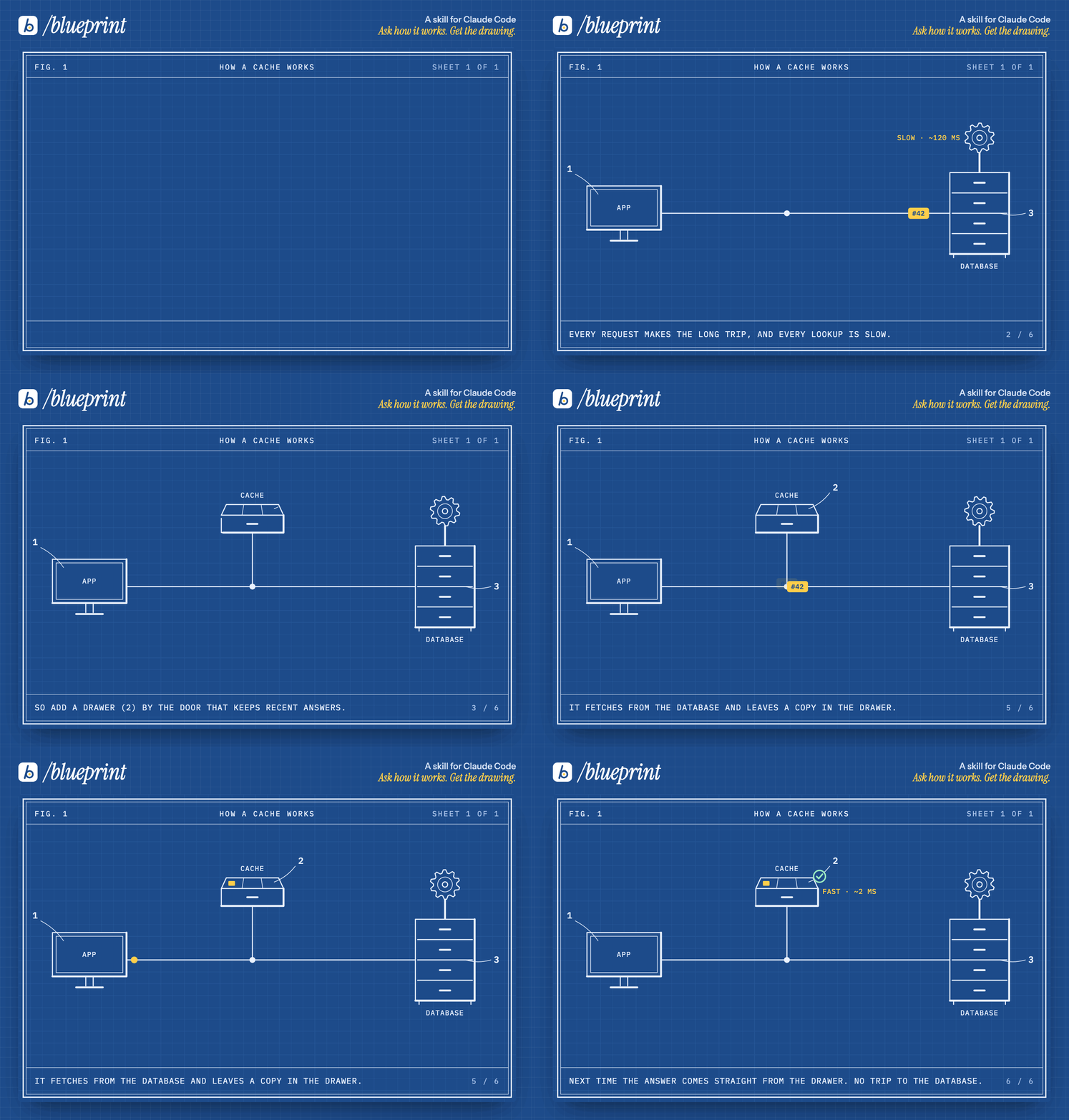
Blueprint is a skill for Claude Code. Give it a topic and it returns an animated explainer: parts drawn in with numbered leader lines, things moving along the lines, and one plain sentence per step. It ships as a single <blueprint-scene> element or a standalone HTML file, and the finished sheet still explains the idea as a picture.
Install
npx skills add intincrab/blueprint
Or clone it into your skills folder:
git clone https://github.com/intincrab/blueprint.git ~/.claude/skills/blueprint
It needs Node 18 or later. Playwright is optional: it lets Claude render frames of a sheet to check its own work, and it is what the GIF, MP4 and PNG exports run on. To set it up, run this once in the skill folder:
cd ~/.claude/skills/blueprint     # or wherever the skill was installed
npm i                             # installs [email protected] from package.json
npx playwright install chromium   # downloads the browser it drives
Linting (scripts/check.mjs) and building a page (scripts/build.mjs) need nothing but Node.
Offline, or on a distro that ships its own Chromium, skip the download and point the scripts at it: BLUEPRINT_CHROMIUM=/usr/bin/chromium-browser node scripts/export.mjs … (works for frames.mjs too).
Use
/blueprint how a cache works
/blueprint our signup flow, for the docs page
/blueprint why the retry storm took the API down
/blueprint the event loop, as a complex scene
/blueprint how a cache works, as a gif
/blueprint last night's outage, from this postmortem
Claude finds the chain of reasons in the topic, picks parts from a kit of 28 (drawers, cabinets, gears, gates, locks, clocks, queues and more), lays out the sheet, lints it, looks at every step, and then embeds it in your page or exports a file.
How a sheet is built
Every part has to earn its place. A sheet starts with one real case and adds a part only when the last one falls short:
The app asks the database for item #42. Every request makes the long trip, and each lookup takes 120 ms. So a drawer by the door keeps recent answers. But the first time it is empty, so it fetches once and keeps a copy. The next request is answered in 2 ms.
That chain of "but… so…" is the explanation, and the animation above is that paragraph drawn.
Examples
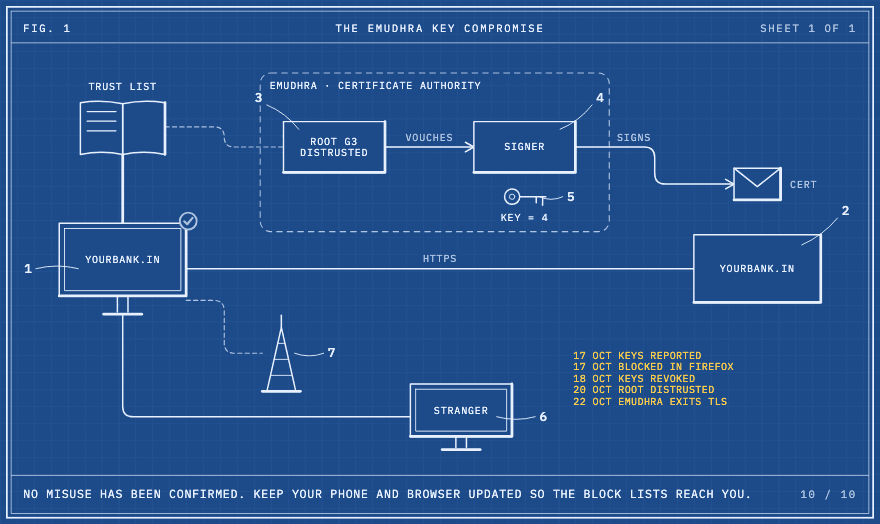 | 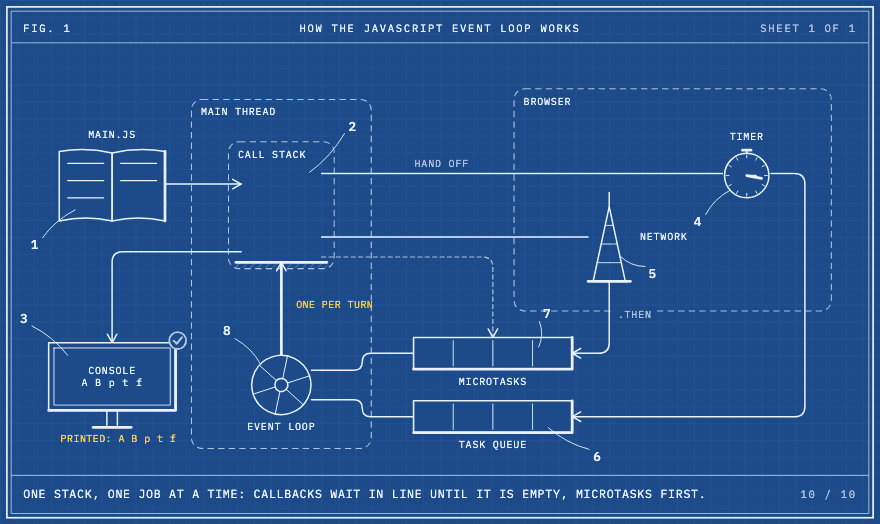 | 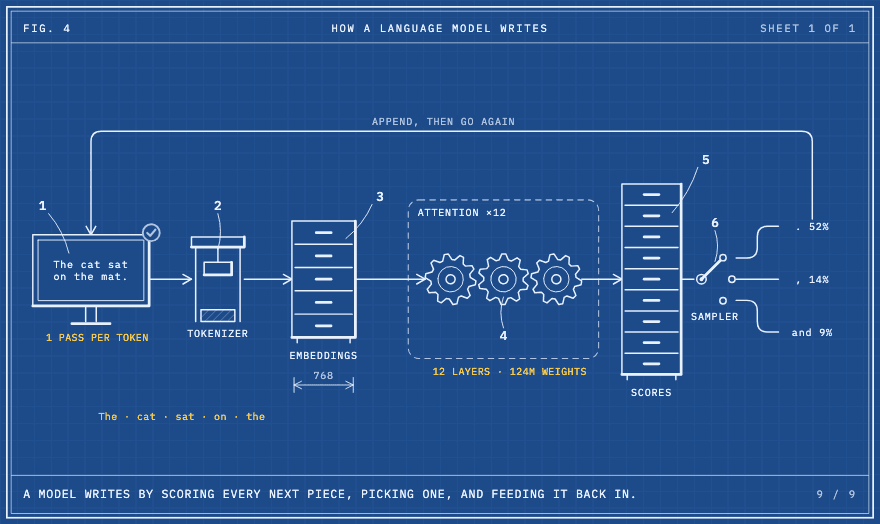 |
| The eMudhra key compromise A real breach from October 2026, for people who are not engineers | The JavaScript event loop Stack, task queue and microtasks | How a language model writes Tokens, attention, one word at a time |
Watch any of them at blueprint.intincrab.com, where you can step through each one and copy its source.
Put it on a page
<blueprint-scene scene="cache" play="view" key></blueprint-scene>
<script src="/blueprint/blueprint.js" defer></script>
<script src="/blueprint/cache.js" defer></script>
| Attribute | What it does |
|---|---|
play | loop (default), view (plays once when scrolled into view), click, or still (the finished sheet) |
paper | blue (cyanotype, default) or linen (ink on cream) |
key | Shows the numbered parts list under the sheet |
no-controls | Hides the play, step and replay bar |
speed | Playback rate, e.g. 1.25 |
no-font | Uses the reader's own monospace font instead of fetching IBM Plex Mono from Google Fonts |
Load blueprint.js before the scene files; defer keeps that order. If a scene can't be found (a misspelled scene, or its file loaded before the runtime), the element says so in the sheet's place and in the console.
Every sheet has play and pause, previous and next step, and a step bar. With reduced motion turned on it shows the finished sheet. The runtime is one file with no dependencies. By default it loads IBM Plex Mono from Google Fonts; add no-font (or pass --no-font to build.mjs and export.mjs) and the page makes no outside requests.
Share it as a GIF, video or image
GitHub READMEs, Slack, X, Notion and slide decks can't run the element, so export the sheet:
node scripts/export.mjs examples/small/cache.js --format gif            # loops in a README or Slack
node scripts/export.mjs examples/small/cache.js --format mp4            # for X or a talk; add --audio track.mp3
node scripts/export.mjs examples/small/cache.js --format png            # the finished sheet at 2x
node scripts/export.mjs examples/small/cache.js --format png --steps    # one image per step, for slides
node scripts/export.mjs examples/small/cache.js --format all --out out/cache.png   # out/cache.png, .gif, .mp4
Or just ask: /blueprint how a cache works, as a gif. Exporting needs Playwright (see Install). --out ending in .png, .gif or .mp4 names the files (each format keeps its own extension, and --steps adds -01, -02…); any other --out is a folder. A file with several scenes exports the first; pick another with --scene <id>.
MP4 needs an encoder. With ffmpeg on your PATH it uses that, with libx264, or libopenh264 where ffmpeg has no libx264 (Fedora's build). Without ffmpeg, Chromium encodes the video itself (WebCodecs) and the script writes the MP4, so on macOS nothing else is needed (Windows should work the same way, but is untested). That needs the full Chromium, which npx playwright install chromium downloads alongside the headless shell. On Linux, Playwright's Chromium has no H.264 encoder, so install ffmpeg (apt install ffmpeg, dnf install ffmpeg-free), or point BLUEPRINT_CHROMIUM at a distro Chromium that has one (Fedora's does). Such a Chromium may still lack AAC; then --audio needs ffmpeg, and the script says so before it renders anything. --encoder ffmpeg or --encoder browser picks one. With --audio, the video sets the length: a shorter track ends in silence, a longer one is cut.
A scene's sources (the links behind an incident sheet) are not drawn into GIFs, videos or images. Put them in the post, the slide notes or the README next to the export. scripts/build.mjs lists them under the sheet.
Incidents and postmortems
templates/incident.js gives an outage a ready-made story: a normal day, the change, what broke, how it was noticed, the fix that stopped it, the root cause, and the change that prevents it next time, ending on a timeline. Hand Claude your postmortem and it fills the template with your facts, links the sources, and keeps the wording blameless. The eMudhra key compromise shows the same shape for a public incident.
One HTML file
To send a sheet to someone as a single file:
node scripts/build.mjs examples/small/cache.js --out cache.html
node scripts/build.mjs a.js b.js --out explainers.html --title "How our API works" --play view --paper linen
The page inlines the runtime and every scene, and lists each scene's sources as links under it.
What is in the repo
| Path | Purpose |
|---|---|
SKILL.md | What Claude reads first: the workflow and the style rules |
references/craft.md | The scene format, the part kit, line kinds, step actions, and which part suits which idea |
runtime/blueprint.js | Layout, timeline, SVG renderer and the <blueprint-scene> element |
templates/scene.js | A starting scene |
templates/incident.js | A starting scene for incidents and postmortems |
scripts/check.mjs | Lints a scene: unknown ids, empty scenes, parts no step draws, overlapping parts, lines through parts or text, text on a zone's border, gates that swing into things, ✓/✕ badges on text, labels off the sheet |
scripts/frames.mjs | Renders chosen moments into one contact sheet (needs Playwright): node scripts/frames.mjs scene.js --out sheet.png |
scripts/build.mjs | Turns scenes into one standalone HTML page |
scripts/export.mjs | Exports a scene to GIF, MP4 or PNG |
scripts/lib/ | The GIF encoder, the PNG decoder, the MP4 writer and browser encoder, and the helpers for inlining code into a page |
package.json | npm scripts (npm run check -- scene.js, build, frames, export) and the pinned Playwright |
examples/ | 10 small and 11 complex scenes |
assets/ | The logo and the README's GIF and stills |
gallery/ | Every example on one self-contained page, built with node gallery/build.mjs |
site/ | The website, built with node site/build.mjs into site/dist (page, share card, robots.txt, sitemap.xml, vercel.json headers) |
video/ | The teaser film and the scripts that render it and the README preview |
Where the look comes from
Victorian patent drawings for the fine line work, numbered parts and shading. Randall Munroe's Thing Explainer for plain words and labels on everything. Bartosz Ciechanowski's explainers for building a machine one part at a time. Bret Victor's Ladder of Abstraction for showing one concrete case before the rule. And Kamran Ahmed's /stick-scene, which this skill's packaging follows.
License
MIT. Scenes you make with the skill are yours.
// faq
What is blueprint?
A Claude Code skill that draws animated explainers like patent sheets. It is open-source on GitHub.
Is blueprint free to use?
blueprint is open-source under the MIT license, so it is free to use.
What category does blueprint belong to?
blueprint is listed under productivity in the Claudeers registry of Claude-compatible tools.
// embed badge

[](https://claudeers.com/blueprint)
// retro hit counter

[](https://claudeers.com/blueprint)
// reviews
// guestbook
// related in Productivity
 🔓
Agent skills for Obsidian. Teach your agent to use Obsidian CLI and open formats including Markdown, Bases, JSON Canvas.
 🔓
Open source repository of plugins primarily intended for knowledge workers to use in Claude Cowork
 🔓
Garry's Opinionated OpenClaw/Hermes Agent Brain
 🔓
An open-source alternative to Claude Cowork (powered by opencode)