
BashCut
Native macOS video editor that coding agents can drive: everything the UI does, Claude Code and Codex can do through the bashcut CLI or MCP server. Layered t…
Install with your AI
Paste into Claude Code, Cursor, or any agent — it reads the repo and wires the tool into your project.
Install and set up BashCut (git-clone project) into my current project.
Found on https://claudeers.com/bashcut
Repo: https://github.com/dongnguyenvie/BashCut
Homepage/docs: https://github.com/dongnguyenvie/BashCut/releases/latest
Detected install method: git-clone → git clone https://github.com/dongnguyenvie/BashCut
Category: mcp-servers. Platforms: cli, api, desktop.
Read the repo's README for exact setup and env vars, then install it and wire it into my project.

Claudeers Health Verdict:
unknown; community-verified: false. Confirm the source before running anything.
git clone https://github.com/dongnguyenvie/BashCut
// compatibility
| Platforms | cli, api, desktop |
|---|---|
| Operating systems | — |
| AI compatibility | claude |
| License | MIT |
| Pricing | open-source |
| Language | Swift |
BashCut
A native macOS video editor that coding agents can drive.
Everything the UI does, Claude Code and Codex can do through the bashcut CLI or MCP.
Download · TestFlight beta · Docs · Automation · Plugins · Agent kit · Issues
About
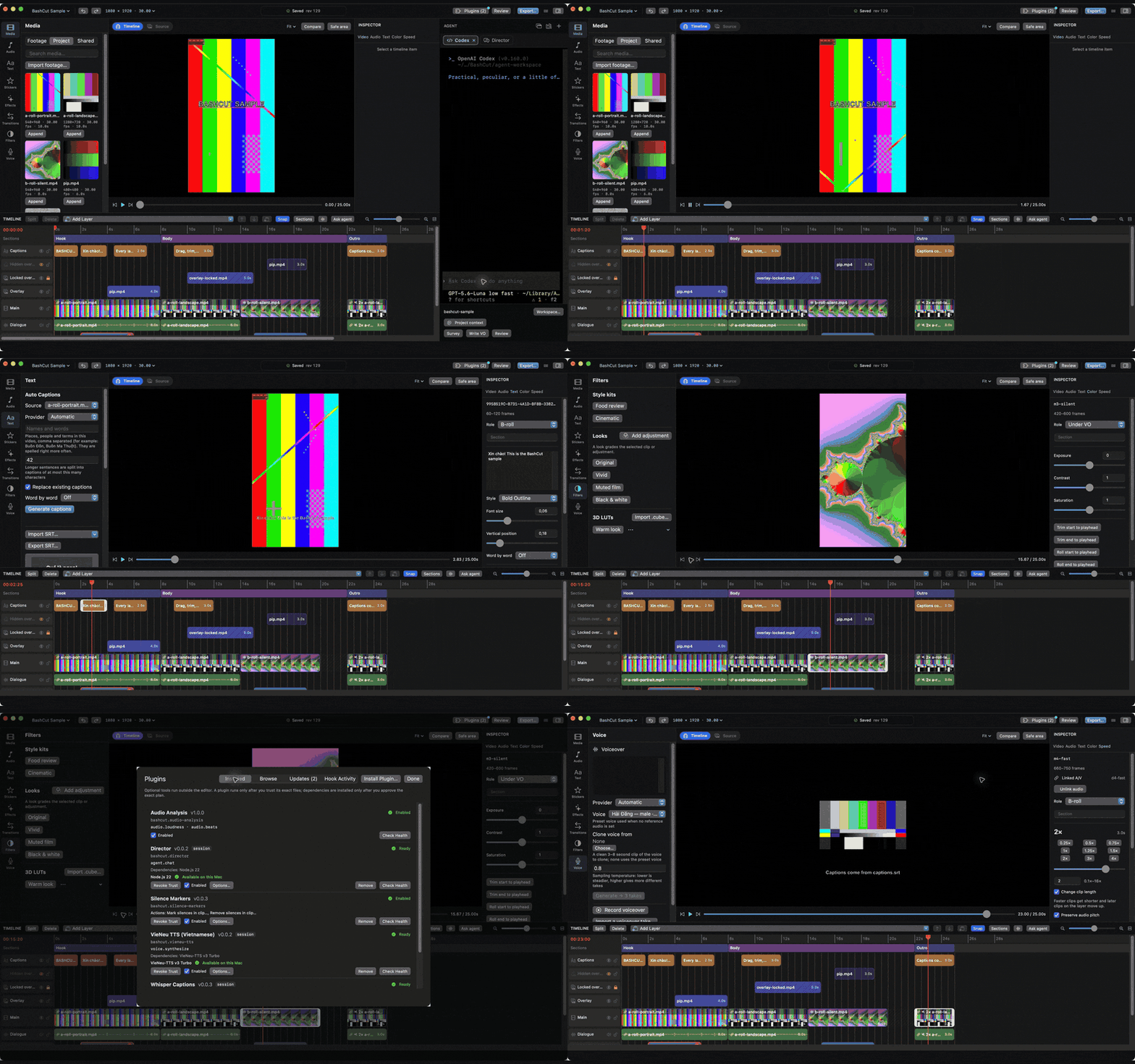
BashCut is a native macOS video editor built on AVFoundation, with a Claude Code / Codex terminal docked beside the timeline. Preview and export share one composition engine, so what you see is what you export. Projects are plain JSON next to your footage: agents and scripts read and edit them through the same atomic, undoable edit operations the UI uses.
BashCut is under active development: the M0 foundation is accepted on real footage and most of the editor and agent features (M1–M3, M5) are in place. See implementation status for what is verified and what is left.
Use the AI you already pay for
No extra AI bill: BashCut works with the subscriptions and apps you already have.
| You have | How BashCut uses it |
|---|---|
| Claude subscription (Pro / Max) | The Claude tab in the agent dock runs the real Claude Code CLI with your login. BashCut never passes ANTHROPIC_API_KEY, so your plan is used, not API credits |
| ChatGPT subscription (Plus / Pro) | The Codex tab runs the real Codex CLI with your ChatGPT login |
| Claude Desktop / Codex app | Point them at BashCut: bashcut agent setup claude or bashcut agent setup codex installs the editing skills and the bashcut MCP server, so they edit the open project from outside the app |
| Any other model (Gemini, GPT, Grok, Mistral, Groq, OpenRouter, a local or OpenAI-compatible server) | Install the Director plugin: a chat agent inside BashCut with your own API key, with thinking levels (off / low / medium / high) for reasoning models |
Whichever you pick, the agent edits through the same undoable commands as the UI: every change lands in History, shows in Show Changes and can be undone. See Automation.
What's inside
- Layered timeline: linked audio, sections, snapping, beat grid, split/trim/move, gaps, freeze frames, constant speed and ramps, keyframes, transitions
- Viewer and source viewer with In/Out, Insert/Overwrite, safe area and compare
- Captions and text with presets, SRT import, Vietnamese and English
- Color: LUTs, exposure, contrast, saturation and adjustment layers
- Audio: volume, fades, ducking under speech, loudness, voiceover recording, source-aligned waveforms
- Review checks, history, autosave with recovery, external-change reload and conflict handling
- H.264 export queue with burned-in captions; OTIO export
- Agent dock with real Claude, Codex and Shell terminals, plus the agent kit of editing skills
bashcutCLI and MCP server: every UI action and dialog, with dry runs and revision checks- Out-of-process plugins for transcription, voice, beats and loudness, from the plugin registry
Install
Requires macOS 14 or later.
Homebrew
brew install --cask dongnguyenvie/tap/bashcut
This installs BashCut.app into /Applications and links the bashcut CLI and bashcut-mcp server into
Homebrew's bin, so agents in any terminal can drive the app. Update with brew upgrade --cask bashcut; remove
with brew uninstall --cask bashcut (add --zap to also delete settings and caches).
Download a release
Download BashCut-<version>.dmg (or .zip) from the latest release,
open it and drag BashCut to Applications. Builds are signed with Developer ID and notarized by Apple; check a download
against the release's SHA256SUMS with shasum -a 256 -c --ignore-missing SHA256SUMS. To use the CLI from a terminal, link it yourself:
sudo ln -s /Applications/BashCut.app/Contents/MacOS/bashcut /usr/local/bin/bashcut
sudo ln -s /Applications/BashCut.app/Contents/MacOS/bashcut-mcp /usr/local/bin/bashcut-mcp
TestFlight
Join the public beta on TestFlight (needs the TestFlight app). The TestFlight build is the sandboxed Mac App Store build: it runs only the plugins bundled with the app, and its bundled CLI cannot run from a regular terminal.
Or build BashCut from source, below.
How to Build
Requires macOS 14+, Xcode with Swift 6, and network access for the first package resolution.
scripts/run.sh
This builds with SwiftPM, packages build/BashCut.app, signs it with the first Apple Development identity in
your keychain (or BASHCUT_SIGN_IDENTITY) so macOS keeps folder-access grants across rebuilds, and opens it. The
app executable is BashCutApp and the bundled CLI is bashcut, avoiding a name collision on case-insensitive
disks.
To try a change against every timeline case, generate the sample project shown
above (needs ffmpeg):
scripts/sample-project.py
For Xcode, install XcodeGen >= 2.46, then run scripts/generate-project.sh and open BashCut.xcodeproj
(generated from project.yml). Xcode builds the string catalog; the SwiftPM launcher copies equivalent .strings
resources. The UI follows the system language.
Verify
scripts/verify.sh build
scripts/verify.sh test
scripts/verify.sh perf       # 20 synthetic clips, ~30 seconds, 1080×1920
scripts/verify.sh lint       # requires SwiftLint
scripts/verify.sh xcode test # regenerates and tests the Xcode project (requires XcodeGen)
Pure model tests also run on their own with cd Packages/BashCutCore && swift test. Tests never use the real
video workspace or agent CLIs, and package downloads happen at dependency resolution, not in tests.
Related repositories
Two other repositories are part of BashCut. Contributions are welcome in each:
| Repository | What it holds | Contribute there |
|---|---|---|
| bashcut-plugins | The plugin registry (registry.json) and its plugins, such as Silence Markers and VieNeu TTS | New plugins and fixes to existing ones. See Writing plugins |
| bashcut-agent-kit | Editing skills for Claude Code and Codex (footage survey, beat cuts, audio mix, captions, colour, effects, voiceover…). BashCut ships them and loads them in its agent tabs | Editing know-how that agents should follow. See its README › Writing skills |
Changes to the editor itself, its commands and the plugin API belong in this repository.
Documentation
- Documentation index: guides, reference and design specs
- Automation: CLI and MCP and the generated command reference
- Project format
- Implementation status
- CONTRIBUTING.md: build layout and one-file templates (agent providers, model adapters, commands, capabilities, timeline formats)
- CHANGELOG.md
License
MIT. See LICENSE.
// faq
What is BashCut?
Native macOS video editor that coding agents can drive: everything the UI does, Claude Code and Codex can do through the bashcut CLI or MCP server. Layered timeline, captions, voiceover, plugins.. It is open-source on GitHub.
Is BashCut free to use?
BashCut is open-source under the MIT license, so it is free to use.
What category does BashCut belong to?
BashCut is listed under mcp-servers in the Claudeers registry of Claude-compatible tools.
// embed badge

[](https://claudeers.com/bashcut)
// retro hit counter

[](https://claudeers.com/bashcut)
// reviews
// guestbook
// related in MCP Servers
 🔓
🔓f.k.a. Awesome ChatGPT Prompts. Share, discover, and collect prompts from the community. Free and open source — self-host for your organization with complete…
 🔓
🔓A cross-platform desktop All-in-One assistant for Claude Code, Codex, OpenCode, OpenClaw, Gemini CLI & Hermes Agent. Only official website: ccswitch.io
 🔓
🔓🪨 why use many token when few token do trick — Claude Code skill that cuts 65% of tokens by talking like caveman
 🔓
🔓An open-source AI agent that brings the power of Gemini directly into your terminal.