
aya
Tabbed terminal manager for coding agents (Claude Code, Codex, shell). Real PTYs, project-grouped tabs, search-everything, theme import.
Install with your AI
Paste into Claude Code, Cursor, or any agent — it reads the repo and wires the tool into your project.
Install and set up aya (git-clone project) into my current project.
Found on https://claudeers.com/aya
Repo: https://github.com/khasinski/aya
Homepage/docs: https://aya.codes/
Detected install method: git-clone → git clone https://github.com/khasinski/aya
Category: skills. Platforms: cli, api, desktop, web.
Read the repo's README for exact setup and env vars, then install it and wire it into my project.

Claudeers Health Verdict:
active; community-verified: false. Confirm the source before running anything.
git clone https://github.com/khasinski/aya
// compatibility
| Platforms | cli, api, desktop, web |
|---|---|
| Operating systems | — |
| AI compatibility | claude |
| License | MIT |
| Pricing | open-source |
| Language | TypeScript |
Aya
A desktop workspace for long-lived coding-agent terminals.
Keep Claude Code, Codex, Aider, Gemini, OpenCode, Amp, Crush, Qwen Code,
Kilo Code, Pi, and plain shell sessions organized by project.
What Aya is
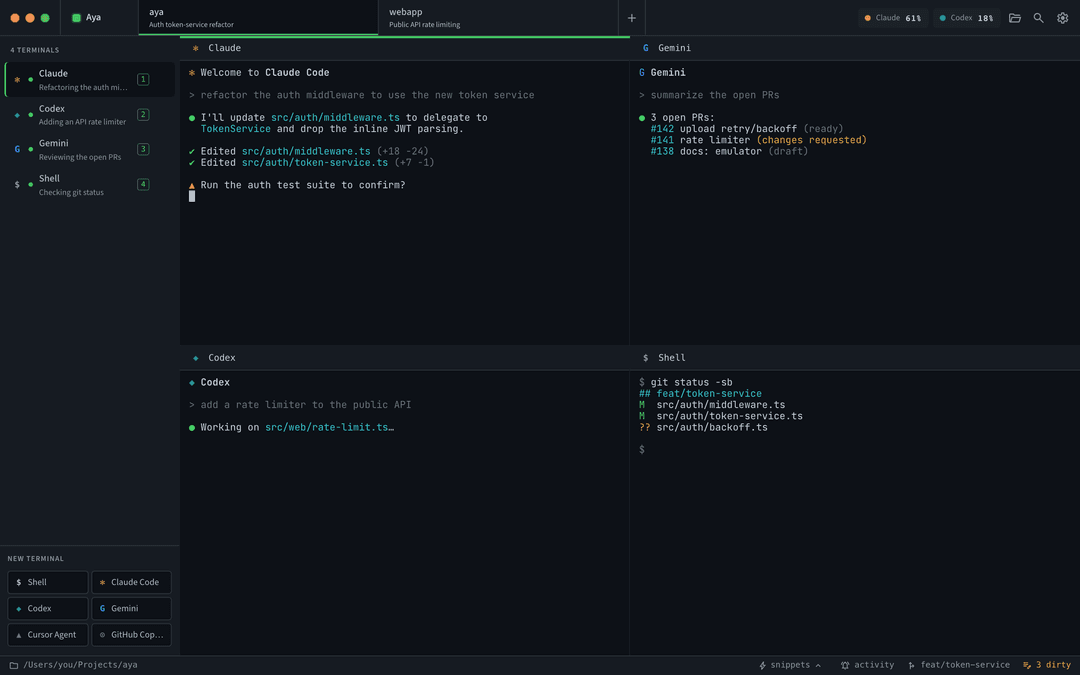
Aya is an Electron terminal manager for people who keep AI coding agents running while they move between real projects. Each project is a directory. Each project can have several terminals: Claude Code, Codex, Aider, another agent CLI, or a normal shell. Switching projects hides terminals; it does not kill their PTYs.
The core workflow is simple:
- Open a repo as an Aya project.
- Start one or more terminal presets inside it.
- Switch to other projects during the day.
- Come back later and find the same agent sessions, panes, scrollback, status, snippets, and project context still there.
Aya does not proxy agent APIs, share accounts, scrape terminal output into a service, or force a git-worktree workflow. It launches normal interactive CLIs in normal PTYs.
Why it exists
Many multi-agent tools are built around launching several agents in parallel worktrees for one task, then comparing or merging the results. Aya is aimed at a different daily pattern:
- You work across several repos, clients, or experiments.
- Each project usually has one checkout or branch you care about.
- Long-running terminal conversations are part of the work, not disposable output.
- Agents and shells should share the same project directory unless you choose otherwise.
Aya is project-first: top tabs are projects, the sidebar is that project's terminals, and the search jumps across projects, terminals, recent output, and run commands.
Version 0.6 highlights
- Desktop chrome polish. Project tabs now own the window header on macOS and Linux, including better macOS fullscreen behavior and Linux custom draggable chrome.
- Long-lived PTYs. Terminals stay alive across project switches, window focus changes, and renderer remounts. A rolling buffer replays recent output when the renderer reconnects.
- Agent-agnostic presets. Aya auto-detects known harnesses on your login-shell PATH and seeds usable presets. Custom commands can be added from Settings.
- Interactive launch policy. Built-in Claude Code and Codex presets are
plain
claudeandcodex. Aya deliberately does not ship-p,--print,--headless, or other non-interactive defaults, and tests enforce that. - Project search.
⇧⇧or⌘Ksearches projects, terminal names, recent PTY output, andRun ...actions with AND semantics. - Splits and navigation. Keep several agents or shells visible in one project, then focus adjacent panes from the keyboard.
- Snippets. Save prompts or commands in
~/.aya/snippets.jsonand inject them into the active terminal. Snippets live in Aya's editor-side storage, not in any agent's conversation. - Status and attention. Aya detects common approval prompts, shows sidebar attention dots, can badge the macOS dock, and can send native notifications when a terminal needs attention.
- Usage chips. Claude usage can be read from an explicit user-enabled hook
that writes
~/.aya/usage.json; Codex usage is read from local Codex session logs. Aya itself does not read Anthropic tokens or call Anthropic endpoints. - Early remote support. Aya includes SSH-backed remote project
opening and a local
aya remote --stdiobridge. This is groundwork for fuller remote session sync; remote control is still intentionally limited.
Install
Download Aya 0.7.3 from the GitHub release:
macOS
Open the DMG and drag Aya to /Applications. The release build is Developer ID
signed and Apple-notarized.
Linux
On Ubuntu and Debian-like systems, prefer the DEB:
sudo apt install ./aya_0.7.3_amd64.deb
/opt/Aya/aya
The AppImage can be run directly:
chmod +x Aya-0.7.3.AppImage
./Aya-0.7.3.AppImage
If AppImage complains about FUSE, use the DEB.
Build from source
Requirements:
- Node.js
>=24 <25 || >=26 <27 - npm
Build and package for the current platform:
git clone https://github.com/khasinski/aya.git
cd aya
npm install
npm run package
macOS packaging produces:
release/mac-arm64/Aya.apprelease/Aya-<version>-arm64.dmgrelease/Aya-<version>-arm64-mac.ziprelease/latest-mac.ymlfor the in-app updater
Unsigned local macOS builds may need right-click -> Open the first time. See Signing macOS builds for release signing and notarization.
To build Linux artifacts from macOS, compile node-pty for Linux in Docker:
docker run --rm --platform linux/amd64 \
  -v "$PWD":/project \
  -w /project \
  electronuserland/builder:wine \
  /bin/bash -lc 'npm ci && npm test && npx electron-builder --linux AppImage deb --x64'
Expected artifacts:
release/Aya-<version>.AppImagerelease/aya_<version>_amd64.debrelease/latest-linux.ymlfor AppImage updatesrelease/linux-unpacked/
Development
Run the app in development mode:
npm install
npm run dev
npm run dev starts Vite, TypeScript watch mode for the Electron main process,
and electronmon. Development state lives in ~/.aya-dev/, so it does not
touch production state in ~/.aya/.
Common commands:
npm test          # typecheck + Electron build + test source build + node tests
npm run build    # renderer + Electron main build
npm run package  # build and package with electron-builder
Daily use
Open projects
Use the app's open-project flow, or install the CLI helper from Settings ->
General -> aya command-line tool and open projects from any shell:
aya
aya ~/code/my-repo
aya open ~/code/my-repo
If Aya is already running, the helper sends the open request to the existing instance. If the project already exists, Aya switches to it.
For repo/dev builds, you can also put bin/aya on PATH yourself:
ln -s "$PWD/bin/aya" /usr/local/bin/aya
On macOS the helper can launch /Applications/Aya.app if Aya is not already
running. On Linux it expects an aya-app launcher on PATH; the DEB installs the
binary at /opt/Aya/aya, so add one if you want that cold-start workflow:
sudo ln -s /opt/Aya/aya /usr/local/bin/aya-app
Start terminals
Each project gets launcher buttons for configured presets. First launch seeds presets from agent CLIs found on your login-shell PATH, plus a shell fallback. Settings can add suggested harnesses, edit commands, set agent metadata, and label unsafe-mode presets.
Aya launches commands with node-pty under a login shell in the selected
project directory. The built-in agent presets are interactive CLIs, not
headless API wrappers.
Use snippets
Snippets are saved reusable text blocks. They can type only, or append Enter and run immediately. Multi-line snippets are sent with bracketed paste so rich TUIs receive the text as one paste operation.
Snippets are stored in:
~/.aya/snippets.json
Use status commands
Terminals launched by Aya receive environment variables that let scripts and agent skills talk back to the current pane:
AYA_SOCKETAYA_TERMINAL_IDAYA_PROJECT_SLUGAYA_PROJECT_DIRAYA_PRESET_ID
The helper exposes a small local control surface:
aya focus
aya notify --title "Aya" "Needs approval"
aya status set "Running tests"
aya status waiting "Needs approval"
aya status done "Build passed"
aya status error "Tests failed"
aya status clear
The companion skill lives in skills/aya-control/SKILL.md and uses only this
public CLI side channel.
Open remote projects
The v0.6 remote flow is SSH-based and early. From the new-project dialog, enter
an SSH target, browse directories on the remote host, create a remote project,
and start remote terminals through ssh -tt.
Remote support requires:
- Aya installed and running on the remote host.
- The
ayahelper available to the remote SSH session. - SSH access already configured by the user.
The fuller design for synchronized remote sessions is still tracked in
docs/remote-sessions.md.
Keyboard shortcuts
| Shortcut | Action |
|---|---|
⌘T / Ctrl+T | New shell tab |
⌘W / Ctrl+W | Close active terminal |
⌘K or ⇧⇧ | Search projects, terminals, output, and run actions |
⌘F / Ctrl+F | Find inside the active terminal |
⌘[ / ⌘] | Previous / next terminal in the current project |
⌘⌥←/→/↑/↓ / Ctrl+Alt+←/→/↑/↓ | Focus adjacent split pane |
⌘⌥\ / Ctrl+Alt+\ | Split active pane right |
⌘⌥- / Ctrl+Alt+- | Split active pane below |
⌘1..9 | Switch to project N |
⌘, / Ctrl+, | Settings |
Shift+Enter / ⌥Enter | Insert a newline in a running rich TUI |
Shift+Enter | Restart a cleanly exited terminal in the same pane |
Right-click a terminal in the sidebar for terminal actions such as restart, rename, and close. Right-click or use the close button on a project tab to close the project without deleting its JSON from disk.
Configuration
Production state lives in ~/.aya/. Development state lives in ~/.aya-dev/.
~/.aya/
  aya.sock                 # local app control socket
  aya-remote.sock          # local remote bridge socket
  projects/<slug>.json     # one hand-editable project file per project
  projects-state.json      # project tab order, open/recent projects, selection
  presets.json             # terminal launcher presets
  snippets.json            # saved snippet definitions
  themes.json              # terminal themes and active theme id
  usage.json               # optional usage snapshot read by top-bar chips
  window-state.json        # size, position, fullscreen/maximized state
Older configs with projects-order.json and open-projects.json migrate into
projects-state.json on launch. External edits to snippets, presets, themes,
and project JSON files are watched and reloaded while Aya is running.
Set AYA_HOME=/path/to/dir to use a separate state directory for screenshots,
scratch sessions, or isolated testing.
Architecture
- Renderer: React 19, TypeScript, Vite, and xterm.js.
- Main process: Electron 42,
node-pty, local sockets, config IO, git probes, remote bridge plumbing, and package integration. - PTY host: child process that owns terminal processes and survives renderer reconnects; stale host detection protects app updates.
- IPC: shared contracts in
electron/types.ts, validated at process boundaries. - Config writes: atomic
.tmp+ rename writes for user state. - Git status: read-only status commands with optional repository locks
disabled so background checks do not leave
.git/index.lock. - Notifications: prompt detection strips ANSI/control sequences and matches common Claude/Codex approval prompts.
Tests and CI
npm test
The test suite covers launch-safety for shipped presets, theme import, configuration normalization, IPC validation, control sockets, usage parsing, PTY buffers, project reloads, git parsing, remote bridge basics, and shared constants.
GitHub Actions runs tests and renderer/main builds on pull requests and pushes
to main. Pushes to main, version tags (v*), and manual workflow runs also
package Linux x64 artifacts.
Status
Aya is pre-1.0 and dogfooded daily by the author. macOS Apple Silicon release builds are Developer ID signed and Apple-notarized. Linux x64 builds are available as AppImage and DEB packages.
License
MIT, see LICENSE.
// faq
What is aya?
Tabbed terminal manager for coding agents (Claude Code, Codex, shell). Real PTYs, project-grouped tabs, search-everything, theme import.. It is open-source on GitHub.
Is aya free to use?
aya is open-source under the MIT license, so it is free to use.
What category does aya belong to?
aya is listed under automation in the Claudeers registry of Claude-compatible tools.
// embed badge

[](https://claudeers.com/aya)
// retro hit counter

[](https://claudeers.com/aya)
// reviews
// guestbook
// related in Claude Skills
 🔓
🔓An agentic skills framework & software development methodology that works.
 🔓
🔓 🔓
🔓💫 Toolkit to help you get started with Spec-Driven Development
 🔓
🔓AI coding assistant skill (Claude Code, Codex, OpenCode, Cursor, Gemini CLI, and more). Turn any folder of code, SQL schemas, R scripts, shell scripts, docs,…