
awesome-html-scrolline-deck
Scrolline Deck — scroll-driven cinematic HTML presentations (scrollytelling decks) as a Claude Code skill: 12 scene techniques, enter/hold/exit choreography,…
Install with your AI
Paste into Claude Code, Cursor, or any agent — it reads the repo and wires the tool into your project.
Install and set up awesome-html-scrolline-deck (claude-skill project) into my current project.
Found on https://claudeers.com/awesome-html-scrolline-deck
Repo: https://github.com/gongnyang/awesome-html-scrolline-deck
Homepage/docs: —
Detected install method: claude-skill → # copy this skill into .claude/skills/awesome-html-scrolline-deck/
Category: skills. Platforms: cli, api, web.
Read the repo's README for exact setup and env vars, then install it and wire it into my project.

Claudeers Health Verdict:
active; community-verified: false. Confirm the source before running anything.
# copy the skill dir into your project:
# .claude/skills/awesome-html-scrolline-deck/   (or ~/.claude/skills/awesome-html-scrolline-deck/ for all projects)
git clone https://github.com/gongnyang/awesome-html-scrolline-deck
// compatibility
| Platforms | cli, api, web |
|---|---|
| Operating systems | — |
| AI compatibility | claude |
| License | MIT |
| Pricing | open-source |
| Language | JavaScript |
Scrolline Deck
Scroll-driven cinematic HTML presentations — a scrollytelling deck you can present from.
One notch of the wheel is not the next slide. It is the next frame of the scene you are already in.
 |  |
 |  |
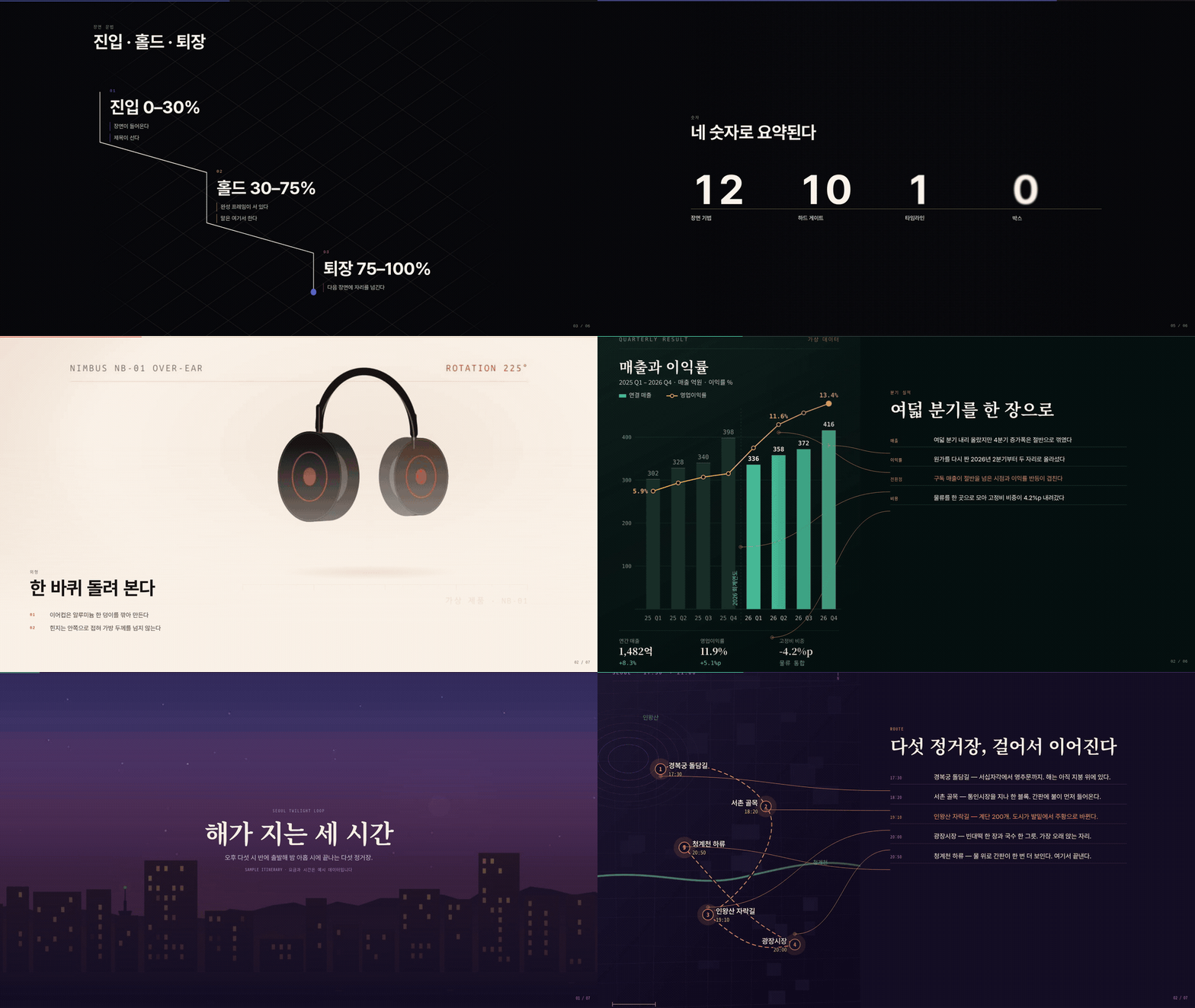
Every image above is a verify capture, taken by driving a real mouse wheel through a deck. Every picture inside the decks is a vector infographic drawn by a script. Nothing here is a mockup. Click a capture to open the live deck.
One-minute demo
Full 59-second trailer: docs/demo.mp4 (1080p). Every shot is a real deck driven by real wheel events; the score is synthesised in ffmpeg. Regenerate with tools/demo/.
Live examples
Four decks, four concepts, all generated and gate-verified by the skill. Open one and scroll, or press →.
| deck | concept | theme | scenes | open |
|---|---|---|---|---|
examples/sample-deck | the tool explaining itself | dark, purple | 6 | ▶ open |
examples/product-launch | 「Nimbus」 headphone launch: 90 drawn rotation frames, exploded view, feature charts, spec odometer | light, cream + coral | 7 | ▶ open |
examples/annual-report | fictional annual results: chart anatomy, six report pages fanning, KPI odometer, structure wipe | dark, forest + amber | 6 | ▶ open |
examples/city-guide | Seoul at dusk: 100 drawn skyline frames, route-map anatomy, postcards, cost/time compare | dark, twilight | 7 | ▶ open |
Gallery of all four: https://gongnyang.github.io/awesome-html-scrolline-deck/ — rebuilt by GitHub Pages on every push (scripts/site/build-examples.mjs). Each deck folder has a README with its storyboard and the scripts that draw its assets; all figures are sample data.
What this is
A slide deck cuts. A scrollytelling deck does not — each scene is pinned to the viewport while the wheel drives its progress from 0 to 1, so motion is continuous and the presenter controls the pace by scrolling. Scrolline Deck is:
- A Claude Code skill (
SKILL.md) that takes a topic and an outline and authors the deck for you. - A CLI (
scripts/cli.mjs) that scaffolds a Vite project, adds scenes from 12 templates, cuts frame sequences, and runs the gates. - An engine (
engine/) built on GSAP ScrollTrigger and Lenis, copied into each generated project so the deck keeps working after you stop using the tool. - Ten gates (G1–G10, plus a schema check) that fail with a non-zero exit code. Six of them drive a real browser with real wheel events.
Output is a static HTML bundle you run locally or host anywhere. Deployment is out of scope on purpose.
Install
git clone https://github.com/gongnyang/awesome-html-scrolline-deck.git
cd awesome-html-scrolline-deck
npm install
To use it as a Claude Code skill, symlink the repo into your skills directory:
ln -s "$(pwd)" ~/.claude/skills/scrolline-deck
Then ask Claude for "a scrollytelling deck about X" and it will follow SKILL.md.
Requirements. Node ≥ 20. qrcode is the only hard dependency. Playwright is optional — without it the browser gates report skipped and exit 0. ffmpeg is needed only for scrolline frames.
Quickstart
# 1. scaffold
node scripts/cli.mjs init my-deck --title "How we ship" --style dark

# 2. add scenes (one per storyboard row; never repeat a technique back to back)
node scripts/cli.mjs add frame-scrub-hero    --id 01-hero    --kicker "2026" --title "How we ship"
node scripts/cli.mjs add horizontal-gallery  --id 02-work    --kicker "Work" --title "Six things we shipped"
node scripts/cli.mjs add closing-qr          --id 03-closing --kicker "Next" --title "Come build with us" --url https://example.com

# 3. run it
cd my-deck && npm install && npm run dev

# 4. gate it
node ../scripts/cli.mjs check .
node ../scripts/cli.mjs verify .     # writes qa/<id>-{30,55,85}.jpg
Read the three captures per scene: 30% should be mid-entrance, 55% should be the finished frame you talk over, 85% should be mid-exit. If 55% is not a frame you would be happy to stand in front of, the choreography is wrong, not the capture.
The twelve techniques
| technique | what it does | reach for it when | assets | default pinVh |
|---|---|---|---|---|
frame-scrub-hero | an image sequence scrubs behind a standing title | opening the talk on an image | frames + poster | 260 |
word-relay | an arrowed title hands off word by word | opening the talk on a sentence | none | 220 |
kinetic-titles | numbered titles assemble along a diagonal | showing the shape of the session | none | 240 |
horizontal-gallery | vertical scroll drives a horizontal rail | showing many images | 3–10 images | 320 |
anatomy-rows | one artefact splits into annotated rows | taking one thing apart | 1 image | 300 |
frame-scrub-video | a body-copy frame scrub | showing a process that moves | frames + poster | 280 |
parallax-video | an unpinned parallax pass over video | letting the room breathe (pin: false) | video + poster | 130 |
paper-assembly | sheets converge into one body of work | proving there is a body of work | 3–8 images | 260 |
odometer-stats | figures roll up on reels and land | landing a number | none | 220 |
wipe-transform | one surface wipes into the next | showing A becoming B | 2–5 images, video optional | 300 |
tilt-card | a portrait held under a slow tilt | introducing a person | 1 image | 200 |
closing-qr | QR, URL and a way back to scene one | handing the room a link | qr.svg | 200 |
references/techniques.md is the canonical list; the numbers above track it.
deck.json
The whole deck is one data file. Scene folders carry the motion; this carries the meaning.
{
  "title": "Scrolline Deck",
  "lang": "en",
  "presenter": { "name": "gongnyang", "autoDurationSec": 180 },
  "theme": { "style": "dark", "accent": "#5e6ad2" },
  "scenes": [
    {
      "id": "01-hero",                    // must equal the src/scenes/<id>/ folder name
      "order": 1,
      "technique": "frame-scrub-hero",
      "pinVh": 260,                       // pin distance as a % of viewport height
      "pin": true,
      "assets": {
        "frames": "/frames/hero/f_%03d.jpg",
        "count": 120,
        "critical": [1, 30, 60, 90, 120], // decoded before the scene is allowed to start
        "poster": "/frames/hero/poster.jpg"
      },
      "copy": { "kicker": "2026", "title": "How we ship", "lines": ["One line, maybe two."] },
      "notes": "Required. Shown in the N panel while you present.",
      "fallback": "Poster still plus a faded-in title, for reduced motion."
    }
  ]
}
Full schema: references/deck.schema.json.
Gates
check is static and needs no browser. verify drives Chromium with real wheel events — it never calls scrollTo, because a deck that only works when you teleport to a scroll position is a deck that breaks under a real wheel.
| gate | asserts | |
|---|---|---|
| check | G1 | every scene module exports { id, mount, build, unmount } and id equals its folder |
| G2 | every timeline sums to ≤ 1.001, and order / pinVh are sane | |
| G3 | no var( inside a tween string, plus lint L1 (no raw colour in scene.css), L2 (every selector scoped to [data-scene="<id>"]), L3 (pathLength="1" on animated paths) | |
| G4 | no window.scrollTo or scrollIntoView in scenes or in the verify path | |
| S0 | deck.json validates and every asset path exists on disk | |
| verify | G5 | measured pin distance equals pinVh% of the viewport, ±2px |
| G6 | ≥ 3 visible elements at 55% of each scene, and writes the three captures | |
| G7 | ArrowRight lands within 4px of 35% into the next pin, with ≥ 3 visible elements there | |
| G8 | zero console.error and zero page errors across the run | |
| G9 | zero horizontal overflow at 1440px and at 390px | |
| G10 | with prefers-reduced-motion, pin distance is 0 and every scene still shows ≥ 3 elements |
Without Playwright installed, verify prints how to install it, reports skipped: true, and exits 0 so CI stays honest instead of green-by-accident.
Presenting
| key | action |
|---|---|
→ Space / ← | next / previous scene, landing 35% into the pin |
1–9, 0 | jump to scene 1–9; 0 is scene 10 |
P | toggle auto-advance (presenter.autoDurationSec); any input stops it |
F | fullscreen |
H | hide the cursor |
N | speaker notes panel |
Build with npm run build && npm run preview, and run verify once on the machine that will actually be on stage.
Project structure
awesome-html-scrolline-deck/
├─ SKILL.md              Claude Code router: principles, workflow, technique picker
├─ engine/               runtime copied into every generated deck (no Vite API)
├─ templates/project/    Vite scaffold: index.html, tokens.css, data/deck.json
├─ templates/scenes/     12 technique templates (scene.html/css/js + template.json)
├─ references/           contract, schema, techniques, choreography, design, pitfalls
├─ scripts/              cli.mjs and cmd/ + gates/ + lib/
├─ examples/              four sample decks (sample-deck, product-launch, annual-report, city-guide)
├─ tests/                node --test: gate units, bad-* fixtures, build smoke
└─ book/                 the companion handbook (Korean, PDF in docs/)
Handbook

「스크롤로 발표하라」 (Korean, 46 pages, PDF in docs/) — a practical guide for presenters, not developers: what a scrollytelling deck is, the enter/hold/exit grammar, the one-table storyboard, how to ask Claude Code for the deck, presenting keys and rehearsal, and a teardown of a real 12-scene seminar deck.
Contributing
Issues and pull requests are welcome. A new scene technique needs four files under templates/scenes/<technique>/ — scene.html, scene.css, scene.js, template.json — plus a row in references/techniques.md and a passing node --test. Keep colours in tokens, keep every timeline at or under 1, and keep the boxes out.
License
MIT. See LICENSE.
Credits
Extracted from the twelve-scene cinema deck built for the FastCampus "ChatGPT Astra" seminar — https://fc-astra-site.vercel.app/deck/. That deck is where the pin-unit bug, the smooth-scroll prevent exception and the CSS-variable interpolation failure were all found the hard way; the gates in this repo exist so you do not have to find them again.
Built with GSAP ScrollTrigger, Lenis and Vite.
// faq
What is awesome-html-scrolline-deck?
Scrolline Deck — scroll-driven cinematic HTML presentations (scrollytelling decks) as a Claude Code skill: 12 scene techniques, enter/hold/exit choreography, 10 wheel-measured gates. Vite + GSAP ScrollTrigger + Lenis.. It is open-source on GitHub.
Is awesome-html-scrolline-deck free to use?
awesome-html-scrolline-deck is open-source under the MIT license, so it is free to use.
What category does awesome-html-scrolline-deck belong to?
awesome-html-scrolline-deck is listed under skills in the Claudeers registry of Claude-compatible tools.
// embed badge

[](https://claudeers.com/awesome-html-scrolline-deck)
// retro hit counter

[](https://claudeers.com/awesome-html-scrolline-deck)
// reviews
// guestbook
// related in Claude Skills
 🔓
🔓An agentic skills framework & software development methodology that works.
 🔓
🔓 🔓
🔓💫 Toolkit to help you get started with Spec-Driven Development
 🔓
🔓AI coding assistant skill (Claude Code, Codex, OpenCode, Cursor, Gemini CLI, and more). Turn any folder of code, SQL schemas, R scripts, shell scripts, docs,…