
autoresearch
Auto Research — automated multi-domain research pipeline (GitHub Actions + Claude Code)
Install with your AI
Paste into Claude Code, Cursor, or any agent — it reads the repo and wires the tool into your project.
Install and set up autoresearch (git-clone project) into my current project.
Found on https://claudeers.com/autoresearch
Repo: https://github.com/INDXDev/autoresearch
Homepage/docs: —
Detected install method: git-clone → git clone https://github.com/INDXDev/autoresearch
Category: integrations. Platforms: cli, api, web.
Read the repo's README for exact setup and env vars, then install it and wire it into my project.

Claudeers Health Verdict:
active; community-verified: false. Confirm the source before running anything.
git clone https://github.com/INDXDev/autoresearch
// compatibility
| Platforms | cli, api, web |
|---|---|
| Operating systems | — |
| AI compatibility | claude |
| License | MIT |
| Pricing | open-source |
| Language | Python |
🔬 Auto Research
🌐 English / 日本語 — English (this page) ・ 日本語
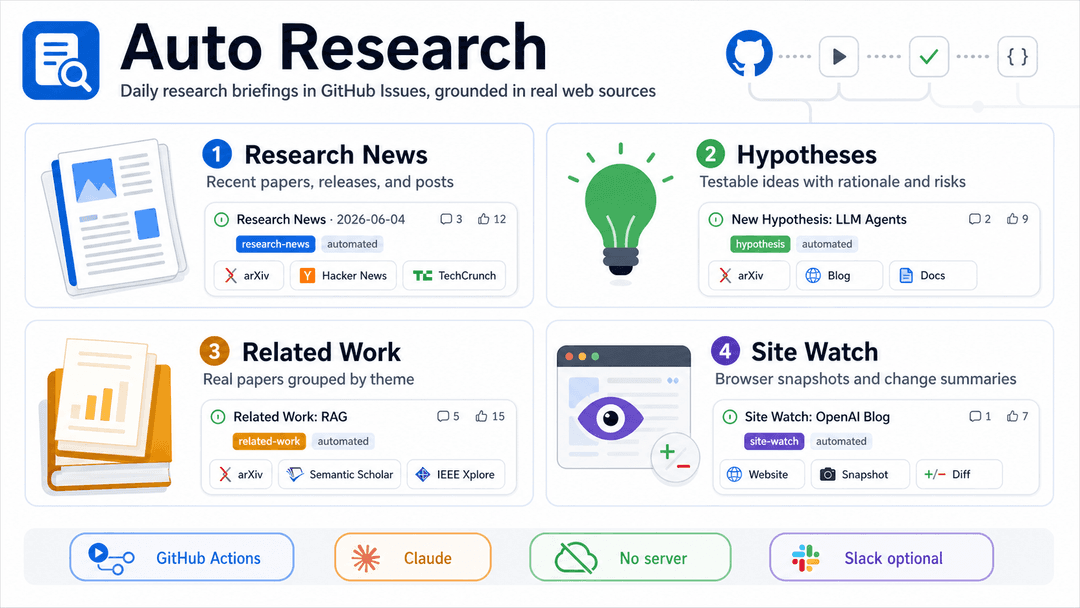

Wake up to a fresh research briefing in your GitHub repo, every morning — written by Claude, grounded in real web sources.
For research labs, AI/ML teams, and anyone who wants to keep up with a moving field without doing the daily reading sweep by hand.
🧭 Built for researchers first — but the same engine works just as well as a daily tech / business / hobby / finance tracker. It picks the right lens per topic (see
config/domains/). More on that below.
Auto Research is a GitHub repository template. You click "Use this template", add one Claude credential, and from then on a scheduled job web-searches your research topic each day and files the results as GitHub Issues you can read, comment on, and close like any other.
There is no server to run and no code to write. Everything happens inside GitHub Actions, which is free for public repos.
▶️ Watch the 5-minute setup
A click-by-click walkthrough — Use this template → enable Actions → generate a Claude token in your terminal → add it as a secret → Run workflow — ending with the Issues it files every morning, the 👍/👎 feedback loop, and the Slack post:

🎞️ Prefer full quality? Download the MP4. The clip is styled after GitHub's own Primer design system.
What you get
Every day, for each topic you care about, Auto Research runs four jobs in parallel — and files one Issue per item, so each paper, hypothesis, release, or page change is its own trackable Issue you can label, comment on, and close independently:
| 📰 Research News | 💡 Hypotheses | 📚 Related Work | 👀 Site Watch |
|---|---|---|---|
| 3–6 recent papers, releases, and posts — each its own Issue with a real link, source, date, and one-line takeaway. | 3–5 concrete, testable, falsifiable hypotheses — each its own Issue with a rationale, an experiment to test it, and the main risk. | Real papers grouped by theme — each its own Issue, plus one Issue collecting the open gaps to chase. | Watches pages you list (e.g. the Hacker News front page) with a real headless browser (Playwright) and, whenever one changes, files an Issue summarising exactly what's new. |
The four are independent jobs you can switch on or off one by one — see Pick which jobs you want.
Where it all lands — three outputs
Every item flows to up to three destinations at once, all from the same schema-validated data:
| 🏷️ GitHub Issues | 🌐 GitHub Pages site | 💬 Slack |
|---|---|---|
| The primary output: one Issue per item, auto-tagged with topical labels you can filter and triage — and 👍/👎 to steer the next run. | A rich Astro + Starlight docs site, rebuilt from every Issue and published to the gh-pages branch — searchable, dark-mode, with tags, reactions, and comments. | One line per item (or a per-section digest) to an Incoming Webhook. Each leads with a public link — its on-site page, else the real source URL — with the GitHub Issue only a secondary ↳ line. Optional — the webhook's presence is the switch. Mirror it to email with RESEND_API_KEY + EMAIL_TO. |
Each item looks like a normal Issue — titled and labelled, with clickable sources — so it slots straight into how you already triage work on GitHub:
Research News: Self-RAG: Learning to Retrieve, Generate, and Critique …   [auto-research] [research-news]

Topic: Retrieval-augmented generation
Date: 2026-06-04

Source: arXiv · 2026-05
Link: https://arxiv.org/abs/…

Trains a model to decide *when* to retrieve, cutting needless lookups.
Why it's trustworthy: Claude only includes papers and links it actually opened via web search. It is told never to invent a title, author, date, or URL — when unsure, it leaves a field blank rather than fabricate a citation.
⚡ Quickstart — running in about 5 minutes
- Click "Use this template" at the top of this repo and create your own copy.
- Open the Actions tab in your new repo and click the button to enable workflows.
- Get one Claude credential (pick whichever you have):
- Claude Pro/Max plan → run
claude setup-tokenlocally, log in, and copy the token it prints. - API billing → grab an API key from console.anthropic.com.
- Claude Pro/Max plan → run
- Add it as a Secret: Settings → Secrets and variables → Actions → Secrets → New repository secret.
- Name it
CLAUDE_CODE_OAUTH_TOKEN(for the plan token) orANTHROPIC_API_KEY(for the API key). You only need one.
- Name it
- (Optional) Set a Variable named
RESEARCH_TOPICto your topic — it defaults toAI. - Run it now: Actions → Auto Research → Run workflow. Check the new Issues, then let it run daily on its own.
💡 Until you add a credential, the scheduled run still succeeds and leaves a note telling you exactly what to add. Nothing breaks while you set up.
What you can do — one capability at a time
Each of the following is something you turn on or change with a single GitHub Variable or Secret (under Settings → Secrets and variables → Actions). No code edits needed unless noted.
1. Choose what it researches
Set the RESEARCH_TOPIC Variable to anything — Retrieval-augmented generation, protein folding, RISC-V compilers. It defaults to AI.
For richer, lab-specific results, also edit config/research_topics.md and
list your topics, datasets, constraints, and open questions. Claude reads this
file on every run for extra context.
Point it at sources you trust. List the feeds, blogs, and listing pages your
lab follows in config/priority_sources.md — one URL per bullet. Before its
open-ended web search, Claude fetches those URLs first and follows the
specific item links it finds on them, so your favourite sources get crawled
preferentially every run. They're priorities, not a whitelist: after exhausting
them Claude still searches freely for anything else new.
Pick a domain (lens) — or let it choose. A run isn't limited to academic
research: it can view your topic through one of five lenses — research / tech /
business / hobby / finance — each a plain Markdown guide under
config/domains/. By default the domain is auto: at the start of each run a
tiny picker reads the topic and chooses the best-fitting lens, and remembers
that choice for that topic (so it stays stable until you change the topic). You
normally set no Variable for this. To force one, set the RESEARCH_DOMAIN
Variable to research, tech, business, hobby, or finance. Whatever the
domain, each run still produces the same three layers — Foundations (the
unwavering facts), Latest (recent developments), and Takes (interpretations)
— and every research Issue is tagged domain:<domain> (the 👀 Site Watch Issues
are not domain-scoped).
2. Pick which jobs you want
Each is an independent job you can switch off:
| Variable | Controls | Default |
|---|---|---|
ENABLE_RESEARCH_NEWS | the 📰 News report | on |
ENABLE_HYPOTHESIS_GENERATION | the 💡 Hypotheses report | on |
ENABLE_RELATED_WORK | the 📚 Related Work report | on |
ENABLE_SITE_WATCH | the 👀 Site Watch page-diff watcher | on |
Set one to false to skip it. Leaving it unset (or true) keeps it on. They all
run in parallel, so any subset works.
Site Watch is configured separately, in config/watch_targets.json — a
simple list of pages to watch (slug, name, URL, and an optional CSS selector to
track just part of the page). It ships watching the Hacker News front page; add
your own, or set enabled: false to pause one. Its snapshots are kept on the
unified auto-research-state orphan branch (not on main, shared with the domain
selection state) so each run diffs against the last without cluttering your main
history.
3. Write in English or Japanese
Set the OUTPUT_LANGUAGE Variable to en or ja. This switches both the
language Claude writes in and the headings/labels in the Issue. When you leave
it unset, the domain picker infers the most fitting language from the topic
(and remembers it per topic, like the domain). Anything unrecognised falls back to
English.
4. Get a Slack ping for each item
Add a Secret named SLACK_WEBHOOK_URL with a Slack
Incoming Webhook URL. Each item then
posts its own one-line message — led by its section emoji (📰 / 💡 / 📚) — with
its title and a link. No webhook, no post — there is no separate on/off flag,
the webhook's presence is the switch.
The primary link is a public URL, not the GitHub Issue. That's deliberate: the site can be public even when the repo is private, and many readers never open GitHub. So each line leads with, in order of preference:
- the item's page on your published docs site — read live from the GitHub
Pages API (the workflow carries
pages: read), so it always matches wherever Pages serves:/<repo>/, root, or a custom domain; then - if Pages isn't set up, the real curated source URL — the actual paper / article / page the item is about; then
- only as a last resort, the GitHub Issue.
The GitHub Issue is otherwise demoted to a small secondary ↳ GitHub Issue:
line. So a reader always gets a link that works for them, even with no repo
access.
5. Get the same ping by email
Want each item in your inbox too? Add a Secret RESEND_API_KEY (a
Resend API key) and a recipient EMAIL_TO (Variable or
Secret; comma-separate several). When both are present, every item that goes
to Slack is also emailed — same text, same digest/per-item behaviour — using
the exact same lines. Like the Slack webhook there is no separate on/off flag:
the presence of both values is the switch, so a run with neither stays
silent. By default the sender is Resend's shared test address
[email protected] (which only delivers to your own Resend account until you
verify a domain); set EMAIL_FROM to your verified sender to reach anyone, and
EMAIL_SUBJECT_PREFIX to override the [Auto Research] subject prefix.
6. Also save each item as a Markdown file
Set ENABLE_FILE_OUTPUT=true to additionally write one file per item,
outputs/YYYY-MM-DD-<section>-<n>.md, and upload them as a downloadable GitHub
Actions artifact. Off by default — Issues are the primary output.
7. Change when it runs
The default schedule is once a day at 04:17 JST (19:17 UTC). To change it,
edit the one cron line in .github/workflows/auto-research.yml (cron is always
in UTC):
schedule:
  - cron: "0 22 * * *"   # 07:00 JST daily
  - cron: "17 19 * * 1"  # 04:17 JST on Mondays only
  - cron: "0 */12 * * *" # every 12 hours
Build your own at crontab.guru. You can always trigger a run by hand from the Actions tab too.
8. Tune how Claude frames each report
Per-section guidance lives in config/prompts/:
hypothesis_generation.md— how hypotheses are framed.related_work.md— how the literature is grouped.watch_summary.md— how Site Watch diffs are summarised.labeling.md— how the auto-labeler picks topical tags.slack_summary.md— notes for the Slack format.
Edit the prose to steer tone and emphasis. (To change the shape of the JSON
data itself, you'd also edit the --json-schema in the workflow and its
renderer in scripts/publish_section.py — see Going further.)
9. Adjust labels and the model
GITHUB_ISSUE_LABELS— shared label(s) added to every Issue (defaultauto-research). Each report also gets its own tag (research-news/hypothesis/related-work).ENABLE_GITHUB_ISSUE— set tofalseto stop creating Issues (pair withENABLE_FILE_OUTPUTto get files instead).ANTHROPIC_MODEL— override the Claude model (defaultclaude-sonnet-4-6).
10. Set how many items each report posts
Set ITEMS_PER_REPORT (default 5) to roughly how many items you want per
report. It's an average — Claude may land a few over or under. News and
hypotheses count as items directly; for Related Work it targets the total number
of papers across themes. Lower it for a tight daily digest, raise it for a wider
sweep.
11. Let it learn from feedback — and never repeat itself
Every run first summarises the Issues it already opened and tells Claude not to propose anything already covered, so you get genuinely new material each day instead of the same papers again.
You can also steer the next run with one click: react 👍 or 👎 on any past
Issue (or add a good / bad label). Claude then produces more like the 👍
ones and avoids the 👎 ones. Tune it with optional Variables:
EXISTING_CONTEXT_MAX— how many prior Issues to summarise each run (default40).GOOD_LABELS/BAD_LABELS— label names that count as good/bad feedback, comma-separated. Defaults already covergood,👍,useful,approvedandbad,👎,not-useful,rejected— and the 👍/👎 reactions work with no setup at all.
12. Publish a rich documentation site of everything — automatically
A second workflow, publish-site.yml, runs right after the Auto
Label / Auto Research run finishes and turns every Issue into a rich
documentation website built with Astro +
Starlight — sidebar navigation, built-in
full-text search, dark mode, and a responsive layout. It reads all the Issues
back (the single source of truth), together with each Issue's tags, reactions,
and comments, and renders:
- a splash landing page with a hero, stat cards, and the feed of items;
- one page per run — the day's items grouped by section (📰 / 💡 / 📚 / 👀), each card showing the item, its topical tags, its reaction chips (👍 ❤️ 🚀 …), and the comments people left on the Issue, plus a link back to the Issue;
- one page per item — the full body with its tags, reactions, and comments;
- one page per section (Latest / Takes / Foundations / Site Watch) and one page per reaction (👍 ❤️ …), each listing the matching items; and
- one page per tag — a facet listing every item carrying that tag (the tags come from the auto-label workflow).
The deterministic Python (scripts/build_site.py, no LLM) does the data work
and emits Markdown; Astro builds it. Content is written in your chosen
OUTPUT_LANGUAGE.
Deploy is to dedicated gh-pages* branches (via peaceiris/actions-gh-pages,
mirroring the auto-research-state pattern) so main's history stays clean.
One-time setup: where Pages serves the site decides the base path baked
into every CSS/JS URL — public project Pages live under /<repo>/, while a
private repo's Pages are served at the root of a random
https://<id>.pages.github.io/ domain. The build can't know which, so the first
run with no SITE_BASE Variable publishes both variants:
gh-pages— built with base/<repo>/(public project Pages)gh-pages-root— built with base/(private root Pages)
Open Settings → Pages → Build and deployment, set Source = "Deploy from a
branch", and pick whichever branch renders with its CSS (the wrong one
looks unstyled). Your site then goes live — https://<you>.github.io/<repo>/ for
the public case.
Lock it in (optional): once you know which fits, set the repo Variable
SITE_BASE—/(→ rebuilds onlygh-pages-root) or/<repo>/(→ onlygh-pages). From then on just the matching branch is rebuilt; the other is a harmless stale branch you may delete.
Optional — live comments & reactions (giscus): the static pages already show
a snapshot of each Issue's comments and reaction counts. To let visitors comment
and react on the site itself, enable Discussions, install the
giscus app, then set the GISCUS_REPO,
GISCUS_REPO_ID, GISCUS_CATEGORY, and GISCUS_CATEGORY_ID Variables (copy the
IDs from giscus.app). Unset → the site stays a clean static
snapshot.
You can also build it by hand any time from Actions → Publish Site → Run
workflow, and cap how many Issues it pulls per section with the optional
SITE_MAX_ISSUES Variable (default 300).
How it works
Auto Research runs on a schedule in GitHub Actions. Each report is its own job, split into two clean halves:
| Half | Who runs it | What it does |
|---|---|---|
| Research | claude-code-action | The open-ended part. Claude web-searches real, recent sources and returns a schema-validated JSON object (structured_output). |
| Publish | Python (scripts/publish_section.py) | The deterministic part. Iterates the JSON array and opens one labelled GitHub Issue per item (+ optional file + Slack line each). No LLM calls. |
That split is the core idea: let Claude do the messy, exploratory research and emit structured data; let Python do everything predictable — composing the Markdown, creating Issues, posting to Slack — so the output is reliable and easy to reason about.
Issues are created with the GITHUB_TOKEN that Actions provides
automatically, so no personal access token is needed; the workflow already
grants the issues: write permission.
It never breaks while you set up
Every optional piece degrades gracefully — a missing key or webhook turns into a clear "skipping" note, not a failed run:
- No Claude credential → research is skipped with a
::noticetelling you what to add. - No
SLACK_WEBHOOK_URL→ logsSlack webhook is not configured. Skipping Slack post. - No
RESEND_API_KEY/EMAIL_TO→ logsResend email is not configured … Skipping email. ENABLE_GITHUB_ISSUE=false→ Issues are off (useENABLE_FILE_OUTPUTinstead).- Running locally without
GITHUB_TOKEN→ Issue creation is skipped.
Secrets — the API key, OAuth token, Slack webhook, and Resend key — are never printed to the logs.
Settings reference
All of these go under Settings → Secrets and variables → Actions. GitHub has two tabs there: Variables (non-sensitive, visible in logs) and Secrets (hidden, never printed).
Variables tab
| Name | Example | What it does |
|---|---|---|
RESEARCH_TOPIC | Retrieval-augmented generation | Main topic. Defaults to AI; Claude also reads config/research_topics.md. |
RESEARCH_DOMAIN | auto | Lens for the run: auto (default — picked & remembered per topic), or pin research/tech/business/hobby/finance. Guides live in config/domains/. |
ITEMS_PER_REPORT | 5 | Average items to post per report (default 5). For Related Work, total papers across themes. |
ENABLE_RESEARCH_NEWS | true | News report on/off (default on). |
ENABLE_HYPOTHESIS_GENERATION | true | Hypotheses report on/off (default on). |
ENABLE_RELATED_WORK | true | Related Work report on/off (default on). |
ENABLE_SITE_WATCH | true | 👀 Site Watch page-diff watcher on/off (default on). Targets live in config/watch_targets.json. |
ENABLE_AUTO_LABEL | true | Auto-label workflow on/off — adds topical tags to today's Issues (default on). |
WATCH_TIMEOUT_MS | 30000 | Site Watch: Playwright navigation timeout per page, ms (default 30000). |
WATCH_MAX_DIFF | 400 | Site Watch: max diff lines kept per page before Claude summarises (default 400). |
ENABLE_GITHUB_ISSUE | true | Create one Issue per item (default on). |
ENABLE_FILE_OUTPUT | false | Also write & upload outputs/<date>-<section>-<n>.md (one file per item). |
SLACK_DIGEST | true | Bundle each section into a single Slack post (default on). Set false to post one Slack message per item. |
GITHUB_ISSUE_LABELS | auto-research | Shared label(s) on every Issue. |
OUTPUT_LANGUAGE | en | Output language: en or ja. Leave unset to let the picker infer it from the topic (remembered per topic). |
ANTHROPIC_MODEL | claude-sonnet-4-6 | Claude model to use (optional). |
EXISTING_CONTEXT_MAX | 40 | How many prior Issues to summarise each run for de-duplication (default 40). |
GOOD_LABELS | good,👍,useful,approved | Label names that mark a past Issue good (steer toward it). 👍 reactions also count. |
BAD_LABELS | bad,👎,not-useful,rejected | Label names that mark a past Issue bad (steer away). 👎 reactions also count. |
LABEL_CONTEXT_MAX | 40 | Auto-label: how many of today's Issues the labeler considers (default 40). |
LABEL_BODY_MAX | 600 | Auto-label: max body characters per Issue fed to the labeler (default 600). |
LABEL_MAX_PER_ISSUE | 5 | Auto-label: cap on how many topical labels are added per Issue. |
SITE_MAX_ISSUES | 300 | Max Issues per section the docs site pulls in (default 300). |
SITE_FETCH_COMMENTS | true | Render each Issue's comments onto its page (set false to skip the per-Issue comment fetch). |
SITE_TITLE | Auto Research | Heading shown in the docs-site header. |
EMAIL_TO | — | Recipient(s) for the optional email digest (comma-separate several). With RESEND_API_KEY, every Slack line is also emailed. May live in either tab. |
EMAIL_FROM | [email protected] | Sender for the email digest. The default test sender only reaches your own Resend account; set a verified-domain address to email anyone. |
EMAIL_SUBJECT_PREFIX | [Auto Research] | Prefix prepended to every email subject. |
GISCUS_REPO / GISCUS_REPO_ID / GISCUS_CATEGORY / GISCUS_CATEGORY_ID | — | Optional giscus IDs to enable live comments/reactions on the site (from giscus.app). |
A flag accepts true / 1 / yes / on (or being unset) to enable; only an
explicit false disables it.
Secrets tab
| Name | What it does |
|---|---|
CLAUDE_CODE_OAUTH_TOKEN | Claude Code OAuth token (Claude Pro/Max). Generate with claude setup-token. |
ANTHROPIC_API_KEY | API key from console.anthropic.com. Use instead of the OAuth token. |
OPENAI_API_KEY | (Optional) OpenAI API key — the Codex sub. Used as a fallback only when no Claude credential is set (see below). |
CODEX_ACCESS_TOKEN | (Optional) ChatGPT/Codex workspace access token. Best-effort fallback; OPENAI_API_KEY is the supported Codex path. |
SLACK_WEBHOOK_URL | (Optional) Slack Incoming Webhook URL. |
RESEND_API_KEY | (Optional) Resend API key. With EMAIL_TO set, every item is also emailed (same text as Slack). |
You only need one of
CLAUDE_CODE_OAUTH_TOKENorANTHROPIC_API_KEY.OUTPUT_LANGUAGEcan live in either tab, whichever you prefer.
Engine: Claude is the main, Codex is the sub
Every LLM step (domain pick, the three research sections, Site Watch summaries,
auto-labelling) runs through one local composite action,
.github/actions/agent. It picks the engine
per run:
- Claude (main) — used whenever
CLAUDE_CODE_OAUTH_TOKENorANTHROPIC_API_KEYis present. This is the default and the recommended setup. - OpenAI Codex (sub) — a fallback used only when neither Claude secret is
set but
OPENAI_API_KEY(orCODEX_ACCESS_TOKEN) is. It runsopenai/codex-actionread-only with live web search, and its reply is normalised back to the same schema-shaped JSON byscripts/extract_json.py, so the deterministic Python publishers don't change.
If both a Claude and an OpenAI credential are set, Claude wins — Codex never
runs. With no credential at all, every job still succeeds and prints a note.
Optionally pin the Codex model with the OPENAI_MODEL variable (empty = Codex's
default).
Try it without GitHub
The research half needs the Claude Code Action, but you can run the deterministic publisher locally on sample JSON — handy for previewing the Markdown. It uses only the Python standard library, so there's nothing to install:
export SECTION_JSON='{"items":[{"title":"Example","url":"https://arxiv.org/abs/0000.00000","takeaway":"…"}]}'
export OUTPUT_LANGUAGE=en
ENABLE_FILE_OUTPUT=true python3 scripts/publish_section.py news
# → renders outputs/<date>-news-01.md, one file per item  (creating Issues would need GITHUB_TOKEN)
The site exporter is just as self-contained. With a GITHUB_TOKEN and
GITHUB_REPOSITORY set it pulls your real Issues (+ their tags/reactions/
comments); without them it still emits a valid empty-state site. The exporter
writes Markdown into site/, then Astro builds it:
python3 scripts/build_site.py site    # → site/src/content/docs/{index,runs,tags}.md
cd site && npm install && npm run build   # → site/dist/  (open site/dist/index.html)
Going further
- Add a new report: copy a job in the workflow, give it a
--json-schema, and add a matching renderer inscripts/publish_section.py. - Enrich a schema: require a confidence score, an author list, etc.
- Daily digest: add a job that combines the day's Issues into one Slack summary.
- Keep a history: commit the daily Markdown back into a
reports/branch. - Many topics at once: run the jobs in a matrix across several research areas.
Security
- Never hardcode secrets. API keys, OAuth tokens, and the Slack webhook belong in GitHub Secrets only.
.envis gitignored; only.env.example(dummy values) is committed.- The scripts never
print()secrets or the webhook URL. - This is a public template — every sample value is a dummy.
- The workflow runs with least-privilege permissions (
contents: read,issues: write).
Project structure
.
├── README.md                             # English (main)
├── README.ja.md                          # 日本語
├── LICENSE                               # MIT
├── CONTRIBUTING.md                       # how to extend the template
├── CLAUDE.md                             # guidance for the agent (research half)
├── .github/
│   ├── workflows/
│   │   ├── auto-research.yml             # select + 4 jobs (news/hypotheses/related/watch): research → publish
│   │   ├── auto-label.yml               # after a run: add topical tags to today's Issues
│   │   └── publish-site.yml             # after a run: Issues → Astro/Starlight site → gh-pages branch
│   └── ISSUE_TEMPLATE/                   # bug report + feature request
├── config/
│   ├── research_topics.md                # your topics (edit me)
│   ├── domains/                          # 🧭 per-domain guides: index.md + <domain>.{en,ja}.md (edit me)
│   ├── priority_sources.md               # URLs Claude crawls first (edit me)
│   ├── watch_targets.json                # 👀 pages Site Watch renders + diffs (edit me)
│   ├── weekly_research_template.md       # skeleton for a hand-written weekly digest
│   └── prompts/                          # editable per-report guidance
│       ├── hypothesis_generation.md
│       ├── related_work.md
│       ├── watch_summary.md
│       ├── labeling.md
│       └── slack_summary.md
├── scripts/
│   ├── select_domain.py                  # deterministic domain/language picker (sticky per topic, no LLM)
│   ├── restore_state.sh / save_state.sh  # race-safe helpers for the auto-research-state branch
│   ├── publish_section.py                # deterministic JSON → Issue publisher (research)
│   ├── watch_fetch.py                    # 👀 Playwright render + diff vs snapshots/ (no LLM)
│   ├── publish_watch.py                  # 👀 deterministic Site Watch JSON → Issue publisher
│   ├── watch_targets.py                  # 👀 loader for config/watch_targets.json (no LLM)
│   ├── build_site.py                     # Issues (+tags/reactions/comments) → Starlight Markdown in site/ (no LLM)
│   ├── existing_context.py               # de-dup digest + 👍/👎 feedback (no LLM)
│   ├── label_context.py                  # 🏷️ gathers today's Issues + label taxonomy for the auto-labeler (no LLM)
│   ├── apply_labels.py                   # 🏷️ additive auto-label JSON → Issue labels (no LLM)
│   ├── github_issue.py                   # GitHub Issue API (stdlib urllib)
│   ├── slack_post.py                     # safe Slack poster (stdlib urllib)
│   ├── email_post.py                     # safe Resend email sender (stdlib urllib)
│   ├── site_url.py                       # resolves the live Pages URL for on-site item links
│   └── i18n.py                           # English / Japanese scaffolding
├── site/                                 # Astro + Starlight docs site (scaffold; content + dist are generated)
│   ├── package.json                      # astro + @astrojs/starlight
│   ├── astro.config.mjs                  # Starlight config (base/site, sidebar, giscus override)
│   └── src/                              # content.config.ts, styles/custom.css, components/Footer.astro
├── snapshots/                            # 👀 page snapshots (diff baseline; kept on the auto-research-state branch, not main)
├── outputs/                              # optional dated files land here
├── requirements.txt                      # (no third-party deps for the publishers)
└── .env.example
Built as a starting point. Keep it simple, then extend it to fit your lab.
// faq
What is autoresearch?
Auto Research — automated multi-domain research pipeline (GitHub Actions + Claude Code) . It is open-source on GitHub.
Is autoresearch free to use?
autoresearch is open-source under the MIT license, so it is free to use.
What category does autoresearch belong to?
autoresearch is listed under devops in the Claudeers registry of Claude-compatible tools.
// embed badge

[](https://claudeers.com/autoresearch)
// retro hit counter

[](https://claudeers.com/autoresearch)
// reviews
// guestbook
// related in Integrations & Connectors
 🔓
🔓Use claude code and codex for free in the terminal, VSCode extension, and discord like OpenClaw (voice supported)
 🔓
🔓Bridge local AI coding agents (Claude Code, Cursor, Gemini CLI, Codex) to messaging platforms (Feishu/Lark, DingTalk, Slack, Telegram, Discord, LINE, WeChat…
 🔓
🔓All parts of Claude Code's system prompt, 27 builtin tool descriptions, sub agent prompts (Plan/Explore/Task), utility prompts (CLAUDE.md, compact, statusli…
 🔓
🔓Claude Code skill/plugin: immersive scroll-scrubbed 'fly through the world' landing pages generated with Higgsfield (Emons-style diorama flights, seamless co…