
AutoMode
Automatic model and effort router for Claude Code. A free plugin that picks Haiku, Sonnet or Opus for each prompt, adds risk floors and a review workflow, an…
Install with your AI
Paste into Claude Code, Cursor, or any agent — it reads the repo and wires the tool into your project.
Install and set up AutoMode (claude-plugin project) into my current project.
Found on https://claudeers.com/automode
Repo: https://github.com/mralexivy/AutoMode
Homepage/docs: https://mralexivy.github.io/AutoMode/
Detected install method: claude-plugin → /plugin install automode@mralexivy/AutoMode
Category: plugins. Platforms: cli, api, desktop, web.
Read the repo's README for exact setup and env vars, then install it and wire it into my project.

Claudeers Health Verdict:
unknown; community-verified: false. Confirm the source before running anything.
⚠ Unverified / not recently updated — review before pasting a run-this config.
/plugin marketplace add mralexivy/AutoMode
/plugin install automode@mralexivy/AutoMode
git clone https://github.com/mralexivy/AutoMode
// compatibility
| Platforms | cli, api, desktop, web |
|---|---|
| Operating systems | — |
| AI compatibility | claude |
| License | MIT |
| Pricing | open-source |
| Language | TypeScript |
Website · Docs · Install · The bar · How it works · Contribute · Open source
AutoMode for Claude Code
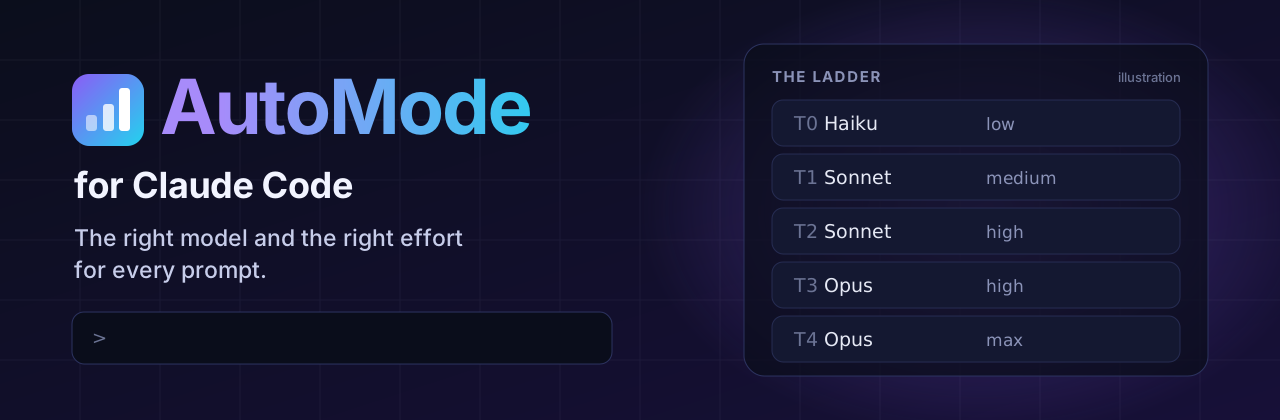
A free, open source model router for Claude Code. It picks the right model and the right effort for every prompt.
On the website: the docs · the benchmark · how to reduce Claude Code costs · install guide · Claude Code routers compared · AutoMode vs effortless · AutoMode vs Claude Code Router · does switching models waste the cache?
Quick questions stay cheap. Hard jobs get the strongest model. Risky changes always get a review. Install it and it starts. You never touch the model or the Effort control again.
A community project. It is not Claude Code's built-in auto permission mode, and Anthropic does not make it. See the difference.
Paste these into Claude Code, one at a time, then run /reload-plugins:
/plugin marketplace add mralexivy/AutoMode
/plugin install automode@automode
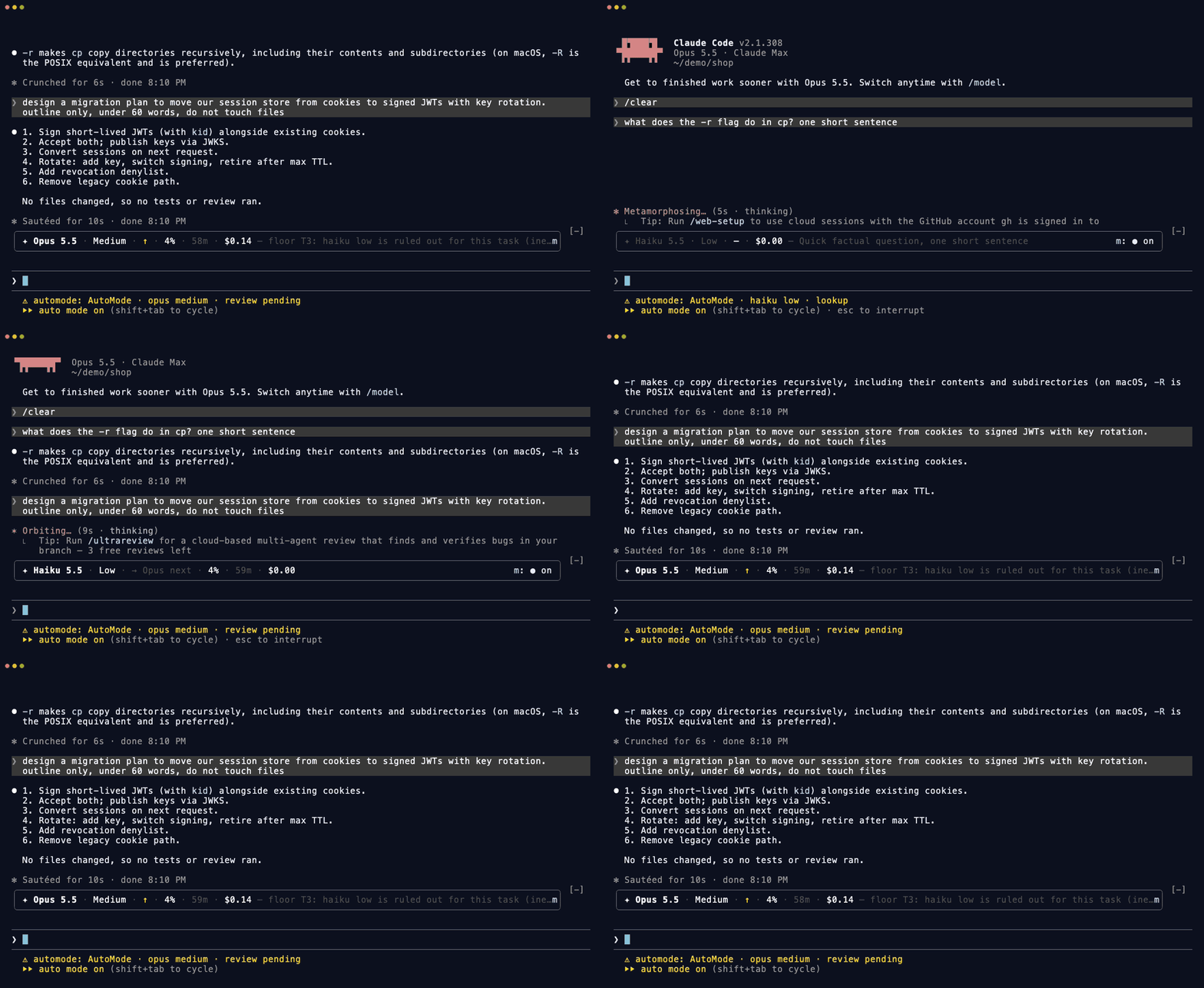
A real session on Claude Code 2.1.308, sped up 1.6 times. A quick question runs on Haiku at Low. A JWT migration moves up to Opus, because the risk floor rules out Haiku.
| No key. No server. It runs on the Claude login you already have. There is nothing to host, and your data stays on your machine. | Six small agents. Open-ended work runs through plan, build, verify and review. Risky work always gets an independent review. | Half the cost of Opus. 51% cheaper than plain Claude Code on Opus in mixed sessions, and 45% on 30 coding tasks, at the same pass rate. See the benchmark. |
What AutoMode does, in one minute
| Without AutoMode | With AutoMode | |
|---|---|---|
| Model | One model for every prompt | Haiku for a quick fact, Sonnet for an edit, Opus for design and risk |
| Effort | You set it, and you forget to change it | Two short Haiku judges set it for each prompt, in about a second |
| Risky changes | The same checks as a typo fix | Security, migrations and payments always get an independent review, on Opus when the diff shows critical risk |
| Big jobs | One long chat that does everything | A plan, build, verify and review workflow with six small agents |
| Prompt cache | A cold cache is a surprise bill | A countdown on the bar shows when the cache goes cold |
| Your setup | A login you already have. No key. No server. |
Install
Three ways. Each takes about a minute.
1. Ask Claude (easiest). Paste this into Claude Code and press Enter:
Install the AutoMode plugin for me: run `claude plugin marketplace add mralexivy/AutoMode` and then `claude plugin install automode@automode`. When both succeed, tell me to run /reload-plugins.
2. Two commands. Type these in the Claude Code chat box:
/plugin marketplace add mralexivy/AutoMode
/plugin install automode@automode
3. One line in a terminal:
claude plugin marketplace add mralexivy/AutoMode; claude plugin install automode@automode
Then run /reload-plugins, or restart Claude Code.
It starts on its own
There is nothing to turn on. AutoMode starts with every session after you install it and run /reload-plugins. It routes on whatever model the session uses, so you do not pick a special model.
- Stop it for one session:
/automode off. Start it again with/automode on. - Stop it everywhere: set
"mode": "off"in yourconfig.json, or setAUTOMODE_ROUTER=off. - Check it is running:
/automode setup.
It can change the model in the middle of a chat. AutoMode may move the main session to another model, or to another effort, when the next prompt needs it. To keep a model or an effort, pin it:
- Pick one with
/modelor/effort. A pin holds until you typeam:reset. - Type
am:opus,am:sonnet,am:haikuoram:highat the start of a prompt, or write "use opus" or "effort: high". - Turn routing off with
/automode off,"mode": "off"orAUTOMODE_ROUTER=off.
Requires Claude Code 2.1.287 or later in the terminal. Mods are on by default from that version. The Desktop app needs 2.1.286 or later, and the VS Code extension needs 2.1.299 or later. Tested with Claude Code 2.1.318.
If you set CLAUDE_CODE_ENABLE_FUNCTION_HOOKS in an early build, remove it. Claude Code 2.1.287 and later ignores it.
If the mod does not load, Claude Code runs as usual and nothing breaks. To check that it loaded, run /plugin. A line under the tabs reads 1 mod active · automode.
Why no special model? AutoMode used to start only when the model ID ended in
[1m]. Claude Code 2.1.311 removes that suffix before a mod sees the model, so the rule never fired. The old rule is still there as"activation": "picker"inconfig.json, for builds that keep the suffix.
Remove
claude plugin uninstall automode@automode
State lives in ~/.claude/plugins/data/automode/. Delete that folder to remove it.
Turn it off
- AutoMode only: run
/pluginand disable it in the Installed tab. Or run/automode offfor one session. - Every mod, one session: start Claude Code with
--safe-mode. - Every mod, every session: set
"disableAllHooks": truein~/.claude/settings.json.
The ladder
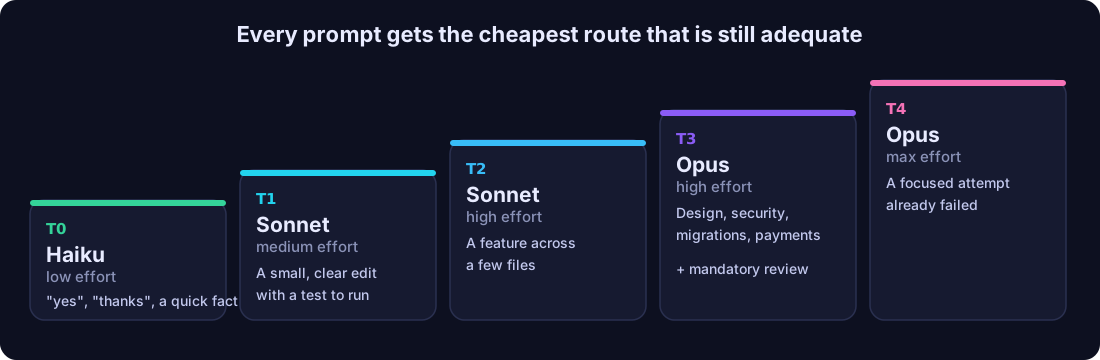
Every prompt takes the cheapest route that is still adequate. Code sets a floor for risky work, and the judge never lowers it.
What the bar shows
One quiet line above the prompt, in your theme's colors. It reports what actually ran.
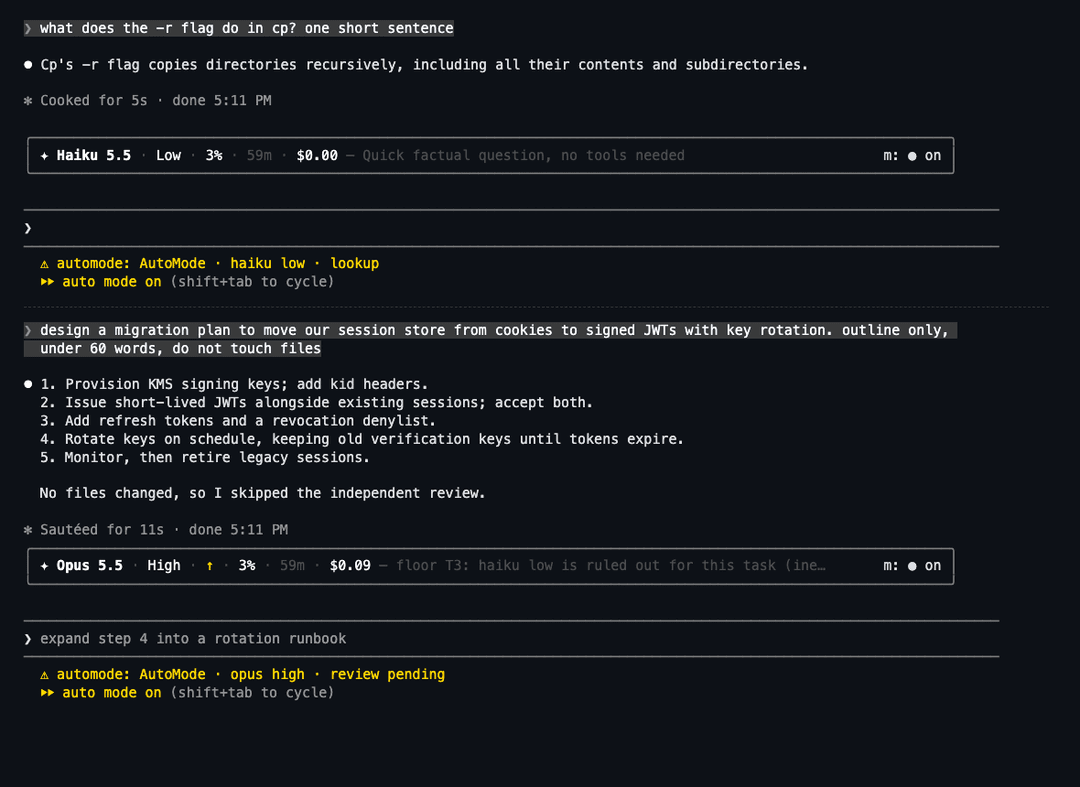
A real session on Claude Code 2.1.314. Each prompt shows the route it took.
| On the bar | Means |
|---|---|
| High · Opus | The effort and the model for this prompt. Deciding… while the judge thinks. |
| ◔ 38% | How full the chat's context is. |
| cache 58:12 | Time until the prompt cache goes cold. After that, the next message pays full price to re-read the chat. |
| saved ~$0.38 | The estimated saving against the model the session started on. Right after a switch it reads ↺ $0.07 to pay back, until cheaper requests pay off the new model's cache rewrite. |
| a refactor across modules | Why the route was chosen. |
| Auto | Switches routing on or off for this session. |
| ⚙ | Settings. |
AUTOMODE_UI=off hides the bar. /automode details prints the same facts as text, and /automode help lists the commands.
Where AutoMode runs
AutoMode's hooks run in every session that loads the plugin. What AutoMode draws depends on the app:
| Where you run Claude Code | Routing and guardian | The bar above the prompt | /automode text |
|---|---|---|---|
claude in a terminal, including an editor's terminal | Yes | Yes | Yes |
| The Code tab of the Desktop app (not a WSL session) | Yes | Yes | Yes |
| The VS Code extension chat panel (2.1.299 or later) | Yes | No. Claude Code does not draw the band above the prompt there. | Yes. Use /automode for the same facts. |
claude -p and the Agent SDK | Yes | No | Yes |
| A WSL session in the Desktop app | No. Plugins are not available there. | No | No |
Source: Mods overview, where mods run.
How it works
Each prompt takes one of four paths:
- Chat and non-code requests: answered directly.
- Code changes with a clear goal: Sonnet does them itself and must show a passing test or build before it says done.
- High-risk changes: after the checks pass, one independent reviewer checks the diff. It runs on Opus when the diff shows critical risk, and on Sonnet otherwise.
- Open-ended work: run
am:run <request>for theautomode:runworkflow. Automatic entry is off by default (autoWorkflow).
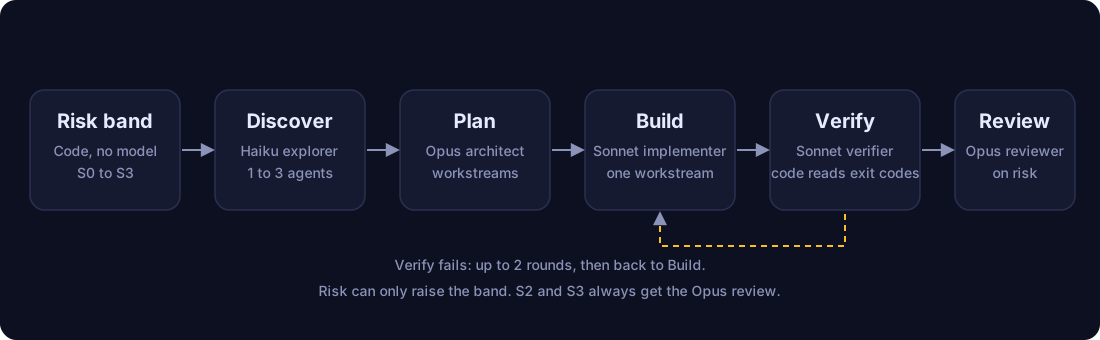
| Stage | What runs |
|---|---|
| Risk band | Code, not a model. It sets S0 to S3 from the task text, the planned and changed files, and blocking unknowns. The band only goes up. |
| Discover | Haiku. One agent for S1. Three agents with separate scopes for S2 and S3. |
| Plan | Opus. Workstreams, acceptance criteria and risks. |
| Build | Sonnet. Workstreams that share files never run together. maxConcurrency defaults to 1. |
| Verify | Sonnet runs the commands. Code decides pass or fail from the exit codes. At most 2 rounds. |
| Review | Opus reads the diff. It is mandatory for S2 and S3, failed checks, unfinished work and incomplete evidence. If the router leaves review out, size alone does not force it. Sonnet fixes blockers and major correctness or security defects. The verifier checks evidence gaps. |
The S3 rule. If a prompt matches security or credentials, migrations or destructive operations, concurrency, external contracts, or payments and sensitive data, the review is mandatory. It runs on Opus when the diff shows critical risk.
One-prompt overrides: am:direct <request> skips the workflow. am:run <request> forces it. am:opus, am:high and am:reset set or clear the route.
The six agents
| Agent | Model | Tools | Job |
|---|---|---|---|
explorer | Haiku | Read, Grep, Glob | Finds files, interfaces and tests. Read only. |
architect | Opus | Read, Grep, Glob | One bounded planning pass. Read only. |
implementer | Sonnet | Read, Edit, Write, Grep, Glob, Bash | Builds one workstream. Edits only the files it owns. |
verifier | Sonnet | Read, Edit, Write, Grep, Glob, Bash | Runs tests, type check and build. Fixes defects the change introduced. |
reviewer | Opus | Read, Grep, Glob, Bash (git diff only) | Evidence-first review against the task. |
diagnoser | Haiku, Sonnet when the task carries risk | Read, Grep, Glob | Reads a failing run and finds the cause. Changes nothing. |
Guardian
The guardian watches the session. Modes: off, observe, recommend, assist, auto.
The shipped config.json sets the mode to auto and turns on every action below. The guardian runs in every session, not only in AutoMode sessions.
- Redacts secret-shaped text before it is stored.
- Shortens large tool results (
reduceOutputs, on). A Bash result, or a text-only MCP result, over 12,000 characters is cut to a short form. The full text is saved in the data folder. Errors are not cut. - Can end a turn (
hardPause, on). A risky or non-converging turn is stopped between requests, never right after a write. You continue witham:continue. - Compacts by itself (
autoCompact, on). When a compaction pays for itself, the guardian queues one after the turn. Haiku writes the summary. Otherwise it shows a toast. - Saves a task checkpoint, and restores it after
/clearwitham:handoff. - Denies git writes and
rm -rffrom subagents. The main session can still commit when you ask.
Turn them off in /plugin configure automode@automode (reduceOutputs, hardPause, autoCompact, guardianEverySession, guardianMode), or set AUTOMODE_GUARDIAN=off to switch the guardian off.
Settings
Defaults live in config.json. To override them, put a config.json in the plugin data directory, or run /plugin configure automode@automode.
| Key | Default | Meaning |
|---|---|---|
activation | always | always: AutoMode starts with every session. picker: only when the model ID is pickerModel |
pickerModel | claude-sonnet-5-5[1m] | The model ID for activation: picker. Claude Code 2.1.311 strips the suffix, so use always |
policy | auto | The routing policy |
defaultPath | direct | workflow sends every standard task through the workflow |
autoWorkflow | false | true lets the router enter the workflow by itself. am:run works either way. Decision records show what entry would have done |
reachHaiku | true | T0 to T2 work without critical risk can run on Haiku. false: Haiku needs T0 and a Haiku verdict |
learning | true | A kind of task that needed rescue in this project starts on Opus next time. It only raises a route |
reviewPolicy | risk | always adds a review to every change |
maxConcurrency | 1 | Workstreams built at once (maximum 2) |
blockGitWritesWhenActive | true | Deny git writes from subagents |
delegation | off | on: a full read of a large file stops once, with an outline and a cheap extract tool. shadow: records what the gate would do |
debugLog | false | Write decisions to the data directory |
Environment switches: AUTOMODE_ROUTER=off, AUTOMODE_UI=off, AUTOMODE_GUARDIAN=off, AUTOMODE_SIGNALS=off.
Commands
Type /automode and a subcommand. With no subcommand, you get the bar as text.
| Command | What it does |
|---|---|
/automode or /automode status | The bar as text: model, effort, context, cache time left, cost, and why the route was chosen. |
/automode details (or stats) | Routing, workflow stages, guardian and usage as text. |
/automode on | Turn routing on for this session. |
/automode off | Turn routing off for this session. Your own model and effort run as set. Nothing is written to your settings. |
/automode setup | A live checklist: mod loaded, router on, activation, routing mode, bar shown. It ends with the one next step. |
/automode settings | The settings in force, and where to change each one. |
/automode debug | A report to paste into a bug issue. It holds no prompt text, and it masks your home folder. |
/automode help | The subcommands, the am: prompt commands and tips. |
/automode:usage [--trace] | Model calls, tokens, cache use and estimated API cost for the session. --trace adds one row per stage. |
Prompt commands. Start a prompt with am: to steer one prompt: am:haiku, am:sonnet, am:opus, am:low to am:max, am:direct, am:run, am:explore, am:new and am:reset. When the guardian pauses a turn, reply am:continue. After /clear, am:handoff restores the task checkpoint.
Benchmarks run from a terminal, not from the chat: node bench/judge-bench-effortless.mts and node bench/style-check.mts --dry. See Benchmarks.
Filing a bug? Run /automode debug and paste the result.
The Concise output style
An optional output style, automode:Concise. Switch to it with /output-style automode:Concise. It writes prose at 80% of the way to ASD-STE100 Simplified Technical English: short sentences, active voice, the answer first. It keeps code, commands, file paths and quoted text exactly as they are. It has nothing to do with routing.
We checked that it saves output tokens without damaging anything that is not prose. bench/style-check.mts runs 20 prompts three times each, with and without the style, on Sonnet 5.5, and checks the answers with code. The reports are run 1 and the rerun of three cases.
| What we checked | Result |
|---|---|
| Code and commands stay exact. Six prompts. Two answers were run in a sandbox. | Same as without the style. |
| Verbatim text stays verbatim. A sentence with em dashes, a Spanish reply, a warm customer email. | Same as without the style. |
Warnings and honesty survive. rm and force push keep their warnings. When a file is missing or the question can't be answered, the model says so. | Same as without the style. |
| Facts stay in explanations. Six prompts, 3 to 5 required facts each. | 99% against 100% without the style. |
| Output tokens. | 10% fewer in total. Shorter on 11 prompts, the same on 7, longer on 2. |
What it does not show:
- The saving is modest. Explanations get up to 30% shorter. Short writing tasks can get longer: a commit message took 179% of the tokens, and a customer email 124%, because the style splits ideas into more sentences.
- It covers short single-turn prompts with no tools, one model, and 20 cases. Long agentic sessions are not covered.
- Three cases failed in the first run because of our own test setup, not the style: the model tried to call tools that were off, and one warning pattern was too narrow. We fixed both and reran those three cases. Both reports are linked above.
Benchmarks
In a typical session, AutoMode costs half as much as Claude Code on Opus, 48% less than effortless, and less than Sonnet high, at the same quality.
A typical session mixes quick questions with real coding work. Each of the 5 sessions below runs in one continuing conversation, on a real repository: a question, a task, another question, then a harder task. Every task is graded by its own hidden tests, and every answer by the facts it must name.
| 5 mixed sessions, 20 steps | Passed | Questions | Coding tasks | Total | vs Opus |
|---|---|---|---|---|---|
| AutoMode | 20/20 | $0.08 | $1.93 | $2.01 | −51% |
| Plain Sonnet high | 20/20 | $0.24 | $1.90 | $2.14 | −48% |
| effortless, on Opus | 20/20 | $0.43 | $3.44 | $3.87 | −7% |
| Plain Opus (Claude Code default) | 20/20 | $0.50 | $3.64 | $4.14 | — |
Questions are where AutoMode pulls ahead. Haiku answers them for a third of Sonnet's cost and a sixth of Opus's, and the session stays warm for the next task. Coding tasks run on Sonnet at the effort a judge picks, at Sonnet's own price.
On single coding tasks, AutoMode is 45% cheaper than Opus and passes one more task.
| 30 real coding tasks | Passed | Cost per passed task |
|---|---|---|
| AutoMode | 29/30 | $0.275 |
| Plain Opus | 28/30 | $0.499 |
| Plain Sonnet high | 30/30 | $0.240 |
The cost ratio against Opus is 0.551, with a 90% interval of 0.511 to 0.591. That clears the ship rule fixed before the run: no task lost and a ratio of 0.85 or less. The one task AutoMode missed, sqlglot, plain Sonnet high passed only 1 time in 3, and plain Opus failed it too. Against Sonnet high, AutoMode costs about 15% more on single coding tasks. The Sonnet high rows come from an earlier run on the same tasks and tests.
Where AutoMode does not win. No router wins every workload, so here is ours:
- Long single coding tasks with no questions. AutoMode runs them on Sonnet, so it costs about what Sonnet high costs, plus its judges and checks. If all you ever do is long coding tasks, and you already run Sonnet high, AutoMode saves you little.
- Haiku on hard work. A Haiku-first mode (
haikuFirst: t3, withrecovery: rescueandreview: observed) cost 44% less than Sonnet high on 14 tasks: $1.74 against $3.09. It failed 1 of them, mathjs-nullish, which Sonnet high passed. So it ships off. Turn it on if your work is mostly small and well tested.
How the numbers were made. Costs are list-price equivalents of every paid request, judges and subagents included. Each arm ran the same tasks and hidden tests, in sessions launched on Opus, as most people run Claude Code. Every decision rule was committed before the first row of its run. One repetition per arm makes this a release signal, not a general law. Read the v6 report, the rows and the harness guide. Reproduce the decision with no model call: node bench/decide.mts bench/results/v6-s2-release.jsonl --policy bench/experiments/policies/v6c-opus-vs-opus.json.
The harness is in bench/. A task names a public repository, a pinned base commit and a pinned reference commit, plus hidden tests and a test command. Other tools:
node bench/style-check.mts: the output style check, with its results.node bench/judge-bench-effortless.mts: how often the judge picks a sensible effort, on labeled cases. One run got 74 of 75 cases right, and 20 of 20 held-out cases. It measures the effort label only.bench/replay.mts,bench/spend-audit.mtsand the other offline tools read your own Claude Code transcripts and cost nothing to run.
Want to help? Add a benchmark task.
How it compares
AutoMode is not the only router for Claude Code. effortless sets the effort, and AutoMode's effort rules are ported from it. jev-router and claude-router route the model. AutoMode adds Haiku for questions and bounded work, a risk floor, a mandatory review for risky work, a fresh rescue builder instead of a costly mid-task model switch, and a plan, build, verify and review workflow. On the same five mixed sessions, AutoMode cost $2.01 and effortless $3.87, both 20 of 20: effortless keeps Opus and sets the effort, and AutoMode also moves questions to Haiku and coding to Sonnet. jev-router and claude-router were audited from source, not run (method). See the full comparison, including how AutoMode decides when a model switch is worth a cache rewrite.
Contribute
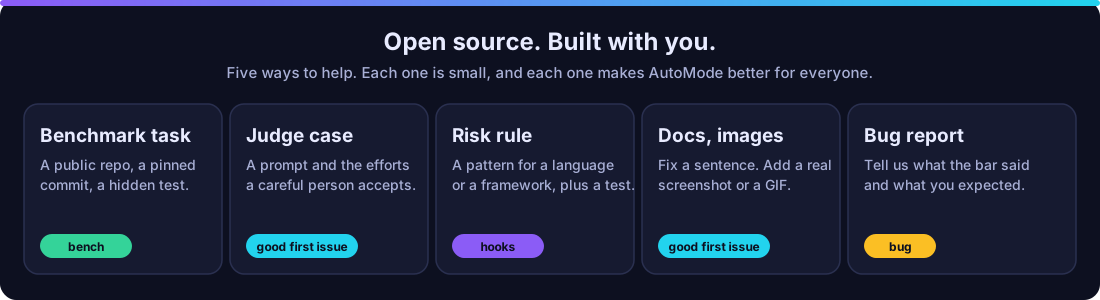
AutoMode gets better when more people use it on more kinds of work. It is MIT licensed, every line is in this repository, and you can add a benchmark task, a judge case or a risk rule in under ten minutes. No contribution is too small. A fixed sentence counts.
| You want to | Do this | Time |
|---|---|---|
| Report a bug | Open an issue. Say what the bar showed and what you expected. | 2 min |
| Add a judge case | Add a prompt and the efforts a careful person accepts to bench/judge-cases.json. | 10 min |
| Add a risk rule | Add a pattern to hooks/lib/risk.ts and a test in tests/. | 30 min |
| Add a benchmark task | Pick a public MIT or Apache-2.0 repository, pin two commits, and add a task file. See bench/tasks/README.md. Run node bench/validate-fixture.mts. | 1 to 2 hours |
| Improve the docs | Fix a sentence, or add a real screenshot or GIF to docs/readme/. | 5 min |
Your first contribution:
- Fork this repository and clone your fork.
- Run
npm install, thennpm run check. Every check passes onmain. - Make one small change, and add or update a test.
- Open a pull request. Say what changed and why.
Read CONTRIBUTING.md for the rules. Look for issues labeled good first issue. Ask questions in Discussions.
Star the repository if AutoMode saves you time. It helps other people find it.
Open source
AutoMode is MIT licensed. A Claude Code mod is code that runs with your permissions. It is not sandboxed. So the whole mod is here to read: hooks/. Install mods only from authors you trust, and review them first.
Review it before you install it
You can list what AutoMode does without running it. Clone the repository, then run:
claude plugin validate ./AutoMode
The hooks: line lists the events AutoMode handles. The calls: line lists the mods API methods it uses. Here is what they mean, checked on Claude Code 2.1.311:
| AutoMode calls | Why |
|---|---|
$.model.complete | Haiku calls, on your own Claude login. Each sends the text of the prompt or session it judges or summarises to Anthropic, as a Claude Code request does. A new prompt makes 2 to 4 calls: the AutoMode judge, 1 or 2 effortless judge calls, and sometimes 1 more. A pinned model makes 2. A short follow-up, or a prompt whose verdict is cached, makes none. A subagent spawn makes 1. A plan-mode change makes 2 to 4. Every compaction of the main session, /compact included, is written by Haiku. A failed call can be retried once or twice. With delegation: on, each extract is 1 more call and sends the named files. |
$.fs.read, $.fs.write, $.fs.exists, $.fs.list | Reads config.json and your settings file. Writes its records, checkpoints and caches to its own data folder, ~/.claude/plugins/data/automode/. With debugLog on, it also writes a log in the plugin folder. |
$.process.run | Four commands. chmod and rm -f on its own data files. git rev-parse and git status, both read only, for the task checkpoint. |
$.env.get | Reads AUTOMODE_* switches, your provider variables, and HOME. It reads ANTHROPIC_API_KEY only to test whether it is set, so it can tell a plan from an API key. It never stores or sends the value. |
$.store.get, $.store.set | Keeps small settings that Claude Code refused to keep. |
$.session.*, $.agent.*, $.prompt.*, $.tool.list, $.turn.abort, $.config.list, $.clock.* | Reads the session's model, usage and messages, and lists agents and tools. $.agent.spawn runs the six agents. $.prompt.compose and $.session.compact support handoff and compaction. $.turn.abort stops a turn when the guardian pauses it. |
$.ui.*, $.command.register | Draws the bar and adds /automode. |
What it writes. Only files in its own data folder, plus judge-log.jsonl in the plugin folder with debugLog on. It never edits a build, start-up, settings or instructions file. Paths are computed from those two folders, so the directory cannot read them as fixed text.
Subagents. The agent.spawn hook sets a subagent's model and effort. It does not change a permission mode.
Commands. AutoMode rewrites one kind of Bash command. When a test, lint, build or type-check command has a pipe, such as go test ./... | tail, it prepends set -o pipefail; so a failing check is not hidden by the pipe (without it, the pipe reports the last command's exit code). It matches common runners, among them go test, npm test, pnpm, yarn, pytest, jest, vitest, tsc, eslint, cargo test, mvn, gradle, make test, dotnet test, swift test and node --test, and skips --help and --version calls. It leaves a command alone when it already says pipefail, or ends the pipe on purpose with || true, ; true or exit 0. It runs only while a task is active. The command's output stays the same. It needs a shell that accepts set -o pipefail, such as bash or zsh.
AutoMode does not call $.http.fetch, $.mcp.*, $.env.set, $.prompt.submit or $.session.send. It has no network code of its own: grep -rnE "fetch\(|https?://" hooks scripts workflows finds only two comments that credit effortless. It sees every prompt and tool call, because it hooks prompt.submit and tool.call. That is how routing works. Nothing leaves your machine except through Claude Code.
- No key. It runs on your own Claude login.
- No server. There is nothing to host and no account to make.
- Your data stays local. See PRIVACY.md for what AutoMode stores and for how long.
Where an organization manages Claude Code
On a machine with managed settings, or in a Team or Enterprise login, Claude Code runs a built-in guard, cc-plugin-sec-default, ahead of every mod a user installs. The guard skips some hooks of a user-installed mod. Two of them matter here: prompt.attachment and session.compact, plus the compaction rows of session.append. Plan mode detection and Haiku compaction are then limited. Routing, the judge and the bar still work.
An administrator can run AutoMode as an organization mod, so these hooks run. See Manage mods for your organization. If the administrator sets allowManagedModsOnly, a user-installed AutoMode does not load, and the debug log says so.
Troubleshooting
| Symptom | Check |
|---|---|
| Nothing changes after install | Run /reload-plugins. Then run /plugin and look for 1 mod active · automode. |
| The mod is not listed | Check claude --version is 2.1.287 or later. Run claude plugin test in a folder that holds no mod: the message says whether mods can load. |
| The bar says AutoMode is idle | You set "activation": "picker" and the model ID does not match. Use "always", or run /automode setup. |
| The bar is missing in VS Code | Expected. Use /automode. |
| A hook seems skipped | Start with claude --debug and search the log for automode. See Troubleshoot a mod. |
| Filing a bug | Run /automode debug and paste the result. |
Develop
npm install                          # TypeScript and Node types, for the checks only
npm run check                        # type check, then the Node tests
claude plugin validate . --strict
claude plugin test .
claude --plugin-dir .
The mod itself has no install step and no build step. Node 23.6 or later runs the tests and bench scripts as TypeScript. CONTRIBUTING.md explains which files are JavaScript and why.
The mod is a function-hooks module. hooks/hooks.json names one file, hooks/register.ts, and that file exports register. Develop with --plugin-dir, not an installed copy: Claude Code caches an installed plugin by version, so raise version in .claude-plugin/plugin.json before you release a change. Read the mods overview first if mods are new to you.
Contributors

Credits
AutoMode stands on open source work. All of it is MIT licensed.
- Effort rules in
hooks/lib/effort.tsand the bar techniques inhooks/ui/are ported from effortless by HeyCubit. - Classifier contract and switch payback are adapted from claude-router by Alexei Ledenev and from jev-router.
- Upstream copies and checksums are in
bench/external/.
License
// faq
What is AutoMode?
Automatic model and effort router for Claude Code. A free plugin that picks Haiku, Sonnet or Opus for each prompt, adds risk floors and a review workflow, and shows cache and context state. No key, no server.. It is open-source on GitHub.
Is AutoMode free to use?
AutoMode is open-source under the MIT license, so it is free to use.
What category does AutoMode belong to?
AutoMode is listed under plugins in the Claudeers registry of Claude-compatible tools.
// embed badge

[](https://claudeers.com/automode)
// retro hit counter

[](https://claudeers.com/automode)
// reviews
// guestbook
// related in Claude Plugins
 🔓
A single CLAUDE.md file to improve Claude Code behavior, derived from Andrej Karpathy's observations on LLM coding pitfalls.
 🔓
Claude Code is an agentic coding tool that lives in your terminal, understands your codebase, and helps you code faster by executing routine tasks, explainin…
 🔓
"CLI-Anything: Making ALL Software Agent-Native" -- CLI-Hub: https://clianything.cc/
🔓financial-services — a Claude ecosystem project on GitHub.