
athena-loops
Backend-agnostic AI agent orchestration loop in Python — the orchestrator→worker→reviewer pattern as a deterministic harness. Drive any LLM backend (Claude,…
Install with your AI
Paste into Claude Code, Cursor, or any agent — it reads the repo and wires the tool into your project.
Install and set up athena-loops (git-clone project) into my current project.
Found on https://claudeers.com/athena-loops
Repo: https://github.com/luckeyfaraday/athena-loops
Homepage/docs: —
Detected install method: git-clone → git clone https://github.com/luckeyfaraday/athena-loops
Category: automation. Platforms: cli, api, web.
Read the repo's README for exact setup and env vars, then install it and wire it into my project.

Claudeers Health Verdict:
slowing; community-verified: false. Confirm the source before running anything.
git clone https://github.com/luckeyfaraday/athena-loops
// compatibility
| Platforms | cli, api, web |
|---|---|
| Operating systems | — |
| AI compatibility | claude |
| License | — |
| Pricing | open-source |
| Language | Python |
agentloop — backend-agnostic AI agent orchestration loop for Python
agentloop is a lightweight Python framework for multi-agent orchestration. It
implements the orchestrator → worker → reviewer pattern (the AI agent
orchestration loop) as a deterministic harness with a closed feedback loop: a goal
is decomposed into subtasks, fanned out to worker subagents, aggregated, and run
through a review gate that loops until the work meets its success criteria. One
loop drives any LLM backend — Anthropic Claude, Claude Code, Codex, opencode, or
aider — through a single Agent interface, and it ships as both an MCP server
and a plain CLI so any coding agent can call it.
The design principle: the loop is a harness (deterministic code), not a skill.
A prompt can describe "decompose, review, loop until done" but can't guarantee
it. So the control flow lives in code, and the model-facing judgement (how to
decompose, the review rubric) lives in swappable prompts. One harness drives any
backend through a single Agent interface.
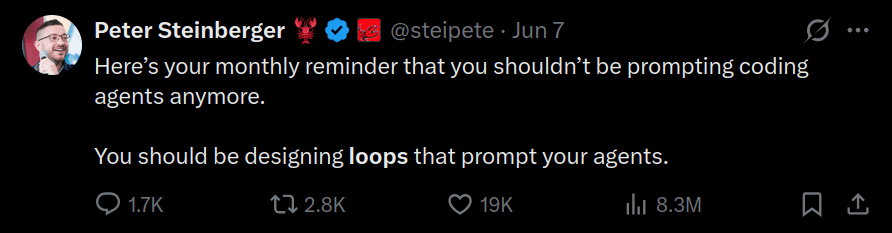
The tweet that started it all — Peter Steinberger (@steipete): "You shouldn't be prompting coding agents anymore. You should be designing loops that prompt your agents." agentloop is that idea as a reusable harness.
            ┌──────────── harness (this package) ────────────┐
goal ─▶ decompose ─▶ fan-out to subagents ─▶ aggregate ─▶ review gate ─▶ done?
            ▲                                                          │ no
            └──────────────── feedback: refine plan ◀──────────────────┘
Quick start
python3 -m examples.run_demo        # zero-dependency MockAgent
python3 -m pytest                   # full test suite, no deps
from agentloop import Orchestrator, Budget
from agentloop.adapters import MockAgent

orch = Orchestrator(MockAgent(), budget=Budget(max_iterations=4))
result = orch.run(
    goal="Write a briefing on the orchestrator-worker pattern.",
    success_criteria="Covers decomposition, execution, review, and the feedback loop.",
)
print(result.completed, result.iterations, result.stop_reason)
print(result.final_output)
Use a real model
pip install -e ".[claude]"
export ANTHROPIC_API_KEY=sk-...
python3 -m examples.run_demo --claude
Plug into any coding agent
The loop is pluggable in two directions, both thin wrappers over the Agent seam:
Inward — coding agents are the workers. CliAgent runs each role
(decomposer / subagent / reviewer) through a headless coding-agent CLI, so the
workers get that agent's tools, file access, and repo context:
from agentloop import Orchestrator
from agentloop.adapters import CliAgent

# Point the worker at a repo and let it actually edit files headlessly:
agent = CliAgent.claude_code(cwd="/path/to/repo", skip_permissions=True)
orch = Orchestrator(agent)                     # or .codex() / .opencode() / .aider()
result = orch.run(goal="Add a /health endpoint + test", success_criteria="test passes")
Knobs for autonomous coding workers:
cwd=...— run the worker inside a specific repo (works for every preset).skip_permissions=True— let the worker use tools without prompting (--dangerously-skip-permissions/--dangerously-bypass-approvals-and-sandbox/--yes-always). Needed for headless coding, but it bypasses all safety prompts — point it at a worktree or throwaway branch, not your main checkout.timeout=...— seconds to cap each worker CLI call. Default isNone(no cap): a real coding worker is slow and unpredictable, so a short per-call timeout just kills it mid-task and throws the work away. Bound the run instead withBudget(max_seconds=...), which is checked between iterations.verify_commands=[...]— run real commands after each worker iteration and feed failures back into the next loop. Use this for deterministic checks likepython3 -m pytest,npm test, ornpx playwright test. Any failing verifier blocks completion even if the reviewer would otherwise accept the work.
For big builds, keep subgoals small (the worker has to finish one in a single
call) and give the loop room with max_iterations; one cold worker can't build
everything in one shot.
Auth piggybacks on the CLI's own login, so a Claude.ai / ChatGPT subscription OAuth session works with no API key.
Isolated runs. The safe default for skip_permissions is to run inside a
throwaway git worktree on its own branch — your main checkout is never touched:
from agentloop import Orchestrator, worktree
from agentloop.adapters import CliAgent

with worktree("/path/to/repo") as wt:               # new branch + checkout
    agent = CliAgent.claude_code(cwd=wt.path, skip_permissions=True)
    Orchestrator(agent).run(goal="...", success_criteria="...")
    print(wt.changed_files())   # what the run touched
    wt.commit("agentloop run")  # optional: persist on the branch
Cleanup mirrors the harness's own worktrees: cleanup="auto" (default) keeps
the worktree iff the run changed something (so you can inspect/merge the branch)
and removes it if it left nothing; "always" / "never" force the choice.
Partial work is never lost. When you orchestrate against a repo, the loop
commits the worktree after every iteration (agentloop: iteration N). So if
a later iteration fails or a budget guard stops the run, each completed
iteration's work is preserved as a checkpoint commit on the branch — recoverable,
not discarded. The result's worktree.checkpoints lists them. Workers are also
told to inspect the working directory and continue from prior work rather
than restart, so a retry builds on what's already there instead of clobbering it.
The example runner isolates automatically when given a repo:
python3 -m examples.run_with_cli_agent claude /path/to/repo
python3 -m examples.run_with_cli_agent claude # codex | opencode | aider
Custom CLI? It's just a command template ({prompt}, {system}, {combined};
no prompt placeholder ⇒ text is piped on stdin):
CliAgent(["my-agent", "--system", "{system}", "--ask", "{prompt}"])
Presets are starting points — CLI flags vary by version; confirm yours and tweak
agentloop/adapters/cli.py. A non-zero exit or timeout becomes a FAILED task
(with retries), not a silent wrong answer.
Outward — a coding agent calls the loop. An MCP server exposes the loop as a
tool, so any MCP-aware agent (Claude Code, Cursor, Codex, opencode, Cline, Windsurf)
can invoke it. By default backend="auto" uses the same agent family as the
caller when detectable; pass backend explicitly to override it.
pip install -e ".[mcp]"                # installs the `mcp` SDK
python3 -m agentloop.mcp_server        # stdio transport
Tools:
orchestrate(goal, success_criteria, backend, cwd, max_iterations, skip_permissions, isolate, model, verify_commands, verify_timeout, playwright, detach=true)— runs the loop. Detached by default: returns{ status: "running", run_id, … }immediately and runs to completion in the background — you monitor it (see below). Passdetach=falseto instead block and get the result (or{ status: "needs_input", questions[], token }) back in a single call.orchestrate_resume(token, answers, detach)— continues a run that asked for inputorchestrate_status(run_id)— light status of a detached run (phase, iteration, running)orchestrate_tail(run_id, cursor, limit)— the events a detached run produced sincecursororchestrate_result(run_id, wait, timeout)— the final result of a detached runorchestrate_list()— every detached run this server has started, with statuslist_backends()— the worker engines this server can drivedoctor(cwd?)— non-invasive diagnostics for backend CLI availability, target directory access, and timeout interpretation
A completed result is structured:
{ completed, iterations, stop_reason, final_output, summary, history[], worktree? }
— summary is a one-line human-readable digest for the calling agent to show.
While it runs, orchestrate streams a notifications/progress update when it
starts and after every iteration (e.g. iteration 2/4: 3/3 subgoals ok, gates pass, goal incomplete), so the caller sees live status instead of a bare
spinner.
When cwd is given it runs in an isolated worktree (see above) by default.
Fire and monitor — the default. orchestrate runs detached: it returns a
run_id immediately and the loop runs to completion (or error) in the background.
There is no run timeout — you watch it rather than race it against a clock:
orchestrate(goal=…, cwd="/repo")   # backend="auto", detach=true by default
  -> { status: "running", run_id, run_dir, events_path, tail_command }
orchestrate_status(run_id)        -> { phase, iteration, running, … }   # poll until running=false
orchestrate_tail(run_id, cursor)  -> { events[], cursor, running, more } # or stream each step
orchestrate_result(run_id)        -> the final result, once running=false
Poll orchestrate_status (it returns instantly) until running is false, then
read orchestrate_result. Avoid orchestrate_result(wait=true) with no timeout —
that re-opens a request for the whole run, the very thing detached mode avoids.
Intake runs in the background too, so even a slow or clarifying intake never
blocks the start call; if it pauses, the result's stop_reason is needs_input
(with questions + token) — answer it with orchestrate_resume.
The calling agent starts the run, then interleaves polling orchestrate_tail
with talking to you — so you both see the loop work in real time: each subgoal
as it's planned, every worker's start/finish and an output preview, the
verification results, and the reviewer's verdict. Pass the returned cursor back
to orchestrate_tail to get only what's new.
Every event is also appended to a durable JSONL log you can tail -f from any
terminal, independent of the agent:
<cwd>/.agentloop/runs/<run_id>/
  events.jsonl     # one event per line — tail -f this
  status.json      # latest phase / iteration / running
  result.json      # the final result (written once, at the end)
  workers/         # full stdout of each worker call: iter<N>_<subgoal>.out
Worker output previews ride inline in the event stream; each worker's full
output is written to workers/iter<N>_<subgoal>.out and referenced by
data.output_path. Because the default flow returns at once, it sidesteps the
MCP request-timeout problem entirely — there's no long-blocking call to time out.
Timeouts, briefly. The default detached flow has no run timeout and never
holds an MCP request open, so the host's -32001 Request timed out cannot occur
on it. That error applies only to the opt-in blocking mode (detach=false), where
one request spans the whole run; if you use that mode, configure the host to wait
generously (≥ 600000 ms). orchestrate(timeout=…) (per worker subprocess) and
max_seconds (cooperative loop budget) remain optional hard kills — both
default off; leave them unset for real coding runs and monitor to completion
instead. Have agents call doctor() before guessing about missing CLIs or broken
backend spawning.
Plug into Claude Code. Point PYTHONPATH at the repo so the server resolves
the package no matter where Claude Code launches it (no install needed):
claude mcp add athena-loops --scope user \
  -e PYTHONPATH=/abs/path/to/athena-loops \
  -- python3 -m agentloop.mcp_server

claude mcp list                        # -> athena-loops: ✔ Connected
Claude Code's CLI registration does not expose a per-server request-timeout flag;
use doctor() to distinguish host timeout symptoms from backend availability.
--scope user makes it available in every project; use local for just this
one, or project to write a shared .mcp.json. If you pip install -e .
instead, the agentloop-mcp console script is on PATH and the -e PYTHONPATH=…
is unnecessary: claude mcp add athena-loops -- agentloop-mcp.
Plug into Cursor / Cline / Windsurf (.mcp.json / mcp.json):
{
  "mcpServers": {
    "athena-loops": {
      "command": "python3",
      "args": ["-m", "agentloop.mcp_server"],
      "env": { "PYTHONPATH": "/abs/path/to/athena-loops" },
      "timeout": 600000
    }
  }
}
Then (restart the session first) ask the host agent to "use agentloop to
orchestrate: ". The default backend="auto" picks the matching worker for
the caller (codex from Codex, opencode from OpenCode, claude_code from
Claude Code when detectable). Choose a concrete backend (claude_code,
codex, mock, …) to override that.
For agents that don't speak MCP but can run a shell, there's a plain CLI over the same contract:
agentloop run --goal "Add a /health endpoint + test" --criteria "test passes" \
  --cwd . --skip-permissions --json \
  --verify "python3 -m pytest" --verify "npx playwright test"
agentloop backends
--json prints the full result on stdout; --progress streams one NDJSON line
per iteration on stderr; --goal - / --goal-file read long prompts. --verify
is repeatable and runs each command after every iteration in the same repo/worktree
as the worker. Exit code is 0 if completed, 1 if a budget guard stopped it,
2 on error — so scripts and agents can branch on the outcome.
For web/UI work, --playwright (MCP: playwright=true) is a one-switch shortcut
that turns on browser-level testing across the whole loop: it adds npx playwright test as a verify gate and instructs the subagent to write/extend Playwright
tests and the reviewer to require passing ones before completing. Leave
--verify-timeout unset — browser launch is slow.
How the user gives input (intake & clarification)
Before any planning, the loop runs an intake phase: it can propose success
criteria (if you didn't give any) and ask the clarifying questions it needs —
the diagram's "App Follow-up Questions". Where the human answers is a second
swappable seam, Interaction, mirroring the Agent seam:
| Surface | Interaction | UX |
|---|---|---|
| Python / headless (default) | AutoInteraction | never blocks; proceeds with best judgment |
| Interactive terminal | ConsoleInteraction | prompts the human via input() |
| MCP / scripted CLI | SuspendInteraction | returns needs_input + a resume token instead of blocking |
Terminal wizard — omit --goal and it asks; criteria and clarifying
questions are prompted inline:
agentloop run                         # Goal> … then proposes criteria + asks questions
agentloop run --goal "…" --non-interactive   # never prompt; use defaults
Inside another agent (MCP) — orchestrate(...) returns
{ status: "needs_input", questions: [...], token } when it needs answers; the
host agent collects them from the user and calls
orchestrate_resume(token, answers) to continue. Same flow on the CLI for tools:
agentloop run --goal "build an API" --ask        # prints questions + token, exits 3
agentloop run --resume <token> --answer "FastAPI" --answer "Postgres"
Python — pass your own:
from agentloop import Orchestrator, ConsoleInteraction
Orchestrator(agent, interaction=ConsoleInteraction()).run(goal="…")  # criteria optional
The seam (where to put what)
| Layer | Lives in | What it owns |
|---|---|---|
| Harness | orchestrator.py, scheduler.py, types.py | the loop, fan-out, aggregation, review gate, termination guards, failure capture |
| Agent seam | agent.py + adapters/ | one Agent.run(request) -> response per backend (Mock, Claude, …) |
| Skills | roles.py | the prompts inside each box: decomposer, subagent, reviewer rubric |
To support a new backend, implement one method:
from agentloop.agent import Agent, AgentRequest, AgentResponse

class MyAgent(Agent):
    def run(self, request: AgentRequest) -> AgentResponse:
        text = call_your_model(system=request.system, prompt=request.prompt)
        return AgentResponse(text=text)
The three roles (Orchestrator, Subagent, Reviewer) are the same Agent
invoked with different system prompts — not separate classes.
Two gaps in the original diagram, handled here
- Termination guards —
Budgetcaps iterations, wall-clock time, and total agent calls so the NO-branch can't spin forever. - Subagent failure handling — a subagent that raises becomes a
FAILEDTaskResult(with retries), visible to the reviewer and the feedback step, instead of crashing the run or being silently dropped.
Layout
agentloop/
  orchestrator.py   # the loop (deterministic harness) — emits live events
  scheduler.py      # parallel/sequential subagent execution + retries
  roles.py          # role prompts — the tunable "skills"
  agent.py          # Agent interface + robust JSON extraction
  types.py          # Budget, Subgoal, TaskResult, ReviewResult, LoopState, LoopEvent, ...
  interaction.py    # Interaction seam: Auto / Console / Suspend (intake & clarify)
  verifier.py       # CommandVerifier: real verify-command gate after each iteration
  runs.py           # detached background runs + the tail-able event log
  mcp_server.py     # MCP tools: orchestrate(detach), orchestrate_tail/status/result
  cli.py            # `agentloop run` / `agentloop backends` entry point
  adapters/
    mock.py         # deterministic, dependency-free (demo + tests)
    claude.py       # Anthropic SDK backend
    cli.py          # CliAgent: drive any headless coding-agent CLI as a backend
examples/run_demo.py, examples/run_with_cli_agent.py
tests/  # full suite (orchestrator, scheduler, CLI adapter, MCP server, ...)
FAQ
What is agentloop? A backend-agnostic Python framework that implements the AI agent orchestration loop — the orchestrator–worker–reviewer pattern with a closed feedback loop — as deterministic harness code rather than a prompt.
What is the orchestrator–worker–reviewer pattern? An LLM agent decomposes a goal into subtasks (orchestrator), parallel worker subagents execute them, and a reviewer gates the aggregated result against success criteria, looping with refined plans until done or a budget guard stops it.
Which LLM backends does agentloop support? Any model behind a single
Agent.run() method. Built-in adapters cover a dependency-free MockAgent, the
Anthropic Claude SDK, and headless coding-agent CLIs — Claude Code, Codex,
opencode, and aider — via CliAgent.
How do I orchestrate multiple coding agents from Claude Code, Cursor, or Cline?
Run agentloop as an MCP server (python3 -m agentloop.mcp_server) and call its
orchestrate tool, or use the plain agentloop run CLI from any agent that has a
shell.
Does agentloop need an API key? No — when you drive it through a coding-agent
CLI it piggybacks on that CLI's own login, so a Claude.ai or ChatGPT subscription
OAuth session works without an ANTHROPIC_API_KEY.
How does agentloop avoid infinite agent loops? A Budget caps iterations,
wall-clock time, and total agent calls, and a failing subagent becomes a FAILED
task result (with retries) instead of crashing or silently vanishing.
Is this like Peter Steinberger Loops / the agent loop technique? Yes — it's the same family of idea popularized by Peter Steinberger's writing on running coding agents in a loop ("Peter Steinberger Loops"). agentloop turns that pattern into a reusable, backend-agnostic harness with an explicit review gate and budget guards, rather than a one-off shell script.
// faq
What is athena-loops?
Backend-agnostic AI agent orchestration loop in Python — the orchestrator→worker→reviewer pattern as a deterministic harness. Drive any LLM backend (Claude, Codex, opencode, aider); ships as an MCP server + CLI.. It is open-source on GitHub.
Is athena-loops free to use?
athena-loops is open-source, so it is free to use.
What category does athena-loops belong to?
athena-loops is listed under mcp-servers in the Claudeers registry of Claude-compatible tools.
// embed badge

[](https://claudeers.com/athena-loops)
// retro hit counter

[](https://claudeers.com/athena-loops)
// reviews
// guestbook
// related in Automation & Workflows
 🔓
🔓 🔓
🔓The API to search, scrape, and interact with the web at scale. 🔥
 🔓
🔓🌐 Make websites accessible for AI agents. Automate tasks online with ease.
 🔓
🔓Taste-Skill - gives your AI good taste. stops the AI from generating boring, generic slop