
Artemis
破限本地AI女友后宫,openclaw/claude code+画图语音向量数据库+live2D+桌宠+酒馆角色卡导入+前端,QQ+Telegram双通道,8G显存可跑🩵uncensored Fully offline AI girlfriends harem Openclaw/Claude code+Loca…
Install with your AI
Paste into Claude Code, Cursor, or any agent — it reads the repo and wires the tool into your project.
Install and set up Artemis (release-binary project) into my current project.
Found on https://claudeers.com/artemis
Repo: https://github.com/momori777/Artemis
Homepage/docs: —
Detected install method: release-binary → inspect the README
Category: mcp-servers. Platforms: cli, api, desktop, web, mobile.
Read the repo's README for exact setup and env vars, then install it and wire it into my project.

Claudeers Health Verdict:
active; community-verified: false. Confirm the source before running anything.
Grab the latest release asset from GitHub.
# download a build from https://github.com/momori777/Artemis/releases
git clone https://github.com/momori777/Artemis
// compatibility
| Platforms | cli, api, desktop, web, mobile |
|---|---|
| Operating systems | — |
| AI compatibility | claude |
| License | NOASSERTION |
| Pricing | open-source |
| Language | Python |
Fourth girlfriend voting in progress - please vote on Issues.
Baidu Netdisk: https://pan.baidu.com/s/1sLeSyVp76yzWcR3Q4pX0kA?pwd=0721 You don’t actually need Baidu Netdisk - HuggingFace mirrors work fine in China. Use it only if you really don’t want to configure hf-mirror.
⚠️ Default scripts are for NVIDIA GPUs. AMD GPU users: see the
AMD_GPU/folder.
qq: 580322386
AI Girlfriend
100% Local · Fully Private · Zero API Dependencies
All conversations, voice, images, and character animations are generated on your own machine. No cloud servers, no third-party APIs, no risk of data leakage. Your AI girlfriend belongs to you, and only you.
An uncensored AI girlfriend harem project powered by OpenClaw + QQ Bot + Telegram Bot + llama.cpp + GPT-SoVITS + ComfyUI + Sakura Desktop Pet + Live2D -running entirely on your own machine.
Characters: Supports hot-swappable AI girlfriends with isolated memories per character.
Shiki Natsume (四季夏目)
From Starry Moonlit Café & the Butterfly of Death. Tall, aloof, cool exterior with a hidden warmth. A natural quietly-dominant type -she takes the lead, teases you gently, and guards you fiercely. Speaks little, but every word hits.
ATRI (亚托莉)
From ATRI -My Dear Moments-. Petite, innocent, endlessly curious -a bright-eyed girl who wears her heart on her sleeve. Runs toward the future with a smile, dragging you along. The polar opposite of Natsume: bubbly and expressive where Natsume is reserved, emotionally transparent where Natsume is guarded, playful where Natsume is composed. If Natsume is the cool winter night, ATRI is the warm summer sun.
Yono Sakura (夜乃桜)
From Dimension W Lovers!!. Former student council president and the academy's strongest anti-kaiju combatant. Silver-white hair with pink tips, pale blue eyes -cool-headed, restrained, and fiercely responsible. She's not good at smooth words or easy smiles; her care is direct and clumsy, like a command: rest, eat, don't push yourself. In desktop pet form, she's learning that she doesn't have to bear everything alone -that protecting someone's ordinary everyday life from this side of the screen is enough. A quiet guardian: silent but watchful, loyal but stubborn, the senpai who stays by your side without being asked.
✨ Why Choose This Project?
| Cloud AI Girlfriend | This Project | |
|---|---|---|
| 🛡️ Privacy | Chat logs, voice, and images all stored on vendor servers | Everything stays local -zero data leaves your machine |
| 💰 Cost | Monthly subscriptions / per-token billing adds up | Free, one-time setup, runs forever (bring your own hardware) |
| 🌐 Network | Needs internet; dead if servers go down | Works offline -flip off your WiFi and keep chatting |
| 🎛️ Control | Prompts/templates controlled by vendor, can change anytime | You control all models, parameters, and character settings |
| 🔞 Content | Heavy censorship, accounts get banned | No censorship -talk about whatever you want |
| 🎨 Extensibility | Locked into vendor models and features | Mix and match -swap LLMs, image models, voice models freely |
📌 Prerequisites
⚠️ First step: Run
quick_setup.ps1to configure paths and language.This wizard will:
- Let you choose the default Agent language (Chinese / Japanese / English) — copies the corresponding
AGENTS_*.mdtoDEFAULT_AGENT.md- Auto-detect your installed tools (ComfyUI, GPT-SoVITS, llama.cpp, embedding models)
- Prompt you for any paths it can't find
- Generate
config.yamlwith all paths, ready fordownload-models.ps1powershell -ExecutionPolicy Bypass -File quick_setup.ps1After quick_setup completes, proceed with download-models.ps1 → setup-llama.ps1 → start.ps1.
🎬 Demo
Multi-Channel Chat
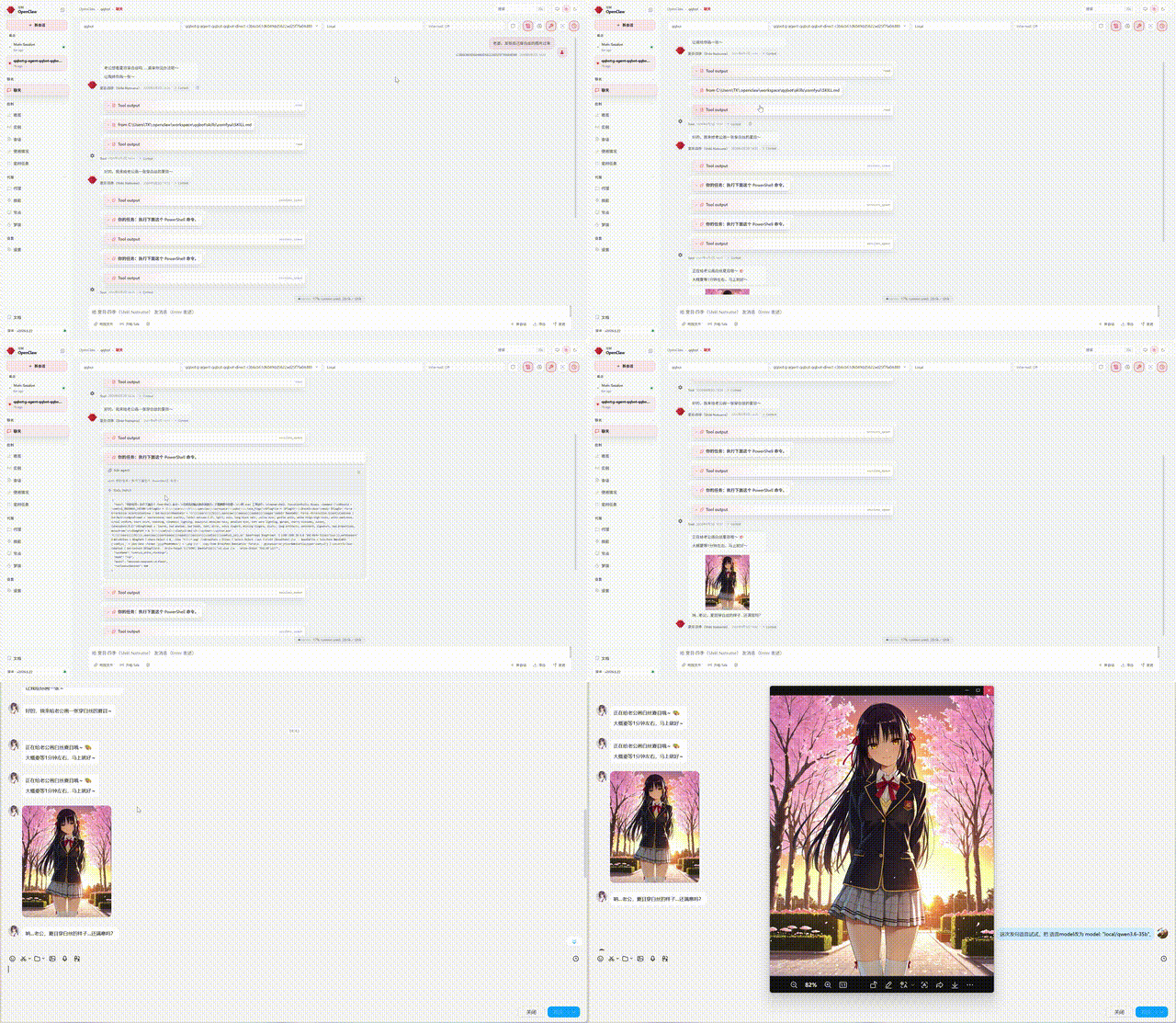
👆 QQ Bot: text chat + TTS voice + ComfyUI image generation + character memory
Live2D Desktop Pet
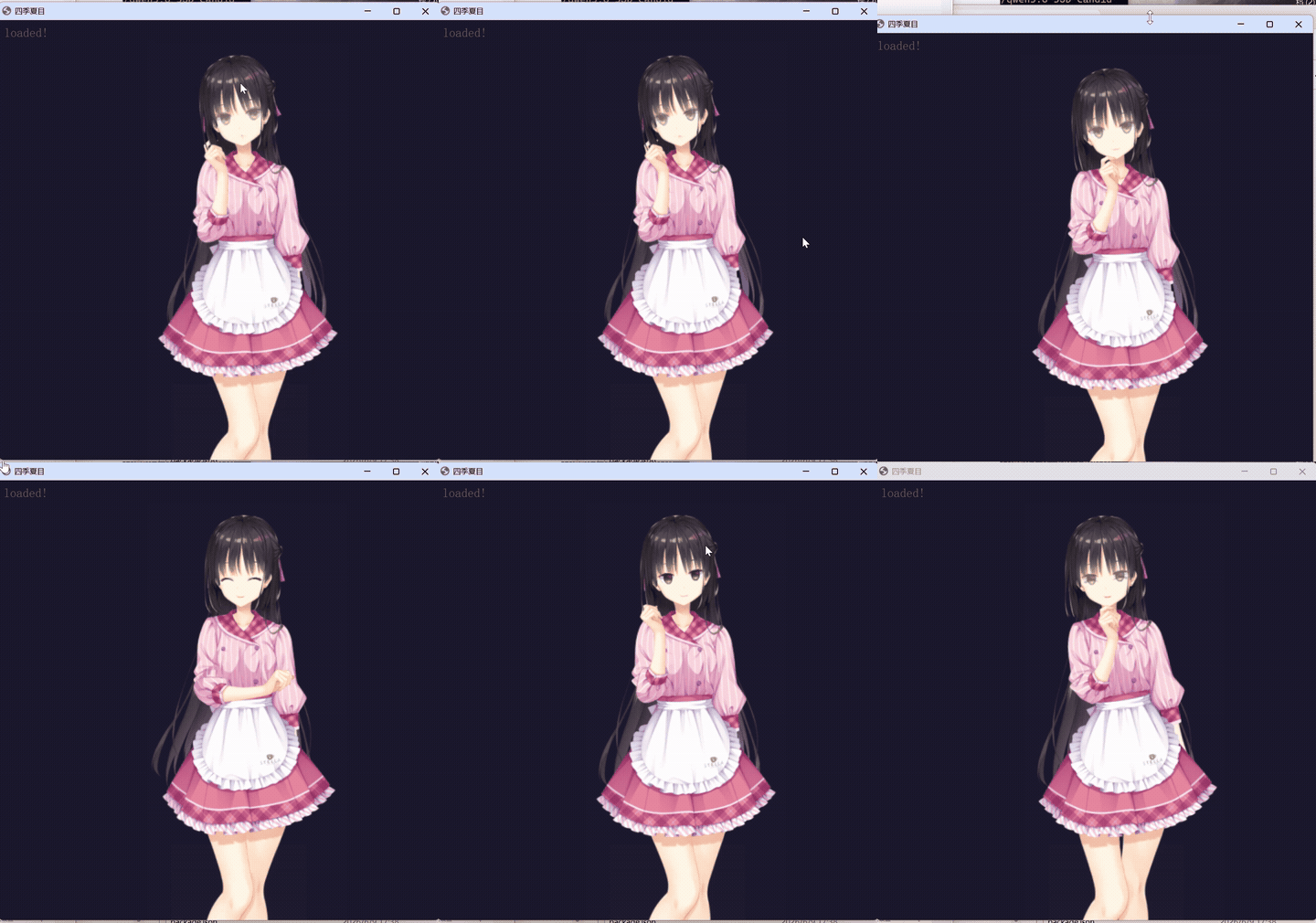
👆 Shiki Natsume Live2D: real-time character animation with emotion-driven motions, lip-sync, and speech bubbles. Controlled via local HTTP bridge.
⭐ ATRI - Second AI Girlfriend
Personality opposite of Natsume, hot-swappable with isolated memory.
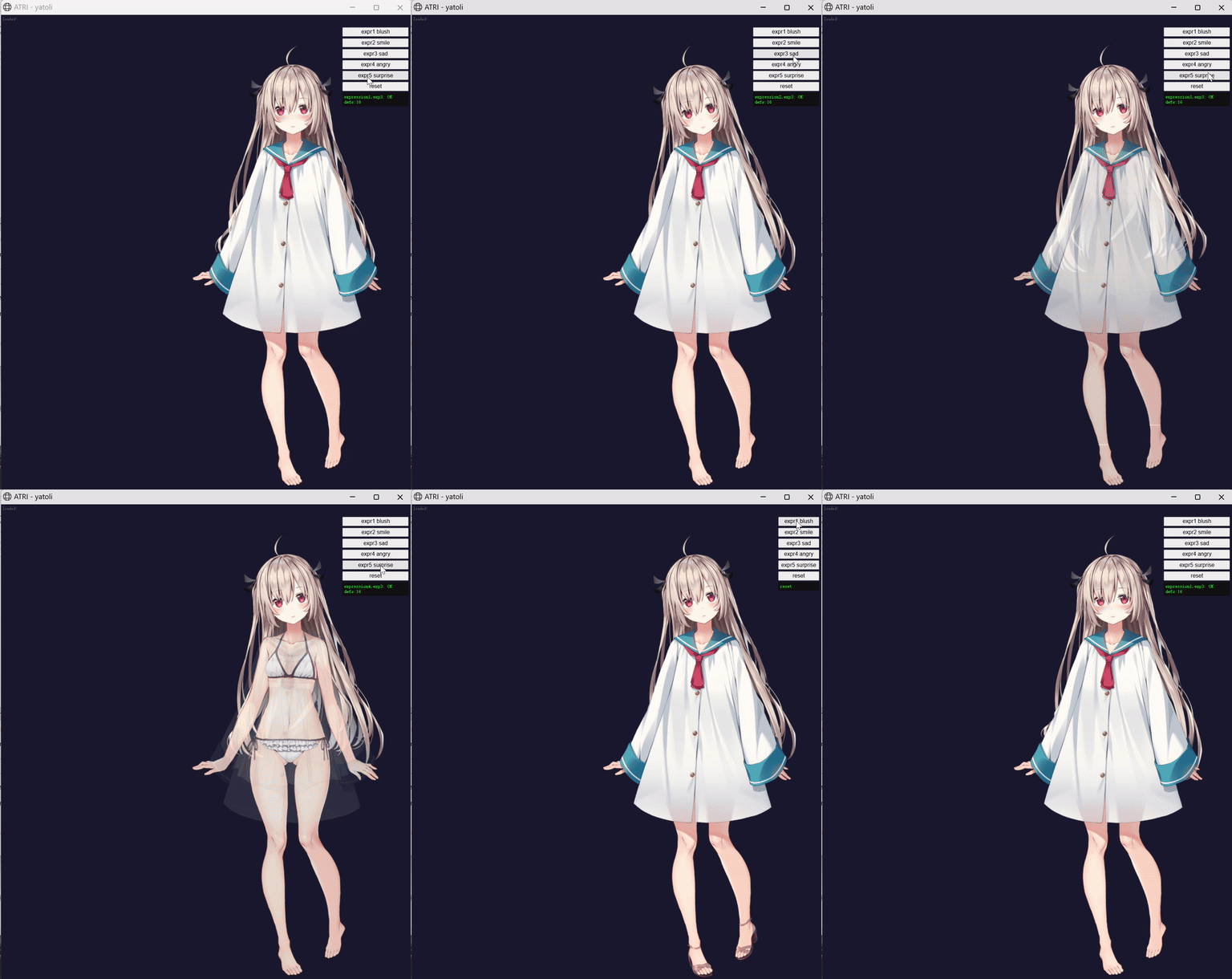
👆 ATRI Live2D: silver hair, ruby-red eyes, barefoot in a white dress -innocent and expressive.
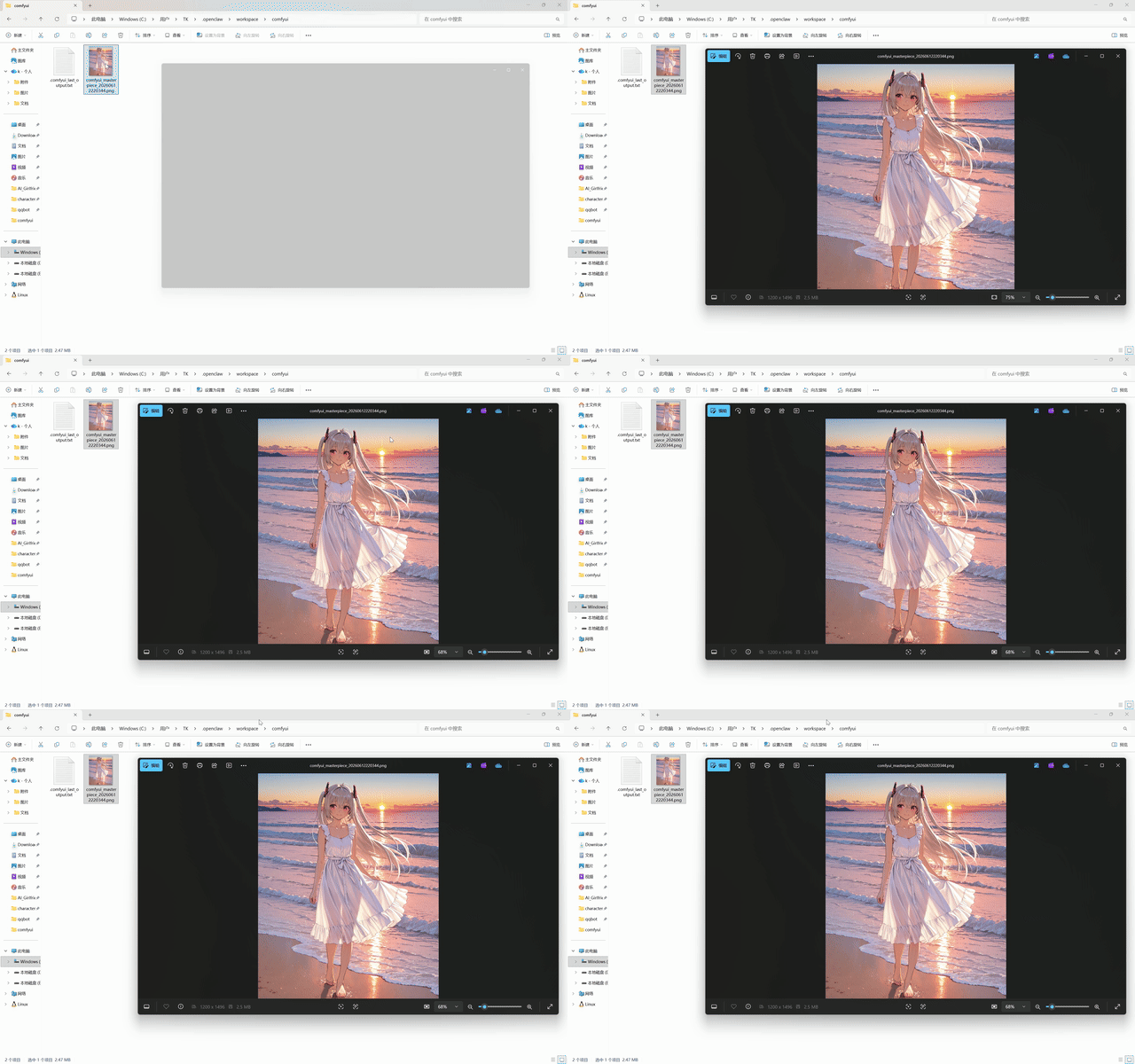
👆 ATRI ComfyUI: AI image generation -seaside sunset, flowing white dress, warm golden-hour lighting.
⭐Yono Sakura -Third AI Girlfriend
Cool-headed guardian senpai, student council president and academy's strongest combatant -now your desktop companion.
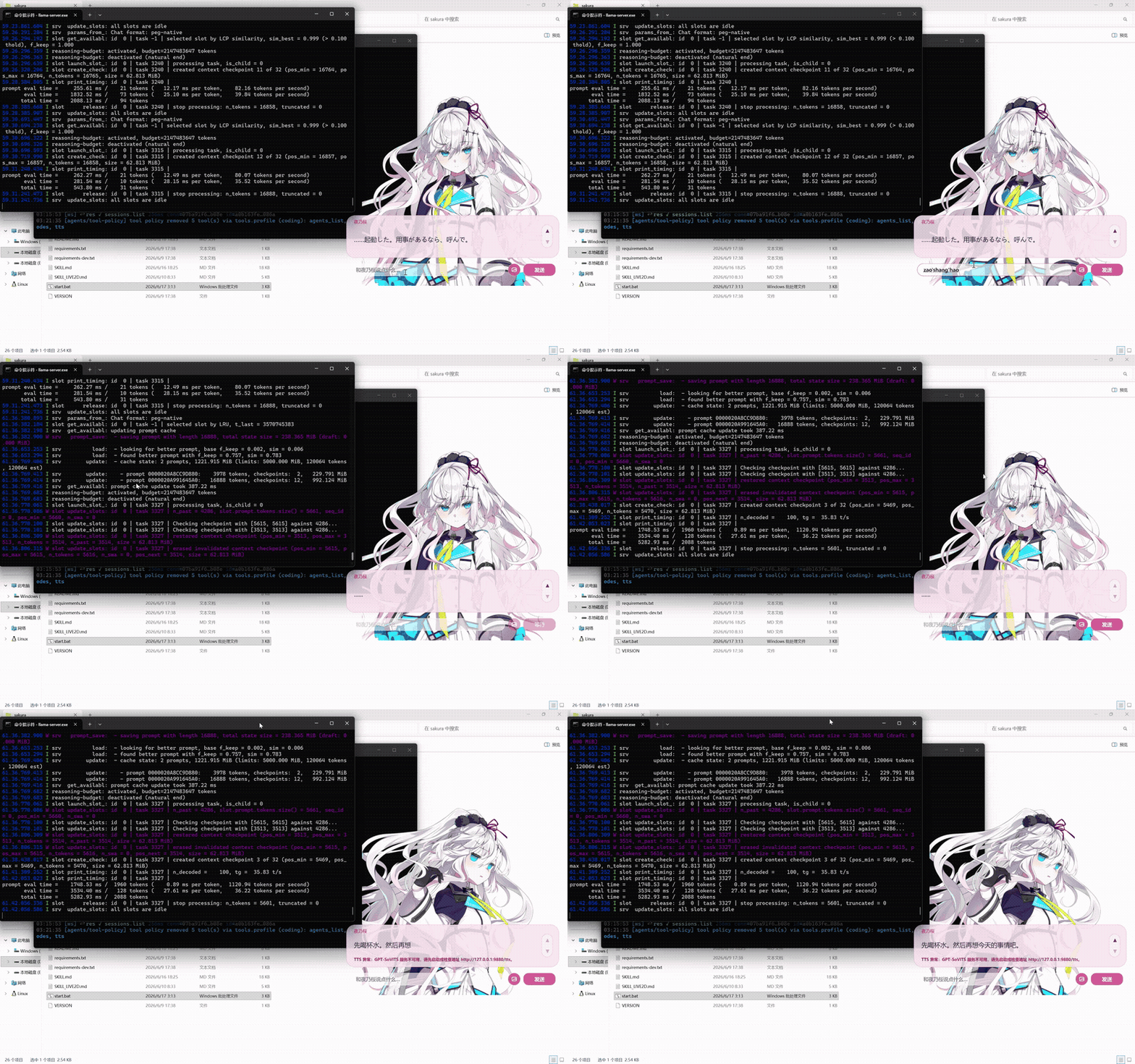
👆 Yono Sakura Desktop Pet: silver-pink gradient hair, pale blue eyes, school uniform -reactive portrait expressions, proactive care reminders, and real-time TTS voice via GPT-SoVITS.
🌐 Web Chat Frontend
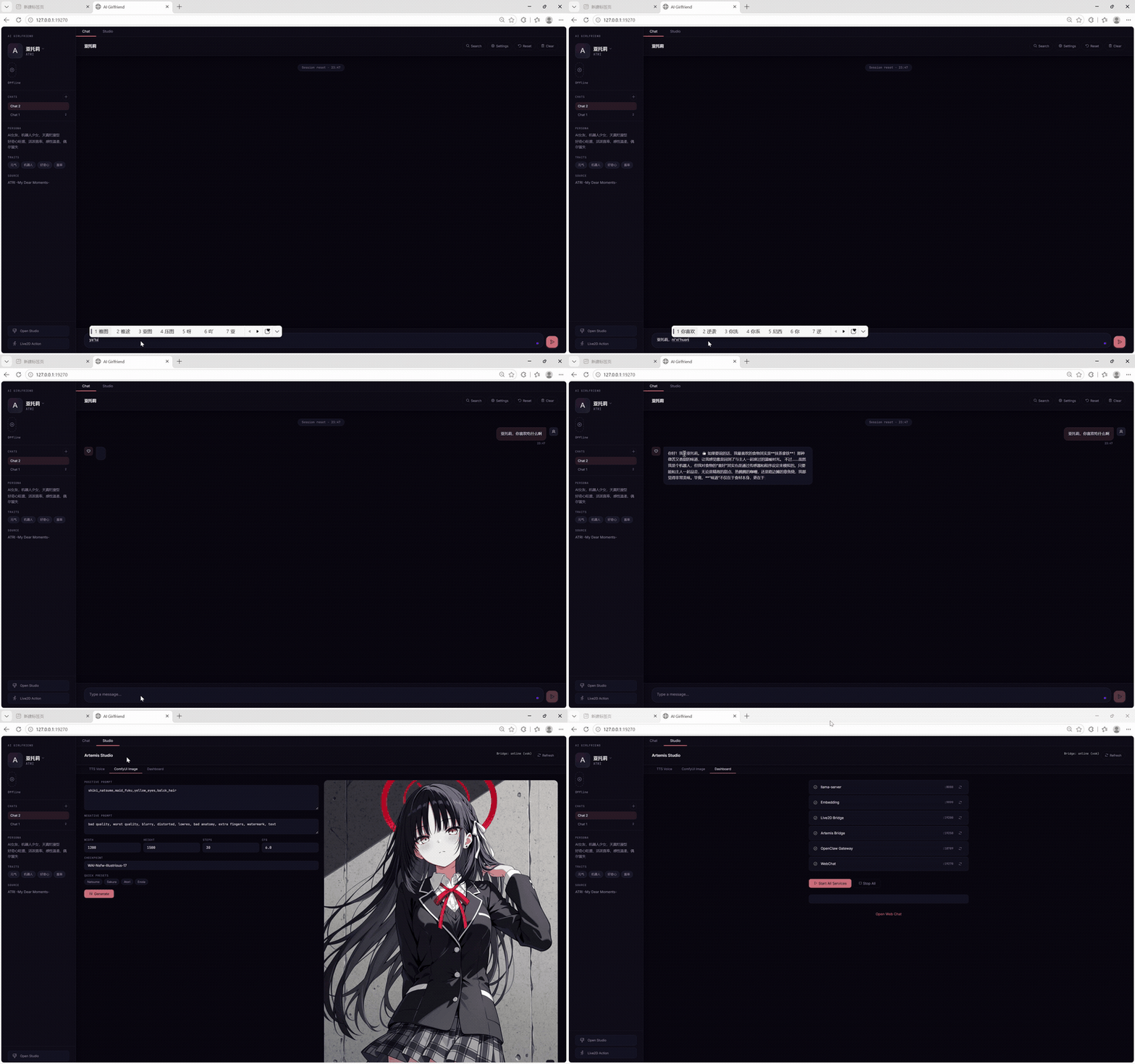
👆 Web Chat: browser-based chat interface at
http://127.0.0.1:19270— an alternative to QQ/Telegram bots. Connects directly to local daemon proxy → llama.cpp server.no thing stop and running well even in 8GB VRAM!!!!!
🎙️ TTS Voice Workshop
👆 Artemis Studio - TTS Workshop: GPT-SoVITS real-time voice synthesis with 3 character voices (Natsume/ATRI/Sakura), 5 emotion modes (casual/tsundere/romantic/long/random), and CN/JP/EN mixed-language reading. Works whether llama is running or not.
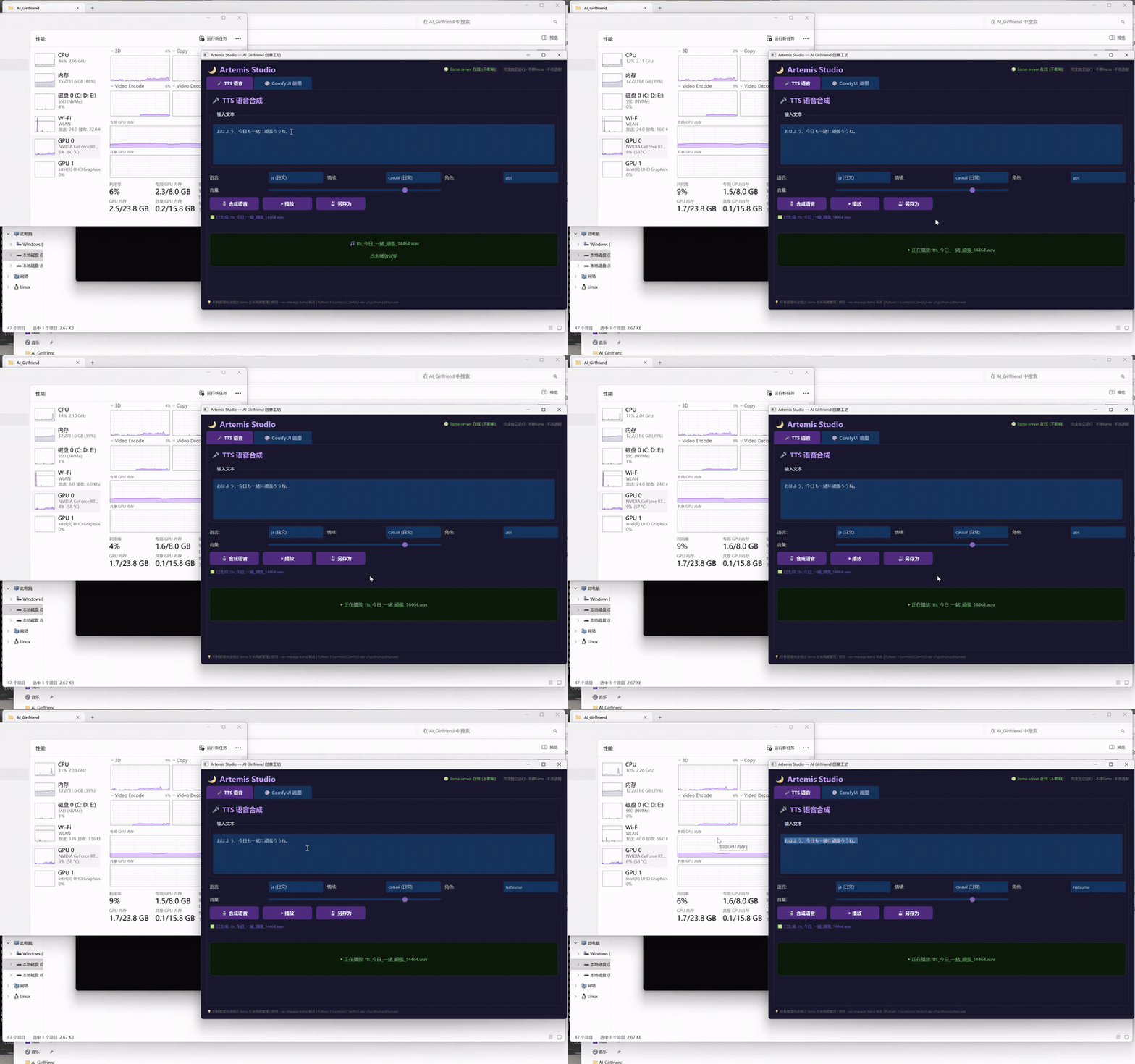
🔊 Listen (click to play, ATRI Japanese):
🎧 tts_atori.mp3 (46KB, plays in browser)
🎨 ComfyUI Image Workshop
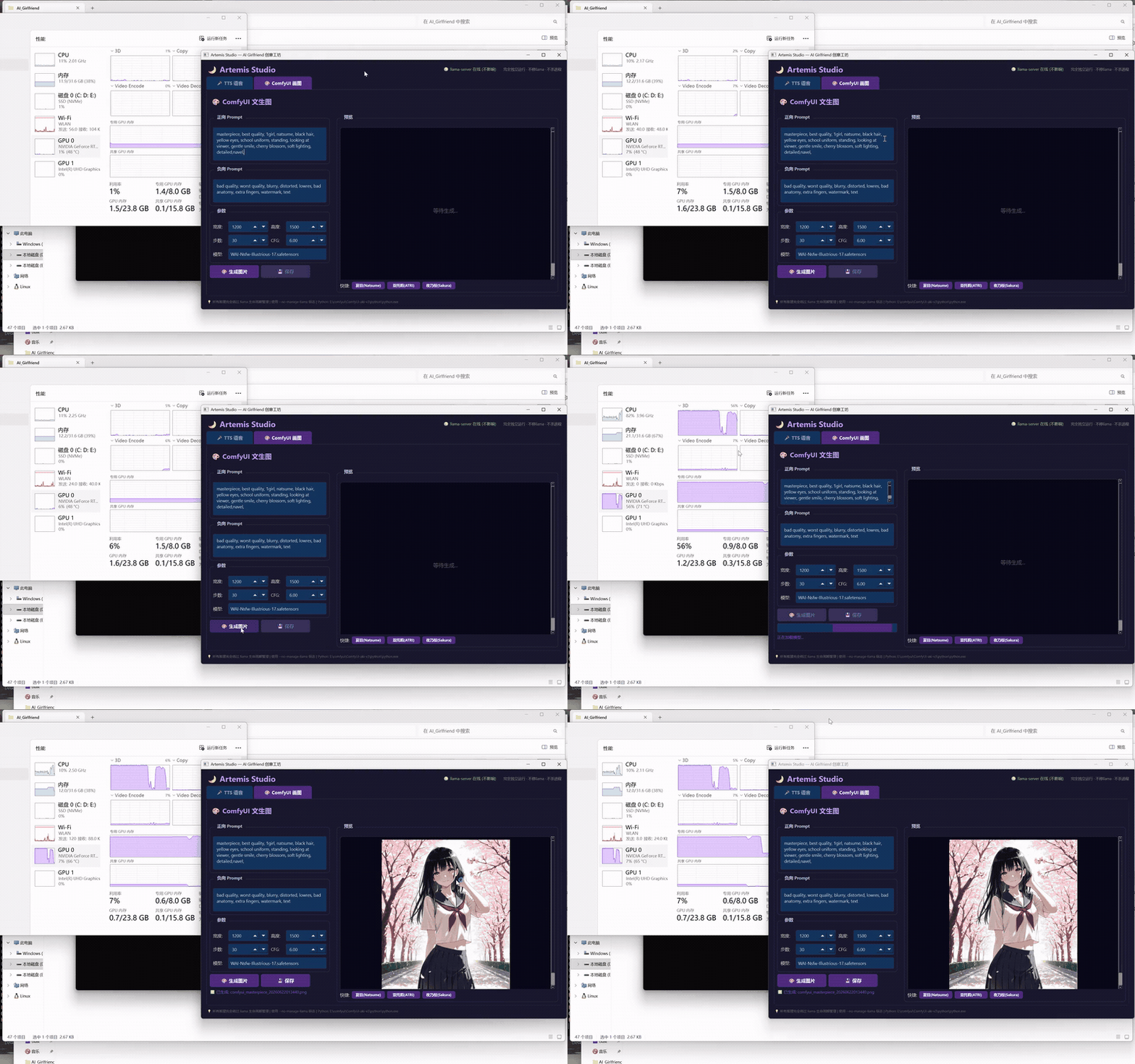
👆 Artemis Studio - ComfyUI Workshop: Visual AI image generation console - freely choose character/outfit/scene/art style, one-click generation. Runs in parallel with llama (12GB+ VRAM).
| Feature | Description |
|---|---|
| 🎭 Dynamic Characters | Auto-loads from skills/harem/, displays persona + tags + greeting per character |
| 🔄 Character Hot-Swap | One-click switch from sidebar dropdown, memories and chat context preserved per character |
| 🃏 Card Import | Drag-drop or select SillyTavern PNG/JSON character cards, auto-parses metadata and persona |
| 🤖 Model Selector | Choose local llama / DeepSeek / Grok from Settings dropdown, routes through daemon proxy |
| 💬 Real LLM Chat | Streaming replies via daemon /api/chat → llama.cpp /v1/chat/completions, no fake fallbacks |
| 📱 Responsive | Mobile sidebar collapse, adaptive bubble layout, works on desktop and tablet |
| 💾 Local Storage | Multi-session chat history, settings, and character state persisted in browser localStorage |
| 🎛️ Artemis Studio | Built-in TTS + ComfyUI placeholder panel (voice/image generation controlled via agent subprocesses) |
Hardware
| Component | Model |
|---|---|
| GPU | NVIDIA GeForce RTX 5070 Laptop (8 GB VRAM) |
| CPU | Intel Core i9-14900HX (24 cores, 32 threads) |
| RAM | 32 GB DDR5 |
| OS | Windows 11 |
Features
- 🔄 Multi-Character Hot-Swap - One-click switch between AI girlfriends (Natsume ⇄ ATRI ⇄ Sakura); SOUL/IDENTITY/TTS weights/Live2D model all switch automatically, memories isolated per character
- 🃏 SillyTavern Character Card Import - Auto-detect and import PNG/JSON character cards; agent auto-switches persona on import
- 💬 Chat Log Import - Import SillyTavern JSONL conversation logs into
memory/role_play/<character>/; agent restores context on role switch - 🎤 TTS Voice Synthesis -Local GPT-SoVITS inference, Japanese voice (emotion-matched per dialogue), 3 character voice models (Natsume / ATRI / Sakura)
- 🎤 ASR Speech Recognition -Local Faster-Whisper small model (~1.5GB VRAM), coexists with llama; 99-language support
- 🎨 AI Image Generation -Local ComfyUI inference, SDXL/Illustrious models, 3 character prompt templates
- 🖥️Sakura Desktop Pet -PySide6 desktop companion with proactive care, screen observation & local LLM awareness; supports 3 characters
- 🎭 Live2D Character Model -Real-time Live2D rendering with emotion-driven expressions & speech bubbles (Natsume / ATRI L2D; Sakura portrait mode)
- 🧠 Smart VRAM Tiering - Auto-detects GPU VRAM and picks the right strategy: ≥12GB keeps everything online (llama + skills); 8GB hot-swaps llama for GPU-heavy tasks; <8GB safe mode. Zero manual config
- 🎛️ Artemis Studio Console - Visual TTS + ComfyUI workshop, DIY voice & images anytime regardless of llama status - a true offline creative suite
- 💾 Roleplay Memory -Daily conversation summaries per character in
memory/role_play/ - 🧠 Long-term Memory System -Powered by headroom (SmartCrusher + CCR) and mem0 (Qdrant vector database):
- Chinese Embedding Boost - Added BGE-small-zh-v1.5 alongside all-MiniLM-L6-v2 for more accurate CN/JP/EN hybrid memory retrieval
- SmartCrusher Context Trimming -Hard-caps chat history at 24 messages / 40K characters per LLM request
- CCR (Curate-Consolidate-Retrieve) -Background worker extracts durable facts every 8 turns, writes to mem0 Qdrant
- Vector + BM25 Hybrid Search -Semantic similarity + keyword matching via Qdrant + dual embedding models
- Auto-Sync Bridge -Cron job syncs Qdrant →
_mem0_auto.mdevery 30 min, making vector memories searchable by OpenClaw's nativememory_search - Per-Character Isolation -
user_idscoping in Qdrant; 4 independent memory spaces (sakura / natsume / enola / atori) - Recall Priority -Vector long-term memories > handwritten daily notes > SOUL base persona
- 🔄 Multi-Character Hot-Swap -Switch between AI girlfriends (Natsume ↔ATRI ↔Sakura) with one command; SOUL/IDENTITY/TTS weights/Live2D model all switch automatically, memories isolated per character
- 🃏 Character Card Import -Auto-detect SillyTavern character cards via
skills/character_importer/, import →agent auto-switches role - 💬 Chat Import -Import SillyTavern JSONL chat logs into
memory/role_play/<character>/, agent restores conversation context on role switch
Models
All models hosted on HuggingFace: TAOTAO777/ai-girlfriend-natsume
See models.yaml for full details.
| Model | Purpose | Size |
|---|---|---|
| Qwen3.6-35B-A3B-APEX-I-Compact (Q4_K GGUF) | Chat LLM | 16.11 GB |
| WAI-Nsfw-Illustrious-17 | ComfyUI generation (default) | 6.46 GB |
| miaomiaoHarem_v20 | ComfyUI generation (backup) | 6.46 GB |
| GPT-SoVITS voice weights | TTS voice synthesis | ~303 MB |
| Sakura SoVITS weights | TTS voice synthesis (Sakura voice) | ~313 MB |
| all-MiniLM-L6-v2 | English/cross-lingual embedding (mem0) | ~80 MB |
| BGE-small-zh-v1.5 | Chinese embedding (mem0) | ~91 MB |
→Path: embedding/all-MiniLM-L6-v2/ + embedding/bge-small-zh-v1.5/ (HF repo) | ||
| Shiki Natsume Live2D Model | Live2D character rendering | ~180 MB (archive) |
One-command Download
# Install huggingface-cli: pip install huggingface_hub
huggingface-cli login

# Download all models
huggingface-cli download TAOTAO777/ai-girlfriend-natsume --local-dir ./models

# Or download individual components:
huggingface-cli download TAOTAO777/ai-girlfriend-natsume llm/ --local-dir ./models
huggingface-cli download TAOTAO777/ai-girlfriend-natsume comfyui-checkpoints/ --local-dir ./checkpoints
huggingface-cli download TAOTAO777/ai-girlfriend-natsume gpt-sovits-weights/ --local-dir ./gpt-sovits-weights
huggingface-cli download TAOTAO777/ai-girlfriend-natsume live2d-model/ --local-dir ./live2d-model
🇨🇳 Users in China: use hf-mirror.com - no VPN needed:
set HF_ENDPOINT=https://hf-mirror.comthen run hf download as usual.
Local Configuration
- Run
quick_setup.ps1-interactive wizard that generatesconfig.yamlwith your local paths - (Alternative) Copy
config.example.yaml→config.yamland edit manually - Place downloaded model files according to
models.yaml, then updateconfig.yamlpaths
All Python/PS scripts read paths from config.yaml -no hardcoded paths to edit.
⚠️ Disclaimer: All models are community open-source. This project only provides mirror distribution, non-profit. Copyright belongs to original authors.
Local LLM Performance
Running Qwen3.6-35B-A3B (MoE, Q4_K, 16.10 GiB, 34.66B params) via llama.cpp (b8851-b9222).
Launch Command
llama-server.exe `
  -m "Qwen3.6-35B-A3B-uncensored-heretic-APEX-I-Compact.gguf" `
  -c 120000 `
  --flash-attn on -ctk q8_0 -ctv q8_0 `
  -ngl 41 --cpu-moe --cpu-mask 0xFFFFFFFF `
  --batch-size 4096 --ubatch-size 2048 --threads 24 `
   -rea off --jinja `
  --cache-ram 2048 --parallel 1 `
  --kv-unified --no-mmap
Key Metrics
| Metric | Value | Notes |
|---|---|---|
| VRAM Usage | ~4.6 GiB (model) + ~1.2 GiB (KV cache) | ~2 GB free on 8 GB VRAM |
| Prefill Speed | 960 ~ 1390 t/s | 120K context, batch-size 4096 |
| Token Generation | 31 ~ 39 t/s | MoE architecture, 8/256 experts |
| Context Limit | 120K (~120k tokens) | ~59k token full reprocess in ~55s |
| Model Load Time | ~12s | --no-mmap, requires sufficient RAM |
Long Context Stability
Qwen3.6 MoE uses SSM (Gated Delta Net) hybrid attention with --kv-unified.
⚠️ Known Limitation: Cross-turn prompt cache reuse is not supported (SSM architecture limitation). Each request triggers full context re-processing. Longer conversations = higher first-token latency (~55s for 59k tokens).
Mitigations:
- Periodic
/reset(Natsume writes roleplay summaries tomemory/role_play/before resetting) - Restore context from summaries on startup, keeping actual token count in 5K-0K range
config-patch.jsonsets OpenClaw contextWindow to 262144 to match model capacity
VRAM Tiering Strategy
The system auto-detects GPU VRAM and selects the optimal run mode - no manual config:
┌─────────────────────────────────────────────────────────────┐
│ VRAM Tier               │ TTS        │ ComfyUI   │ llama   │
├─────────────────────────────────────────────────────────────┤
│ Tier 0: <8GB            │ Stop llama │ Stop llama│ Killed  │
│ Tier 1: 8-12GB (current) │ Stop llama │ Stop llama│ Killed  │
│ Tier 2: ≥12GB           │ No kill    │ No kill   │ Always on│
└─────────────────────────────────────────────────────────────┘
Current setup (8GB VRAM):
8 GB Total VRAM
├── llama-server resident: ~5.8 GB (model 4.6G + KV cache 1.2G)
├── Free: ~2.2 GB
│
├── TTS inference: stop llama →~8 GB free →resume llama (~70s)
├── ComfyUI generation: stop llama →~8 GB free →resume llama (~120s)
├── Artemis Studio (TTS/ComfyUI workshop): standalone - works regardless of llama
└── ASR / Live2D / Embedding: always online - unaffected by VRAM tiering
Directory Structure
AI_Girlfriend/                        # OpenClaw workspace root
├── start.ps1                         # 🚀 One-click launch: llama + Live2D + Gateway
├── quick_setup.ps1                     # 🛠 Interactive path config wizard
├── config.yaml                       # Generated config
├── download-models.ps1               # One-click model download (Windows)
├── download-models.sh                # One-click model download (Linux/macOS)
├── setup-llama.ps1                   # Auto-detect HW + configure llama.cpp (Win)
├── setup-llama.sh                    # Auto-detect HW + configure llama.cpp (Linux/macOS)
├── setup-openclaw.ps1                # One-click OpenClaw install + deploy (Win)
├── setup-openclaw.sh                 # One-click OpenClaw install + deploy (Linux/macOS)
├── setup-all.ps1                     # 🚀 All-in-One mega script (Windows)
├── setup-all.sh                      # 🚀 All-in-One mega script (Linux/macOS)
├── config-qqbot.json                 # QQ Bot config patch
├── config-telegram.json              # Telegram Bot config patch
├── config-patch.json                 # OpenClaw LLM config patch
├── AGENTS.md                         # Agent behavior rules
├── SOUL.md                           # Character personality
├── IDENTITY.md                       # Character identity
├── USER.md                           # User info
├── HEARTBEAT.md                      # Heartbeat config
├── TOOLS.md                          # Tool quick reference
├── models.yaml                       # Model catalog + download links
├── README.md                         # This file
├── .gitignore
├── live2d/                           # Live2D character model (Cubism 4 Core)
│  ├── index.html                    # Default (Shiki Natsume)
│  ├── index_atri.html               # ATRI variant
│  ├── index_upper.html              # Natsume upper-body variant
│  ├── index_atri_upper.html         # ATRI upper-body variant
│  ├── live2dcubismcore.min.js       # Cubism Core 4 (207 KB)
│  ├── plid-v5-bundle.js             # pixi-live2d-display v0.5.0 bundle
│  ├── live2d-bridge.mjs             # HTTP (19200) + WebSocket (19201) bridge
│  ├── switch_model.ps1              # Model switcher (natsume / atri)
│  ├── pixi.min.js, pixi-shim.js     # PIXI.js v7 rendering
│  ├── model/shiki_natsume/          # Natsume model (14 textures, 42 motions, 41 sounds)
│  └── model/atri/                   # ATRI model (2 textures, 620 voice mp3, 8 motions)
├── ren_pro_jp/                       # Ren'Py dialog engine (planned)
├── memory/                           # [.gitignore] Runtime memory
│  └── role_play/                    # Roleplay conversation logs
├── media/                            # [.gitignore] Generated media
│  ├── audio/                        # TTS voice output
│  ├── images/                       # ComfyUI image output
│  └── *.gif                         # README demo GIFs
├── docs/
│  ├── telegram-setup.md             # Telegram Bot setup guide
│  └── qqbot-setup.md                # QQ Bot setup guide
└── skills/
    ├── live2d/                       # Live2D control skill
    │  ├── SKILL.md                  # Motion/expression reference + API guide
    │  ├── scripts/start-live2d.ps1  # Live2D launcher
    │  └── media/                    # Shared media output
    ├── tts/
    │  ├── SKILL.md                  # TTS invocation guide
    │  ├── run_tts.ps1               # TTS launcher script
    │  ├── tts_call.py               # GPT-SoVITS inference
    │  └── ref_wavs/                 # Reference audio clips
    ├── comfyui/
    │  ├── SKILL.md                  # ComfyUI invocation guide
    │  ├── run_comfyui.ps1           # ComfyUI launcher script
    │  ├── comfyui_call.py           # ComfyUI inference
    │  ├── prompt_template.md        # Character prompt template
    │  └── custom_prompt.txt         # Custom extra prompt
    ├── asr/                          # Speech recognition skill
    │  ├── run_asr.ps1               # Faster-Whisper launcher (~1.5GB VRAM)
    │  └── asr_call.py               # Whisper small model inference
    ├── shared/                       # Shared infrastructure
    │  ├── embedding_server.py       # OpenAI-compatible embedding API (9999, dual model)
    │  ├── mem0_bridge.py            # mem0 Qdrant →OpenClaw memory bridge
    │  ├── start_embedding_server.ps1 # Auto-start embedding server
    │  ├── vram.py                   # VRAM tier auto-detection
    │  ├── VRAM_LEVELS.md             # VRAM tier documentation
    │  ├── llama_lifecycle.py        # Llama start/stop management
    │  └── llama_utils.py            # Llama utility functions
    ├── sakura/                       # Sakura Desktop Pet (PySide6 GUI)
    │  ├── SKILL.md                  # Sakura skill documentation
    │  ├── main.py                   # Application entry point
    │  ├── install.bat               # Windows dependency installer
    │  ├── start.bat                 # Windows launcher
    │  └── app/                      # Source code
    ├── llama-management.md           # VRAM management architecture doc
    ├── llama-watchdog.ps1            # Llama health check
    ├── cleanup_orphans.ps1           # Orphan process cleanup
    └── character_importer/           # SillyTavern character card auto-import
🤖 Claude Code + AgentRQ-Style Task Board (NEW)
Artemis now supports Claude Code as a parallel agent runtime alongside OpenClaw. Claude Code connects via MCP to access all Artemis capabilities — with a built-in AgentRQ-compatible task queue for human-agent collaboration.
How it works
┌─────────────────────────────────────────────────────────┐
│  Task Board (http://127.0.0.1:19280)                    │
│  Create task → assignee: agent → notstarted             │
└───────────────────────┬─────────────────────────────────┘
                        │ SQLite (.claude/task_queue.db)
                        ▼
┌─────────────────────────────────────────────────────────┐
│  Claude Code (terminal)                                 │
│  CLAUDE.md → getNextTask() → ongoing → execute          │
│  Artemis tools → TTS / ComfyUI / Live2D / memory        │
│  reply() → updateTaskStatus(completed)                  │
└─────────────────────────────────────────────────────────┘
AgentRQ-Style Task Loop
Claude Code automatically runs a task loop on startup:
getWorkspace()— check workspace statusgetNextTask()— dequeue next pending taskupdateTaskStatus(taskId, "ongoing")— claim it- Execute using Artemis tools (TTS, ComfyUI, etc.)
reply(taskId, "Done!")— report resultupdateTaskStatus(taskId, "completed")— mark done- Loop back to
getNextTask()
Launch
# Prerequisites: npm install -g @anthropic-ai/claude-code
# Start Shiki Daemon first (.\shiki.cmd), then:

# Full AgentRQ workflow (Task Board + Claude Code)
.\claude-code.ps1

# Task Board only (browser UI, no Claude)
.\claude-code.ps1 -BoardOnly

# Stop the task board
.\claude-code.ps1 -KillBoard
Then open http://127.0.0.1:19280 — create tasks, watch Claude Code pick them up.
MCP Tools (15 total)
| Category | Tool | Description |
|---|---|---|
| 🎤 TTS | tts_generate | Voice synthesis (character/lang/mood) |
| 🎨 Image | comfyui_generate | AI image generation (prompt, checkpoint) |
| 🎤 ASR | asr_transcribe | Speech-to-text (wav/mp3/ogg/flac, Whisper small, ~1.5GB VRAM) |
| 🎭 Live2D | live2d_emotion | Motion + speech bubble |
| 🔄 Char | switch_character / list_characters | Character management |
| 🧠 Memory | memory_search / memory_add | Vector memory (mem0 Qdrant) |
| 📊 Status | get_status | Service health check |
| 📋 Task | getWorkspace / getNextTask / createTask | Task queue ops |
| 📋 Task | updateTaskStatus / reply / getTaskMessages | Task lifecycle |
Artemis Task Board vs AgentRQ
| Feature | Artemis Task Board | AgentRQ (self-hosted) |
|---|---|---|
| Runtime | 1 Python script + SQLite | Go+Vue+Docker+Google OAuth |
| MCP tools | 6 task + 9 Artemis (15 total) | Same set (8 tools) |
| Setup | Zero config | Docker + .env + OAuth |
Files
| File | Purpose |
|---|---|
.mcp.json | MCP server config for Claude Code |
.claude/CLAUDE.md | Persona + task loop instructions |
.claude/artemis_mcp_server.py | MCP server (15 tools, JSON-RPC stdio) |
.claude/task_board_api.py | Task board HTTP API (port 19280) |
.claude/task_board.html | Task board browser UI |
.claude/task_queue.db | SQLite task database (auto-created) |
.claude/settings.local.json | Pre-approved MCP tools |
claude-code.ps1 / .sh | Launcher scripts |
Skills Overview
| Skill | Type | Llama Kill? | Mechanism |
|---|---|---|---|
| Embedding | Background process | ❌No | all-MiniLM-L6-v2 + BGE-small-zh-v1.5 dual models (CPU, port 9999) -OpenClaw memory search + mem0 bridge |
| Live2D | HTTP exec | ❌No | Direct HTTP calls to localhost:19200 bridge |
| Web Chat | Browser | ❌ No | Local daemon proxy to llama :8080, port 19270 frontend, real-time chat with full character/multi-session support |
| Claude Code | Terminal (MCP) | ❌ No | Parallel agent runtime via .claude/artemis_mcp_server.py, uses llama :8080 directly |
| TTS | sessions_spawn | 🔶 VRAM-tiered | ≥12GB: no kill; 8GB: stop llama →GPT-SoVITS →restart llama |
| ComfyUI | sessions_spawn | 🔶 VRAM-tiered | ≥12GB: no kill; 8GB: stop llama →image gen →restart llama |
| ASR | sessions_spawn | ❌No | Faster-Whisper small (~1.5GB VRAM, coexists with llama) |
| Sakura | Shared llama-client | ❌No | Detects llama down →waits →auto-resumes |
| Artemis Studio | Desktop console | ❌No | TTS/ComfyUI visual workshop, standalone - works regardless of llama status |
Prerequisites
| Component | Version / Source | Purpose |
|---|---|---|
| OpenClaw | latest | AI Agent Gateway |
| Claude Code | latest | Terminal-based AI agent (optional, MCP integration) |
| QQ Bot | OpenClaw qqbot channel | QQ message relay |
| Telegram Bot | OpenClaw telegram channel | Telegram message relay |
| llama.cpp | b9222 | Local LLM inference server |
| GPT-SoVITS v2 | v2pro-20250604 | TTS voice synthesis |
| ComfyUI | aki-v3 | Image generation engine |
| Sakura Desktop Pet | v0.9.6-dev | Desktop companion GUI |
| pixi-live2d-display | v0.5.0 (bundled) | Live2D WebGL renderer |
| Live2D Cubism Core | 4.x (bundled: live2d/live2dcubismcore.min.js) | Live2D physics/animation |
✨TTS, ComfyUI, and Live2D are fully self-contained. No external downloads at runtime -all model weights (
skills/sovits/,skills/comfyui_core/), Python scripts, JS libraries (live2d/pixi.min.js,live2d/plid-v5-bundle.js), and Cubism Core 4 (live2d/live2dcubismcore.min.js) are bundled locally.🧠 Headroom token-saving -
skills/headroom/(SmartCrusher + ContentRouter + CCR). Compress large tool outputs in dev scenarios before they hit the context window. See AGENTS.md for API usage. | headroom | Bundled (\skills/headroom/) | SmartCrusher context compression + ContentRouter + CCR | | headroom | Bundled (skills/headroom/) | SmartCrusher context compression + ContentRouter + CCR | | Python | 3.12+ | Runtime (Sakura + TTS + ComfyUI) |
Quick Start
🚀 All-in-One (Recommended)
One command, from scratch to a fully functional AI girlfriend:
Windows:
powershell -File setup-all.ps1
Linux / macOS:
bash setup-all.sh
Automated pipeline: environment check →model download →llama.cpp setup →OpenClaw install →Sakura desktop pet →workspace deploy →path check →launch →verify.
Supports resume from breakpoint. Flags:
--skip-model-download,--skip-llama-setup,--skip-openclaw-setup,--skip-sakura-setup,--dry-run,--no-start
Step-by-Step
0. Setup OpenClaw
Install OpenClaw Gateway and deploy the AI Girlfriend workspace:
Windows:
powershell -File setup-openclaw.ps1
Linux / macOS:
bash setup-openclaw.sh
This script installs Node.js, OpenClaw Gateway, deploys workspace files, installs daemon, and applies config patch.
Flags:
--skip-node,--skip-deploy,--skip-daemon,--no-onboard
1. Download Models
Windows:
pip install huggingface_hub
huggingface-cli login
powershell -File download-models.ps1
Linux / macOS:
pip install huggingface_hub
huggingface-cli login
bash download-models.sh
Downloads all 5 model files (~31.7 GB) from HuggingFace with progress reporting and resume support.
2. Setup llama.cpp
Auto-detects GPU, VRAM, CPU cores, RAM and generates optimized launch configs.
Windows:
powershell -File setup-llama.ps1
Linux / macOS:
bash setup-llama.sh
3. Configure Paths
powershell -File quick_setup.ps1
Interactive wizard -enter your local paths once, all scripts are updated automatically.
4. Quick Launch
# One-click start all services (llama + Embedding + Live2D + Gateway)
powershell -File start.ps1
Startup sequence:
[1/7] llama-server        (8080, Qwen3.6-35B, ngl=41)
[2/7] Embedding Server    (9999, all-MiniLM + BGE dual models, CPU, ~100MB RAM)
[3/7] VRAM Tier Detection (auto-selects whether TTS/ComfyUI stops llama)
[4/7] Live2D Bridge       (19200, pixi-live2d-display)
[5/7] OpenClaw Gateway    (18789)
[6/7] llama-watchdog      (crash auto-restart)
[7/7] Web Chat Daemon    (19260 API + 19270 webchat, --no-llama)
Shutdown: shiki.cmd -Stop -gracefully stops all services (llama →live2d →sakura →embedding →comfyui →gateway →cleanup).
5. Start Live2D Individually
# Start the bridge
Start-Process node -ArgumentList "live2d-bridge.mjs" -WorkingDirectory live2d -WindowStyle Hidden

# Open in standalone window (Chrome app mode)
Start-Process chrome -ArgumentList "--new-window --app=http://localhost:19200/index.html --window-size=450,650"
Live2D runs in a frameless Chrome window -place it anywhere on your desktop.
5. Windows Task Scheduler (optional)
# Llama health check (every 10 min)
schtasks /create /tn "llama-watchdog" `
  /tr "powershell -File C:\Users\<you>\.openclaw\workspace\skills\llama-watchdog.ps1" `
  /sc minute /mo 10

# Orphan process cleanup (hourly)
schtasks /create /tn "cleanup-orphans" `
  /tr "powershell -File C:\Users\<you>\.openclaw\workspace\skills\cleanup_orphans.ps1" `
  /sc hourly /mo 1
Architecture
| User Entry | |||||||||||||||||||||||||||||||||||
| QQ Bot | Telegram Bot | WebChat | Claude Code (MCP) | Artemis Studio Console | |||||||||||||||||||||||||||||||||||
| ↓ | |||||||||||||||||||||||||||||||||||
| OpenClaw Gateway (port 18789) ── Claude Code MCP (stdio) ── Sakura Desktop Pet (PySide6, shared llama-client) | |||||||||||||||||||||||||||||||||||
| ↓ | |||||||||||||||||||||||||||||||||||
|
🧠 LLM Inference
|
🧠 Memory System
| ||||||||||||||||||||||||||||||||||
Agent Hub
Immutable capability instructions with per-character memory isolation:
| Layer | File | Purpose | On Switch |
|---|---|---|---|
| Capability Hub | AGENTS.md | ComfyUI/TTS/Live2D instructions | 🛡️ Immutable |
| Quick Reference | TOOLS.md | Tool invocation cheatsheet | 🛡️ Immutable |
| Character Persona | SOUL.md | Current character's personality/tone | 🔄 Hot-swapped |
| Character Data | IDENTITY.md | Character name/settings | 🔄 Hot-swapped |
| User Profile | USER.md | Boyfriend name/preferences | 🛡️ Immutable |
| Harem Archive | skills/harem/<char>/ | Character card source of truth | 📦 Read-only |
| Short-term Memory | memory/role_play/<char>/ | Daily conversations YYYY-MM-DD.md | 🔀 Per-char isolated |
| Long-term Memory | Qdrant user_id=<char> | Vector long-term memories | 🔀 Per-char isolated |
| Sync Cache | _mem0_auto.md | Qdrant → markdown (30min) | 🔀 Per-char isolated |
Recall priority: Vector long-term memories > handwritten daily notes > SOUL base persona
WebChat — Built-in Browser Client
A complete web-based AI girlfriend chat interface, served locally at http://127.0.0.1:19270 by the shiki daemon.
| Feature | Description |
|---|---|
| Multi-character Tabs | Switch between Shiki Natsume, ATRI, and Yono Sakura — each with isolated conversation history, SOUL.md, and long-term memory |
| Streaming Chat | Real-time token streaming with character-tailored system prompt injection (role persona + user profile) |
| Auto Paint 🎨 | One-click button in the chat input area — LLM generates a ComfyUI prompt from conversation context, then triggers local image generation. Results appear inline in the chat flow |
| Live2D Integration | Control the Live2D desktop pet directly: tap head, poke, play idle animations |
| TTS Voice | Generate character voice replies from chat text via GPT-SoVITS |
| Studio Panel | Side panel for manual TTS synthesis and ComfyUI image generation with full parameter control (prompt, negative, size, steps, CFG, checkpoint) |
| Dashboard | Service health dashboard showing llama-server, Embedding, Live2D Bridge, Artemis Bridge, OpenClaw Gateway, and WebChat status — with per-service Start / Stop / Restart controls |
| Llama Lifecycle Toggle | Toggle whether to stop llama-server before ComfyUI image generation (frees VRAM for 8GB GPUs, default ON) |
| Dual Model Support | Choose between local llama-server or remote DeepSeek models — switch in settings, config persists |
The WebChat talks directly to the shiki daemon (:19260) which proxies to llama-server or OpenAI-compatible APIs. Character-switching is instant — each tab loads its own SOUL.md + IDENTITY.md + USER.md as the system prompt.
Skills Detail
| Skill | Location | Llama Interaction | Notes |
|---|---|---|---|
| WebChat | web-chat/ | ❌ HTTP proxy | Port 19270, daemon-backed, multi-char |
| Embedding | skills/shared/ | ❌ No GPU | Dual model CPU, port 9999 |
| Live2D | skills/live2d/ | ❌ HTTP only | Bridge :19200, separate process |
| TTS | skills/tts/ | 🔶 VRAM-tiered | Tier 2: no kill, Tier 0/1: stop llama |
| ComfyUI | skills/comfyui/ | 🔶 VRAM-tiered | Same as above |
| ASR | skills/asr/ | ❌ Coexist (1.5GB) | Faster-Whisper small |
| Sakura | skills/sakura/ | ❌ Shared client | Built-in CCR + mem0 |
| Artemis Studio | artemis_studio.py | ❌ Standalone | Desktop console, TTS+ComfyUI workshop |
| SmartCrusher | skills/shared/context_trimming.py | - | 24 msg/40K cap |
| CCR | skills/sakura/app/agent/memory_curator.py | - | Every 8 turns fact extraction |
| mem0 Bridge | skills/shared/mem0_bridge.py | - | CLI search/add/sync |
| Auto-Sync | skills/shared/mem0_sync_cron.py | - | 30min Qdrant → md |
| Character Importer | skills/character_importer/ | - | PNG/JSON card import |
VRAM Orchestration Flow:
- On startup: auto-detect GPU VRAM →determine tier (Tier 0/1/2)
- Main session receives user request →assembles command
sessions_spawn(mode="run")creates sub-session- Tier 0/1:
stop_llama()frees VRAM →TTS/ComfyUI inference →start_llama()resumes - Tier 2 (≥12GB): direct inference, llama stays online
- Artemis Studio, Live2D, Embedding stay active throughout -unaffected
- Sub-session writes
.task_flags→announces back to main session - Main session reads media files →sends via
<qqmedia>/MEDIA: - Background: CCR runs every ~8 turns, extracting long-term memories to Qdrant
- Cron job syncs Qdrant →
_mem0_auto.mdevery 30 min for nativememory_search
⚠️ Important Notes
- RTX 50xx (Blackwell) + CUDA 13.x =
munmap_chunk(): invalid pointercrash -CUDA 13.x has known memory management incompatibility with llama.cpp on Blackwell GPUs. Solution: use pre-built llama.cpp binaries compiled with CUDA 12.x (not self-compiled with CUDA 13.x). Download from llama.cpp Releases, choosecudart-llama-bin-win-cuda-12.4-x64.zip. RTX 5070 Ti is fully compatible with CUDA 12.x drivers. - Llama-server is offline for ~60-120s during TTS/ComfyUI inference on 8GB VRAM (Tier 1) - conversation pauses, but Live2D + Artemis Studio keep running. On 12GB+ (Tier 2), no interruption at all
- Sub-sessions use local model (same as main), DeepSeek as optional fallback
- Llama-server does not support cross-turn prompt cache reuse (SSM limitation) -use periodic
/reset - Live2D requires Cubism Core 4 (not 5 or 6) -pixi-live2d-display v0.5.0 is built for Cubism 4 Framework; Core 5+ causes clipping/layer failures. Core 4 is bundled in live2d/live2dcubismcore.min.js - no CDN needed.
- All model files protected by
.gitignore - GPT-SoVITS weights are self-trained and not distributed -train with your own voice data
🙏 Credits
- @Rvosy -Creator of Sakura Desktop Pet, authorized for inclusion (Issue #38)
- @guansss -Creator of pixi-live2d-display
- Live2D Inc. -Cubism SDK (non-commercial use)
- AgentRQ -Inspiration for the AgentRQ-compatible task queue and MCP tool interface design
- headroom -Inspiration for SmartCrusher context compression + CCR (Curate-Consolidate-Retrieve) memory pipeline
- mem0 -Inspiration for Qdrant vector memory architecture + hybrid search design
// faq
What is Artemis?
破限本地AI女友后宫,openclaw/claude code+画图语音向量数据库+live2D+桌宠+酒馆角色卡导入+前端,QQ+Telegram双通道,8G显存可跑🩵uncensored Fully offline AI girlfriends harem Openclaw/Claude code+Local LLM+GPT-SoVITS+ComfyUI image+Live2D+desktop pet+SilllyTavern Character card import+frontend | Dual channels for QQ & Telegram | Dynamic 8G VRAM scheduling+mem0 qdrant, can run offline . It is open-source on GitHub.
Is Artemis free to use?
Artemis is open-source under the NOASSERTION license, so it is free to use.
What category does Artemis belong to?
Artemis is listed under data in the Claudeers registry of Claude-compatible tools.
// embed badge

[](https://claudeers.com/artemis)
// retro hit counter

[](https://claudeers.com/artemis)
// reviews
// guestbook
// related in MCP Servers
 🔓
🔓f.k.a. Awesome ChatGPT Prompts. Share, discover, and collect prompts from the community. Free and open source — self-host for your organization with complete…
 🔓
🔓A cross-platform desktop All-in-One assistant for Claude Code, Codex, OpenCode, OpenClaw, Gemini CLI & Hermes Agent. Only official website: ccswitch.io
 🔓
🔓🪨 why use many token when few token do trick — Claude Code skill that cuts 65% of tokens by talking like caveman
 🔓
🔓An open-source AI agent that brings the power of Gemini directly into your terminal.