
architecture-diagram-generator
Generate beautiful dark-themed system architecture diagrams as standalone HTML/SVG files. Works as a Claude AI skill.
Install with your AI
Paste into Claude Code, Cursor, or any agent — it reads the repo and wires the tool into your project.
⚠ Unverified source (community-unclaimed, low activity) — reveal the prompt
⚠ Unverified source (community-unclaimed, low activity). Inspect the repo before letting your agent install it.

Install and set up architecture-diagram-generator (release-binary project) into my current project.
Found on https://claudeers.com/architecture-diagram-generator
Repo: https://github.com/Cocoon-AI/architecture-diagram-generator
Homepage/docs: —
Detected install method: release-binary → inspect the README
Category: devops. Platforms: cli, api, web, mobile.
Read the repo's README for exact setup and env vars, then install it and wire it into my project.

Claudeers Health Verdict:
dormant; community-verified: false. Confirm the source before running anything.
Grab the latest release asset from GitHub.
# download a build from https://github.com/Cocoon-AI/architecture-diagram-generator/releases
git clone https://github.com/Cocoon-AI/architecture-diagram-generator
// compatibility
| Platforms | cli, api, web, mobile |
|---|---|
| Operating systems | — |
| AI compatibility | claude |
| License | MIT |
| Pricing | open-source |
| Language | HTML |
Architecture Diagram Generator
Need an architecture diagram? Get AI to build you one.
Use Claude.ai with this special skill to generate professional architecture diagrams in seconds. Describe your system, and Claude creates a beautiful, dark-themed diagram as a standalone HTML file you can open in any browser.
- No design skills needed — just describe your architecture in plain English
- Iterate quickly — ask Claude to add components, change layouts, or update styles
- Share easily — output is a single HTML file, no special software required
- Export built in — Copy / PNG / PDF buttons baked into every diagram
🚀 Quick Start (3 Steps)
Step 1: Install the Skill
⚠️ Available on Free, Pro, Max, Team, and Enterprise plans (Code Execution must be enabled in Settings → Capabilities first)
- Download
architecture-diagram.zip - Go to claude.ai → Customize → Skills
- Click the + button → + Create skill → Upload a skill, then upload the zip file
- Toggle the skill on
📚 Need help? See the full installation guide below.
Step 2: Get Text that Describes Your Architecture
You just need a text description of your system. Pick whichever works for you:
Option A: Have AI analyze your codebase
Open your code in Cursor, Claude Code, Windsurf, or ChatGPT and ask:
Analyze this codebase and describe the architecture. Include all major
components, how they connect, what technologies they use, and any cloud
services or integrations. Format as a list for an architecture diagram.
Option B: Write it yourself
Just list your components and how they connect:
- React frontend talking to a Node.js API
- PostgreSQL database
- Redis for caching
- Hosted on AWS with CloudFront CDN
Option C: Ask for a typical architecture
Don't have a specific system? Ask Claude for a starting point:
What's a typical architecture for a SaaS application?
Step 3: Generate Your Diagram by Asking Claude to Use the Skill
Take the output from Step 2 and paste it into Claude (with the Architecture Diagram Generator skill installed):
Use your architecture diagram skill to create an architecture diagram from this description:

[PASTE YOUR ARCHITECTURE DESCRIPTION HERE]
That's it! Claude will generate a beautiful HTML file you can open in any browser.
Then! You can iterate simply by using chat. Ask Claude: Please update XYZ to see your diagram update in real time. You can ask Claude to fix any issues you have with the diagram as well.
Example Prompts for Common Scenarios
For a web app:
Create an architecture diagram for a web application with:
- React frontend
- Node.js/Express API
- PostgreSQL database
- Redis cache
- JWT authentication
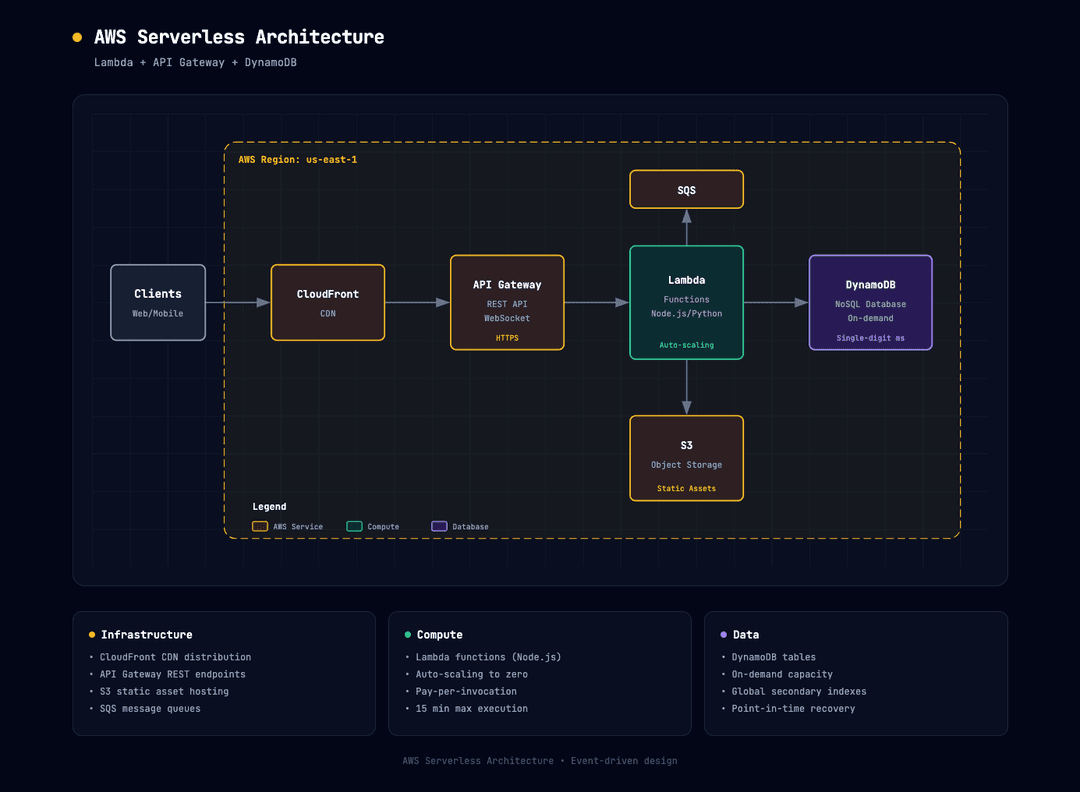
For AWS serverless:
Create an architecture diagram showing:
- CloudFront CDN
- API Gateway
- Lambda functions (Node.js)
- DynamoDB
- S3 for static assets
- Cognito for auth
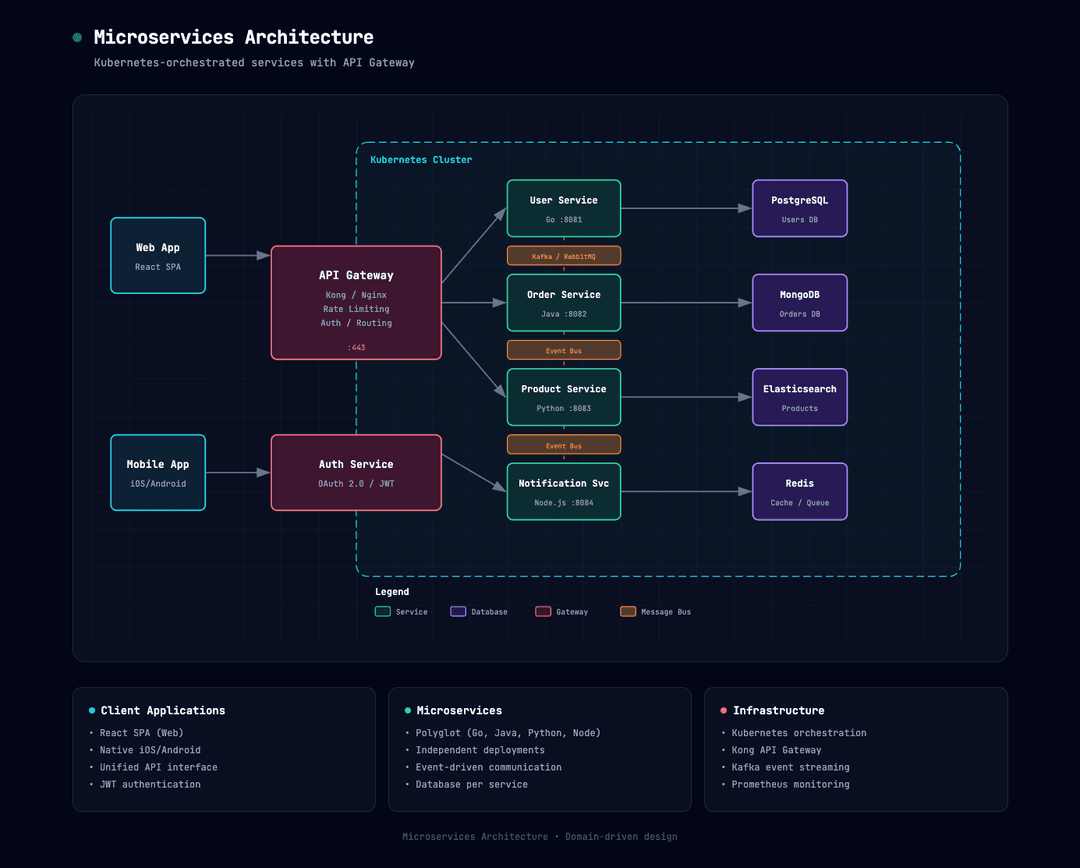
For microservices:
Create an architecture diagram for a microservices system with:
- React web app and mobile clients
- Kong API Gateway
- User Service (Go), Order Service (Java), Product Service (Python)
- PostgreSQL, MongoDB, and Elasticsearch databases
- Kafka for event streaming
- Kubernetes orchestration
📸 Examples
Web Application (React + Node.js + PostgreSQL)

AWS Serverless (Lambda + API Gateway + DynamoDB)
Microservices (Kubernetes + API Gateway)
📤 Export your diagram
Open the HTML file in any modern browser and use the toolbar in the header:
- 📋 Copy — copy a high-resolution PNG to your clipboard, paste straight into Slides, Docs, or Slack
- 🖼️ PNG — download a high-resolution PNG file (great for slides and screenshots)
- 📄 PDF — download a PDF that preserves the dark theme
No install. No command line. Just open the file and click.
✨ Features
- Beautiful dark theme — Slate-950 background with subtle grid pattern
- Semantic color coding — Consistent colors for frontend, backend, database, cloud, and security components
- Self-contained output — Single HTML file with embedded CSS and inline SVG
- Works in any browser — nothing to install, just open the file
- Professional typography — JetBrains Mono for that technical aesthetic
- Smart layering — Arrows render cleanly behind component boxes
🎨 Color Palette
| Component Type | Color | Use For |
|---|---|---|
| Frontend | Cyan | Client apps, UI, edge devices |
| Backend | Emerald | Servers, APIs, services |
| Database | Violet | Databases, storage, AI/ML |
| Cloud/AWS | Amber | Cloud services, infrastructure |
| Security | Rose | Auth, security groups, encryption |
| External | Slate | Generic, external systems |
📦 Installation
⚠️ Available on: Free, Pro, Max, Team, and Enterprise plans
Prerequisite: Code Execution must be enabled before you can upload a custom skill:
- Free / Pro / Max — turn on under Settings → Capabilities
- Team / Enterprise — admin enables under Organization settings → Skills
📚 New to Claude Skills? Check out the official guide: Use Skills in Claude
Claude.ai (Recommended)
- Download
architecture-diagram.zip - Go to Customize → Skills
- Click the + button, then + Create skill, then Upload a skill
- Choose the zip file and toggle the skill on
Claude.ai Projects (Alternative)
- In your Claude.ai Project, upload the
architecture-diagram.zipto the Project Knowledge
Claude Code CLI
Extract to your skills directory:
# Global skills
unzip architecture-diagram.zip -d ~/.claude/skills/

# Or project-local
unzip architecture-diagram.zip -d ./.claude/skills/
Manual Setup
Simply ensure both files are accessible to Claude:
architecture-diagram/
├── SKILL.md              # Skill instructions
└── resources/
    └── template.html     # Base template
💾 Output
Claude generates a self-contained HTML file that you can:
- Open directly in any browser
- Share with teammates (just send the file!)
- Include in documentation
- Print or export to PDF
- Host on any static site
📐 What's Included in Output
Each generated diagram includes:
- Header — Project title with animated status indicator
- Main diagram — SVG with all components and connections
- Summary cards — 3 info cards highlighting key details
- Footer — Project metadata
🛠 Customization
The skill uses a consistent design system, but Claude will adapt:
- Layout — Components positioned based on your system's flow
- Connections — Arrows showing data flow and relationships
- Labels — Protocols, ports, and annotations
- Groupings — Security groups, cloud regions, bounded contexts
📄 Example Output
The generated HTML structure:
<!DOCTYPE html>
<html>
  <head>
    <!-- Embedded styles, Google Fonts -->
  </head>
  <body>
    <div class="container">
      <div class="header"><!-- Title --></div>
      <div class="diagram-container">
        <svg><!-- Architecture diagram --></svg>
      </div>
      <div class="cards"><!-- Summary cards --></div>
      <p class="footer"><!-- Metadata --></p>
    </div>
  </body>
</html>
🔧 Technical Details
- SVG viewBox: Typically 1000-1100px wide, scales responsively
- Font: JetBrains Mono (loaded from Google Fonts)
- Background:
#020617with 40px grid pattern - Z-ordering: Arrows drawn first, masked by opaque backgrounds under transparent component fills
📄 Sister skill
For step-by-step workflows that unfold in time — approval flows, runbooks, automation pipelines, process-flow-diagram-generator — same design language, different shape language.
📝 License
MIT License — Free to use, modify, and distribute.
👥 Contributing
Suggestions and improvements welcome! Feel free to:
- Open an issue for bugs or feature requests
- Submit a PR with enhancements
- Share your generated diagrams
📬 Contact
Cocoon AI 📧 [email protected]
Made with ❤️ by Cocoon AI
// faq
What is architecture-diagram-generator?
Generate beautiful dark-themed system architecture diagrams as standalone HTML/SVG files. Works as a Claude AI skill. . It is open-source on GitHub.
Is architecture-diagram-generator free to use?
architecture-diagram-generator is open-source under the MIT license, so it is free to use.
What category does architecture-diagram-generator belong to?
architecture-diagram-generator is listed under skills in the Claudeers registry of Claude-compatible tools.
// embed badge

[](https://claudeers.com/architecture-diagram-generator)
// retro hit counter

[](https://claudeers.com/architecture-diagram-generator)
// reviews
// guestbook
// related in DevOps & CI/CD
 🔓
🔓⭐AI-driven public opinion & trend monitor with multi-platform aggregation, RSS, and smart alerts.🎯 告别信息过载,你的 AI 舆情监控助手与热点筛选工具!聚合多平台热点 + RSS 订阅,支持关键词精准筛选。AI…
 🔓
🔓Use Claude Code as the foundation for coding infrastructure, allowing you to decide how to interact with the model while enjoying updates from Anthropic.
 🔓
🔓Professional Antigravity Account Manager & Switcher. One-click seamless account switching for Antigravity Tools. Built with Tauri v2 + React (Rust).专业的 Antig…
 🔓
🔓Roadmap to becoming an ASP.NET Core developer in 2026