
Apple-Hig-Designer
A Agent Skill for designing professional interfaces following Apple Human Interface Guidelines 一项用于设计苹果前端交互界面的代理技能
Install with your AI
Paste into Claude Code, Cursor, or any agent — it reads the repo and wires the tool into your project.
⚠ Unverified source (community-unclaimed, low activity) — reveal the prompt
⚠ Unverified source (community-unclaimed, low activity). Inspect the repo before letting your agent install it.

Install and set up Apple-Hig-Designer (claude-skill project) into my current project.
Found on https://claudeers.com/apple-hig-designer
Repo: https://github.com/axiaoge2/Apple-Hig-Designer
Homepage/docs: —
Detected install method: claude-skill → # copy this skill into .claude/skills/apple-hig-designer/
Category: skills. Platforms: web, mobile.
Read the repo's README for exact setup and env vars, then install it and wire it into my project.

Claudeers Health Verdict:
dormant; community-verified: false. Confirm the source before running anything.
# copy the skill dir into your project:
# .claude/skills/apple-hig-designer/   (or ~/.claude/skills/apple-hig-designer/ for all projects)
git clone https://github.com/axiaoge2/Apple-Hig-Designer
// compatibility
| Platforms | web, mobile |
|---|---|
| Operating systems | — |
| AI compatibility | claude |
| License | MIT |
| Pricing | open-source |
| Language | JavaScript |
Apple-Hig-Designer
Apple-Hig-Designer is used to create interfaces that conform to Apple Hig principles and blend with various styles.
📸 Basic effect demonstration:
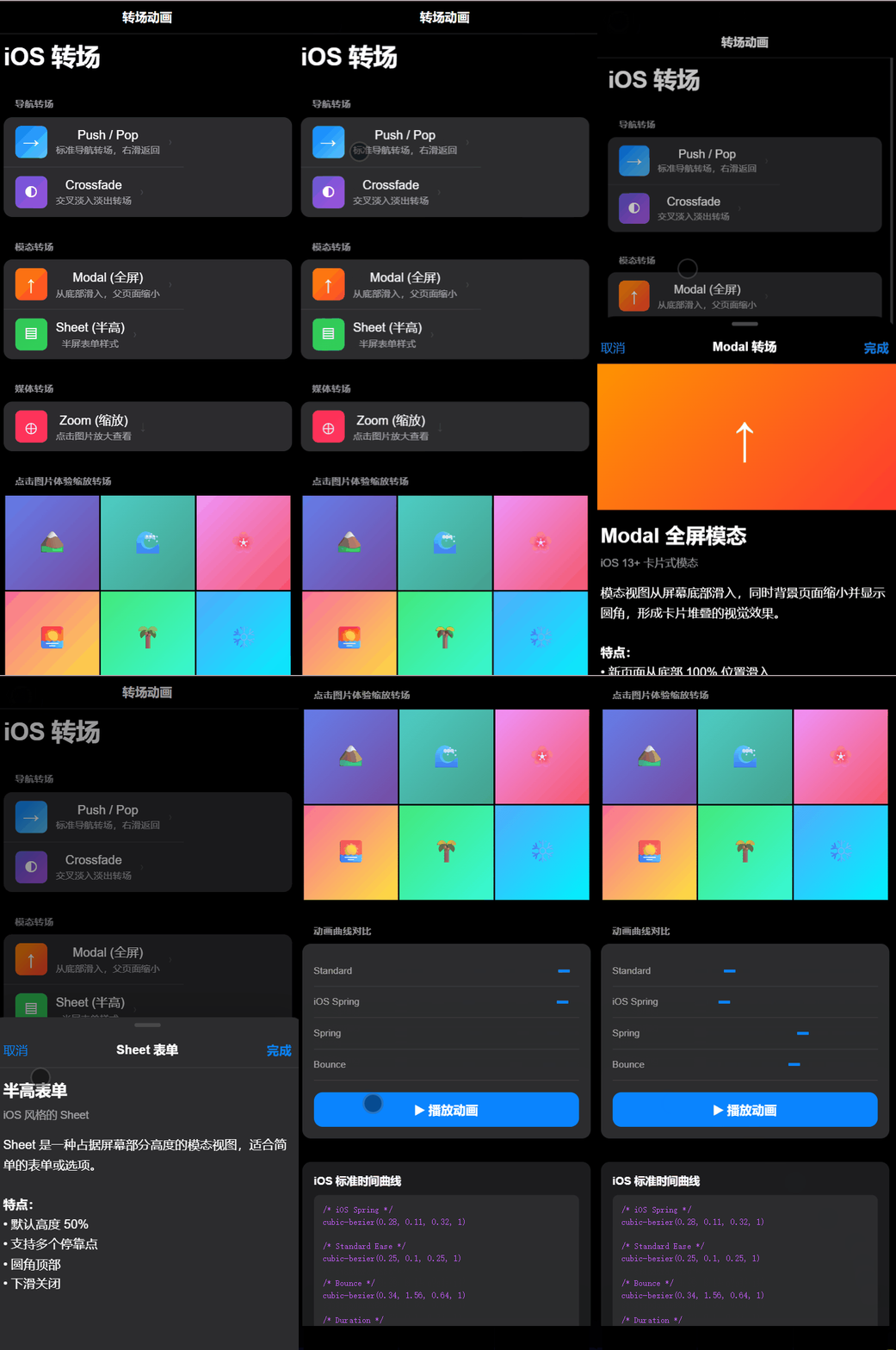
Single page design
"Creating iOS Page Transition Animations"
"Design a Mac-style chat page for web use."

"Please use your apple-hig-designer skills to choose a suitable framework and develop a complete responsive front-end project that incorporates a luxury brand aesthetic."
🎯 Overview
This apple-hig-designer enables you to design professional web and mobile interfaces that follow Apple's Human Interface Guidelines. It provides comprehensive knowledge about:
- SF Pro Typography system
- Apple System Colors with light/dark mode support
- 8pt Grid Spacing System
- Component Patterns (buttons, cards, inputs, etc.)
- Animation Guidelines with Apple-standard easing curves
📦 Installation
Method 1: User-level Installation (Recommended)
Copy the skill to your Claude Code skills directory:
# Windows
xcopy /E /I "apple-hig-designer" "%USERPROFILE%\.claude\skills\apple-hig-designer"

# macOS / Linux
cp -r apple-hig-designer ~/.claude/skills/
Method 2: Project-level Installation
Copy to your project's .claude/skills directory:
mkdir -p .claude/skills
cp -r apple-hig-designer .claude/skills/
🚀 Usage
After installation, Claude Code will automatically activate this skill when you perform the following actions:
Basic usage: Please tell Claude Code that you want to use apple-hig-designer.
Example
- "Design an Apple-style..."
- "Create a HIG-compliant..."
- "iOS-style components"
Advanced usage: Integrate apple-hig-designer with other styles, using apple-hig-designer as the basic design framework.
Example
"Using your apple-hig-designer skills and a cyberpunk aesthetic, could you help me develop a robot showcase page?"
"Using apple-hig-designer skills to blend other styles, how would you recommend a style for developing a blog-themed website?"
📁 File Structure
apple-hig-designer/
├── SKILL.md              # Main skill definition
├── REFERENCE.md          # Detailed HIG reference documentation
├── README.md             # English documentation
├── README_CN.md          # Chinese documentation
├── LICENSE               # MIT License
└── resources/
    ├── components.jsx    # React component examples
    ├── design-tokens.css # CSS custom properties
    └── ui-patterns.md    # UI pattern documentation
🎨 Features
| Feature | Description |
|---|---|
| Typography | SF Pro font system with proper size thresholds |
| Colors | Complete Apple system color palette |
| Spacing | 8pt grid system implementation |
| Components | Buttons, cards, inputs, glass panels |
| Animations | Apple-standard cubic-bezier easing |
| Accessibility | WCAG AA compliant, reduced motion support |
| Dark Mode | Full light/dark mode support |
📚 Resources
🤝 Contributing
Contributions are welcome! Feel free to submit Issues and Pull Requests.
📄 License
This project is licensed under the MIT License - see the LICENSE file for details.
// faq
What is Apple-Hig-Designer?
A Agent Skill for designing professional interfaces following Apple Human Interface Guidelines 一项用于设计苹果前端交互界面的代理技能. It is open-source on GitHub.
Is Apple-Hig-Designer free to use?
Apple-Hig-Designer is open-source under the MIT license, so it is free to use.
What category does Apple-Hig-Designer belong to?
Apple-Hig-Designer is listed under skills in the Claudeers registry of Claude-compatible tools.
// embed badge

[](https://claudeers.com/apple-hig-designer)
// retro hit counter

[](https://claudeers.com/apple-hig-designer)
// reviews
// guestbook
// related in Claude Skills
 🔓
🔓An agentic skills framework & software development methodology that works.
 🔓
🔓 🔓
🔓💫 Toolkit to help you get started with Spec-Driven Development
 🔓
🔓AI coding assistant skill (Claude Code, Codex, OpenCode, Cursor, Gemini CLI, and more). Turn any folder of code, SQL schemas, R scripts, shell scripts, docs,…