
app-shell-ui
App Shell UI: reusable desktop-utility frontend skill for Codex / Claude Code / Grok
Install with your AI
Paste into Claude Code, Cursor, or any agent — it reads the repo and wires the tool into your project.
Install and set up app-shell-ui (claude-skill project) into my current project.
Found on https://claudeers.com/app-shell-ui
Repo: https://github.com/yg2224/app-shell-ui
Homepage/docs: —
Detected install method: claude-skill → # copy this skill into .claude/skills/app-shell-ui/
Category: security. Platforms: cli, api, desktop, web.
Read the repo's README for exact setup and env vars, then install it and wire it into my project.

Claudeers Health Verdict:
slowing; community-verified: false. Confirm the source before running anything.
# copy the skill dir into your project:
# .claude/skills/app-shell-ui/   (or ~/.claude/skills/app-shell-ui/ for all projects)
git clone https://github.com/yg2224/app-shell-ui
// compatibility
| Platforms | cli, api, desktop, web |
|---|---|
| Operating systems | — |
| AI compatibility | claude |
| License | Apache-2.0 |
| Pricing | open-source |
| Language | — |
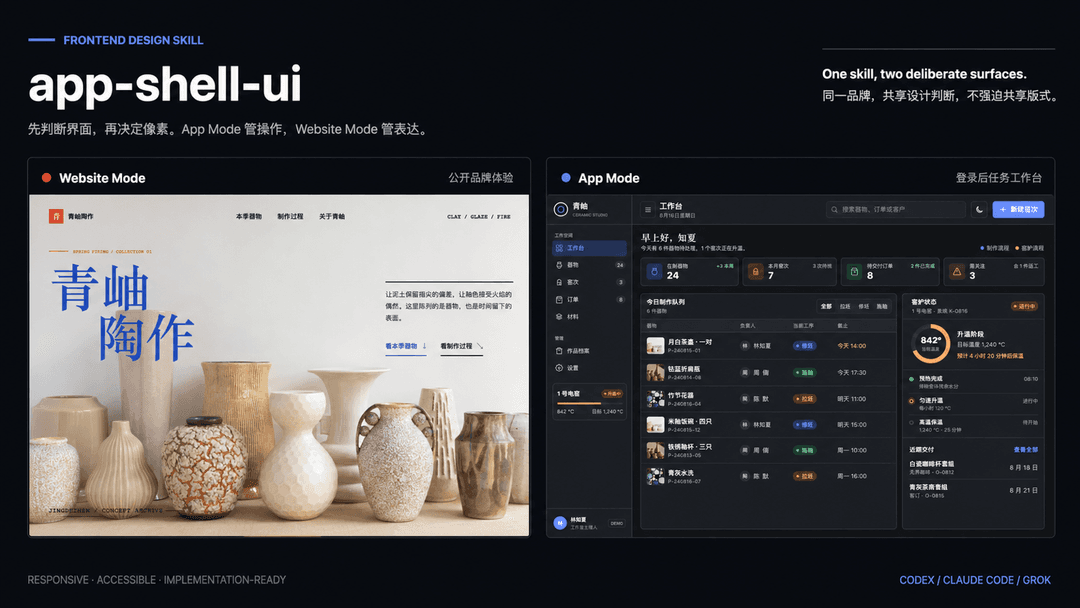
App Shell UI · 桌面工具风应用外壳 Skill
可复用的前端视觉语言:左导航 + 右内容 · 浅/深双主题 · Token 驱动 · 克制图标
- 本仓库维护 App Shell UI skill:让 AI agent 按统一规范生成「系统设置 / Clash Verge / 桌面客户端」一类界面,而不是落地页或密运营后台。
- 业务内容会变(水果市集、游戏论坛、AI 工作台…),壳不换:侧栏、画布、卡片、单主色、浅深主题、并列等高。
- 面向 Codex / Claude Code / Grok 等能加载
SKILL.md的 agent;请整目录安装,不要只复制一个SKILL.md。 - 源码许可为 Apache License 2.0。
案例展示
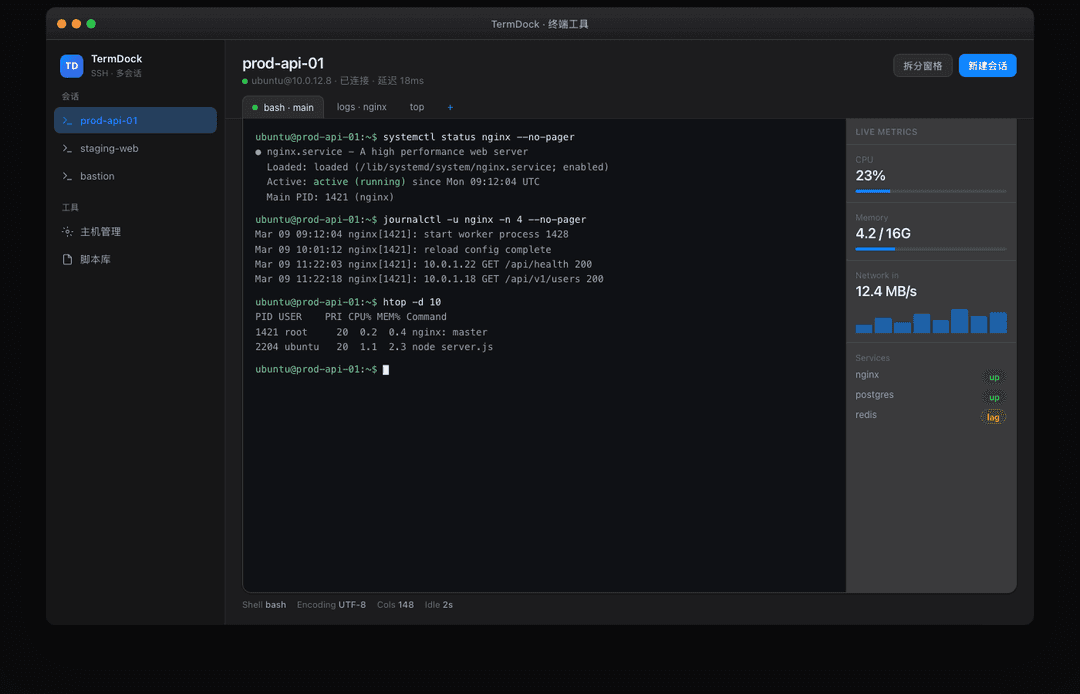
同一外壳,四种业务。可运行 Demo 在 demos/,截图在 assets/showcase/。
生成方式:无提示词,仅限定主题生成。
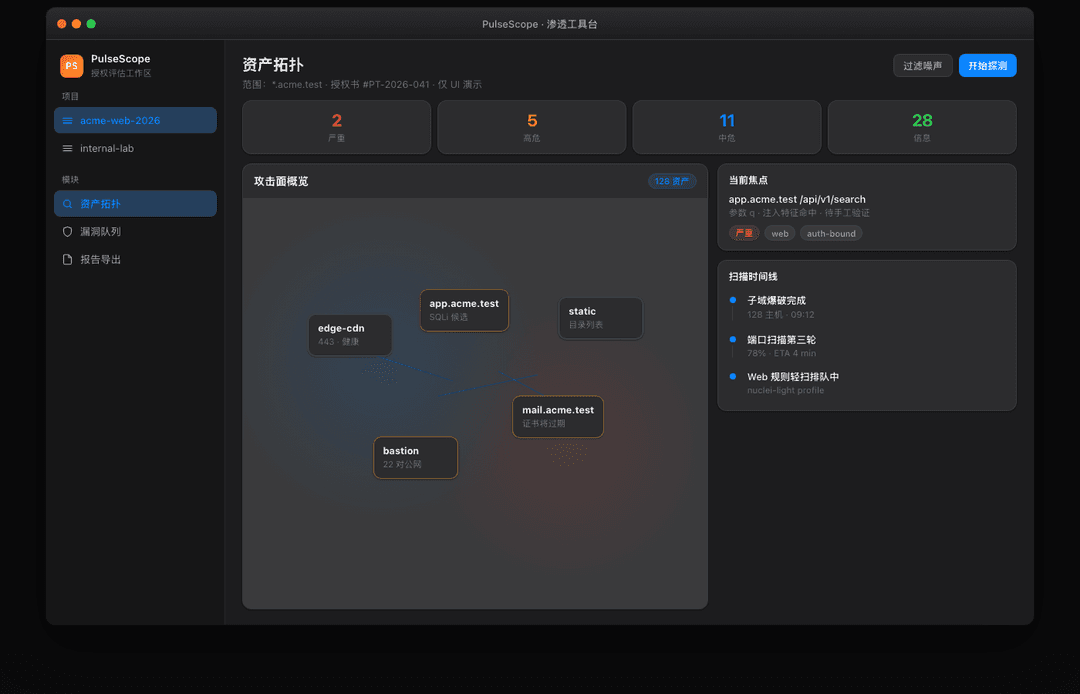
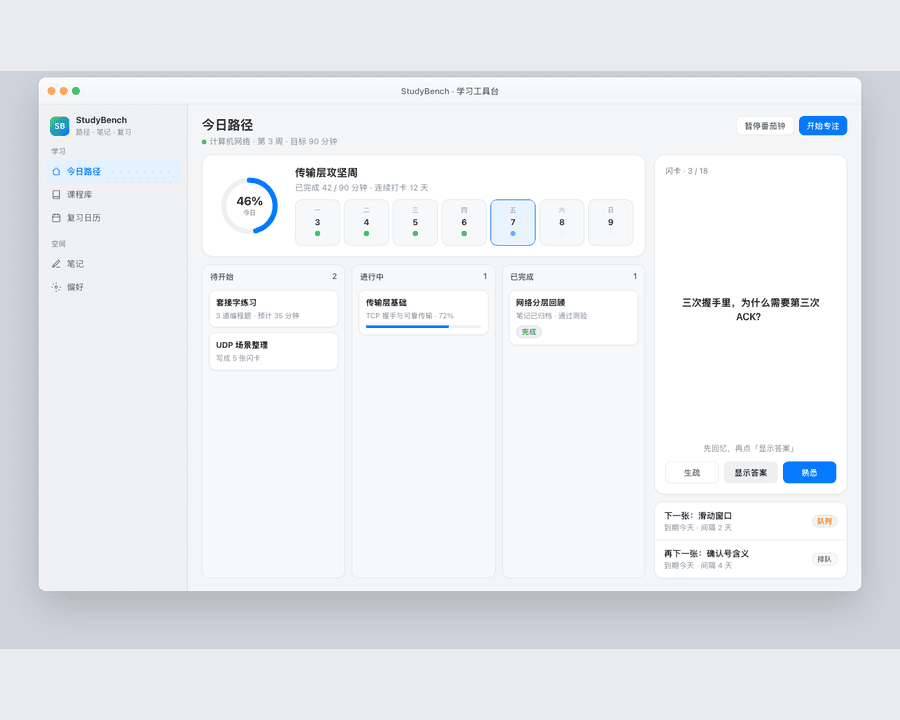
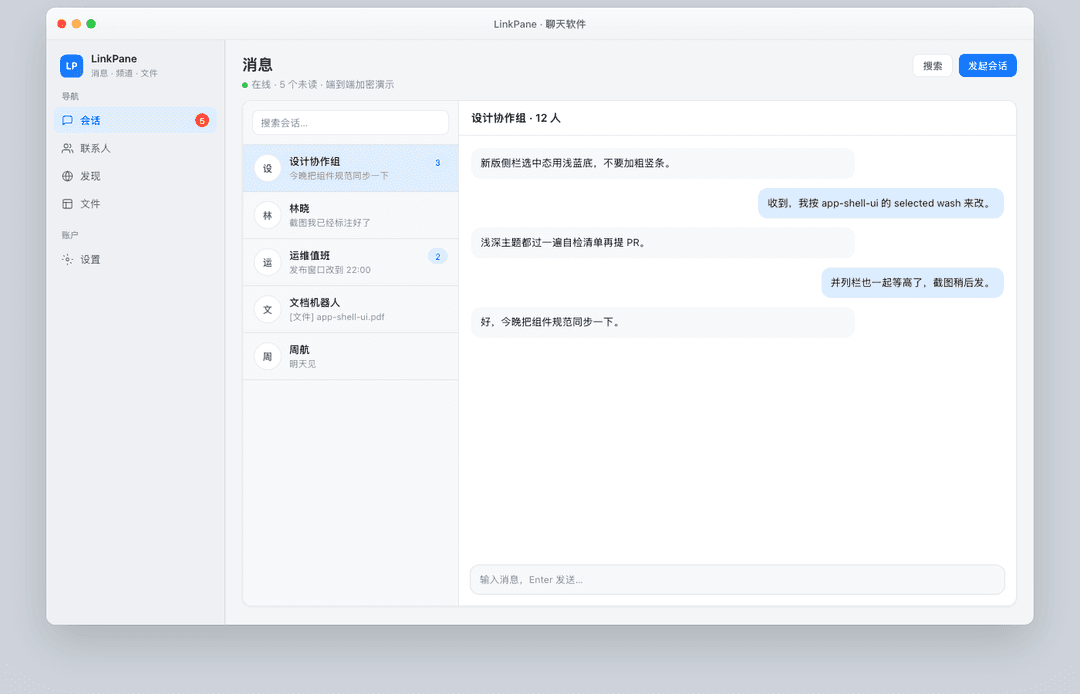
不额外规定版式细节,只给出主题(终端工具 / 渗透工具 / 学习工具台 / 聊天软件),由app-shell-uiskill 约束壳层与风格后直接生成。
Codex 写前端对比:学习工具台
同一主题「学习工具台」——左:未使用 skill;右:使用 app-shell-ui skill。
|
左 · 未使用 skill 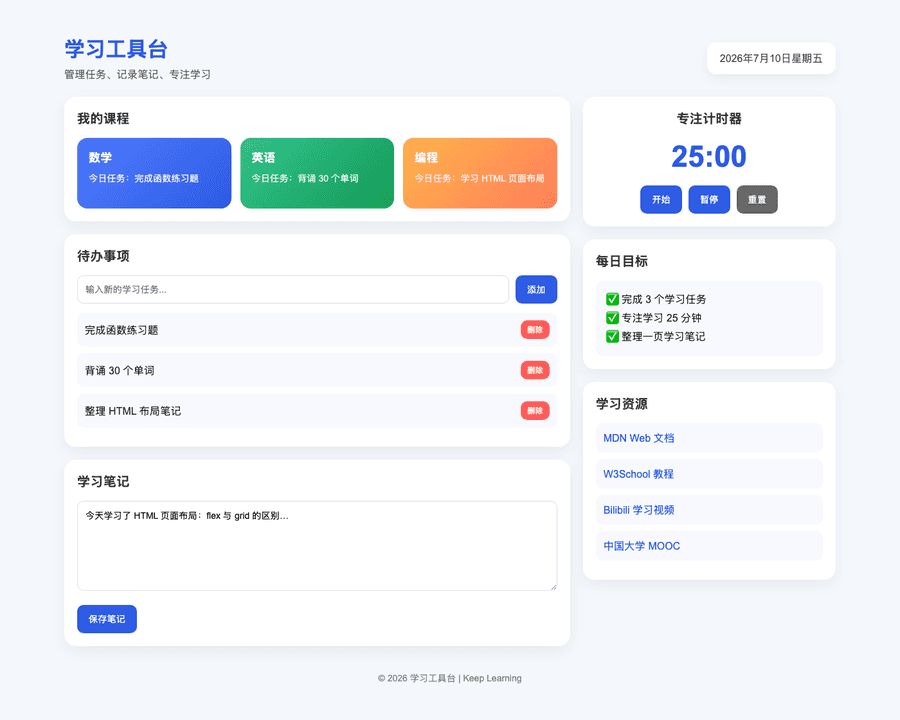
彩色卡片堆叠 · 通用 Web 仪表盘 · 无统一壳层 |
右 · 使用 skill 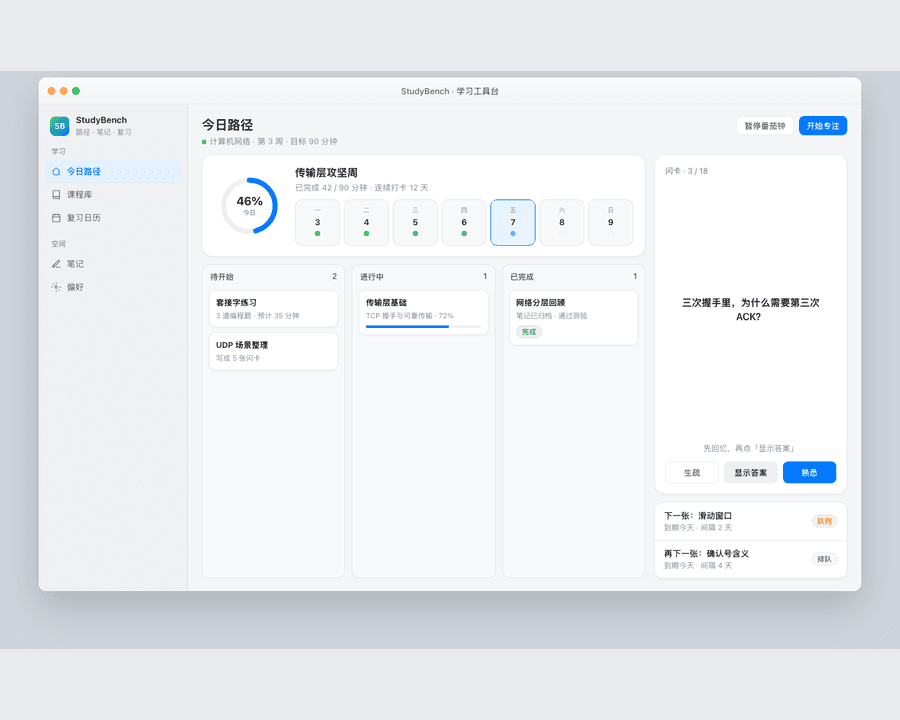
桌面工具壳 · 侧栏导航 · Token / 克制配色 |
四主题案例
|
终端工具 · TermDock
深色 · SSH 多会话 · 主机状态并列栏 |
渗透工具 · PulseScope
深色 · 漏洞队列 · 授权范围提示(仅 UI 演示) |
|
学习工具台 · StudyBench
浅色 · 路径卡片 · 复习队列 + 快速笔记等高 |
聊天软件 · LinkPane
浅色 · 会话列表 + 对话区三栏信息流 |
本地预览 Demo:
cd demos
python3 -m http.server 8040
# 打开 http://127.0.0.1:8040/terminal.html
#      http://127.0.0.1:8040/pentest.html
#      http://127.0.0.1:8040/learning.html
#      http://127.0.0.1:8040/chat.html
快速开始
安装完成后,直接把任务描述交给 agent。下面提示词可复制使用:
| 想做什么 | 直接这样说 |
|---|---|
| 做一页桌面工具风 Demo | 用 app-shell-ui 做一个浅色 + 深色主题的设置页,左导航右列表开关。 |
| 控制台 / 卡片网格 | 用 app-shell-ui 控制台布局:统计卡 + 卡片网格 + 底部双栏等高。 |
| AI 工作台空态 | 用 app-shell-ui 工作台型:侧栏会话 + 居中新会话标题 + 大输入卡。 |
| 论坛 / 列表站 | 用 app-shell-ui 做游戏指南论坛:少 emoji,文字 + 线框图标,双主题。 |
| 只改视觉、不改业务 | 按 app-shell-ui 重画这个页面,保持信息架构,统一 Token 和浅深色。 |
| 并列栏对齐 | 双栏列表和提问卡底边对齐,按 app-shell-ui 的 equal-height 规则。 |
| 明确点名 skill | 使用 /app-shell-ui 或 使用 app-shell-ui skill |
不确定时直接描述产品类型即可;agent 会按 skill 选型布局模板(设置 / 控制台 / 工作台 / 三栏)。
主要贡献者
- yg2224:
app-shell-ui维护者 · GitHub
它能做什么
| 能力 | 说明 |
|---|---|
| 布局模板 | 设置型 · 控制台型 · 工作台型 · IM/三栏型 |
| 双主题 | data-theme=light|dark,Token 成对交付,主题切换可持久化 |
| 组件配方 | 侧栏、页头、卡片、列表行、开关、Pill、Composer、虚线添加区 |
| 硬性约束 | 单主色、少 emoji、浅边框分层、并列栏等高、禁止 invert 伪深色 |
| 交付清单 | 浅色 + 深色各过一遍的自检表 |
不是:营销落地页、Material 厚阴影后台、彩虹图标仪表盘。
安装
app-shell-ui 是一个围绕 SKILL.md 组织的可复用技能包。references/ 是规则细节,安装时必须一并保留。
克隆(通用)
# HTTPS
git clone https://github.com/yg2224/app-shell-ui.git

# 或 SSH
git clone [email protected]:yg2224/app-shell-ui.git
Codex 安装方式
mkdir -p ~/.codex/skills
git clone https://github.com/yg2224/app-shell-ui.git ~/.codex/skills/app-shell-ui
或把仓库地址交给 Codex:
请从该仓库安装 skill:
https://github.com/yg2224/app-shell-ui.git

安装到 ~/.codex/skills/app-shell-ui,保留完整目录(SKILL.md + references/),不要只复制 SKILL.md。
Claude Code 安装方式
推荐保留稳定 clone,再用 subagent 或 slash command 指向真实 SKILL.md,这样 references/ 仍可被读取。
mkdir -p ~/ai-skills
cd ~/ai-skills
git clone https://github.com/yg2224/app-shell-ui.git
Subagent wrapper:
mkdir -p ~/.claude/agents
cat > ~/.claude/agents/app-shell-ui.md <<'EOF'
---
name: app-shell-ui
description: Use for macOS-style desktop utility UI shells, light/dark themes, sidebar layouts, and restrained frontend demos.
---

When invoked, first read `~/ai-skills/app-shell-ui/SKILL.md` and follow it as the governing workflow.
Read supporting files from `~/ai-skills/app-shell-ui/references/` only when needed.
Do not replace this skill with a generic flashy landing-page UI.
EOF
Slash command wrapper:
mkdir -p ~/.claude/commands
cat > ~/.claude/commands/app-shell-ui.md <<'EOF'
Read `~/ai-skills/app-shell-ui/SKILL.md` first and follow it strictly.
Read supporting files from `~/ai-skills/app-shell-ui/references/` when needed.

$ARGUMENTS
EOF
使用示例:
/app-shell-ui 做一个游戏指南论坛首页,双主题,并列栏等高。
后续更新:
cd ~/ai-skills/app-shell-ui && git pull
Grok 安装方式
Grok 从 ~/.grok/skills/<name>/ 加载 skill:
# 方式 A:直接克隆到 skills 目录
git clone https://github.com/yg2224/app-shell-ui.git ~/.grok/skills/app-shell-ui

# 方式 B:已有 clone,同步进去(排除 .git)
rsync -a --delete \
  --exclude .git \
  /path/to/app-shell-ui/ \
  ~/.grok/skills/app-shell-ui/
安装后新开 Grok 会话,触发:
/app-shell-ui
或:
用 app-shell-ui 做一页 macOS 风格的浅深色设置界面。
其他 agent
- 将完整目录复制到该 agent 的 skills / prompt library。
- 保留
SKILL.md与references/*.md。 - 如目标平台有 frontmatter 要求,可微调但不删除
name/description。
目录结构
app-shell-ui/
├── LICENSE                   # Apache License 2.0
├── README.md                 # 本说明(给人看)
├── README_EN.md              # English overview
├── SKILL.md                  # 主指令(给 agent 加载)
├── demos/                    # 四个案例 Demo(HTML)
│   ├── _shell.css
│   ├── terminal.html         # 终端工具
│   ├── pentest.html          # 渗透工具台
│   ├── learning-before.html  # 学习工具台 · 未使用 skill(对比)
│   ├── learning.html         # 学习工具台 · 使用 skill
│   └── chat.html             # 聊天软件
├── assets/
│   ├── readme-banner.png     # README 展示横幅
│   ├── readme-banner.svg
│   ├── readme-preview.jpg
│   └── showcase/             # 案例截图
│       ├── learning-compare.png  # 前后对比(等尺寸)
│       ├── learning-before.png
│       ├── learning-after.png
│       ├── terminal.png
│       ├── pentest.png
│       ├── learning.png
│       └── chat.png
└── references/
    ├── tokens.md
    ├── components.md
    └── layouts.md
关键规则:整夹安装。只丢一个 SKILL.md 会丢失 Token / 布局 / 组件细则。
技能索引
| 技能 | 状态 | 用途 | 触发词 | 入口 |
|---|---|---|---|---|
app-shell-ui | Stable | 桌面工具风应用外壳:布局、双主题、组件、自检 | app-shell-ui、/app-shell-ui、桌面工具风、系统设置感、应用外壳、浅色/深色主题、sidebar shell | SKILL.md |
参考文件
| 文件 | 用途 |
|---|---|
| references/tokens.md | 颜色 / 字阶 / 圆角 / 浅深 Token 与切换脚本 |
| references/components.md | 侧栏、卡片、列表、开关、Composer 等配方 |
| references/layouts.md | 设置/控制台/工作台/三栏 + equal-height 双栏 |
共享设计原则
本 skill 遵守以下原则:
- 壳稳定、业务可换:同一外壳可套聊天、设置、库存、论坛,不换视觉系统。
- 显式胜过隐式:Token、圆角、选中态、主题 API 写清,不靠「看起来高级」。
- 双主题一等公民:默认同时交付 light + dark,禁止
filter: invert()。 - 内容区克制:线框图标 + 文字 + status pill;列表/卡片默认不刷 emoji。
- 输出优先:交付可运行的 HTML/React/CSS 变量实现,而不是空泛审美描述。
- 并列要对齐:并排卡片/面板底边等高(
stretch+ flex surface)。 - 自检闭环:浅色与深色各过交付清单再收工。
你可以直接这样问(更多例子)
用 app-shell-ui 做一个 macOS 窗口壳的 AI 后端设置页,左导航 + 开关列表。
按 app-shell-ui 规范给现有页面加 data-theme 深浅切换,Token 用 CSS 变量。
首页底部「动态列表 | 快速提问」两列等高,输入框随高度拉伸。
控制台型:Banner + 四格统计 + 三列卡片,少 emoji,单主色 #007AFF。
更新
cd /path/to/app-shell-ui
git pull

# 若安装到 Codex
rsync -a --delete --exclude .git ./ ~/.codex/skills/app-shell-ui/

# 若安装到 Claude Code 稳定 clone
# cd ~/ai-skills/app-shell-ui && git pull

# 若安装到 Grok
rsync -a --delete --exclude .git ./ ~/.grok/skills/app-shell-ui/
Codex / Claude Code / Grok 建议新开会话后再触发 skill,避免旧上下文。
状态标签
| 标签 | 含义 |
|---|---|
Draft | 规则已写,案例未充分验证 |
Beta | 已在示例页验证,边界仍可能调整 |
Stable | 已在真实 Demo(设置/控制台/论坛等)验证,规则相对稳定 |
当前 app-shell-ui 标记为 Stable。
友情链接
- linux.do — 新的理想型社区
许可
本项目采用 Apache License 2.0。
Copyright 2026 yg2224

Licensed under the Apache License, Version 2.0 (the "License");
you may not use this file except in compliance with the License.
You may obtain a copy of the License at

    http://www.apache.org/licenses/LICENSE-2.0

Unless required by applicable law or agreed to in writing, software
distributed under the License is distributed on an "AS IS" BASIS,
WITHOUT WARRANTIES OR CONDITIONS OF ANY KIND, either express or implied.
See the License for the specific language governing permissions and
limitations under the License.
你可以使用、修改、分发本 skill(含商用),但需保留版权与协议声明;修改后的文件建议注明变更。完整条款见 LICENSE。
Issue 与 PR 请提交到 yg2224/app-shell-ui。
// faq
What is app-shell-ui?
App Shell UI: reusable desktop-utility frontend skill for Codex / Claude Code / Grok. It is open-source on GitHub.
Is app-shell-ui free to use?
app-shell-ui is open-source under the Apache-2.0 license, so it is free to use.
What category does app-shell-ui belong to?
app-shell-ui is listed under security in the Claudeers registry of Claude-compatible tools.
// embed badge

[](https://claudeers.com/app-shell-ui)
// retro hit counter

[](https://claudeers.com/app-shell-ui)
// reviews
// guestbook
// related in Security & Compliance
 🔓
🔓A complete AI agency at your fingertips - From frontend wizards to Reddit community ninjas, from whimsy injectors to reality checkers. Each agent is a specia…
 🔓
🔓π RuView turns commodity WiFi signals into real-time spatial intelligence, vital sign monitoring, and presence detection — all without a single pixel of video.
 🔓
🔓Prowler is the world’s most widely used open-source cloud security platform that automates security and compliance across any cloud environment.
 🔓
🔓🐶 A curated list of Web Security materials and resources.