
app-launch-video
Claude skill for Apple-keynote-style app launch films: real UI components in Remotion, spring-physics motion, synced spatial sound, storyboard + frame-level…
Install with your AI
Paste into Claude Code, Cursor, or any agent — it reads the repo and wires the tool into your project.
Install and set up app-launch-video (git-clone project) into my current project.
Found on https://claudeers.com/app-launch-video
Repo: https://github.com/renthelautomations/app-launch-video
Homepage/docs: —
Detected install method: git-clone → git clone https://github.com/renthelautomations/app-launch-video
Category: skills. Platforms: cli, desktop, web, mobile.
Read the repo's README for exact setup and env vars, then install it and wire it into my project.

Claudeers Health Verdict:
unknown; community-verified: false. Confirm the source before running anything.
git clone https://github.com/renthelautomations/app-launch-video
// compatibility
| Platforms | cli, desktop, web, mobile |
|---|---|
| Operating systems | — |
| AI compatibility | claude |
| License | MIT |
| Pricing | open-source |
| Language | Python |
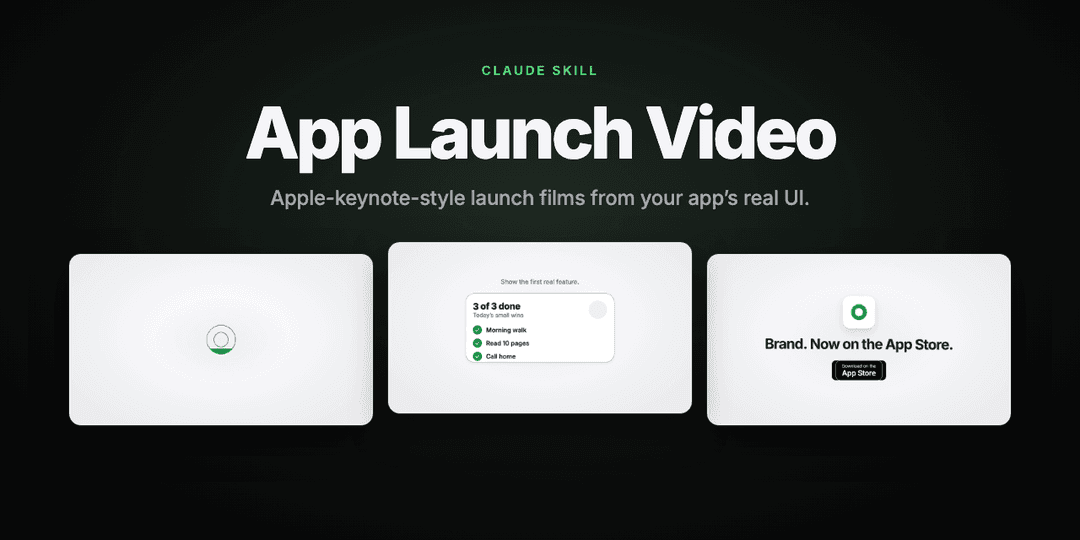
Turn any app into a launch film that looks like Apple made it.
Real UI components, spring-physics motion, spatial sound, automated QA, and 16:9, 9:16 and 1:1 in one run.
Watch the example · Install · How it works · The rules · QA kit
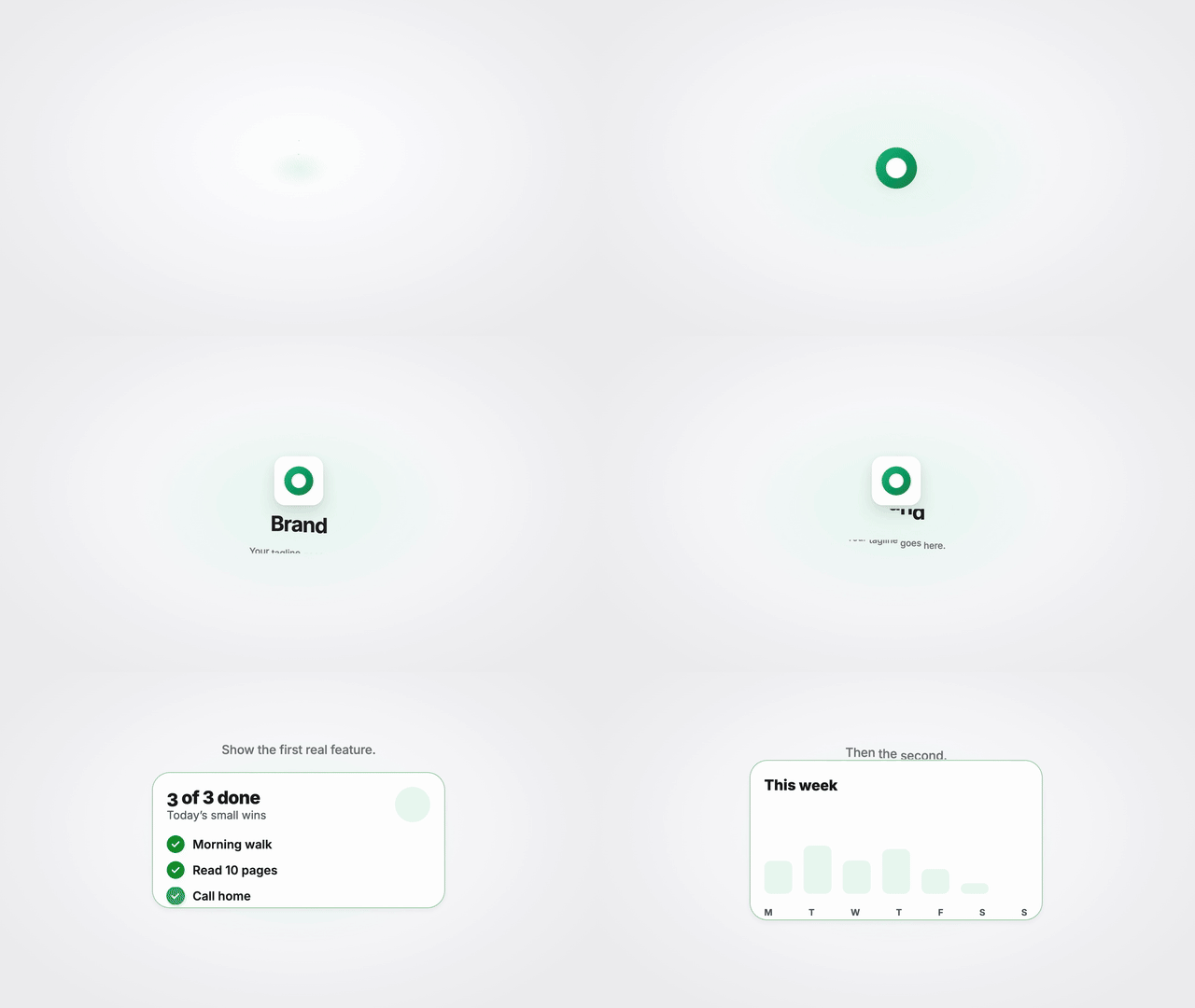 | 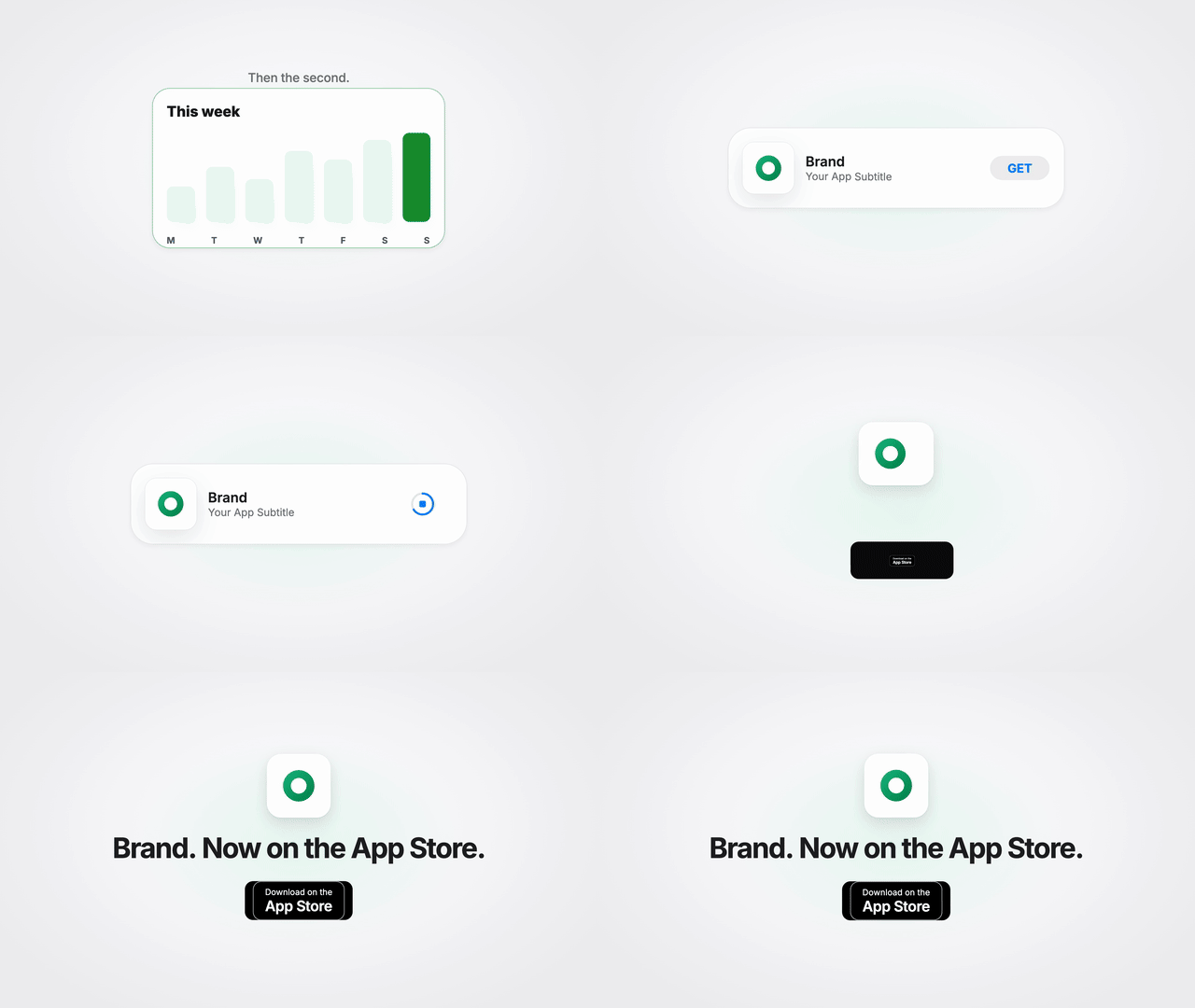 |
| The brand moment: the logo outline draws itself, fills, becomes the icon, and morphs into a real feature card. | The launch moment: GET → download ring → OPEN, then the button grows into the store badge. |
Both clips come from the 34-second example film in template/. Swap in your own brand and components and it becomes yours. Full example with sound (MP4)
Why this exists
Ask an AI for a product video and you usually get phone mockups, crossfades, stock whooshes and captions that move too fast to read. This skill is the opposite: a production process refined frame by frame on a real app launch, with a demanding reviewer flagging everything that looked cheap, awkward, unreadable or out of sync.
Every rule in it started as one of those complaints. Each one has a measured cause, a fix, and usually a script that catches it the next time.
| What a viewer said | What was actually wrong | What the skill does now |
|---|---|---|
| "Looks like a template" | Phone mockups | Rebuilds the app's real components on a clean stage |
| "Cheap zoom-blur transitions" | Content swapped by blur and fade | Shape morphs, carousels and masked reveals; opacity never changes |
| "Feels linear, not smooth" | One easing curve for everything | Apple's spring presets assigned by role, plus staggering |
| "Too fast, I can't read it" | 1.5 s per line | At least 2.2 s per line; a longer film rather than a rushed one |
| "It shakes" | Camera move, resizing and rolls all at once | Fixed frames, one motion per change, verified to 0 px drift |
| "There's a dot at the end" | Exit springs never reach 100% | Exits that finish in a fixed time, plus a leftover-pixel scan |
| "The audio feels like a horror movie" | Low detuned drones | A warm major-key score and plucks tuned to it |
| "The sound effects are out of sync" | Cues timed to the spring settling | Cues on the first visible frame, from the same timeline |
See the full lessons log
The complete log, with every symptom, cause and fix, is in
references/review.md. Highlights not in the table:
- Grey and taupe mid-colors during dark↔light changes → hard-edged wipes instead of color interpolation.
- Empty cards for 0.2 s between components → content enters while the shape is still morphing.
- Logo reveals that looked broken (a dot that turns into a blob, carving, pieces assembling) → the outline draws itself, then the fill rises.
- Vertical cuts with items parked "off-screen" in view, cropped close-ups, and a headline colliding with the badge → format-aware offsets and layouts.
- 230 sound cues (14 per second) → 112, with headlines getting tuned plucks and exits staying silent.
What you get
| A storyboard first | An HTML shot list at true 1920×1080 using your components, with in-between frames for every morph and a QA pass that runs on load. You approve it before anything is rendered. |
| A Remotion project | One timing file (timeline.js) drives picture and sound. Motion primitives, a brand layer for your components, and an example film. |
| A designed soundtrack | Score, tuned UI plucks, foley with body, optional CC0 recordings, binaural placement, music that dips under key moments. |
| Every format | A 16:9 ProRes master plus 16:9, 9:16 and 1:1 MP4s at −16 LUFS / −1.5 dBTP. |
| Honest critique | After every render, a prioritized list of what's still weak, backed by measurements. |
Install
git clone https://github.com/renthelautomations/app-launch-video.git
cp -R app-launch-video/app-launch-video ~/.claude/skills/
| Where | How |
|---|---|
| Claude Code, everywhere | Copy app-launch-video/ into ~/.claude/skills/ (above) |
| Claude Code, one project | Copy it into the project's .claude/skills/ |
| Claude.ai / desktop apps | Zip the app-launch-video/ folder and upload it in Settings → Capabilities → Skills |
Use it
Talk to Claude normally. The skill picks up launch videos, promos, trailers, teasers and product reveals:
Make a launch video for my app. It just went live on the App Store, and widgets are coming next month.
Storyboard a 30-second "coming soon" teaser for our Live Activities, vertical for Reels.
Turn our onboarding cards into a short promo. Use the real components in src/components.
What happens next: Claude reads your theme, fonts and components → proposes a story → builds a storyboard for your approval → renders a preview and runs the QA kit → designs the sound → delivers every format → tells you honestly what could still be better. Expect a few review rounds; the process is built for them.
How it works
flowchart LR
  A["Read the app<br/>theme · fonts · components · logo"] --> B["Story<br/>problem → answer → proof → launch → next"]
  B --> C["Storyboard<br/>true-size frames + QA"]
  C -->|approved| D["Build in Remotion<br/>timeline · motion · brand"]
  D --> E["Preview + QA kit"]
  E -->|fix| D
  E --> F["Sound<br/>cues from the same timeline"]
  F --> G["Deliver<br/>16:9 master · 9:16 · 1:1"]
  G --> H["Critique +<br/>recommendations"]
The story structure
| Act | Stage | What's on screen |
|---|---|---|
| Problem | light | Generic notifications stack up; one line of copy; one swipe clears them |
| Answer | light + glow | A question → the logo draws itself → an icon forms → the name and tagline |
| Proof | light | 2–4 real components, each morphing into the next |
| Launch | light | Store listing → GET → ring → OPEN → headline and official badge |
| Problem two | dark (hard cut) | One line |
| Coming soon | dark | A chapter title card for each feature, then the feature with labels |
| End | dark | Icon, name, badge, one line |
The motion system
Springs use Apple's duration-and-bounce model (from the WWDC23 talk Animate with springs):
stiffness = (2π/d)², damping = (1 − bounce)·4π/d.
| Preset | Duration, bounce | Used for |
|---|---|---|
smooth | 0.5, 0 | shapes, frames, carousels |
text | 0.7, 0 | type reveals |
snappy | 0.42, 0.12 | decisive morphs |
bouncy | 0.5, 0.3 | meaningful pops only |
island | 0.55, 0.24 | system-surface resizes |
exit | 0.32, 0 | leaving (always completes) |
camera | 2.6, 0 | slow push-ins |
Patterns, anti-patterns and timings are in references/motion.md.
The rules
- Real components, never device mockups. Mockups read as templates and shrink the product.
- No crossfades, opacity or blur swaps. Use morphs, masked reveals, carousels, wipes or hard cuts.
- The hero stays at the center. Type goes above or below it. The camera only pushes in and out.
- One meaningful motion at a time. Several things animating at once reads as mess.
- Exits must finish. Anything that only approaches zero leaves slivers at the cut.
- Hold every line ≥ 2.2 s. If it feels fast, it is.
- Say what things are. Chapter titles and labels like
ON THE LOCK SCREEN. - Minimal and small. The hero takes at most about a third of the frame, with three type sizes.
- No empty placeholders. Reveal content while the shape is still growing.
- Picture and sound share one timeline. Sounds land on the first visible frame or the measured impact.
- Honest and legal. Generic third-party UI, official store badges, licensed assets.
- Isolate the work. A git worktree or separate folder; your app's build is never touched.
The reasoning behind each is in SKILL.md.
The QA kit

| Script | Catches |
|---|---|
transition_sheets.py | Empty shapes, overlaps, cut text, awkward midpoints (sheet above) |
pop_scan.py | Single-frame jumps; only intentional hard cuts should appear |
residue_scan.py | Slivers and hairlines left after exits |
bbox_track.py | Elements that should be still but move or resize |
sync_check.py | Sounds early or late against the picture, or sounds over a still frame |
sfx_report.py | Each sound's level against the music, brightness, harsh-band share, density |
| storyboard QA | Overlap, clipping, frame bounds, title-safe, type < 20 px, hero off-center |
The storyboard

Sound
| Family | Character | Used for |
|---|---|---|
| Tonal | Soft kalimba/wood plucks tuned to the chord playing at that moment | UI, type, pops, confirmations |
| Paper and foley | Real body (200 Hz–4 kHz), never just hiss | paper, pencil, stamps, letters, cards |
| Air | Warm, low pink-noise moves | transitions |
Levels, spatial audio and music
| Group | Level vs. music | Examples |
|---|---|---|
| Bed | −19 to −13 dB | text air, word plucks, small taps |
| UI | −15 to −9 dB | plucks, swishes, pushes, alerts |
| Moments | −8 to −1 dB | logo pencil, stamp, brand chord |
- Spatial: binaural HRTF convolution (the MIT KEMAR head recordings) following each object's on-screen position; falls back to stereo panning without the file.
- Mix: the music dips about 3 dB under key moments; the effects' harsh 2.5–5 kHz band and extreme top are turned down.
- Music: the generated score is a warm major-key piano and pad at 120 BPM. A licensed track at
public/music.mp3replaces it automatically. - Loudness: two-pass
loudnormto −16 LUFS integrated and −1.5 dBTP.
Formats
| Format | Size | Layout rules |
|---|---|---|
| 16:9 | 1920×1080 | The master; ProRes 422 HQ plus H.264 |
| 9:16 | 1080×1920 | Line breaks placed on purpose, wide rows stack, no cropping close-ups, larger off-screen offsets |
| 1:1 | 1080×1080 | Same narrow-format rules |
[!IMPORTANT] App Store preview videos must show features that are already in the shipping app, captured from the app. For a store preview, cut the "coming soon" chapters and use the official store badge artwork.
Run the template yourself
cp -R app-launch-video/template my-film && cd my-film
npm install                                          # or: bun install
bash ../app-launch-video/scripts/fetch_hrtf.sh       # optional: binaural sound
bash ../app-launch-video/scripts/fetch_kenney.sh     # optional: recorded CC0 foley
npx remotion studio src/index.js                     # live preview in the browser
node src/export-cues.js && python3 audio.py hrtf/kemar.sofa
bash ../app-launch-video/scripts/deliver.sh mylaunch # all formats, normalized audio
Requirements: Node 18+ or Bun · ffmpeg/ffprobe · Chrome (Remotion fetches a headless shell) ·
Python 3.10+ with numpy scipy pillow h5py · potrace for logo tracing.
Repository layout
app-launch-video/                 ← the skill (copy this folder)
├── SKILL.md                      workflow, rules, phases
├── references/                   direction · motion · sound · qa · formats · review
├── assets/storyboard-template.html
├── template/                     working Remotion starter (34 s example film)
│   ├── src/timeline.js           single source of truth for timing, text, cues, music plan
│   ├── src/motion.js             track · words · chars · rise · pop · roll · timer · ex · Shell · Content · Line
│   ├── src/brand.js              your app: palette, logo geometry, components
│   ├── src/Film.jsx              scenes
│   └── audio.py                  cue-driven soundtrack
└── scripts/                      trace_logo · fetch_hrtf · fetch_kenney · deliver · qa/*
docs/                             README media and the example film
FAQ
Does it work for Android, web or desktop apps?
Yes. It recreates components from your source (React, SwiftUI, Compose, CSS); the stage and motion system don't care where they came from.Do I need to know Remotion?
No. Claude builds and edits the project. Knowing it helps if you want to tweak scenes by hand inFilm.jsx.
Can I use my own music?
Yes. Put it attemplate/public/music.(mp3|wav|m4a|aif|flac). It's loaded before the effects pass, so it
still dips under key moments.
How long does a film take?
A half-resolution preview renders in about 30–60 s on a recent Mac; a full 70-second master in a few minutes. Most of the time goes into review rounds, which is where the quality comes from.Why are components HTML strings rather than React components?
They're built at 1× point size and zoomed as one unit, so the layout matches the app exactly and can be measured once. Per-element motion is inline styles computed each frame.Contributing
Issues and PRs are welcome. The most valuable contribution is a lesson from a real production: what a viewer noticed, what caused it and what fixed it. See CONTRIBUTING.md.
Credits
- Remotion: video in React
- Kenney: CC0 sound effects
- MIT Media Lab KEMAR HRTF via sofacoustics.org
- Inter by Rasmus Andersson (SIL OFL)
- Spring model from Apple's WWDC23 session Animate with springs
License
MIT © Renthel Cueto. Downloaded assets keep their own licenses: Kenney sounds are CC0, check sofacoustics.org's terms for the HRTF data, Inter is SIL OFL, and store badges belong to Apple and Google (follow their marketing guidelines).
// faq
What is app-launch-video?
Claude skill for Apple-keynote-style app launch films: real UI components in Remotion, spring-physics motion, synced spatial sound, storyboard + frame-level QA, 16:9/9:16/1:1 delivery.. It is open-source on GitHub.
Is app-launch-video free to use?
app-launch-video is open-source under the MIT license, so it is free to use.
What category does app-launch-video belong to?
app-launch-video is listed under skills in the Claudeers registry of Claude-compatible tools.
// embed badge

[](https://claudeers.com/app-launch-video)
// retro hit counter

[](https://claudeers.com/app-launch-video)
// reviews
// guestbook
// related in Claude Skills
 🔓
An agentic skills framework & software development methodology that works.
 🔓
 🔓
💫 Toolkit to help you get started with Spec-Driven Development
 🔓
AI coding assistant skill (Claude Code, Codex, OpenCode, Cursor, Gemini CLI, and more). Turn any folder of code, SQL schemas, R scripts, shell scripts, docs,…