
animate
Procedural animation in any style for Claude Code: short single-file canvas videos with story, look and storyboard check-ins. 7 built-in styles or one matche…
Install with your AI
Paste into Claude Code, Cursor, or any agent — it reads the repo and wires the tool into your project.
Install and set up animate (git-clone project) into my current project.
Found on https://claudeers.com/animate
Repo: https://github.com/cth9191/animate
Homepage/docs: —
Detected install method: git-clone → git clone https://github.com/cth9191/animate
Category: plugins. Platforms: cli, api, web.
Read the repo's README for exact setup and env vars, then install it and wire it into my project.

Claudeers Health Verdict:
unknown; community-verified: false. Confirm the source before running anything.
git clone https://github.com/cth9191/animate
// compatibility
| Platforms | cli, api, web |
|---|---|
| Operating systems | — |
| AI compatibility | claude |
| License | MIT |
| Pricing | open-source |
| Language | JavaScript |
Animate — procedural animation in any style, for Claude Code
A Claude Code skill that makes short animated videos entirely in code: one <canvas>, drawn and scored procedurally, deterministic frame by frame, rendered to MP4 with a headless browser and ffmpeg. Explainers, histories, little stories — in one of the built-in styles, or in a new look matched from your own references.
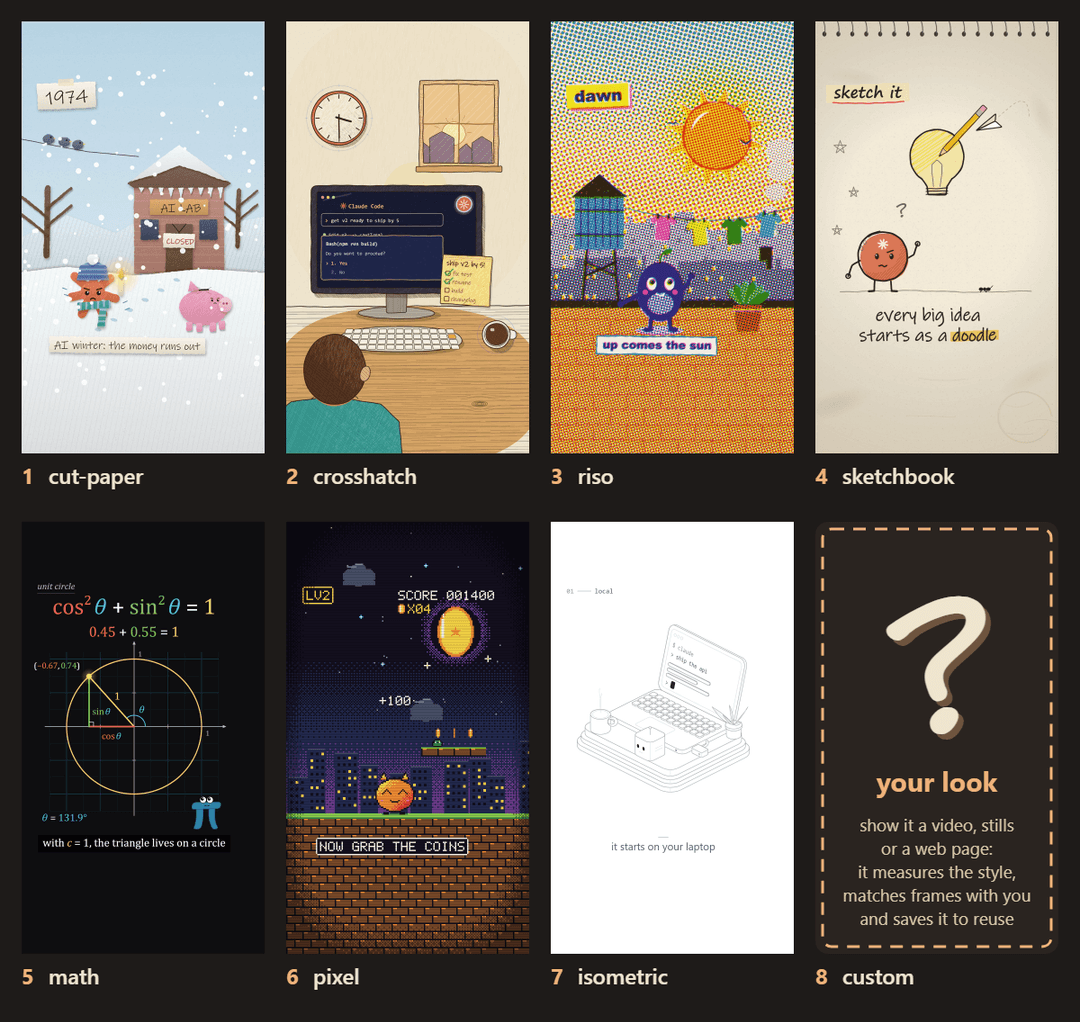
The built-in styles, each a frame from its demo piece: cut paper, crosshatch ink, riso print, sketchbook, math, pixel, isometric — and the eighth slot: any other look, made from your references.
How it works
The skill walks you through a few questions, then makes you approve three cheap things before it spends time animating:
| step | what you see | you decide |
|---|---|---|
| 0. Intake | a handful of questions (subject, formats, voice, the look, hero, your music, your product) and the style gallery | answers, a style, or your references |
| 1. Story check | the format it picked and a numbered beat table, facts web-checked | approve / change beats |
| 2. Look check | 2–4 full-size style frames (for a new look: side-by-side comparisons with your references) | thumbs up per frame |
| 3. Storyboard | every beat as a key frame, with sound and the transition into the next | thumbs up/down by panel number |
| 4. Build | — (animate the approved panels, render, review) | — |
| 5. Delivery | the video plus measured checks: cuts on the beat grid, story arc loudness, hero anchoring, the loudest moment after the silence, narration pace | notes → a revision run |
Styles
A style is a plug-in: the story grammar, timing, sound, renderer and tools stay the same; the style supplies the drawing kit. A piece picks one in its piece.json ("style": "riso").
| style | the look |
|---|---|
| cut paper | torn paper, drop shadows, crayon, patterns, characters with faces |
| crosshatch | sketchy ink that boils on 2s, hatch and pencil shading, warm paper and navy "inside the machine" worlds |
| riso | a three-ink risograph print: halftone screens at their own angles, overprints, misregistration |
| sketchbook | graphite and one accent colour on a sketchbook page, hand lettering |
| math | a manim-style math explainer: black stage, axes and graphs, colour-coded variables, smooth easing |
| pixel | low-resolution eras: drawn at the true resolution, upscaled nearest-neighbour, a bitmap font |
| isometric | precise isometric line art: constant hairlines, white faces hiding what's behind, rounded slabs, one dark accent; light or dark ground |
Your own look: give the skill references (a video, stills, a web page) and it follows a procedure — measure the palette, line weight, texture, motion and cut rhythm; draw 1–2 matched frames next to your references (tools/compare.mjs); ask for your thumbs up; save it as styles/<name>/ in your project so every later piece can use it. Reference media stays on your machine.
Each style folder has a STYLE.md (its rules, palette, motion habits and a frame checklist), a kit.js, a sample.png and a small demo/ piece.
What's baked in
- A story grammar (
grammar/) — 8 short-form formats (a history is a chronology joined by shape morphs; a mission cuts on the beat; …), the rules every piece follows (one constant, colour means one thing, silence before the payoff and loudest on it, the end is the start changed), and a checklist for what any single frame needs. - A kit (
kit/) — seeded randomness and a line that boils on 2s; cameras; a renderer with shape-morph transitions (the old world closes in on one object, it morphs into the next world's counterpart, the new world opens out of it) that draws through the style's hooks; a storyboard; a synthesizer and a loudness stage for phone playback. - Tools (
tools/) — build (assembles one self-containedindex.htmlfrom the piece, the kit and the style), test tiles, stills, storyboard, export (frames → WAV + stems → MP4), review (contact sheets and the measured checks, including text that's cut off or overlapping, and loudness), compare (reference vs frame), a reference measurer, gallery, and a frame-hash check that a kit change left a piece pixel-identical. - Craft rules (
craft.md) — everything learned building these pieces, from "the sustained pad sets a section's loudness, not the plucks" to "cameras put a world point on a screen point". - A voice-over — it writes the script, gets one take per line from the ElevenLabs connector (or your recording), hears when every word is spoken (locally, with faster-whisper) and times the picture to the words; re-takes re-time the picture automatically.
- Your own music — give it a track and it maps the beats (tempo, bars, the big hits, the drops), cuts on the song's beats and puts the payoff on its loudest hit; or it composes a score in code.
- Your real product — it screenshots your site (or takes your logo files) and animates the real screens inside the style.
- Every format from one piece — 9:16, 1:1, 4:5 and 16:9 laid out for each shape, not cropped.
- Motion that feels expensive — closed-form springs in the kit and optional motion blur for smooth styles.
- Parallel builds — long pieces split one scene file per agent, joined by the build.
Coming: a WebGL motion-design style (ray-marched 3D, sub-frame motion blur, bloom) — the export and review tools already run WebGL pieces on the GPU and warn when only software rendering is available.
Install
Requirements: Claude Code, Node 18+, Playwright with Chromium, and ffmpeg on your PATH. Fonts are local system fonts with fallbacks for Windows, macOS and Linux. For voice-overs: Python with faster-whisper (word timing) and, optionally, the ElevenLabs connector in Claude (Settings → Connectors) for the voice.
npm i -g playwright && npx playwright install chromium
As a plugin:
/plugin marketplace add cth9191/animate
/plugin install animate@animate
Or copy the skill folder by hand: plugins/animate/skills/animate/ → ~/.claude/skills/animate/.
Use
/animate a 45-second history of the bicycle, cut paper
/animate how a hash map works, in the math style
/animate a short about our API in the style of these screenshots: ./refs/
/animate a 20s launch reel for https://my-product.com, cut to ./audio/song.mp3, vertical and square
/animate a narrated 45s explainer of how DNS works, math style, 16:9, voice from ElevenLabs
Pieces are created in your project under pieces/<name>/. You can also drive the tools yourself:
SKILL=~/.claude/skills/animate            # or the plugin's install path
node $SKILL/tools/build.mjs pieces/my-piece
node $SKILL/tools/tile.mjs pieces/my-piece tile.png 24 48 96
node $SKILL/tools/still.mjs pieces/my-piece 2.5,9,14 frames.png --scale 0.5
node $SKILL/tools/storyboard.mjs pieces/my-piece
node $SKILL/tools/beats.mjs pieces/my-piece/audio/track.wav pieces/my-piece --start 12
node $SKILL/tools/capture.mjs https://my-product.com pieces/my-piece/assets/home.png
node $SKILL/tools/voice.mjs pieces/my-piece            # voice/script.json + one take per line -> voice.wav, voice.json (--scratch: a timing voice)
node $SKILL/tools/export.mjs pieces/my-piece --share --formats 9:16,1:1,16:9
node $SKILL/tools/review.mjs pieces/my-piece
node $SKILL/tools/measure/refs.mjs references/my-look/
node $SKILL/tools/compare.mjs references/my-look/a.png pieces/my-piece 2.5 compare.png --auto-trim
Open any built index.html in a browser to preview it (click to hear the score; ?t=12.5 freezes a frame). Every style's demo builds the same way: node $SKILL/tools/build.mjs $SKILL/styles/riso/demo.
The example
plugins/animate/skills/animate/examples/history-of-ai/ is a complete 60-second cut-paper piece: 15 eras from Turing's "Can machines think?" (1950) to Claude Code (2025), a small orange "spark" that gains a ray each era, 13 shape-morph transitions, one hard cut on the payoff, and a synthesized score. Build it with node plugins/animate/skills/animate/tools/build.mjs plugins/animate/skills/animate/examples/history-of-ai, then export it.
License
MIT
// faq
What is animate?
Procedural animation in any style for Claude Code: short single-file canvas videos with story, look and storyboard check-ins. 7 built-in styles or one matched from your references, your own music (beat-mapped), real product screenshots, every format from one piece.. It is open-source on GitHub.
Is animate free to use?
animate is open-source under the MIT license, so it is free to use.
What category does animate belong to?
animate is listed under plugins in the Claudeers registry of Claude-compatible tools.
// embed badge

[](https://claudeers.com/animate)
// retro hit counter

[](https://claudeers.com/animate)
// reviews
// guestbook
// related in Claude Plugins
 🔓
🔓A single CLAUDE.md file to improve Claude Code behavior, derived from Andrej Karpathy's observations on LLM coding pitfalls.
 🔓
🔓Claude Code is an agentic coding tool that lives in your terminal, understands your codebase, and helps you code faster by executing routine tasks, explainin…
 🔓
🔓"CLI-Anything: Making ALL Software Agent-Native" -- CLI-Hub: https://clianything.cc/
🔓financial-services — a Claude ecosystem project on GitHub.