
algo-sensei
Your AI-powered LeetCode & DSA mentor for Claude Code and Claude.ai. Master algorithms through intelligent guidance, progressive hints, and pattern recog…
Install with your AI
Paste into Claude Code, Cursor, or any agent — it reads the repo and wires the tool into your project.
Install and set up algo-sensei (claude-skill project) into my current project.
Found on https://claudeers.com/algo-sensei
Repo: https://github.com/karanb192/algo-sensei
Homepage/docs: —
Detected install method: claude-skill → # copy this skill into .claude/skills/algo-sensei/
Category: skills. Platforms: api.
Read the repo's README for exact setup and env vars, then install it and wire it into my project.

Claudeers Health Verdict:
active; community-verified: false. Confirm the source before running anything.
# copy the skill dir into your project:
# .claude/skills/algo-sensei/   (or ~/.claude/skills/algo-sensei/ for all projects)
git clone https://github.com/karanb192/algo-sensei
// compatibility
| Platforms | api |
|---|---|
| Operating systems | — |
| AI compatibility | claude |
| License | MIT |
| Pricing | open-source |
| Language | — |
Algo Sensei 🥋
Your Personal LeetCode & DSA Mentor
Master algorithms through intelligent guidance, not just solutions.
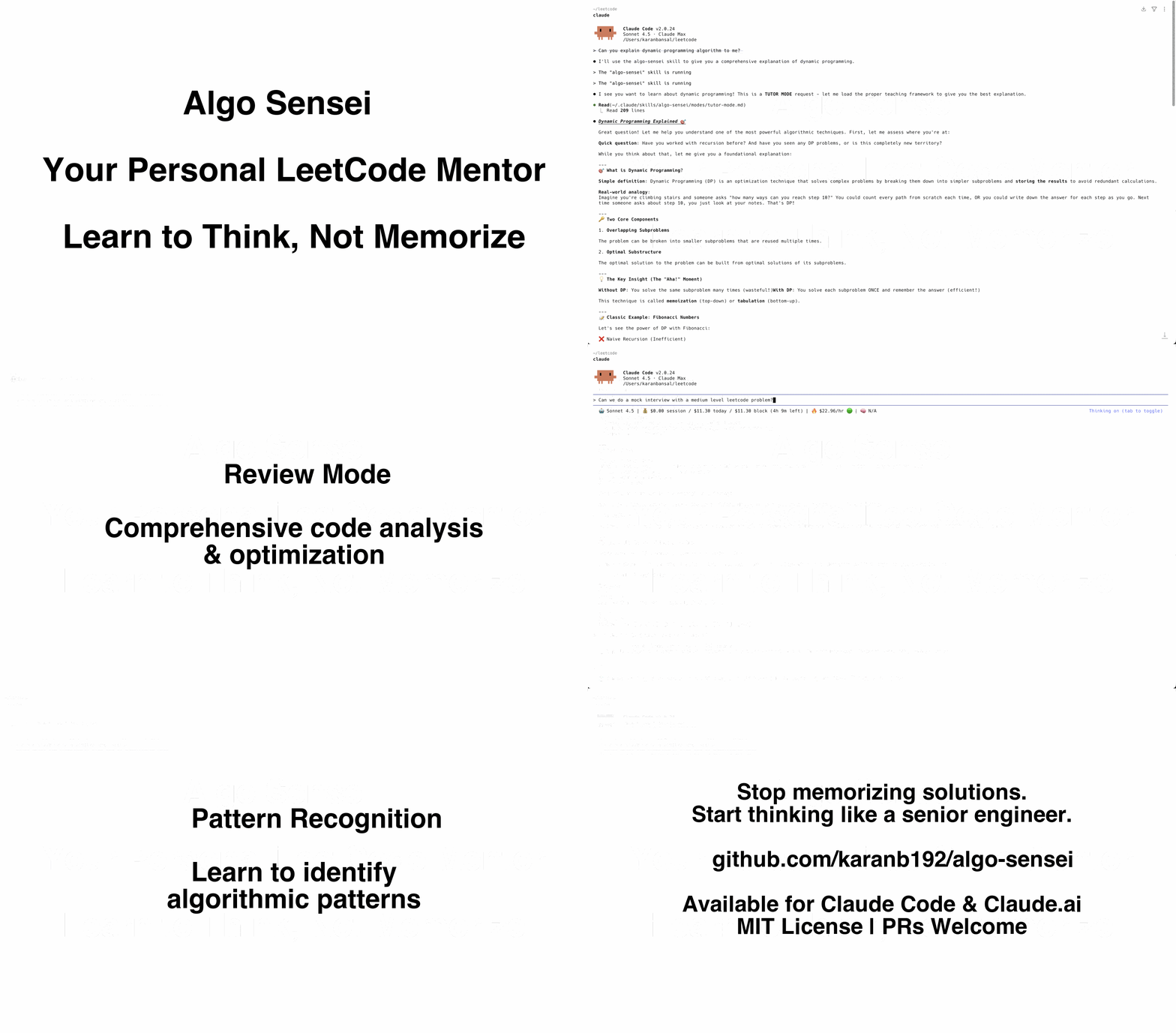
Algo Sensei is an intelligent Claude Code skill that transforms how you practice LeetCode and master Data Structures & Algorithms. Instead of just giving you answers, it teaches you to think like a senior engineer.
Why Algo Sensei?
Traditional LeetCode practice has a problem: Copy-pasting solutions doesn't build problem-solving skills.
Algo Sensei is different:
- ✅ Teaches patterns instead of memorizing solutions
- ✅ Progressive hints that guide you without spoiling
- ✅ Real interview simulation with feedback
- ✅ Intelligent mode detection - adapts to what you need
- ✅ Pattern recognition training - see problems like pros do
Features
🎓 Tutor Mode
Get foundational understanding through:
- Clear concept explanations with examples
- Step-by-step problem breakdowns
- Visual diagrams (ASCII art)
- Building intuition, not just memorization
💡 Hint Mode (The Secret Weapon)
5-level progressive hint system:
- Observation hints (gentlest)
- Pattern recognition nudges
- Approach direction
- Specific technique reveal
- Pseudocode skeleton (last resort)
You learn 10x more when you discover the solution yourself with guidance.
🔍 Review Mode
Comprehensive code review covering:
- Correctness verification
- Time & space complexity analysis
- Code quality feedback
- Optimization opportunities
- Edge case identification
- Interview readiness assessment
🎤 Interview Mode
Realistic mock interviews with:
- Professional interviewer roleplay
- Real-time feedback and hints
- Communication evaluation
- Detailed performance rubric
- Post-interview improvement plan
🗺️ Pattern Mapper Mode
Learn to recognize algorithmic patterns dynamically:
- Teaches HOW to identify patterns, not just memorize them
- Draws on Claude's comprehensive knowledge of ALL patterns
- Builds transferable pattern-recognition skills
- Works with any pattern: Two Pointers, DP, Graphs, Monotonic Stack, and more
Stop solving random problems. Start recognizing patterns.
Installation
For Claude Code Users (Recommended)
Option 1: Install to personal skills (available in all projects)
# Clone the repository
git clone https://github.com/karanb192/algo-sensei.git

# Copy to your personal Claude skills directory
cp -r algo-sensei ~/.claude/skills/

# Restart Claude Code
Option 2: Install to project (team-shared via git)
# Clone the repository
git clone https://github.com/karanb192/algo-sensei.git

# Copy to your project's Claude skills directory
cp -r algo-sensei /path/to/your/project/.claude/skills/

# Commit to git so your team gets it too!
git add .claude/skills/algo-sensei
git commit -m "Add Algo Sensei skill for DSA practice"
For Claude.ai Users
Algo Sensei works great on Claude.ai too! Here's how:
Method 1: Project Knowledge (Recommended - Full Experience)
- Go to Claude.ai and create a new Project
- Click "Add content" → Upload files
- Upload these key files for full functionality:
SKILL.md(main skill)- All files from
modes/folder (5 files) docs/dsa-cheatsheet.md(optional but helpful)templates/solutions/solution-template.md(for structured solutions)
- All conversations in this project now have full Algo Sensei capabilities!
Method 1b: Quick Setup (SKILL.md only)
For a lighter setup, just upload SKILL.md - you'll get intelligent routing but won't have access to the detailed mode instructions.
Method 2: Copy Specific Modes
- Browse to the mode you need (e.g.,
modes/hint-mode.md) - Copy the entire content
- Paste it as your first message in a new conversation
- Continue with your DSA problem
Method 3: Manual Integration
If you have Claude Pro with custom instructions:
- Add shortened version of
SKILL.mdto your custom instructions - Algo Sensei will be available in all chats
Tip: Project Knowledge with all files uploaded gives you the full experience - Claude can access all modes, patterns, and templates just like in Claude Code!
Quick Start
Once installed, Algo Sensei automatically activates when you need help with DSA/LeetCode problems.
Usage Examples
Get hints on a problem:
You: "I'm stuck on LeetCode #3 - Longest Substring Without Repeating Characters. Can you give me a hint?"

Algo Sensei: [Automatically switches to Hint Mode]
💡 Hint #1: What if you needed to track which characters you've seen recently?
...
Learn a concept:
You: "Can you explain dynamic programming to me?"

Algo Sensei: [Automatically switches to Tutor Mode]
📚 Let's build your understanding of DP from the ground up...
Review your code:
You: "Here's my solution for Two Sum. Can you review it?"
[paste code]

Algo Sensei: [Automatically switches to Review Mode]
🔍 Code Review: Two Sum
...
Practice interview:
You: "Can we do a mock interview with a medium-level problem?"

Algo Sensei: [Automatically switches to Interview Mode]
🎤 Hi! I'm Alex, senior engineer at TechCo. Ready to start?
...
Identify pattern:
You: "I'm not sure what approach to use for this problem..."

Algo Sensei: [Automatically switches to Pattern Mapper Mode]
🗺️ Let me help you identify the pattern...
Pattern Recognition Training
Instead of memorizing fixed templates, Algo Sensei teaches you to recognize patterns dynamically:
- Signal keyword detection - Learn to spot clues in problem statements
- Problem characteristic analysis - Identify data structures and constraints
- Pattern matching skills - Build intuition for which approach fits
- Comprehensive explanations - Understand any algorithmic pattern Claude knows
Works for all patterns: Two Pointers, Sliding Window, DP, Graphs, Heaps, Tries, Monotonic Stack, and more!
What Makes This Different?
vs. LeetCode Premium
- ✅ Free and open-source
- ✅ Personalized teaching style
- ✅ Deeper explanations
- ✅ Pattern-focused approach
vs. ChatGPT/Claude prompts
- ✅ Specialized for DSA/interviews
- ✅ Structured progressive learning
- ✅ Intelligent mode switching
- ✅ Consistent methodology
vs. YouTube tutorials
- ✅ Interactive and personalized
- ✅ Adapts to your skill level
- ✅ Available 24/7
- ✅ Covers YOUR specific problems
File Structure
algo-sensei/
├── SKILL.md                          # Main skill file (intelligent router)
├── README.md                         # You are here
├── modes/
│   ├── tutor-mode.md                # Concept explanations
│   ├── hint-mode.md                 # Progressive hints
│   ├── review-mode.md               # Code review
│   ├── interview-mode.md            # Mock interviews
│   └── pattern-mapper-mode.md       # Pattern recognition
├── templates/
│   └── solutions/
│       └── solution-template.md     # Multi-language solution format
├── scripts/
│   └── [future: test generators, complexity analyzers]
└── docs/
    └── dsa-cheatsheet.md            # Quick reference
Philosophy
Algo Sensei is built on research-backed learning principles:
- Socratic Method: Learn through questions, not lectures
- Progressive Disclosure: Start simple, add complexity gradually
- Pattern Recognition: Master frameworks, not individual problems
- Deliberate Practice: Struggle productively with guidance
- Metacognition: Understand your thinking process
The goal isn't solving 1000 problems. It's building the mental framework to solve ANY problem.
Roadmap
- Core 5 modes (Tutor, Hint, Review, Interview, Pattern Mapper)
- Dynamic pattern recognition (leverages Claude's full knowledge)
- Multi-language support (Python, Java, C++, JavaScript, Go, etc.)
- Interactive visualization scripts
- Complexity analyzer tool
- Test case generator
- Spaced repetition integration
- Progress tracking across sessions
Contributing
We welcome contributions! See CONTRIBUTING.md for guidelines.
Ideas for contributions:
- Improve mode instructions based on user feedback
- Add more language-specific examples
- Create automation scripts (test generators, complexity analyzers)
- Bug fixes and improvements
- Documentation enhancements
FAQ
Q: Do I need Claude Code to use this? A: Algo Sensei works best with Claude Code, but you can use individual mode files as prompts in Claude.ai.
Q: Is this better than LeetCode Premium? A: Different purposes. Algo Sensei teaches you HOW to think. LeetCode Premium gives you solutions. Use both!
Q: Can this help me pass FAANG interviews? A: Yes! Interview Mode simulates real interview conditions, and Pattern Mapper teaches the frameworks used in top companies.
Q: I'm a complete beginner. Is this for me? A: Absolutely! Tutor Mode is designed for beginners. Algo Sensei adapts to your level.
Q: Does it support languages other than Python? A: Yes! Algo Sensei supports all major programming languages (Python, JavaScript, Java, C++, Go, TypeScript, Rust, etc.). Just specify your preferred language and Claude will adapt accordingly.
License
MIT License - See LICENSE file for details.
Acknowledgments
- Built for Claude Code by Anthropic
- Inspired by the LeetCode community
- Pattern frameworks from NeetCode, AlgoMonster, and interview experience
Connect
- ⭐ Star this repo if Algo Sensei helped you!
- 🐛 Report issues via GitHub Issues
- 💡 Suggest features via GitHub Discussions
- 🐦 Share your success:
#AlgoSensei
Ready to level up your DSA game? Install Algo Sensei and master patterns, not just problems. 🥋
Made with ❤️ for developers preparing for their dream roles.
// faq
What is algo-sensei?
Your AI-powered LeetCode & DSA mentor for Claude Code and Claude.ai. Master algorithms through intelligent guidance, progressive hints, and pattern recognition training—not just copy-pasting solutions. Features: Mock interviews, code review, multi-language support (Python, Java, C++, JS, Go). Learn to think like a senior engineer. 🥋. It is open-source on GitHub.
Is algo-sensei free to use?
algo-sensei is open-source under the MIT license, so it is free to use.
What category does algo-sensei belong to?
algo-sensei is listed under other in the Claudeers registry of Claude-compatible tools.
// embed badge

[](https://claudeers.com/algo-sensei)
// retro hit counter

[](https://claudeers.com/algo-sensei)
// reviews
// guestbook
// related in Claude Skills
 🔓
🔓An agentic skills framework & software development methodology that works.
 🔓
🔓 🔓
🔓💫 Toolkit to help you get started with Spec-Driven Development
 🔓
🔓AI coding assistant skill (Claude Code, Codex, OpenCode, Cursor, Gemini CLI, and more). Turn any folder of code, SQL schemas, R scripts, shell scripts, docs,…